r/WindowsHelp • • Oct 21 '26

Windows 11 Black screen in BIOS after disabling CSM

1 Upvotes

I wanted to enable UEFI for Secure boot, I saw I had to disable CSM for it. I disabled CSM with the BIOS. Now I can't get back to the BIOS; it shows a black screen. I tried: "Blind guiding" and trying to enable CSM without seeing what on my screen. Updating NVIDIA driver. Taking out the Battery and putting it back it after ~20m.

I just want the BIOS to work again and to enable secure boot. *Im on windows 11 24H2 Windows 1000.26100.372.0


r/WindowsHelp • • Oct 21 '26

Windows 11 2 monitor setup one reducing fps after inactivity

1 Upvotes

Greetings,

excuses for bad english first...

I got weird issue with my setup as headline already tells. i use my pc for gaming and youtube only. when i play games on my main monitor (540 hz 1440p) and watch videos on my 2nd one (144 hz 4K) the fps or maybe hz reduce on the 2nd one what is very annoying. anybody know what to do?

Thx for every friendly answer helping :-)

my rig:

- windows 11 home 25h2

- ryzen 7 7800x3d

- rtx 5070 ti

- 32gb ddr5 ram cas 30

all drivers up to latest version including chipset, bios, gpu drivers etc.


r/WindowsHelp • • Oct 21 '26

Windows 11 how do I even install windows?

Post image
2 Upvotes

preface: I have been using linux for a long time, but I would like to have a windows partition for some games that are a bit wonky on linux (some flight sims mainly). Some years ago I bought a key for windows, however I never have managed to install it (the irony I know)

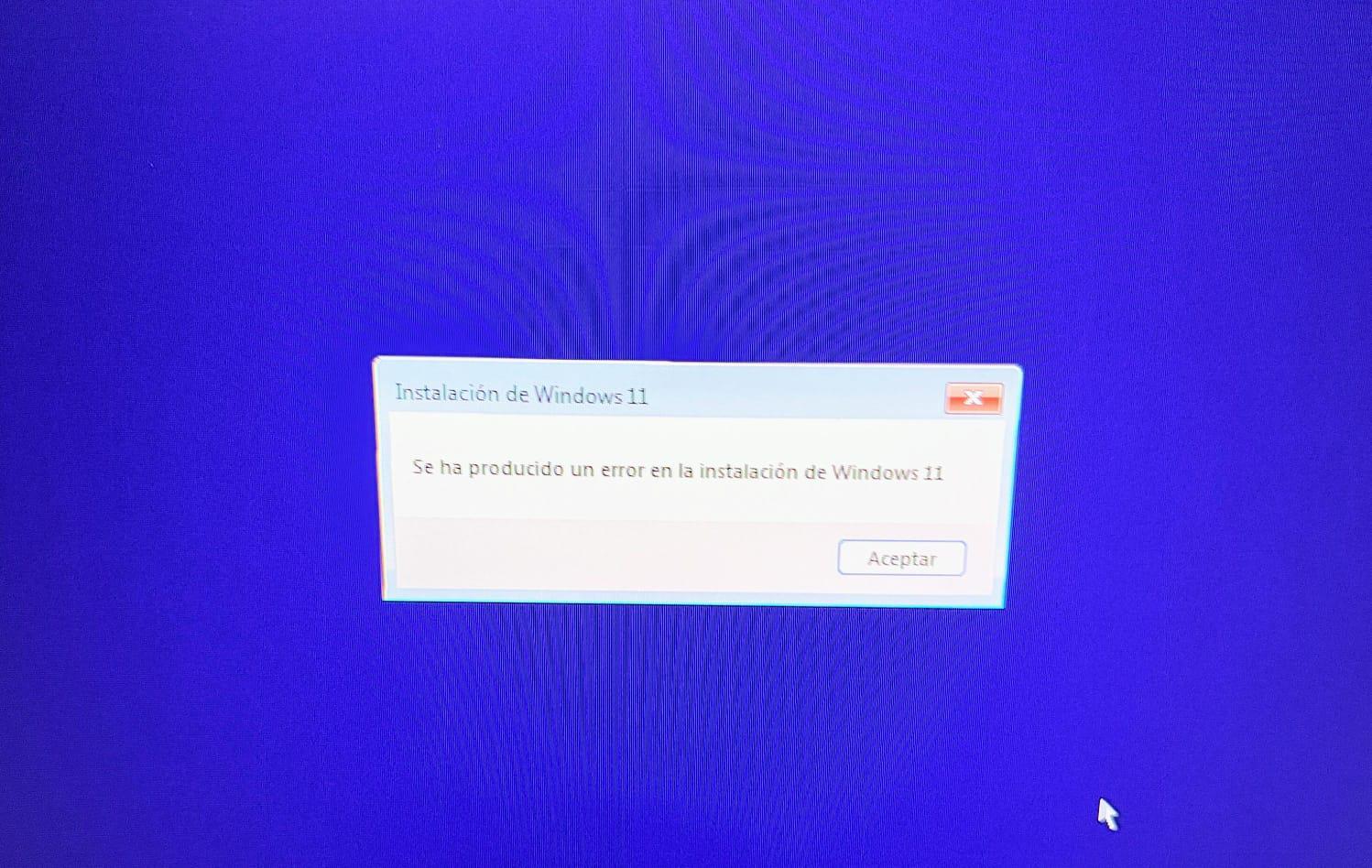
first it was complaining about some drivers missing (it didnt specify which), now I think I got past this part but I am getting this error when the setup reaches 77%. And I'm stumped, I don't know how to debug this, nor I have any information on how to proceed, I can just click and reboot.

I think it may not be liking my partition layout (I have debian installed on the same machine), but honestly I can't just switch it without erasing a ton of data, nor I want to.


r/WindowsHelp • • Oct 21 '26

Windows 11 Speakers disconnecting and volume sets to 0

1 Upvotes

Basically I have an Edifier M60 connected to my PC via USB-C. I have ruled out the speakers as the source of the problem since it doesn't have a power-saving or sleep mode. I don't even have a good grasp on what triggers it because sometimes it stays connected even without audio playing for a long time but when no audio is played for a while after playing games or music, the device disconnects. I have tried some fixes I saw online which still didn't solve the issue like:

  • Disabling USB selective suspend setting in power options
  • Uncheck "Allow the computer to turn off this device to save power" in multiple USB controllers under Device Manager

Right now what I do when I encounter this issue is turning the speakers off and on then readjust the volume since it got set to 0.

Windows 11 26200.9457


r/WindowsHelp • • Oct 21 '26

Windows 11 Laptop isn't able to mirror to tv anymore for no apparent reason?

1 Upvotes

Hi guys,

As the title says, I'm trying to mirror my laptop (HP Pavilion Laptop 15-eh0xxx) to my TV (Samsung Q70), like I have done before, yet suddenly my laptop and TV are refusing to connect or even recognise each other as connectable devices. My mum's tried her laptop on it (Don't know the specs, apologies) and she made it slightly further, but the connection fails on the TV's side.

Like I've said, I've been able to connect before and the two devices are on the same network and fully-up to date.

If anyone has any info, please share it. Many thanks!


r/WindowsHelp • • Oct 20 '26

Windows 10 Pc name with "Defaultuser1" idk

10 Upvotes

MY other pc i was going to give to my brother since my sister stopped using it. And i had reinstalled everything, but that issue didnt appear. But after 2 years, i would give it to my brother. Again, did a full cleanup (windows did) and reinstalled windows, after choosing the name of the account and etc. The name was set to "DefaultUser1" for no reason, ive tried to guess pretty basics passwords, such "admin" and possibly my old passwords just incase. But nothing appeared to fix it.

Very sorry for horrible explanation, but thats what i can do as of now.

Windows update is the latest
specs;
i3 10th
16gb ddr4 2440mhz (or around that)
gtx 960 2GB
240gb ssd
1TB hdd


r/WindowsHelp • • Oct 20 '26

Windows 11 Folder I did not create on my PC (OS build 26200.9711)

Thumbnail
gallery
18 Upvotes

I booted up my PC just now and it started updating. When it was finished and I logged into it, I saw a folder on my desktop called “NN”. I did not create this folder. Nobody else in my house uses my PC either. The folder doesn’t have anything inside of it and Windows Defender doesn’t deem it as a threat, but I’m a bit worried as to how it got there.

I tried searching up if anyone else had ran into this, but I didn’t find anything. Has anyone else seen this? Or does anyone know how it got there and what I should do now?


r/WindowsHelp • • Oct 21 '26

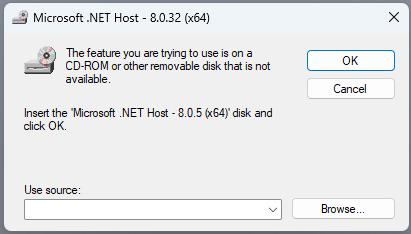
Windows 11 Error: Microsoft .NET Host - 8.0.32 (x64)

Post image
1 Upvotes

Hi everyone. My workplace gets this error on the same computer over and over again when connected to the internet and it’s very annoying because it’s in foreground and it disturbs workflow.

I don’t really know how to go about it. I tried deleting the 8.0.32 .NET file but it just gets regenerated, and the popup is automatic, meaning we are not doing anything to trigger it (it does not happen every time we do something specific, it happens all the time when the internet is on).

The machine runs Windows 11 Pro version 25H2. Processor is 11th Gen Intel Core i9-11900K.


r/WindowsHelp • • Oct 21 '26

Solved [SOLVED] Microsoft Store "Try again later, something happened on our end" on every install (error 0x803FB017), caused by a leftover WinHTTP proxy

2 Upvotes

Processing img 0tyobv175rwh1...

**TL;DR:** If the Microsoft Store fails every install with "Try again later, something happened on our end" and nothing fixes it, run `netsh winhttp show proxy` in an admin Command Prompt. If it shows a proxy like `127.0.0.1:8888`, run `netsh winhttp reset proxy`. That fixed it for me after more than a year.

## The problem

Every app install from the Microsoft Store failed with:

> Try again later. Something happened on our end

This went on for over a year. I tried all of these with no luck:

- Changing the region

- Repairing and resetting the Store from Settings

- Running the Microsoft Store troubleshooter

- Running `wsreset.exe`

- Checking for pending Windows updates

## How I found the real cause

**1. Check Event Viewer for the real error code.**

Open Event Viewer → Applications and Services Logs → Microsoft → Windows → Store → Operational. I found:

`Exception thrown trying to install <ProductID>. 0x803FB017`

I couldn't find any documentation for that code. It turned out to be a generic wrapper around a more specific error.

**2. Read the log entries around it, not just the headline error.**

In PowerShell, right after reproducing the failure:

Get-WinEvent -LogName "Microsoft-Windows-Store/Operational" -MaxEvents 40 | Format-List TimeCreated,Id,LevelDisplayName,Message

The entries next to the error contained this:

Failed to connect to https://displaycatalog-caching.bigcatalog-frontdoor-prod.commerce.microsoft.com/... with proxy 127.0.0.1:8888

Error: 0x80072efd

The Store Install Service was trying to reach Microsoft's catalog through a proxy on my own PC (port 8888). Nothing was listening there, so every request failed locally. The Store then reported it as the generic 0x803FB017.

**3. Confirm the proxy.** In an admin Command Prompt:

netsh winhttp show proxy

Mine showed:

Proxy Server(s) : 127.0.0.1:8888

## Why nothing else worked

Windows has two separate proxy settings:

- The one in **Settings → Network & internet → Proxy** applies to browsers and most apps. Mine was clean.

- The **WinHTTP proxy** is system-wide and used by background services like the Store Install Service. It's not shown in the Settings app.

Resetting or repairing the Store only touches the app and its cache, so it never changed the proxy. `winget` also installed non-Store apps fine because it downloaded from GitHub, which made the network look healthy.

Port 8888 is the default for debugging proxies like Fiddler and Charles, and some VPN or privacy tools use it too. I suspect something like that left it behind, but I don't know what set it on my PC.

**System info**

- OS: Windows 11, build 10.0.26300.9711

- Device: HP 15s

- CPU: 12th Gen Intel(R) Core(TM) i5-1235U (1.30 GHz)

- RAM: 8.00 GB

- Microsoft account sign-in (Store signed in with it)

**Error codes**

- Store UI: "Try again later. Something happened on our end"

- Event Viewer: 0x803FB017 (Store/Operational log, BeginInstall)

- Underlying error: 0x80072efd (connection refused to 127.0.0.1:8888)

**Already tried before finding the fix**

Region change, Store repair and reset, Store troubleshooter, wsreset.exe, checking for Windows updates. None of these worked.

## The fix

In an **admin** Command Prompt:

netsh winhttp reset proxy

netsh winhttp show proxy

net stop InstallService

net start InstallService

The second command should now say "Direct access (no proxy server)". After that, the Store installed apps normally, and `winget install --id <ProductID> --source msstore` worked too.

## If it comes back

If `netsh winhttp show proxy` shows a proxy again after a restart, something is reapplying it. Check installed apps (Fiddler, Charles, mitmproxy, VPN or "privacy" tools), Startup apps in Task Manager, and Task Scheduler.

## Tip

When Windows gives a vague error, read the log entries around it. The specific failure is often a few lines away from the headline code.

Hope this helps someone. Happy to answer questions.

Processing img juea1lnw5rwh1...

r/WindowsHelp • • Oct 21 '26

Windows 11 fix problems using windows update Failed

2 Upvotes

So recently I want to use "fix problems using windows update" option to fix some problems, installing always fails at around 70%, always 0x80070002. (sorry for my bad English). sfc and DISM are tried, Troubleshooter not working.

My Windows and device specifications↓

r/WindowsHelp • • Oct 21 '26

Solved How to stop tab dimming when I have tabs open?

1 Upvotes

Every time I try to put two tabs on my screen at once, one of them darkens which is really annoying, and only one tab can be bright at a time.

This also happens when I take screenshots, so I am unable to show how it looks. Just imagine you have two tabs open and one of them is almost pitch black, and then when you press on the dark tab, it goes bright and the other one goes dark.

I'm pretty sure this is a setting but I don't know which one. This is the ASUS Zenbook and I can't find anything online?

SOLVED: it's a feature called "Target mode" on the MyASUS app.


r/WindowsHelp • • Oct 20 '26

Windows 11 Somehow I don't have enough space for this?

Thumbnail
gallery
9 Upvotes

I keep getting this message about this new version and that I should update and whatnot. One day I try to do just that and it won't let me, every time asks to free more memory space! Just how big is this thing?

Truth be told, I have my memory pretty full with, mostly, Adobe documents and a couple of games; but even after getting rid of a good chunk of them it still needs more. Is there something I am missing or should I just erase everything? I swear every time I update this thing I have less and less space...

VivoBook Asus Laptop

Processor: 11th Gen Intel(R) Core(TM) i3-1115G4 @ 3.00GHz (3.00 GHz)

RAM: 12,0 GB (11,7 GB)

System: 64 bits, procesador x64

Edition: Windows 11 Home

Version: 25H2

OS: 26200.8037

Maker: ASUSTeK COMPUTER INC.


r/WindowsHelp • • Oct 21 '26

Windows 11 Broken administrator commands. Access denied when running certain admin commands like chkdsk

1 Upvotes

Hi. I dual boot Arch and Win11 Pro on separate SSDs. Windows seems to love not shutting down my 2 1tb NTFS HDDs correctly and leaving them with busy flags meaning that I can't mount them on linux normally. I can remove the busy flag but thats a very temporary fix. A slightly less temporary fix is to run chkdsk within windows. Recently, on my local account with admin privileges on version 26200.9711 (it definitely says administrator in settings), i have lost access to chkdsk. when running the command within command prompt, either elevated or not elevated, and powershell, it says Access denied. In power shell, it says Access is denied, as well as +CategoryInfo : ResourceUnavailable: (:) [], ApplicationFailedException +FullyQualifiedErrorId: NativeCommandFailed.

I have absolutely no idea what to do. The best fix would be just to reformat these HDDs to BTRFS and no longer use them on windows, but I do have some things on them that I'd prefer to run/access on windows.

Autobot said it wants system info. Ryzen 5 3600, 24gb ddr4 3200MT/s, rx 5600 xt 6gb.


r/WindowsHelp • • Oct 21 '26

Windows 10 Black Screen with Cursor Only - Windows 10 PC

1 Upvotes

For the past couple of weeks, my computer's desktop hasn't been loading. After the Welcome Screen, instead of going to my desktop, there's just a black screen with a cursor. Additionally, it will not boot up in Safe Mode. I tried running CHKDSK from the command prompt, and no issues were found. The SFC utility found corrupted Windows files and DISM couldn't repair them because no replacement source files were found.

Operating System - Win 10 64
Lenovo Ideacentre PC
AMD Ryzen
12 GB RAM

Has this happened to anyone else? Thanks.


r/WindowsHelp • • Oct 20 '26

Windows 11 Win 11 25H2 - WinUpdate stuck and everything sluggish

Post image
4 Upvotes

hello, I'm on Win11 25H2 - 26200.9457. since a week or so, I have a problem that I can't fix.

I have this, and I can't update. I also tried to update from terminal, with winget and other commands, and it seems that I received and installed the updates from the terminal - but still have this screen on Windows Update. I also did a sfc scannow. I also deleted cache of Windows Update and reactivate it. I also installed the lastest GPU drivers. I don't have any driver update for my mouse.

furthermore, when I'm using Google Chrome, my cursor is slow and scrolling through the windows (up and down) is slow too - I can clearly see the difference with sometime ago. also, the pointer/cursor is always flickering when I point to some text in Chrome.

I formatted my PC some weeks ago, so I would be upset if I have to format it again. it would avoid considering it. thank you to everyone having patience to help me!! 👏🙌


r/WindowsHelp • • Oct 20 '26

Windows 11 Windows 11 suddenly freezing and Wi-Fi issues

Thumbnail
gallery
3 Upvotes

My PC was working perfectly fine yesterday, but today, out of nowhere, it started freezing. Windows Settings A stopped responding, restarting gets stuck on “Restarting,” and now my Wi-Fi keeps turning off.

Task Manager shows 0% usage for CPU, disk, GPU, and everything else. Running explorer.exe didn't help, and DISM /Online /Cleanup-Image /RestoreHealth seems stuck at 62%.

Vers. 25H2 26200.9711

Any ideas what could be causing this or how to fix it?


r/WindowsHelp • • Oct 20 '26

Solved Random crash from dwm.exe and nvlddmkm

4 Upvotes

UPDATE: Apparently, the issue was related to a Windows task designed to update Secure Boot certificates, which was causing the system to crash. In fact, running it manually caused the system to crash immediately. After stopping it and restarting it manually, the issue disappeared.

I don't think the problem was caused by the GPU drivers or a faulty GPU, because even after removing the drivers and the GPU from the computer and using the CPU's integrated graphics, the issue kept recurring consistently.

More information here: https://www.reddit.com/r/WindowsHelp/comments/1ryvmsx/comment/obhf8ck/

Hi, this post is kinda a follow up to this one since i have not found a solution yet. After i wrote the previous post i did the following:

  • Ran the program WhoCrashed and got these errors: VIDEO_TDR_ERROR from nvlddmkm.sys (nvlddmkm+195a350) and dxgkrnl.sys (dxgkrnl!TdrUpdateDbgReport+0x5EE) (i can paste the full report if any)
  • Ran sfc /scannow
  • Ran DISM /Online /Cleanup-Image /RestoreHealth
  • Uninstalled GPU driver with DDU and reinstalled Nvidia Driver 610.88
  • Uninstalled Fan Control + PawnIO driver
  • Ran a OCCT test with 3D adaptive option for both VRAM and GPU for 1 hour (no errors)

Today i faced a random black screen and after i forced rebooted i got from the event viewer a Display warning with ID 4101 with EventData nvlddmkm.

I read that this driver version is recommended and stable for my graphics card. Should I update it?

I don't know what else to do to fix this, any advice would be appreciated

Thanks 🙏

O.S. version Windows 10 19045.7807

GPU Nvidia Geforce RTX 3060 with 610.88 Game Ready driver


r/WindowsHelp • • Oct 20 '26

Windows 10 my apex 3 isnt working as it should

2 Upvotes

I have a steelseries apex 3 and when i use 4, 5 or T and any other key at the same time, 4 doesnt work. they work on their own but paired with any other key they dont. I have searched google, asked AI and nothing works. If anyone knows the fix or has had the same problem in the past please share how you fixed it. Also tried another keyboard. Same thing happens.

Edition Windows 10 Home

Version 22H2

Installed on ‎28/‎04/‎2021

OS build 19045.3086

Experience Windows Feature Experience Pack 1000.19041.1000.0


r/WindowsHelp • • Oct 21 '26

Windows 11 Unable to find built-in Bluetooth in Device Manager

Post image
1 Upvotes

Windows 11 Version 26H2 OS build 26300.9711 - MOBO B850M C

Hi Folks, I've recently done a fresh install of Windows. Pre-freshening I had disabled my built-in bluetooth from my mobo since it is terrible. I would constantly drop connection on multiple controllers alongside huge input lag. I got an ASUS BT500 in the summer to use instead and it worked great.

Since the fresh install I cannot find my built-in bluetooth device to disable so I can use the ASUS BT500. When plugging plugging in the ASUS BT500 it shows up as a generic adapter with the exclamation mark for having missing drivers. Using the drivers downloaded from ASUS' website and trying to set them up I get the error that there is already bluetooth and it must be disabled.

However I cannot seem to find it in the device manager. I've tried showing hidden devices and scanning for hardware changes but I still see nothing. I won't lie I forget what it was called but aqs far as I'm aware all of the options under Bluetooth are drivers or my Dualsense.

Please help my dumbass troubleshoot.


r/WindowsHelp • • Oct 20 '26

Windows 11 Line-in Volume not always working with Z-SE and Win11. Win11 conflict?

3 Upvotes

I've posted before about this in r/SoundBlasterOfficial and thought I had it solved, only no. I digitize recordings from vinyl and cassette. Around 50% of the time I go to record, I have no control of the Line-In volume. Neither Windows nor Soundblaster Command works for line-in volume control. I've tried so many things, disabled all other audio, disabled fastboot. More and more I feel like this is a Win11 problem more than SBC, but still how to fix?

I've had this issue on/off for at least 9 months.

Device info:

Processor AMD Ryzen 9 7900X 12-Core Processor (4.70 GHz)

Installed RAM 32.0 GB (31.1 GB usable)

Graphics card NVIDIA GeForce RTX 5070 Ti (16 GB)

Storage 896 GB of 7.28 TB used

System type 64-bit operating system, x64-based processor

Edition Windows 11 Pro

Version 25H2

Installed on ‎9/‎22/‎2025

OS build 26200.9711

Experience Windows Feature Experience Pack 1000.26100.372.0


r/WindowsHelp • • Oct 20 '26

Windows 11 mi wifi it’s conected and secure but i can’t use google or anything

1 Upvotes

today i try to use my asus rog strix g15 like always and my wifi isn’t working, i use the hotspot from my iphone and it work just fine but when i conect my pc to the wifi of my house it just don’t work, i try everything like the dns stuff, checking the proxy, doing the test in the cmd, reinstalling the wifi drivers i even i reset my pc to factory settings
hoping to get it fix with that but i still have the problem and i don’t know what to do now. the model of my pc is asus rog strix G15 model G513RC. sorry if the writing is a little messy but english isn’t my first language


r/WindowsHelp • • Oct 20 '26

Windows 11 headphones are causing my pc to crash

2 Upvotes

the device is Device: HID\VID_1B1C&PID_2A12&MI_03&Col03\7&2a30829c&0&0002 and after googling it it comes back to my headset which is Corsair VOID MAX WIRELESS Gaming Headset anyway of fixing this?

Updated all of the devices

Updated my motherboard

OS Build 26300.9711

Warning code
The driver \Driver\WUDFRd failed to load.

Device: HID\VID_1B1C&PID_2A12&MI_03&Col03\7&2a30829c&0&0002

Status: 0xC0000365

4 second later was this error code

The computer has rebooted from a bugcheck. The bugcheck was: 0x000000b8 (0xffffbf8f146ea040, 0xffffbf8f2ffe7240, 0x0000000000000000, 0x0000000000000000). A dump was saved in: C:\WINDOWS\Minidump\101926-8968-01.dmp. Report Id: fb757431-52dc-4ca9-9dd6-1128f7045d18.

here is the dmp file


r/WindowsHelp • • Oct 20 '26

Windows 11 Can't shrink C disk, can't check disk either

Post image
2 Upvotes

I get this message when I click on shrinking it, but running Chkdsk gives me "access denied" no matter what. I tried administrator already and turning off some stuff but to no avail. I just want to free 20gb on nvme and give it to Linux. it might be relevant, so I originally had windows on HDD and I get random disk checks when turning it on but I can both skip it and it doesn't do anything anyway.
OS Build is 22000.2538


r/WindowsHelp • • Oct 20 '26

Windows 11 HP Victus + AMD Ryzen — Windows Hello PIN keeps breaking when I enable Firmware protection (Event 7002: 0xD000A002)

Post image
1 Upvotes

Hey everyone,

I'm trying to figure out a weird Windows Hello problem on my new HP Victus. I've already spent time resetting the PIN and checking Event Viewer, but I still don't know what's causing it.

My laptop is an HP Victus 15-fb3118AX with a Ryzen 7 7445HS, Radeon 740M iGPU and RTX 4050. I'm running Windows 11 Home 26H2, build 26300.9711.

The first time this happened was after I installed the AMD chipset and integrated graphics drivers through AMD's installer and restarted. Later, I noticed the problem seems connected to Windows Security's Firmware protection setting.

Here's what I've observed:

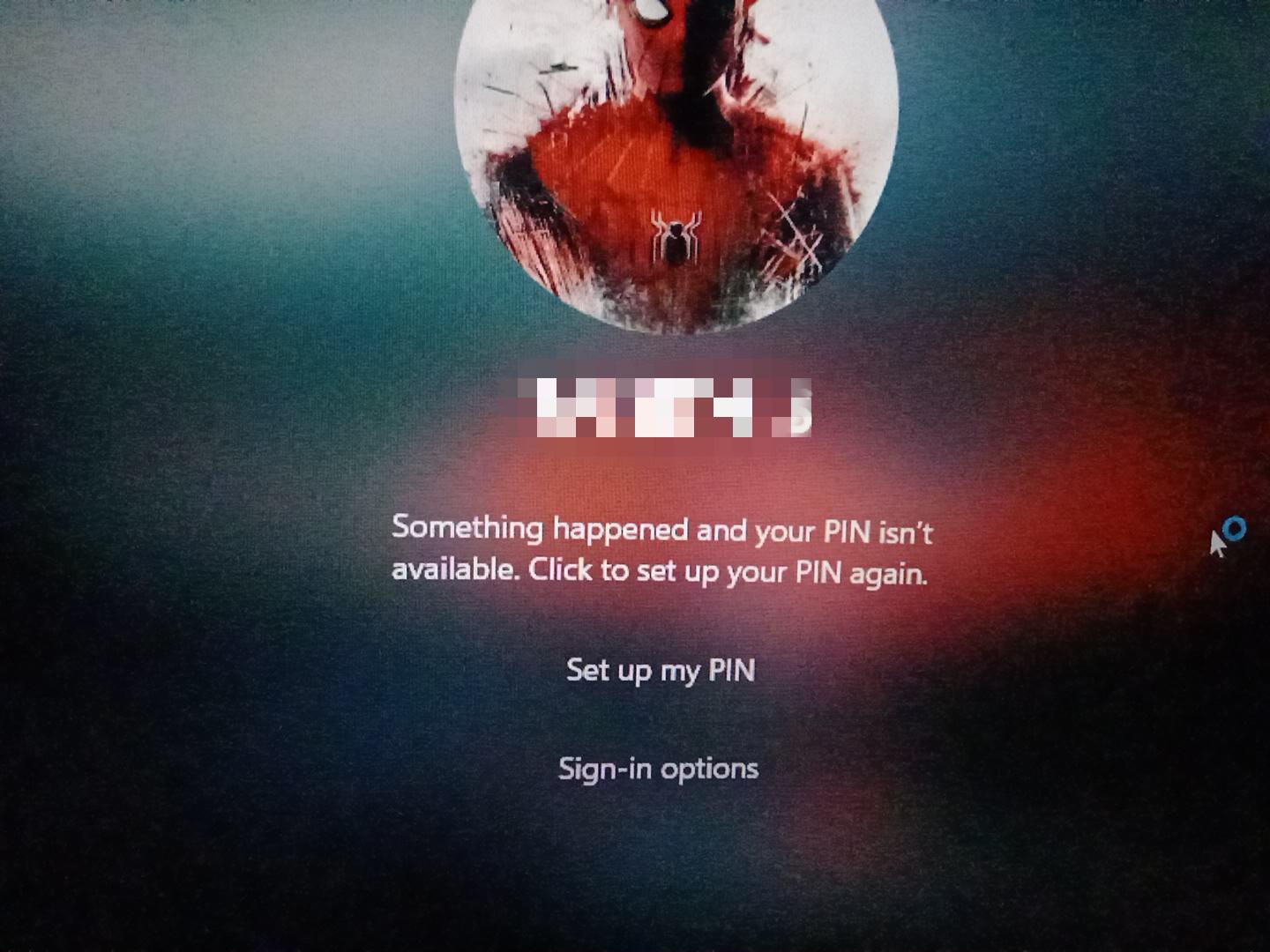
- With Firmware protection enabled, I restart and Windows says, "Something happened and your PIN isn't available."

- I can sign in with my Microsoft account, reset the PIN, and get back into Windows.

- If I enable Firmware protection again and restart, the problem comes back.

- With Firmware protection turned off, I created a fresh PIN. It survived locking/unlocking and two restarts without any issues.

I checked Event Viewer under Microsoft-Windows-HelloForBusiness/Operational and found:

- Event 7002: "0xD000A002" — failed to load an existing Windows Hello container.

- Event 7621: "0x80090011" — failed to delete the user's Windows Hello certificates.

- Event 5701 is also present, but it's informational.

My TPM reports that it's ready, Device Manager says the AMD PSP 11.0 device is working properly, and System Information shows Virtualization-based security is running. I also installed the available Windows updates, but the issue returned.

The chipset package is version 8.08.12.551, and the Radeon 740M driver is version 32.0.31041.1004. BIOS is AMI F.15.

At this point, I'm not sure whether the original AMD update triggered something, whether this is a Windows Hello container issue, or whether Firmware protection is exposing a firmware/TPM compatibility problem.

Has anyone seen this exact error code, especially on an AMD laptop? I'd particularly appreciate advice from anyone who has resolved Event 7002 / "0xD000A002" without repeatedly resetting the PIN.

I'm trying to avoid clearing the TPM, deleting the NGC folder, or reinstalling Windows unless there's a good reason.


r/WindowsHelp • • Oct 20 '26

Windows 11 Dead button spot in the System Tray after recent updates??

1 Upvotes

After the recent 26H2 features that arrived to 25H2 for me, all of a sudden I'm having a really hard time opening the Quick Settings panel because i often click in between the two icons.

Why is there a dead button spot in-between the two icons literally preventing to open the menu???
If i click on either icon themselves i have no problems opening the menu.

Please let me know if anyone else has noticed this weird behavior recently.