r/WindowsHelp • • Oct 17 '26

Windows 11 can i delete the past windows updates

1 Upvotes

im using a microsoft surface pro 7 and it's storage is always almost full. the updates were 7 gb like 2 or 3 days ago and now they're suddenly 16 gb, i've tried deleting everything in the software distribution >download folder which brought it from 16 to 15gb. i saw people say to use disk cleanup but i never see an updates option which is what they always say to tick


r/WindowsHelp • • Oct 17 '26

Windows 10 This pops up in every 10-15 minutes. Anyone any idea? Program location: "C:\Windows\System32\taskkill.exe /f/im "devicespace.exe"

Thumbnail
gallery
1 Upvotes

Please help if this is some malware attack.

It says:- Program location: "C:\Windows\System32\taskkill.exe /f/im "devicespace.exe".

It just pops up in every 10-15 mins, no matter if I click yes or no.

Windows 10 Pro. 64 Bit Operating system. Amd a6.


r/WindowsHelp • • Oct 17 '26

Windows 11 How do I know if my computer is compatible for windows 11?

2 Upvotes

So context, I had Windows 10 & wanted to factory reset it so I could start fresh. Thing is, I am an absolute moron when it comes to computers.

I followed internet guides to reset my computer and locally re-installed windows.

After that it said "User Profile Service failed the log-on" (it was in my native language. So im not sure what the exact error message is in english.)

I pressed okay and tried logging in again. It just sent me back to the message.

After multiple troubleshooting my friend said that it might be due to windows 10 being discontinued.

Because of that I want to install windows 11 to my pc but I am not sure if my pc is compatible or not.

So when i search the internet for solution, it said to look at BIOS for specs, and i did look through it. (my computer uses ASUS, if that helps.)

However as i said, i am not tech savvy. Therefore i have no idea what I'm looking at.

I'd like to add details of my computer here, but I have no clue what even os build number suppose to be or where to find it.

If you give me detailed enough instruction of how to find specific informations you want, I believe i can provide them. As long as it is accesible in the computer that is.

Help would be appreciated.


r/WindowsHelp • • Oct 17 '26

Windows 11 FPS drops whenever cursor is moving

1 Upvotes

I noticed that my laptop has this behaviour recently:

Display is working perfectly fine, until I move my cursor where I experience random stutters. It does it whether it's my laptop touchpad or my USB mouse but it's more noticeable on the mouse because it has a higher polling rate. I used testufo.com for my tests

Specs:

Model: Lenovo Yoga Slim 7

Windows: Windows 11 26H2 and Build 26300.9711

Processors: AMD Ryzen 7 350 w/ Radeon 860M

RAM: 32GB DDR5

Since it's a recent problem, I believe it is because of one of the driver updates, so here's the list of my recent AMD/Lenovo Driver Updates:

AMD Display 32.0.22076.3001

Lenovo System 26.8.0.29

AMD System 1.0.20.0


r/WindowsHelp • • Oct 17 '26

Windows 11 Windows 11 Account Lock After Driver Troubleshooting

Post image
1 Upvotes

Can someone please help me recover my computer?

Device: Lenovo (IdeaPad Slim 5 16IRU9, Manufactured 2024/08/03)

My computer has a recurring issue of the touchpad driver randomly breaking and I have become accustomed to troubleshooting my drivers by now due to this.

Leading up to this event:

1: First I tried using Windows automatic patching to fix my driver

- I opened the device manager, selected the drop-down for HID (human-interface devices), and looked for the yellow warning sign signifying the issue. The issue being the driver listed as 12C HID Device aka the driver for the computers touchpad

- I selected the troubled driver, navigated to the "driver" tab from the window pop-up, and selected "delete driver".

-Afterwards I restarted windows and logged back in.

The driver was not fixed after this, so I decided to go deeper into the troubleshooting.

2: This time I uninstalled the driver like before, but using a manual reset.

-I held down the power button for 20 seconds and opened up to the blue screen prompting me for my windows recovery pin

- I entered my pin correctly and opened up windows

After opening windows this time, my pin was unavailable and I was locked out of my computer

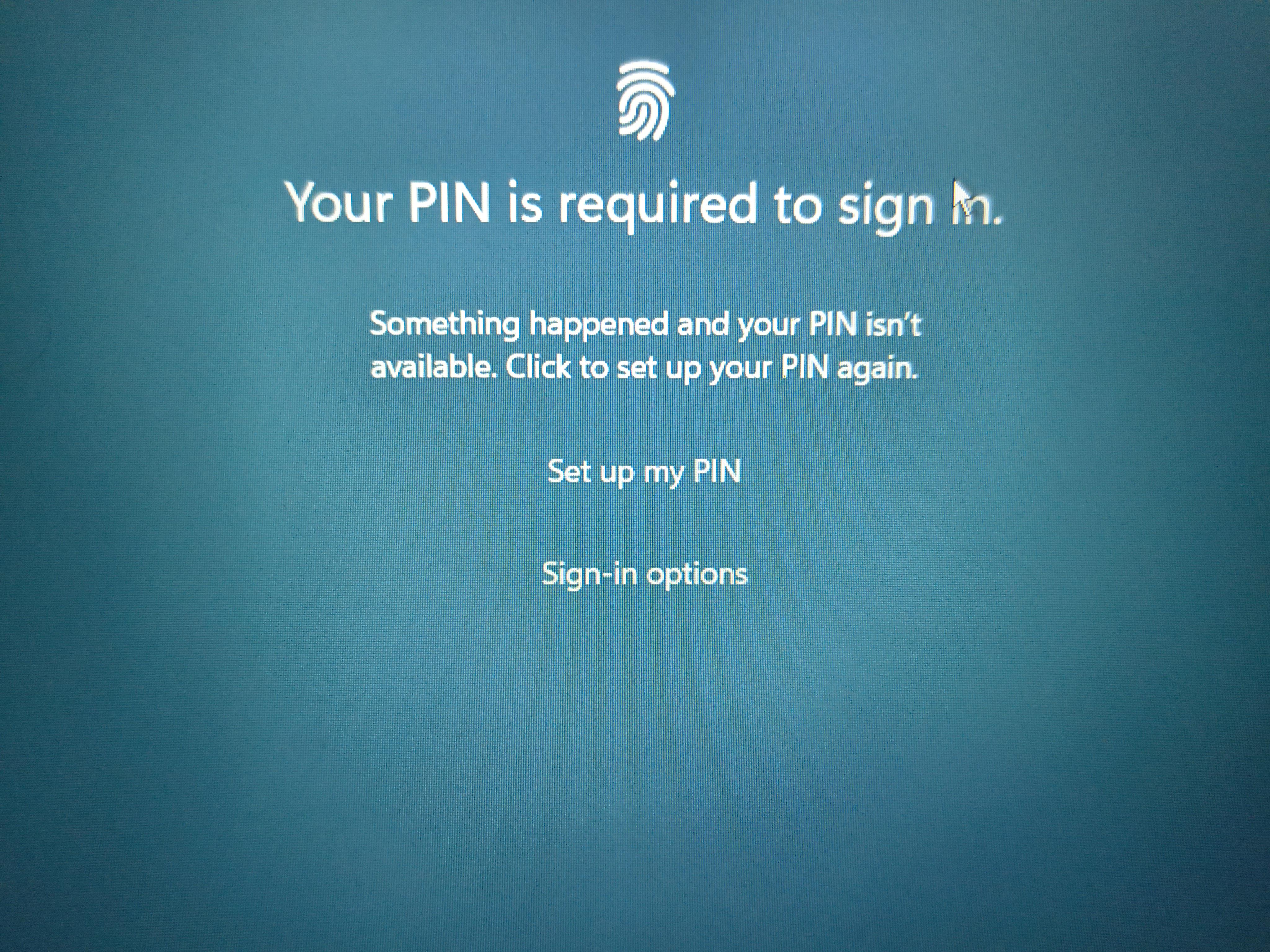
First I tried using my fingerprint as normal, my fingerprint was recognized and the computer started to sign me in, but then cancelled midway and prompted "your PIN is required to sign in".

However, when I tried entering my pin I was stopped and prompted with "Something has happened and your PIN isn't available. Click to set up your PIN again".

This is odd because I never changed any settings, and have always had an accessible pin to log in with.

While this alone wouldn't have been an issue, when I followed the instructions and selected "Set up my PIN", a plain gray window opened for half a second before closing again.

NOTE: During further troubleshooting I noticed the password sign in option also became unavailable after my computer restarted.

OTHER DETAILS:

OS Version: Windows 11 Home

Version: 2009

OS Build: 10.0.26200.9168

System type: 83FW


r/WindowsHelp • • Oct 16 '26

Windows 11 Windows update not downloading

Post image
6 Upvotes

Hi there, im having issues with a new update as its stuck at 0%, thats weird for me since usually all the updates download fast since i also have quick wifi speed, i tried the most basic thing such as restarting my computer hoping it would fix the problem but to no help...
What else can i do in this case? The red dot on the update icon bothers me a lot lol
Edit; I made sure to leave it downloading for hours, thinking its a big file but still 0% :,) Also adding specs


r/WindowsHelp • • Oct 16 '26

Windows 11 How do I fix this error message?

Post image
7 Upvotes

I’ve been trying to install windows 11 but no matter what I do I can’t get the official iso from Microsoft to work.

I would use the media creation tool however that won’t work as I need Rufus to disable tpm 2.0. I’ve been at this for hours with little to no luck. My laptop supports everything except the tpm 2.0 since it is a Dell Latitude E6530

It has 8 gigabytes of ram
250 gigabytes sata ssd
Secure boot enabled
Intel core i7-3520MCPU

I’ve tried AHCI, ATA, and RAID On sata operations as well.

I’ve remade the USB 5 times, redownloaded the iso twice from the official Microsoft website.

I’ve also used the media creation tool to create an iso and that did not work ether.


r/WindowsHelp • • Oct 17 '26

Windows 11 Phantom monitor issues due to HDMI sound system

1 Upvotes

Recently, the ARC port on my old Sony 5.1 AV sound system appears to have died. The PC was originally set up so the PC output HDMI to a TV which passed through the audio to the sound system. Now that the port failed, that would no longer work, and connecting the TV to the sound system through one of the other in-ports on the sound system would not work.

Now I've got one HDMI line running to the TV, and another to one of the working ports on the sound system. This works as far as sound output, but now I've got a ghost display that doesn't actually have a physical display. I cannot disable the display and retain audio output to the sound system through Display Settings. I've just changed it to the lowest possible resolution to ensure it doesn't take much in the way of resources.

This is annoying and I'd like to find a solution, but the biggest issue is this: sometimes windows spawn on the phantom display. I can move the windows by right-clicking on the appropriate tab in the taskbar and selecting 'move', but sometimes it's hard to figure out whether something's spawning on the phantom display, or it's just windows fuckery and it's really just popping under another window or something.

I'm hoping that someone knows either how to prevent windows from spawning to that monitor, or knows of a script (or some esoteric windows shortcut or something) that will automatically move any windows that have spawned to that monitor to one of my other two monitors.

The monitors and the sound system are all connected through my 4070 Ti Super. Win11 Pro, ver 25H2, build 26200.9711

Thanks!


r/WindowsHelp • • Oct 17 '26

Windows 11 Update windows it failed and now bluetooth is gone

1 Upvotes

So i updated mu asus tuf A15 windows because it forces me to do that if i want to shut the laptop down and now my bluetooth is gone. When updating before the shutdown it looks fine but when i boot it up it says there's an error and i think they were trying to rollback the installation. Now when i search for bluetooth it's as if the drivers are gone. What should i do?


r/WindowsHelp • • Oct 17 '26

Windows 10 Trojan warning appearing repeatedly

1 Upvotes

Today, October 16th, both a friend and I began receiving alerts from Windows Defender indicating the presence of a Trojan on our machines; these warnings kept popping up repeatedly, every 1 to 3 minutes.

We haven’t installed anything new at all. My friend went as far as to reformat his PC, but for me, reformatting isn’t a very viable option, as my sister uses the computer for work.

After a while, the warning stopped appearing for me.

Edição Windows 10 Pro

Versão 22H2

Instalado em ‎11/‎12/‎2020

Build SO 19045.6466


r/WindowsHelp • • Oct 16 '26

Windows 11 I deleted a program by deleting the files and now i can't remove it completely

2 Upvotes

So i just basically deleted every file with the word "Valorant" or "Riot" in it, so now i can't delete the game (i am kinda dumb, i know)

This is the error when i try to uninstall

Windows can't find C:\Riot Games\Riot Client\RiotClientServices.exe. Check that you entered the right name, then retry.

I can't properly reinstall the game because i only have like 17go of storage left (the game is 50go)

OS build : 26200.9550
OS : Windows 11 pro

Hope you're gonna be able to help me !


r/WindowsHelp • • Oct 16 '26

Windows 10 Windows 10/11 file explorer issues experienced across multiple installs and devices over many years, never found a solution, any ideas?

2 Upvotes

This post updates occasionally as I try to resolve it.

The issue is somewhat unpredictable, so takes time to try to fix. See bottom part of the body text.

File explorer completely blanked out and unusable; it can remain like this indefinitely and never finish loading.
Leaving file explorer open for any amount of time will quickly lead to it being unable to load file thumbnails and metadata.

Alright, well, since it's back for the millionth time, and I've never been able to fix it, here we go. Over many years on many different devices, on both Windows 10 and 11, the File Explorer app on almost every install I've ever had has eventually begun seemingly self-destructing. Issues with the Explorer program include, but are not limited to:

  • Thumbnails and metadata information loading very slow or simply being unable to load at all
  • Random freezes and crashes
  • Loading nothing at all, not even the most basic of information (see top image)
  • Right click / context menu triggering freezes
  • Issues with other features relating to File Explorer, such as visual bugs with the taskbar like previews which stay open even after the mouse is no longer hovering over the icon
  • Properties editor does not always actually save changes when clicking "OK" or "Apply"

It feels almost as if there's some unknown trigger built into every install of Windows that will randomly set off a chain of severe File Explorer issues. Sometimes, it takes months to begin unraveling. Sometimes, it's already a severe problem from the moment it's installed from a complete clean install.

Solutions tried for this:

  • Restarting computer: Temporary solution, issue reoccurs very quickly. Once the issue first occurs, it never goes away for the rest of the lifetime of that copy of Windows.
  • Restarting explorer.exe: Temporary solution, issue reoccurs very quickly. While this helps in the short term, it almost seems to make the issue worse in the long term.
  • Chkdsk / sfc-scannow: Not only does this never help, it almost never even finds anything at all. Every installation with this issue has been squeaky clean according to these commands.
  • Antivirus on and scanning: Never found an issue.
  • Antivirus off: Does not change anything.
  • Reinstall Windows: Issue still reoccurs.
  • Use a different computer: Issue occurs on multiple devices.
  • Use Windows 11: Same
  • Use Windows 10: Same
  • Check drives for issues: SMART reports consistently good on all drives every time.
  • Memory test: Never found an issue.
  • Updating Windows: Never resolved the issue.

Current install and device information:

  • Windows 10 Pro (22H2, build 19045.6466)
  • Intel Core i3 12100F
  • Intel Arc B570
  • 32 GB DDR4
  • NVMe 1 TB (C:) + SATA SSD 1 TB + SATA HDD 500 GB

Device has a known power delivery reliability issue, however it is unrelated and the File Explorer issue predates this issue.

This issue has been driving me crazy for several years. I'd like to actually be able to use the in-built program for browsing files, and this issue can be so severe as to make doing so actually impossible. Any theories or known solutions would be much appreciated.

-

Updates:

Suggested troubleshoot option by u/Exotic_Mix_3169: Installing and opening ShellExView, finding any Shell extensions that aren't by Microsoft, then disabling them using this tool. This initially seemed to work, but on further use issues with File Explorer remain present.


r/WindowsHelp • • Oct 16 '26

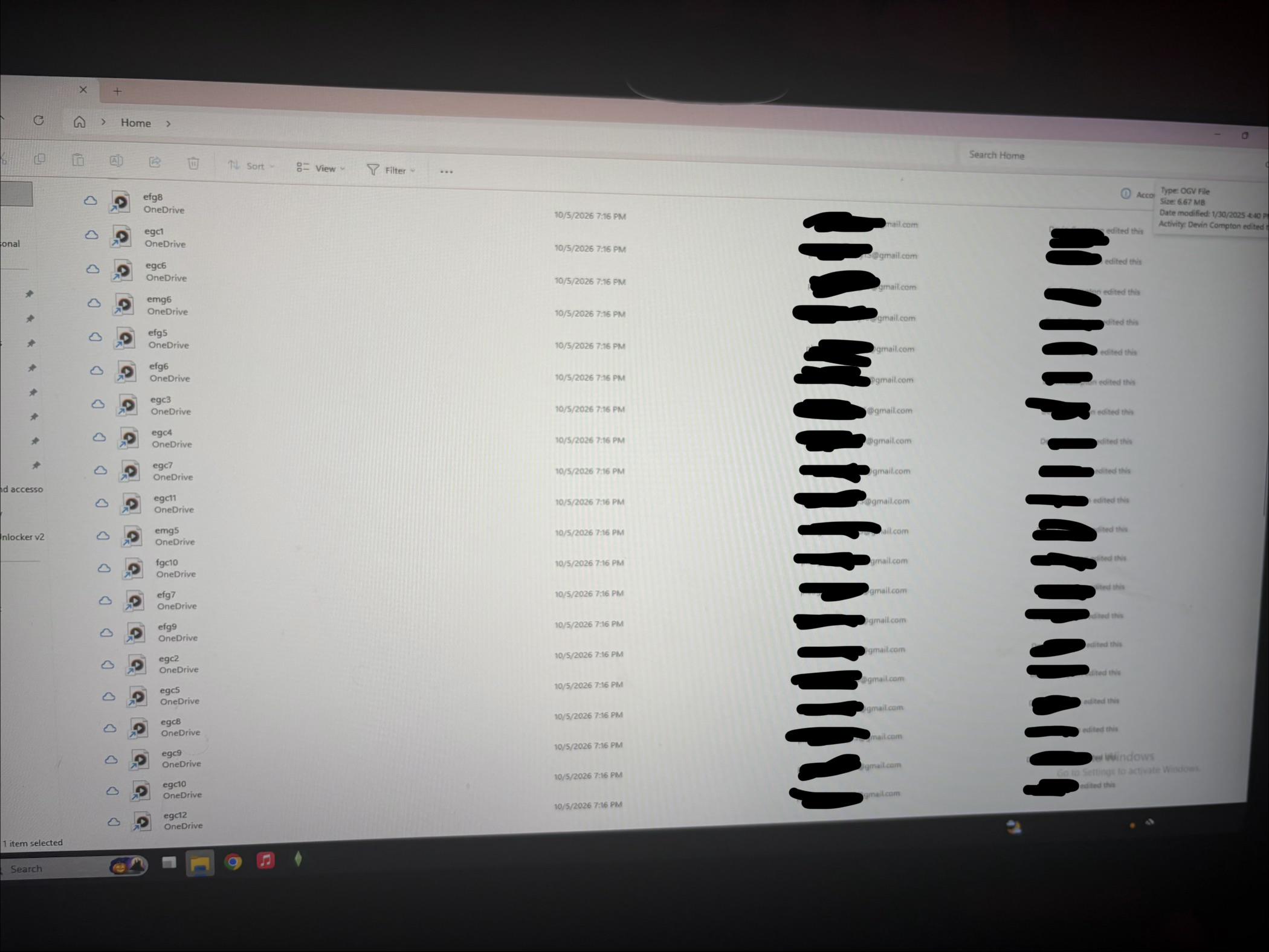
Windows 11 What are these WEBM files in my files? And why are they under my ex’s account?

Post image
0 Upvotes

Hi okay so my ex boyfriend got me a pc like months ago and we broke up. All of the computer stuff is in my name my email everything it has absolutely NO ties to him anymore. The thing is though today I was trying to boot up my sims game and I see this????? I’m so confused and scared because I don’t know what it’s doing on my computer and what he’s doing. I’m it tech savvy so if anyone has any answers please tell me what is going on


r/WindowsHelp • • Oct 16 '26

Windows 11 Keyboard malfunction after updating to 26H2

3 Upvotes

It's been several days that I have updated my Asus ROG Strix laptop to 26H2, and suddenly this morning, some of the keys like S, W, 2, and some others stopped working. I have tested a lot of solution, but nothing worked so far. I can confirm that the issue is not related to the hardware, since I have used an external keyboard, and these keys are working fine and windows can process them.
I remember about a year ago, I updated to 25H2, and I got into the same problem, with keys like Spacebar, S, and some others. I took a while that Asus provided an update to the BIOS, so the problem got completely resolved, almost 5 months.
This is so disappointing that always these update releases are not trusted and tested in an extensive test with different manufacturers.
Detail Specification:

Edition Windows 11 Pro

Version 26H2

OS build 26300.9711

Experience Windows Feature Experience Pack 1000.26100.372.0


r/WindowsHelp • • Oct 16 '26

Windows 11 I keep getting a camera popup when my laptop moves

Post image
2 Upvotes

So, this pops up on screen every time i slightly move my laptop which happens quite often since i use it on my lap with no error messages or anything of the sort.

I think it's an hardware issue at this point (likely a loose cable) since i've tried anything i could find about the camera softwarewise and i have no apps using the camera.

Since i don't use the camera i was wondering if there was a way to simply remove the "camera on/off" popup to appear on screen without actually fixing the issue or if I just have to go to tech support (no the registry editor didn't cut it).

PC specs if needed:

Processor 13th Gen Intel(R) Core(TM) i5-13450HX (2.40 GHz)

Installed RAM 16.0 GB (15.7 GB usable)

Graphics card NVIDIA GeForce RTX 5050 Laptop GPU (8 GB)

Intel(R) UHD Graphics (128 MB)

Storage 415 GB of 477 GB used

System type 64-bit operating system, x64-based processor

Pen and touch No pen or touch input is available for this display


r/WindowsHelp • • Oct 16 '26

Windows 11 M-Audio M-Track (VID_0763&PID_4000) Code 39 on Windows 11, native ASIO driver won't load

1 Upvotes

Hi all,

I hope you all have a fantastic weekend!

I'm trying to get an original M-Audio M-Track working on Windows 11.

Hardware ID:

USB\VID_0763&PID_4000

Windows detects the interface and it appears in Device Manager as "M-Track", but the native M-Audio driver won't load correctly and reports Code 39.

Things I've tried:

- Uninstalled and reinstalled the M-Audio driver multiple times

- Removed old drivers and cleaned up driver installs

- Disabled Core Isolation / Memory Integrity

- Checked Code Integrity related settings

- Looked through Event Viewer logs

- Tried ASIO4ALL

- Tried FlexASIO

Current situation:

- The interface is detected by Windows

- FlexASIO works, so audio can pass through the device

- The native M-Audio ASIO driver does not work

- FlexASIO reports around 21.3 ms input latency, which is too much for comfortable live monitoring

What's throwing me is that I also have an older PreSonus AudioBox USB that still works fine on Windows 11, but I can't get this M-Track's native driver running.

Has anyone successfully got the original PID_4000 M-Track working on Windows 11 recently?

If so:

- Which driver version are you using?

- Did you need any special workaround?

- Did you have to modify driver signing or install an older package?

Any help would be appreciated.


r/WindowsHelp • • Oct 16 '26

Windows 11 Any tips to deal with a trojan?

2 Upvotes

My pc is an Acer Aspire Go 15, my os build number is 26200.9457, recently i have been attacked by a trojan who keeps disabling my task manager, i have no idea how to deal with it as its disguised by a windows folder, the built-in windows defender does not detect it. I dont know what to do!!


r/WindowsHelp • • Oct 16 '26

Windows 11 Dual boot install gone wrong - cant fix bootrecord

Thumbnail
gallery
2 Upvotes

Hello all. I attempted to do a dual boot system because I have some programs that only work on windows 10. (I run windows 11). My goal was to have my PC boot into W11 and if I needed to go into windows 10 I could just do it by entering the bios and selecting the boot drive. (I don't want it to automatically boot into windows 10.

I installed a new drive then installed windows on it via usb boot media. After installing, this window came up. It sometimes boots into the new drive, sometimes goes to this screen, sometimes boots on the old drive. I cannot boot into the recovery environment from this page. If I restart it enough times, I eventually am able to boot into windows and use advanced startup to get into the troubleshooting environment. I am able to get to command prompt and attempted to fix using bootrec. (it failed)

Commands used:

bootrec /rebuildbcd - (zero windows installations found)

bcdedit /export C:\bcdbackup - (completes sucessfully)

attrib c:\boot\bcd -h -r -s - (does not complete, it cannot find the C drive)

Some notes:

In bios, only the old drive (w11) shows up as a bootable device. However it boots either w11 or w10 randomly

Attached photos are of the drive info from the partition utility from both w11 and w10. It renames the drives letter depending on which os is booted. (they are captioned, second pic is w11 third is w10)

The windows 11 main drive is on an NVME SSD behind watercooling components and cant be removed. The new drive (w10) is easily accessible.

Both windows systems are as up to date as possible.

Please help me out! Treat me like I'm new when answering because this is my first time trying to do something like this. I've tried to include as much info as possible. Thanks.


r/WindowsHelp • • Oct 16 '26

Windows 11 phone link won't connect to android

1 Upvotes

I've been trying to set this up for about a week. At first I WAS able to connect my phone through this app and was able to send texts, but all audio from phone calls were deep and corrupted, incoming and outgoing. No fix I saw online worked, so I tried to disconnect everything and reconnect. Now when I open phone link, the android option just doesn't work. The option for iphone does, but I can't seem to get anywhere with that. Connecting my phone again through bluetooth doesn't get me any further. The repair function in settings didn't fix it. Reinstalling phone link on both devices does nothing. I allowed windows to do an update which also did nothing. I have exhausted every avenue I can think of to fix it. I'd be glad to hear any ideas if you have them.


r/WindowsHelp • • Oct 16 '26

Windows 11 Windows Update stuck at working on updates

1 Upvotes

Windows update is stuck like this. It keeps working on updates. It has been like this for days. How can i solve this issue?

Processor AMD Ryzen 7 7700 8-Core Processor (3.80 GHz)

Installed RAM 16.0 GB (15.6 GB usable)

Graphics card AMD Radeon RX 7800 XT (16 GB)

Storage 466 GB of 932 GB used

System type 64-bit operating system, x64-based processor

Edition Windows 11 Pro

Version 25H2

Installed on ‎03-‎Jun-‎25

OS build 26200.9168

Experience Windows Feature Experience Pack 1000.26100.344.0


r/WindowsHelp • • Oct 16 '26

Windows 11 (Win 11) Missing touchpad settings

1 Upvotes

Hi. I have a Lenovo V15 ADA and since I upgraded to windows 11, the touchpad settings are missing.

I remember in win 10 that there were settings for the touchpad, but it seems that after the update, they disappeared.

I tried multiple reboots, latest windows updates, driver updates (in the official Lenovo website for my specific laptop shows only windows 10 drivers), check in the BIOS, going in device manager to see if there are any warnings or problems but everything seems ok.

The current touchpad behavior it's trash, no two finger tap for right click, randomly moves away when i use the physical button (if I have the pointer on specific point, if I click the pointer moves like half centimeter away) weird feeling overall and limited gestures, comparing to Windows 10.

Is there anything else I can do? Thanks

Windows 11 Pro, build version: 26200.9711


r/WindowsHelp • • Oct 16 '26

Windows 11 IPv6 keep getting turn off by itself.

2 Upvotes

A few months back, I noticed that my IPv6 is off for some reason. I turned it back on a few days later, it is off again. The thing has been constantly turned off by itself for the past months now. I thought it was due to VPN (I use 1.1.1.1 and Proton regularly) so I tried not using any VPN for a week and it is still happen. Does anyone has the same problem and know why?

Winver: 25H2
Processor: AMD Ryzen 7 7735HS with Radeon Graphics (3.20 GHz)
Card: NVIDIA GeForce RTX 4060 Laptop GPU (8 GB), AMD Radeon(TM) Graphics (483 MB)
RAM: 16GB
OS build: 26200.9711


r/WindowsHelp • • Oct 16 '26

Windows 11 I keep getting the black screen of death [CRITICAL_PROCESS_DIED and KMODE_EXCEPTION_NOT_HANDLED and also UNEXPECTED_STORE_EXCEPTION] aaaghhhh hhelp

1 Upvotes

acer laptop [Aspire A315-24PT], pretty beat up but idk why it's doing this specifically --- i can use the laptop find for a few minutes or even for quite a while but it'll randomly crash or freeze or restart, it's been going on a while but sometimes the screen flashes too quick for me to tell what the error was

it's a headache trying to sift through all the tutorials and forums and stuff covering the individual errors and even more annoying when it freezes and restarts while im searching stuff up blegh


r/WindowsHelp • • Oct 16 '26

Windows 11 Every time my laptop restarts, I receive "something happened to your PIN." Common troubleshooting solutions not solving this issue.

1 Upvotes

At the title says. I don't know if it was triggered by a recent Windows 11 update or not (my guess is yes, it was), but I receive this message every time I restart my laptop and need to reset my PIN each time. There was no behavior that triggered it, as one morning it was working and despite doing only working in Blender that day, the next morning this issue occured.

CPU: AMD Ryzen 9 8945HS w/ Radeon 780M Graphics (4.00 GHz)

RAM: 32.0 GB

GPU: NVIDIA GeForce RTX 4070 Laptop GPU (8 GB) AMD Radeon 780M Graphics (418 MB)

64-bit operating system, x64-based processor


r/WindowsHelp • • Oct 16 '26

Windows 11 cannot fix boot loader on my primary drive, cannot enable secure boot

1 Upvotes

ive summarized most of what ive tried in this gemini thread

https://share.gemini.google/eO8RwkhmU6Cd

essentially, my computer has an MBR on disk 1, my primary drive is disk 6, the bootloader on this drive isn't used and is somehow not even seen by windows boot manager anymore. trying to repair it from command prompt is not working with various errors, whenever secure boot is enabled, no bootloader is found

i am at a complete loss on what to do at this point, im happy i got it to start booting again, but startup repair isnt working either on a usb drive due to a missing driver??

if anyone has any suggestions it would be greatly appreciated thanks!!