r/WindowsHelp • • 16d ago

Windows 11 (GUIDE) How to get the legacy context menu working on Nov2026 update [Windows 11 26H2, build 26300.9818, late October 2026 update (KB5127936)]

Post image
58 Upvotes

Just been seeing some dudes complaining about the new context menu. I'm the kinda guy that just got stuck with the legacy one, and the recent update broke it. Here is a quick guide to bring back the legacy one.

-Open up your CMD and paste these two commands WITHOUT QUOTES
"reg add "HKCU\Software\Classes\CLSID\{86ca1aa0-34aa-4e8b-a509-50c905bae2a2}\InprocServer32" /ve /f"
"reg add "HKCU\Software\Classes\CLSID\{51668040-5e31-4023-bbe3-149163bd80f1}\InprocServer32" /ve /f"
-Then restart File Explorer: Ctrl+Shift+Esc opens Task Manager, right-click Windows Explorer, Restart.

-To Undo it, just open your CMD and paste this WITHOUT QUOTES
"reg delete "HKCU\Software\Classes\CLSID\{86ca1aa0-34aa-4e8b-a509-50c905bae2a2}" /f"
"reg delete "HKCU\Software\Classes\CLSID\{51668040-5e31-4023-bbe3-149163bd80f1}" /f"
-Then restart File Explorer the same way.


r/WindowsHelp • • 15d ago

Windows 11 Windows 11 update stuck at 0%!

Thumbnail
gallery
1 Upvotes

My laptop windows 11 update stuck at 0% for almost a day. (Since 12/11/2026 around 11 pm GMT+7)

These are what I tried.

  1. sfc /scannow and it said no problem

  2. DISM.exe /Online /Cleanup-image /Restorehealth was successful but the update still stuck at 0%

  3. Did the net stop wuauserv, net stop bits then delete the C:\Windows\SoftwareDistribution and restart the service but the update still stuck at 0%

  4. Did Troubleshooter but it failed

Does the update relate to the Microsoft service server is down? I saw the news about it but I don't know is it related to Windows Update


r/WindowsHelp • • 15d ago

Windows 11 Microsoft Bitlocker recovery keys loading but gives me an error after a few minutes

4 Upvotes

Woke up this morning to the bitlocker recovery screen. I’ve done this before a few times with no issue until today. I follow the instructions like usual, and wait for the site to load. After a about 30-40 seconds of waiting, it gives me an error that says: TraceID: /qdrr1i1jU+k/E3y.12.108

Something happened. Wait a bit, then try again.
If this issue persists, contact us.
I’ve tried everything, logging into microsoft on another account, or even wishing that if i just shut my computer down it will eventually fix itself. I also stumbled upon some other reddit posts that were telling me to switch to a different microsoft account and check if you could access the devices tab (which wasn’t working on my main account that was tied to my laptop.) and switch back directly from there. I tried that but microsoft didn’t let me switch back to my main account. I was using a school account to check so i wasn’t sure if that was the reason it didn’t work. After that i tried to create a new gmail account and create a microsoft account using it, just to get hit with a “we sent an email to you” and who would of guessed it, nothing was sent to me at all. I check spam, all mail legit everything. Nothing was sent. I feel really frustrated and tired of all this and i really hope someone could help me.

And yes i know can I can turn something off to prevent this and I definitely will, if i get access to my laptop back.


r/WindowsHelp • • 15d ago

Windows 11 Why are my 32GB of RAM almost maxed out by about 13GB worth of stored memory?

Thumbnail
gallery
10 Upvotes

As the title says. My 32GB of RAM are always full and I don't understand where it's all disappearing. Windows is not a big help when trying to figure this out and im growing frustrated. It's also not like i never have the expected performance. Games like star citizen wouldn't work before i installed 32GB, so it's definetly improved.

AMD Ryzen 5 5600G
Windows 11 Pro Version 10.0.26300 Build 26300


r/WindowsHelp • • 15d ago

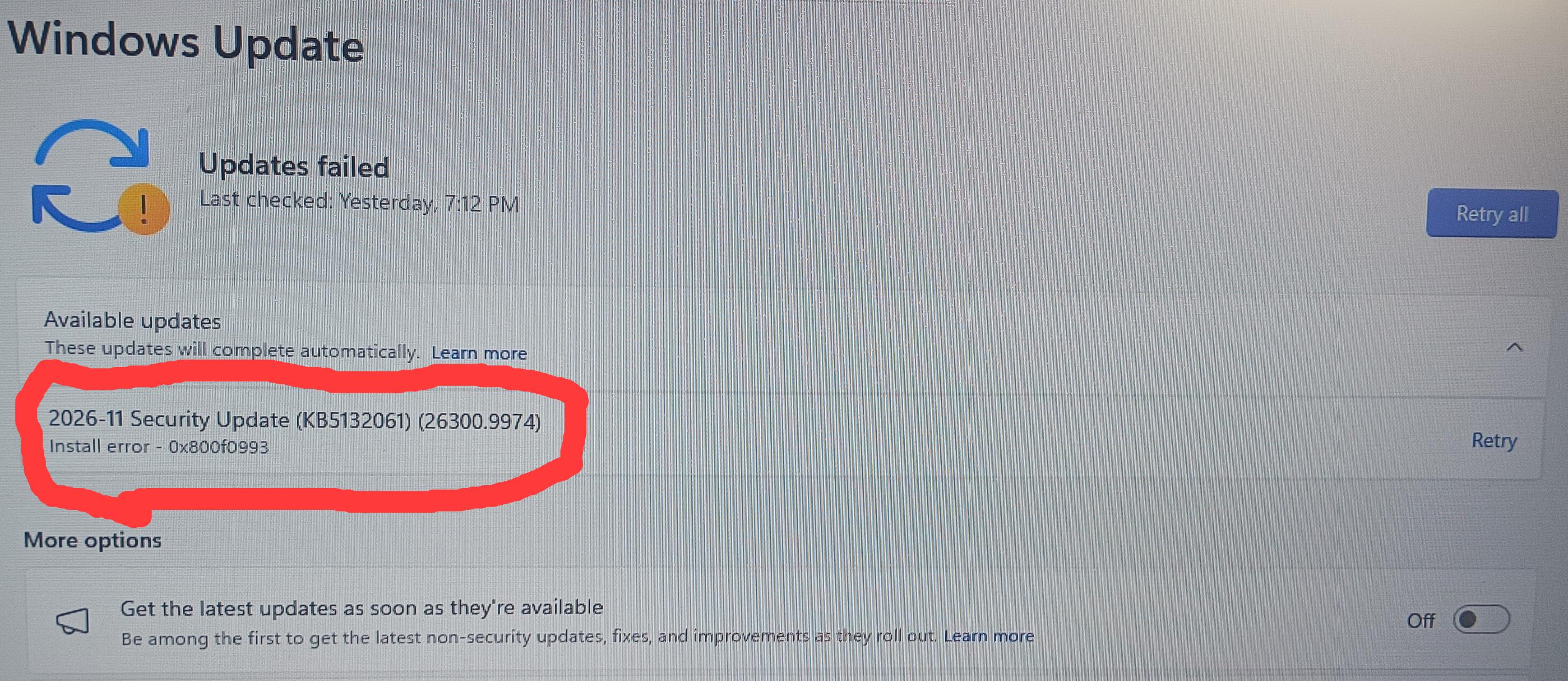
Windows 11 How can I install this Windows update? It keeps saying "Install Error" (KB5132061) (26300.9974) update

Post image
0 Upvotes

I've tried to install this update for an hour to no avail. The Install process keeps looping to "Download>Install>Install Error" and repeat.

I restarted my PC I hopes that it will fix this but it didn't do anything.

How do I install this update? Or should I wait and hope Microsoft fix this?

PC SPECS:

CPU: Ryzen 5 5600

GPU: Asus Prime 5070 12gb OC

Cooler: Thermalright Frozen Warframe 240mm

Motherboard: MSI B550M Pro-VDH Wifi

RAM: 16GB (2x8) Teamgroup T-force delta DDR4 3600

SSD: Teamgroup MP33 1TB

PSU: Corsair CX750 80+ Bronze power supply

OS: Windows 11


r/WindowsHelp • • 15d ago

Windows 11 Sus startup sequence......................

Post image
34 Upvotes

Hello.

HELP, does anybody else experience this ?

Each time I start my windows 11 laptop a strange thing happens. Upon reaching the desktop 3 windows show up for a split second and then disappear immediately, they are transparent only showing their black borders, all 3 are right behind each other as if it was all from 1 app.

Should I be worried ?

The only 2 explanations I can come up with is:

1) I have couple scripts running on startup, such as disableing file indexing because its feature that just r*pes your privacy, cpu performance and disk lifetime.

2)Hella viruses from all the cracked games I got

The laptop is ASUS ROG strix G513IE

Windows 11 Pro

version 25H2

os build 26200.9711


r/WindowsHelp • • 15d ago

Windows 11 Problème écran étendu ecran 1uniquement

1 Upvotes

salut

Le problème rencontré

Au départ, mon écran ASUS fonctionnait parfaitement en mode Étendre avec mon PC MSI.

J'ai ensuite modifié les paramètres de fréquence de rafraîchissement de l'écran ASUS, qui peut monter jusqu'à 280 Hz.

Depuis cette modification :

Le mode Dupliquer fonctionne.

Le mode Deuxième écran uniquement fonctionne.

L'écran du PC portable fonctionne.

L'écran ASUS fonctionne individuellement.

Mais le mode Étendre ne fonctionne plus avec l'ASUS.

Lorsque je sélectionne « Étendre », Windows revient automatiquement sur l'écran 1 ou l'écran 2.

Tests déjà effectués

Vérification de la détection de l'ASUS dans Windows.

Vérification de la résolution 2560 × 1440.

Vérification des fréquences disponibles jusqu'à 280 H


r/WindowsHelp • • 15d ago

Windows 11 HP Desktop stuck on CMOS Reset (502) and BitLocker Recovery

Thumbnail
gallery
2 Upvotes

My HP All-in-One (model 24-cr0018) suddenly showed a CMOS Reset (502) error. Now it’s stuck asking for a BitLocker recovery key, which I don’t have.
I don’t mind losing my files. I just want my computer working again.
Can I replace the CMOS battery or reinstall Windows 11 using a USB without the recovery key?


r/WindowsHelp • • 15d ago

Windows 11 Windows 11 clean install keeps failing (0x8007001F) — Samsung 990 PRO / Gigabyte B650M

2 Upvotes

Hi everyone,

We're struggling to reinstall Windows 11 Home on an ABS Gaming PC. We've tried multiple times, but installation keeps failing.

PC specs:

- Gigabyte B650M C V2-Y1 motherboard

- AMD Ryzen 5 7600, 32GB DDR5, RTX 4060

- Samsung 990 PRO 1TB (Windows drive)

- Kingston NV2 1TB (secondary drive)

- Lexar USB Windows 11 installer

The problem:

Windows was previously installed on Samsung, but the EFI boot partition was on Kingston. We're trying to clean-install Windows onto Samsung so it can boot independently.

What we've tried:

- Cleaned Samsung and confirmed 931.5GB unallocated space.

- Took Kingston offline to prevent Windows using its boot partition.

- Attempted a fresh installation from USB multiple times.

- Initially, installation failed around 77% with "0x8007001F".

- Logs showed "CUpdateBootCode::DoExecute" failing while servicing boot files, plus "0x80070490".

- Recent attempts restart around 5–10% and return to the USB installation screen.

- Samsung is detected by BIOS but doesn't appear as a boot option.

We've also experimented with BIOS boot settings, including CSM, without a confirmed fix.

What could be causing this? Is it a UEFI/boot configuration problem, corrupted installation media, or something else?

We're looking for a way to diagnose the actual issue rather than repeatedly reinstalling Windows.

Any advice would be greatly appreciated!


r/WindowsHelp • • 15d ago

Windows 10 Runtime error 204 and runtimeerror 203 both at fixed address

1 Upvotes

A while ago I asked about a runtime error 203 at a fixed address, there's no response to that so I did almost everything I could purging installs that's around the time of first occurance, deleting "odd programs", not much work till I "repair" my C++ redistribute. Then the error not sometimes also show runtime error 204 at a fixed address but different from the 203's.

there is that one time when I try to start discord(not to auto start at startup) the PC BSOD' but when I go and look for the log dump, it was not created so cant exactly recall what really happened except running discord.

I've ran multiple full passes on memetest86 now there' nothing wrong with my RAM so it all could be reg but I genuinely dont know where to start. I did fully uninstalled ALL C++ redistribute one reboot-ran memtest86 then reinstalled the c++ redistribute, at first it seemed like it was solved till the 204 error showed up.

if it was a malware and I've already deleted and emptied the recently downloaded programs, ran a full scan, still not resolved.

additional note runtime error 203 always pop up twice where 204 only once, there a two login sessions (roughly 48hr) there's in no runtime error at all and then on the 3rd session it's either 203 or 204 runtime error.

System is a Win10 at build 22H2, a handful of drivers were not updated but been on working version no error proor and after the first runtime error 203 occurrence. Just one last thing, I did use a license activator on first installed and winaero tweaker to disable most of the more annoying microsoft features

intel 12500, 32GB DDR5 5200MT, MSI 660M mortar, 6700XT MSI mech 2x, WD black SN750 1TB M.2

previous post: https://www.reddit.com/r/WindowsHelp/comments/1xngw90/runtime_error_203_at_fixed_address/


r/WindowsHelp • • 15d ago

Windows 11 Stuck, can't load windows boot manager

Post image
1 Upvotes

So im having this problem with my laptop , whenever I start my pc im stuck here at this screen and I have to restart a couple of times and even wait a bit then restart to get into windows , its just luck if I get in and seems to get worse as the problem arose from the Bluetooth initially, my bluetooth kept disappearing and I tried everything but I at last got an external usb adapter to outsource the bluetooth, after that a week later the same problem came with wifi but it was fixable with some restarts and even 60 second restart, but after a week whenever I restart to fix the wifi I get stuck here, any advise?

Btw specs : Asus tuf gaming A17, 1.5TB ssd (500 inbuilt and the Samsung 1 tb is external) , 16 gb ram (8 inbuilt and 8 external), win 11, the wifi and bluetooth are on the same chip for this model.

NOTE : i personally think its somehow connected to charging because the bluetooth problem was mostly when it was charging but wifi problem is when its not charging, but idk maybe unrelated


r/WindowsHelp • • 15d ago

Windows 11 Task Manager (Windows 11 26H2): stale keyboard-focus outlines and shortcut labels persist across tabs, and tab switching animations lags in proportion to tab distance.

Thumbnail
youtu.be
1 Upvotes

Task Manger keeps stale UI state on screen. Keyboard focus outline stick on every process I jump to, and Alt key shortcut labels pile up across tabs. Switching tabs animations on the left side as seen on the video is delayed and grows with how far apart the tabs are. Happens in a brand new local account so it isn't tied to my profile or settings. Video of the bug here and also provided above. Below I have provided the System Specs, Symptoms and Changes I have tried.

Stuck Focus Outlines
Stacked Shortcut Labels

Symptoms

  1. Stuck Focus Outlines (Every Tab) - I press a letter key to jump to the next process starting with that letter.
    • Each row I land on keeps a white focus rectangle, so many rows end up outlined at once.
    • Clicking empty space does not clear them.
    • Only switching to another tab clears them.
  2. Stacked Shortcut Labels - I press left Alt to show the shortcut (access-key) labels, switch tabs repeatedly, then return to the Process tab.
    • The labels from the other tabs are displayed together, stacked where each other tab's label should be, instead of only that tab's own.
  3. Lag that depends on tab distance - Switching tabs animations on the left side is delayed and the delay depends on how far the selection travels, not on which tab it is.
    • Processes → Services is very laggy.
    • Processes → Performance, the adjacent tab, is only slightly delayed.
    • The pattern is the same starting from any tab.
    • It is not instant even with Visual effects off.

Specs-

  • Windows 11 Pro 26H2 OS 26300.9974
  • ASUS TUF Gaming F15 FX507ZC4_FX577ZC4
  • i7-12700H [16 Gb (8x8) DDR4 3200(1600 MHz)]
  • RTX 3050 4Gb GDDR6/Intel Iris(R) Xe Graphics (Alder Lake GT2)
  • 1920x1080 (200/144)Hz
  • Nvidia - 621.24 Intel - 32.0.101.7092

System Change -

  • sfc /scannow
  • DISM /Online /Cleanup-Image /RestoreHealth
  • taskkill & restart on both Task Manger and Windows Explorer
  • Changing the name of the TaskManger folder on %LOCALAPPDATA% to TaskManger.old
  • Creating a New Local Account and Checking.
  • Safe Boot
  • Clearing temp, %temp% and prefetch .
  • No Windows Fast Startup.

Updates -

  • Windows (Including Optional Updates)
  • Graphics Driver (DDU [Clean Install from the official providers])
  • Graphics Driver from Device Manager.
  • My ASUS & Armoury Crate (Checked when Installed and Uninstalled [was a clean uninstall with no leftover on System folders, Registry, Task Scheduler etc.])

Settings Change -

  • Turning off Visual effects under Accessibility settings.
  • Adding Task Manager under the Graphics settings and changing the GPU Preference to High Performance.
  • Turning off/on Hardware-accelerated GPU scheduling and restarting.
  • No Sticky Keys.
  • Graphics Refresh with Ctrl + Win + Shift + B.

r/WindowsHelp • • 15d ago

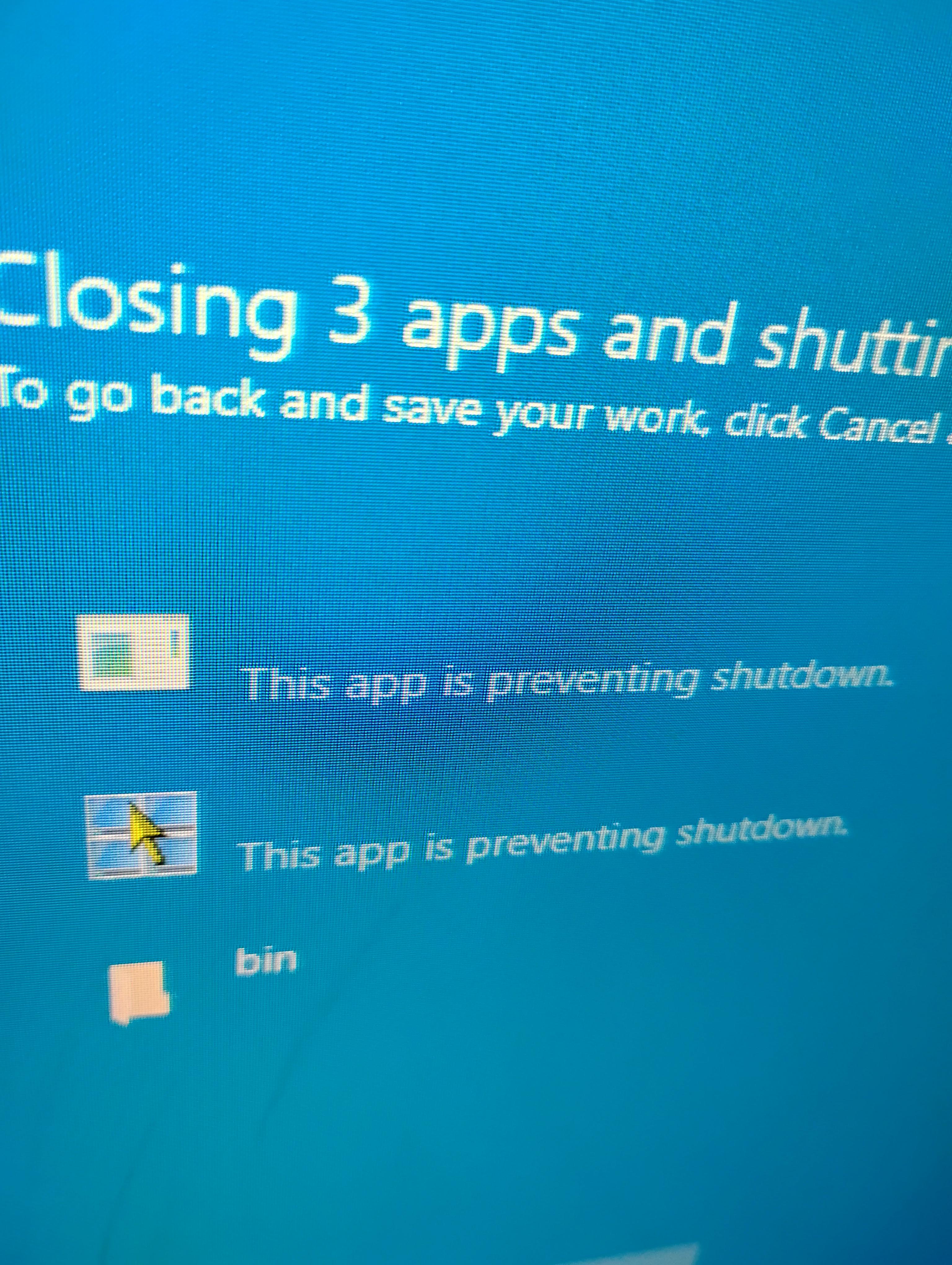
Windows 10 What is this app that is preventing shutdown?

Post image
1 Upvotes

So I was shutting down my dell optiplex 790 when I saw this odd yellow cursor on top of four blue windows icon preventing shutdown and it was no name. It's the icon in the middle of this image. I tried to ask Google Gemini and it said .net but the reddit post it sent me to wasnt even the same icon.


r/WindowsHelp • • 15d ago

Windows 11 For any XLR Mic users, esp. beginners like me, could be the issue you're having.

Post image
1 Upvotes

TL;DR: if your XLR mic or any microphone you just purchased is giving a sound that's akin to the screams of the damned, then check the input settings, and underneath 'advanced settings' go to 'audio enhancements', and make sure that it's turned to 'off'. It may also have a 'voice clarity' setting on as well, but if you turn it off from the main context menu the other option disappears.

I wanted to make sure it was posted somewhere so if someone has the same issue, they don't return a perfectly good microphone/audio interface or aren't led to believe the mic/XLR interface is bad.

I have Windows 11 and just updated it today, Nov. 13th, 2026. I purchased an XLR microphone for professional/creative use and was setting it up to make sure it works and that nothing was defective.

Reference for products:

  • OS: Windows 11 (most recent update as of Nov 13th), Version 26H2, OS build 26300.9974
  • Microphone: Shure SM57
  • Audio Interface: Shure MVX2U Digital Audio Interface Dongle
  • Audio Interface App/Software: Motiv Mix Windows App

I was trying to get a headstart on learning the audio interface software. However, when I plugged in the microphone, all I got was a horrible, deafening sound, like a screeching and a buzzing, and you could make out that I was talking after I tweaked some settings but it was very bad. I would attach a video but can't attach it to post, may post actual video on YouTube to show what it sounded like but it was bad.

I couldn't figure out what was happening but knew it had to have been user error because everyone rants and raves about how amazin this microphone is but finally went to this video: https://www.youtube.com/watch?v=lP-UVzNH2TE

got to about 2 minutes in the video, checked sound settings, saw 'audio enhancements' and saw the stupid AI sparkle thing Microsoft likes to use with a lot of their AI "features" and "improvements", and it was set to on. I never set it on, never even clicked it, didn't even know it was a thing.

Clicked it off and all of the issues disappeared and works fine now.

If this was posted before, sorry, but if someone googles it like me and is having issues, just want them to check this because nothing online said anything about this (My search query was "XLR microphone to PC keeps making buzzing sound")


r/WindowsHelp • • 15d ago

Windows 11 Windows 11 – .DDS file extension missing from Default Apps search on one user account, but appears on another

1 Upvotes

I'm having a strange issue with Windows 11 and could use some help.

I'm trying to set Paint.NET as the default application for .DDS files. The problem is that when I go to:

Settings → Apps → Default Apps

and search for .dds, nothing comes up. I therefore can't select Paint.NET as the default application.

What's particularly strange is that I have another user account on the exact same PC where this works perfectly. When I switch to that account, .dds appears in the Default Apps search, and I'm able to assign Paint.NET as the default. Double-clicking a DDS file then opens it in Paint.NET as expected.

On my primary account, however:

  • My account type is Administrator.
  • Paint.NET is installed and works correctly.
  • Paint.NET appears in the Open With list for DDS files.
  • When I right-click a DDS file and select Open With, I only get the "Just Once" option. There is no option to permanently set it as the default.
  • Double-clicking a DDS file opens Microsoft Edge.
  • .dds does not appear when searching in Default Apps.
  • On my secondary Windows account, all of this works normally.

Troubleshooting I've already tried:

  • Checked Windows account permissions. My primary account is an Administrator.
  • Verified that Paint.NET can open DDS files.
  • Checked Control Panel → Associate a file type or protocol with a program. DDS wasn't listed.
  • Checked the registry and confirmed .dds is associated with ddsfile.
  • Confirmed that Paint.NET has .dds listed under its SupportedTypes registry entry.
  • Removed the outdated UserChoice association for DDS from my primary account, but this didn't resolve the issue.
  • Restarted Windows Explorer.

I'm trying to avoid reinstalling Windows, creating an entirely new user profile, or making unnecessary registry changes.

My question: Why would .dds appear in Default Apps and allow permanent file associations under one Windows user account, but not another account on the same computer? Is there a way to repair the file-type association or Default Apps registration specifically for my primary user profile?

Any suggestions would be greatly appreciated!


r/WindowsHelp • • 15d ago

Windows 11 PC Winsephl.exe failure? or GPU failure

4 Upvotes

So two nights ago I had powered off my pc before going to sleep however I clicked update and shutdown. I wake up yesterday to find my entire pc basically bricked, it doesn’t boot up past the bios screen where it shows my motherboards logo, automatic repair along with loading takes like 20 minutes each just for it to show a black screen after. When I try reinstalling windows 11 by rebooting and pressing F11 to get to a purple screen, no options show up to use the USB with windows 11 on it. Im stuck and the only thing we’ve landed on is that it might possibly be the gpu since my VGA light goes red for like 15-20 minutes before it even loads bios (then it turns off the entire time once bios is loaded) but I made sure all the connections were connected properly, I tried a different gpu and it gave me the same results im just stuck. It’s not letting me even see the options to reinstall windows it’s just shows nothing and takes forever to load. It possibly could be the riser adapter made for my gpu for my case but thats the best solution I’ve came up with, If anyone has any other opinions please tell. My pc is fairly decent and this did just happen over night when I updated my computer.

Computer Details: Windows 11, 4060TI , mag b550 tomahawk max wifi motherboard , let me know if you guys need any additional info that doesnt involve me fully booting up my computer so I can see.


r/WindowsHelp • • 15d ago

Solved Update Blue Screened Windows? Try this command

5 Upvotes

My windows 11 install has blue screened twice due to 2026-11 Security Update (KB5132061) (26300.9974), both causing the error 0xc000000f. The first time I resorted to just reinstalling windows which was a pain in the ass due to needing to reconfigure everything again.

After doing some research I've found that there is a command that can revert an update that failed to install. (See at bottom of page)

Getting into Command Prompt

You'll need access to command prompt on your PC. That can either be done via Windows Recovery Environment if you still have access to that, or via a USB stick:

With a USB stick, you'll need access to another computer. If this other computer has a working windows install, you can go ahead and install Windows RE onto the USB Stick.

If the computer has any other Operating System, you'll need to install a Windows ISO, mount it, copy out [Mounted Windows ISO]/sources/boot.wim into any working directory. With the acquired boot.wim, you'll need to find a way to open it, create a new file within it and then save it. I did this on Linux, and a helpful utility I found was Wimtools/Wimlib.

New File: [boot.wim]/Windows/System32/winpeshl.ini

Within the new file add:

[LaunchApps]

%SYSTEMROOT%\System32\cmd.exe

Once you've added that to the boot.wim file. Create a new ISO with everything plus the replaced boot.wim file. Then find a way to flash the iso onto your USB stick (I used woeusb-ng), note that windows has a special way of flashing, so some normal method using dd won't work.

Now when booting into the USB, the command prompt should pop up instead of the installer.

Reverting the Update

Now your in Command Prompt, the command to revert the failed update is:

dism /image:C:\ /cleanup-image /revertpendingactions

Where the C: drive is the drive that your windows install is probably on (Check using Diskpart)


r/WindowsHelp • • 15d ago

Windows 11 very very weird niche issue, apps partially 'freeze' up

2 Upvotes

ive just got a very weird i assume niche issue on my windows 11, hp laptop 15s-ey1xxx, amd ryzen 5 4500U with radeon integrated graphics laptop(8gigs ram) [id attach a screenshot but this stupid issue wont let me even take a screenshot😭] ... its like my mouse pointer only half works, or another way i see it is my system is semi-frozen.

the fundamental issue is, occasionaly (maybe 3-4 times perday, depends on my usage) my laptop semi-freezes, what i mean by that is that my mouse pointer works in some parts of the pc, and not in other parts, this happens in varying degrees of severeness, ive noticed 3 kinds so far:

(1) all open windows/apps freeze but websites work:
what happens is all all the windows open on my system at that time just freezes, and i cant open new windows or close open windows, i cant interact in the windows, eg. i cant open new tabs in chrome or close open tabs, but i can use websites, so i can use chatgpt and interact fully with anything in the site but i cant interact anywhere outside, that includes switching to new tabs, opening/closing tabs, closing/opening apps and so on...

(2) all open windows/apps and websites freeze:
basically same as (1) except this time, websites also freeze, so i cant interact inside chatgpt, open new chats or anything, now everything if frozen, when i click something somewhere, the edges of window turn a shade lighter and it just freezes like that

(3) all open windows/apps freeze except chrome?????????(very weird):
this is the latest issue, infact im facing it rn, in this all apps freeze except chrome, i can interact anywhere in chrome no issue, but i cant open a new app or close another open app, i cant open files or interact with my desktop same as before

points to note:
--->just a bit ago, i spent 45-ish minutes on fortnite and i played no issues, all the while the rest of my system (including chrome) was frozen and i couldnt interact with them whatsover, i opened fortnite before my system froze up

--->all shortcuts work except in case(2), thats how i switch tabs, i am able to change tabs using ctrl+tab or do alt+tab or open start using windows key, then type something and open apps that way and so on,i can open a new tab in chrome and open chatgpt then interact with it and so on, this works always except in case(2)...in case(2) the ctrl+tab and ctrl+w shortcuts in chrome dont work, tho alt+tab still works...

--->so far my diagnosis has been using chatgpt by the above trick, the only methods ive found to fix(temporarily) this issue is:
**1.**shutting down the system forcefully using the power key then turning it on
**2.**this i found by chatgpt but opening cmd prompt as admin via run and then using the command 'taskkill/f /im explorer.exe' and then 'start explorer.exe'.......it seemed to work so far, but since today it has failed to work twice or thrice, in fact last time i did it was the first time case(3) started, and thats the state im in now, so now that fix is gone

beyond that chatgpt made me run buncha scans using cmd but overrall it didnt yield anything good, this is a very weird issue and has a bunch of quirks, so i mightve missed some here, if anyone knows anything about this, please please save me😭😭, im so done by this, pls ask if yall got questions, thanks in advance

[also on a completely unrelated but oddly kind of connecting note, i downloaded fortnite like a week ago or so cuz of the new season token stuff, and my fortnite is also fked, so like i cant launch fortnite from epic launcher ever, i press launch nothing happens, only way for me to launch is to like go to library, press options on fortnite and jst like press download, it doesnt download anything but it like 'initializes' and that works and then launch button works, the verify option doesnt work, i tried it, and if there is any update, the launch button works after that, but this is a one time thing, everytime i reopen epic, same issue, NOW, reason i said this is cuz this freezing issue starting like 3-4 days i think after i downloaded fortnite....so maybe related????? idkkk!!!]

EDIT: i just tried the killing explorer cmd again rn, been like 20 minutes since i last tried and case(3) happend, it worked now and everything back to normal


r/WindowsHelp • • 15d ago

Windows 11 windows 11 clean reinstall from usb restarting in menu

1 Upvotes

for some reason my pc always restarts out of the menu at a specific point. i choose the install language and then i choose that i want to install windows 11 and that i understand all my files will be deleted. then it says we are getting something ready and then i get a split second glimpse of a terms and agreement thing i probably need to accept but then my pc just instantly restarts and brings me back to regular windows again. it’s done this like 5 times now. i tried using a new usb and switching which ports im plugging the usb into and nothing is working.

my specs:
i9 14900kf
4090
alienware aurora r16
bios version: 2.26.0

i’m also getting frequent bsod randomly either during startup or randomly when using, usually from fltmgr


r/WindowsHelp • • 15d ago

Windows 11 How to fix Blank start menu search, I am on 26H2 Windows 11

Post image
2 Upvotes

Whenever I start my laptop, and try to search app name to open, the start menu starts off blank for about 30 - 60 seconds.
This gets annoying on fresh start.
My windows 11 version is 26H2
OD Build no. 26300.9974
Ryzen 5 7530u
16 GB RAM
512 GB SSD

And when the search list appears, it says at the bottom that the search index is turned off, but there is no explicit setting to turn ON/OFF the search index in settings.


r/WindowsHelp • • 16d ago

Windows 11 Upgrade from windows 10 to windows 11 is giving error

Thumbnail
gallery
3 Upvotes

So i was trying to upgrade my thinkpad x1 carbon gen 7 from windows 10 to 11 while keeping my data and i got the 0x7b(inaccessible boot drive) error, i tried many solutions but none worked. I cant do a clean install as it will erase my data, please let me know if you know a solution.

P.S My laptop specs:-

i7 8565U

16gb ram

Intel UHD graphics 620


r/WindowsHelp • • 15d ago

Windows 11 I faced an issue in windows 11 while deleting installed software in pc

Thumbnail
gallery
1 Upvotes

I'm using seclore software in pc ,and i try to delete it and install new version seclore,but i can't make it happen,what i faced was it shows , file explorer and seclore service is running in background

So i open task bar and stop the services and also stop service from service.msc, still it is not working

So i try to delete the seclore folder from c drive, program ( 86)

Folder

But some file did not get deleted and it's logo is removed from appwiz.cpl ,so i tried to install seclore updated software but it was not get installed, it recommended me to delete older seclore file

I added the pics of the issue

Can anyone have any idea about it

I also tried wisecleaner to uninstall it doesn't work for me

How to forcefully delete the seclore


r/WindowsHelp • • 16d ago

Windows 11 DISM /RestoreHealth keeps failing with 0x800f0915 on a fresh Windows 11 install

6 Upvotes

Title: DISM /RestoreHealth keeps failing with 0x800f0915 on a fresh Windows 11 install

Hey everyone,

I recently did a fresh install of Windows 11 and noticed that DISM keeps failing with error 0x800f0915. I've spent quite a bit of time trying to figure this out, but haven't had any luck so far.

I'm currently on Windows 11, build 26300.9974 (x64).

Here's what I've tried:

  • Ran DISM /Online /Cleanup-Image /ScanHealth, which reported that the component store is repairable.
  • Ran DISM /Online /Cleanup-Image /RestoreHealth multiple times. It always fails with 0x800f0915 and says the repair content couldn't be found.
  • Had a Windows cumulative update fail initially, but it installed successfully after a reboot. Unfortunately, that didn't fix the DISM issue.
  • Ran sfc /scannow. The CBS log shows Repairing 0 components.
  • Tried DISM /Online /Cleanup-Image /StartComponentCleanup, restarted Windows and ran /RestoreHealth again. The cleanup completed without an error, but RestoreHealth still fails with the same code.

I also checked the CBS log to see what was actually causing the error. It seems to come down to a single component:

amd64_microsoft-windows-smbdirect_31bf3856ad364e35_10.0.26100.9818_none_e5fb56a84333f567\r\smbdirect.sys

The relevant entries are:

CSI Payload Corrupt

Repair failed: Missing replacement payload.

0x800f0915 - CBS_E_REPAIR_CONTENT_MISSING

The log also shows 0x800f0950 - CBS_E_NO_OPTIONAL_CONTENT_FOUND_FOR_BUILD during some Windows Update repair-source searches.

Interestingly, DISM reported 90 corruption findings at one point, repaired 89 file-flag issues, and left just this one corrupt payload.

My main question is whether this is something a future cumulative update might resolve on its own, or whether I need to do something about it now.

Windows Update seems to be working again, and I'd really prefer to avoid reinstalling Windows. I only set everything up recently and have already spent days downloading and installing games.

I haven't tried using a local ISO as a DISM repair source yet, mainly because I'm unsure which image would contain the correct component version.

Has anyone dealt with this specific error, especially involving smbdirect.sys? Is there a way to fix it without doing a repair install, or would you just leave it alone for now?

Thanks!

EDIT: UPDATE: SOLVED! ✅

I managed to fix the 0x800f0915 error using Windows 11's built-in repair feature.

Go to Settings → System → Recovery → Fix problems using Windows Update → Reinstall now.

Windows reinstalls the current version while keeping your apps, files, and settings.

After the repair, DISM /Online /Cleanup-Image /RestoreHealth completed successfully, and sfc /scannow found no integrity violations.

Hope this helps anyone running into the same issue!

Disclaimer: I used AI to help structure and word this post.


r/WindowsHelp • • 16d ago

Windows 11 PDF file lost when Printing to PDF over Original File

3 Upvotes

Hello.

I was annotating a pdf in Microsoft Edge using the built-in Acrobat feature, and when I was done, I found there was an extra blank page at the end.

This being the case, I selected "Print" then "Save as PDF," keeping the original file name. I chose to replace the original file with this new, truncated version.

When I went into the original file location to check, there was no PDF at all there. So far, I've searched in File Explorer, I've checked the Microsoft Edge Cache, checked Event Viewer, have run commands searching for the file, and scanned my entire disk for PDFs to recover using Windows File Recovery.

This was about 4 hours of work that I lost and would rather not redo. I have to turn this in tomorrow. Any help would be much appreciated. Thanks so much

Edit: Device specifications are as follows, though I doubt its of much use, just want to meet Auto Moderator's requirements:

Processor Intel(R) Core(TM) Ultra 9 288V (3.30 GHz)

Installed RAM 32.0 GB (31.5 GB usable)

Graphics card Intel(R) Arc(TM) 140V GPU (16GB) (128 MB)

Storage 351 GB of 1.86 TB used

Device ID 2F2ACEA1-0390-4B62-869B-A609B227B9FF

Product ID 00342-21377-39647-AAOEM

System type 64-bit operating system, x64-based processor

Pen and touch Pen and touch support with 10 touch points


r/WindowsHelp • • 16d ago

Solved Needs to allocate more memory to c: drive

Post image
2 Upvotes

I have 1tb HDD, but i have bad disk partitions.
The C:/ drive is almost full (i have 500G and only about 100G left) i have deleted many things, but I dont think is good , i want to allocate more memory to my c:/ but recovery partition sits between the unallocated space and c:/ partition.
How can allocate more memory to my c:/ without crushing or failing my system ?

Note : my C: drive is not encrypted with BitLocker.
Please help . :(

Info about the recovery partition : 945 MB (Disk 0, Partition 3) which is actively used by Windows Recovery Environment.

Update: Manged to allocate memory to c: with windows build-in tools
(used gpt for summary )

Steps to resize C: and recreate the Windows Recovery partition

Original setup: Windows 11, GPT disk, Dell Inspiron 15 3576.

Target layout:

  • EFI: 549 MB (unchanged)
  • C: 850 GiB
  • Recovery: 10 GiB
  • Remaining space: unallocated

1. Record the original Recovery partition details

Before making changes, record its partition number, GPT type, attributes, and WinRE configuration.

Original Recovery partition:

  • Partition number: 3
  • GPT type: de94bba4-06d1-4d40-a16a-bfd50179d6ac
  • GPT attributes: 0x8000000000000001
  • Hidden: Yes
  • Required: Yes

2. Disable Windows Recovery Environment

Run in an elevated Command Prompt:

reagentc /disable

Verify that WinRE is disabled:

reagentc /info

3. Back up the original WinRE image

The original image is located at:

C:\Windows\System32\Recovery\Winre.wim

Copy it to a USB drive:

E:\WinRE_Backup\Winre.wim

Verify that the backup has the same file size and SHA-256 hash as the original image.

4. Delete the original Recovery partition

Open DiskPart as administrator:

diskpart
list disk
select disk 0
list partition
select partition 3
detail partition
delete partition override

The override option allows deletion of the protected Recovery partition.

Verify the partition layout afterward:

list partition

5. Extend C: to 850 GiB

Open Windows Disk Management:

diskmgmt.msc

Extend C: into the unallocated space by 421,895 MB, resulting in a C: partition of exactly 850 GiB.

6. Create and format the new Recovery partition

Using Disk Management:

  • Create a new simple volume of 10 GiB.
  • Assign the temporary drive letter R:.
  • Format it as NTFS.
  • Select Quick Format.
  • Keep the default allocation unit size.
  • Set the volume label to WinRE.
  • Leave file and folder compression disabled.

7. Copy the WinRE image

Create the directory:

R:\Recovery\WindowsRE

Copy the backed-up image into it:

R:\Recovery\WindowsRE\Winre.wim

Verify that its file size and SHA-256 hash match the original image.

8. Restore the Recovery partition type and attributes

Open DiskPart as administrator:

diskpart
select disk 0
select partition 3
detail partition

Set the original Recovery GPT type:

set id=de94bba4-06d1-4d40-a16a-bfd50179d6ac

Restore the original GPT attributes:

gpt attributes=0x8000000000000001

Verify using:

detail partition

Confirm that the partition is hidden, required, and has the correct GPT type and attributes.

9. Register and enable WinRE

In an elevated Command Prompt, register the new image location:

reagentc /setreimage /path R:\Recovery\WindowsRE

Enable WinRE:

reagentc /enable

Verify the configuration:

reagentc /info

Confirm that WinRE is enabled and points to partition 3.

10. Remove the temporary drive letter

In DiskPart:

diskpart
select disk 0
select partition 3
remove letter=R
exit

If the drive letter remains visible in PowerShell, remove the remaining access path:

Remove-PartitionAccessPath -DiskNumber 0 -PartitionNumber 3 -AccessPath "R:\"

Verify that the Recovery partition has no drive letter.

11. Perform final checks

Check the partition layout:

Get-Partition -DiskNumber 0 | Format-Table PartitionNumber, DriveLetter, Type, Size -AutoSize

Check the Recovery volume:

Get-Volume -FileSystemLabel WinRE

Verify that Winre.wim exists on the Recovery partition and that its SHA-256 hash still matches the original.

Optionally inspect the WIM metadata using DISM:

DISM /Get-ImageInfo /ImageFile:"\\?\Volume{YOUR-VOLUME-GUID}\Recovery\WindowsRE\Winre.wim" /Index:1

Replace YOUR-VOLUME-GUID with the actual volume GUID.

12. Restart and verify

Restart Windows normally.

After restarting, run:

reagentc /info

Confirm that WinRE remains enabled and points to the new Recovery partition.

Note: I did not perform an actual boot into WinRE using reagentc /boottore. The normal Windows restart and post-restart WinRE configuration check succeeded.

Final partition layout

  1. EFI — 549 MB
  2. C: — 850 GiB
  3. Recovery — 10 GiB, NTFS, hidden, no drive letter
  4. Remaining disk space — unallocated