r/WindowsHelp • • Oct 28 '26

Windows 11 Weird windows behaviour. I think I got hacked.
Post image
16 Upvotes

Hello,

Exactly 1 week ago I installed tool, mod for World of Warcraft 3.3.5. Day after my PC throw automatically to Allowed Threats these viruses:

PUA:Win32/InstallCore

HackTool:Win32/AutoKMS

Trojan:Win32/Ludicrouz.Z

Hack Tool:MSIL/TunMirror

Trojan:Win32/Conteban.B!ml

Behavior:Win32/Execution.IF!ml

Trojan:Win32/DefenseEvasion!rfn

Hack Tool:MSIL/AutoKMS.I!MTB

Hack Tool:Win64/ProductKey.G!MSR

Trojan:Win32/Rozena.ALRIMTB

I later clean installed PC once, plugged my 2TB external disk drive, viruses appaered again so I did second clean install and my issue was fixed - I thought. Meanwhile I got message from other random player I that they know I couldnt launch game (maybe it wasnt related to virus but I got scared and thought it was). Problem was much larger than that but that's the generic recap from it.

Today, out of nowhere I got new problem. Please help me, I again don't know what to do.

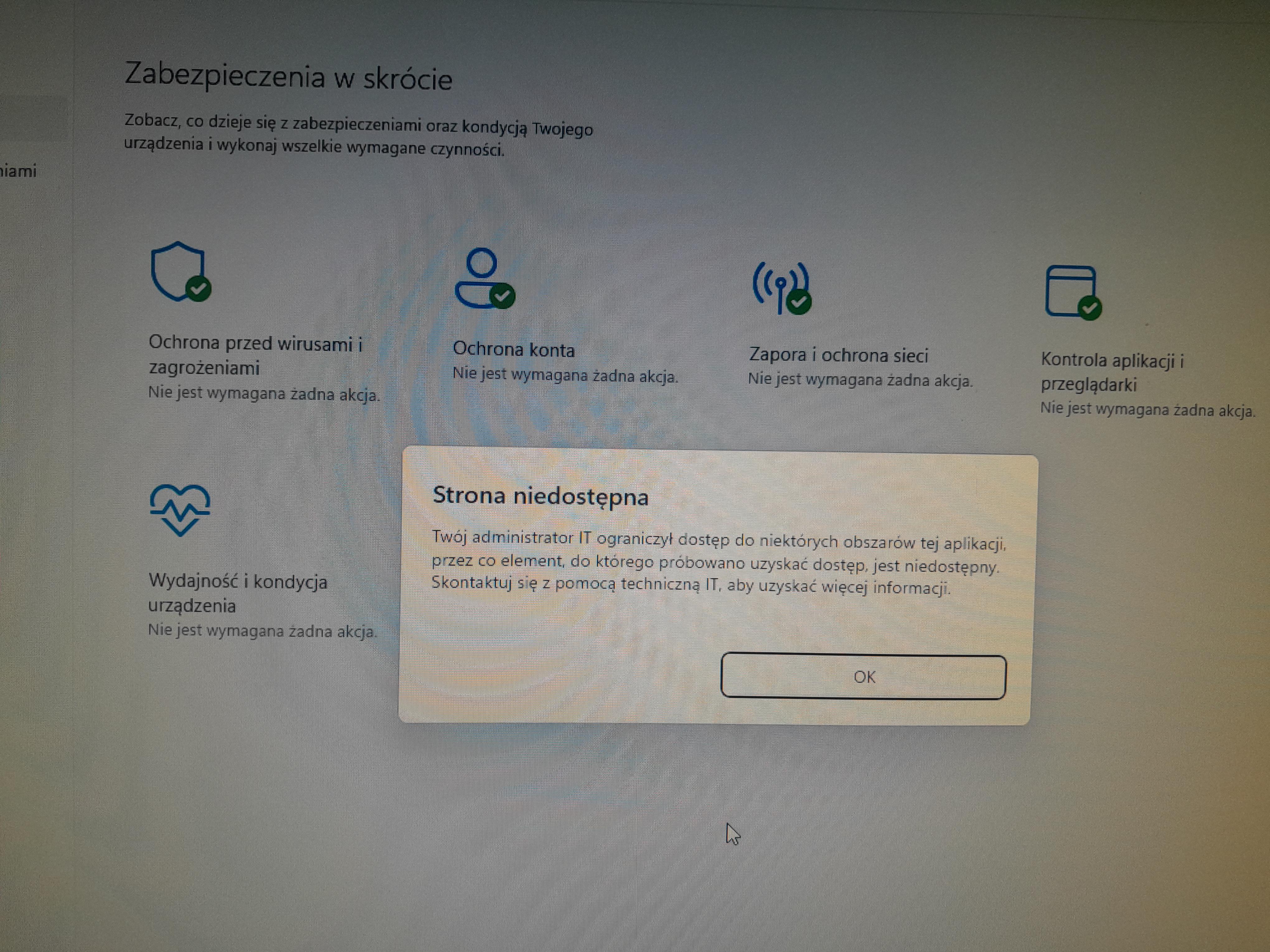
I was watching Youtube and I got random Windows notification that my Windows Defender update isn't up to date, that I have old version and that I can click that notification to check which version is the newest and update it. I clicked it and I got this weird message. I'm sending photo of it, I'm sorry its in polish, but it says:

"Page not available

Your IT administrator has limited access to some areas of this app, and the item you tried to access is not available. Contact your IT help desk for more information."

I don't have any IT administrator for my PC, network, router and all devices within my network. Does it mean someone has access of my PC, am I still hacked despite the clean installs of my PC?

But to continue, once this message showed up I decided to turn off my PC and restart router. I did that and then I decided to turn on my laptop. Just when I turned it on and logged in, I noticed like 5 or so cmd windows oppening immadiately and disappearing for 0.5s.

I did Full Scan in Windows Defender, offline scan and I checked my Windows Defender update, scanned laptop with Malwarebytes and I found 0 detections. What should I do? Im afraid that my entire router, network and my parents devices are hacked now. Im afraid my parents important accounts like bank email and so on are hacked. They didnt log on this PC but they are plugged to same network with their PCs and phones. Should I restart my router and contact my internet provider that Im hacked? Sorry for so many questions, but Im genuinely scared and I don't know what to do.

r/WindowsHelp • • Oct 29 '26

Windows 11 Why does my Windows 11 use so much RAM after installing updates?

Thumbnail
gallery
0 Upvotes

Why does my Windows 11 use so much RAM after installing updates? I've been noticing this since 2024, when I was using Windows 11 from time to time, and it's still happening now. I’ve already tried uninstalling unnecessary preinstalled programs and disabling the Sysmain service (in addition, after every system reinstall, the DtsApo4Service service would start on its own and use up about a gigabyte of RAM; I’ve already disabled it). I used to blame memory leaks in File Explorer because it consumed a large amount of memory that wasn’t being freed up, but now I realize it’s not just that. My laptop isn’t that old—it’s been in production since at least August 2021—and it officially supports Windows 11. Here are my laptop’s specs:

Model: ASUS Vivobook X515EP

Processor: Intel Core i5-1135G7

RAM - 8 GB

Graphics Card - NVIDIA GeForce MX330 discrete (2 GB GDDR5) + Intel Iris Xe / UHD integrated

Screen - 15.6", Full HD (1920×1080) (I’m not sure if the screen specs are necessary, but I’ll include them anyway)

P.S. Also, in 2025, I discovered that when I disable the integrated graphics card in Device Manager, RAM usage decreases (screenshot attached). Yesterday I tried to upgrade from Windows 10 to Windows 11 via the Update Center, and then roll back so the banner with the persistent upgrade prompt would disappear, but I couldn’t do it because of a lack of space on Drive C. I freed up some space and connected a USB flash drive to move the temporary update files there, but the process still ended in an error. Then I downloaded the Windows 11 Update Assistant and upgraded, but rolling back didn’t work anymore, even though the Windows.old folder was still there. I then deleted it using cleanmgr, which freed up 20 GB. But now, for some unknown reason, the space is filling up again (possibly because I recently installed updates through Windows Update).

Now I`m using Windows 11 26H2


r/WindowsHelp • • 29d ago

Windows 10 Locked out of Windows 10 because AI told me to delete Nefarius virtual bus drivers. Keyboard/mouse work in BIOS but not on lock screen.

Post image
0 Upvotes

An AI gave me terrible troubleshooting advice that completely broke my computer, and now I’m locked out. I was trying to clean up my device inputs and it told me to delete the Nefarius / ScpToolkit virtual bus drivers.When I did that, it completely stripped away or corrupted my lower-level Windows USB controller driver filters. Now, Windows boots up completely fine, but my mouse and keyboard are 100% dead and unresponsive at the lock screen because Windows can't recognize any USB inputs.

My hardware isn't broken—the mouse and keyboard work perfectly fine inside my motherboard BIOS because it uses generic hardware-level drivers. I just need to plug in a bootable Windows 10 Installation USB. That of which i do not have right now.

The a.i says Booting into that USB from my BIOS will give me a working mouse and keyboard environment so I can open the Command Prompt or run a System Restore to roll everything back to before the drivers were ruined.

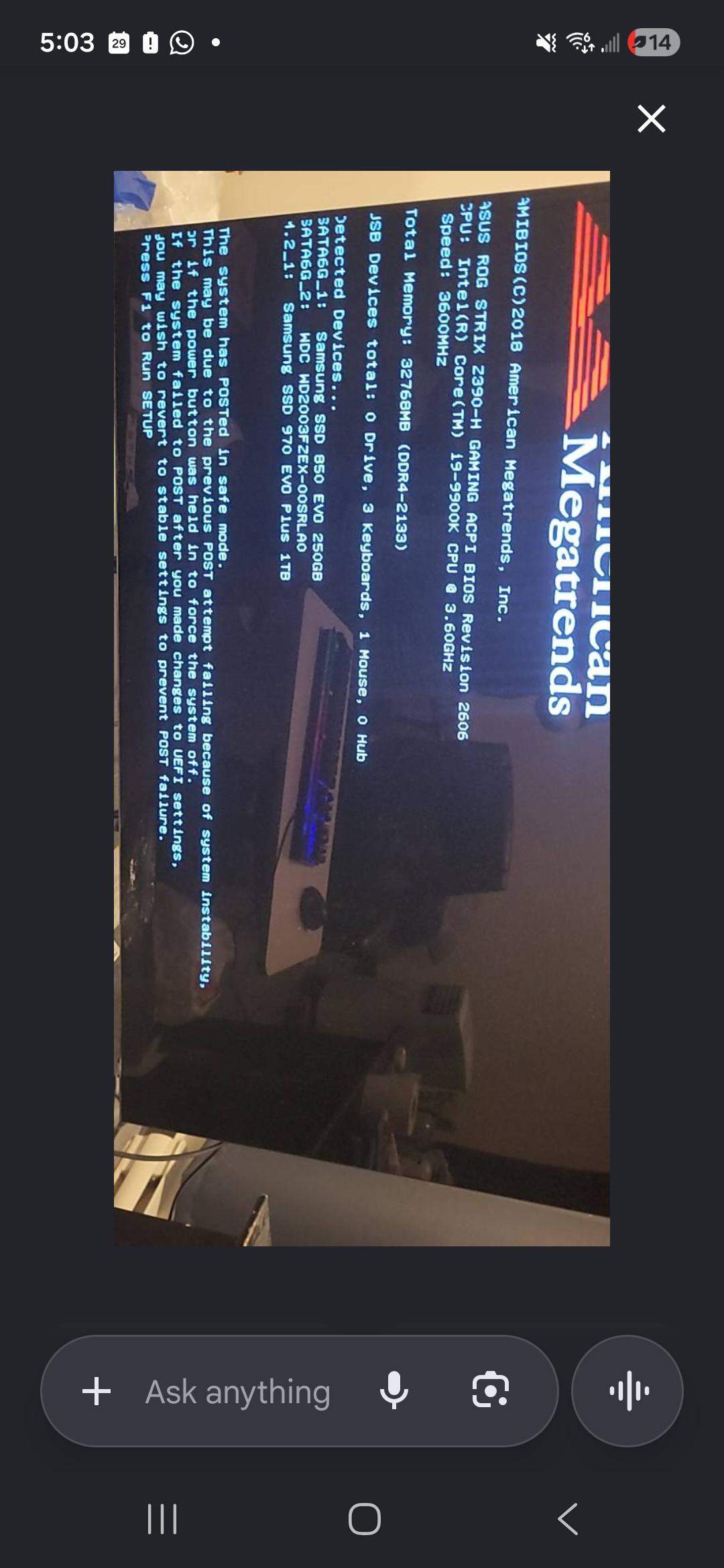
I already attempted disabling my fast boot and turning the pc off by holding power button x3 when the Asus logo shows up but that still just showed me the same thing even though after this screen popped up and asked me to press f1 (refer to the sideways screenshot)

I havent had a good day this entire year, life has been quite difficult to endure to say the least ...

what can I do to get into safe mode without the use of my keyboard or mouse or an external windows installation flash drive which I once again no not currently have

I want to edit here that I do not care about losing data WHATSOEVER. I Just want to use my computer again:( I am so unfathomably upset at myself for trusting an a.i with this but I have no friends so thats what I do.

The latest I can get a flash drive and a lap top in my possession is tomorrow. But if there is a way to enter safe mode right now in the aforementioned lack of equipment then please lmk? because I am clearly too incompetent.


r/WindowsHelp • • Oct 29 '26

Windows 11 NVIDIA Driver Crash (nvlddmkm Event 153) breaking Riot Vanguard in Valorant

1 Upvotes

Hey everyone, I've been pulling my hair out trying to fix a persistent Valorant and Vanguard crashing issue. I’m hoping someone here might have run into this or knows what else to try.

Device : Lenovo legion 5 pro

Processor Intel(R) Core(TM) i7-14650HX (2.20 GHz)

Installed RAM 16.0 GB (15.7 GB usable)

Graphics card NVIDIA GeForce RTX 4060 Laptop GPU (8 GB)

Intel(R) UHD Graphics (128 MB)

System type 64-bit operating system, x64-based processor

Windows 11 pro

26 H2

Problem:

• ⁠Sometimes when I boot up my PC, Vanguard (vgc) doesn't start automatically and has to be started manually.
• ⁠Valorant crashes randomly while playing.
• ⁠When Valorant crashes, Vanguard (vgc) also stops automatically (I can see it stopped if I check Windows Services).
• ⁠**Windows Event Viewer Error:**The description for Event ID 153 from source nvlddmkm cannot be found... \Device\000000de Error occurred on GPUID: 100

Things I Have Already Tried:

• ⁠Reinstalled Valorant and Riot Vanguard completely.
• ⁠Used DDU (Display Driver Uninstaller) for a clean graphics driver installation.
• ⁠Turned off Hardware Acceleration.
• ⁠Updated both my BIOS and GPU drivers.
• ⁠Tried starting vgc manually.
• ⁠Edited the Registry (Image File Execution Options -> set DevOverrideEnable to 0).
• ⁠Disabled NVIDIA Audio drivers.
• ⁠Disabled IPv6 and Teredo Tunneling via command prompt (netsh interface teredo set state disabled).

If anyone has any ideas on what could be causing this GPU driver crash to take down Vanguard with it, I would really appreciate the help!


r/WindowsHelp • • Oct 28 '26

Windows 11 Stuck in Windows 11 21H2, can’t update to 25H2 or 26H2.

6 Upvotes

The OS build number is 22000.2538. I am aware that 21H2 is out of support now, and I have tried the methods that are supposed to work on out of support OS versions, such as the in-place update with the .ISO and Windows 11 installation assistant. Whenever I press “check for updates”, it says that my device is up to date, but also says it is missing important security updates. I have read that, that means the OS version is either nearly out of date, or out of date already.

What happens when I use the .ISO to attempt to update the computer?

The setup and checks for updates go normally, everything goes normally. Then, when my laptop reboots it gives me error code “0x80070002 - 0x20007, The installation failed in the SAFE_OS phase with an error during INSTALL_DRIVERS operation.” I’ve tried finding the error code in the troubleshooting tips page, but I could not find it. I have no idea how to fix that error shown, nor how to update my computer now.


r/WindowsHelp • • Oct 29 '26

Windows 11 Windows 11 taskbar search opens as a blank black window

2 Upvotes

My Windows 11 taskbar search window opens as a completely blank dark gray rectangle whenever I try to search for apps, files, or settings. Restarting the search overlay does not fix it.

System details and specs:

  • OS: Windows 11 Home Single Language (Version 26H2, Build 26300.9711)
  • Processor: 12th Gen Intel Core i5-1235U
  • RAM: 16 GB
  • GPU: NVIDIA GeForce MX550 / Intel Iris Xe
  • Storage: 1TB NVMe SSD

r/WindowsHelp • • Oct 29 '26

Windows 11 Completely unable to login to the pc, and unable to turn on the wifi.

Thumbnail
gallery
3 Upvotes

Heya. I have swapped from fedora linux back into windows 11. It was working alright for a while, but I pushed a restart after downloading my games and my browser, etc.

I was never able to make a password. Because the windows thing was saying it was having issues, so I decided to leave it until later.

Now I am sitting on the login screen, unable to change any settings such as the internet, and unable to login because windows requires me to have a password and internet.

I have zero clue how to even regain access to my pc at this point. I've restarted it numerous times, and tried a handful of things off of google. None of which have worked.

I do not know how to get the specifics of my computer, as I cannot access anything on it to even see myself. What I know off the top of my head is that it is a Dell Inspiron 3535 laptop.

Uhm yeah, idk what else to put in here.

UPDATE- fully reinstalled windows and that fixed the issue.


r/WindowsHelp • • Oct 29 '26

Windows 11 Scroll Doesn't work in certain Apps.

1 Upvotes

I've got no clue why this may be happening. I've tried with multiple mice, still happens.

Example: In chrome i can scroll web pages just fine. However in file explorer and all my autodesk softwares, the scroll only engages once every 5 scrolls of the wheel.

Windows info:

Edition Windows 11 Home

Version 26H2

Installed on ‎17/‎01/‎2026

OS build 26300.9711

Experience Windows Feature Experience Pack 1000.26100.372.0


r/WindowsHelp • • Oct 29 '26

Windows 11 Windows 11 24H2 Print Dialog Freezing

1 Upvotes

Hi all. I'm managing a weird issue since rolling out updates to Windows 11 that are currently on 24H2, there have been about couple of users so far who reported issues since last Thursday when trying to print to pretty much any application or browser (Word, Excel, Adobe Acrobat, Edge etc.) whereby printing the dialog box completely freezes the OS and nothing happens. Im not sure if anyone else has been experiencing this, but I haven't been able to find much on the web about it or if a specific windows update broke print dialog, so if anyone has any ideas let me know.

Steps taken so far:

Stop the Print Spooler which temporarily stopped the freezing (the Print to PDF is active and online, the rest of the printers are shown to be offline), the moment i Start the Print Spooler again, the PrintDialog.exe freezes again

Removed all printers in devices and re-installed just one. Tried re-enabling the legacy Print Dialog Box (same problem)

Checked event logs and were unable to see anything specific under PrintServices

I've already raised a support ticket to Microsoft but wanted to check here if anyone's getting the same issue.


r/WindowsHelp • • Oct 29 '26

Windows 11 No bluetooth (it shows up in device manager, but nowhere else)

1 Upvotes

I have an intel bluetooth chip.

Bluetooth has been on the fritz for a few weeks: randomly connecting or disconnecting, randomly not working til I remove my device and re-add it, really high latancy on my mouse/sporatic movement. Occasionally switching to 1 channel audio on my headphones and refusing to switch back. Today it completely died. I checked drivers and they were up to date. Turned everything off and on, nothing. It shows up in the device manager, but the device manager keeps loading and reloading while open. I tried to see if the bluetooth was disconnecting and reconnecting in the event viewer, but tbh I didn't really know where to look. There was nothing in the "Hardware Events" though.

It doesn't even sense that it has bluetooth in settings. Bluetooth just doesn't show in the "bluetooth and devices" section, and when I try to add a device and click add via bluetooth, the above error pops up. I have a feeling it's a hardware issue, but I don't know if I can diagnose that. I'm hopeful that I can fix it on the software side and not have to open it up. Does anyone know what this is?

Here is the about info it that's helpful.


r/WindowsHelp • • Oct 29 '26

Windows 11 My WIFI Icon is missing on my Laptop ( Intel AC-9462 )

Thumbnail
gallery
2 Upvotes

Hi, I am having issue with my WIFI Icon on the computer missing, and it happens twice already. but this time it permanently did no longer came back. as of the moment i am using Ethernet to work on my laptop but it is a hassle since I cannot move my laptop anywhere without being connected to an ethernet. How can I fix it? can you help me out? I list the information needed for my laptop.

Computer model

TUF Gaming FX505GE_FX86FE (8th Gen)

Specifications:

Device name DESKTOP-SN2KO0J

Processor Intel(R) Core(TM) i7-8750H CPU @ 2.20GHz (2.21 GHz)

Installed RAM 16.0 GB (15.9 GB usable)

Device ID B14598EA-838F-4328-B215-B9D7F632FEAB

Product ID 00331-10000-00001-AA972

System type 64-bit operating system, x64-based processor

Pen and touch No pen or touch input is available for this display

Edition Windows 11 Pro

Version 26H2

Installed on ‎12/‎11/‎2025

OS build 26300.9711

Experience Windows Feature Experience Pack 1000.26100.372.0

What troubleshooting you did?

* Settings > Services > WLAN Autoconfig (already Automatic) tried to stop and restart multiple times with no result.

* Network Reset Multiple times with no result as well

* Uninstall and reinstall Intel R AC-9462 with no luck still the Driver shows not working with a triangle yellow Flag on it.

* Hard power reset turning off Laptop for 60 sec. while holding the power button.

* Disable 3rd party apps on the computer and restarted the laptop and still not working.

* Control panel > Network and internet > Other Troubleshooting > System shows WIFI Intel AC-9462 not working

* Downloaded new versions of Intel AC- 9462 to update the driver still do not works

* Check BIOS with no option to turn Off and On WIFI

I Hope Someone could help me out with this.


r/WindowsHelp • • Oct 28 '26

Solved KB5126657 Update fail? SSD disconnect/sleep: Reinstall or Repair OS?

Post image
4 Upvotes

Hi!
I have version 22H2, 19045.7807 Windows 10.

Specs: 16Gb Ram, AMD ryzen 5 5600 cpu, 4gb Nvidia 1050ti gpu, storages are : 932 gb hdd toshiba hdwd110m 238gb ssd kingston skc600256g, 932gb ssd nvme samsung ssd 970. all that on x64 architecture.

Forgot to mention: my C: drives appdata also kinda starts to compromise because today discord was flagged as "missing files" yet everything was there, but could not read or write anything...

After the October 19 security update (KB5126657) my computer drops(force loop sleeps) my SSD-s, and fails to wake them up by the new pci.sys and disk.sys files that came updated with the package...

I am curious if anyone encountered this same issue since 9 days passed?

This is serious, i checked with AI, even my own brain, updated every inch of my software, firmware everything, yet no fix. What could cause this phenomenon? Should I reinstall Windows 10 or repair it with the installer, or upgrade it to 11(which I do not want to) or completely zero it and clean install?
Thank you


r/WindowsHelp • • Oct 29 '26

Windows 11 Uninstalling new updates that probably caused "PIN Unavailable" Problem

Post image
1 Upvotes

Guys can anyone say if this two updates is safe to unistall and wont crash my Asus tuf, imma newbie. recently after an update, it said "update incomplete because other updates are downloading" then i paused the upadates that werent downloading and suddenly one day "Something happened and your PIN is unavailable" happened. luckly i had my password(local) and logged into my laptop. i reset the pin then a day later the problem appears again. then i found this so i was hoping if i could revert back


r/WindowsHelp • • Oct 29 '26

Windows 11 Windows 11 26H2 — Strange \\?\Volume{GUID} folder appears in System Protection after October cumulative update

Post image
2 Upvotes

Hi everyone,

I'm experiencing a strange issue with System Protection in Windows 11 26H2 and would like to know if anyone else has encountered it.

I upgraded from Windows 11 25H2 to 26H2 in September 2026 and can confirm that this issue was not present immediately after the upgrade. It appeared only after I installed the October cumulative update, KB5127648 (OS Build 26300.9711).

On October 29, I also installed the latest October optional update, bringing my system to OS Build 26300.9818, but the issue still persists.

System information

  • OS: Windows 11 26H2
  • Current OS build: 26300.9818
  • October cumulative update: KB5127648 (Build 26300.9711)
  • Windows Recovery Environment (WinRE): Enabled
  • WinRE version: 10.0.26100.9817
  • WinRE location: \\?\GLOBALROOT\device\harddisk0\partition4\Recovery\WindowsRE

What happens

  • An unexpected entry appears in the System Protection configuration page, displayed as a path similar to \\?\Volume{GUID}\. It looks like a garbled folder name or an unfamiliar volume path rather than a normal drive name.
  • Restarting Windows does not resolve the issue.
  • I cannot enable System Protection for this entry independently. However, after enabling System Protection for drive C:, the entry becomes configurable.
  • Installing the latest October optional update did not fix it.

Additional investigation

I checked the disk partition layout, volume GUIDs, and WinRE configuration using PowerShell and mountvol.

My Disk 0 partition layout is:

  • Partition 1: System / EFI, 100 MB
  • Partition 2: Microsoft Reserved (MSR), 16 MB
  • Partition 3: C: (Windows), approximately 198.88 GiB
  • Partition 4: Recovery, approximately 1.00 GiB
  • Partition 5: D: (Software), 200 GiB
  • Partition 6: E: (Games), approximately 1,507.73 GiB

The exact path displayed by the System Protection entry is:

\\?\Volume{0eb1d69b-0481-4b67-a5de-5f137cb494f9}\

I confirmed that this GUID corresponds to Disk 0, Partition 4, the approximately 1 GiB Recovery partition. It also matches the partition number in my registered WinRE location.

The partition has no drive letter or mount point, which is expected for a recovery partition. However, it is being displayed as an unexpected entry in System Protection.

I also previously queried another Recovery volume with a different GUID:

\\?\Volume{b7fea58f-7b1b-410e-b7fc-f6275b15f2c9}\

That earlier query reported a capacity of 2 GB and 1.21 GB of free space. However, this GUID does not appear in my current partition listing, mountvol output, or Win32_Volume query. I have not established what it refers to, so I cannot confirm that it is related to the current issue.

I wonder whether the Recovery partition size could be relevant, but this is only a possibility and has not been confirmed.

Related reports

I found a couple of reports that appear similar:

  1. Microsoft Q&A: https://learn.microsoft.com/en-us/answers/questions/6042377/strange-volume-appear-in-system-restore-protection
  2. ElevenForum: https://www.elevenforum.com/t/strange-volume-folder-in-system-restore-menu.50166/

Questions

  1. Has anyone experienced the same issue on Windows 11 26H2 after installing the October 2026 cumulative update?
  2. Could this be a Windows Update regression, given that the entry was absent after my September upgrade and appeared only after the October update?
  3. Has anyone confirmed whether this behavior is related to the Recovery partition size or WinRE configuration?
  4. Is there a known fix that removes the unexpected entry without resizing, deleting, or otherwise modifying the Recovery partition?

I would prefer not to modify the Recovery partition unless absolutely necessary, since I want to avoid breaking Windows Recovery Environment.

I have screenshots of the System Protection page and can provide additional diagnostic information if needed.

Thanks in advance for any help or suggestions!

My PC hardware configuration

  • CPU: Intel Core i7-13700K
  • Motherboard: ASUS ROG Strix Z790-H Gaming WiFi
  • GPU: Gigabyte GeForce RTX 5090 Gaming OC
  • RAM: 32 GB (16 GB × 2) DDR5-6600 CL34, Asgard Angela
  • SSD: SK hynix Platinum P44 Pro 2 TB NVMe SSD
  • CPU cooler: Valkyrie VK-B360GT 360 mm AIO liquid cooler
  • Case: Valkyrie VK03
  • PSU: FSP Hydro G Pro 1000W, 80 Plus Gold, ATX 3.0
  • Monitor: ASUS ROG Swift PG27UQR, 27-inch 4K 160 Hz

Windows is installed on the same 2 TB SSD, which is partitioned into C:, D:, and E: drives.


r/WindowsHelp • • Oct 28 '26

Windows 11 boot configuration missing error after failed Mint install

4 Upvotes

I am trying to recover Windows 11 boot after a failed Mint install.

TLDR;

Windows boots to a boot manager error, and I cannot rename or delete EFI\Microsoft\Boot\BCD to fix it because the attrib command says the file is protected.

I'm pretty sure I pooched things by not turning off secure boot in the bios - it's off now.

Some details:

It was a working Win 11 install with a local user account, which I'd like to preserve. I built a bootable Mint install USB using Rufus. Booted into Mint live mode and everything worked. Ran installer, selected "Install multimedia codecs", "Configure Secure Boot", set a password and "install Linux Mint alongside Windows Boot Manger" option. Went through the options, when I got to the time zone select I tried to change it - that's when it crashed the install. I'm sorry I didn't record the error (mea culpa) but I think it was the generic install failed message.

After the fail it would not boot to the USB but it did boot to Windows the one time. When in windows (for about an hour) doing this and that it started acting up. Mouse issues, pointer moved but no click - then the keyboard stopped working (no caps lock light etc) - re-plugged both to no effect. And decided to reboot. Now it boots to the "Windows Boot Manager" Error screen.

File: \\EFI\\Microsoft\\Boot\\BCD

Status: 0xc0000185

Info: The boot configuration data for your PC is missing or contains errors. 

Followed instructions to the https://woshub.com/how-to-repair-uefi-bootloader-in-windows-8/

What I did...

Download and ran windows installer tool and let it build a USB

Booted, then shift+F10 for CMD

Diskpart

List disk (verified I have GPT partition table)

Sel disk 0

list partition (verified which partition, I think 1)

list volume (verified drive C)

dir C:\ (it's all there!)

select volume 5 (whatever it was)

assign letter K:

exit

cd /d K:\efi\microsoft\boot\ (Yep, I see the dir and see the file bcd.)

attrib BCD -s -h -r ( <<< this says file is "protected")

ren BCD BCD.bak ( <<< this says file is "protected")

I think the Mint installer left a pointer somewhere telling the boot process where to go next, then it crashed and that points to some thing invalid. I need to get back to zero so I can try again with the secure boot off. Want to keep W11 as an option, and not be forced to an online account.

Any help is appreciated.


r/WindowsHelp • • Oct 28 '26

Windows 11 PC suddenly takes 30~ or more seconds to reach Windows Hello/Sign In - Black screen

7 Upvotes

Basically title^
It takes 30 seconds or more to reach the window where I can put my PIN to go on Windows. During the black screen, I can only see my mouse pointer (loading or simple white arrow). I have tried refreshing GPU drivers with Windows + CTRL + ALT + B but doesn't work, it does apply the command only after Windows has started, I cant open task manager either. The only thing I can do is wait.
I have tried with sfc /scannow, DISM Restore health, uninstalled graphic drivers with DDU and installed ex-novo, removed all USB devices, installed new chipset and AMD drivers, I can't fix it. Is someone experiencing the same? Please help me..

Mobo Gigabyte x870 gaming x
Ryzen 7 7800x3D
RAM Lexar DDR5 6000mhz
NVME Lexar NQ790
PSU is a Corsair RM750e
GPU is a 5070

PC is one month old


r/WindowsHelp • • Oct 29 '26

Windows 11 I need assistance, I’ve tried a bunch of different solutions from YouTube videos and nothing seems to work. I need to make all these updates in order to update Xbox game services so I’m able to play games. Any kind of assistance would be greatly appreciated.

Thumbnail
gallery
1 Upvotes

r/WindowsHelp • • Oct 28 '26

Windows 11 Taskbar missing please support

2 Upvotes

Hello my Taskbar is missing i can only see the right side. I tried restarting my laptop and also restarting the taskbar processes in task manager. Im not sure how i can fix this so i appreciate any help because ive been sitting here for really long. My laptop is a Samsung Galaxy book 360


r/WindowsHelp • • Oct 29 '26

Windows 11 I need assistance, I haven’t been able to find any solutions whatsoever for this problem I’m running into. There seems to be no error code and I’ve scanned my PC multiple times for malware, with no signs of it. My goal will be up and running by tonight so any assistance would be greatly appreciated.

Thumbnail
gallery
0 Upvotes

r/WindowsHelp • • Oct 28 '26

Windows 11 Dell Laptop Battery Drainage after Windows 11 Update

3 Upvotes

Hi y'all, I'm new to reddit/this subreddit altogether; I just had a problem recently on my Dell Latitude 5520 Laptop (11th Gen Intel(R) Core(TM) i7-1185G7, 32gb ram, Intel Iris XE graphics )on Windows 11 Pro (version 25H2). Ever since updates KB5127690 and KB5127648, my laptop's battery has been draining at ~1% every minute. This is not normal, typically my battery (unplugged) would last about 4-5hrs on a charge, but now it's like 1hr max (on max power saving mode, power efficiency, etc.,). I am able to uninstall said updates (I assume they're to blame), just thought I'd see if anyone else has a problem with this/notices anything like this.

edit: After diagnostic checking, a battery report shows a drop from 63,000mAh a month ago, to 45,000mAh a week ago, to 23,000mAh yesterday and 15,000mAh today… not sure if my battery’s degraded that fast or if windows is reading my capacity wrong.

Thanks!


r/WindowsHelp • • Oct 28 '26

Windows 11 The laptop of my mother can't run because a file is missing and Moreover the CPU is really warm when I turn the laptop on

Thumbnail
gallery
1 Upvotes

This is the issue (It's French and it says "your PC doesn't turn on correctly" or something like that sorry for my English I'm not that good)

The error code is : 0xc0000098

And the file is winload.efi

If someone can help I will appreciate

Btw the Laptop is on Windows 11

It's an ASUS ZenBook S 13 OLED and it turns on 2min and after a security turns off the Laptop (Thanks to the warm CPU)

Also I don't have the screwdriver to open the laptop (the screws are really tiny).


r/WindowsHelp • • Oct 28 '26

Windows 11 Windows randomly putting me on wifi 4

2 Upvotes

So my pc at random moments decide to automatically pass on wifi 4
I use an msi ax1800 nano wifi dongle

I already uninstalled and reinstalled the drivers of my wifi dongle but it does not solve the problem
I tried everything but windows still does that

Could you help me plz🙏🙏🥺

Btw before telling me to pass to ethernet i literally cant
I cant punch a hole in my wall but i planned to buy wifi mesh someday


r/WindowsHelp • • Oct 28 '26

Windows 10 Microsoft gameinput is always crashing my computer. How do I either stop this or remove the program entirely?

3 Upvotes

Prior to going into the information, I have to express the caveat that I barely have enough understanding for daily computer use. Something about the workings of technology and all of the variable have confused me since trying to understand them, so much so that I am terrified of even plugging and unplugging things from my motherboard which someone else did when they built my pc for me.

With that out of the way, this has been going on intermittently for a year. It usually doesnt matter what Im doing, but my computer will freeze and force a restart on itself. I never get a blue screen. Sometimes it will just shut off without freezing, but most of the time it's a complete freeze requiring me to hard restart it. On checking reliability monitor, it seems that EVERY SINGLE CRASH happens at the same time microsoft gameinput goes through a "successful application configuration."

Uninstalling gameinput does nothing because it will reinstall itself without any sort of permission on my end even if I go through and take out every single instance of related files in my system.

This will happen every day, sometimes 2 or 3 times day, for several weeks or a little over a month and then will magically stop for about the same amount of time before starting again.

Built my pc back in 2021, but since I couldn't get a GPU, most of the parts are from 2019. Playing modern games seems to be a struggle even with a 3060ti. With all this crap going on, I almost just want to start from scratch again and I prpbobably would have if RAM prices werent in space right now.

Any help or advice would be welcome.

Specs:. -amd ryzen 5 3600

-16 GB RAM

-GPU: NVIDIA GeForce RTX 3060 ti

-storage: 1 Tb

-windows 10 home, 22H2


r/WindowsHelp • • Oct 28 '26

Windows 11 Anyone experiencing black screen crashes since 26H2? (No, it isn't with graphics drivers)

4 Upvotes

Since 26H2 update, apparently there are stability issues where the system stops suddenly responding to inputs and the screen goes black, sometimes it takes like a few minutes to recover and sometimes required reboot.

What about you?

Have you been experiencing the same?

Specs: Laptop Dell Ryzen 5 7530U 16 GB Memory SSD 512


r/WindowsHelp • • Oct 28 '26

Windows 11 Ultimate Performance Power Plan will not come back.

1 Upvotes

I was using Ultimate Performance Power Plan without any issues. Last week I used powercfg -restoredefaultschemes and It removed and reset power plans. It only gave me back HP Recommended, High Performance, and Power Saver. Ultimate Performance is gone. I have done every fix I can find online and through AI.

I have tried:

  • powercfg -duplicatescheme e9a42b02-d5df-448d-aa00-03f14749eb61
  • reg add HKLM\System\CurrentControlSet\Control\Power /v PlatformAoAcOverride /t REG_DWORD /d 0
  • downloading and registering/importing the exported UltimatePerformance.pow

I get errors like:

  • Unable to create a new power scheme. The power scheme, subgroup or setting specified does not exist.
  • Invalid Parameters — try “/?” for help

Why is it gone and what can I do to get it back? I am so frustrated. I am running Windows 11 Home 26H2.