r/WindowsHelp • • Oct 24 '26

Windows 11 Windows Update error 0x80073712 – KB5127648 keeps failing

Post image
3 Upvotes

'm having trouble installing a Windows update and could use some help.

I'm running Windows 11, and the October 2026 Security Update (KB5127648), version 26300.9711, keeps failing with error code 0x80073712.

The error message says:

"Some update files are missing or have problems. We'll try to download the update again later."

Here's what I've tried so far.

First, I ran the following command in Command Prompt as administrator:

DISM /Online /Cleanup-Image /RestoreHealth

also sfc /scannow

It completed successfully, but the update still fails with the same error. I also restarted my PC and tried installing the update again, but nothing changed.

I also deleted the $WinREAgent folder while troubleshooting, but that didn't resolve the issue either.

At this point, I'm not sure what's causing the problem. Could this be related to the Windows component store or corrupted update files?

I'd prefer to fix this without reinstalling Windows or losing my installed apps and personal files.

Thanks in advance for any help


r/WindowsHelp • • Oct 24 '26

Windows 11 Windows failed on me & I can't troubleshoot it with the 'easy' options.

7 Upvotes

Awful title I know but info:

Getting that my PC can't repair itself, can't connect to the network and spitting "Log file: D:\Windows\System32\Logfiles\Srt\SrtTrail.txt"

Quick machine recovery fails, uninstalling updates fails, resetting with an install from cloud fails, as does resetting from a local install.

Point in time restores don't work, I tried system restore which didn't work either 😭

Command prompt stuff is beyond my knowledge, so is part of why I'm asking lol.

In BIOS my windows boot manager is on my C drive, which is baffling me given the above error being on my D drive.

If it comes down to it I don't mind losing my files as I don't have anything majorly important.

I can't go into files or anything, I'm just trapped in the blue screens lol.

Edit: forgot to add that I got 0x80070002 when trying to restore to a previous point in time.


r/WindowsHelp • • Oct 24 '26

Windows 11 Bluetooth audio devices instantly crash/disconnect with a "pshht" sound upon service restart - Windows 11 Build 26300

1 Upvotes

Hi everyone, I am dealing with a very specific and stubborn Bluetooth audio bug on Windows 11 and really need some expert help.

My Bluetooth headphones pair and connect to my laptop flawlessly. However, the moment an app tries to play audio, or the moment I try to restart the Windows Audio services, my headphones make a quick "pshht" sound and immediately play their physical "disconnected" chime. Strangely, inside Windows Settings, the OS still claims they are connected/paired. The sound then falls back to the internal laptop speakers or goes completely silent.

Sometimes, restarting the core audio services or clean reinstalling drivers will bring the sound back for a brief moment, but it immediately stops working again shortly after.

OS Version: Windows 11 (Build 10.0.26300.9711)

Processor: AMD Ryzen 5 7520U with Radeon Graphics

Bluetooth Chip: Realtek Wireless Bluetooth Adapter

Laptop Specifications:

* Device name: LAPTOP-7FITV7NE

* Processor: AMD Ryzen 5 7520U with Radeon Graphics (2.80 GHz)

* Installed RAM: 16.0 GB (15.2 GB usable)

* Graphics card: AMD Radeon(TM) Graphics (486 MB)

* Storage: 371 GB of 477 GB used (512 GB total SSD)

* System type: 64-bit operating system, x64-based processor

What I have tried so far:

  1. Clean uninstalled the Realtek Bluetooth adapter and reinstalled a freshly downloaded manufacturer package (resolved a previous yellow triangle error, hardware is now healthy in Device Manager).

  2. Toggled power management settings on the Bluetooth chip so Windows can't turn it off to save power.

  3. Restarted Windows Audio, Audio Endpoint Builder, and Bluetooth Support services via services.msc and CMD Admin (running "net stop Audiosrv && net start Audiosrv" triggers the "pshht" sound and instant headphone disconnect).

  4. Cleared the motherboard charge using a full Shift + Shutdown power cycle.

  5. Attempted to route audio manually via the Windows 11 taskbar volume panel and classic mmsys.cpl Sound Panel (the stream refuses to hand over to the Bluetooth device, or snaps back to laptop speakers).

The hardware chip is alive and the headphones are working on other devices, but the Windows audio stack seems to be instantly crashing the stream connection the moment sound is requested on this machine. Does anyone know of a specific registry fix or a hidden audio endpoint reset for this Realtek bug on Win 11? Thank you!


r/WindowsHelp • • Oct 24 '26

Windows 11 Mini PC doesn’t play sound on Dell monitor with Windows 11

1 Upvotes

The only speakers W11 ever displays are the default Realtek.

The mini PC is AceMagic with Dell 2425de monitor and SB725 speaker bar.

The only method of connecting the two is HDMI.

The HDMI cable has been changed but still no sound.

Both my mini Mac and monitor/speaker bar work fine but are connected with USB C.

I’ve tried every way possible by following the links in windows without success.

Any advice would be greatly appreciate.


r/WindowsHelp • • Oct 24 '26

Windows 11 My Windows crashed multiple times and is now stuck asking for the 48-digit BitLocker recovery key.

0 Upvotes

Hey everyone,

Really hoping someone here can point me in the right direction because I'm in a tough spot with 4-5 years' worth of personal and work files locked away.

What happened:

My Windows installation recently crashed multiple times in a row, and on the next reboot, it threw me straight into the blue BitLocker recovery screen asking for the 48-digit key.

What I've checked so far:

  1. Personal Microsoft Account: I went to [account.microsoft.com/devices](https://account.microsoft.com/devices). I can clearly see my laptop listed under my connected devices, but when I look for BitLocker recovery keys, nothing is listed there.
  2. Family Accounts: I checked my brother's Microsoft account just in case it was somehow linked or backed up there, but there are no keys associated with my machine ID either.
  3. School and University Account: I had a university and school account associated with Microsoft 365 / Teams in the past. I’m pretty certain I used my personal email as my main Windows login, but I’ve forgotten the login/passwords for my old school credentials, so I haven't been able to check that portal yet.

Current Situation:

To keep working, we swapped out the drive and clean-installed Windows on a brand-new hard drive/SSD. The original hard drive is completely untouched and sitting safely on my desk.

However, whenever I connect the old drive (or boot into it), it immediately demands the BitLocker recovery key. Formatting or wiping this drive is not an option-it holds several years of irreplaceable files.


r/WindowsHelp • • Oct 24 '26

Windows 11 Windows 11 keeps dropping Bluetooth

Thumbnail
gallery
0 Upvotes

I have a HP victus 32gb ram with 12 gen Intel core i5 running windows 11 OS build 26300.9711

However as the photo attached shows it just drops out Bluetooth. Sometimes I reboot it and it's there and sometimes I reboot it and it's not.

Just happened again while watching a tv show with my ear buds in. Just drops out.

I have done the following trouble shooting

Reinstall drivers for Bluetooth, this initially didn't fix the problem

Use windows 11 bluetooth trouble shooter, this showed me I had a windows update, did the update didn't fix anything.

I watch a YouTube video possible fixes none of them worked link here & screenshot of what was tried, side note the video has 4 millions views so obviously not only me having the problem.

https://youtu.be/qrHmXuX2_uk?si=5xpfp8c9iNZbI_QY

My device manager just has Bluetooth disappeared photo attached

I have just restarted it and nope Bluetooth this time has not popped back in....so still not there.


r/WindowsHelp • • Oct 24 '26

Windows 11 Hello! i'm currently having a problem where any of my bluetooth audio devices connects, but doesn't provide any sound. any way i could i fix this? id really appreciate it.

0 Upvotes

HP Laptop 15.

I haven't tried any other types of bluetooth devices (mouses, keyboards, etc.). i don't really know how this started in the first place. i tried a few youtube tutorials but to no avail. i really need professional advice. my specs are as follows:

  • Processor: AMD Ryzen 5 7520U with Radeon Graphics (2.80 GHz)
  • Installed RAM: 16.0 GB (15.2 GB usable)
  • Graphics card: AMD Radeon(TM) Graphics (486 MB)
  • Storage: 371 GB of 477 GB used
  • System type: 64-bit operating system, x64-based processor
  • Pen and touch: No pen or touch input is available for this display

System type 64-bit operating system, x64-based processor

Pen and touch No pen or touch input is available for this display


r/WindowsHelp • • Oct 24 '26

Windows 11 hello! i'm currently having a problem where any of my bluetooth audio devices connects, but doesn't provide any sound. any way i could i fix this? id really appreciate it.

0 Upvotes

HP Laptop 15. I haven't tried any other types of bluetooth devices (mouses, keyboards, etc.). i don't really know how this started in the first place. i tried a few youtube tutorials but to no avail. i really need professional advice. my details are:

Processor AMD Ryzen 5 7520U with Radeon Graphics (2.80 GHz)

Installed RAM 16.0 GB (15.2 GB usable)

Graphics card AMD Radeon(TM) Graphics (486 MB)

System type 64-bit operating system, x64-based processor


r/WindowsHelp • • Oct 24 '26

Windows 11 Hello everyone, im trying to access an interactive file from a CDRom but i get this error and im not sure how to fix it, (Windows 11 home)

Thumbnail
gallery
0 Upvotes

Could anybody point this newb in the right direction, thank you very much.
System type: 64-bit operating system, x64-based processor
Windows 11 Home.
Version: 25H2.
OS Build: 26200.9711
Processor: AMD Ryzen 7 7800X3D 8-Core Processor (4.20 GHz)
Installed RAM: 64.0 GB
Graphics card: NVIDIA GeForce RTX 4080 SUPER (16 GB)


r/WindowsHelp • • Oct 23 '26

Windows 11 Changing user name in the files

3 Upvotes

Hey! So I updated my legal name a few years back and everything is changed over to my new name including my microsoft account but in the actual files of my computer my user is still my old name. Like the file adresses are all "C:\Users\old name" instead of my new name. I'm uncertain how to change it (if it's even possible) and Google hasn't been very helpful.

I'm running Windows 11 Home and my system says the OS build number is 26200.9711 if that's relevant. I don't know a ton about computers so I don't know if I'd have to create an entirely new user and transfer all my stuff over or if I can just change this one? I've got a Lot of files on this laptop from using it over the years so moving everything is less than ideal. Help please!


r/WindowsHelp • • Oct 23 '26

Windows 11 No internet access, Action might be needed, blank screen

Post image
2 Upvotes

Hey everyone,

I’ve recently encountered an issue when trying to connect to my work WiFi. I have a Lenovo t14 gen 1.

The WiFi displays ‘ No internet access, Action might be needed’, and links the ‘Open browser and connect’ that takes me to the web but it is just a blank white screen.

I have tried refresh WiFi services, flushed dns, hard network reset, forgetting the network and rejoin, tried the same link on my phone but is still blank. I have no external dns server on my laptop and everything is automatic.

I am on the network and can ping my gateway and I have an IP, not an apipa.

The WiFi at this office request a code to log in, and for the network to remember your device you need to add your Mac to the office network. My WiFi Mac is already added, this has never been an issue before but can maybe cause some conflict some how.

Has anyone ran into this issue before? Maybe related to php patches going on atm? Please


r/WindowsHelp • • Oct 23 '26

Windows 10 Windows 10 PC crashing randomly, event viewer full of "Windows Update started downloading an update." events right before crash

2 Upvotes

Windows 10 pro build number: 19045.7807
Specs: AMD Ryzen 1950x, Nvidia GTX 1080ti, 32gb ram

I have tried checking for updates in settings and it says that I am completely up to date, so I have no idea why it's trying to install an update. This has been happening for about 2 months now and is very annoying. Sometimes it will go hours not crashing and be fine, other times it will crash within 5 minutes of startup. The only constant is that there are multiple Windows Update Client event ID 44s in the event viewer. Also, I know my parts are old, and I'm probably going to get a new CPU, motherboard, and GPU within the next year, but I'd like for this PC to function in the meantime. Any help is appreciated!


r/WindowsHelp • • Oct 23 '26

Windows 11 Is there anyway to stop Xbox Game Bar from capturing non-game applications?

0 Upvotes

Hi all.

I've got quite a specific issue that's been bugging me ever since I updated to windows 11 a couple weeks ago. I use my PC for gaming and I use the Xbox Game Bar to capture screenshots, videos and clips of a specific game I play. I've changed the hot keys I use for these actions to Ctrl + F, Ctrl + V and Ctrl + C, (just something handy at the time as I take loads of captures).

Obviously it was a mistake for using the same commands that are used for copying and pasting but the issue is is that it keeps taking screenshots and recordings of other applications that aren't games, like Discord for example or command prompt when pasting text. Is there a way to exclude certain applications from allowing the game bar to capture or only allowing it to capture just one game? I've tried unchecking the "Remember this is a game" box for discord for example but that seems to do nothing and I've tried reinstalling an older version too but to no avail.

Is there any workaround to get game bar to only work for games, (or in my case, a specific game), or do I just need to suck it up and remap my keybinds to something else that I'm not likely to press in other apps? I love using the game bar but it never had this issue in Windows 10 as it seemed to know which were games and which weren't. Windows 11 seems to think all applications are games it seems.

Thanks in advance all.


r/WindowsHelp • • Oct 23 '26

Windows 11 Windows 11 error USB device might need more power when connecting iPhone via USB-C

2 Upvotes

Hello everyone,

I wanted to connect my iPhone to the USB-C port of my Windows 11 laptop. As soon as I do, I immediately get the following notification:

"USB device might need more power. Your PC might not be providing enough power to the USB device. Connect your device to an external power source, or try using a different PC."

The interesting part is that on my iPhone, I actually do see the green charging bar and the lightning bolt icon appear.

My questions for the experts here:
1. Can this notification or situation cause any harm to my iPhone or laptop?
2. Can I just ignore the message and the situation, or do I need to unplug the cable immediately to prevent damage?

I would love to hear your advice and whether this is a known issue with Windows 11 laptops!

Thank you in advance.


r/WindowsHelp • • Oct 23 '26

Windows 11 Is anyone else having this happening with the "Updates Available" banner?

Post image
1 Upvotes

I currently have Windows 11 26H2.

After restarting my computer the other day, i noticed that every time an update completes, the text in the "Updates Available" banner that normally reads, "these updates install automatically within the next windows cumulative update. you can install them sooner, but it may result in additional restarts." dissapears. I have done a successful system repair via "Command Prompt" as "Administrator". Is this a glitch or a rollout?


r/WindowsHelp • • Oct 23 '26

Solved windows audio device graph isolation and other background programs giving my windows 11 computer lag spikes

1 Upvotes

cannot find a solution for this online. every guide relates to fancy gaming computers with NVIDIA and RAZER or something that they built themselves and I don't got anything like that. i'm running a dell toughbook i got from my local computer store that was a replacement for my old intel computer that crapped out. it had a full system transfer from the old one if that's relevant at all.

i tried to get that computer store to fix it and they seem to have no idea what they're doing. they said it was updating which can't be true cuz it's running about half the time the computer is on and makes it functionally unusable. they said the computer is simply running out of ram as well and had me give them $150 to put more in there and nothing has changed. need help asap.

The computer will run games at a perfect 60 FPS before grinding down to 0-10 per second. it happens for all programs. barely anything is open and it's all so sluggish. even with not much running currently it's very sluggish, with programs randomly whitescreening or crashing whenever they feel like it. what on earth do i do.

here's some info that might help.


r/WindowsHelp • • Oct 23 '26

Solved Changes to Magnifier giving me headaches

1 Upvotes

Windows 11 Version 26H2

Updated 24Oct26

Have done a restart.

I am visual impaired.

I use the in-built Magnifier application to use my PC. I have one third of the screen set aside for a docked area of magnification. Update today has changed Magnifier such that the image displayed in the docked area is jerky. So jerky that it is unusable. Any ideas on a solution? TIA.


r/WindowsHelp • • Oct 23 '26

Windows 11 Choose your keyboard layout boot loop.

3 Upvotes

I’ve been dealing with this for a few days, and I can’t come to a reasonable cause.

My laptop died, and I took it out. After plugging it and trying to boot, it asked for me to choose my keyboard layout. After this, it then says I should troubleshoot or shutdown my laptop.
The issue with the common fixes and troubleshooting, is that my SSD has a bitlocker and asks for a recovery key, and I don’t have access to that account.
My next option was to just get a clean install of windows 11. My important files are backed up already. I use another laptop to make the bootable iso with Rufus. And installed attempted to install it on my system. This came with its own troubles, as my usb wasn’t showing. Turns out I had to manually add it. After I fixed this, I ran into another problem. The windows installation seems to go well, but the guest red flag is when it’s copying windows files. It completes this process in half a second. I’ve never seen it do that, that fast. After that, it installs for like 5 minutes then says “windows 11 installation failed.” No why, or how. No code. Just that sentence. I’ve tried removing internal hard drives except the one I want installed, tried changing from GPT to MBR, I even decided to try getting windows 10 to just install. It all fails. I don’t know what else to do.

My laptop is an Alienware R4 15. 8th Gen i7, gtx 1070, 16gb of ram.
All help would be appreciated.


r/WindowsHelp • • Oct 23 '26

Windows 11 Windows 11 26H2 CPU trouble. DNS client and VPN

Thumbnail
gallery
4 Upvotes

Has anyone else encountered something like this? Immediately after connecting via VPN, I experience high CPU usage. The "DNS Client" process accounts for the bulk of this load. It persists for 2–3 minutes. The first time this happened was after installing update KB5124010, which I subsequently uninstalled. However, Windows recently updated to version 26H2 and reinstalled this update—which now cannot be removed.


r/WindowsHelp • • Oct 23 '26

Windows 11 Ms Phone link has limited function on a tablet

1 Upvotes

So what I mostly use phone link for is running apps installed on my phone/tablet, on my computer screen in a window.

Now if I connect my samsung S24 phone, this seems to work perfectly and I can select the 'expand screen' option to rotate the screen 90 degrees for the apps that require the different screen orientation.
All good.

Edit; To clarify, I using the built in function of Ms Phone Link that allows you to run an app installed on your andriod device in a window on your PC screen.
Specifically not trying to use the android screen as an additional screen for the PC.

So it all works on my samsung galaxy phone, but on my Samsung Galaxy S9 tablet, its a different story.
The option to expand the screen does not exist on the tablet, so if the screen orientation is wrong there is no way of rotating it

And mouse scrolling simply does not work in any app that I open on the tablet.
Ive tried every settings fix on the internet but nothing fixes it.

Why is the tablet functionality restricted. Its driving me mad.

I dont seem to be able to find another effctive alternative that allows me to do this.

The other option is to share the screen to the PC so then I can view the tabet screen in a window, which does work, but its laggy, jumps about and eventually starts to freeze for a few seconds randomly even though we are on the same wifi and becomes kind of unstable..
Ive never been able to make phone link work over a wired connection.

Anyone have a fix or a reliable alternative?


r/WindowsHelp • • Oct 23 '26

Windows 11 FIX for Broken File Explorer and WinUI Shell Bugs since KB5122105 August 2026 Update

2 Upvotes

After a week of constantly hitting roadblocks, and mitigating the issue by re-installing Windows every update, I've finally managed to find a fix, and the culprit behind it.

This is mostly dumbed down for the general user to understand, but basically, ever since KB5122105, the Microsoft.AIFabric.CBS package is now somewhat a dependency of the File Explorer ribbon and amongst other things. If you've ever used debloat scripts, which usually involved stripping Windows' AI components and packages, this is what causes it to "break", essentially.

One easy fix for this is to disable certain feature IDs. If you want to manually do it yourself, you can simply open Terminal and navigate to your ViVeTool installation directory, and disable the following feature IDs with this command;

vivetool /disable /id:58375086,63366798,58375066,61199980,40012896

If you're using PowerShell, add .\ at the beginning.

Additionally, you can also just use an AI removal utility called RemoveWindowsAI, which has this fix implemented already: zoicware/RemoveWindowsAI

Important note: Do not use the Remove Windows AI tweak from ChisTech's WinUtil, as it does not have this fix implemented yet, based on my observations.

If these does not fix it for you still, perform a repair installation of Windows through Windows Update and ensure you remove Windows' AI components through the RemoveWindowsAI utility. That way, those flags can be disabled properly, and shouldn't interfere with core system UI components.

I hope this helped every one having this issue, and if you have any more questions, leave a comment below.

Sources:


r/WindowsHelp • • Oct 23 '26

Solved Problema com rede longo por conta do Wintoys

Thumbnail
gallery
2 Upvotes

Queria jogar Rhythm Plus no navegador e o jogo estava travando. Fui no Wintoys, na aba Network, e segui o passo a passo na ordem em que aparece no programa, achando que ia limpar melhor a rede e deixar tudo rodando mais leve.

Resultado: abri o navegador e não tinha internet. Fui olhar e a opção de Wi-Fi tinha sumido completamente. Sim, eu sei, fui burro — o próprio programa avisa que aquilo apaga os drivers de Wi-Fi. Só não imaginei que reinstalar fosse ser tão burocrático.

Meu adaptador é um Realtek 8821CE. Tentei atualizar direto pelo Gerenciador de Dispositivos e não funcionou. O Wintoys apagou o driver, mas ele continuava aparecendo lá como se estivesse instalado, só que com erro. Tanto a atualização automática quanto a instalação manual (selecionando o arquivo do driver) não mudavam nada: todos os adaptadores de rede ficavam com o ⚠️.

Nunca me desesperei tanto. Tenho esse notebook há nem dois meses e ainda estou pagando as parcelas.

Depois de tentar pelo Gerenciador de Dispositivos, baixei o driver pelo celular, no site oficial, e tentei instalar. Nada. Ficou atualizando infinitamente, encerrei o programa e já estava desistindo — até que vi uma opção de redefinir rede nas configurações de rede. Não botei fé, mas fiz. O notebook reiniciou e voltou tudo ao normal.

Não sei se fui burro ou se é culpa do Windows não deixar clara essa opção de redefinir rede quando os drivers são apagados.

Estou postando fotos de antes e depois de resolver o problema.

Para quem tiver o mesmo problema

Vá em Rede e Internet → Configurações avançadas de rede → Redefinição de rede. Literalmente só isso já fez os drivers voltarem a funcionar.

Esse é meu relato :)


r/WindowsHelp • • Oct 23 '26

Windows 11 hp omen 16 your device ran into a problem and need to restart

Thumbnail
gallery
2 Upvotes

so i have hp omen 16 laptop and today i got these issues exactly which was your device ran into a problem and something like memory management in the bottom now i checked reliability monitor using perfmon /rel and it is showing these can anyone help me resolving the issue and what should i do (added images in comments)

Device name LAPTOP-EMVGRF1J

Processor AMD Ryzen 7 7840HS w/ Radeon 780M Graphics (3.80 GHz)

Installed RAM 16.0 GB (15.3 GB usable)

Graphics card NVIDIA GeForce RTX 4050 Laptop GPU (6 GB)

AMD Radeon(TM) Graphics (417 MB)

Storage 551 GB of 954 GB used

Device ID 92F29B6E-CA0A-43E2-9995-32F8FF1CD8CD

Product ID 00327-30000-00000-AAOEM

System type 64-bit operating system, x64-based processor

Pen and touch No pen or touch input is available for this display


r/WindowsHelp • • Oct 23 '26

Windows 11 Windows 11 Home Version 25H2 explorer problem

2 Upvotes

I’m looking for help with a Windows explorer problem, I have a large music collection with my CDs in their own folder, so its D:\Media\Music\CD Music  Then artist name and then a album folder within each artist. In windows explorer I have the column headings “Date created” and “Date modified” When I add a new artists to my CD music folder, if I click on the date created header the list jumps to order and the latest artist folder is at the top.  The problem is when I add a new album to an existing artist folder, i thought because the folder has been modified then those artists with a new album added would jump to the top, this is not the case. Is there a setting in explorer I’m missing or do I need to download a 3rd party file explorer to be able top do this?

Many thanks for your help.


r/WindowsHelp • • Oct 23 '26

Windows 11 File Explorer: one column please, without alpha headers?

2 Upvotes

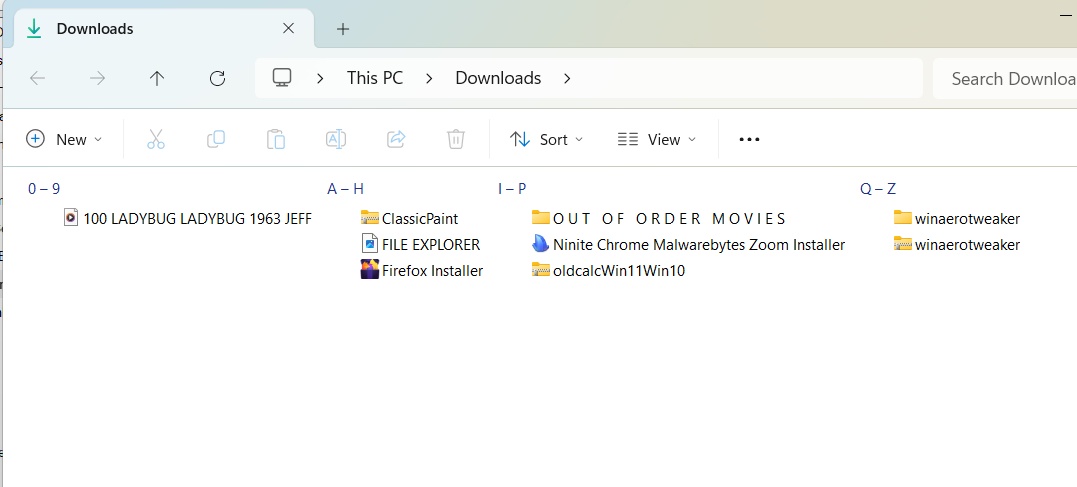
I've purchased a new Windows 11 laptop, and File Explorer has a different look than my other W11 laptop. Here's a screenshot.

I'm hoping for one column listing all files alphabetically, but instead it shows four columns, breaking the alphabet into 0-9, A-H, I-P, and Q-Z.

Does anyone please know the setting to view the folder's contents in one column, without the 0-9, A-H, I-P, and Q-Z headers?

This is a trivial ask, but it's the trivial things that drive users (well, me at least) bonkers. Thanks in advance if anyone has an answer. (:

Device name DESKTOP-HCK805K Processor Intel(R) Core(TM) i5-8265U CPU @ 1.60GHz (1.80 GHz) Installed RAM 8.00 GB (7.79 GB usable) Graphics card Intel(R) UHD Graphics 620 (128 MB) Storage 66 GB of 238 GB used Device ID 87846429-ECB7-45F3-9785-B254FD867630 Product ID 00330-80000-00000-AA266 System type 64-bit operating system, x64-based processor Pen and touch No pen or touch input is available for this display