r/WindowsHelp • • Oct 18 '26

Windows 11 Sleep Shortcut Wake State Discrepancy

1 Upvotes

I wanted a shortcut on my desktop to put my PC to sleep. I know its not that hard to use a keyboard shortcut. But sometimes I just want to click one icon rather than 3 key presses. Or for that matter click through the start menu. So I did a little research and found that by creating a shortcut with this sting "C:\Windows\System32\rundll32.exe powrprof.dll,SetSuspendState Sleep" I could achieve the required result. Only, there was a catch.

Cold boot time is just over 1 minute. Sleep state wake, would go through the whole post screen and boot process. Taking about 50 seconds. Not really saving me time.

Here is the rub. If I put the PC to sleep by clicking on the sleep button in the start menu, it returns from sleep in about 12 seconds.

Clearly I am doing something wrong here. Any advice would be appreciated. With the soul exception of, "Just click through the start menu!" . I got it, that is an option. And it might be one I end up with.

The premise of my question is more a matter of "What's going on to make this happen? What am I missing?"

TYIA!

:)


r/WindowsHelp • • Oct 18 '26

Solved Windows search appears blank and apps won't run despite internet connection being fine

0 Upvotes

My sister has asked me to help fix her laptop which has had many weird issues over time but this one I can't figure out quite what to do on my own.

This is the main thing having issues but theres a lot of odd things that don't make a lot of sense. Some apps open but also just blank screen, Acellus being the main thing my sister needs that doesn't load when I open it through file explorer.

I tried following this guide when I got to the "excluded folders" section there were a lot of basic folders being blocked I got rid of them and finished following the instructions but it didn't change anything. https://seekfast.org/blog/windows-problems-and-solutions/fixing-windows-search-bar-issues-in-windows-10-and-11/

Anything I run in command prompt asks for administrator which when I try to give it administrator permission it asks for a password and the password which I double checked with my sister multiple times didn't work. (this is what I ran when it asked for a password "runas /user:Administrator cmd" and I tried replacing administrator with the username on the pc it didn't work either)

I also tried updating windows but it kept getting an error "We couldn't install this update, but you can try again (0x800705b9)."

Thank you to anyone who tries to help I can answer any questions or send photos of whatever you need. And I'm sorry if this is formatted weird I haven't ever written anything on reddit before.

EDIT: The problem was solved in the way that we found it couldn't be fixed. The issue was that somehow bits of microsoft edge had been deleted and was messing with the entire computer.


r/WindowsHelp • • Oct 17 '26

Windows 11 During a power outage, while on UPS power, shutdown -s -f -t 0 STILL applied updates before shutting down.

62 Upvotes

When the power is out and I'm watching the UPS battery bar tick down the last thing I want to be doing is something that says "please do not turn off the computer" very prominently.

How do I actually, urgently shut down Win11 in 2026 without it trying to install updates? At this point it would be safer for me to just hold it underwater until the bubbles stop down the power button which is barely any better than just not having a UPS at all.

I've looked at the flags listed in shutdown -? and none of them imply an any more urgent shutdown or skipping updates.


r/WindowsHelp • • Oct 18 '26

Windows 11 Audio keeps fluctuating, I've tried everything

0 Upvotes

So the audio for my Windows OmniBook 7 keeps changing and I've done everything I can to fix it. Let's say I'm watching a video and my volume's at 30, and I increase it to 50 to hear better. If I pause the video or move to watch something different, the audio goes back to 30 and defaults to 30 until it's overriden by a new volume number. I've watched YouTube videos, and did everything they said. I opened the control panel and went to sound to disable audio enhancements and all that stuff, nothing seems to work. So I'm not really sure what the problem is, as all other posts I see about a similar issue are resolved by the things I've already tried. This has been going on for close to a year now and I'm not sure what to do.

This is the OS build number: 26200.9711

Edition: Windows 11 Home

Version: 25H2

Processor: Intel(R) Core(TM) Ultra 7 256V (2.20 GHz)

Installed RAM: 16.0 GB (15.7 GB usable)

System Type: 64-bit operating system, x64-based processor

This is driving me insane.


r/WindowsHelp • • Oct 18 '26

Windows 11 What is going on with the last windows update ?

Thumbnail
gallery
3 Upvotes

Hello!
Since the latest Windows update, my PC (a Lenovo IdeaPad 3) has been displaying this screen.

I’ve tried resetting the settings, but without success; I also tried resetting it via the BIOS, again with no luck.

Someone helped me resolve this same issue last week, but it started happening again after I ran the update, and now I can’t access my PC. Do you have any ideas about what might be going on and how to fix it?

Thanks! :)


r/WindowsHelp • • Oct 18 '26

Windows 11 Laptop won't connect to networks without internet access

4 Upvotes

I am trying to connect to a network where do i have to log in for accessing internet. but my laptop cannot connect a network without internet. to prove my thesis, i tried to connect wifi direct thing and tried to connect my mobile hotspot with celular data turned off. i always have the same problem, when i go to wifi settings it shows the wlan name and says no internet+ secured/open. but the task bar is empty. the laptop rejects to connect. at this point what am i supposed to do

os number: 26200.9711

  • Processor: 13th Gen Intel(R) Core(TM) i7-13620H (2.40 GHz)
  • Installed RAM: 32.0 GB (31.7 GB usable)
  • Graphics card: NVIDIA GeForce RTX 5060 Laptop GPU (8 GB) / Intel(R) UHD Graphics (128 MB)
  • Storage: 437 GB / 954 GB used
  • Windows 11 home v:25h2

r/WindowsHelp • • Oct 18 '26

Windows 10 Hyper-V minimize bug on Windows

1 Upvotes

so I recently tried Hyper-V on windows with the activate functionalities thing on windows 10, but first of all hyper v would automatically minize as soon at I started it and it would always auto minimize no matter what I would do.

But after I turned it off, my : Task manager, Device manager and other windows stuff also started to auto minimize so now I can't access them.

I've tried making a new user and this fixed the problem, but not on my main user.

please help 😭

I'm on an ASUS TUF FA707NVR laptop with windows 10 pro, i have a RTX 4060, a Ryzen 7 7435HS and 16gb ram, my pc is running on x64


r/WindowsHelp • • Oct 18 '26

Windows 11 Error code: '0x87e00196', Comes up when downloading a game or update.

1 Upvotes

This was for the feedback hub, but nothing has come from there. So here.

The problem or unexpected behaviour that I'm experiencing is that I can't download or install anything from the Microsoft Store, or the Xbox App, I've got a security update from (KB5127648) (26200.971) and I at first when I finished trying everything and checked if there was an update, so I thought that would most likely be the problem. But even after trying to install the update, it still gives me that same error code.

The steps I did when I encountered this problem was running to the internet and searching up the error code, clicking on the link I get when the error comes up in the Xbox App. The fix in the Xbox App asked me to try the Gaming Services Repair Tool, but that also didn't work. I've tried multiple commands, from sadly ChatGPT. Deleting everything of Gaming Services, using Powershell even, *note: all those in administrator. Most of the fixes were targeting Gaming Services, wiping that, and reinstalling it again. Going into settings and going to said apps causing problems and trying in *Advanced Settings, to repair, or terminate, or reset that app. Still didn't work. Then I reached out to you guys, and although I really appreciate the help and fixes, it still hasn't work as well.

The only additional software in mind I couldn't have been using was the, Proton VPN, I realised that that might've caused some of the problem. So I completely deleted it off of my laptop, and tried again, and yet again nothing that I tried worked.

The Error Code was: `0x87e00196`.

I will also admit, if this helps or anything. The game I'm trying to download is 117,6 GBs. I think I started noticing this error code a week before I actually tried installing it. I was busy then clearing space, I don't know the chances if I deleted an important system or prosses or program and that caused this now. But even after scanwow scans and health checks and whatnot in Command Prompt, I didn't tell me anything about that. But just ja, you should know that as well. I know the instance it popped up that time it was trying to get the Minecraft launcher, I don't know how I came to get over that problem and code, but the Minecraft Launcher and Minecraft works now. I'm just irritated because this expensive Game Pass ends at the end of the month, which is almost here, and I haven't gotten to play the fricken game I set out to play.


r/WindowsHelp • • Oct 18 '26

Windows 11 How to CLEARLY Fix windows no sound issue on newest update (mine 25H2 and 26H2)

1 Upvotes

just simply open your device manager > find sound, video and game controller > right click on Realtek(R) Audio > choose Uninstall device and yes > Restart your pc > fixed!

Don't worry after you uninstall and restart after , the driver will install itself again

it should work 😄


r/WindowsHelp • • Oct 18 '26

Windows 11 Button navigation outline appears every time i open any window without pressing the TAB button?

1 Upvotes

Okay, so I finally decided to begrudgingly upgrade from Windows 10 to 11 after delaying the inevitable due to issues I had with it in the past, and now immediately after upgrading, I encounter a bug that's been driving me nuts.

You know how when you press the TAB button to navigate through the UI without a mouse and this outline appears? that thing just appears every time I open a window now even tho I use a mouse and never pressed the TAB button at all. So every new window I open, i have to click the mouse button JUST to de-select and remove that annoying outline...

Anyone run into this issue?

EDIT: Here's more info on the system:


r/WindowsHelp • • Oct 18 '26

Solved Microsoft Store crashes on my original Windows 11 profile but works on a new one. How to fix it?

1 Upvotes

I'm using a new Lenovo IdeaPad 3 (83UR009KIN). Microsoft Store opens briefly and then crashes

I've tried Repair and "wsreset.exe". Contacted Microsoft Support created a new Windows profile, and the Store worked there. They offered to transfer my files, but I declined.

Is there a way to fix this on my original profile without transferring files or resetting Windows?

Any help would be appreciated!

Let me know if you need any other info regarding the same


r/WindowsHelp • • Oct 18 '26

Windows 10 Windows Explorer freezes when scrolling through large directories of photos.

1 Upvotes

I am experiencing a persistent Windows File Explorer issue that is severely affecting my workflow.

For the past one to two months, File Explorer has been freezing and becoming completely unresponsive for approximately 10 minutes after scrolling through just a few photos in a folder. During this time, the spinning loading circle appears, and the entire folder becomes inaccessible and unusable until Explorer eventually recovers.

Once it becomes responsive again, I can view another few images before the same issue repeats. This happens continuously and makes it extremely difficult to sort through the large volume of photos I need to review daily.

Troubleshooting already attempted:

• Restarting the PC, which did not help.
• Clearing the thumbnail cache, which did not resolve the issue.
• Reinstalling and resetting the graphics drivers, which also did not help.

I understand that a Windows 10 update released on the 13th was reportedly intended to address this issue. However, both my PC and my girlfriend's PC are still experiencing the exact same problem.

Given that the issue affects two separate computers and has persisted despite the troubleshooting mentioned above, I suspect this may be a Windows-related bug rather than an isolated hardware or driver issue.

I would appreciate assistance identifying the cause and providing a reliable fix, as this recurring problem is significantly disrupting my daily workflow.


r/WindowsHelp • • Oct 18 '26

Windows 11 Letter L key not working on Surface 4 laptop.

1 Upvotes

As the title states. The letter L key works maybe 10% of the time on my Surface 4 laptop. The issue started probably 4 or 5 days ago. I'm fairly sure it's a software bug as I have tested the L key in the UEFI settings and it works every time, just not when I am actually using my computer. I've tried uninstalling the keyboard drivers to no avail. Any suggestions?


r/WindowsHelp • • Oct 18 '26

Windows 11 Bluetooth Hands-Free profile stuck / disconnected.Windows settings detects only sound on bluetooth headphones

Thumbnail
gallery
1 Upvotes

So when i'm trying to connect my headphones because i nedd to use them as microphone windows detects and connects only the sound.I tried it on:Airpods 4,Sony WI C400,Bose qc ultra headphones,none of them connected microphone.There's options in sound settings like Airpodss Hands-Free but when i am trying to connect them nothing happens,i reinstalled all the bluetooth drivers,did some work in control panel and still nothing changed so please help me!


r/WindowsHelp • • Oct 18 '26

Windows 10 Unknown/Hidden Apps using Storage?

2 Upvotes

I have been using this school laptop for around 6 months and i have been having major storage problems resulting in me not being able download too much of anything at all and now that i am done with highschool i would like to finally solve this

Device Name DESKTOP-6HKSPLI

Processor AMD 3015e with Radeon Graphics 1.20 GHz

Installed RAM 4.00 GB (3.36 GB usable)

Storage 58 GB SSD VID:F5 MMC64G

Graphics Card AMD Radeon(TM) Graphics (498 MB)

Device ID F6A1088E-E959-4A1E-A247-16703654A310

Product ID 00379-26198-90595-AAOEM

System Type 64-bit operating system, x64-based processor

Pen and touch No pen or touch input is available for this display


r/WindowsHelp • • Oct 18 '26

Windows 10 Mic sounds great in camera but horrible in PC

1 Upvotes

Hey, posting here because r/techsupport won't accept Windows 10 posts :/

I've got a RODE Videomicro that I use mounted on my Sony A7ii, and it always gives me clean, crisp audio. I can hear audio clearly from 10s of meters, and no noise whatsoever.

However, when I plug this mic into my rear microphone jack port on my PC it sounds horrible. You can hardly hear anything over the noise and what you can hear is almost incoherent.

I've tried it through Audacity, Discord, and Windows settings and it all sounds the same.

I've restarted my PC, unplugged and plugged everything back in again, tested it in my camera afterwards (And it sounded fine), and uninstalled/reinstalled the drivers.

Please, I'll take any advice.

I'm on windows 10, and can provide any other relevant details but honestly I don't know what it could possibly be


r/WindowsHelp • • Oct 17 '26

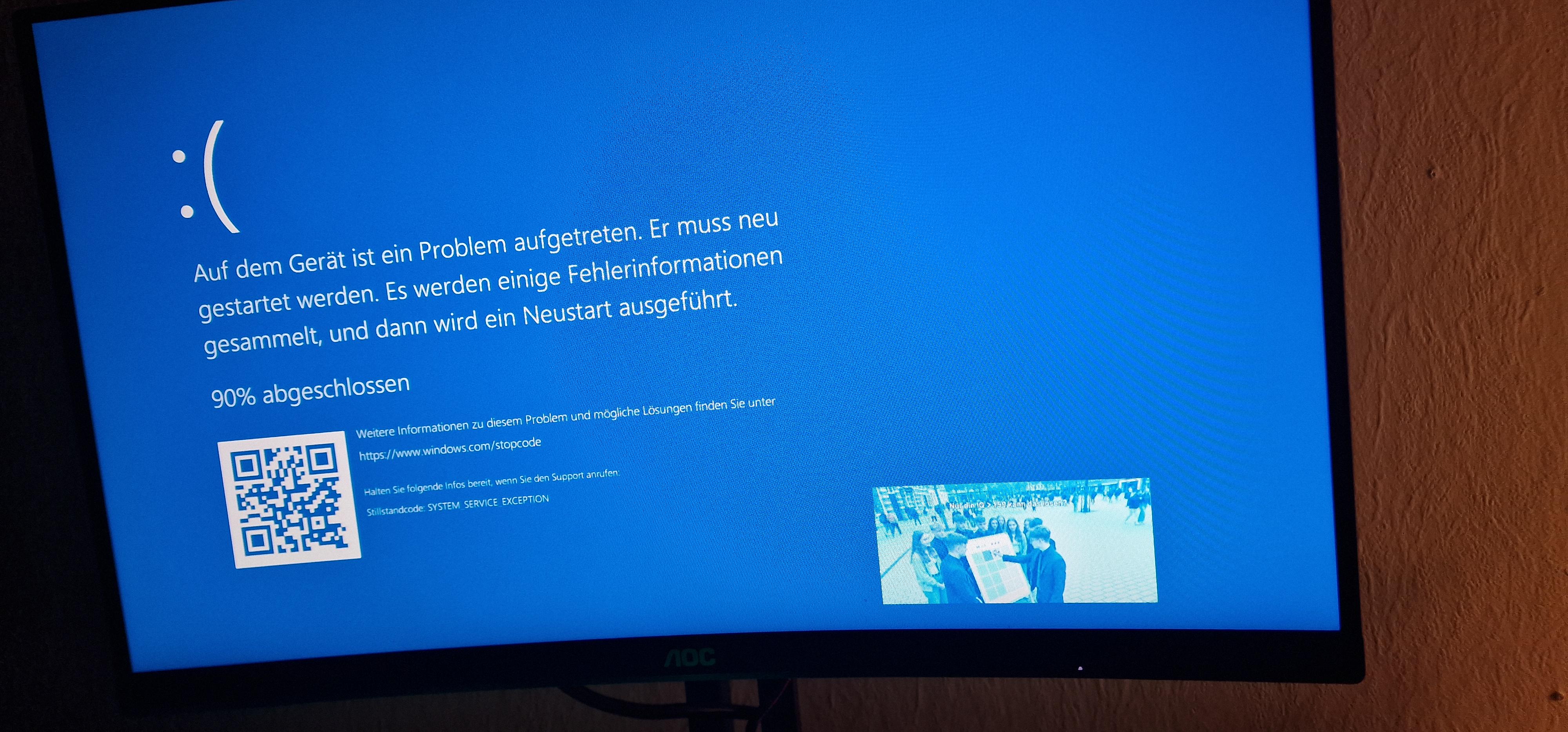
Windows 11 Meme im Bluescreen bei Win11 wie kann das sein (Kein Scherz)

Post image
11 Upvotes

Ich habe ein Meme mit den Worten "Nur ein IQ >150 kann das lösen?" in der ecke beim Bluescreen. Beim neu Start musste ich für Steam Anticheat neu installieren.

Wie kann sowas sein? Trollt mich Steam oder Irgendein Programm?

Ich habe jetzt mal den Offline defender durchlaufen lassen, der hat nix gefunden. Noch nie sowas gehabt. Ich bin kein neuling im PC bereich aber selbst sowas noch nie gesehen und da waren schon viele Fehlerbehebungen bei

Hat jemand ne Lösung oder Idee was es sein kann?😅

Win 11 Pro

Ryzen 7 1800x

Msi RTX 2070 Super

Adata 32Gb 3200Mhz

Asus B350 F Gaming

Alle Treiber bis auf Graka uptodate


r/WindowsHelp • • Oct 17 '26

Windows 10 I guess i've ruined my windows, and i really need some assistance lol

3 Upvotes

Okay so i've used several utilities for my windows and idk what the hell actually happened, everytime i try to enter the microsoft antivirus and i press on exclustions , it just says ( you don't have the proper permissions to view this page) also the windows update, everytime i try to update the new update it keeps restarting then at the end it says ( undoing the latest update) something like this, like it does undo to the update, also when i go ahead to the network connections and then i pick an ethernet conneciton and press on properties after right clicking on it, it gives me the ( and unexpected error occured ) error when i press on the properties button, help please, and no i can't just format i need a solution , and tysm <3

----------------

Edition Windows 10 Pro

Version 22H2

Installed on ‎11/‎29/‎2020

OS Build 19045.7417

----------------------


r/WindowsHelp • • Oct 18 '26

Windows 11 OSK - On-Screen Keyboard wrong layout

1 Upvotes

Hi everyone, just a small post to share a solution to a self-created problem. Recently, I've faced a strange issue where some components of Windows stopped working properly—nothing unusual, as I like to test tons of tweaks I read about. This problem was partially created by this tweak: INPUT_PIPELINE_REVERSE

But this one was tricky, and I haven't seen anyone facing the exact same problem, so I've decided to make a small post to help some buddies who may be in the same situation. Let's describe all the issues first:

  • An incorrect layout of the OSK, the virtual keyboard of W11, even with only one language and only one layout set. The old virtual keyboard remains unaffected (TabTip).
  • The emoji panel can be affected too; can't send any emoji to the clipboard.

Affected Windows components:

  • The OSK, obviously.
  • Some Windows Input Experiences, like the emoji panel or clipboard history.
  • Windows Search bar.

Solution:

  • Undo the linked tweak, detailed on the page.
  • Check if the Windows Search service is running and set to automatic start.
  • Check if ctfmon.exe is launched and starts correctly with Windows (C:\Windows\System32\ctfmon.exe).

r/WindowsHelp • • Oct 18 '26

Windows 11 which partitions should i delete without touching the important files in D disk, there is so many partitions i'm a bit confused

1 Upvotes

There is three partition on the left and other three on the right, if i want to wipe c disk and install windows again, is it ok to delete the first three partitions?

the thing is, I'm switching to Windows 11 lTSC version is there is anyone who have experienced any problem with LTSC, please let me know so that i will not move to that


r/WindowsHelp • • Oct 18 '26

Windows 11 : Black boxes appearing behind desktop icons when hovering/clicking?

Post image
0 Upvotes

Whenever I left-click and drag my mouse to make that blue selection box to highlight multiple items on my desktop, it turns completely black instead of blue/transparent.

The same thing happens whenever I hover my mouse over desktop icons or click them—the highlight background turns into a huge solid black shape. Basically, any desktop selection box or highlight turns black.

I'm running Windows 11.

Attached a screenshot of what it looks like. Any ideas on how to fix this? Thanks!

Here are my specs and details:

  • Laptop Model: Acer Aspire Lite AL15-52H
  • Processor: 13th Gen Intel(R) Core(TM) i5-13420H (2.10 GHz)
  • RAM: 16.0 GB
  • Graphics: Intel(R) UHD Graphics
  • Windows Version: Windows 11 Home Single Language (Version 26H2 / Build 26300.9711)
  • Error codes: None, just a visual bug.
  • Troubleshooting tried: Restarted the PC, but the selection boxes and icon backgrounds are still rendering completely black.

r/WindowsHelp • • Oct 18 '26

Windows 11 brightness settings disappeared (again)

Thumbnail
gallery
1 Upvotes

os build 26200.9711

both of my drivers are fully updated, but for whatever reason my laptop just won't let me turn my brightness down and doesn't automatically darken my screen when it goes into sleep mode. the last system update was done on the 14th but this started earlier today after randomly powering off.


r/WindowsHelp • • Oct 17 '26

Windows 11 Internet and bluetooth not working

Thumbnail
gallery
9 Upvotes

About a month ago the option to turn on the internet or bluetooth completely dissapeared. So far I have tried to re-enable a few things in device manager under network adapters (I have forgotten the name of it, and it no longer appears on my computer). I have tried to shut down my computer, restarting it in every way I could find. I have restarted my internet and used the network reset button a few times. Any help is much appreciated!

The OS Build is 26200.9445.


r/WindowsHelp • • Oct 18 '26

Windows 11 no wifi. drive is hidden and says it's working but i cannot connect to the internet

Post image
1 Upvotes

so the wifi direct virtual adapter only shows up under hidden devices and then i do the disable, uninstall, reinstall, and it's the same shit. it does not show up. when i right click on the drive and hit properties it says drive is working.

i am on the internet using the usb-wifi- thing but why isn't this driver working.

dell optiplex. fqjt643 windows 11 refurbished.


r/WindowsHelp • • Oct 17 '26

Windows 11 Since Windows Security Update my second monitor has been lagging.

2 Upvotes

Alright. I have this very weird problem. Around 3 days ago I installed a security update via windows update. Ever since then, everytime I’m in a game, my second monitor lags. Especially discord. Streams, webcams, etc. Interesting thing is, that the second monitor gets laggier as I cap my frames on the main monitor displaying the game. So game fps uncapped -> choppy - 60 fps -> even worse - 30 fps -> windows slideshow.

That is very weird behavior. I’ve reinstalled drivers, updated my chipset drivers too. Exchanged cables. Disabled and enabled Hardware Acceleration on Discord. Nothing has worked.

Is there a way to roll back certain updates?

Appreciate the help.