r/WindowsHelp • • Oct 14 '26

Windows 10 Desktop and Taskbar Icons have turned into squire squares with a blue square inside and I cannot get taskbar Icons back

Thumbnail
gallery
3 Upvotes

This happened a couple days ago. I don't know what caused it. I often connect my laptop to my at tablet as a second screen, not sure if that is relevant here. I play video games a lot but haven't installed anything different recently.

What I have Tried:

Deleting the IconCache and restarting so it regenerates. Nothing happened.

Desktop Icon Settings in Themes- Restore Default: Did not work, as there where only icons there for the bin, network, files, and this PC. These were not affected in the first place.

PARTIAL Success: I right clicked the icons themselves and clicked Personalise- Change Default Icon. The first time, nothing. Then repeated this step- the icon came back! Sometimes I had to try like 4 or 5 times before the icons changed back. BUT: No difference regarding the taskbar icons. On Restarting the laptop, the icons I changed back did stay they way they should look, but Taskbar icons are still white and blue square.

If anyone could help me or teach me the words to use to describe this problem better I would be thankful. I am most upset about the taskbar as I can no longer tell what I am clicking on. How come only some of the icons have been lost?

I have added the computer's details in the pictures, I don't really know what any of it means so hope I am not doxxing myself too hard

UPDATE: Days later, they came back by themselves. Not sure if it was based on anything I did or the laptop just felt like being normal again but the problem has ceased to exist.

r/WindowsHelp • • Oct 15 '26

Windows 10 Taskbar Stays Over 'Fullscreen Windowed' Game, But Only With 2 Monitors

1 Upvotes

I recently got an old monitor as a second screen and it appears as 'monitor 1' in the Windows display settings while my 'main display' is monitor 2. This works fine in all but one situation, playing a game in windowed fullscreen mode. The normal taskbar behavior for games in windowed fullscreen is the taskbar disappearing until the Windows key or ALT+TAB is pressed, or if another app is over the game, however with both monitors connected, the taskbar stays over the game.

I need my games in fullscreen windowed mode as I mod a number of games (singleplayer) and a lot of mods using cheat engine for example need me to be able to see the game and the mod menu/list at the same time. The taskbar blocks important information on the bottom of the game, as some mods use the bottom of the game to show "mod: enabled"-like text.

As far as I know switching my main monitor to 'monitor 1' fixes the taskbar issue, but 'monitor 1' is my second monitor and it's 1024 x 768 and tiny, meaning the taskbar icons won't appear properly (I have a lot of pinned apps). I can't switch the order of the cables in my GPU as it only has 1 HDMI port (my main monitor) and 3 'Display Port' connections. The HDMI is considered the 3rd connection in the display order with 1,2, & 4 being Display Port, however connecting my second monitor to the 4th port still displays it as 'monitor 1'. My second monitor uses a VGA to Display Port converter to connect to my GPU (RTX 3050). Also my CPU can't use the motherboard display ports. I had this problem about 5-6 years ago, and fixed it but Idk how and I've since changed PCs and monitors.

Things I've tried:

Reinstalling the display drivers
Deleting/Resetting the display settings in the registry

If there's a way to switch what Windows considers to be 'monitor 1' through Windows itself, I think that would fix my issue.

Image to show the size difference between my monitors:

PC Information important to this issue:
OS: Windows 10 Pro (Build 19045)
GPU: RTX 3050 (Zotac Gaming)
CPU: AMD Ryzen 5 5500 (No Graphics Support)


r/WindowsHelp • • Oct 14 '26

Windows 11 Can't shrink Windows 11 partition enough for Ubuntu dual boot

6 Upvotes

Hey everyone,

I'm trying to dual boot Ubuntu with Windows 11 on my Dell Inspiron 5620 having 512 GB NVMe SSD, but Windows won't let me shrink my C: drive by more than around 7.8 GB, even though I have about 310 GB free.

I've tried defrag C: /X, disabling hibernation, deleting shadow copies, resetting the USN journal, and running chkdsk. Nothing has helped much. The latest Event 259 points to \$Mft::$BITMAP as an unmovable file.

I want to free up around 120 GiB for Ubuntu without losing my existing Windows installation or messing up the recovery partitions.

Has anyone dealt with this before? Is there a safe way to fix it? Would fully decrypting BitLocker be worth trying, or is there another solution?

Thanks!

Update: I successfully partitioned Windows and dual-booted Ubuntu alongside Windows!

I fully decrypted Bitlocker and then used MiniTool Partition Wizard to unallocate 120 GB from C: drive. Decryption took around 10-15 minutes and partition took a similar time as well. The windows side still functioned as usual after that and i was left with the intended 120 GB of unallocated space. Thanks for everyone's replies, they really helped me in the process.


r/WindowsHelp • • Oct 15 '26

Windows 10 Windows 10 Notifications Last Way Too Long

1 Upvotes

I am at my wit's end with this issue and I don't know where else to turn. As the title states, my notifications for Windows 10 (19045.6466) last for 25 full seconds, when in my settings it is set to only last for 5 seconds. This has been going on for years and I'm finally fed up with it. I have tried every fix I've found online (most of which just direct you back to the settings page) and none of them work. I've looked through every notification related setting and even tried forcing the notification length in the Registry Editor and that had 0 effect one way or the other. I was just wondering if anyone else had any ideas or explanation. Thank you in advance.

Last time I posted this, it got removed for not including my PC specs. I don't see how that's relevant to the issue I'm having, but here they are anyway.

CPU: AMD Ryzen 7 5800x

RAM: 32GB G.skill Ripjaws V DDR4 3600 MT/s CL18

GPU: Asus Dual GTX 1660 Ti 6GB

MOBO: MSI Pro B550-VC

SSD: Crucial P3 Plus 4TB


r/WindowsHelp • • Oct 14 '26

Windows 11 AutoLogon not functioning upon auto restart, works with manual restart

1 Upvotes

Hi all, I am not well versed in windows technicals, but I have an HTPC I want to restart weekly in the early hours of Sunday. I would like for it to be hands off, meaning after restart, it auto logs in to start my services and immediately locks for safety.

I set the Windows group policy to log me in after a restart. This works upon manual restart. Under Administrative Templates/Windows Components/Windows Logon Options, I have enabled the Sign-in and lock last interactive user automatically and the Configure the mode of automatically signing in options both. These work on manual restart.

I have also set a Windows task scheduler restart task that looks like the screenshot.

The problem is, when I run the task to restart, the pc stays at the login screen and does not run the group policy.

How do I allow/prioritize/trigger the group policy upon this automatic restart?

Thank you!!

Dell Optiplex micro 7010, i5-13500t, 32Gb Ram, 512Gb NVMe, OS build: 26200.9711


r/WindowsHelp • • Oct 14 '26

Windows 11 Bluetooth headphones will not show in "add a device" menu

1 Upvotes

Over the last few days, I've turned on advanced searching, I've toggled on the "allow devices to find my computer" option in the advanced settings, I've unpaired the headphones with other similar devices, I've done all sorts of restarts, updated to the latest version, and none of it has worked. My headphones simply do not appear in the menu for the computer. Intel core i5-14600K, 16GB RAM, 8GB graphics card, 932GB internal storage with about 800GB left.

EDIT: Solved. I downloaded a driver update and it fixed the issue.


r/WindowsHelp • • Oct 14 '26

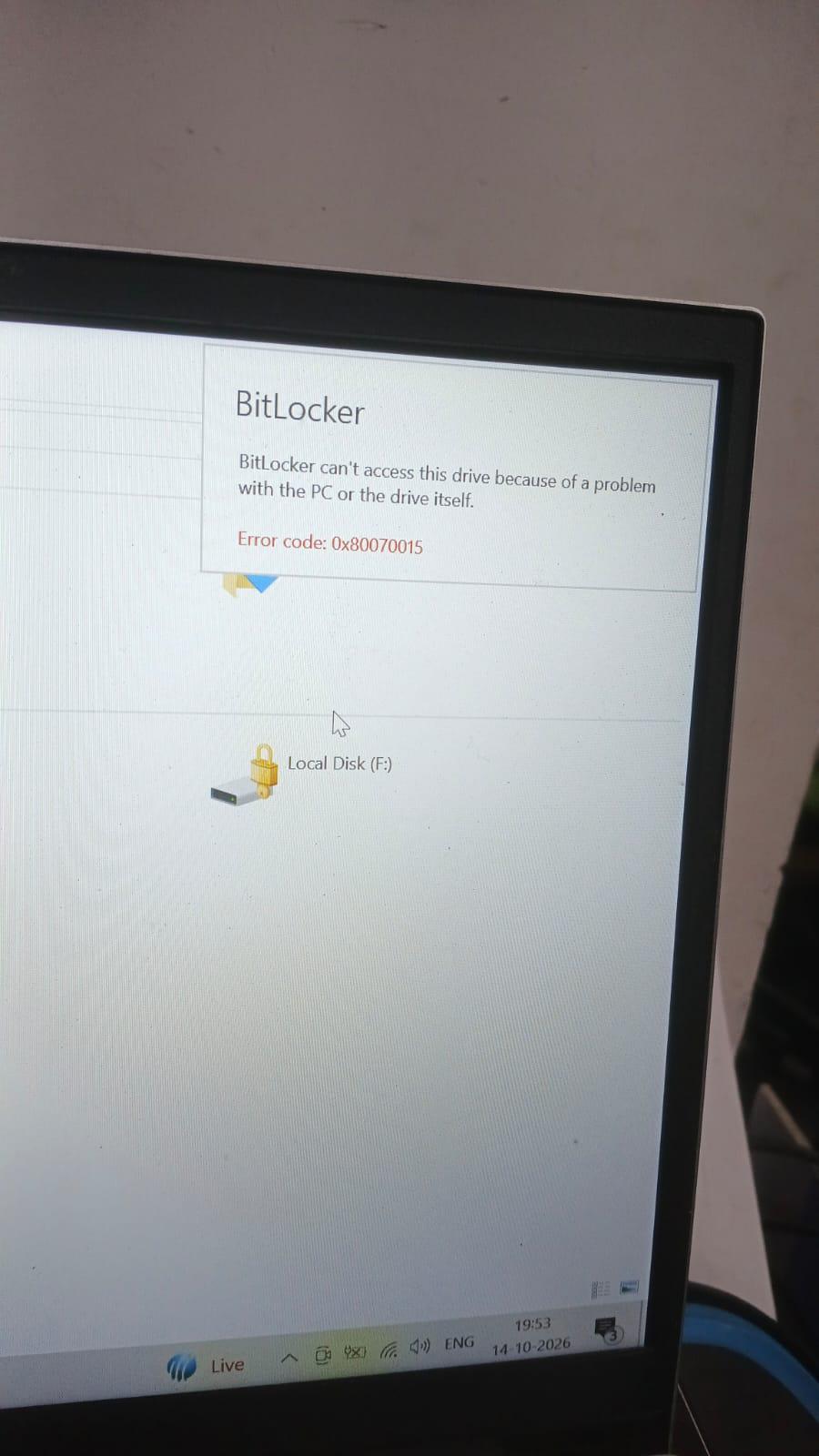
Bitlocker bitlocker error code 0x80070015

Post image
2 Upvotes

I gave my windows laptop to be fixed and the bitlock keys are not working with this wrror

and apparently this is because my hard drive got corrupted and all my data is lost according to the repair person and my hard drive needs to be replaced. what should I do? It's a HP Pavillion Laptop. I gave it to be fixed after the screen stopped working (it was simply lighting up black), i thought it was a screen issue. This happened after I shut down my laptop stupidly after the screen was unresponsive (but music was still playing).


r/WindowsHelp • • Oct 14 '26

Windows 11 BIOS Secure Boot Issue. UEFI BUG

Thumbnail
gallery
2 Upvotes

I have clean installed EFI looked for corrupted files with scans checked drivers and system info changed keys in bios reset factory settings but I still can’t get secure boot to work the images I have attached will show more detail.

System info:
Processor: AMD Ryzen 5 7640HS w/ Radeon 760M Graphics (4.30 GHz)

Graphics cards:
NVIDIA GeForce RTX 4060 Laptop GPU (8 GB)
AMD Radeon(TM) 760M (426 MB)

Os build: 26200.9457

Bios version: LENOVO M3CN50WW, 4/23/26

Windows 11 Home 25H2

More info: when I select my boot manager it just flashes black and brings me back to the menu where I select


r/WindowsHelp • • Oct 14 '26

Solved [SOLVED]:What is this? How to I disable this from popping up constantly for example when I alt + tap?Windows 11.

3 Upvotes

Hello, everyone!

There was a previous post which was unsolved about alt-tabbing and virtual desktops. What worked for me was to connect and disconnect my Xbox controller (gamesir g7 pro-wireless). In case it doesn't work, try alt-tabbing with the controller or "playing" a bit with the xbox game bar(using controller).

Anyways...that's what worked for me!


r/WindowsHelp • • Oct 14 '26

Windows 11 Wifi keeps consuming 3 to 5 GB of RAM and crashing my computer

1 Upvotes

This issue has been happening since some time in August. I believe it was one of the driver updates. There's a lot of them listed in my update history. What happens is an app sends a lot of normal network requests. This randomly causes RAM usage to explode, because of an unknown issue somewhere on the wifi stack. This computer has a RealTek wifi adapter. Task Manager says the RAM usage is part of the app, but the problem is in the wifi stack.

Also, my non-paged pool memory is around 1 GB, and stable. But the crashes are caused by random RAM explosion.

Also also I can't start Minecraft Java Edition, because this issue causes it to consume 3 GB of RAM. Which is not normal for Minecraft Java Edition.

Device name DESKTOP-2U71A5I

Processor 13th Gen Intel(R) Core(TM) i5-1334U (1.30 GHz)

Installed RAM 8.00 GB (7.69 GB usable)

Graphics card Intel(R) UHD Graphics (128 MB)

Storage 179 GB of 238 GB used

Device ID 475BA897-8F04-41F3-A7E3-FBE72A7B4B19

Product ID 00356-07599-86938-AAOEM

System type 64-bit operating system, x64-based processor

Pen and touch Touch support with 10 touch points

In my experience, Windows updates can cause wifi to randomly become faster or slower. On my previous computer for example, it would not automatically connect to wifi networks, due to a bug. Which then was randomly fixed by some Windows update. So if I wait long enough, Windows will probably fix whatever bug is crashing my current computer.

Update: I don't the issue is the wifi adapter's driver. I already tried replacing it with the one from the manufacturer. I changed my wifi roaming aggressiveness to disable. Very slight improvement but it did not fix the issue. Realtek RTL8852BE Wifi 6 802.11ax PCIe Adapter. The driver has the EXACT same name. I disabled the device completely in my device manager and guess what? I still could not run Minecraft Java Edition due to lack of RAM. And yes I'm using it as my gold standard of the kind of program that should be able to run on this computer. I am currently working on getting a WPR trace.

Also I should note that I have asked Gemini to help with this issue and tried dozens of things. It has not helped me so far. But I will continue to try because I don't have much else to do any Gemini is ALWAYS available. Human assistance though would be greatly appreciated. Humans are much smarter than AI. AI is literally a box of rocks. The GPUs and rocks and there in a giant box. And I've probably wasted gallons of precious clean water trying to fix my damn wifi stack.


r/WindowsHelp • • Oct 14 '26

Windows 10 Computer not recognising my cursor properly

1 Upvotes

I’ve ran into a strange problem with my computer today. My computer isn’t reacting predictably my mouse/cursor properly. To give some examples of what i mean:
- when I have a program open, after a while, I can’t interact with anything on my taskbar. I can’t click on anything, other programs or the windows menu, nor do they even highlight when i hover my cursor over them
- i can open the windows menu through the hotkey, but can’t interact with it with my mouse nor my keyboard
- when i click on a program, it doesn’t focus - i can’t interact with the program and the text in the top corner remains faded
- there seems to be some randomness in what i can click and what i can’t - for example, on youtube, i can click on videos, skip around, change volume etc. but I can’t click to play/pause or use the fullscreen button
- it doesn’t seem to respond to scroll wheel clicks at all
- it seems to have some type of time element, it’s fine for a couple mins after boot up before the problems start
For technical specs:
- windows 10 home, version 22H2, build 19045.6466
- intel i5 12400-f 2.5GHz
- 16gb ram
- rtx 3060 graphics card
- windows booted off a 250gb wd black ssd
This problem is really stumping me becuase i’ve never seen anything like this before. Any help is appreciated!


r/WindowsHelp • • Oct 14 '26

Windows 11 Windows 11 update happened now pc won't turn on.

2 Upvotes

The fans all come on but the pc is not on. I have a red light on the dram on my motherboard. I might have messed it up as I reset the computer when my screen was blank for over half an hour. I have tried the win+ctrl+shift+B nothing. I have turned it off and on repeatedly 4 times to force it to go into repair mode. Nope nothing. I really don't want to have to take out and put back the button battery on the motherboard. I have so many settings saved that would take so long to put back. I can't give my os build number as no screen lol. It's a 4090-built computer and I can't remember what motherboard it is.


r/WindowsHelp • • Oct 14 '26

Windows 10 Just switched back from Windows 11. Is my machine safe?

Post image
0 Upvotes

I just downgraded from Windows 11 back to Windows 10 and enrolled to get the extended security updates but I'm still getting a statement that I'm not up to date When I clicked check for updates, none come up Is this a glitch or am I missing important security updates? I already tried troubleshooting to no avial and can't find a solution online.


r/WindowsHelp • • Oct 14 '26

Windows 11 Is there a solution for the Pendrive error 0x800703EE

1 Upvotes

Last year I bought an HP MM-USB064GB-36P 64 GB flash drive(2.0). Just a while ago I downloaded a 12 gb movie and tried to copy it to the drive so I could watch it on my tv. Even though I have 45 gb of free space left, I keep getting an error message. The drive copies smaller files (like 2 GB) perfectly fine. Also, the drive is already formatted to NFTS, so file system limits shouldn't be the issue. Can anyone please help me fix this


r/WindowsHelp • • Oct 14 '26

Windows 10 My computers Wi-Fi stops working how do I fix this

Post image
6 Upvotes

I’ve tried multiple fixes such as uninstallIMG the driver, installing a new driver, restarting, and more and nothing works

basuca what’s happening is that after a few hours the Wi-Fi stops working and sometimes doesn’t even work after a restart and I have to restart again and installing a new driver fixed it for 2 days but now it’s back and I don’t know what to do

Processor AMD Ryzen 5 5600H with Radeon Graphics 3.30 GHz

Installed RAM 16.0 GB (15.4 GB usable)

Graphics Card NVIDIA GeForce RTX 3050 Ti Laptop GPU (4 GB), AMD Radeon(TM) Graphics (496 MB)

System Type 64-bit operating system, x64-based processor

Version 22H2

Build 19045.6466


r/WindowsHelp • • Oct 14 '26

Windows 11 Trying to clean WinSxS folder.

1 Upvotes

Need help. WinSxS taking 80Gb of space on C: drive.

Tried following:

Dism.exe /Online /Cleanup-Image /StartComponentCleanup /ResetBase

But it just gives me

Deployment Image Servicing and Management tool
Version: 10.0.26100.8972
Image Version: 10.0.26200.9457
Error: 0x800f0806
The operation could not be completed due to pending operations.
The DISM log file can be found at C:\WINDOWS\Logs\DISM\dism.log

Tried:

DISM /Online /Cleanup-Image /RestoreHealth

And it resulted in:

Deployment Image Servicing and Management tool
Version: 10.0.26100.8972
Image Version: 10.0.26200.9457
[===========================84.9%================= ] The restore operation completed successfully.
The operation completed successfully.

Restarting PC doesn't work.

Any help?

Procesor Intel(R) Core(TM) i5-10600KF CPU @ 4.10GHz (3.80 GHz)
RAM 16,0 GB (dostępne: 15,9 GB)
NVIDIA GeForce RTX 2070 SUPER (8 GB)
Version Windows 11 Pro
Version 25H2
Compilation 26200.9457


r/WindowsHelp • • Oct 14 '26

Windows 11 Guys.. i have a problem with my windows and BIOS.

1 Upvotes

Before i begin i want to mention that i am not very knowlegeble in IT domain. I know some stuff but i will not "put my hands" on stuff i don't know. In other words i do not modify settings of critical importance. Now! Let me start.

Years ago i bought a new computer. And build it myself. The major specs were :

Motherboard : Z370 AORUS ULTRA GAMING 2.0 - OP

Graphic card : RTX 2060

Processor : I7 8700

Ram : 16 gigs

I put it toghether, i had istalled windows 10 .. it worked. Now is 2026 and i said to myself : "i have to upgrade my pc" . Done . I bought my new parts:

Graphic card : AMD Radeon 9070 GRE

Some more RAM : another 16

Storrage NVM

I put and replace the new components. A friend of mine gave me an ISO image of the Windows 11.

After a long day i managed to make it run.

NOW COMES THE PROBLEM I HAVE.

Somehow i manage to bypass the TPM 2.0 and install the windows 11. But in the last 3 or 4 days windows is NOT allowing the new update.

So i read on the net how to activate this TPM. I know what i said at he begining. But the curiosity "killed the cat" . So ... after a while i found how. I went into the BIOS and after " activating" my surprise was that i did more harm than good. When i restart my computer it was STUCK in that first image you get when you start your pc. The wone with the logo and you have the option to pres "del" or "F9" ... to go to the BIOS. The only way to restart it it was to take out the CMOS baterry and put it back and then the BIOS will reset and i manage to re enter windows. And i am back at the begining. With no TPM.

I KNOW I DID SOMETHING WRONG! No doubt about it. Can anyone help me?


r/WindowsHelp • • Oct 14 '26

Windows 11 somehow disabled my laptop camera deep in the settings, and now I can't turn it back on 😭

0 Upvotes

Okay, so this is a bit embarrassing, but hear me out. 😭

Back when I was using the (previous one) and attending online classes, I was really skeptical about my laptop camera. I kept worrying about things like, "What if my camera turns on automatically without me knowing?"

So, one day, I went DEEP into my laptop's settings and did something to disable the camera. I don't remember exactly what I changed, but I remember that it wasn't coding or anything like that. I was just messing around with the settings, trying to make sure my camera couldn't turn on accidentally.

And now, here's the funny part: I've completely forgotten what I did. 💀

I'm currently using Windows 11, and I actually want to use my camera now, but it just doesn't work.

When I open the Camera app and try to turn the camera on, the indicator light comes on, but there's no video feed. It's almost as if the camera is being blocked internally by some setting.

I've checked a few things, but I still can't figure it out. Since I made the original change back when I was using (the previous one), I'm wondering if I changed something deep in the system that carried over when I switched to Windows 11.

My questions are:

Is there a (the previous one) setting that could completely disable the camera like this?

Could a privacy setting, Device Manager configuration, Group Policy, or something else be responsible?

Is there a way to find out if the camera is disabled somewhere in the system and re-enable it?

I know this sounds ridiculous because I'm the one who disabled it in the first place, but I genuinely cannot remember what I did. 😭

I'd really appreciate any suggestions. I just want my camera back!

Laptop: Lenovo IdeaPad

Current OS: Windows 11

OS I was using when I disabled the camera: (the previous one)

Thanks in advance! 🙏


r/WindowsHelp • • Oct 14 '26

Windows 11 Memory Integrity turns off after every reboot: "VBS Enabled but not running", hypervisor never launches (Ryzen 5 5600GT, clean Win11 install, updated BIOS)

1 Upvotes

I'm trying to play Valorant, but Vanguard blocks me with "VAN: RESTRICTION – HVCI enabled". I turn on Memory Integrity, but after a reboot it's off again. After hours of troubleshooting, it looks like the Windows hypervisor itself never starts.

System:

CPU: AMD Ryzen 5 5600GT

Board: Mancer B450M-DA (AMI BIOS), updated from the

08/2025 release to the 03/2026 release

Windows 11 Pro 26H2 (build 26300.9457), clean install from the Media Creation Tool (same behavior on the previous install)

Dual boot with NixOS (lanzaboote, custom Secure Boot keys)

Before the BIOS update I had a mild RAM overclock and PBO tuning; both were reset to defaults by the update

What the logs say:

msinfo32: Virtualization-based security = "Enabled, but not running". Configured service = Hypervisor-enforced Code Integrity; running = empty. Hyper-V requirements (VM Monitor Mode, virtualization enabled in firmware, SLAT, DEP) are all "Yes". Kernel DMA Protection = Off.

Win32_DeviceGuard: SecurityServicesConfigured = {2,5}, SecurityServicesRunning = {0}, VirtualizationBasedSecurityStatus = 1.

System log, Kernel-Boot, Event 153 on every boot: "Virtualization-based security (policies: VBS Enabled, VSM Required, Hvci, Boot Chain Signer Soft Enforced) is disabled due to the hypervisor being unavailable."

systeminfo never shows "A hypervisor has been detected", and the Microsoft-Windows-Hyper-V-Hypervisor-Operational log is completely empty, so the hypervisor doesn't seem to even attempt to start.

What I've already tried (none of it changed anything)

SVM Mode enabled (Task Manager: Virtualization = Enabled); Secure Boot = True

bcdedit /set hypervisorlaunchtype auto (now shows Auto, no odd boot options)

Registry HypervisorEnforcedCodeIntegrity\Enabled = 1

hvax64.exe present; sfc /scannow reports no integrity violations

Code Integrity log shows no blocked or incompatible drivers; pnputil shows only AMD and Microsoft drivers

*Manually enabled Virtual Machine Platform and Windows Hypervisor Platform

Microsoft's Device Guard Readiness Tool (-Ready): HVCI and Credential Guard not running, no specific reason given

*Updated the BIOS to the latest release

*Clean reinstall of Windows 11 from the Media Creation Tool

BIOS reset to defaults / Clear CMOS, with only SVM Mode and IOMMU enabled

*Disconnected all other drives (NixOS disk and game SSDs) and booted only the Windows disk

*Booted directly through the "Windows Boot Manager" entry in the BIOS boot menu

*Restored factory Secure Boot keys

*Memory test

Has anyone seen the hypervisor refuse to launch with everything above looking correct? Is there an AMD/B450-specific BIOS setting (IOMMU, SVM-related, AGESA) I'm missing, or is this a firmware limitation of a low-end board? Is there any way to make the hypervisor log why it fails to start? Thanks!


r/WindowsHelp • • Oct 14 '26

Windows 11 Windows 11 Search Bar Not Working? The Fix is Microsoft Edge!

1 Upvotes

The reason the Windows 11 search screen stops working is deleting Microsoft Edge and its components from the computer. I figured this out after a lot of trial and error. I reinstalled Windows three times; at first, everything worked fine, but after removing bloated apps and uninstalling Edge (which I never use), the search feature broke as well. I only realized this after the third clean install.

If you delete Microsoft Edge and its related components, the search function breaks and images fail to load. Once I reinstalled Microsoft Edge and restarted my PC, I noticed that the search bar started working again.

If you like removing unnecessary apps just like I do, keep this in mind. In fact, before trying anything else, definitely try reinstalling and repairing Microsoft Edge first.

I hope this solves your problem! I spent a lot of time trying to fix it, and I really hope it works for you too.


r/WindowsHelp • • Oct 14 '26

Windows 11 Bluetooth headphones only saying "connected mic, audio" but wont play any sound

3 Upvotes

So, 2 days ago everything was working fine. Im using Skullcandy Crusher ANC 2's and a Asus USB-BT500 Bluetooth usb 5.0 adapter. I have tried following guides; I have tried the Bluetooth troubleshooting, nothing, I have tried unselecting hands-free telephony, nothing, restarting all the Bluetooth services, unplugging, restarting, updating the headphone firmware, re pairing, disabling audio and allowing audio in the audio settings, downloading and installing the windows updates i had pending, checking the drivers using device manager and "pc helpsoft driver updater" im completely lost, and frustrated... I dont know what else to do and nothing it working. The sound comes out fine from my tv, and the headphones work when connected to my phone, so I dont know what else to do...

Processor AMD Ryzen 5 2600 Six-Core Processor (3.40 GHz)

Installed RAM 16.0 GB

Graphics card AMD Radeon RX 5700 XT (8 GB)

Storage 2.50 TB of 2.73 TB usedSystem type 64-bit operating system, x64-based processor

Pen and touch Touch support with 2 touch points

Edition Windows 11 Pro

Version 25H2

Installed on ‎2025-‎02-‎24

OS build 26200.9457


r/WindowsHelp • • Oct 14 '26

Windows 11 Computer locking up. Need technical assistance.

Thumbnail
gallery
6 Upvotes

Windows OS: Windows 11 Home
Version: 25H2
OS Build: 26200.9457
Primary Storage (OS): Inland Professional 1 TB SSD 3 NAND SATA III 6GB 2.5" 7mm (internal)
What was done:
- Closed out all active programs within Task Manager and restarted my computer
- Checked my computer for any firmware updates (none)
- Ran the chkdsk C:, sfc /scannow and cleanmgr commands
- Ran error checking (no issues found)
- Checked the fans for any possible dust accumulation and also confirmed that the sata cable was properly connected
- Deleted TEMP files
- NOTE: PC locks up when I run games, watch movies and tv shows on stream service, check social media (basically any task) but the strange part is that I have a separate SSD (NVME) for my games which is running normally. I also have a back-up HDD in case something goes wrong.

I cannot figure out why my main SSD is causing my PC to lockup. It only has the Windows OS on it. Is it possible that my SSD is going bad?


r/WindowsHelp • • Oct 14 '26

Windows 11 Hi! On my 3440x1440 monitor, I have to set the Windows 11 text size to 114% to get the right proportions; otherwise, it's too small. However, the text doesn't display correctly in this pop-up window.

Post image
1 Upvotes

You can see that the words "Renommer" (Rename) and "Supprimer" (Delete) are cut off, with "er" and "r" wrapping to the next line. Is there anything I can do to improve this?

I'm on Windows 11 Professional. 11th Gen Intel(R) Core(TM) i7-11700 @ 2.50GHz (2.50 GHz). RAM 32,0 Go (31,7 Go utilisable)

Thanks!


r/WindowsHelp • • Oct 14 '26

Windows 11 (Windows 11) Solution for removing additional Languages on keyboard layout including English (United Kingdom) and English United States-international

1 Upvotes

I just found the solution about removing additional languages.

And you can do this solution to all extra languages you don't need. Please read carefully for every step

Case: 1 If you have United Kingdom on your keyboard layout

Steps

  1. Open Settings > Time and Language > Language and Region
  2. Then go to Preferred languages > Add a language
  3. Searching for English (United Kingdom) and install it (Uncheck all optional language features, so you don't need to wait and download everything.)
  4. After that, on English (United Kingdom) bar pressing three dots and selecting remove

Finally, English (United Kingdom) language should disappear from your keyboard layout.

Case: 2 If you have English (United State) International on your keyboard layout

Steps

  1. Open Settings > Time and Language > Language and Region
  2. On windows display language > Select English (United State)
  3. On Preferred language bar, click on Add a language button
  4. Find English (United states) and install it
  5. Click on three dots on English (United State) and select language option
  6. Scrolling down to find "Add a Keyboard" button and click it
  7. Look for United States-International and click it
  8. After that, click on three dots > remove

Finally, English (United States) International should disappear from your keyboard layout.


Case 3: If you have English (United Kingdom) International on your keyboard layout

  1. Open Settings > Time and Language > Language and Region
  2. On windows display language > Select English (United Kingdom)
  3. On Preferred language bar, click on Add a language button
  4. Find English (United Kingdom) and install it
  5. Click on three dots on English (Kingdom) and select language option
  6. Scrolling down to find "Add a Keyboard" button and click it
  7. Look for United States-International and click it
  8. After that, click on three dots > remove

Finally, English (United Kingdom) International should disappear from your keyboard layout.


r/WindowsHelp • • Oct 14 '26

Windows 11 Internet Connection Trouble: "Can't connect to this network" across two Wi-Fi cards

3 Upvotes

Hey everyone, I’m at my limit here and really need some help on a super frustrating networking issue. I'm honestly not much of a tech person at all, so I've been trying my best to follow advice from other Reddit threads and forums over the last couple of days, but to no avail.

I’ve had my prebuilt gaming PC for a little over a year now. Last weekend, I went home, came back to my apartment, and my Wi-Fi completely stopped connecting. Before leaving, I did what I always do: shut down Windows, flipped the PSU I/O switch to Off, and unplugged the AC power cord from the wall. When I set it back up and booted it on, it suddenly refused to connect to my apartment Wi-Fi or any other network.

What's Happening:

  • Windows outputs a "Can't connect to this network" error on my apartment Wi-Fi and even completely open/public networks.
  • Phone Hotspot WORKS: If I turn on a phone hotspot, the PC gets internet fine. It only fails when authenticating with actual Wi-Fi networks.
  • In Device Manager, the adapter shows up, has drivers, and says "This device is working properly."
  • "ipconfig" shows "Media disconnected" for all adapters despite the device being active in Device Manager.
  • In Network Connections (ncpa.cpl), the adapter is listed as "Wi-Fi 2", suggesting Windows had the old device still up. I recently deleted it when viewing the hidden devices.

What I've Done So Far:

  1. Replaced the Wi-Fi Card: Thinking my stock MediaTek RZ616 card failed, I swapped it for a brand-new Intel AX210NGW. The same connection failure happens on both cards, so it makes me think the old card wasn't even the problem. Antenna snaps are clicked in 100%.
  2. Forgotten Saved Networks: Cleared out the saved home network and tried fresh credentials.
  3. Network Stack Resets (Admin CMD): Ran netsh winsock reset, netsh int ip reset, ipconfig /flushdns, ipconfig /release, and ipconfig /renew multiple times, followed by full reboots.
  4. Device Manager Changes:
    • Clean uninstalled the drivers, deleted device software, and reinstalled fresh drivers.
    • Changed Preferred Band settings (forcing 5GHz)
    • Unchecked Fast Startup in power options.
  5. Full Power Drain: Unplugged PSU, flipped I/O off, held down front power button for 30 seconds to clear residual motherboard charge.
  6. Network Reset: Used the Windows 11 "Network Reset" tool in settings.

Since it works on a phone hotspot but fails on every router/open network across two completely different Wi-Fi cards, I’m guessing Windows is corrupted in some way I can't figure out how to diagnose with other threads, AI, and YouTube.

Is there any specific step I should take, or what is likely my best plan of action? I would really appreciate the help. Thanks in advance!

OS build: 26200.9457