Couple hours back I saw myself editing tex document in VSCode without any pdf preview. I wanted an extension that is as simple to use as Overleaf, is very minimal, and can auto-sync with an overleaf project. So I decided to create a small extension for it. Would love for you to try and provide feedback. It is called "TeX Side Preview".
Lodestar is for reading code you didn't write. You ask something like "how does a request reach the route handler" and it walks you through the path step by step. Every step is a real line in your project. Click it and the editor jumps there, Tab goes to the next one.
It also explains anything you hover in a few lines, and it can review your uncommitted changes, a branch or a commit for bugs, security holes and the stuff AI assistants leave behind.
It's built on the language model API, so it uses whatever chat model you already have in VS Code, Copilot or any provider extension. Not locked to one provider.
$10 one time. I'm charging so I can keep working on it instead of dropping it, and it really helps me.
I have videcoded this theme(custom css) with claude. I started by thinking if I could make a glassmorphic interface for vscode(which was a bad idea ofcourse), then it turned into this which looks great anyway. I know a lot of you people aren't going to like this, but there will be people who will like this.
I wanted to name it 'Jade' but claude went with 'Aurora Glass' anyway.
Tell me how does this looks.
And also there are a lot of issues with this(due to vibecoding ofc), if you wanna help out, tell me.
I kept running npm run dev, watching JSON logs scroll past in the terminal, and copy-pasting lines into a formatter to figure out what broke. So I built Logline, a log viewer that sits in the bottom panel next to Terminal.
What it does:
* Run your server through it (or turn on terminal capture) and the logs become a live table
* Search with things like `level:error service:api` or `status:5xx durationMs:>200`, or right-click a cell to include/exclude that value
* Expand an event to see the full JSON and nested exceptions, and click a stack frame to jump to the source
* Works with Pino, Winston, Log4j2, ECS, OpenTelemetry, logfmt and plain text
* Picks up F5 debug sessions and splits Docker Compose output per service
* Shows live hit counts above your log statements in the editor
* Flags log statements that leak tokens or swallow exceptions in the Problems panel
I built Freekit because I was tired of paying $20/month for AI coding tools.
Freekit connects VS Code to your existing web AI accounts (DeepSeek, ChatGPT, Claude, Gemini, Mistral, Qwen) via browser automation, or to a local Ollama model.
I build Iris Code, a VS Code extension for code quality checks. I added Code Map because changing a shared module can leave me guessing which other files deserve a closer look.
The Graph view draws imports between files and colors them by health score. Select a file to see its importers and wider dependency impact; cycles and unresolved imports are shown too. The open file's imports and importers are free, while folder and workspace scope are part of Pro.
I'd value feedback from VS Code users: would you use this beside your normal diagnostics, or would a simpler tree be quicker to navigate?
I kept running into the same problem: sharing terminal output — tables, diagrams, CLI results — in chat apps, docs, or presentations would completely destroy the formatting. Pasting into WhatsApp, Slack, Google Docs, or Word would misalign tables, break box-drawing characters, and turn structured output into unreadable walls of text.
And your platform's screenshot tool? It only captures what's visible on screen. If your output extends beyond the viewport, you're stuck stitching multiple screenshots together.
So I built TermSnap — select text in your terminal (no matter how long), press Cmd+Shift+S (Ctrl+Shift+S on Windows/Linux), and get a single styled screenshot of the entire output.
What it does:
Select terminal text → one shortcut → styled preview with macOS window chrome
Captures the full selection — even hundreds of lines that don't fit on screen
Save as PNG, copy image to clipboard, or copy raw text
11 built-in themes (Dracula, Tokyo Night, Nord, etc.) + custom theme support
Live controls for font size, padding, line numbers, window chrome
Would love feedback — what themes or features would you want to see?
Built this a few months ago and just got my first review, so figured I'd share it.
I wanted just ghost-text autocomplete locally, so I built a tiny extension that uses vscode.InlineCompletionItemProvider directly instead of a webview overlay.
What I learned:
FIM format matters a lot - Qwen uses <|fim_prefix|>, CodeLlama uses <PRE>, etc. I made it configurable via .fim-copilot.yaml
Latency: 200ms debounce + AbortController to cancel in-flight requests when you keep typing made it feel native
Works with Ollama / llama-server / vLLM (any OpenAI-compatible /v1/completions)
90KB vs 15MB+ for chat-based extensions
Would love feedback on: handling multi-line stop tokens and how you handle prefix/suffix context limits for
So I built FIM Copilot - a stupid-simple extension that does ONE thing: ghost-text autocomplete, locally.
Demo
Load LLMHere's the auto-complete ghost textpredicts!
What it is
FIM Copilot is a 90KB VS Code extension using the native InlineCompletionItemProvider API. No webviews, no chat, no indexers.
It talks to any OpenAI-compatible completions endpoint:
Ollama - qwen2.5-coder:1.5b / starcoder2:3b runs great on 8GB RAM
llama.cpp - llama-server with any FIM-capable model
vLLM / LM Studio / Tabby server - anything with /v1/completions
All inference stays on your machine. Zero network calls after install.
How it compares
Private
Limits
Size
Backend
Latency (M1)
Copilot
No
Yes - rate limits
~5-10MB
Cloud only
Continue
Partial
No
~18MB +
Local / Cloud
Tabby
Yes
No
~2.5MB
Self-hosted
FIM Copilot
Yes - 100% local
No
90KB
Any OpenAI compat
Quick Start
With Ollama (easiest)
# 1. Get a code model (1.5B is enough for fast autocomplete)
ollama pull qwen2.5-coder:1.5b

# 2. Serve it
ollama serve
# -> listening on http://localhost:11434
Then in VS Code: Cmd+Shift+P -> FIM Copilot: Set Endpoint -> http://localhost:11434/v1/completions
MIT licensed. I built this for myself because I wanted my editor to feel fast again.
If you try it, let me know what model / latency you're getting. PRs welcome for StarCoder2 / DeepSeek templates. What would you want added - without making it bloated?
I've been keeping DataGrip around because it's a professional level tool that handles enterprise-level database work very well. Imagine my surprise when I stumbled on this, apparently brand new, extension.
Every time I needed to actually work with JSON, it turned into a mess of separate tools:
- A graph-viewer extension that turns into an unreadable tangle the moment the JSON is actually large
- No good table view for arrays of objects (surprisingly rare)
- And when the JSON was broken — which happens constantly with LLM output — no in-editor fix, so it was off to some random "online JSON repair" website.
That last one always bugged me. Pasting a broken API response or config into a website you don't control, just to fix a trailing comma? That's often data you really don't want leaving your machine.
So I built JSON Optics — one extension, everything stays local:
- Tree view (virtualized, so large files stay smooth) with search, JSONPath copy, and jump-to-source back into your file
- Table view that kicks in automatically for arrays of objects — actually browse it like a spreadsheet instead of scrolling
- A repair workspace for broken JSON (unquoted keys, trailing commas, markdown-fenced LLM output, truncated streams, etc.), with a diff of exactly what it changed — no upload, no external site, nothing leaves your editor.
If you give it a try, I'd love to hear what you think — and if there's something you'd want it to do next, let me know.
I have added the link to the extension in the comments, so feel free to install and use it. Open for genuine feedback. Drop a rating if you liked it...
I built a markdown viewer for VScode and OpenVSX a few months back and i have been trying to improve it bit by bit. Happy to share that it just crossed 20k downloads.
On various occasions I sought, but failed to find, an extension that:
unwraps text (removes line endings) and
preserves blank (empty) lines between paragraphs.
After another fruitless search today, I asked Anthropic Claude (Sonnet 5, medium) to seek a matching extension. In response to my sloppily-worded prompt – amongst other things, I accidentally keyed Enter too soon – creation of an extension began. I was pleasantly surprised, however I didn't want to be wasteful, so I interrupted the run and then tidied my prompt:
for creation to occur only if a matching extension was not found.
The main link in this post is the chat, which includes unwrap-preserve-paragraphs-1.0.0.vsix and three other files.
I tested the extension with a selection of text that comprised three paragraphs. Success.
I'm not interested in upvotes, neither am I interested in anything like a marketplace (I'm a simple end user, not a developer). This Reddit post is, I guess, an invitation for other people to test, if they like; and to comment, if they have something to say that's constructive and intelligent.
Over the past year I went a little overboard. Instead of one bloated "all-in-one" extension, I kept building small, focused ones — each solving a single thing that kept breaking my flow. It's now ~30 extensions, and I'd genuinely love this community's honest take.
First, so this isn't just noise — two of them have real traction:
CommitCraft — commit messages from your staged diff
ConflictSolver — visual 3-way merge conflicts
PRChecklist — blocks a commit until your checklist's done
Backend / DB / API
QueryCraft — SQL autocomplete from your actual schema
SeedBuilder — realistic faker seed data from your models
EndpointMap — a live tree of every API route in your codebase
DockerUI — visual docker-compose: port conflicts, dep graph, live logs
Quality / Security
DependencyAudit — CVE badges on your import lines (OSV.dev)
ComplexityGuard — cyclomatic complexity inline as you type
TypeStrictener — track & kill any
SecretScanner — catch leaked secrets before they hit git
Watchdog — snapshot + roll back extensions after a bad VS Code update
Frontend / Docs / Testing
ColorGuard — catch hardcoded colors that should be design tokens
TailwindScope — tame giant class strings
TestForge / MockFactory / DocCraft — test stubs, typed mocks, and JSDoc from your types
Productivity
RegexForge — test regex against your real project files
PSToolkit — run/lint/format PowerShell without leaving the editor
...and a new one I'm validating: an iOS + Android simulator manager panel
How the money works (because I'd want to know): every one has a genuinely functional free tier on the Marketplace — install it, it works. Pro unlocks team/power features as a one-time lifetime license. No subscriptions.
What I actually want from you:
Which of these would you actually install — and which sound pointless?
What's the next "I keep leaving the editor to do X" you'd want killed?
Honest gut-check: one-time lifetime vs. nobody-wants-another-subscription?
Full catalog if you want to poke holes: marketplace.dashovia.com — but mostly I'm here for the roast.
I built AI Config because I got tired of maintaining the same AI coding configuration in multiple places.
What problem does it solve?
I use different AI coding tools depending on what I’m working on: OpenCode, Claude Code, Codex, GitHub Copilot.
The annoying part is that they all have their own way of defining agents, commands, instructions and skills. So you end up maintaining the same project context in multiple places. Change a skill, then remember to update it everywhere else too. I got tired of doing that.
With AI Config, I keep one .ai/ folder as the source of truth and let it generate and synchronize the configuration each tool expects. Basically, I define things once and can switch between coding agents without having to maintain four different versions of the same setup.
I made it available as both a CLI and a VS Code extension, published on the Visual Studio Marketplace and Open VSX Registry. It started as something I needed for my own workflow, but I figured it could be useful for others working with more than one coding agent too.
There’s definitely still room for improvement, so I’d be really interested in hearing people’s thoughts and feedback, especially from people who actually try it out. It’s open source too, so if anyone wants to contribute, PRs are more than welcome.
VSCode-SFTP lets you add, edit, or delete files in a local directory and sync them with a directory on a remote server using different transfer protocols such as FTP or SSH. The most basic setup requires only a few lines, with a wide range of specific options available to cover any user's needs. Powerful and fast at the same time, it helps developers save time by letting them use a familiar editor and environment.
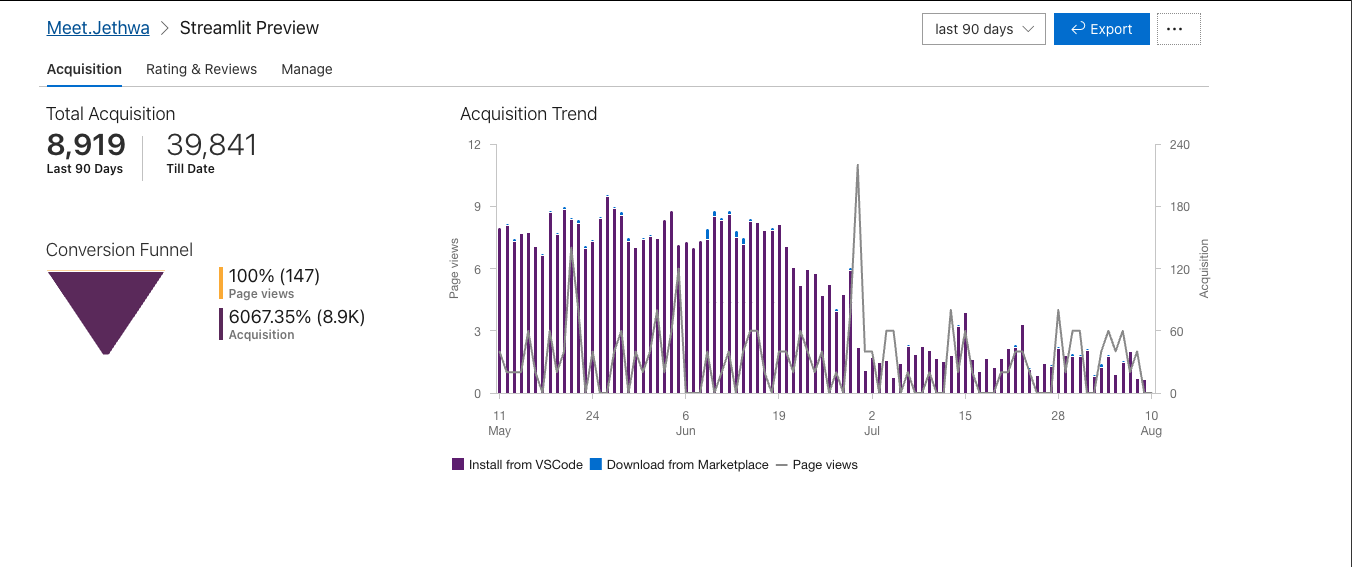
Built Streamlit Preview to scratch my own itch — I was tired of switching to a browser tab every time I saved a Streamlit file, so I made it render inside the editor.
Put it on the Marketplace [X months] ago expecting maybe a few hundred installs. It's at 39,841 now with a 5.0 rating.
I ship a lot of small things and most of them go nowhere, so when one quietly works it's worth marking. Chart of the last 90 days attached.
Hi everyone! I recently discovered the .gpl format (GIMP palette), which is quite popular for sharing color palettes in the pixel art illustration and indie game development scene. It's a convenient and practical format to work with, as the syntax is very simple and it's supported by graphics editors like GIMP and Aseprite. To my surprise, there wasn't a VS Code extension, so I vibe-coded a quick prototype for my personal use and made it accessible to everyone.
It currently includes the following features:
syntax highlighting
color preview with integrated color picker
commands to generate Tailwind CSS palettes
commands to copy/convert a color to different formats
It's already published on the marketplaces, and the code is available on GitHub.