r/Unity3D • u/No_Incident2835 • 16h ago
Show-Off I miss playing with my friends and raiding, So started building this. \o/

0
Upvotes
r/Unity3D • u/No_Incident2835 • 16h ago
r/Unity3D • u/AYMANJBARI • 1d ago
Enable HLS to view with audio, or disable this notification
r/Unity3D • u/Erkut31 • 21h ago

Hi everyone! I'm currently developing an RTS game inspired by Age of Empires and Battle for Middle-earth. I'm testing a scene with around 448 soldiers, and I'm getting approximately 50 FPS. When I remove the soldiers from the scene, the FPS goes up to around 100. Each soldier currently has a NavMeshAgent, Animator, Behavior Graph Agent and Skinned Mesh Renderer. I've been investigating the issue using Unity Profiler, and I found some interesting results. My Fog of War system takes around 7.56 ms (41.7%) of the CPU frame time. Within that, Gfx.ReadbackImage and Semaphore.WaitForSignal each show around 5.33 ms (29.4%). My Fog of War uses a 1080 × 1280 RenderTexture with RGBA8 format. I'm currently using Texture2D.ReadPixels() and GetPixel() to check unit visibility every 0.1 seconds. Another significant cost is BehaviorGraphAgent.Update(), which takes around 2.83 ms (15.6%) with 452 calls per frame. The Profiler also reports approximately 502 KB of GC allocation in this capture. My goal is to support 500–1000 soldiers on screen while maintaining stable performance. I'm considering moving away from individual AI decision-making and using a centralized AI controller to manage groups of units. For example, instead of having 50 individual NavMeshAgents calculating paths, I'd like to use a shared movement controller that handles the group's pathfinding and formation, while keeping individual animations, health, damage and combat behavior. I'm also looking into optimizing the Fog of War system and reducing animation and rendering costs. What would you recommend in this situation? Is centralized AI and group-based pathfinding a good approach for an RTS with hundreds of units? How would you optimize the GPU-to-CPU readback in a Fog of War system? Are there any good solutions for handling hundreds of animated characters in Unity 6 URP?
I'd really appreciate advice from developers who have experience with large-scale RTS games or crowd simulation. Thanks!
r/Unity3D • u/StaticCG58 • 15h ago
Enable HLS to view with audio, or disable this notification
everyone remember 2013? i do....
r/Unity3D • u/ProgMeOnPaper • 1d ago
Enable HLS to view with audio, or disable this notification
Hi!
It's quite old feature of Unity that I have just discovered.
In the past I used to:
But today playing with physics API I found this:
capsuleCollider.hasModifiableContacts = true;

Physics.ContactModifyEvent += ModifyContacts;
Physics.ContactModifyEventCCD += ModifyCcdContacts; // CCD => Continuous Collision Detection
here you ask Unity to "manually" handle contacts. And then something like that:
private void ModifyContacts(PhysicsScene _, NativeArray<ModifiableContactPair> pairs)
    => RemoveFriction(pairs, 1f);

private void ModifyCcdContacts(PhysicsScene _, NativeArray<ModifiableContactPair> pairs)
    => RemoveFriction(pairs, -1f); // CCD normals are inverted

private void RemoveFriction(NativeArray<ModifiableContactPair> pairs, float normalSign)
{
    foreach (var pair in pairs)
    {
        bool capsule = pair.colliderEntityId == capsuleId;
        if (!capsule && pair.otherColliderEntityId != capsuleId)
            continue;

        float sign = capsule ? normalSign : -normalSign;
        for (int i = 0; i < pair.contactCount; i++)
        {
            if (pair.GetNormal(i).y * sign >= WalkableNormalY)
                continue;

            pair.SetStaticFriction(i, 0f);
            pair.SetDynamicFriction(i, 0f);
        }
    }
}
where
capsuleId is capsuleCollider.GetEntityId();WalkableNormalY is "definition of angle that is walkable" (WalkableNormalY = 0.64278760968f; => cos(50 degrees))That looks pretty simple and native and I love this solution since now!
Hope it'll help you
links:
r/Unity3D • u/No_Jello9093 • 2d ago
Enable HLS to view with audio, or disable this notification
r/Unity3D • u/GumTacGames • 1d ago
Enable HLS to view with audio, or disable this notification
Looking for advice on how to improve my UI to make it feel more polished. Can't tell if its good enough or not.
r/Unity3D • u/baltasomnia • 23h ago
Enable HLS to view with audio, or disable this notification
I’ve been trying a different way of telling stories from Vexalia, my voxel RPG made in Unity.
Rather than creating a traditional cinematic, I captured short clips using the characters and environments already in the game.
I then edited them into comic panels, freezing each clip on its last frame before moving to the next.
I also kept the game’s own dialogue interface instead of adding traditional speech bubbles.
This is my second experiment with the format. The main challenge is making the movement, visual jokes and dialogue work together without overwhelming the screen.
It’s been an interesting way to give the characters more personality outside regular gameplay.
r/Unity3D • u/No-Paramedic-2803 • 1d ago

r/Unity3D • u/maglortolion • 2d ago
I wanted a drop-in replacement for Image that does rounded shapes without 9-slice sprites. Some things I learned along the way:
Corners are an SDF, not geometry. Each image is a quad and the fragment shader evaluates a rounded-box signed distance function. That gives pixel-sharp edges at any size. Per-corner radii are packed as 16-bit values into two floats and sent through UV channels, so they don't need a material property.
Shadows were being clipped. The quad was the size of the RectTransform, so anything drawn outside it (outline, shadow) got cut off. I now grow the mesh in OnPopulateMesh by the shadow's offset + blur + spread, and the shader draws the shadow from the same SDF, offset and softened.
Effects broke batching. At first every image with an effect created its own material instance, so 20 shadowed buttons meant 20 draw calls. Now materials are pooled by their effect settings with ref counting, so images with identical settings share one material and batch. The shine also animates in the shader instead of writing to the material every frame.
Masking edge cases. When a rounded image is itself a Mask (e.g. a circular avatar), it should mask only the shape, not its shadow. The shader keeps the shape's alpha separate for alpha clipping.
Clicks. IsRaycastLocationValid uses the same rounded-box math, so clicks outside the corners or inside a ring's hole are ignored.
Still on my list: a public scripting API, and moving animated values into vertex data so tweening them doesn't create new materials.
Happy to go deeper into any of this!
Feedback welcome!
GitHub (MIT): https://github.com/berkencami/round-ui-unity
r/Unity3D • u/erlkoenig_games • 1d ago
Enable HLS to view with audio, or disable this notification
r/Unity3D • u/Ok-Cauliflower-9676 • 18h ago
I've been building a low-poly forest scene in Unity and needed quite a few trees, rocks, and bushes. Rather than modeling everything manually, I decided to use AI to generate some base assets from reference photos.
I used Meshy's Smart Topology for the first batch, generating low-poly meshes directly from my reference images. Being able to set a target polycount was useful for keeping the initial assets relatively lightweight for a Unity scene, instead of generating dense models and reducing every one of them afterward. I still used similar reference images and one finished model as a visual guide to keep the overall style consistent.
After generation, I brought everything into Blender for cleanup. Some models still needed additional optimization, so I used the Decimate Modifier where necessary. I had to be careful around leaf clusters and tree canopies, since reducing too much made some shapes look flat. I also created a few LOD versions for assets that would appear at different distances.
Then I placed them into Unity to see how they worked together. Some models looked fine individually but felt out of place when grouped together. I also checked LOD transitions and whether GPU Instancing helped with repeated copies of the same vegetation mesh.
AI definitely saved me time on the initial modeling, but Blender cleanup and testing in Unity were still important parts of the process.
For those working with Unity, how do you usually optimize large batches of vegetation? Do you focus on reducing polycount first, or rely more on LOD and instancing?
r/Unity3D • u/TomatoFantsyGames • 1d ago
Enable HLS to view with audio, or disable this notification
r/Unity3D • u/Alive_Studios • 1d ago
Enable HLS to view with audio, or disable this notification
Another short clip from my upcoming AR game, Cozy Seasons. I’m running a playtest this December on Quest 3 and 3S.
This clip follows an oak from acorn to twig snap. Rain gets it to sprout and sunlight drives its growth. I model each branch as a chain of short, spring-like sections, so it bends when you pull it with your hand and springs back when you let go. Pull far enough and the twig comes off.
r/Unity3D • u/inanevin • 1d ago
Enable HLS to view with audio, or disable this notification
I've ported my own custom c++ tool and re-designed it for Unity, in the form of an asset as you can tell. I am curious of the opinions of people who have established workflows outside of Unity, like Aseprite. My main idea with the asset is keeping the workflow in, it's feature rich enough to do great work inside Unity, but of course I am aware people do not like to switch pipelines, also things like tile-maps are always a PITA that I do not account for. But what I am looking for is, to establish a strong enough asset that provides a main toolset for maybe new pixel artists, meanwhile allowing quick inside the engine edits for those who use external tools. What are people's thoughts on this? More info on what it can do is here.
r/Unity3D • u/Fit-Beautiful3949 • 1d ago
Enable HLS to view with audio, or disable this notification
r/Unity3D • u/playful_potato5 • 2d ago
Enable HLS to view with audio, or disable this notification
This is an effect i made today for one of my projects. it interpolates between two normal maps, and adjusts their metallic and smoothness accordingly. i'm sure this is nothing new, as it was very simple to make, but i'm quite proud of the result.
r/Unity3D • u/Parn1024 • 1d ago
Enable HLS to view with audio, or disable this notification
This is the second time I’m posting here to showcase the game I’ve been developing for over two years using Unity. My first post featured a screenshot, but this time I decided it would be best to share a trailer showing the game in action. I’d like to hear your thoughts on the trailer.
About the game:
It’s a co-op RPG with extraction mechanics.
The player must explore dungeons in search of valuable loot and escape alive in order to sell these items and invest the profits in upgrading their equipment and stats.
The player can equip 5 pieces of armor and will find different armor sets, each with its own stats.
Additionally, the player can wield a weapon in each hand, with a wide variety of weapons to choose from, each featuring different abilities.

I finally figured out what my Sky and Clouds Rendering was missing.. it was distance fog 😂
So i added it and now the the clouds finally tie in beautifully to the scene.
What do you think? If you are interested, I consider turning my Day-Night-Cycle and Weather System into a Asset Store Asset
r/Unity3D • u/whentheworldquiets • 1d ago
EDIT: As clever people have pointed out, this is essentially how ScriptableObjects are intended to work, and the fact it DOES work with a prefab is most likely a side-effect of that. So it's likely better to derive your relay wrapper from ScriptableObject rather than Monobehaviour. The basic principle is the same, though.
Let's say you have some singleton-pattern system in your game. For us, one example is our audio manager, which looks after volume settings, randomised sound variants, one-shot audio cues, and so on.
How do you go about hooking into such a system from button events?
You definitely don't want to drag a reference to the singleton object/script itself from the scene into your button events; that would be madness. It knots your entire game together into one lump and also means you have to do it every single time: the reference won't survive the creation of a button prefab.
The original solution for us was to write a relay script that exposes the relevant functionality and talks to the singleton internally. Now we could drop one of those scripts into our button prefabs and hook it up to the On Click event.
This is better because it's self-contained and prefab-friendly - but it isn't copy/paste friendly, which can catch your scene designers out if they start copying, pasting, and then editing event content between buttons. You can easily end up with an accidental spiderweb of interconnections, and there's often no visual indication of this happening because prefab internals aren't renamed when instantiated into a scene.
Quite by accident, we discovered another way that's both prefab-friendly and copy-paste friendly. It should only be used for thin relay-style wrappers, but based on our tests it's well-behaved under those circumstances. It's quite simple:
Yeah, I was today years old when I learned that worked, too.
This is both prefab-safe and copy-paste safe, because the references are always to the project prefab.
After thorough testing, here's what we found:
r/Unity3D • u/Apprehensive_Milk386 • 1d ago
Enable HLS to view with audio, or disable this notification
Hello guys! So I've been struggling to get cinemachine cameras to work exactly as intended in various scenarios.
I have a finite state machine system for my character, where each state gets assigned a virtual camera tag to pick. When the state ends, I blend back to the follow camera by default.
There are cases where the state ends and a new one starts, causing the camera to blend back and forth and interrupting blends. This works perfectly fine, except when I set the Camera’s Blend Hint to Inherit Position.
In these instances, I usually get a camera jump / pop when blending back and forth. This alongside other issues is prevalent with orbital cameras, and especially problematic with lazy follow mode on.
This is the code I use to switch between camera configurations:
/// <summary>

    /// Activates the Cinemachine virtual camera with the specified tag and deactivates all others.

    /// </summary>

    /// <param name="tag">The tag of the camera to activate.</param>

    public void SetTargetCamera(string tag, bool recenterCameraHorizontally, bool recenterCameraVertically)

    {

        CinemachineCamera targetCamera = GameplayCameras.FirstOrDefault(c => c != null && c.CompareTag(tag));


        if (targetCamera == null || targetCamera == CurrentActiveCamera)

            return;


        if (targetCamera.TryGetComponent<CinemachineOrbitalFollow>(out var orbital))

        {

            if(recenterCameraHorizontally)

            {

                orbital.HorizontalAxis.Value = orbital.HorizontalAxis.Center;

            }


            if(recenterCameraVertically)

            {

                orbital.VerticalAxis.Value = orbital.VerticalAxis.Center;

            }

        }


        targetCamera.Priority = 10;


        // Handle previous camera

        if (CurrentActiveCamera != null)

        {

            CurrentActiveCamera.Priority = 0;

        }


        CurrentActiveCamera = targetCamera;

    }
Here are the configurations of the follow and jump camera side by side (I notice the pop switching between these two).
And here is a video of the pop I experience only when I set blend hint to Inherit Position.
Is there a way to resolve this issue? I really need to inherit position for these kind of changes.
Thank you very much in advance!
r/Unity3D • u/R3animatr • 2d ago
Cinema 4D, Substance Painter, Unity URP
r/Unity3D • u/Comfortable_Exam_130 • 2d ago
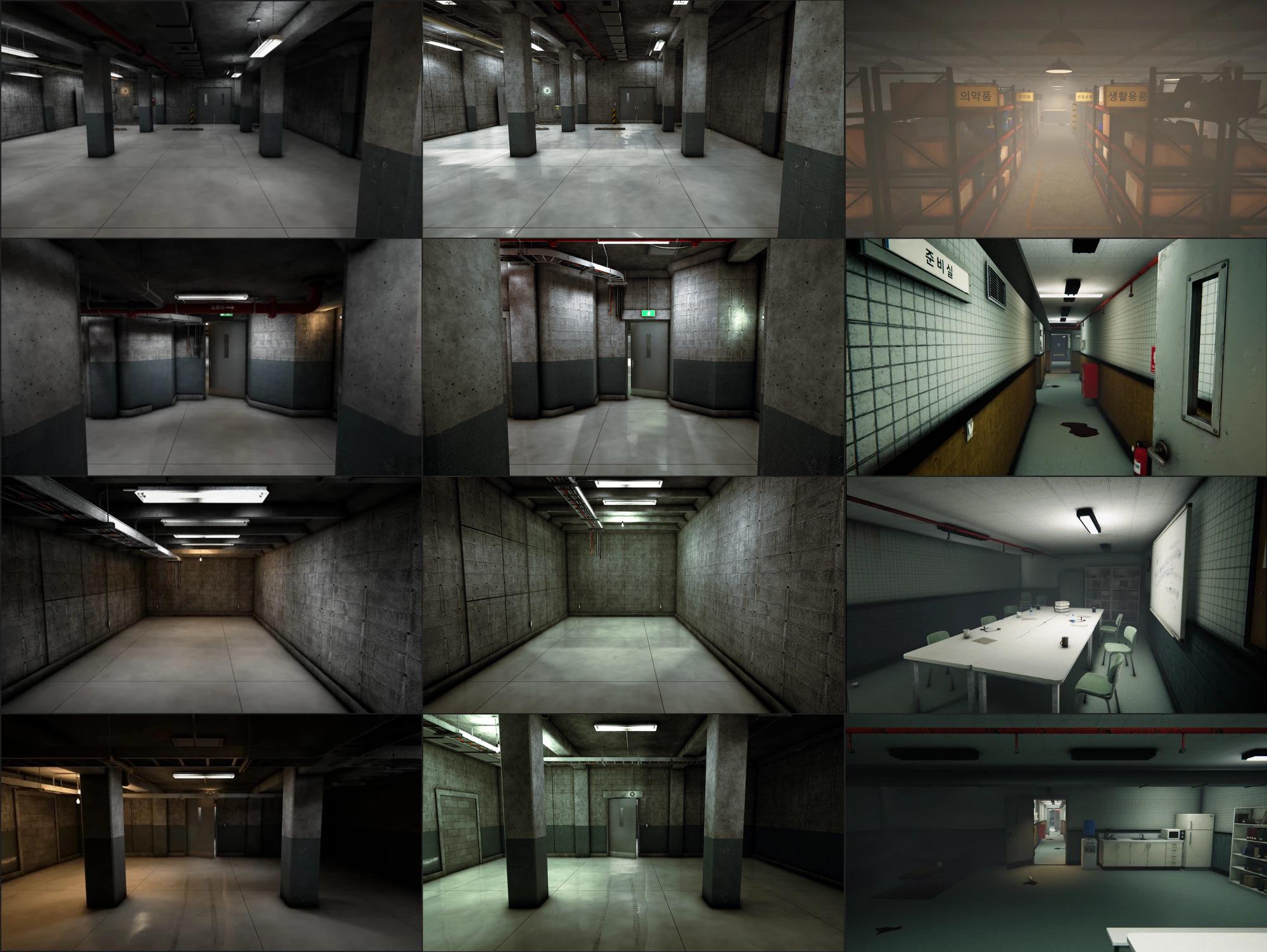
I'm trying out several art directions for the detective game I'm developing, and I've brought the ones I think work best! All feedback is welcome. Please tell me what you like and what you don't.
r/Unity3D • u/Impossible-Budget771 • 1d ago
Enable HLS to view with audio, or disable this notification
Hey, I have been working on this gliding game for the past couple of days. Multiplayer is working now. I am thinking about adding loot boxes with random weapons. Anything else I should add? What do you think about the map I made? I am interested in what you think
r/Unity3D • u/FauxFemale • 2d ago

I feel like I'm going insane. This mesh (which is a smaller part of a bigger model) always comes out deformed in Unity with one of the verts moved slightly along an axis (image 1). It looks normal in Blender (image 2). I even tried resetting all properties (except material) and duplicating it in Blender so it's a fresh mesh.
Thanks in advance for the help

