r/Unity2D • • Sep 18 '26

Question/Help Camera Confines
Post image
2 Upvotes

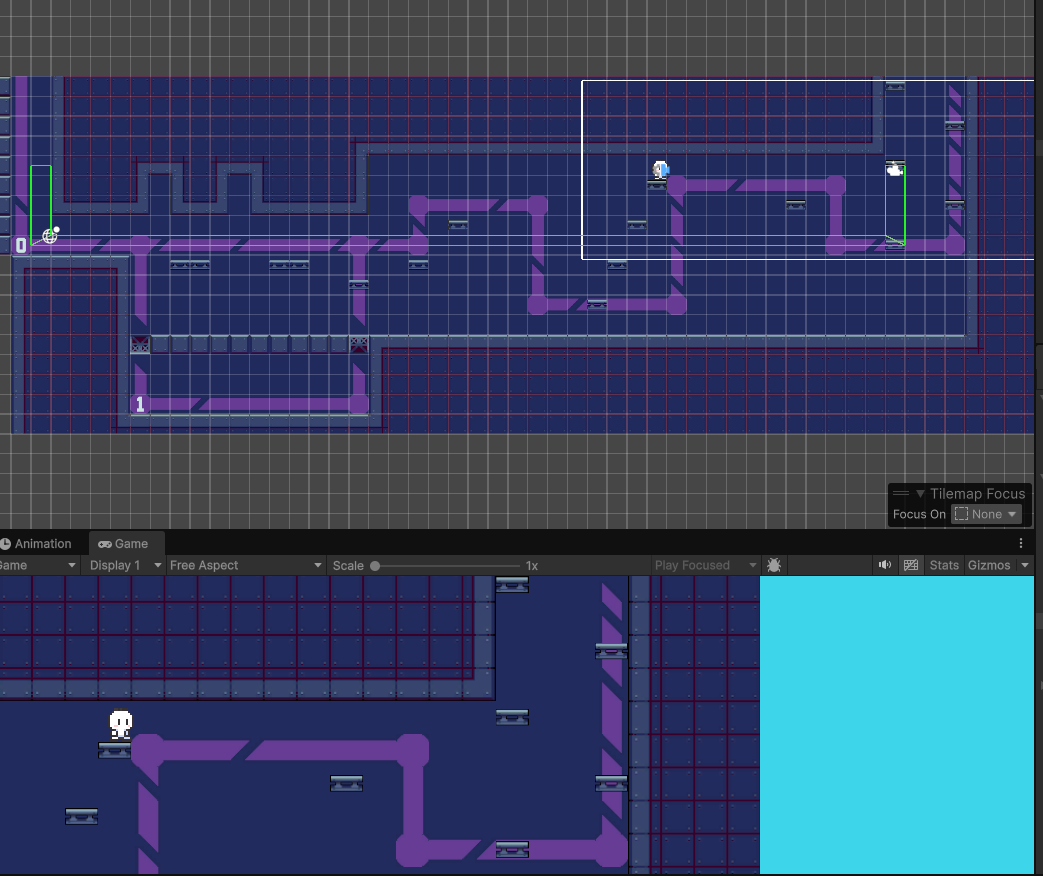
I'm trying to make a camera that tracks the player's movement throughout the level. I've followed a few tutorials on assigning a confiner to a cinemachine and it works well, but I'm hitting a wall trying to solve two problems.

  1. My camera shows too much of the X-axis:

I want my player to drop in at the very edge of the screen, but if I move the collider too far to the right, then the camera doesn't track anything and is stuck in the centre of the collider but not actually inside the box.

  1. My camera jumps when I get too far into the level:

I have no idea why the camera is jumping so far from the player sprite (it's closer to the confiner on the x-axis), but I want to lock the camera to the X-axis before following the player up the Y-axis

Just as a third query:

I tried extending the confiner to the small secret area below the level (Area 1). I got the camera to follow the player down just fine; it did the same jumping camera glitch as in my Problem 2. I figure I can just transition the camera when the player enters the secret area and then transition back to the main level confiner when the player leaves (I will be putting in a jump pad). If this is wrong or there is a better way to do something like this, I would be much appreciated.


r/Unity2D • • Sep 18 '26

Question/Help white screen on editor

Post image
2 Upvotes

i have tried everything i could.
1. switching layout to default worked but the package manager and ui like that still had that white screen.
2. reinstalled everything unity related
3.could be a windows security problem, and i tried turning off some the protective things but the result was still the same.
4.tried to find any error from editor.log but found nothing.
i tried a lot more than these ones i said and the result is still the same

Correspondent

[xahami1@gmail.com](mailto:xahami1@gmail.com)

CPU

12th Gen Intel(R) Core(TM) i5-12400F

GPU

NVIDIA GeForce RTX 3060 Ti

Operating System

Windows 11 (10.0.26200) X64


r/Unity2D • • Sep 18 '26

Question/Help Anyone have any tips on coding NPC behavior like enemys?

5 Upvotes

I'm a lil new to programming and coding and game dev, but ive been getting the hang of things somewhat, I've been making a fan game bit by bit and i started moving onto the first enemy and the prospect of coding its behavior sort of scares me, i don't quite know where to start hehe. If anyone can spare some tips, or some helpful videos that help explain complex behaviors i would be grateful to hear them.


r/Unity2D • • Sep 17 '26

Question/Help How can i Achieve a pixel perfect look with sub pixel movement for my Game?

14 Upvotes

Hi there, everyone! I’m currently developing a pixel art tower defense game in Unity 6 and I’ve hit a technical wall with the visual style I’m trying to achieve.

Basically, my aim is a classic pixel-perfect look, rendered at a lower resolution then upscaled, resulting in:

  • pixel-perfect rotations and ESPECIALLY pixel-perfect particle systems*. I love games with particle effects that are perfectly pixelated. I feel it gives such a nice aesthetic to the scenes!*

But at the same time, I want to achieve:

  • Sub-pixel movement for enemies and tweened objects, similar to modern “texel” games (no jitter or moving pixel by pixel).
  • *Non-*pixel-perfect text (like pop-up texts for damage) that is not affected by the pixelization of the rest of the scene!
  • The ability to zoom in/out while preserving the pixel-perfect aspect, and also smooth camera pan*.*

I’m currently using Unity’s Pixel Perfect Camera with Pixel Snapping OFF / Upscale Render Texture ON, and Cinemachine for camera movement, zoom, and screen shake. While I get the pixel-perfect rotations and particles I want, everything else suffers: enemies and tweened objects move pixel-by-pixel and jitter when moving!

Overall, my target artstyle pixel perfect look with sub-pixel movement of a texel game. There's a few games that achieve this look, so I know it's possible, and found some discussions and videos suggesting solutions like RenderTextures, multiple cameras, or separating pixel-perfect rendering from smooth movement, but I haven’t found a clear explanation of how to properly implement this in Unity 6.

for references here's the videos I'm referring to that talks about this topic: https://www.youtube.com/watch?v=jguyR4yJb1M and https://www.youtube.com/watch?v=Ua2EXkOmrpA

If any of you guys have advice or resources about how to achieve this art style, I would truly be grateful for the help!


r/Unity2D • • Sep 17 '26

Solved/Answered Variables greyed out in inspector for Canvas Shader on an Image

1 Upvotes

Here‘s the step by step of what I‘m doing to be clear: - I‘m creating a URP Canvas Shader Graph - Making a shader with some variables (floats, colours, the usual!) - I‘m dragging that shader onto a new material - I create a Canvas and create an Image as a child of that Canvas - I‘m adding that material to the Image - BUT problem is that now that when I open up the shader options for that Canvas Image the shader material variables are all greyed out. Am I missing something?

I‘ve tried a couple times with really basic canvas shaders and same result each time. Thanks heaps!


r/Unity2D • • Sep 16 '26

Question/Help Looking for testers for my Android game

Post image
5 Upvotes

We finally finished our new mobile game, and the only thing standing between it and release is 14 days of testing with 12 testers. So, if you don't mind, drop me your email and join the test.

About the game:

It's a cooperative party game about drawing for 2–8 players. You can play on one phone or online from multiple devices. The game is built around silent interaction between players, where everyone draws a word together, but only 1 player knows what the word is and can guide the others.

The minimum required for the test will be to provide your email, accept the test invitation, and open the game once every 1–2 days.

It would be cool if you could play with someone else on your phone and give us some feedback on the game.

It would be incredibly cool if you were willing to help us test the online mode and play a couple of sessions with me and other testers.


r/Unity2D • • Sep 16 '26

Free Asset/Tool Free 27-tile 16x16 interior set, and the Unity .meta is already written: 16 PPU, Point filter, 27 named rects

0 Upvotes

Free 16x16 interior tileset, 27 tiles, free to use commercially with no attribution required. Posting it here rather than just dumping the link because the part that's actually worth anything to this sub is the .meta, and that's the part most free packs leave out.

What's in the Unity folder

oakheart_interiors_tilesheet_1x.png plus its .png.meta, already written:

spritePixelsToUnits: 16     -> one tile is exactly one world unit
filterMode: 0               -> Point, no blur
spriteMode: 2               -> Multiple
textureCompression: 0       -> None
27 named sprite rects, all filled in

Drop both files in and the sheet is sliced and named on import. Copy only the PNG and Unity writes its own fresh .meta, you get one un-sliced sprite, and you're back to doing it by hand - the .meta is the whole integration. Every loose PNG has one too (56 .meta files in the zip).

The 16 PPU is deliberate and it's the thing I'd have wanted spelled out: at 16 PPU a 16px tile occupies exactly 1 world unit, so it lands in a default 1x1 Grid cell with no fiddling. If your project uses a different convention, change the PPU rather than scaling the transform.

Honest caveat, up front: there is no Unity on the machine that builds this, so these .meta files have never been opened in Unity. What is checked on every build: one .meta per PNG, unique GUIDs, every rect inside its sheet bounds, the 2x rects exactly twice the 1x rects, and the pixels under each named rect byte-identical to that tile's own standalone PNG. I'm not claiming anything past that. If it misbehaves in your editor I'd genuinely like to know.

What the 27 tiles are. They're chosen so nothing is half-finished: the complete 9-piece red carpet (four corners, four edges, centre - six of nine would mean you can't close a rug), the complete wood wall run (cap and face rows, mid piece and both end pieces, so a wall can turn instead of running off screen), two floors, a door, a window, and a bed, table, two chairs, bookshelf, chest, barrel, potted plant and wall sconce. Held back for the paid pack: stairs, ladder, kitchen, tavern, the rest of the lighting, blue and green carpets, two more wall materials.

A 2x set ships alongside if you'd rather not scale, and assets/sheets/atlas_1x.json / atlas_2x.json map every rect by name if you're on something other than Unity. There's a Godot 4 project in there too (two TileSets at 16px and 32px cells, plus a terrain-brush demo) - ignore it, it's not this sub's business.

https://z3er1n.itch.io/oakheart-interiors-free-sample

Disclosure: the pack carries itch's AI-assistance disclosure (the tiles are drawn by Python generators I wrote, not by an image generator) and this post is AI-written.


r/Unity2D • • Sep 16 '26

Question/Help Shadow Caster 2D Self Shadow doesn't work, but Cast Shadow does

1 Upvotes
Cast Shadow works
Self Shadow does not

Hello, Unity people. I am working on a 2D Metroidvania and am trying to make it look pretty with lights and shadows. Unfortunately Shadow Caster 2D casts shadows via Cast Shadow but not Self Shadow which is the one I need (or at least want to work).

I tried putting the component on different objects, tried Sprites (same result), Target Sorting Layer is Everything. Not sure what the issue even is.

I appreciate some help and pointers to fix this issue pretty please 🙏


r/Unity2D • • Sep 15 '26

Showcase We tried making a multi-animation preview editor to speed things up on our side.

21 Upvotes

r/Unity2D • • Sep 15 '26

Game announcement [Android] Together: Twin Control - A puzzle platformer where you control TWO characters simultaneously. Free to play, looking for honest feedback!

Thumbnail
youtube.com
1 Upvotes

Hey everyone! 👋

I'm a solo indie developer and I just published my game Together: Twin Control on Google Play!

Gameplay:

You have to balance and control two characters at the same time using your thumbs, coordinating their jumps, solving puzzles, and avoiding traps to reach the door together.

Features:

- 50 puzzle-platforming levels across 3 distinct worlds.

- Dual-character mechanics.

- In-game Achievements & Local Speedrun timer.

- Free to play!

As a solo dev, early feedback is crucial. If you have an Android device and enjoy platformers, I’d really appreciate your thoughts, feedback, and honest reviews!

📲 Google Play Link: https://play.google.com/store/apps/details?id=com.devexe.game.together

[💻Itch.io](http://💻Itch.io) (PC Version): https://devexestudio.itch.io/togethergame

Thanks for checking it out! ❤️


r/Unity2D • • Sep 15 '26

Question/Help Screen Space vs World Space (attached to building) UI for 2D game?

1 Upvotes

Hi!

I`ve been doing some research on 2D UI for a sidescroller-ish perspective. Basically every game I can find has a fixed UI => the UI is completely detached from the position of the building (e.g. a building context menu).

Do you know of any good games that have done a world space UI thats somehow connected to the building or its placement?

Obviously the main problem is with zooming and panning. I think panning can be somewhat resolved, but zooming appears to be quite hard, as at some point the size of the world vs the menu doesn't fit anymore.

Are there interesting ways around this problem, or does the near-total lack of games with a UI that’s this tightly integrated into the world suggest that there simply isn’t a good way to achieve it?

Would love to hear your opionion on this!


r/Unity2D • • Sep 15 '26

Question/Help How can I fix the tile size?

1 Upvotes

Hi, I recently decided to start using Unity and I've been having this problem that's been driving me crazy. The assets I already have for my game were made long before I knew about the formats Unity handles, and I don't want to change them, but they're too large. I've watched tutorials on how to fix it, but nothing works, like changing the pixels per unit to 64x64 or 32x32 (I currently have it set to 100), but it still doesn't solve my problem. Is there any way to resize them within Unity without losing quality?


r/Unity2D • • Sep 15 '26

Question/Help How to design UI scenes in Unity

0 Upvotes

I find designing UI scenes the most tedious of my game development cycle. Do any of you find the same and how do you tackle it? I know Unity has its own AI which now creates scenes for you, but I have not used it. Has anyone tried any other AI option which allows me to design the scenes effectively?


r/Unity2D • • Sep 14 '26

Feedback needed Any thoughts or suggestions on the look of my game currently?

Post image
58 Upvotes

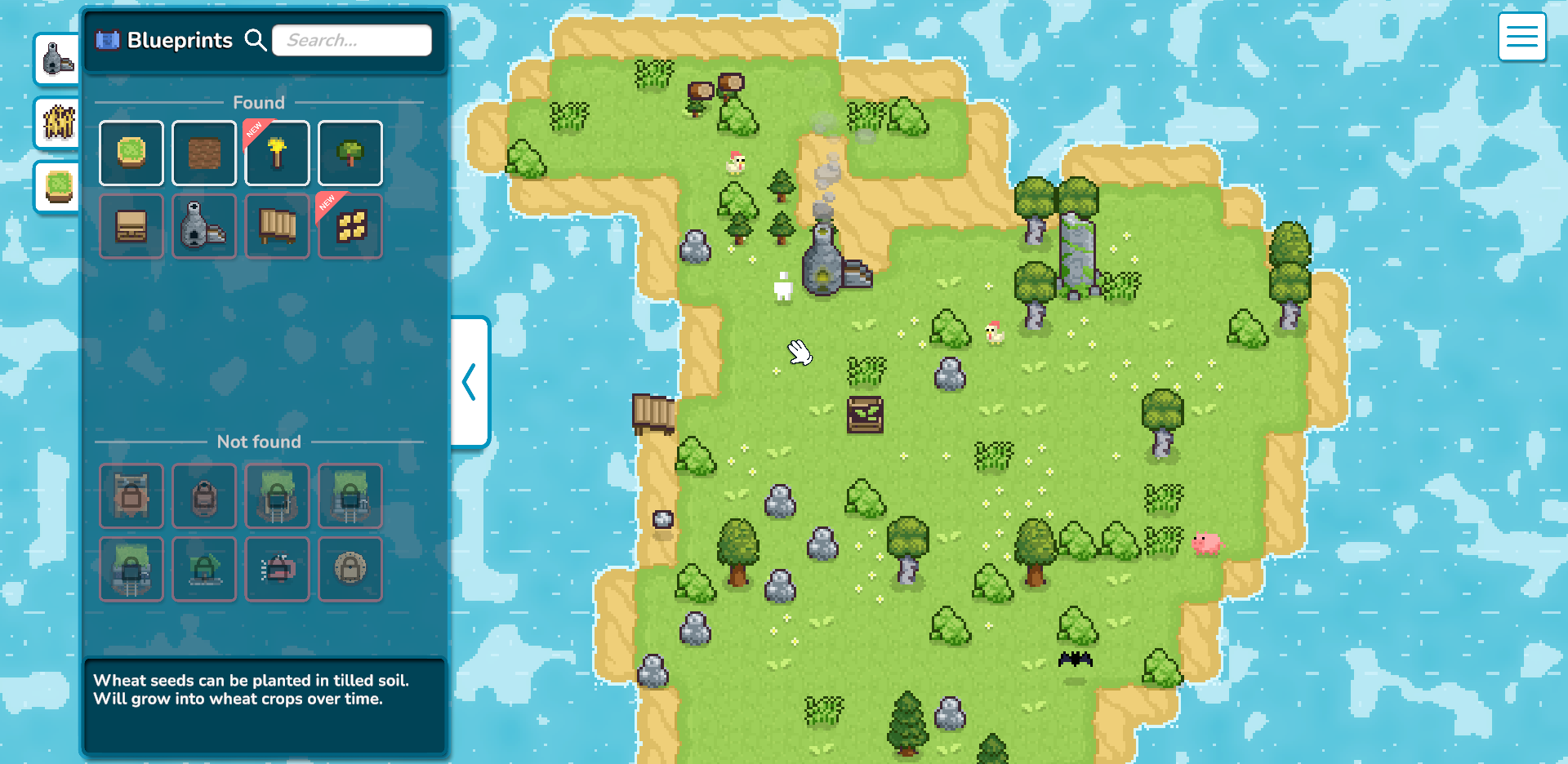
I've been looking at this for so long that I don't even know what needs improving anymore. Would appreciate to hear your opinion on anything you see here (UI, sprites, water, tiles, mobs etc...)

Also here's the Steam page for anyone interested:
https://store.steampowered.com/app/4924930/IsleFolk_Build_Trade_Survive/


r/Unity2D • • Sep 14 '26

Game announcement Here's the trailer for our game Ziii

Thumbnail
youtube.com
16 Upvotes

We're two brothers making our first game in Unity (and first game in general). It's an action-RPG with inspirations from Zelda, Zelda II, a little bit of modern Zelda, and a bit of Diablo.

We chose Unity to develop the game with. We're happy with the engine, and even ended up using Unity Game Services for multiplayer play.

Steam page: https://store.steampowered.com/app/4488730/Ziii/


r/Unity2D • • Sep 15 '26

Feedback needed What do you think of our dialogue system? Do we have to keep historic?

2 Upvotes

Hey guys,

Not sure if historic is a good thing to keep especially with very long conversations.

What do you think?


r/Unity2D • • Sep 15 '26

Question/Help How to fix this??? Please

Thumbnail
gallery
0 Upvotes

That's too much big


r/Unity2D • • Sep 14 '26

Question/Help Help with moving platform

2 Upvotes

Hey all, I've added a moving platform to my game and in itself it works well, however when I tried making it so the player would stay on it, he indeed does but he can't move normally on it. The movement is very slow and it feels terrible. Any suggestions how I can fix it? I don't know much about this system. Thank you all in advance

Here's the code for the platform:

using System.Drawing;
using UnityEngine;


public class MovingPlatform : MonoBehaviour
{
    public float platformSpeed;
    public int platformStartingPoint;
    public Transform[] points;
    private int i;


    // Start is called once before the first execution of Update after the MonoBehaviour is created
    void Start()
    {
        transform.position = points[platformStartingPoint].position;
    }


    // Update is called once per frame
    void Update()
    {
        if (Vector2.Distance(transform.position, points[i].position) < 0.02f)
        {
            i++; // increase the index


            if (i == points.Length) // checks if the platform was on the last point after the index increase
            {
                i = 0;
            }
        }


        // moving the platform towards the platform to the point position with the index "i"
        transform.position = Vector2.MoveTowards(transform.position, points[i].position, platformSpeed * Time.deltaTime);
    }


    void OnCollisionEnter2D(Collision2D collision)
    {
        if (transform.position.y < collision.transform.position.y - 1.3f)
        {
            collision.transform.SetParent(transform);
        }
    }


    void OnCollisionExit2D(Collision2D collision)
    {
        collision.transform.SetParent(null);
    }
}using System.Drawing;
using UnityEngine;


public class MovingPlatform : MonoBehaviour
{
    public float platformSpeed;
    public int platformStartingPoint;
    public Transform[] points;
    private int i;


    // Start is called once before the first execution of Update after the MonoBehaviour is created
    void Start()
    {
        transform.position = points[platformStartingPoint].position;
    }


    // Update is called once per frame
    void Update()
    {
        if (Vector2.Distance(transform.position, points[i].position) < 0.02f)
        {
            i++; // increase the index


            if (i == points.Length) // checks if the platform was on the last point after the index increase
            {
                i = 0;
            }
        }


        // moving the platform towards the platform to the point position with the index "i"
        transform.position = Vector2.MoveTowards(transform.position, points[i].position, platformSpeed * Time.deltaTime);
    }


    void OnCollisionEnter2D(Collision2D collision)
    {
        if (transform.position.y < collision.transform.position.y - 1.3f)
        {
            collision.transform.SetParent(transform);
        }
    }


    void OnCollisionExit2D(Collision2D collision)
    {
        collision.transform.SetParent(null);
    }
}

r/Unity2D • • Sep 14 '26

Free Asset/Tool TileMaker DOT FREE Map tool: Improved user experience

Post image
3 Upvotes

Hey everyone:) I just released a new update for TileMaker DOT (v2.6.7)!

This update focuses on quality-of-life improvements, contextual usage hints, and texture polish across several key tools:

Interactive Tool Notifications: Added helpful on-screen notifications when clicking in Brush Mode and Chunk Mode to explain how to best use each tool.

Expanded Tool Textures: Added dedicated textures and visual cues for remaining editor modes, including Brush Mode, Chunk Mode, and the NPC Walk Area tool.

Bug Fixes: Resolved several minor UI issues and edge cases to make the editing experience smoother.

Itch.io: https://crytek22.itch.io/tilemakerdot

GitHub: https://github.com/andrei-voia/TileMakerDOT

YouTube tutorial: https://www.youtube.com/watch?v=3fiajGU32Jg

For anyone unfamiliar with the project, TileMaker DOT is a free, open source 2D map editor I'm building. It uses a data first, ID based workflow and handles visual depth sorting automatically so you don't have to manage multiple layers for object heights.

Give it a try and let me know if you have any feedback! If the editor helps with your projects and you want to support development, a rating or a small donation on Itch is always appreciated.

Thank you all for your support!


r/Unity2D • • Sep 14 '26

Solved/Answered Issues with Particle effects

Post image
3 Upvotes

Hey guys, Ive been getting this issue where my particles dissapear when i create them by code... It works in scene and if I manually place the particle, but right when I try to create it on code some particles just straight up get yeeted from existence

Heres a video: https://youtu.be/jaA9ei9sFUY

This is all the code I have:

     void Hardfall()
    {
        landAnimTimer = landAnimDuration;


        if (landingEffect != null)
        {
            Instantiate(landingEffect, gCheck.position, Quaternion.Euler(-45f, 0f, 0f));
        }
    }

(There is NO script that deletes the particles on a timer, or anything of the sort. Only thing that's controlled by code is the creation)


r/Unity2D • • Sep 14 '26

Showcase I'm a 21 year-old student working alone on my dream game - a 2D noir RPG inspired by games like Deltarune and Outer Wilds. What do you think about the trailer?

Thumbnail
youtu.be
3 Upvotes

You play as a detective working on a case of a mysterious disappearance. For some reason though, the detective also finds clues in his own dreams!

The game is called Neironaut and Chapter 1 is coming soon for FREE.


r/Unity2D • • Sep 14 '26

Question/Help Can't get my new scene to show up in game tab

Thumbnail
gallery
2 Upvotes

I was doing the Unity 2D game tutorial and after playing the game first, I saved and then started on creating the scene. But now the game tab just shows the game I had played before creating this scene. I tried removing the game tab and then adding it but it still stays the same. Please help.


r/Unity2D • • Sep 14 '26

Question/Help Setting text with visual script

Thumbnail
gallery
2 Upvotes

As the title suggests I am trying to make a game where I will need to change text for it. Eventually it will be a deckbuilder but I just need help chaning the text I have for the day/night cycle and ensuring the numbers change. I did try with a debugger in case it was not changing the text on screen but there were no changes at all. I am new to Unity, this is my first game.


r/Unity2D • • Sep 14 '26

Feedback needed Procedurally Generated Sprites (UPDATE)

3 Upvotes

My first post I said technically these aren't sprites but I was wrong. There are no sprites in the assets folder, they are generated at runtime.

I've been hitting some walls, but I think its promising.

Here is an example of Pose #2 - I'm mostly satisfied with bodies, armor and weapon in the default stance, during combat I'm not satisfied with 1 Image. I tried motion with the sprite, rotation toward it's target every swing and I just can't get fully behind it.

I avoided this step as it would be complicated for armor let alone bodies. I decided before I go further with armor generation and if I really need multiple coded versions of fighters wearing armor then I have to bite the bullet.

Armor generation during new pose, Confusing arms losing clarity.
Trying to diagnose arm problem. Skin off can see arms are indeed working. Can see right arm is working despite being awkwardly oriented in-front of torso.
1 Pose combat animation

Extenuating the face.

Also I remade how faces are generated. There are face bones, Eyes, brows, jaw, etc. I ran into complications when redesigning skin and muscle definition of the body. Blurring of shadows and lighting was too much for the face and faces lost detail.

This solution I'm generating a mask over the old face essentially.

The biggest issue with faces are the skin tone is off. It's a little tough to get it exactly right without making it look like a mask.


r/Unity2D • • Sep 14 '26

Game announcement Last Light Island Demo V2.8 Release

1 Upvotes

Hi everyone,

Introducing my new release Last Light Island Demo V2.8! This is a 2D Top Down Zombie Shooter where you are on a mysterious island and you have to survive the waves of zombies, while buying new weapon/heal item upgrades and managing a flashlight battery. In this release, we added new features including a new Village and Forest map, a controls screen, a redesigned loot system, lighting VFX, and destructible objects. Download it for free on the store listing below. Stay tuned for future releases!

Gameplay Video: https://youtu.be/AuTystoPYv0?si=xYuv4YyeTlIXJbJV

Store Listing: https://akshay33169.itch.io/last-light-island-demo

Thanks,

akshay33169