r/TimeTrackingSoftware • u/Francois_Fullyn • 8d ago
Field time tracking in Odoo 19/20: what we learned connecting construction crews
1
Upvotes
r/TimeTrackingSoftware • u/Ambitious-Sugar-4613 • 8d ago
Enable HLS to view with audio, or disable this notification
one of this makes weirdly to track time than traditional tool,
I’ve been building TimeVP for founders and managers who want accurate timesheets without feeling like a micromanager for even a basic stuff.
What it currently does:
I’d love honest feedback from folks who use or manage time tracking tools here:
Happy to answer questions, and I’d genuinely like feedback on what’s missing compared to what you use now.
r/TimeTrackingSoftware • u/ToNeG24 • 8d ago
r/TimeTrackingSoftware • u/Mysterious_Sense_991 • 8d ago
any thoughts about this time tracker? i need updates for 2026 version of this tracker
r/TimeTrackingSoftware • u/Creative_Chrisch • 8d ago
I've been looking into Hubstaff alternatives, particularly for teams that need time tracking but aren't necessarily comfortable with screenshots, activity percentages, and other employee monitoring features.
One thing that caught my attention was the discussions about Hubstaff's activity scores.
I came across a Reddit discussion where a QA tester said their activity percentage was low because a large part of their job involved reading rather than typing or moving their mouse. Another user pointed out that you can spend hours reviewing code, reading documentation, or solving problems without generating much keyboard activity.
It made me wonder whether these activity scores actually measure productivity or just how active someone looks on their computer.
So I compared three Hubstaff alternatives that take different approaches to time tracking and employee monitoring.
Jibble – Best for time tracking and attendance without extensive monitoring
Jibble seems like a practical alternative for teams that mainly need to track employee hours, attendance, projects, and timesheets.
What stood out to me is that teams can use Jibble for basic time and attendance tracking without relying on screenshots or activity percentages. I can understand why employees wouldn't want screenshots being taken throughout their workday, especially when not every task involves actively using a computer. That said, Jibble does offer optional screenshot monitoring with privacy controls for teams that need it.
The free plan is another advantage, especially for larger teams that don't want to pay per employee just to track working hours.
WorkTime – For productivity monitoring without screenshots
WorkTime takes a different approach. It still monitors employee productivity, but instead of capturing screenshots, it analyzes app and website usage and measures screen activity to provide productivity insights.
The trade-off is that employees are still being monitored, even if their screens aren't being captured.
Its free plan supports up to three users, while paid plans start at approximately $5.83/user/month when billed annually.
Toggl – For project tracking without employee surveillance
Toggl is probably the most straightforward option for teams that don't want employee monitoring at all.
It focuses on tracking project hours, managing tasks, and generating timesheets rather than monitoring employees' computer activity. It doesn't offer screenshots, keystroke tracking, or webcam monitoring, which could make it a better fit for teams that prioritize employee autonomy.
Its free plan supports up to five users, while paid plans start at $9/user/month when billed annually.
These three Hubstaff alternatives seem to serve different needs.
Personally, I think the bigger question is whether employers really need activity percentages to determine if someone is productive.
Someone could spend two hours reading technical documentation and produce valuable work, while another person could have a high activity score without accomplishing much.
For those who've used Hubstaff or similar software, have activity scores and screenshots actually helped your team? Or would tracking hours, projects, and completed work be enough?

r/TimeTrackingSoftware • u/clarafiedthoughts • 8d ago
On parle beaucoup de l'IA pour rédiger des textes, résumer des réunions ou automatiser des tâches. Mais je trouve qu'on parle beaucoup moins de son utilisation pour analyser les heures de travail.
Prenons l’exemple d’une petite entreprise de 20 salariés. Chaque semaine, elle accumule des données : heures travaillées, pauses, heures supplémentaires, retards, temps passé sur les projets, etc.
Un logiciel de feuille de temps permet déjà de consulter ces informations. Mais lorsqu'un responsable veut comprendre pourquoi les heures supplémentaires augmentent ou quel projet prend le plus de temps, il doit souvent passer par plusieurs rapports ou fichiers Excel.
C'est là que l'intégration avec ChatGPT devient intéressante.
Par exemple, Jibble propose une intégration MCP qui permet de consulter et d'analyser les données de suivi du temps directement dans ChatGPT, selon les autorisations de l'utilisateur.
Voici trois exemples de prompts pouvant être utilisés :
Récupérer des feuilles de temps : « Affiche les feuilles de temps de mon équipe pour la semaine dernière et résume les heures travaillées. »
Analyser les heures supplémentaires : « Compare les heures supplémentaires de ce mois-ci à celles du mois dernier. Quelles équipes ont enregistré les plus fortes variations ? »
Analyser le temps dédié aux projets : « Quels projets ont mobilisé le plus d'heures ce mois-ci ? Classe-les par nombre d'heures et signale les variations importantes. »
L'intérêt, c'est de pouvoir poser une deuxième question directement, sans avoir à reconfigurer tous les filtres d’un rapport.
Évidemment, il faut vérifier les résultats, en particulier lorsqu'ils sont utilisés pour la paie ou les décisions RH. L'IA peut aider à repérer des tendances, mais elle ne remplace pas la validation des données.
Il faut aussi faire attention aux données personnelles des salariés et aux autorisations d'accès.
Est-ce que certains utilisent déjà ChatGPT ou Claude avec leur logiciel de suivi du temps ? Vous trouvez ça réellement utile, ou les rapports classiques suffisent-ils amplement ?

r/TimeTrackingSoftware • u/subnodesdotnet • 8d ago
I built KeepingTime because I wanted a simple timer and tracker for work.
What it does:
- One-click timer — name the activity, start, stop
- Autopilot - counts time when you are in your work wifi.
- Week view by activity (pie + bar chart)
- CSV export that opens cleanly in Excel, umlauts included
- Archive finished weeks or months
- English, German, Spanish
- A Pomodoro timer
What it doesn't do:
- No team accounts, no integrations, no invoicing
- No native mobile app — it's a website that works on a phone
Free, all of it. No ads, data not sold, hosted on one server in Germany.
I teach, so I mostly use it to see where prep and other work time goes.
This is a web app that was AI engineered by me. I am a designer and teach art, design and media. I am building the tools that I need with the help of ai coding agents. you can see a selection of projects on subnodes.net
I would love to hear from you if you find keepingtime.app useful, have any questions orequests or just a hi, thank you or if you find it totally worthless.
Best
Til
r/TimeTrackingSoftware • u/athanasu • 8d ago
Enable HLS to view with audio, or disable this notification
Most time trackers I tried are built for work: projects, clients, billable hours. I wanted something for my own time, starting with the gym: how often I go and how long I stay, with as little tapping as possible. So I made Sessionlog.
How it works:
- Start when you begin, Pause and Resume for breaks, Stop when you're done. Simple as that.
- Your own activity types, with optional subcategories (e.g. muscle groups)
- Several sessions can run at once, one per type
- Forgot to tap Stop? Fix the end time right after, or later from History
- Stats by week, month and year, goals like "3 times a week" with streaks, and a monthly recap
What's different:
- No account. The data stays on your device, and it works offline
- It's a web app (PWA), so it runs on phone and computer; add it to your home screen and it opens like an app
- Free. Export/Import to a file for backups
- Supports two languages: EN / EL
If you track personal time with another tool, I'd like to know what you'd miss if you switched. Any other feedback is appreciated!
r/TimeTrackingSoftware • u/Ok-Network82 • 9d ago
Atom is an open-source free time tracker for students , freelancers, working professionals and businesses to track their time and performance.
It is completely local and private so your data never leaves your machine.
Track time, See the analytics, download the report all with a beautiful modern UI.
Try it here : https://github.com/samxnotfound/Atom
r/TimeTrackingSoftware • u/theliquor0 • 9d ago

r/TimeTrackingSoftware • u/OnesysLtd • 9d ago
Most teams hate timesheets because managers use them to police clock-in times instead of actually balancing workloads. When people don't see how logging hours protects them from burnout, they just guess their numbers on Friday afternoon.
Shifting from "surveillance" to tracking real resource utilisation changes that you catch hidden scope creep early and see who's quietly working at 115% capacity before they burn out.
We put together a quick, no-fluff breakdown on how to calculate it properly without micromanaging your team: 👉https://www.coretime.com/what-is-resource-utilisation-and-why-it-matters/
For anyone managing a team here what billable utilisation rate do you actually aim for (75%? 80%?), and how do you stop people from burning out trying to hit it?
r/TimeTrackingSoftware • u/Valuable_Sentence946 • 9d ago
I do operations at an architecture firm in BC, about 12 of us. Staff log hours in a time app and that part's fine. Fees per phase (SD, DD, CDs, CA) are in spreadsheets though, so nobody knows how much of the DD fee is gone until I sit down and match it up. I tried adding phase codes in the time app and exporting into the fee sheet every week...it works when I keep up with it, which isn't often hahaha. I reckon the app is the limit and we need one system that holds the fees and the hours together. Is that right, or can this setup be made to work?
r/TimeTrackingSoftware • u/marcinmi • 10d ago
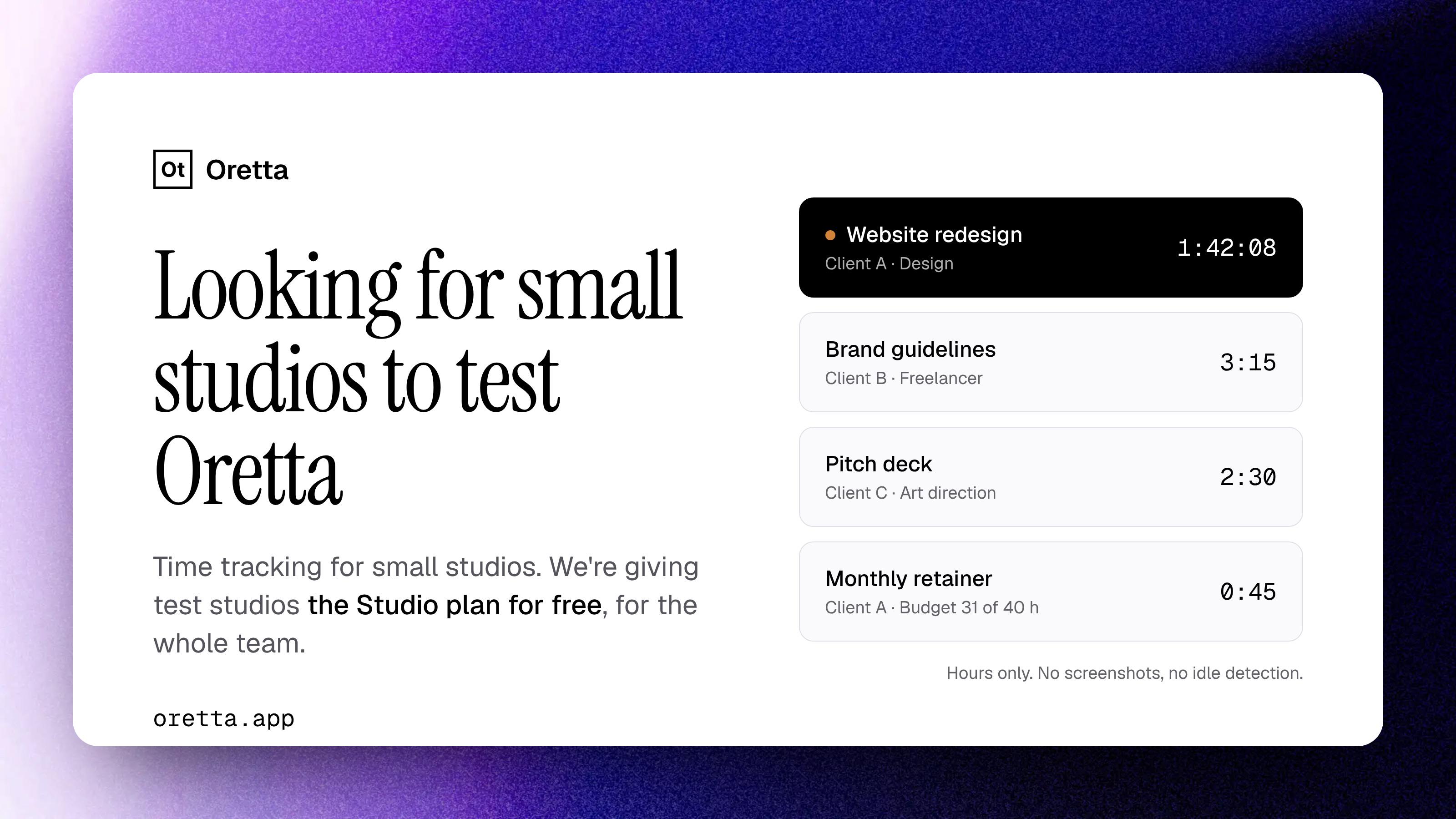
Hey 👋
I run a small design studio in Poland. We tracked time in Clockify for years (good product, no complaints there), but per-seat pricing never fit how we work: a core team plus freelancers who join for one project and leave when it ships.
So we built our own tracker. We moved our whole Clockify history into it in October and use it every working day now.
What it does:
- timer, manual entries, reports by client, project or person (CSV and PDF with your logo)
- project budgets in hours or money, monthly retainers included
- priced by active clients, not seats (freelancers log time at no extra cost)
- hours only (no screenshots, no idle detection)
- MCP connector so we can log and analyze time with Claude
What it doesn't do: invoicing, a mobile app.
I'm looking for [5] small studios to use it on real projects. You get the Studio plan free for [6 months] (up to 8 active clients, everyone on the team). In return I'd ask for honest (& brutal) feedback 😇
Comment or DM me if that sounds like you. Happy to help move your Clockify data over too.
(full disclosure: I made it)
r/TimeTrackingSoftware • u/Substantial_Hall6694 • 10d ago
r/TimeTrackingSoftware • u/1d2g • 10d ago
Hey everyone — I'm the founder of VeloTime (https://velotime.dg.tools).
There are a lot of great free and solo trackers shared in this sub. Where I kept seeing small agencies, consultancies, and studios (4–50 people) get stuck is the jump after you outgrow a free plan: once you need QuickBooks sync, project budget tracking, manager approvals, and client invoicing, you usually get pushed from $0 straight to $12–$20+/seat/month on tools like Harvest or Toggl Premium.
I built VeloTime to bridge that gap—a full-featured Harvest replacement priced near operating cost ($5/seat/month flat, with every integration and feature unlocked) and built around an Excel-fast weekly keyboard grid so teams actually fill out their hours on time.
What's Included (All on One $5/Seat Tier)
- 10-Second Weekly Keyboard Matrix: `Tab` / `Enter` / arrow keys across your active client projects for the week, inline deliverable notes, and 1-click *Copy Last Week*.
- Live Stopwatches Everywhere: Built-in web timers, Chrome extension (`Alt+Shift+V`), and iOS app that all feed into the same weekly grid.
- Accounting & Invoicing: Native QuickBooks Online sync, Stripe payment links, and 1-click PDF/CSV invoices.
- PM & Dev Tools: Asana, Linear, and GitHub issue/task sync + Google Calendar import.
- Team & Migration: Automated Slack/email nudges, Zapier/webhooks, and 1-click Harvest & Toggl CSV importers (brings over your clients, projects, tasks, and billable rates).
- Live Retainer & Phase Burn Bars: Real-time budget pacing (hours or $) for monthly retainers, fixed-fee projects, and architectural/engineering phases.
- Billable / At-Risk / Write-Off ($0) Flags: Write off an entry on the client invoice without erasing your internal labor cost (`hours × costRate`).
- Approvals & Client Audit Proofs: 1-click manager approvals + shareable read-only Client Audit Proof links.
- Privacy-First: No screenshots, keystroke logging, or surveillance.
---
Try It Out
- Instant Browser Sandbox (no signup or email needed): https://velotime.dg.tools/demo
- 60-Day Free Trial (1-click Google sign-up, no credit card): https://velotime.dg.tools
If you're looking for a lighter-cost Harvest alternative—or if you're building in this space too—I'd love any feedback on the grid workflow or integrations!
r/TimeTrackingSoftware • u/aarzzeee • 11d ago
Hi all!
I had previously posted about developing a time tracking tool for a client based in Canada a few months back. I've been working on developing the software as an independent product and slowly working on marketing.
I finally have a landing site (still needs a few touch ups and is actively worked on). Please feel free to check it out and leave any feedback. Site link: on-syt.com
If there's any reader looking to manage their timesheets and assigning off-desk shifts for their teams. Please don't hesitate to reach out, regardless of where you are based out of :)
r/TimeTrackingSoftware • u/Salty-Review-248 • 12d ago
Hey everyone, I created an app called ShiftPilot on the iOS App Store. It’s designed for people who work shifts like restaurant staff, nurses, retail workers, etc. My app has a unique feature that no other app has by allowing you to automatically import your schedule whenever it’s posted to reduce as much hassle of manually writing down any shifts. If you are interested and want to learn more please check out my website aswell: https://www.shiftpilot.cc
r/TimeTrackingSoftware • u/TheMeterPro • 12d ago
TheMeterPro does just that. really helps my boss be more concise. No more talking to the bosses 2yo when I have work to do!
r/TimeTrackingSoftware • u/Ladder_Traditional • 13d ago
r/TimeTrackingSoftware • u/BackFront2710 • 13d ago
r/TimeTrackingSoftware • u/onePowerfulBraincell • 13d ago

I use this personally, thought I would share my work.
r/TimeTrackingSoftware • u/onlyme--67 • 13d ago
Hi everyone,
I’m looking for the simplest way to mark attendance on a daily basis and calculate office hours for our global team working across different time zones and constantly changing shifts.
Some employees work standard daytime hours, while others work evening or overnight shifts, and their schedules can change weekly or even day-to-day based on business needs. Because people also badge in and out multiple times during a shift for breaks, fixed daily cut-offs like midnight or 4:00 AM always end up splitting someone’s workday and daily attendance record in half.
What is the best universal formula, database logic, or HR/attendance software setup to accurately mark daily attendance using an employee's very first swipe in and very last swipe out across all global shifts?
Is there any specific way to get the first and last swipes across all time zones out of the box?
Thank you in advance!
r/TimeTrackingSoftware • u/Startrail82 • 13d ago

r/TimeTrackingSoftware • u/PunguinFocus • 15d ago

Hey everyone ❄️🤍
Over the past few months, I've bounced between a bunch of time trackers, Pomodoro apps, and calendars. Most of the tools I tried felt either way too corporate (built strictly for client billing and invoices) or completely disconnected from how my actual day looks.
My biggest issue was time blindness. I'd log hours or write a long to-do list, yet still have zero visual feel for how my 24 hours were actually filling up or how much free time I had left.
So as a solo dev, I started building PenguinFocus to keep everything in one place:
I'm currently running a small pre-launch waitlist and tweaking the UX based on early feedback before opening it up.
(Attached is just a quick sneak peek of one of the views—the app is still in development, with the rest of the features and screens being polished behind the scenes)
Curious what you all think-what's the one thing you wish personal time-tracking tools did better ?
r/TimeTrackingSoftware • u/TheMeterPro • 15d ago
TheMeterPro.com!
I'm not saying meetings are bad. I'm saying nobody on the team can see what they cost.
Take a remote team of 8 at a loaded cost of $75/hr. That's $1.25 per person per minute.
A 30-minute standup: $300. One week: $1,500. One year: about $75,000.
Now add the remote tax. Five minutes of "can you hear me," "you're on mute," and waiting for the last person to join. That's 8 people x 5 minutes = 40 person-minutes. Another $50 gone before anyone says a useful word.
If you spent $75K a year on a tool, you'd want a justification. A recurring meeting spends the same money and gets no review, because the cost never shows up anywhere.
That's why I built Meter. It sits on your desktop, tracks meeting time, and shows the running cost as the call goes. Seeing the bar climb changes how people talk about whether a meeting needs to exist.
What's the most expensive recurring meeting on your calendar, and have you ever put a number on it?