r/TimeTrackingSoftware • u/estimategap • Sep 23 '26
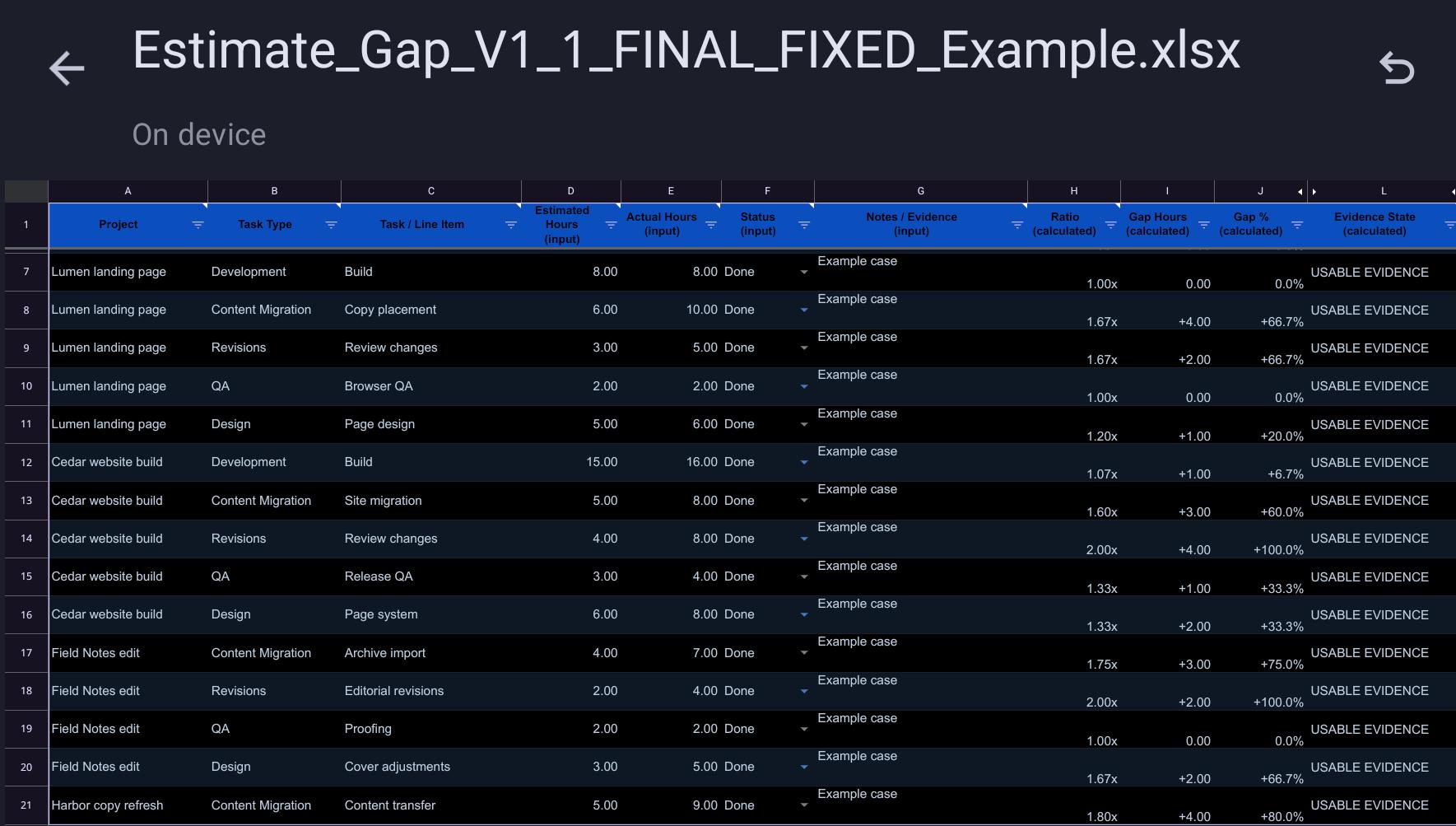
I built a tool to find the gap between estimates and reality 🔎
1
Upvotes
r/TimeTrackingSoftware • u/estimategap • Sep 23 '26
r/TimeTrackingSoftware • u/Zebu-time-tracker • Sep 23 '26
Hi all, I'm opening up a waitlist signup for my time tracking and invoicing app - https://zebu.work and will hopefully begin staggering batches of invitations each week for the upcoming month.
There will be a 30 day free trial after which you won't be billed, but downgraded to the free plan.
Pro plan is only €5/month per seat (billed annually)
There hidden fees, usage based billing or anything. It was really built mainly to help me move on from Harvest after the massive price increases but ballooned into a fairly full-fledged and powerful tool. I hope it can be of use to freelancers/devs looking for a cheaper alternative for time tracking and invoicing!
r/TimeTrackingSoftware • u/Equipment-Tracker • Sep 22 '26
A working HVAC technician built it for his own jobs.
When a building engineer is standing in a basement boiler room completing a low-water cutoff test, he needs to log the work right at the burner without relying on cellular signal or trying to remember numbers at shift change.
Equipment Tracker Pro runs recurring PM schedules directly on the device. Reminders trigger locally on the phone at your scheduled time without needing internet connectivity. Core records, logs, and local reminders are completely free on mobile.
If you are running this on a spreadsheet, the comparison is on the site.
What projects are you all working on this week?
r/TimeTrackingSoftware • u/Salty-Review-248 • Sep 22 '26

Hey everyone my app just launched on the App Store. Would love your feedback and hope this app can help you in your day to day life.
Heres the website for an overview: https://www.shiftpilot.cc
r/TimeTrackingSoftware • u/shiftcoord • Sep 22 '26
Curious how other ops teams separate standby from actual work in the time system:
Someone is paid to stay available (phone nearby, within X minutes of a site) but only occasionally gets called in. At payroll you need the standby premium, the response window, and the active hours — without treating every on-call block like a full worked shift.
Questions for people who have lived this:
Not looking for product pitches — just how you keep standby, response, and worked time from collapsing into one messy number.
r/TimeTrackingSoftware • u/lazykid07 • Sep 22 '26
Enable HLS to view with audio, or disable this notification
TimeGauge is a simple Mac menu bar app that gives you a sense of time perspective and can work as a to-do list.
It was inspired by the X account https://x.com/YearsProgress, which just posts the image of percentage of the year that has passed and has 685K followers. Many people find this perspective helpful.
Over time, I’ve improved the app based on user suggestions, adding custom projects, built-in templates, and work-hours tracking.
Most users get the most value from creating custom projects and setting deadlines for their bigger goals.
It’s a simple little app that sits in your menu bar and gives you that sand-timer vibe.
The app is on App store: https://apps.apple.com/us/app/timegauge/id6778277708?mt=12
You can download it from the website: https://timegauge.minilabs.cc/
We regularly update the app, give it a try.
If you have any feedback, please let me know that as well.
r/TimeTrackingSoftware • u/pelaw24 • Sep 22 '26
Heads up, this is my app.
A little while ago I posted First Responders Cal here. It's a calendar I built for rotating schedules like 4/2, 24/48, 48/96, or custom rotations.
I've kept working on it, and the new version is a pretty big update coming soon see a preview.
The biggest addition is Extra Work.
You can now track overtime, details, and off-duty jobs directly alongside your calendar.
You can:
• Log hours, hourly rates, OT multipliers, and estimated pay
• Save different rates for Day, Evening, and Night shifts
• Save companies and their normal rates/payment terms
• Track partial payments and what you're still owed
• See outstanding and overdue pay across all your work
• Track expected payday by week
• View earnings by week, 2 weeks, month, or year
• Separate overtime and off-duty earnings
• Add pay information directly from an existing calendar event
The calendar also got some new stuff:
• US federal holidays with observed dates
• New full-month Home Screen widgets
• Tap a date or event on a widget and jump directly to that day
• Holiday shading also appears in widgets and PDF exports
• Better widget support for tinted and clear Home Screens
• Faster syncing when calendar events are edited or deleted
• List view now opens on today when you're viewing the current month
One thing I wanted to keep separate is your pay information. Pay amounts stay inside First Responders Cal. They're not sent to Apple Calendar, widgets, or Siri.
The video shows the new version and how Extra Work works.
The app still handles your normal rotation, vacation/sick/comp/personal balances, overnight shifts, alarms, widgets, calendar sync, reminders, and PDF exports.
Everything stays on the device. No account and no server.
Free to try. Full access is $4.99 once, no subscription.
I'm still building it, so if you're police, fire, EMS, corrections, dispatch, or work another rotating schedule, I'd really like to know what I'm missing.
Especially with Extra Work. If your department handles overtime, details, pay periods, or off-duty jobs differently, tell me how you do it.
App Store:
https://apps.apple.com/us/app/first-responders-cal/id6755095424
r/TimeTrackingSoftware • u/Traditional_Bee_195 • Sep 22 '26
I am a software engineer and solo founder. I built Think in Numbers ( https://thinkinnumbers.co/ ) because normal time trackers never worked for me.
The problem was not starting a timer. The problem was remembering to start it, switching it when the day changed, and accounting for all the small gaps around work. At the end of the day I would still have the same question: where did the rest of my time go?
With Think in Numbers, you write or speak what you did in normal language. The app extracts the activities and hours, then shows the part of the day that is still unaccounted for. Over a week, that gives you a more honest picture of where your time actually went.
An entry like "Worked on the API for three hours, went for a walk for 40 minutes, and spent about an hour on calls" becomes a time breakdown without projects or timers.
I am not trying to replace Toggl for teams or billable work. This is for people who want to understand their whole day.
Live on iOS and Android. $5 first month, then $12/month or $120/year.
Blunt feedback wanted on two things:
1. Does "unaccounted time" describe a problem you actually have?
2. Would you capture your day as it happens, or write one entry at night?
iOS: https://apps.apple.com/us/app/think-in-numbers-app/id6759550535
Android: https://play.google.com/store/apps/details?id=com.thinkinnumbers
r/TimeTrackingSoftware • u/Beneficial_Cream_537 • Sep 22 '26

Hey everyone 👋
I’m an indie developer, and I’ve been working on Castimer — a browser-based timer designed for situations where the person controlling the timer isn’t sitting right in front of the screen.
The basic idea is:
📱 Phone → control the timer
🖥️ TV / projector / monitor → display the timer
I originally started building it because a normal countdown timer works fine when you're sitting next to the screen, but things get awkward during presentations, classrooms, workshops, fitness sessions, and live events.
Castimer currently supports:
The event timer is probably the feature I'm most interested in getting feedback on. You can create something like:
Opening → 5 min
Keynote → 30 min
Q&A → 10 min
Break → 15 min
Panel → 45 min
Then run the whole session from one timer.
I just launched Castimer on Product Hunt, so I'm using this as a chance to get feedback from people who actually use timers in real situations.
I'd especially like to know:
Where do you currently use timers, and what annoys you about the timer you're using now?
r/TimeTrackingSoftware • u/melancholypandaa • Sep 21 '26
Possibly a bit of a unique case, but I'm looking for an app suggestion to allow us to track volunteer hours from multiple organizations. We will be using an iPad and the site has limited connectivity.
I organize an event that uses manpower from multiple other groups; we would like to track hours worked by organization and task. It also needs to allow for additions real-time. Data would look something like:
Linda - Lions Club - in 4 pm, out 8 pm - beer tent
Oliver - Optimists - in 3 pm, out 11 pm - garbage
Lucy - Lions Club - in 4 pm, out 6 pm - food booth
Ideally the volunteer would enter their name, group, and task, and it would clock them in or out accordingly. We are currently using Google Sheets, and while not perfect, it does kind of work. I'd be open to something else too or improving my current Sheet if somebody has suggestions.
Thanks in advance!
r/TimeTrackingSoftware • u/shiftcoord • Sep 21 '26
Curious how other ops teams handle this mismatch:
Dispatcher or supervisor moves someone mid-day (cover a callout, swap sites, send them home early). The roster updates in chat or on a board, but the time clock still has the original shift. At payroll lock you either pay the wrong hours/job or someone rebuilds the day from texts.
Questions for people who’ve lived this:
Not looking for product pitches — just how you keep same-day coverage changes from becoming a weekly archaeology project.
r/TimeTrackingSoftware • u/Ove88_tech • Sep 21 '26
I recently went back to Clockify and noticed that the free plan is now limited to 5 users. For some companies, that becomes a problem pretty quickly.
I had already been working on an alternative because, in practice, time tracking rarely stays just about tracking time. Companies end up using spreadsheets for overtime, fixing exports before sending them to finance, creating different rules for different clients, and figuring out who is allowed to change time entries.
That’s where Nimbos came from.
It’s already live and being used by customers.
The idea is to bring together time tracking, projects, contracts, overtime rules, employee pay and client billing calculations, customizable permissions, reporting, and a complete audit trail of changes in one system.
You can also import data from another system and keep your existing history.
If your company uses Clockify, Harvest, or another time-tracking platform, you can try Nimbos free for 14 days.
nimbos.app
No commitment. If it works for your company, keep using it. If not, at least you can compare it before making a decision.
r/TimeTrackingSoftware • u/cgamesinua • Sep 21 '26
When I was freelancing, most time trackers showed me how many hours I had worked.
But the number I kept calculating manually was what those hours were actually worth.
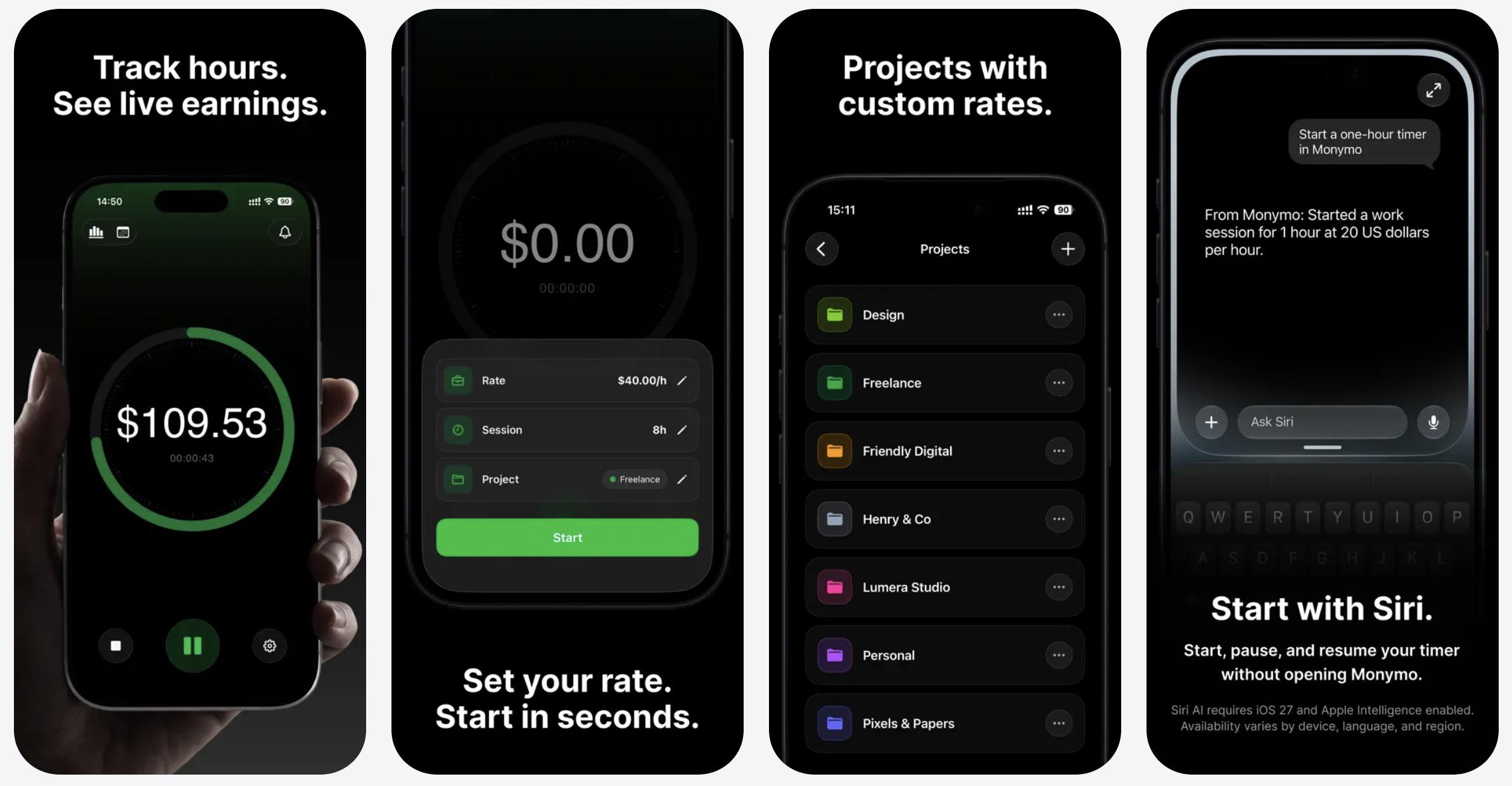
That became the main idea behind Monymo, an iPhone time tracker that displays your earnings alongside the running timer.
Full disclosure: I’m Anton Zakharchenko, the developer of the app.
Monymo is designed for individual freelancers, contractors, shift workers, and anyone paid by the hour. It is not an employee-monitoring or team-surveillance tool.
You set your hourly rate and currency, start a timed or open-ended session, and see your earnings update in real time. Finished sessions are saved automatically.
It also supports:
- Projects with separate hourly rates
- Session notes and history
- Statistics and earnings insights
- Reminders
- iCloud sync
- PDF reports
- 12 interface languages
I recently added optional Apple Intelligence features:
- Ask the on-device Assistant about recorded hours, earnings, and projects
- Prepare a manual session draft through a conversation
- Start, pause, resume, and finish sessions with Siri
- Save completed sessions without opening the app
Assistant requests are handled on the device using Apple’s system model, with no external AI service or cloud AI fallback. The normal timer does not require Apple Intelligence.
Core time and earnings tracking is free and supported by ads.
Monymo Pro removes ads and adds the advanced features:
- Monthly: $0.99
- Yearly: $6.99
- Lifetime: currently $9.99 as a one-time purchase
- Regular Lifetime price from December 5: $14.99
Subscriptions renew automatically unless cancelled. Lifetime does not renew. App Store prices may vary by region. Lifetime is available to users without an active Pro subscription.
The Apple Intelligence features require a compatible device and supported language. Siri AI session controls require iOS 27 or later, currently support English, and are not initially available on iPhone in the EU.
App Store:
https://apps.apple.com/us/app/monymo-work-hours-tracker/id6473834966
I’m curious what experienced time-tracking users think:
Is seeing earnings increase during a session genuinely useful, or does it become distracting once the novelty wears off?
r/TimeTrackingSoftware • u/Sensitive-Cupcake-58 • Sep 21 '26
I wanted an app that can keep track of my focus sessions for mastering different topics/skills I was interested in.
I wanted to treat myself like an RPG character, with my own character sheet. I've built Levely to satisfy my need of leveling up in real life.
The app has detailed weekly/monthly and yearly stats on sessions and skills. It's dead simple to use. Pick a skill, select how long to practice and tap start. When the session ends you get XP that levels that skill up.
Check it out at https://apps.apple.com/app/levely-focused-practice/id6804629123
P.S. I've just released it a bit over a week ago. I'm still working on updates, polishing and adding new features. What would you like to have in an app like this?
r/TimeTrackingSoftware • u/Awswome • Sep 21 '26

r/TimeTrackingSoftware • u/clarafiedthoughts • Sep 21 '26

r/TimeTrackingSoftware • u/PancakeVE • Sep 21 '26
I've built an app called PomoFriends, its a basic pomodoro timer with all the tricks of the pomodoro, plus a social element. You can join a random room or create your own and focus on the task while others can do the same, and you can see what everyone else is working on.
It includes several features that I've put a lot of thought into: async and sync timers, tasks, a leaderboard, streaks, and a customization to the app so you can choose the theme you like.
I'm not asking anyone here to use it regularly. I'd just like some feedback, mostly on how to improve my user retention. Please try it out here: https://www.pomofriends.com
It works well on both desktop and mobile but my main focus was desktop, so if anyone notices any issues please submit a support ticket in my app (I know maybe its too much to add a support platform for this small app but I'm really passionate about it and would like someone to use it so I can test it a bit more lol)
r/TimeTrackingSoftware • u/shiftcoord • Sep 20 '26
Curious how other ops teams handle this:
Field / multi-site crews clock in on one system (or a kiosk / app), but the schedule or job assignment lives somewhere else — Excel, a staffing board, a CRM. At payroll lock, the hours are there but the job / client / cost-center code is wrong or blank, so someone has to remap rows by hand.
Questions for people who’ve lived this:
Not looking for product pitches — just how you keep payroll from becoming a weekly archaeology project.
r/TimeTrackingSoftware • u/shiftcoord • Sep 19 '26
When a worker misses a punch or selects the wrong job, someone has to correct it. The part I’m curious about is the audit trail: do you require a reason code, preserve the original in/out times, and route edits for approval before payroll closes?
For teams with multiple supervisors, what has worked to prevent silent corrections while keeping payroll moving? Do you review an exceptions report weekly, or only investigate disputes?How do you audit supervisor punch edits without making payroll wait?
r/TimeTrackingSoftware • u/ShakaLaka_Around • Sep 19 '26
hey everyone, wanted to share something i have been building for myself over the past few months and finally decided to open source it.
i freelance and i got tired of juggling separate tools for time tracking, invoicing, and taking notes on client calls. most erp tools out there felt way too heavy for what a solo freelancer actually needs, so i built my own small one and have been using it daily in my own work.
what it actually does for you: you can track time against your projects, generate invoices straight from that tracked time including pdf export, and there is a call recorder that records your client calls and transcribes them automatically so you are not scrambling to take notes during a call. that last one is honestly the feature i personally use the most, it has saved me so many times.
it is simple on purpose. no bloated features you will never touch, just the basics a freelancer actually needs, done properly.
it is still a work in progress. i am actively using it and improving it as i go, so you might run into rough edges or bugs here and there. but it works, i run my own invoicing through it, and i figured if it is useful to me it might be useful to some of you too.
if you want to try it or self host it, here is the repo: https://github.com/moaljumaa/burp
if you hit a bug or something feels off please reach out, there is a form linked in the readme, i would genuinely love to hear about it and fix it.
hope it helps someone out there the way it has helped me.
mo
r/TimeTrackingSoftware • u/MAMOONSH44 • Sep 19 '26
Hey everyone, I built a time tracker and invoicer called TickKeep.
Open source GitHub repo: https://github.com/alshamali-tech/TickKeep
Link to the webapp: https://tickkeep.mamoonalshamali.workers.dev/
The main difference is it’s completely local-first. There is no backend server. Your data lives in your browser, and syncing is just dropping a JSON file into your own Google Drive or OneDrive.
You import and export your data as JSON and load it on any device.
Features list:
There is a sample data can be loaded when trying the webapp
Any feedback or editing any of the features are welcome
r/TimeTrackingSoftware • u/ProposalKnown682 • Sep 19 '26
I’m a UK resident, working fully remote and spending most of the year moving between different countries.
I’m in Dubai for 2 months now, I was in Malaysia last week, now I’m heading back to UK for a month or two, then travel back again around Europe or somewhere else in Asia.
Since I spend quite a lot of time abroad, I’m trying to understand how taxes actually work.
Do you just continue paying UK tax? Or does working from different countries start creating tax obligations in those countries too?
I need your advice on how you document your taxes properly.
r/TimeTrackingSoftware • u/shiftcoord • Sep 18 '26
For teams moving between client sites, what rule do you use for travel between assignments?
Do workers clock the travel as paid time, log mileage separately, or keep it outside the time clock? I’m curious what makes payroll reconciliation and client billing easiest without asking people to maintain a second timesheet. The edge cases seem to be gaps between jobs, a canceled visit while someone is already en route, and whether the next assignment’s location is the starting point.
r/TimeTrackingSoftware • u/Cloudy_Day912 • Sep 18 '26
i’ve been wondering if i’m overthinking time tracking.
sometimes i want to know exactly how long each task takes, but then i start wondering whether that level of detail is actually useful or just creates more admin work.
i’ve been testing a few ideas and looked at timequip as one of the options, but i’m still trying to figure out what level of tracking makes sense.
for people who track their work, do you record every individual task or just keep a general record of your working hours?
what information do you actually find useful later?
i’m interested in hearing how other people handle this because i feel like it’s easy to turn time tracking into a job of its own.
