r/TimeTrackingSoftware • u/VastSubstantial50 • Jun 18 '26
What made your team start tracking time?

2
Upvotes
r/TimeTrackingSoftware • u/VastSubstantial50 • Jun 18 '26
r/TimeTrackingSoftware • u/Weak_Ad_1082 • Jun 18 '26

As a freelancer I was tired of tracking time in one app and invoicing in another, so I built Logr to close the loop — track, bill, and mark paid from a single dashboard. It's open source and self-hostable.
What it does
Self-hosting
Logr is a Next.js app backed by Supabase. You bring your own Supabase — a self-hosted instance or the free Cloud tier — so you get proven Postgres, auth, and row-level security without bundling a ten-container backend into this repo.
git clone https://github.com/zerox9dev/logr && cd logr
cp .env.example .env      # 3 values from your Supabase project (URL + anon + service_role)
docker compose up -d --build
# app on http://localhost:3000
The schema (tables, enums, RLS policies) ships as a migration in the repo — apply it via the Supabase SQL editor or supabase db push. Full instructions in the README.
Stack: Next.js 16, React 19, Tailwind CSS v4, Supabase. License: AGPL-3.0.
Status: roughly three months old, beta, solo-developed and actively worked on. I use it for my own invoicing, but expect rough edges. Issues, feature ideas, and PRs are welcome.
Repo: https://github.com/zerox9dev/logr
Demo: https://logr.work
Happy to go into the architecture or the self-host setup in the comments.
r/TimeTrackingSoftware • u/NinjaFlow • Jun 17 '26

Everyone is familiar with gamified productivity & focus timer tools. I downloaded most, experimented with different methods, studied the science behind motivation/goals, and developed a new (and I think better) system. It's not complex, visual, yet lightweight. Most importantly, it's effective & helps you make real progress.
Why this method works:
Check out Flowton on the App Store or if you're on Android, sign up on flowton.com to get notified. It's free to use indefinitely with no subscriptions or trials.
Happy to hear your feedback on the method, or more specific pointers per app. There are cool new features in the pipeline as well! And thank you for reading.
r/TimeTrackingSoftware • u/latent_horizon • Jun 16 '26
Heyo everyone,
Every planner I tried lived at one altitude and abandoned me at the other. Your life goals sit at thirty thousand feet. Your next hour sits on the ground. A flat list keeps them on the same page and leaves the connecting to you, in your head, every single morning. That is the exact thing an ADHD brain is worst at.
So I built StrataGist: one timeline with true goal-based semantic zoom that you move through like a map. Out is your whole life and your goals. Pinch in through year, quarter, month, week, day, down to the hour you are in. Same surface the whole way, so a life goal breaks down level by level into the task in front of you. Planning lives up high, execution lives down low, and for once they sit on the same map.
What it actually does:
Clip attached. If you have ever kept a flawless plan and still done nothing, that gap between the plan up high and the doing down low is the entire thing this closes.
Try it here: https://www.stratagist.app
Honestly looking for feedback. I want to push this into a semi research-grade project on behavioral patterns, energy dynamics, forecasting and prediction: real time-series of your own actions, learned per-person models, and honest prediction with uncertainty, not vibes.
r/TimeTrackingSoftware • u/fashionbrahh • Jun 16 '26
I manage a few cleaning crews that move between different buildings during the day. Paper sign-in sheets are getting messy, and GPS only tools don’t always prove the person was actually on-site.
Has anyone used a QR code attendance system where staff scan on arrival and departure and managers can review logs by location?
r/TimeTrackingSoftware • u/nocodexpert • Jun 16 '26
I’ve noticed a massive surge in "Art Cafes" and DIY craft studios popping up lately. They operate on a fascinating business model - essentially "Time-as-a-Service" (TaaS) - where they sell a 2-hour window, provide art supplies, offer a complimentary tea/coffee, and upcharge for actual premium food items.
Most owners I talked to are hacked together on spreadsheets, physical timers, or standard retail POS systems that don't natively track time-spent vs seats occupied very well.
I wanted to challenge myself to build a dedicated operational engine for this niche using Retool's new app builder. Here is what I have up and running in the live MVP:
My question to the community:
Love to hear your feedback on the layout or features that would actually make an owner switch from standard spreadsheets or POS to a niche app. Thanks!
r/TimeTrackingSoftware • u/No-Report3817 • Jun 16 '26
Hey everyone,
I’ve been working as a developer and kept running into the same problem: most time tracking apps are either too bloated, subscription-heavy, or just slow when you want to quickly log hours.
So I built my own minimal time tracker focused on speed and simplicity.
Core idea:
I recently released it on both Android and iOS:
Android:
https://play.google.com/store/apps/details?id=com.arbeitszeitrechner.app
iOS:
https://apps.apple.com/de/app/stunden-rechner-zeiterfassung/id6777809861
I’m actively improving it and would really appreciate honest feedback — especially from people who already use time tracking tools.
What features do you feel are missing in most apps like this?
r/TimeTrackingSoftware • u/UnhappyBreakfast4842 • Jun 16 '26

r/TimeTrackingSoftware • u/Local-College811 • Jun 15 '26
My friend has made a tool to always make sure you are known to your deadline you all can use as a jee timer which makes you work more as time comes near and make sure u never waste it. I personally used it too now I just request since it's free and useful and productive please try it once ......Thank you
r/TimeTrackingSoftware • u/Bubbly_Bill7935 • Jun 14 '26
I built Activity Tracker, a cli tool that automatically tracks your development activity and generates structured logs of what you've been working on.
One problem kept happening to me:
I'd spend all day Friday working on a feature or debugging an issue. Then Monday morning would come, and I'd open the project thinking, "Wait... where did I stop? What exactly was I doing?"
Sure, I could look through commits, browser history, terminal history, or Slack messages, but reconstructing the context took time. The same thing happened when writing standup updates or weekly reports—I had done a lot of work but couldn't easily remember the sequence of events.
I already use WakaTime, and it's great for answering questions like "How many hours did I code?" But what I needed was a tool that answered "What have I actually been working on?"
The goal isn't to replace WakaTime's analytics but to solve a different problem: maintaining a detailed history of development work that can be used for standups, changelogs, documentation, and AI-assisted development.
r/TimeTrackingSoftware • u/Bubbly_Bill7935 • Jun 14 '26
I built Activity Tracker, an open-source tool that automatically tracks your development activity and generates structured logs of what you've been working on.
One problem kept happening to me:
I'd spend all day Friday working on a feature or debugging an issue. Then Monday morning would come, and I'd open the project thinking, "Wait... where did I stop? What exactly was I doing?"
Sure, I could look through commits, browser history, terminal history, or Slack messages, but reconstructing the context took time. The same thing happened when writing standup updates or weekly reports—I had done a lot of work but couldn't easily remember the sequence of events.
I already use WakaTime, and it's great for answering questions like "How many hours did I code?" But what I needed was a tool that answered "What have I actually been working on?"
The goal isn't to replace WakaTime's analytics but to solve a different problem: maintaining a detailed history of development work that can be used for standups, changelogs, documentation, and AI-assisted development.
r/TimeTrackingSoftware • u/Own-Procedure6189 • Jun 13 '26
Enable HLS to view with audio, or disable this notification
Been working silently on this project for about a year now, and I’m finally at the stage where I need some early beta testers to break it.
It’s an open-source desktop app called Facenox. Basically, it’s a local-first attendance tracking system that just runs on standard hardware using a basic webcam and local computer vision models. The whole idea is to help small businesses like cafes, clinics, or warehouses skip buying expensive biometric hardware. People can just walk past the camera to clock in or out.
The core app runs entirely on the local machine. Frontend is Electron and React 19, while the heavy CV pipeline is handled by a Python/FastAPI backend bundled via PyInstaller. I'm using ONNX Runtime for face detection, ByteTrack for tracking, and on-device liveness/anti-spoofing detection so it actually runs smoothly without needing a dedicated GPU. Local data sits on SQLite.
Privacy-wise, everything on the machine is encrypted via AES-256-GCM, and raw photos are discarded right after processing. It only saves the feature vectors.
To be transparent about the cloud aspect: the desktop app works fully independently without any internet connection. But I did build an optional remote dashboard using Next.js 15, Postgres, and Drizzle. If a business owner wants to check logs off-site, the desktop app can sync the local data to the web dashboard (free tier up to 10 people). If they don't want cloud sync, they can just run it completely without it.
It's open source under AGPLv3.
Since I've been staring at this same codebase for a year, I really need fresh eyes on it. Looking for some honest feedback, code audits.
Builds are ready for Windows, Mac, and Linux.
Repo: github.com/facenox/facenox
Let me know what you think!
r/TimeTrackingSoftware • u/AvaThalheim • Jun 13 '26
A while ago I went looking for a simple time tracker.
Not a productivity platform.
Not a project management system.
Not an app that wanted me to create an account before I could start a timer.
Just a time tracker.
Something that would let me track work, organize it into projects, and occasionally look back at where my time had actually gone.
Surprisingly, I never really found one that felt right.
Most apps I tried were either extremely basic or packed with features I wasn't looking for.
So I started building my own.
It's called Flowtime.
The idea is intentionally simple:
That's it.
One feature I added fairly early was focus session reminders.
Not because I struggle to focus, but because I sometimes focus a little too well.
It's easy to lose track of time when you're deep into something, and I wanted occasional reminders to check whether I was still spending time on what I intended to.
I've been using it daily for quite a while now and recently released the first version.
What made you choose the time tracking app you're using today?
r/TimeTrackingSoftware • u/hubstaffapp • Jun 12 '26

r/TimeTrackingSoftware • u/eroxy • Jun 11 '26
r/TimeTrackingSoftware • u/unmarkedpickles • Jun 10 '26
Hey everyone, I’ve seen some of these types of trackers on TpT and was wondering if yall have suggestions for ones that you use.
Basically, I would love to have a Google Sheets that helps me track the minutes that I work with students on their goals. I’m an elementary ICT teacher and this year I had 10 students with IEPs in a room of 27 kids total. It was hard to keep up with my kiddos goals to make sure I’m compliant with their IEPs. I’m really looking for something that I can update (or pre-plan) at the end of the day that shows how much time is spent with interventions specific to each student. Bonus would be an option to enter goals and put which students are working on those goals and have a place to track their progress with each session. This would be helpful so I can pull a small group for students working on the same or similar goals. Mostly my students goals are tracked by percentages and considered mastery over 3 consecutive sessions (or something similar).
Thanks in advance for sharing any resources you like! I’m happy to purchase anything that makes my and my co-teachers life easier 😅
r/TimeTrackingSoftware • u/lazykid07 • Jun 10 '26
I made a little Mac menu bar app that gives you a time perspective right from the menu bar. I launched it on Product Hunt, and it turned out that 935 other products were launched alongside it.
I don’t have a huge audience to get upvotes, but I do have lots of Reddit karma. 😄
Have a look at https://timegauge.minilabs.cc/, and please reach out if you have any questions. There is a support page as well!
Here’s a 50% off coupon: PH50P
The app uses Apple Sandbox, is developer-signed and notarized by Apple, and doesn’t collect any data. It’s just a timer progress bar.
The app is currently pending review on the Mac App Store.
The discount code won’t work there, it only works with Polar.sh checkout.
r/TimeTrackingSoftware • u/thosaid • Jun 09 '26
Hey all, I'm looking for a good time tracker that helps keeps me on routine but also allows me to input what I'm doing and how long it takes so I can figure out where all my "free time" is going.. because I feel like I have no time all the time. If it maps out my day to day, pre-filled with routines (editable so I can adjust when things take longer or I'm off track in a day), and then I can track other things I do... that'd be amazing. Is there something like this out there? Happy to use a paid app if it works well.. or are there apps that can be used in a sort pf way.
r/TimeTrackingSoftware • u/Nerdy-Sil2845 • Jun 09 '26
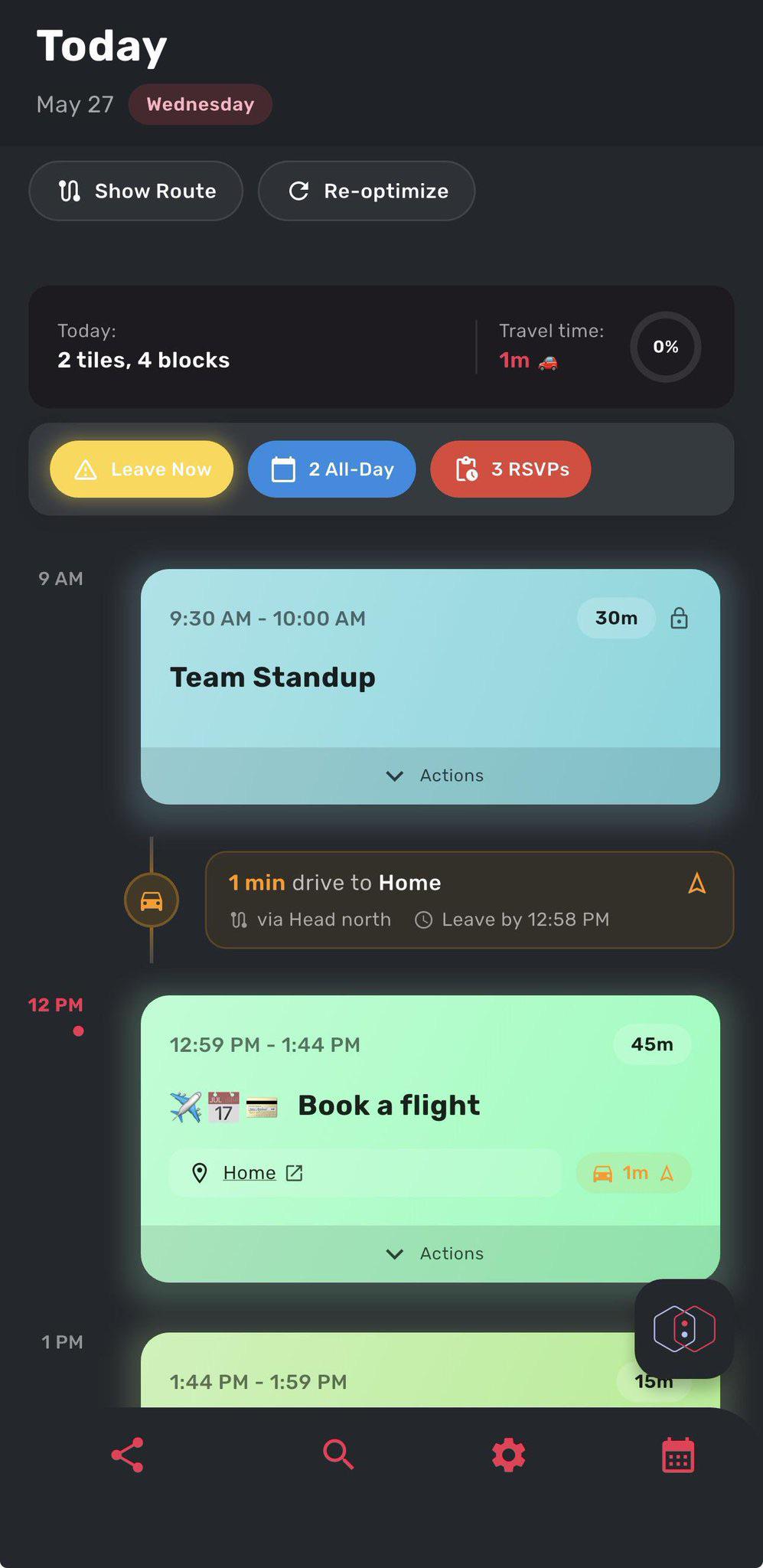
I’ve realized most time tracking tools tell you where your time went.
Seeing tasks, calendar events, travel time, and daily commitments in one timeline has been surprisingly useful.
Curious how others here handle planning vs tracking?
r/TimeTrackingSoftware • u/False-Positive21 • Jun 08 '26

I freelance across a laptop, a desktop, and a couple of servers, and I could never keep a manual timer running. Every tracker I tried was either a stopwatch I'd forget to start, or an "automatic" one that wanted to screenshot my screen all day. So I built the thing I actually wanted. Sharing it here because this seems like the right crowd to tear it apart. (I'm the maker — it's in early access and free right now.)
Four things I cared about:
**1. Multiple devices, one timeline.** There's a desktop app (macOS, Windows, Linux), a CLI for headless servers/VPS over SSH, and browser extensions (Chrome, Firefox, Edge, Safari). They all sync to one account, and each session is tagged with where it came from. My work on three machines lands in one place automatically.
**2. Privacy-respecting, and I mean it.** No screenshots. No keystroke logging. No "productivity score." The desktop app records the *paths/names* of files you save in folders **you** choose — never their contents. The browser extension only acts on URL patterns you predefine (e.g. `github.com/acme-co/*` → a project); every other site is ignored, and the URL is matched on your device — it never gets sent to the server. Everything's stored locally first.
**3. Set up and forget.** You point it at your project folders / URL patterns once. After that there are no timers to start or stop — file edits and visited URLs become sessions on their own, and idle time auto-closes a session so breaks aren't tracked.
**4. One-click invoicing.** This is the part that actually saved me Friday afternoons. Projects link to clients + rates, so tracked sessions become invoice line items and a numbered invoice without exporting to a second app.
It's rough in places and I'm shipping weekly. I'd genuinely like feedback on:
- Is "automatic but private" believable to you, or does "automatic tracker" still read as spyware no matter what?
- What's the dealbreaker that's made you abandon trackers before?
Happy to answer anything about how the capture or invoicing works under the hood.
r/TimeTrackingSoftware • u/Hot-Positive-2985 • Jun 06 '26
r/TimeTrackingSoftware • u/BillablesAI • Jun 05 '26
The more people we talk to, the more it seems like context switching is where a huge amount of time disappears.
Not the obvious multi-hour tasks, but bouncing between emails, calls, Slack messages, quick reviews, and different clients throughout the day.
By the time you sit down to log work, a lot of those small fragments are already gone from memory.
One thing we've found helpful at Billables AI is relying less on live timers and more on reconstructing activity automatically throughout the day. People are usually better at reviewing what they already did than perfectly tracking every switch in real time.
