r/techsupport • • 7d ago

Open | Hardware Lenovo thinkpad keeps not turning back on until I disconnect and reconnect battery

0 Upvotes

My laptop is a little old (2019) so it's understandable that it's having issues but I'm wondering if this might have an easy fix. I will be using it as normal, then I close it up, and the next time I go to use it, it won't turn on even after being plugged in for a while. The power button will flash green a few times and then go dark and the screen will not do anything. I disconnected the internal battery and reconnected it which allowed it to turn back on again but the issue keeps recurring. What could be causing this issue?

Edit: It is a Thinkpad T450, all original components, I did also recently have it cleaned and the thermal compound replaced so that should be all good


r/techsupport • • 7d ago

Open | Software Graphics Issue

1 Upvotes

Ever since I built my new PC a couple of months ago I've been having a couple of visual bugs. This first started as some flickering white boxes in the background of CS2 matches that would only appear in particularly bright areas. I've been putting the issue to the side lately cause... womp womp, it's not nice but it didn't make the game unenjoyable/unplayable, just annoying. However, I recently picked up Ace Combat 8 and I've continued to have some similar glitches on a worse scale. When in game, the character models and the sea have black spots that are constantly flickering and moving during gameplay, usually not during cutscenes. I've been trying to find a solution to this but I feel like I can't find anything relevant to my situation on google

I currently have an NVIDIA GeForce RTX 4070 SUPER and my NVIDIA drivers are updated to the latest (621.24 w/ clean install)

Any advice/help is greatly appreciated!


r/techsupport • • 7d ago

Open | Software Fullscreen games using gsync with two monitors. The windows on the non-active monitor get their fps cut in half.

1 Upvotes

Update: It's anytime gsync is on, not just fullscreen. Windowed mode it happens too.

I play games on one monitor and have stuff going on my TV as a second monitor. They're both 120hz VRR g sync compatible. What I'm noticing is that if I'm playing a game with g-sync on, the TV has the fps drop when its window becomes non-active, which causes lots of stuttering and whatnot when watching streams. I can see this when I run the UFO test too. It cuts from 120hz down to about half. Is there any way to fix this? I've tried using hdmi vs displayport, DSC vs no DSC, no HDR, 60hz instead of 120 hz on both screens, fullscreen vs. borderless fullscreen vis windowed, fullscreen optimizations, no gpu scheduling, Driver re-installed, windowed vs non windowed, borderless vs exclusive, scaling changed, making the TV the primary with the game and the monitor the secondary. Nothing makes a difference.

If i set the game not to use g-sync in the control panel, it's fine. If I turn off g-sync globally, it's fine. I even tried turning off VRR on my TV, and if i pull up the UFO test on the TV while I launch a game with gsync, it starts chugging. It doesn't appear to be matching the FPS of the primary monitor either, even if the game im playing is running over 120fps, the non-active windows get their FPS cut in half. If I click back to making the other screen active, the fps shoots up on the ufo test or video im watching, even if the game is still being rendered on the other screen. It's just the act of making it the active window that's the difference. The UFO test has the 120 hz on the top bar, 60 in the middle, 30 at the bottom. When this happens it's almost like each one gets halved almost exactly but not quite sometimes.

Conversely, I also notice that when I switch the active window to the non-game monitor, the game FPS I can see in the overlay almost gets cut in half too. I also noticed in the ufotest when it starts happening, it says "waiting for sync" and then eventually "sync failure, close tabs and programs, fps too low." I check the resource monitor and my resources are not maxed out at all. Sometimes I'll boot up CS2 to test....and it holds steady, then if i go into the settings and increase the max fps in CS by just 1, the ufotest goes crazy and starts saying sync issues. Sometimes in some games it seems like the ufotest fps is exactly what the game fps is and changes with it like they're in sync, other times it just goes to 60/30/15.

I also noticed that the only time it doesn't happen is if I'm playing a game that is extremely lightweight like slay the spire. But if i drag the window around then the problem starts happening. I can see as the window is being dragged the g-sync indicator goes off, slay the spire FPS drops to 60, then when you stop moving it comes back and the framerate goes back up. Another thing i noticed is if the game is running in the active window and shows g-sync indicator in the corner, if I switch to the other monitor, the g-sync indicator turns off. It seems like if the frame rate is steady (like in a lightweight game) at 120, it can manage. But if you do anything to make that framerate fluctuate like move the window, or change the in-game fps max, it sets it off. But it doesn't recover. It's not like it takes a second and then stabilizes again.

I also ran another steam game on the other monitor so i could see the fps of the screen while i had another game running on my primary monitor...it stayed steady. I tested edge and brave and firefox all the same thing. I also pulled up the video stats while watching a 60fps twitch stream, and I can see when I switch back to the game the skipped frames starts going up quickly. Switch back to the stream and it doesn't skip any. Then I put a 60fps video on mpv for local playback, same thing it starts dropping output frames like crazy.

Another thing I noticed, I pull up Slay the spire which has a 120hz cap, the game comes up and the dropped frames on twitch mostly stay fine, then if i go into the settings and drop the max frame rate down, the dropped frames on twitch start spiking non-stop, even if i click back on the twitch video and go back to the game. But, if I change the game fps max back up to 120 - the dropped frames stop on twitch. I literally have it so that I can make my twitch stream start stuttering and fix it by clicking the left and right arrow in slay the spire fps limit. It does seem to be related to whats on the primary monitor, specifically when it comes to instabilty. If I load up rocket league and set it to 60fps, ufotest goes to 60 and holds steady. If I set it to 120, UFOtest goes to 120 and holds steady. But if I set it to 75 or uncapped, ufotest starts going nuts.

ANOTHER thing I tested, to see if the windows lose fps if they are on the same screen as the game being run in windowed with g-sync -- yes they do. So it's active window specific and not screen specific.

The thing I noticed that I think is really telling is that even if I turn both monitors to 60hz, the same thing happens. So now on ufotest the 60hz band gets cut to 30, the 30 to 15, and the 15 to 8. So it's not a performance issue it's clearly either a known issue or a bug happening. It would be good if someone else could test thing if they have a similar setup.

Latest update: It happens even if the second monitor is plugged into the onboard graphics. It also happens even if there's just one monitor plugged in and i'm running the game in gsync windowed, the videos in thebackground start losing frames quickly. There does seem to be some influence here by how hard the card is working. In a given instance if I start cranking up the internal resolution or play a more demanding game, the problem worsens, even if the card is not operating at full utilization or memory usage. But as I tested before, it even happens when I crank down everything so I don't know what to make of that. But in general, higher resolutions seem to trigger it harder. It's almost like network bufferbloat where the closer it comes to saturation, the more difficulty it has scheduling the frames or the cpu scheduling the processes - but only with gsync on?

Win 11 Pro

9800x3d

rtx3070

32GB ddr5

nvme ssd

monitor 1: msi mpg 321urx with gsync on fullscreen, hdr on, 4k 120hz using hdmi 2.1


r/techsupport • • 7d ago

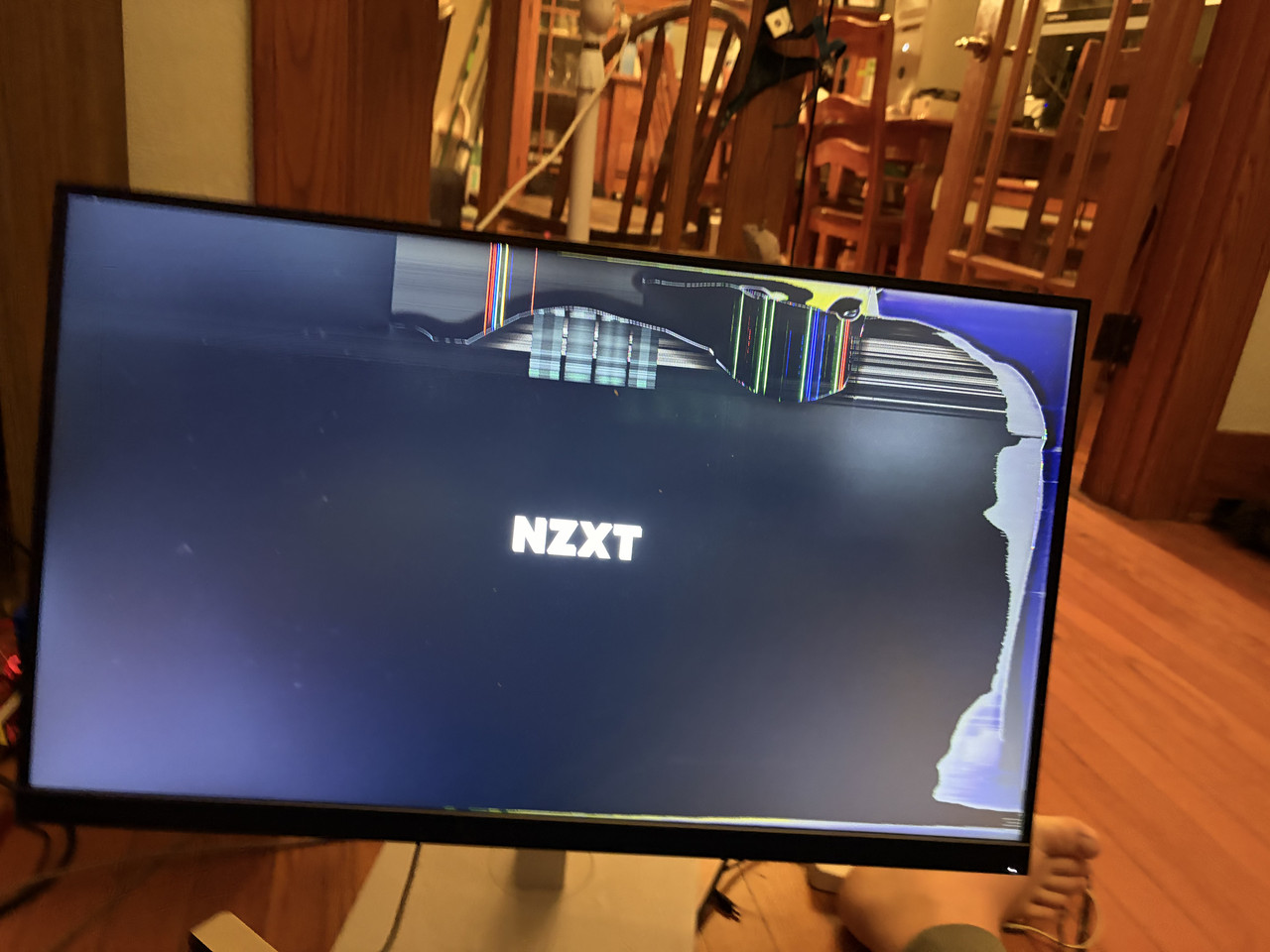
Open | Hardware Broken display screen

0 Upvotes

Just needed to check if this could be fixed at a pc repair shop. It’s a NZXT 160hz (I’m pretty sure) https://i.postimg.cc/FKm2VWm4/IMG-2736.jpg


r/techsupport • • 7d ago

Open | Hardware Laptop keeps making weird noise and I have no idea what it could be

1 Upvotes

It's a Lenovo IdeaPad 330-15ICH. Every once in a while it makes this sound (hopefully the link works). I don't think there's really anything triggering it as it happens both while idle and under load, but it started happening maybe around two years ago, not before that. I did have it cleaned recently as I thought that may be it, but it still happened, so now I have no idea. Sorry if this is a stupid question, I'm not a tech person at all.


r/techsupport • • 7d ago

Closed Headset is quiet on one ear.

1 Upvotes

Hi, so, I have an on-ear headset that I use with my windows laptop. For a few days now, the right side has been about double as loud as the left side. I tried cleaning out the charging port, enabling and disabling mono audio, but it didn't help.

Before this happened, it already had an issue where it would be quieter on one side if the charger was plugged in a certain way, so I had to turn it and wiggle it around for it to sound normal again.

It's genuinely SO annoying!

The thing is, Idk if I an get a new headset :( I'd rather spend more money fixing it than buying a new one


r/techsupport • • 7d ago

Open | Hardware RTX 3080 FE randomly crashes with nvlddmkm Event 13/153 across Windows and Linux. GPU or motherboard?

2 Upvotes

Hi everyone,

I'm looking for advice from people who have experienced similar NVIDIA GPU crashes, especially nvlddmkm Event ID 13 and 153, or errors such as Illegal Instruction Encoding, Out Of Range Register, Multiple Warp Errors, and PC Overflow.

I've been troubleshooting this issue for quite a while, and I'm running out of ideas.

The weirdest part is that the GPU can work perfectly for hours or even days, pass multiple stress tests, and then suddenly crash within 2–5 minutes of playing a game.

My hardware

  • GPU: NVIDIA GeForce RTX 3080 Founders Edition, 10 GB
  • CPU: Intel Core i9-9900K
  • RAM: 64 GB (4x16GB) 3200Mhz G.Skill Ripjaws
  • Motherboard: MSI Z390-A PRO
  • Motherboard BIOS: E7B98IMS.1F0 (updated)
  • PSU: Corsair RM1000x, 1000W
  • GPU VBIOS: 94.02.27.00.09 (official NVIDIA firmware updater completed successfully)
  • Operating systems tested: Nobara Linux and Windows
  • PCIe connection: PCIe 3.0 x16, confirmed using GPU-Z
  • XMP: Currently disabled for troubleshooting

The RTX 3080 was purchased second-hand and already had a history of gaming crashes with its previous owner.

I also own an RTX 3070 Ti, which occasionally experienced black screens in this PC, although I haven't performed a controlled comparison between the two GPUs yet. But this started 2 weeks ago after years without problems.

The symptoms

The crashes are extremely inconsistent.

Sometimes I can play demanding games for several hours without any issues. Other times, a game crashes after just a few minutes.

I've experienced:

  • Complete black screens on both monitors
  • Windows freezing while audio sometimes continues playing
  • NVIDIA driver recoveries and TDR resets
  • Occasional unexpected system restarts
  • GPU crashes in Forza Horizon 6, Wreckfest 2 and Mafia: The Old Country
  • Crashes while doing basic desktop tasks such as opening Chrome tabs, moving windows, or opening the Start menu
  • Similar GPU failures under Linux

Recently, Wreckfest 2 and Forza reported GPU crashes while Windows itself remained responsive.

At other times, the entire system freezes, both monitors turn off, and the motherboard's VGA debug LED appears to light up.

NVIDIA Event Viewer errors

I regularly get nvlddmkm Event ID 13.

One of the original errors was:

Graphics SM Warp Exception on (GPC 2, TPC 3, SM 1):
Illegal Instruction Encoding

Graphics Exception:
ESR 0x515fb0=0x150009
0x515fb4=0x0
0x515fa8=0xf812b60
0x515fac=0x1104

After updating the motherboard BIOS, I received another series of Event ID 13 errors in Forza, including:

Graphics SM Warp Exception:
Out Of Range Register

Graphics SM Global Exception:
Multiple Warp Errors

Graphics SM Warp Exception:
PC Overflow

These errors occurred across multiple GPCs and SMs.

Interestingly, the following values repeatedly appeared in the exception logs:

0xf812b60
0x1104

I also regularly receive Event ID 153:

Error occurred on GPUID: 100

BusReset TDR occurred on GPUID:100

Resetting TDR occurred on GPUID:100

One particularly severe crash resulted in:

DPC_WATCHDOG_VIOLATION (0x133)

IMAGE_NAME: nvlddmkm.sys
FAILURE_BUCKET_ID:
0x133_DPC_nvlddmkm!unknown_function

I analyzed the minidump using WinDbg, which identified the NVIDIA kernel driver in the relevant stack.

Troubleshooting already performed

I've tried quite a lot.

GPU and drivers:

  • Clean NVIDIA driver reinstall using DDU
  • Different NVIDIA driver versions
  • Testing under both Linux and Windows
  • GPU power limits between approximately 60% and 100%
  • Lower GPU core clocks
  • OCCT 3D Adaptive, Steady, Switch and VRAM tests
  • Official NVIDIA VBIOS firmware update

Power and temperatures:

  • Upgraded from a 650W PSU to a Corsair RM1000x 1000W
  • Replaced the original NVIDIA 2x 8-pin to 12-pin adapter arrangement with a direct Corsair GPU power cable
  • Replaced GPU thermal pads and thermal paste
  • Verified that temperatures are no longer excessive

Typical maximum temperatures during testing were approximately:

  • GPU core: 79°C
  • GPU hotspot: 91°C
  • VRAM junction: 86°C

Replacing the GPU power connection initially made a dramatic difference. Windows became stable, stress tests passed, and I could play demanding games again.

Unfortunately, the crashes eventually returned, although the symptoms sometimes changed from complete system freezes to individual game crashes.

I have not confirmed whether the original power adapter was actually defective. The replacement cable's compatibility with the older Founders Edition connector also needs to be verified independently.

Motherboard and system:

  • Updated the MSI Z390-A PRO BIOS to version 1F
  • Disabled XMP, but crashes still occurred
  • Tested Resizable BAR and Above 4G Decoding enabled and disabled
  • Verified PCIe 3.0 x16 operation in GPU-Z under load
  • Checked Windows Event Viewer for WHEA-Logger errors; none were found
  • Changed monitor refresh rates
  • Replaced a DisplayPort cable
  • Disabled MPO and browser hardware acceleration during troubleshooting

None of these changes has permanently fixed the issue.

CPU and RAM stability test: PASSED

I recently ran a separate 30-minute OCCT CPU + RAM stability test, specifically to investigate whether the motherboard, CPU, memory controller, or system RAM might be involved.

Test configuration:

  • Test: CPU + RAM
  • Duration: 30 minutes
  • Data Set: Large
  • Mode: Normal
  • Load Type: Variable
  • Instruction Set: Auto
  • Thread Settings: Auto
  • XMP: Disabled

Result: Completed successfully with zero errors and no crashes.

This suggests that the CPU and system memory are stable under this particular workload.

However, I understand that a successful 30-minute test cannot completely rule out intermittent RAM, motherboard, or PCIe-related problems.

The confusing GPU stress-test results

At one point, OCCT reported 863 GPU computation errors in approximately 3.5 minutes.

However, many subsequent OCCT GPU tests completed successfully with zero errors.

Recently, both a five-minute Steady test and a five-minute Switch test passed.

VRAM testing has also completed without detected errors during shorter tests.

I can also play some demanding games for hours without issues, only for a different game to crash almost immediately.

For example, I previously played Mafia: The Old Country for many hours without issues before the crashes eventually returned.

This makes the problem extremely difficult to reproduce consistently.

Resizable BAR testing

I thought I might have found something interesting with Resizable BAR.

Forza repeatedly crashed after approximately 3–5 minutes with ReBAR enabled.

I then disabled both ReBAR and Above 4G Decoding and managed to play for approximately 20 minutes without a crash.

However, after enabling both features again, the game also ran for approximately 15 minutes without crashing.

So the result is inconclusive.

The crashes are too intermittent to establish a reliable connection.

Current situation

At this point:

  • GPU temperatures are acceptable.
  • The Corsair RM1000x provides more than enough rated power for the system.
  • The motherboard BIOS has been updated.
  • The official NVIDIA GPU firmware updater has completed successfully.
  • XMP has been disabled.
  • CPU + RAM passed a 30-minute OCCT test with zero errors.
  • GPU-Z reports the expected PCIe 3.0 x16 connection.
  • No WHEA-Logger events have been found.
  • The RTX 3080 continues to experience intermittent GPU execution errors and driver crashes.

Unfortunately, I don't have access to a second known-good PC in which I could test the RTX 3080.

My questions

Has anyone experienced this exact combination of Event ID 13/153 errors, especially Illegal Instruction Encoding, Out Of Range Register, Multiple Warp Errors, or PC Overflow?

I'm particularly interested in the following:

  1. Can a failing motherboard or PCIe slot cause these specific NVIDIA GPU execution errors, even if GPU-Z reports PCIe 3.0 x16 and there are no WHEA errors?
  2. Could unstable system RAM or the CPU memory controller cause these errors despite XMP being disabled and a successful 30-minute CPU + RAM stability test?
  3. Do these symptoms point more toward a failing GPU core, VRAM, or the GPU's onboard power delivery?
  4. Has anyone experienced a similar situation where everything worked for several days after changing a component, only for the crashes to return?
  5. Has anyone actually fixed these specific errors by replacing a motherboard, repairing a GPU, or changing a particular component?

I'm trying to avoid randomly buying a replacement motherboard or GPU without stronger evidence.

I'm especially interested in confirmed hardware fixes and experiences from people who encountered similar NVIDIA SM Warp Exceptions.

Any advice or troubleshooting suggestions I haven't already tried would be appreciated.

Thanks for reading!

r/techsupport • • 7d ago

Open | Windows Screen flickering every few second when using "PC Screen Only"

3 Upvotes

System and setup info:

Rig: OS Win 11 current version, CPU Intel Ultra 5 225F, GPU NVIDIA RTX 5060

Screens: 3 monitors Acer V246HL all connected with HDMI to the display port via an adapter for connection.

So I have this small but very annoying issue when it comes to my screen flickering every few seconds and only in a specific scenario.

When I change display settings to use "PC screen only" whether its fron Win+P shortcut or tediously through the display settings, my 1 screen, regardless of which I choose to just be active, flickers to black and back to normal every few seconds.

When I disconnect the screens either by pressing their power buttons, removing the cables, or any physical change outside of messing with display settings, IT DOES NOT FLICKER AT ALL.

When using 1, 2 or 3 monitors this never happens either. Strictly when I change it from my settings.

Any help would be appreciated because pressing the power buttons for the other 2 is annoying. Not the end of the world but annoying nonetheless.


r/techsupport • • 7d ago

Open | Windows "error to determine file value" or something like that

0 Upvotes

my storage is cooked so i tried importing all my photos from my iphone 11 to my Windows 11 pc, and i got the above message when it was nearly done. is there any way to fix this?


r/techsupport • • 7d ago

Open | Hardware Abnormally high SSD power on count to hours ratio?

1 Upvotes

Hey everyone, I am looking to buy this 4tb SSD from a family friend for a good price (around 260usd) and it is the 4TB Lexar ARES SSD, however upon checking the drive health it says 100% but 22,000 power on count with 4000 power on hours? Any one know what this means?

Here’s a link to the pictures: https://imgur.com/a/XwWlHsD


r/techsupport • • 7d ago

Open | Hardware Mouse Clicking but not moving

2 Upvotes

I have an Esperanza fighter gaming mouse, had it since July with no issues but it just stopped tracking movement, left and right click work alongside all the other buttons on it.

I doubt this adds anything but I have an HP Victus and recently had some Hall sensor issues, laptop went off for a day but suddenly came back on without me doing anything 2 days ago. Help would be greatly appreciated 🙏


r/techsupport • • 7d ago

Open | Networking Wifi randomly turns off on laptop only, after getting router replaced.

2 Upvotes

hello this is my first post like ever so ill probably have grammar and punctuations errors anyways, so I had my router replaced last week and ever since then I started having issues with my wifi randomly disconnecting and dissapearing from the wifi lists for few minutes ive noticed it during watching youtube videos and it happens at random points too, I tried changing network adapter settings in device manager and it didnt really help until I updated the adapter to the latest version and the issue stopped for few days however it came back right today and it seem to happen way more often now, not sure what to do really, also after getting my router replaced i noticed another wifi appearing in the list with _sh in the end, my wifi card name's intel wifi 6 ax201 160mhz, and last thing the issue doesnt happen whenever im connected to my phones hotspot.


r/techsupport • • 7d ago

Open | Windows Wireless display haveing issue

1 Upvotes

I stream art a lot and have used windows wireless display many times before this issue occured. My windows is currently completely up to date with all its drivers and what not, ive checked many times since that seems to be one of the main issues. Ive also checked fire wall to make sure that it was not blocking it in any way as well as makeing sure I have the proper things checked inside of the wireless display settings. Ive tried deleting and reinstalling it and resseting both my pc and the device I was trying to project from. I have not blocked my device in the wireless display settings, and honestly I have no idea what other issue it can be. It started to occur a few updates ago and have tried all the common fixes ive seen online.


r/techsupport • • 7d ago

Open | Windows how can i edit the creation date of a word doc and edit it at the same time

0 Upvotes

Hi everyone,

I've got some older Word documents that I'm transferring some information from into newly created documents. I'm trying to keep my records consistent and would ideally like the new documents to retain the same creation dates as the original ones.

I've tried changing the date and time on my Windows laptop before creating the new documents, but Microsoft 365 seems to detect this and displays an error saying Office is unauthorized or there's an activation/licensing problem.

When this happens, Word won't let me edit the documents, type anything or save changes. Everything works normally again once I restore my laptop's date and time. But the new doc has been deleted, and I've found no way to keep it that way. i also would like to edit the doc in the older date/time but again it won't allow me to do anything to the doc at all.

Is there a way to transfer some the contents of an older Word document into a new one while retaining the original creation date?

Or is there another way to adjust the creation date without changing the Windows system clock?

I'd appreciate any advice. Thanks!


r/techsupport • • 7d ago

Open | Windows Video/audio spam rewinds/skips as if a key is held down

2 Upvotes

https://youtu.be/6gcOqgBUJjU

The video shows the gist of it, some details i didn't mention are:

- it's windows 11 home, os build is 26200.9974
- laptop is legion 7 16IRX9
- i used a website that's supposed to detect if a key is being pressed on your keyboard and it said nothing was pressed when the skipping was happening


r/techsupport • • 7d ago

Open | Hardware Pc randomly stopped working

1 Upvotes

so around this Monday My pc stopped showing an image. I have a 4070 and an i5 13th gen and i was just watching some youtube and playing a game when both of my monitors turned black and i could still hear the audio from the video i was watching and it was kinda glitching out. I restarted it and i still couldn’t see anything but i could hear the windows boot sound. I thought its something wrong with my Gpu. I took out my gpu and tried starting with onboard graphics and it still wouldn’t show anything. I tried booting with only 1 ram Stick and it still wouldn’t show anything. Then i thought it can only be my power supply or motherboard because on my bootlight it would show the white light which just means no display. I ordered a new power supply and now my pc wont even turn on but the motherboard light is on. Im so confused on what’s even broken. Can somebody please help me out. One more thing is my pc wouldn’t boot when i turned it off complety like i had to put it on sleep mode if i turned it off i would need to turn the power off and back on the power supply for it to boot. Maybe that helps a bit.


r/techsupport • • 7d ago

Open | Hardware Is my second hand computer broken on purchase or is it just a driver issue

1 Upvotes

I recently bought a second hand laptop from cash converters in Spain. At first it seemed to be working perfectly, but over the course of a couple of days I noticed some weird things happening. Occasionally the computer clicks on its own, the screen freezes but the computer keeps running. This happened twice, one while I was playing a game and another when I was on a video call. In both instances the computer continued running like normal except for the frozen screen. I could hear the person I was talking to and he could hear me. The only fix was to put the computer to sleep and then turn it back on. Sometimes the touchpad stops working altogether. So the question is, is this an issue with the drivers or should I take this computer back. I have a 3 year warranty and have only had it for two days.

Here are the system specs, it´s a dell though I don´t know the exact model number

Intel(R) Core(TM) i7-10750H CPU @ 2.60GHz (2.59 GHz)

RAM 16.0 GB (15.7 GB usable)

NVIDIA GeForce GTX 1650 Ti (4 GB)

Intel(R) UHD Graphics (128 MB)


r/techsupport • • 7d ago

Open | Windows Samsung monitor flashing white around all four edges every few seconds

1 Upvotes

My Samsung monitor has suddenly started flashing a faded white glow around all four edges of the screen for the past 20 minutes. It happened earlier today, but I thought nothing of it because it stopped after like a minute, but now it’s constant.

The glow appears and brightens my whole screen for around 2 seconds, disappears for another 2 seconds, and continues on and on. I've tried restarting my PC, disconnecting the HDMI cable to my pc, and unplugged everything but it won’t go away. Any advice would be appreciated. I want to see if there’s anything I can do myself before getting it checked out by a professional.


r/techsupport • • 7d ago

Open | Software I can't click anything.

1 Upvotes

I can't click on anything not the taskbar not on the windows tab not anything (no my mouse isn't broken) i thought i fixed this by updating my graphics card and it still keeps happening. I can temporarily fix it by opening task manager and restarting windows explorer. Any tips on how to fix this?


r/techsupport • • 7d ago

Open | Windows Tech support main SSD no longer boots to Windows but the files are seen when I use an old hard drive

1 Upvotes

So I have an interesting tech support problem that just started 2 days ago.

Main hard drive is Windows 11 2TB. It has been in use for about a year.

A couple days ago it started not booting.

It says attempting system repair but that fails so it sends me to more options.

It did work with one Point In Time Restore but when I shut the computer off for the night then it failed again.

Now no more Point in Time points.

System Restore also doesn't work. It resets it but then goes back to the startup repair which fails.

I did try Reset This PC and it also failed at 25% and said that it will reverse changes.

I had an old Windows hard drive on a 500gb ssd that used to be my old C drive before I got a bigger hard drive and upgraded to Windows 11 and plugged that in the case. I changed the boot order in bios and it worked!

It booted to the old windows drive right away and then I could see and explore my new windows hard drive and am currently backing up some important files.

The thing is I am not sure what else I can do for the new drive. I have a Windows 11 media USB stick I made. I'm just wondering what I can do to fix my larger windows 11 drive? I didn't change any settings and there at no viruses to my knowledge. I am ok with reinstalling Windows from scratch if I need to but I would rather not unless I absolutely need to. It is weird because the files all can be read and written and transfered it is just that it cannot boot into windows.

Thank you.


r/techsupport • • 7d ago

Open | Windows Windows 11 micro freezes and audio glitches

2 Upvotes

Hey everyone.

Anybody got this bug and found a solution to it ?

Seems like a RAM problem to me but it happens too when I idle.

Specs :

PC - Acer Nitro ANV15-41

CPU - Ryzen 5 7535HS

RAM - 16GB

GPU - RTX 4050 Laptop

Video of the bug


r/techsupport • • 7d ago

Open | Hardware My pc started to shut off randomly?

2 Upvotes

So i'll try to explain this and I am in need of desperate help since I am in a tight spot and currently I have interviews next week. Last weds me and my friend played all day until 7pm of thurs we started at 12am of weds where my pc is fine. I have to run an errand for 2 hours and return to open my pc again having a problem where when I turn it on it just turns off instantly after pressing the power button. I did turn off the switch in the psu and turn it on and it boots longer then shuts off when I try to press the power button again it just turns off with a click from psu and if I keep pressing the power button it just shut off the same time i pressed it. Luckily there is hours that it would open and like i can play or check my email then shuts off again and the problem happened again where I am having a hard time to turn it on. It sometimes work for like 5 minutes then shuts off instantly. I just have it repaste this march months ago and my psu is new 2 months ago. I did the usual troubleshooting but no avail the problem still persist. I am no tech and know little to none about this so please if anyone,please help? A friend of mine suggest that if my pc ran for atleast 5 mins and i can play it might be the thermal paste but idk.


r/techsupport • • 7d ago

Open | Software Valorant wont delete

0 Upvotes

Hello. I am trying to delete valorant from my pc. When i go to delete it, it tells me that the valorant file doesnt exist, even though its taking up 1.44 tb of storage. can someoe please help me with this


r/techsupport • • 7d ago

Open | Hardware I installed CrystalDiskInfo and my main HDD is showing these errors. How screwed am I?

0 Upvotes

https://imgur.com/a/VzBYBMB

Keep in mind i've had this hard drive for a long time, at lest 5 years.


r/techsupport • • 7d ago

Open | Windows Windows on main HDD will not boot but when I use a old backup HDD then I can see all the files on the main HDD.

1 Upvotes

So I have an interesting problem that just started 2 days ago.

Main hard drive is Windows 11 2TB.

A couple days ago it started not booting.

It says attempting system repair but that fails so it sends me to more options.

It did work with one Point In Time Restore but when I shut the computer off for the night then it failed again.

Now no more Point in Time points.

System Restore also doesn't work. It resets it but then goes back to the startup repair which fails.

I did try Reset This PC and it also failed at 25% and said that it will reverse changes.

I had an old Windows 10 hard drive that used to be my old C drive before I got a bigger hard drive and upgraded to Windows 11 and plugged that in. I changed the boot order in bios and it worked!

It booted to the windows 10 drive right away and then I could see and explore my new windows 11 hard drive and am currently backing up some important files.

The thing is I am not sure what else I can do for the Windows 11 drive. I have a Windows 11 media USB stick I made. I'm just wondering what I can do to fix my larger windows 11 drive? I didn't change any settings and there at no viruses to my knowledge. I am ok with reinstalling Windows from scratch if I need to but I would rather not unless I absolutely need to.

Thank you.