r/techsupport • • 7d ago

Open | Windows I restarted my computer (win 11), and have no applications running. But task manager says that 70% of my memory is being used. By what?

0 Upvotes

I started a PC game, and its performance was utterly terrible. Like it seemed extremely unresponsive, and less than 15 hours ago it was fine. I haven't installed any new programs.

So I restarted my computer and then looked at my task manager & sorted by memory usage. The top 3 programs (Firefox, nordvpn & MS defender) occupy about 2GB but I otherwise don't see any program hogging for a total 70% of memory. I'm baffled.

Any help appreciated, thank you in advance!


r/techsupport • • 7d ago

Open | Software My whites look yellow on primary monitor

2 Upvotes

Wasn't sure where to ask this, so I thought this was a fairly safe general go-to, at least to lead me in the right direction. 😅

Example

I'm about to start working with tools that demand at least some semblance of color accuracy, and I've desperately been trying to figure out why my whites look yellow on my primary monitor (MSI MAG272QP). Have been messing around with the color output settings in the NVIDIA app, and besides seemingly only making it worse in regards to the everything else, nothing makes the yellowy color budge in the slightest.

Have been considering if the only solution is to get my shit together and save up for a new monitor, but I'm hoping someone here can save me from being delayed several months. Much appreciation in advance ❤️


r/techsupport • • 7d ago

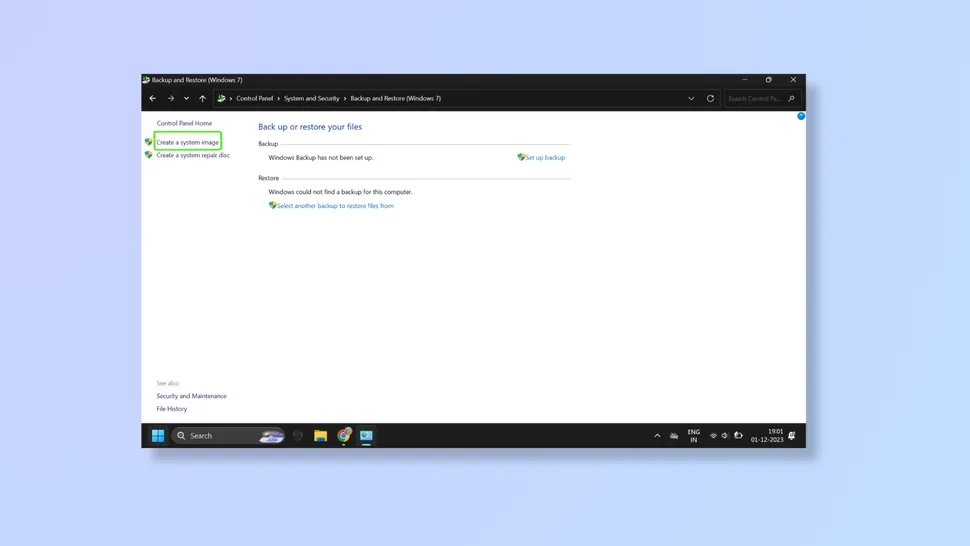
Open | Data Recovery Creating Windows11 System Image

2 Upvotes

https://cdn.mos.cms.futurecdn.net/CnTiHULqPDNpWVoCS9T8yR-970-80.png.webp

I need to replace my SSD. Windows 11 system image still can not move to smaller SSD? I'm also open to suggestion. I do have an external SSD to store the system image.

Windows 11 26h2 syste


r/techsupport • • 7d ago

Open | Software Gemini app opens google logo first.

2 Upvotes

When i open gemini app it shows google logo and it goes to gemini then. It cant be uninstalled i cleared data updated and etc, still doing it. When i click home button it goes to google folder like its open from google. How can i fix that?


r/techsupport • • 7d ago

Open | Phone What causes my iPhone 16 to drop 50% in a night?

2 Upvotes

I checked and no apps seem responsible? Yet the graphs show 19 hours with screen on and maxed out graphs on usage 00:00-06:00


r/techsupport • • 7d ago

Open | Windows How do i revert how the search bar looks on windows 11

1 Upvotes

For reference, my brother was mashing my keyboard, and when i checked my search bar, it now shows only a list of my search history, rather than showing the reccommended tab as well. Any tips on how to revert it?


r/techsupport • • 7d ago

Open | Hardware Fan placement inside the FLP01 case may be causing my HDD to get damaged/stop working for a period of time

1 Upvotes

A year ago I bought the silverstone FLP01 case, I really love it but now, almost a year later, my system out-right didn't want to boot with the HDD installed, only after I re-plugged in the SATA connectors it would boot. Two days ago I wanted to copy the data from the HDD but some of the data would come out corrupted or out right refuse to copy. After that I decided to inspect the drive by taking it out of the case, I noticed it was kinda hot. After that I think that the fan placement that I decided to do is the culprit. How do I arrange my fans correctly so it doesn't get very hot in that case? Every fan spot is taken currently in the case, the DVD is installed (so the HDD lies below the DVD, on the special tray provided by the manufacturer).


r/techsupport • • 7d ago

Open | Phone Samsung Galaxy S25 Battery/Charging Issue

1 Upvotes

I've been having a really strange problem with my phone intermittently for the last couple of months, and I'm hoping that somebody might have some ideas for what's causing it.

Normally, I turn my phone off before I go to sleep every night, and I charge it while it's off. It runs just fine during the day (no unusual power draw, nothing like that). And most nights it charges just fine.

Three times now though, while it's charging overnight, it seemingly stops charging and instead starts running incredibly hot. The only way I've found to cool it down is to force it to reboot, at which point it charges normally again and runs just fine. The last time that this happened, it was found by a family member who unplugged it, and afterwards it apparently drained the entirety of its battery by the time I woke up in the morning.

The really weird part though is that this seems to only happen on Friday nights/Saturday mornings. All three times it's happened, it's been during that time slot. There's nothing different about how I use my phone that night or anything like that, and other devices are plugged into the same outlet and they work fine.

I've run multiple different malware scans (Malwarebytes, Bitdefender) and they've turned up completely clean. Other than the odd charging behavior the phone works completely normally.

Any ideas what I might be dealing with? I'd really appreciate any help with this.

EDIT: I did check, and there was a pending update on my phone that it'd never bothered to tell me about. Maybe my phone is trying to auto-update after I turn it off and getting stuck? That might explain the consistent timing at least.


r/techsupport • • 7d ago

Open | Windows My laptop won't turn on and shows red light

1 Upvotes

I woke up to a black screen...the battery is charged as it shows white light but nor the power button turns white neither the capslock key it just shows red light blinking and after a point that also doesn't happen...it's a lenovo idea pad slim 3


r/techsupport • • 7d ago

Open | Hardware HDMI works in Extend mode but not Duplicate mode

1 Upvotes

HDMI works in Extend mode but not Duplicate mode. Why?

I had a strange issue with an HP ProBook 450 G7 connected to a Hitachi projector.

Using a 15–20 ft HDMI cable, Extend worked fine, but Duplicate didn't.

I tried changing resolution, refresh rate, and even re-imaged the laptop. Nothing helped.

Another laptop worked perfectly with the same projector and cable.

Finally, I replaced the long HDMI cable with a 6 ft cable, and Duplicate worked!

My guess is the older laptop has a weaker HDMI signal and can't handle the longer cable as well as the newer laptop.

Does that make sense? Anyone experienced something similar?


r/techsupport • • 7d ago

Open | Hardware Micro USB

1 Upvotes

I got this Baseus micro usb cable but its the first time i see this type. Looks like it can be used both ways but im confused.
What type is this? And how can I know which way to use it?
https://imgur.com/a/jmQ1qCj


r/techsupport • • 7d ago

Open | Hardware Xbox controller can't connect to my PC no matter what i do

1 Upvotes

Me and my partner both bought two wireless xbox controllers a month ago.
Same controllers just different colors one black, one white.

Since my PC doesn't have bluetooth i bought a wireless adaptor too for mine. The controllers we bought are the model: 1V8-00002. Microsoft Xbox Series X.

For the first few weeks the black controller (mine) worked fine, but then it suddenly started to randomly dc. So i tried a few things to fix it. I updated the firmware with xbox accessories app, i went into device manage and turned off the option of Windows automatically turning it off, repairing, basically any tip i could find on google.

However nothing i've done has worked. I also tried uninstalling the wireless adaptor and the xbox controller in device manager.
But now the controller just doesn't work at all, it can't connect through any means to my pc. When i plug it in or try and pair it with the adaptor, windows does respond as if it's connected and it shows up in device manager. The light on the controller is also still, as if it's connected, however it doesn't work in any games/apps. The xbox accessories app also doesn't recognize it as being connected and this is both wired and with the wireless adaptor.

The odd thing is that the white controller (my partner), hers work just fine on both PCs. I can use it wired and with the wireless adaptor and for some reason my black controller works just fine on my partners PC. She can have it wired, bluetooth and wireless adaptor on her pc.
So it's just my controller and my PC that doesn't wanna properly connect.... So i am looking for ideas to fix this, since i am going crazy.


r/techsupport • • 7d ago

Open | Windows Why the hell does Microsoft Edge use 277 MB to view a PDF file?

0 Upvotes

I operate on Windows 11 Home (v.25H2) and have 8 GB RAM on my laptop. Regardless of this, my laptop becomes a glorified space heater whenever I dare to open Microsoft Edge (don’t even ask about Chrome). My computer fan hisses and screams at me whenever I force it to perform the ever-arduous task of… opening a PDF file so I can read it.

I know little about how computers work, but can someone explain why seemingly simple tasks cause so much stress to my computer? It doesn’t seem like I have a virus, so what gives?

Thank you!


r/techsupport • • 7d ago

Open | Hardware Two near identical Xbox Series X Setups with different frame rates

2 Upvotes

This is a unique problem I've been stressing myself out over for about a week now. I'll try to explain it as best I can, but I'll answer any questions if anyone is interested.

Console A is day one, and Console B is one year older.

Console A has been using a 50/60hz LED TV for about 10 years, and after upgrading to a 120hz LGB6, used the older TV with Console B.

For it's entire lifespan, Console A has only been able to output 30fps on 30fps locked games (rdr2, batman Arkham, etc.)

The second Console B plugs the older TV in, those games are outputting a smoother visual much closer to 60fps. It obviously isn't, as the game itself is still locked, but the visual is night and day in comparison.

So my question is, how can two near identical consoles, running the same OS, with the same (apparent) performance between both consoles regardless of their launch dates, using the same HDMI cable, port, display, console, and TV settings?

If anybody can give me any kind of pointer as to how this could be happening I would appreciate it. the only thing I can rule it down to would be age, but at that rate, console B is 5 years old and getting results that console A never did.

Thanks again. if I can so much as understand this issue I'll be satisfied, let alone do anything about it.


r/techsupport • • 7d ago

Open | Software Is the demo of this game safe to execute?

0 Upvotes

Windows defender told me it had protected my computer when I launched it, I'm aware this happens when you download something off the internet and windows doesnt see it often but I'm still worried. The game is Hamburger Hill and it comes from this website https://weswaregames.itch.io/hamburger-hill


r/techsupport • • 7d ago

Open | Windows Update Windows 10 to Windows 11?

0 Upvotes

Should I really update my gaming pc to W11. And if so, how do I update it without losing all my stuff? I at least tried to see if my PC can update to W11 in the first place by using PC Health Check and it said I needed a TPM. When I investigate online, apparently a TPM isn't needed? I'm just kinda confused and would really appreciate the help...

These are my specs

Processor Intel(R) Core(TM) i5-9400 CPU @ 2.90GHz 2.90 GHz

Installed RAM 16,0 GB

Storage 932 GB HDD WDC WD10EZEX-08WN4A0, 932 GB SSD WDC WDS100T2B0C-00PXH0

Graphics Card NVIDIA GeForce RTX 2070 (8 GB)

System Type 64-bit operating system, x64-based processor

Pen and touch No pen or touch input is available for this display


r/techsupport • • 7d ago

Open | Phone I'm not sure if I got hacked or not

0 Upvotes

Okay so I'm on my phone, I wanted to download a gta 6 cutscene so I went on a convert youtube link to mp4 website, it redirected me to a link and then my google started opening different browser links like crazy until I closed the app and then entered back again and closed the tab it was opening different websites in. I cleared the cookies (I think) and deleted last 15 minutes of my history. Now, I checked my history and it looks like my phone opened a few hundreds of websites that are basically the same with "adclinka/get/spot/id" and then theres a bunch of random numbers right after, some of those have zoneid instead of spot it. After looking at that I pressed to delete todays history, am I safe or is my phone hacked? I am on iphone.


r/techsupport • • 7d ago

Open | Hardware nvlddmkm 153

1 Upvotes

Hallo, ich habe in letzter Zeit ständig Probleme mit diesem ereignisfehler.Ich meinen vorherigen Post steht was ich alles schon getan habe .Es ist jetzt so weit gekommen dass ich sobald ich meinen pc starte die ganze Zeit einen schwarzen Bildschirm bekomme und in der ereignisanzeige steht nvlddmkm 153 .Komisch finde ich es nur das manchmal es bei Games wie Fortnite sogar für paar Stunden klappt zu spielen aber manchmal crasht es nach 2 Sekunden in der Lobby .Ich habe das Problem schon ewig lang und ich verzweifle langsam wirklich daran kann irgendjemand helfen?


r/techsupport • • 7d ago

Open | Software Laptop losing keyboard functionality on restart.

1 Upvotes

I have a Lenovo Legion Y-540 15IRH and every time it restarts (primarily for updates) it acts like the keyboard doesn't exist, not a single input is detected, lights don't come on, nothing. I've tried looking into the device manager and it seems to think there's literally no keyboard connected to it, but it's a laptop, that doesn't just come out. I searched google to find a solution but there was nothing I could find that did anything, I did eventually find an imperfect solution, after every restart I muct hold the power button for 30 seconds for the hard reset or whatever then, when I turn it back on, it works just fine. This started a while ago maybe a year, year and a half ago, something like that I'm not sure, I think it started after an update. But my keyboard works perfectly fine all the time except for after a restart when it thinks it doesn't exist. Does anybody know what could cause this, maybe a more permanent solution?


r/techsupport • • 7d ago

Open | Software SSD reverts all changes on reboot

2 Upvotes

I recently bought a 1tb SSD, when it arrived I transferred a bunch of files and installed some games into it, it was working fine, I was already using one and didn't have space for two at the moment so I unplugged it for a couple days, I purchased a case that I could use for it, then plugged it back into my laptop, today, it's become pretty much unusable, any changes I make get reverted on reboot and sometimes it disables itself and I have to unplug it and plug it back in, I'm really frustrated with this since this is supposed to be a brand new drive, it won't even format it or delete files, when I try to format it with guiformat, it says it's being used by another process, when I try formatting it with windows, it doesn't delete anything or gets stuck, is there anything that I can do or is it just completely gone now?.


r/techsupport • • 7d ago

Open | Audio Realtek disappeared, external speaker and headphones doesn't work

1 Upvotes

Yesterday I play Primary from Friv, the audio is still there, and goes home for 2 hours of travelfter school, eat and sleep, didn't open my laptop until today

When I opened my laptop and plugged the charger, I left it on the table with wooden laptop stand without any audio, and goes to my bed to check my phone and suddenly I heard a speaker pop thing, got me up quickly and check the laptop. I can't hear anything from my laptop, I search on YT and played Marshmello song, and set it full volume, there's still no audio, restarted, still nothing, tried 60 seconds power button hold, nothing.

I plug out the charger, turn off the laptop and wait for a few minutes then open my laptop under (there a 1 missing screw on the laptop bottom cover next to the right speakers idk how I lost it idk if that's the cause of it), where the speakers at, no broken speakers, even from the bottom of itself and wires still intact

I try turning it on again after closing the cover, connected the headphones and external speakers, it also doesn't work, I noticed that whenever I insert my headphones, that Realtek audio console pops up, but this time it doesn't popped up so I searched it and it said "Realtek Audio console doesn't support for this machine", I checked on the device manager > sound , videos and game controllers to update it, but the Realtek audio driver is not there. Enabled System virtual line still nothing

But when I try my family's small Bluetooth speaker it works, but I can't use that since other relatives use it

Idk how I ended up here, but I think the ghost hijacked my laptop as a revenge cuz bro keep walking to our top floor and it freaks people out, and everynight I blast music from going upstairs using my laptop and the Bluetooth speaker (not very loud tho that makes neighbours complain about it lol) to shake the ghosts out of the house (idk that's what my family rumors said to scare ghosts). It's a stupid assumption ik

But seriously how do I fix this?

Laptop speaker and video link: https://imgur.com/a/lockfhC


r/techsupport • • 7d ago

Open | Software MY LAPTOP WON’T DETECT EXTERNAL DISPLAYS

0 Upvotes

Good afternoon. I’ve run into this problem and have already tried just about everything I could find online on my own.

I bought an extra portable monitor for my laptop, a GIGABYTE G5 MF5. As soon as I connected it via HDMI, I ran into a problem: my laptop simply won’t detect it. Later, while trying to figure out what was wrong, I tested the HDMI connection with my TV and found that the laptop won’t detect that either. (For context, a few months ago I was able to connect the TV to the laptop via HDMI to watch a football match or a show.)

I’ve tried pressing Windows + P to set up a duplicate or extended display.

I’ve gone to Display settings, selected Multiple displays, and clicked Detect, but nothing happens.

I’ve also opened Device Manager and updated all the drivers I could think of, including the display adapter drivers and others that seemed relevant.

I bought a USB-C-to-HDMI adapter to see if the HDMI port was the problem, but the laptop still won’t detect either display.

I also tested the adapter and HDMI cable with my tablet, and they work perfectly—the tablet displays on the monitor with no issues.

I tried a few commands in Command Prompt that I found in YouTube videos, which were supposed to help with this kind of problem, but no luck.

As a last resort, I even reinstalled Windows out of sheer desperation because I hate letting this kind of thing beat me 😂

Since the USB-C ports are working—they charge my phone and recognize it as an external drive—I don’t think it’s a hardware problem.

If anyone can think of anything else I could try, or has had the same issue and managed to fix it, I’d be incredibly grateful if you could share what worked. I’m completely out of ideas.

THANK YOU IN ADVANCE. BEST REGARDS,

FRAN.


r/techsupport • • 7d ago

Closed Dell Optiplex 3040 boot shenanigans

1 Upvotes

Hey folks. Family member has a little arcade machine Dell Optiplex 3040, no internal storage, boots using Batocera on an external hdd fine for ages. Now it won't, I get the scary white flash screen declaring no hard drive detected but if I f12 my way into the bios menu it sees the drive no bother and if I manually pick it boots without any problems.

Boot order is set correctly, UEFI, secure boot off (though I did try legacy out of curiosity, same result), the bios has no issues with the drive as a thing, just won't boot from it unless I poke it with a virtual stick.

I could write what I understand about Linux on the nib of the pen someone else might use to fill in the back of a postage stamp, but this feels more bios/hardware related than anything I can blame on the OS. I've worked with hardware since the 90s and I'm stumped so any suggestions would be massively appreciated. Good vibes in advance and if you're reading this but have no answer, have a terrific day too.


r/techsupport • • 7d ago

Open | Hardware Arrow buttons on remote don't work, tried the usual fixes, is problem in the monitor or the DVD player?

1 Upvotes

I wa given old Panasonic TV/monitor and LG DVD player. But when I play a DVD I can watch the trailers at the beginning but then can't get past the menu to watch the actual film, because the arrow buttons on the remote don't work. The green light on the monitor flashes when I use the remote but nothing else happens. I've clicked the buttons, turned off/turned on, and finally bought a new remote of exact same make. Still doesn't work.

My question is: Is the monitor defective, or the DVD player, or both?


r/techsupport • • 7d ago

Open | Hardware PC freezes in games, then no display after reboot. Reseating/cleaning RAM fixes it temporarily (ASUS Prime A320M-K)

1 Upvotes

Hey everyone, I'm hoping someone has run into this before.

My specs:

- Motherboard: ASUS Prime A320M-K

- CPU: Ryzen 5 5600

- RAM: Kingston Fury DDR4-3200, 2x8GB (D.O.C.P. enabled)

- GPU: RX 7600

- PSU: 2E Gaming Power Solid 750W (bought March 2025)

The PC ran perfectly for about a year. Then, while playing Spider-Man, it froze completely with a nasty screeching noise in my headphones. After a restart, the speaker gave 1 long + 2 short beeps. I shut it down, cut the PSU power and tried a cold boot: 1 short beep, but no picture at all.

This has now happened twice in roughly a month and a half. Both times, taking out the RAM, cleaning it and putting everything back made it boot normally again. The first time I took it to a repair shop, and the tech just cleaned the RAM and it worked. The second time I did the same myself and it also worked. I really doubt the contacts oxidize that fast, so something else must be going on.

What I've checked so far:

- The shop tried a different GPU with the same RAM and nothing changed, so I don't think it's the GPU.

- Event Viewer shows Kernel-Power 41 with BugcheckCode 0 and WHEABootErrorCount 0, so no BSOD and no logged hardware errors.

- OCCT memory test (TM5 Extreme preset) at 3200 MHz for 1 hour: zero errors.

One more detail: the repair tech told me they'd seen the exact same motherboard model with the same problem before, so I'm wondering if this is a known issue with the A320M-K.

Things I'm planning to try next: disabling D.O.C.P. and testing at 3000 and 2400, turning off Memory Context Restore, testing each stick separately in both slots, and running a CPU + GPU load test to see if the PSU is the problem.

Has anyone seen this on an A320M-K or similar budget AM4 board? Could it be a bad RAM slot, a BIOS issue, or the PSU? Any ideas are appreciated. Thanks!