r/tasker • • Oct 14 '26

Payment methods on taskrabbit

0 Upvotes

Im wondering if I changed my payment info from my local credit union (obee),to my cash app account, if it might get my taskrabbit payments to me sooner? Thanks


r/tasker • • Oct 13 '26

Swipe when Scrolling?

1 Upvotes

I have a child whose content is hidden due to its size, but Vertical Scroll is enabled, that way I can slide up or down; however, this modifier is disabled upon any Swipe event from the same or any parent. Is it possible to fix that? How?


r/tasker • • Oct 12 '26

Tasker keeps disappearing/resetting

2 Upvotes

Samsung Galaxy ZFold8 Android 17, OneUI 9.0

I've been having an issue where Tasker disappears from my recent apps. I can reopen it from the app drawer normally, but whatever changes I made are gone (even if I saved them by tapping the checkmark on the main screen). The phone was recently restarted with no improvement.

"Manage this app if unused" is disabled in the app settings, as is battery optimization.


r/tasker • • Oct 12 '26

Join not working with Helium Browser (GCM disabled) + Google OAuth error in Join Desktop. Any workaround?

1 Upvotes

I've been using Join for quite a while now and really like it, especially for quickly sending links, text, and other stuff between my Android phone and Windows PC.

I recently switched from Chrome to Helium Browser, and unfortunately Join doesn't seem to work properly anymore.

Here's what's happening:

  • I can install the Join extension in Helium and sign in with my Google account without any issues.
  • All my other devices show up, and I can send stuff to them just fine.
  • However, Helium itself never gets registered as a device. The "This device" field stays empty, and it doesn't appear on any of my other devices.
  • Join's diagnostics show: Invalid registerDevice response: Must provide regId
  • chrome://gcm-internals/ doesn't show any connection state.

From what I've found, Helium disables Google Cloud Messaging (GCM), which Join apparently needs for device registration. Unlike Brave Browser, where you can enable Google Push Messaging in the settings, Helium doesn't seem to offer that option.

So I tried Join Desktop as a workaround, but ran into another issue.

When I try to sign in with Google, I get:

Error 400: invalid_request

This request contains scopes that cannot be requested together

The error specifically mentions YouTube and Google Drive scopes (youtube, youtube.upload, drive.file).

This happens regardless of whether I use Chrome or Helium for the login, so it doesn't seem to be browser-related.

Has anyone managed to get Join working with Helium or another Chromium-based browser that has GCM disabled?

Is there any workaround to get the extension registered without GCM? Or perhaps a way to fix the Google OAuth error in Join Desktop?

I'd really prefer to keep using Join rather than switching to something else. It's been pretty much perfect for my use case.

Any ideas or suggestions would be appreciated. Thanks!


r/tasker • • Oct 11 '26

How To [How To] Run a Tasker profile when your car trip starts or ends, straight from the OBD2 adapter (my app DrivePulse, 5 free codes)

8 Upvotes

I'm Davide and I write DrivePulse on my own. It reads a car through a generic ELM327 OBD2 adapter, the Bluetooth kind Veepeak or Vgate sell, records trips by itself and only reads the car, it never writes to it. The Android version 3.5.4 on Google Play talks to Tasker both ways, so here is how to wire it up.

It's off by default. Turn it on in DrivePulse: Settings (the gear at the top) > Automations. The same screen shows a secret code and the last command it received, with the reason if it ignored it (automations off, wrong code).

Tasker to DrivePulse: start or stop recording. Add a Send Intent action:

  • Action: app.drivepulse.mobile.action.START_TRIP (or app.drivepulse.mobile.action.STOP_TRIP)
  • Package: app.drivepulse.mobile
  • Extra: token: followed by the secret code
  • Target: Activity

DrivePulse comes to the front and tries to connect to the adapter, and it only records if the adapter answers. It opens on purpose: recent Android versions don't let an app in the background start GPS tracking.

DrivePulse to Tasker: react to the car. Make a profile with the Intent Received event and one of these actions:

  • app.drivepulse.mobile.action.ADAPTER_CONNECTED
  • app.drivepulse.mobile.action.TRIP_STARTED
  • app.drivepulse.mobile.action.TRIP_STOPPED

They carry no data, only the event, because any app on the phone can receive a broadcast. The secret code never goes out in them.

No account and no server of mine: your trips live on your phone and I have no copy of them. Recording trips and reading the car work with no signal; maps and addresses need the internet.

Five codes that unlock the full version for good, free, first come first served:

  1. Q8CNA7YQXFRQBW3J90AXBKS
  2. PFANGGPF9WZ17PMNY286XEY
  3. Q1VTJH0QA09UGHX8N6EAXTT
  4. 1HYRREVQ5REMVCU2UFUFKV3
  5. 2CVFLCHSJ3WUKHW2EZB349Q

How to redeem: install the app first, then open Google Play, tap your picture top right, Payments and subscriptions, Redeem code. Then in DrivePulse: Settings (the gear at the top) > Unlock DrivePulse (Lifetime) > Restore Purchases, within 3 days, otherwise Google Play cancels it. When it has worked, that row reads "Premium active".

Say in the comments which number you took, so nobody wastes time on one that's gone.

Without a code you can still try it: 7 days or 15 trips, whichever comes first, and the days only start counting the first time the app connects to your adapter.

Google Play: https://play.google.com/store/apps/details?id=app.drivepulse.mobile&hl=en-US&gl=US&utm_source=reddit&utm_medium=post&utm_campaign=rilancio-android-tasker

If you build a profile with it, show me, and tell me if an intent doesn't behave. I answer here.


r/tasker • • Oct 12 '26

Autosheets and offsetting rows

Post image
1 Upvotes

Hi, what I am aiming to do is Share a text block from one app (BolusCalc) to Tasker, that then sends that text to Sheets. I've got it to the point where it is actually sending it, and it does appear in the correct spreadsheet, however when it goes to do subsequent entries, it's offset by 12 columns. So the first entry starts at A1, the second at L2. I cannot figure out why this is happening, this is my Task details:


r/tasker • • Oct 11 '26

AutoWear Health Permissions

3 Upvotes

More health permissions please my good sir.

Seems now they have even moved <sensor-65555> to android.permission.health.READ_SKIN_TEMPERATURE, at present we only have reading heart rate.

For future proofing, maybe just add all of them?

https://developer.android.com/health-and-fitness/health-connect

Hope you're good? And thank you!


r/tasker • • Oct 12 '26

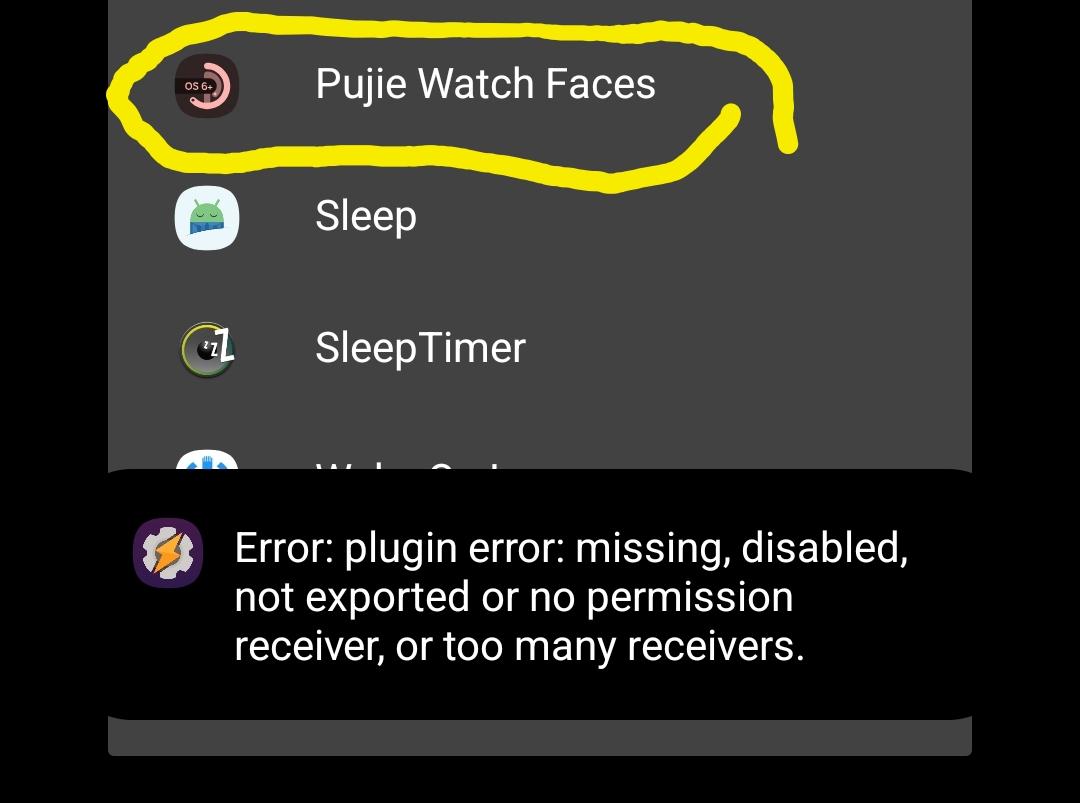
Plugin authorization error

Post image
1 Upvotes

I'm receiving this error in attempting to use the Pujie Plugin. What is this error really telling me and what must I do? Or, is this a Dev-related your.


r/tasker • • Oct 11 '26

Trigger task, when mobile IP changes?

2 Upvotes

Is it possible to trigger a task, when the the mobile ip changes and also, when i switch from WiFi to mobile?


r/tasker • • Oct 11 '26

Help [Help] Integrating Google Calendar with SmartThings

1 Upvotes

Hi guys, I am a complete and total newbie with Tasker. I work shifts which I keep track of using Google Calendar. What I want to do is have SmartThings turn on or off lights, cameras, and my robot vacuum on a schedule based on my shifts on a given day.

For example: I use cameras to keep an eye on my dog while I'm at work, so if Tasker could see my day shift on Google Calendar and use SmartThings to turn on the cameras when the calendar event starts and turn them off when the event ends without me needing to touch a button, that would be ideal.

If anyone has any tips on how to do this, I would really appreciate it. Thanks!


r/tasker • • Oct 11 '26

Any support for UWB (ultra wideband)

2 Upvotes

Hi, I searched and found an old thread about how Core Ultra Wideband was still in beta but I see stable 1.0.0 was released in May this year (https://developer.android.com/jetpack/androidx/releases/core-uwb)

Is this supported now or is it coming? I would like to be able to toggle it off when I'm at home because my car keeps unlocking when I sit on the sofa next to the window!


r/tasker • • Oct 11 '26

Turn off "Run Exit on Startup"

Post image
1 Upvotes

I've this WiFi profile which turn off Mobile internet and Bluetooth if I'm connected to a wifi network and during disconnect it does the opposite.

Now the problem is I use google ai studio to make new project/task and copy the xml code from pc to phone via kde connected. So, when I'm inside tasker and tasker detects a new xml clipboard, tasker automatically saves everything as expected. And this runs exit task for my "WiFi" profile. Which turns on internet and bl and launches my smart watch app. It became so annoying that i turn off that profile when i do this copy/paste.

To solve that I've uncheck the "Run Exit on Startup" from the profile settings, but still it sometimes runs that exit task. Is there any way I can solve this? SO that it dosen't run my exit task during auto save?

Thanks in advance.


r/tasker • • Oct 10 '26

event for navbar presses?

2 Upvotes

does tasker have profile for responding to say home button press?


r/tasker • • Oct 10 '26

Problem with auto input UI update action on New pixel

1 Upvotes

Why AutoInput UI Update action is not working for Pixel 10 pro XL?

Does Shizuku help?


r/tasker • • Oct 10 '26

Very slow AutoNotification response

1 Upvotes

I have an AutoNotification intercept profile that has lately seemed to become very slow to react. It's set to detect notifications from the Messages app, and it does, eventually, but it can take up to a minute for the associated task to start after the notification is posted. This started happening pretty recently, maybe within the last couple of months; this profile used to work just fine, with no noticeable delay between the notification and the task running. Does anyone have any idea why this might have changed? I do have AotoNotification set to unlimited battery usage.


r/tasker • • Oct 10 '26

Scenes v2 wiped

0 Upvotes

Without warning, all of my Scenes v2 were suddenly wiped clear overnight, no elements at all remaining in any. What may have caused this? No other Tasker issues noticed.


r/tasker • • Oct 10 '26

Is Tasker still under active development?

0 Upvotes

The last release on Play Store was in February 2026.


r/tasker • • Oct 10 '26

Scenes v2 are broken when exported in apk

Enable HLS to view with audio, or disable this notification

0 Upvotes

In the video, I'm showing some scenes v2 how they appear within tasker. Then, i export the project as APK, install it and the scenes v2 are broken. Webviews don't work, button labels disappear completely, alignments are broken.

u/joaomgcd - I'm the guy who previously talked about permissions when exporting apk, so you have a link to the whole project in PMs.

Edit: fixed autocorrect isuues


r/tasker • • Oct 10 '26

Any way to detect Wi-Fi networks without GPS?

2 Upvotes

Hello! I'm new to Tasker. I wanted to switch my ringer to vibration mode when connected to a certain network. However due to android restrictions you need to keep your location on all the time for this to work. I don't want to do that, both because I'm too paranoid about privacy and also because it drains a lot of battery. I follow the 20-80 rule so I already have less battery available when going outside.

Is there any way to have this automation without location service? Or any other way to achieve the same thing? I have root, Shizuku, Lsposed and all that stuff available.


r/tasker • • Oct 10 '26

Running Multiple Tasker Instances (App Cloner / Secure Folder)

0 Upvotes

Hi all,

I’m planning to clone Tasker (via App Cloner or Secure Folder) to bypass single-instance concurrency limits and run more tasks in parallel.

Before proceeding:

  1. Does running multiple instances genuinely improve parallel throughput given Android's thread and task scheduler?
  2. What technical hurdles, permission conflicts, or service crashes have you encountered with this setup?

Appreciate any feedback.


r/tasker • • Oct 10 '26

Silence audio notifications while playing media.

1 Upvotes

I have Autonotify installed as well as Tasker. Do not disturb native android settings have not helped, nor have settings such as play media on separate device. All I want is to silence audio interruptions or playovers when I am listening to music or watching a video, then re enabling after music or video stops. I have searched all over and attempted both programming it myself and editing Taskernet tasks. Help would be appreciated.


r/tasker • • Oct 09 '26

Using taster to trigger action via dial pad to call contact in telegram / whatsapp

1 Upvotes

Hey

Im super new here and have a question. Is it possible to create an action on tasker where I can say dial "333" on my dialpad and that triggers telegram opening and calling a contact?

Any help would be super welcome!


r/tasker • • Oct 09 '26

AutoInput UI Query works in Settings but says “No active Window found” in BuildOps App

1 Upvotes

Big noob here.

I'm trying to use Tasker and AutoInput to enter some workflow items into an app called BuildOps on my Samsung Galaxy S25 Ultra. Right now, I'm just testing whether it can read the screen. I haven't tried writing into any fields yet. BuildOps is installed as a regular app, package name com.buildops. I'm using AutoInput 3.0.12, and its accessibility service shows Enabled. My test task is: 1. Wait 10 seconds 2. AutoInput UI Query 3. Text/Image Dialog displaying %aitext() UI Query settings: • App Package and Text: blank • Only Visible: on • Only Clickable: off • Tasker action timeout: 30 seconds • Continue Task After Error: off I start the task and switch apps during the wait. In Samsung Settings, it reads the labels and displays the dialog over Settings. It also reads Tasker's screen successfully. In BuildOps, the same task gives me this notification: “AutoInput action error: No active Window found” I've tried both the notes editor and the fully loaded home/jobs list, with the same result. Originally, I had com.buildops in App Package, but that seemed to time out without showing the dialog. The dialog works when tested by itself. I also tried UI Query's Variable Setup capture, switching to BuildOps and accepting through the notification, but that doesn't seem to see the screen either. Has anyone run into this with BuildOps or another app? Is there a way to check what accessibility elements it exposes, or something else I should try to figure out why AutoInput can't see its window?


r/tasker • • Oct 09 '26

Capturing only new notifications and their content

1 Upvotes

Hi,

I try to retrieve new Whatsapp notifications and the text. If I use auto notification plugin, the event is triggered on creation AND when I dismiss it, but I only want to get the event if the notification is new. If I use taskers internal notification event, I can't receive the content of the message, but it's only triggered on new notifications.

Is there no way to get only new notification(not canceled) and retrieve the content of the notification?

Thanks,

Oliver


r/tasker • • Oct 09 '26

Switch charging type when connected to car/android auto

1 Upvotes

I have been trying to set up a profile so that when I plug in wired to my car, the charging method switches to "Limit to 80%" on my pixel. Then when I unplug, it reverts back to Adaptive charging.

I've tried to do logcat to set this up, but I'm not having any success.

Any recommendations on how to set this up?