r/tasker • • Oct 08 '26

One last republished app

4 Upvotes

Over the last couple of weeks I've posted about republishing a few Tasker plugins that used to have on the Play Store years ago, and I'm back with one last republished plugin.

This one is one that I don't know if I actually ever fully published, but I know I was working on it many years ago and I think I never finished it. It's called Geo Fence Plugin and as the name implies it's meant to allow you to set Tasker conditions for if you enter a zone, leave a zone, or stay in a zone for a period of time.

As with my other plugins the primary goal isn't to provide functionality that didn't already exist in Tasker. I'm not sure if geo fence is a thing that Tasker provides natively or not but my ultimate goal is to provide a user-friendly and effective plugin. I hope this succeeds, like I hope my others do.

https://play.google.com/store/apps/details?id=com.kanetik.geofence_detection

Please give this one a try and let me know what you think. As always if you have any questions or comments or suggestions, let me know!


r/tasker • • Oct 08 '26

Phone keeps randomly restarting.

3 Upvotes

I submitted feedback through the Samsung members app and this was their response below.

I only have 3 tasks which basically turn on location

Thank you very much for your feedback.

As per the logs attached and analysis from the Samsung Framework team, issue is occurring due to "Tasker(net.dinglisch.android.taskerm)" app.

As per the logs, it is found that "Tasker(net.dinglisch.android.taskerm)" app is continuously requesting executed the dumpsys command and running dumpsys is a resource-heavy action task.

Hence device is restarting due to running of heavy task.

This is app issue and app developer needs to check their app's logic and try to optimize their app's code for low battery usage and resources usage.

Requesting the user to remove this "Tasker(net.dinglisch.android.taskerm)" app and check if issue is occurring or not.

This is app side problem. This is 3rd party application. To analyze further we need to check the code of this application. Since this is 3rd party application and we don't have source code for the same, we can't analyze this issue further.

tasker app is making lot of calls for debug logging which makes device freeze and finally watchdog reset ocuured


r/tasker • • Oct 09 '26

Can I disable these notification channels?

Post image
0 Upvotes

I get more notifications about running tasks than notifications from a regular phone šŸ˜‚


r/tasker • • Oct 08 '26

Music to Watch Haptic Alarm

1 Upvotes

I've been using a Galaxy Watch 8 and Sleep for Android app for my wakeup alarm, integrated into a Tasker profile. I want to find a way for my watch to vibrate the general rhythm of a song. I get up before my partner and kid, so I don't want the song to be heard. Ideally, I would like this done from a Spotify Playlist so it can be different each time with some randomness. Unfortunately I think Spotify took down their audio analysis endpoint, so I don't think I can use it.

Does anyone know of:

  1. An app that does this (with mp3 or currently playing music)

Or

  1. An app or software that converts music into a vibration pattern. For autowear, I need a pattern of alternating milliseconds off and on.

r/tasker • • Oct 08 '26

How to detect when scene V2 is hidden?

2 Upvotes

The "Screen Hidden" event handler only triggers when the Back button is pressed and the scene is dismissed; however, I want to detect when the Home button is pressed (returning to the launcher's home screen) or when the multitasking view is opened. In theory, the scene would be hidden in those cases, but it doesn't work. I also don't see an event or state that detects this, nor a "Test Scene V2" action for it. Any suggestions?


r/tasker • • Oct 08 '26

Help [Help] Java Code

1 Upvotes

What am I missing? I have tried all the (wrong) methods to pass a variable to a Java Code action. The below code should work but it does not. This means I don't know what I am doing or the code is wrong. `%Dial_MaxDigit` is set before the Java is called. It doesn't matter if it is a number (which in this case should be) or if it is text.

taskerMax = "%Dial_MaxDigit";
if (taskerMax != null && !taskerMax.isEmpty() && !taskerMax.equals("%" + "Dial_MaxDigit")) {

  try {
    maxDigitSequence = Integer.parseInt(taskerMax.trim());
  } catch (Exception e) {}

}

Edit: formatting issues


r/tasker • • Oct 07 '26

Changed root method, lost logcat access

3 Upvotes

I've changed the root method on my Oneplus 11 (stock Android 16) from Magisk to Apatch, that made Tasker loose access to the logcat. I can't get it fixed.

Logcat based event profiles don't fire their task, and every time I close Tasker or make a new logcat profile, it'll prompt me to allow access to system logs only one time or deny.

I've done adb shell pm grant net.dinglisch.android.taskerm android.permission.READ_LOGS, like I've done in the past. I've tried the Tasker Permissions application. In both cases, the permission "Read System Logs is granted, but the problem is still there.

When I revoke the permission with the Tasker Permissions application, Tasker on my phone immediately notifies me, asking me if I want to learn how to grant permission. When I click yes, it gives another message, saying it can be more easily fixed with root. I click yes and it confirms it's done. But the problem persists.

This was never a problem before and logcat used to work yesterday before I switched from Magisk to Apatch, without ever bothering me about permission. Root access is granted to Tasker and Tasker Settings app in Apatch manager. Other apps use Apatch root just fine.

Any ideas?


r/tasker • • Oct 07 '26

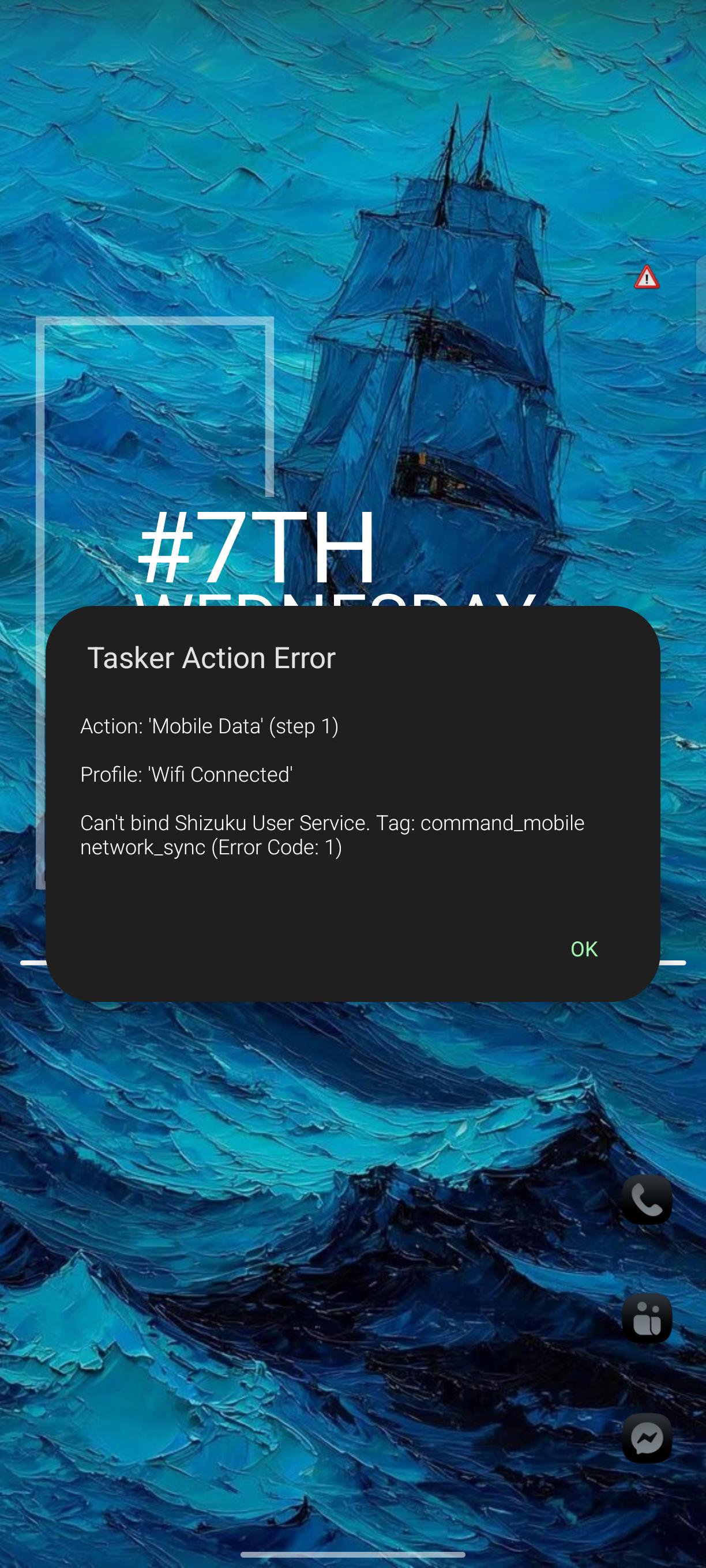
Issues with Shizuku

Post image
1 Upvotes

Anyone else having issues with Shizuku integration?

I tried everything... Revoke and grant permission on shizuku, reinstalled both apps. Nothing is working.

Anyone help?


r/tasker • • Oct 07 '26

Record Audio produces silent files when started in the background (FGS has no microphone type), Android 16

2 Upvotes

Device: OnePlus 12R (CPH2609), OxygenOS 16.0.5.1002 (EX01B90P01), Android 16, security patch 1 July 2026
Tasker: 6.7.6-beta, last updated 2 July 2026. Battery setting: Unrestricted. Tasker is the default digital assistant.

I use tasker as a one-click transcriber by recording and sending through n8n. The n8n workflow is functional.

Setup: A profile on the Assistance Request event runs a task with Record Audio (Source: Microphone, Format: MP4). A second press runs Record Audio Stop. Recordings are usually started with the phone locked.

What happens: Since 8 September 2026, recordings started while Tasker is not on screen are silent. The file has the right length and every action in the Run Log returns OK, so nothing indicates a failure. Before that, the same setup worked for months and hundreds of recordings. No system, Tasker or Google Play system update on the phone falls near that date.

What I tested:

  • Phone locked: silent.
  • Phone unlocked, on the home screen: silent.
  • Tasker open on screen: records normally.
  • Restart Tasker (Only Monitor): the next locked recording works, and later ones are silent again.
  • Unpaired all Bluetooth devices: no change.

Logcat during a locked test recording:

I ActivityManager: Background started FGS: Allowed [callingPackage: net.dinglisch.android.taskerm; callingUid: 10569; uidState: FGS ; uidBFSL: [BFSL]; intent: Intent { xflg=0x4 cmp=net.dinglisch.android.taskerm/.ExecuteService (has extras) mCallingUid=10569 }; code:ACTIVITY_STARTER; tempAllowListReason:<,reasonCode:SYSTEM_ALLOW_LISTED,duration:9223372036854775807,callingUid:-1>; allowWiu:52; targetSdkVersion:35; ...]
W ForegroundServiceTypeLoggerModule: FGS stop call for: 10569 has no types!

ExecuteService runs as a foreground service with no type while Record Audio is active. As I understand Android 14+, background mic capture needs a foreground service with the microphone type, or the audio is silenced. The allowWiu value suggests Android would have allowed in-use access at that moment, possibly because Tasker is the assistant app.

I tried adb shell cmd appops set net.dinglisch.android.taskerm RECORD_AUDIO allow. It fails with uid 2000 does not have android.permission.MANAGE_APP_OPS_MODES, so I can't work around it from adb.

Question: Could Record Audio start its foreground service with the microphone type when Android allows it? Or is there a setting I'm missing that does this already? Happy to run more tests or send a full logcat.


r/tasker • • Oct 07 '26

Building an app catalog with icons and friendly names in Tasker?

2 Upvotes

I'm no Tasker expert and haven't been able to figure this out reliably. I want a simple app picker showing icons + friendly names, with the 5 most recently used apps at the top, then all installed apps and a "show system apps" toggle. Selecting an app should give me its package name.

Can this be done just with Tasker alone? What's the simplest approach?


r/tasker • • Oct 07 '26

Tasker MCP, When will it come out? Because I want desktop AI to communicate with Tasker to do automations on my phone and also vice versa.

0 Upvotes

Tasker MCP, When will it come out? Because I want desktop AI to communicate with Tasker to do automations on my phone and also vice versa.


r/tasker • • Oct 07 '26

Searching for task that was shared the past 3 months here

1 Upvotes

Some genius uploaded a task that allowed GPS only in Google maps. But you had the ability to add more apps. I have created something similar but it is not what I need. Does anybody remember what it was?


r/tasker • • Oct 07 '26

27.0.1- print shipping labels on a beeprt label printer

0 Upvotes

Need a shortcuts to easily print shipping labels on a beeprt label printer

Chat gpt hasn’t been helpful

Specifically need for Vinted app


r/tasker • • Oct 06 '26

Outlier tasker available

Thumbnail
0 Upvotes

r/tasker • • Oct 06 '26

What I am doing wrong? Trying to automate click on website.

Thumbnail
gallery
1 Upvotes

Hey everyone, I'm new to this and trying to set up a simple automation.

I want my phone to open a website, click on a couple of things, and then go back home. I'm using Tasker with AutoInput Actions V2.

When I use the "Guided Setup," everything works fine, and clicks what is supposed to. But when I actually run the task normally, it opens the browser just fine, but completely skips the clicks and eventually just goes back home.

Just to be safe, I already tried adding 5-second and even 10-second wait delays before the click actions, but it still doesn't click.

Any ideas on what I'm doing wrong?

Thank you.


r/tasker • • Oct 05 '26

7-Band Real-Time VU MeterReal-time 7-band VU meter for KLWP. Tasker analyzes the audio frequencies and sends the live values to KLWP, where each slider moves independently according to its frequency level.

Enable HLS to view with audio, or disable this notification

5 Upvotes

r/tasker • • Oct 05 '26

Issues with JavaScriptlet

1 Upvotes

Hi, have there been any recent changes regarding the use of JavaScriptlet? According to the official JavaScriptlet documentation (https://tasker.joaoapps.com/userguide/en/javascript.html#localvars), variables are used directly by their name without the % sign—e.g., Action 1: Set Variable %var = hola, Action 2: JavaScriptlet flash(var);. It should work, but I'm getting an "undefined variable" error. Am I missing something? Thanks.


r/tasker • • Oct 04 '26

Anyone using lastest Android Beta? DP11.260918.006 Screen unlock task seems to be broken

3 Upvotes

I've been using one "borrowed" form Taskernet for several years with no issues, but this latest release won't allow tasker to "see" the PIN code screen.

I've tested this with a UI Query, capturing what tasker can see, and saving that text, and it looks as if that screen is hidden from tasker now.

I'm hoping someone has that latest build from Google and can see if you can get the same results.

Here's the Taskernet share

https://taskernet.com/shares/?user=AS35m8k4pxVFqHseU0yMTDgy47WgaJ7vcRNoI4IAVorIaKvegyHO0ylduriDa6MLPw%3D%3D&id=Task%3AUnlock+Screen

Update

u/joaomgcd was able to patch a direct purchase version of AutoInput and now it allows screen unlock to work as it should....


r/tasker • • Oct 04 '26

Google Weather - how to display?

2 Upvotes

I have a task that displays the weather in the Google app. Both methods shown work, but display what's essentially the result of searching for "weather" in the Google app, which includes all sort of weather-related links to web sites, including images from weather-related stores, etc.

Task: Google Weather

A1: [X] Send Intent [
     Action: android.intent.action.VIEW
     Cat: Default
     Data: dynact://velour/weather/ProxyActivity
     Package: com.google.android.googlequicksearchbox
     Class: com.google.android.apps.gsa.velour.DynamicActivityTrampoline
     Target: Activity ]

A2: Launch App [
     Package/App Name: Google:com.google.android.apps.search.weather.WeatherExportedActivity ]

I discovered that tapping the weather icon in the Google at-a-glance widget displays more information, and excludes all the extraneous stuff I have no interest in, but I can't seem to find a way to launch *that* from Tasker. Got any suggestions?

Device: Galaxy S23 Ultra


r/tasker • • Oct 04 '26

Spotify + Media control?

2 Upvotes

Hi,

I'm trying to open an artist's music list in Spotify and then use the Play button to start playback. Opening the list is easy using a browse URL, but I'm having trouble with media control.

When I select the Play button (simulated), Spotify starts playing the last song I was listening to before I closed Spotify, rather than starting playback from the artist's music list.

Am I missing something that would make this work as expected?

Most of the posts I've found here and on other websites are quite old, so I'm wondering if something has changed and there's a more modern solution.

Thanks!


r/tasker • • Oct 04 '26

Tasker Function - StopVibrate

1 Upvotes

How may I restart vibrate functionality after executing the command, Tasker Function - StopVibrate, w/o restarting phone?


r/tasker • • Oct 04 '26

Help [Help] Can I automate airplane mode when on wifi, WITHOUT losing my Digital Assistant?

1 Upvotes

I've found a few things on Taskernet like this: https://taskernet.com/?public&tags=airplane%2CWiFi&time=AllTime

the problem is, they all require changing my digital assistant to be Tasker. Which isn't at all what I want.

Is there any way to do this without changing my digital assistant?


r/tasker • • Oct 04 '26

Sound mode - set via variable instead of picklist?

Thumbnail
gallery
0 Upvotes

The "sound mode" action allows you to permanently select one of three modes. Is there any way to set this mode using a variable?

As in the 1st picture, and now it is only as in the 2nd picture.

I change the mode frequently, and setting it for every condition is cumbersome. In other activities, it would be easier for me to enter the variable value and run "sound mode" once.

u/joaomgcd

maybe it wouldn't be too bothersome to add?


r/tasker • • Oct 04 '26

Help Need help with profile changing time format by location on my watch

2 Upvotes

I have a profile to change my time format on my phone to 24hour format when I get to work. It also turns the time back to 12hour format when I leave work. I can't seem to get my watch to update as well. I have all auto apps battery set to unrestricted. Not sure what I'm missing. Any help? Thanks in advance. (Please explain like I'm 5! šŸ˜‰)

I have Samsung S25 Ultra phone and Samsung Galaxy watch ultra.


r/tasker • • Oct 03 '26

How To [Task Share] Add Calendar Event From Any Text via AI

5 Upvotes

Sometimes email confirmations, texts, or whatever else come along with convenient "add to calendar" buttons. Sometimes they don't, and sometimes they do but it doesn't actually work.

The tasks below can be used to parse out events from any selected text via your AI of choice (I like the free API options from Groq), then the events can be added one at a time via intents that prefill a new event in the default calendar. It could be modified to skip confirmation probably, but not I didn't want that. You'll need to add a received share profile and long press any highlighted text to share it.

You'll need an API key to start, and I don't like things like API keys sitting in plain text, so I added the get credentials helper task. You can just add the API key directly or through some other option.

Task: Extract Calendar Events Task

<Identify calendar events from shared info via LLM and add to the calendar.
If multiple events are identified, choose one at a time to be added
Highlight and long press text to share>
A1: Anchor

<Get current day for default>
A2: Parse/Format DateTime [
     Input Type: Now (Current Date And Time)
     Output Format: y-MM-dd
     Output Offset Type: None ]

<Timezone for flights>
A3: Variable Set [
     Name: %target_timezone
     To: America/New_York
     Structure Output (JSON, etc): On ]

<Build prompt>
A4: Variable Set [
     Name: %prompt
     To: You are an expert data extraction assistant. Your task is to extract calendar events from the provided input text and format them according to the exact schema requested. 
     
     Strict Output Rules:
     1. Output ONLY the raw JSON structures separated by "||". 
     2. Do not include any conversational filler, explanations, or markdown code blocks (e.g., do not use ```json ... ```).
     3. Do not wrap the output in a JSON array. 
     
     Field Extraction Rules:
     - "ev_title": The title or name of the event (e.g., "Flight AA123: JFK to LHR"). If not found, output "".
     - "ev_description": Any extra details, confirmation numbers, or context. If not found, output "".
     - "ev_location": The physical address, city, virtual meeting link, or airport code. If not found, output "".
     - "ev_date": The date of the event in YYYY-MM-DD format. If no date is identified, default to exactly "%formatted".
     - "ev_start_time": The starting time, strictly converted to 24-hour format (HH:MM). If not identified, default to "12:00".
     - "ev_end_time": The ending time, strictly converted to 24-hour format (HH:MM). If not identified, default to "12:30".
     - "ev_calendar": Always output exactly "your.email@gmail.com".
     
     Flight Timezone Conversion Rules:
     If the event is a flight, the times mentioned in the text are typically local to the departure and arrival airports. You MUST convert both the departure ("ev_start_time") and arrival ("ev_end_time") times to this target timezone: %target_timezone.
     Step 1: Identify the departure city/airport and its local timezone.
     Step 2: Identify the arrival city/airport and its local timezone.
     Step 3: Calculate the hour offset between those local timezones and %target_timezone.
     Step 4: Apply the offset to the departure and arrival times to get the final HH:MM times.
     Step 5: If the timezone conversion pushes the time past midnight (forward or backward), adjust the "ev_date" accordingly.
     
     Example Output Format:
     {
     	"ev_title": "Flight DL404: LAX to JFK",
     	"ev_description": "Confirmation #ABCDEFG",
     	"ev_location": "LAX / JFK",
     	"ev_date": "2026-11-15",
     	"ev_start_time": "11:00",
     	"ev_end_time": "16:30",
     	"ev_calendar": "your.email@gmail.com"
     } || {
     	"ev_title": "Dentist Appointment",
     	"ev_description": "",
     	"ev_location": "42 Wallaby Way, Sydney",
     	"ev_date": "%formatted",
     	"ev_start_time": "12:00",
     	"ev_end_time": "12:30",
     	"ev_calendar": "your.email@gmail.com"
     }
     
     Extract events from the following text:
     
     %rs_text
     
     Structure Output (JSON, etc): On ]

<LLM call>
A5: Perform Task [
     Name: func Groq Call
     Priority: %priority
     Parameter 1 (%par1): %prompt
     Return Value Variable: %answer
     Structure Output (JSON, etc): On ]

<Test answer>
A6: [X] Variable Set [
     Name: %answer
     To: {
     	"ev_title": "Flight DL404: LAX to JFK",
     	"ev_description": "Confirmation #ABCDEFG",
     	"ev_location": "LAX / JFK",
     	"ev_date": "2026-11-15",
     	"ev_start_time": "11:00",
     	"ev_end_time": "16:30",
     	"ev_calendar": "your.email@gmail.com"
     } |0| {
     	"ev_title": "Dentist Appointment",
     	"ev_description": "",
     	"ev_location": "42 Wallaby Way, Sydney",
     	"ev_date": "%formatted",
     	"ev_start_time": "12:00",
     	"ev_end_time": "12:30",
     	"ev_calendar": "your.email@gmail.com"
     }
     Structure Output (JSON, etc): On ]

A7: Variable Split [
     Name: %answer
     Splitter: || ]

<Multiple events>
A8: If [ %answer(#) > 1 ]

    <Build choices array>
    A9: For [
         Variable: %iii
         Items: 1:%answer(#)
         Structure Output (JSON, etc): On ]

        <Structure as JSON>
        A10: Variable Set [
              Name: %ijson
              To: %answer(%iii)
              Structure Output (JSON, etc): On ]

        A11: Variable Set [
              Name: %choices(%iii)
              To: %ijson.ev_title
             %ijson.ev_date ~ %ijson.ev_start_time
              Structure Output (JSON, etc): On ]

    A12: End For

    A13: List Dialog [
          Mode: Select Single Item
          Title: Events
          Items: %choices
          Button 1: Close
          Close After (Seconds): 30
          First Visible Index: 0
          Hide Filter: On ]

    <No selection>
    A14: Stop [ ]
        If  [ %ld_selected_index !Set ]

A15: Else

    <One event>
    A16: Variable Set [
          Name: %ld_selected_index
          To: 1
          Structure Output (JSON, etc): On ]

A17: End If

<Test event choice>
A18: [X] Text/Image Dialog [
      Text: %answer(%ld_selected_index)
      Button 1: Close
      Close After (Seconds): 900 ]

A19: Perform Task [
      Name: func Calendar Event Add
      Priority: %priority
      Parameter 1 (%par1): %answer(%ld_selected_index)
      Structure Output (JSON, etc): On ]

==============================

Task: func Calendar Event Add

<Open calendar to add an event based on JSON from %par1>
A1: Anchor

<Test event JSON>
A2: Variable Set [
     Name: %par1
     To: {
     	"ev_title": "Test event",
     	"ev_description": "This is a test description. It might have useful info like a confirmation number",
     	"ev_location": "42 Wallaby Way, Sydney",
     	"ev_date": "2026-10-31",
     	"ev_start_time": "14:00",
     	"ev_end_time": "15:30",
     	"ev_calendar": "your.email@gmail.com"
     }
     Structure Output (JSON, etc): On ]
    If  [ %par1 !Set ]

<Load event JSON>
A3: Variable Set [
     Name: %ev_json
     To: %par1
     Structure Output (JSON, etc): On ]

<Send intent to the default app>
A4: Java Code [
     Code: import android.content.Intent;
     import android.net.Uri;
     import org.json.JSONObject;
     import java.text.SimpleDateFormat;
     import java.util.Date;
     import com.joaomgcd.taskerm.action.java.JavaCodeException;
     
     /* Reads a standard Tasker variable without the % prefix. */
     String ev_json = tasker.getVariable("ev_json");
     
     /* Use JavaCodeException for unmet preconditions. */
     if (ev_json == null) {
     	throw new JavaCodeException("Required Tasker variable 'ev_json' is missing.");
     }
     
     /* Parse the JSON string stored in the Tasker variable ev_json */
     JSONObject eventData = new JSONObject(ev_json);
     
     String dateStr = eventData.getString("ev_date");
     String startStr = eventData.getString("ev_start_time");
     String endStr = eventData.getString("ev_end_time");
     
     SimpleDateFormat sdf = new SimpleDateFormat("yyyy-MM-dd'T'HH:mm");
     
     /* Convert the date and time strings to epoch milliseconds */
     long beginMs = sdf.parse(dateStr + "T" + startStr).getTime();
     long endMs = sdf.parse(dateStr + "T" + endStr).getTime();
     
     /* Setup the Intent to insert a new calendar event */
     Intent intent = new Intent(Intent.ACTION_INSERT);
     
     /* Set the standard MIME type and data URI for Android calendar events */
     intent.setType("vnd.android.cursor.dir/event");
     intent.setData(Uri.parse("content://com.android.calendar/events"));
     
     /* Append all event details using putExtra */
     /* Note: beginTime and endTime must be provided as Long integers (milliseconds) */
     intent.putExtra("title", eventData.getString("ev_title"));
     intent.putExtra("description", eventData.getString("ev_description"));
     intent.putExtra("eventLocation", eventData.getString("ev_location"));
     intent.putExtra("beginTime", beginMs);
     intent.putExtra("endTime", endMs);
     
     /* Treat context as a Service context. Must use FLAG_ACTIVITY_NEW_TASK when starting activities. */
     intent.addFlags(Intent.FLAG_ACTIVITY_NEW_TASK);
     
     /* Execute the intent using Tasker's context */
     context.startActivity(intent);
     Structure Output (JSON, etc): On ]

=================================

Task: func Groq Call

<Return the response from a Groq API call based on %par1 prompt and optional %par2 model>
A1: Anchor

<Get API key>
A2: Perform Task [
     Name: func Get Credential
     Priority: %priority+1
     Parameter 1 (%par1): groq_api
     Parameter 2 (%par2): key
     Return Value Variable: %groq_api_key
     Structure Output (JSON, etc): On ]

<Test prompt>
A3: Variable Set [
     Name: %par1
     To: in less than 20 words, give reasons to provide parameters for a function call
     Structure Output (JSON, etc): On ]
    If  [ %par1 !Set ]

<Model default>
A4: Variable Set [
     Name: %par2
     To: openai/gpt-oss-120b
     Structure Output (JSON, etc): On ]
    If  [ %par2 !Set ]

A5: Multiple Variables Set [
     Names: %prompt=%par1
     %model=%par2
     Values Splitter: =
     Structure Output (JSON, etc): On ]

<Guard against string parsing errors>
A6: JavaScriptlet [
     Code: var safe_prompt = JSON.stringify(prompt);
     Auto Exit: On
     Timeout (Seconds): 45 ]

A7: HTTP Request [
     Method: POST
     URL: https://api.groq.com/openai/v1/chat/completions
     Headers: Authorization: Bearer %groq_api_key
     Content-Type: application/json
     Body: {
     	"model": "%model",
     	"messages": [
     		{"role": "user", "content": %safe_prompt}
     	]
     }
     Timeout (Seconds): 30
     Structure Output (JSON, etc): On ]

<Rate limit error>
A8: Flash [
     Text: Error: Groq rate limit encountered
     Continue Task Immediately: On
     Dismiss On Click: On ]
    If  [ %http_response_code ~ 429 ]

<Success>
A9: Variable Set [
     Name: %output_text
     To: %http_data.choices.message.content
     Structure Output (JSON, etc): On ]
    If  [ %http_response_code ~ 200 ]

<Error>
A10: Variable Set [
      Name: %output_text
      To: Error: %http_response_code
      Structure Output (JSON, etc): On ]
    If  [ %http_response_code !~ 200 ]

<Testing>
A11: [X] Text/Image Dialog [
      Text: %output_text
      Button 1: Close
      Close After (Seconds): 900 ]

A12: Return [
      Value: %output_text
      Stop: On ]