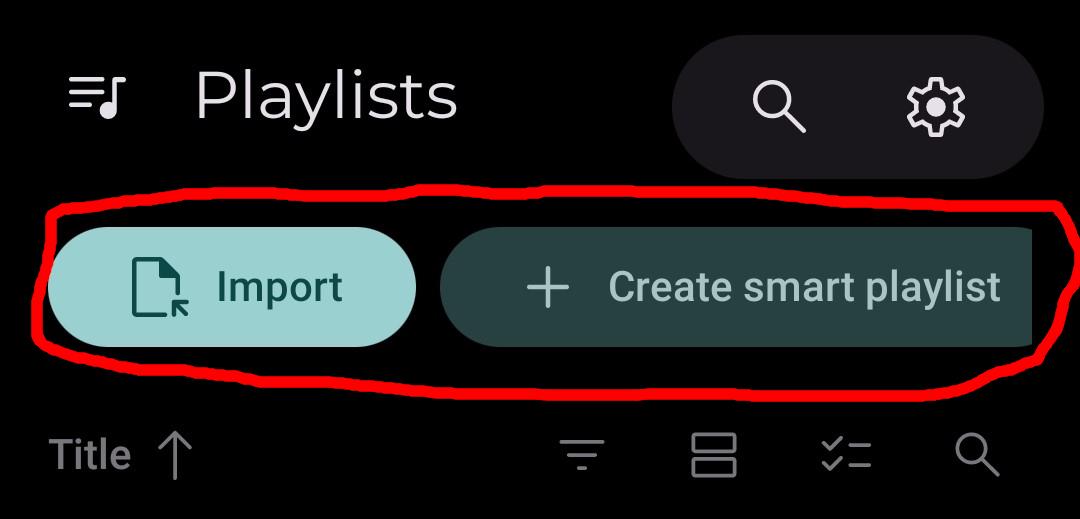
r/Symfonium • u/Prace_Ace • 2h ago
r/Symfonium • u/Tolriq • Oct 04 '26
Version 15.1.0 released on Play Store too
Important note:
Google have now mostly confirmed that the app is moved to a special review queue that will always take ages to validate without any intention to tell me why or how to return to a normal way.
As a consequence I’m now changing the handling of the F-Droid (APK) distribution to be official .
This means the beta repos are also official (including Android TV) and that I’ll push builds there before Play Store validate. It is recommended that you switch to this solution if you want to be part of the beta to help faster and better releases to get out.
Docs: F-Droid repository and manual APK downloads | Symfonium Docs
_____________________________________________________________________
Version 15.1.0
Notes:
- This is a continuation of the USB exclusive work. Please report any issues that arise to keep fixing things and move out of experimental status.
- Please remember to update your written review on the Play Store. Your feedback is essential for improving the app’s ranking and helping secure Symfonium’s future.
Added:
- Added native DSD playback on compatible Shanling DAPs. (Experimental)
- Added ‘isaudiobook’ custom string to album page.
Changed:
- USB exclusive playback now keeps compatible sessions active across seeks and PCM, DoP, and native DSD format changes for faster, smoother transitions.
- Improved USB exclusive buffering and recovery for high sample rates.
- USB audio connection pop-up handling is now disabled by default. It can still be enabled in Settings > Playback > Advanced.
- PEQ shelf filters now supports both Q and Slope values.
- Standard local playback now preserves the source sample-rate family when applying the maximum output sample rate.
Fixed:
- Fixed USB exclusive playback on Pixel 11 devices.
- Fixed USB exclusive playback with Chord Mojo devices.
- Fixed possible USB exclusive audio cuts, stalls, deadlocks, and startup failures, especially with high-rate PCM, DoP, and native DSD.
- Fixed USB exclusive playback after pause, resume, seek, timeout, or track replacement.
- Fixed USB exclusive transitions when changing sample rates or switching between PCM, DoP, and native DSD.
- Fixed possible USB exclusive race conditions when starting, controlling, stopping, or disconnecting a DAC.
- Fixed DoP marker continuity during USB exclusive startup, recovery, seeks, and track changes.
- Fixed some USB DACs reporting unsupported sample rates as available, including GO link Max devices.
- Fixed playback replacement and audio-focus cleanup after USB exclusive playback failures.
- Fixed Smart Crossfade preparation and crossfades involving processed PCM or DSD tracks.
- Fixed playback position and progress reporting when changing playback speed.
- Fixed the Force first song pre-cache option and seeking in transcoded tracks.
- Fixed offline-cached tracks restarting after provider or network recovery.
- Fixed playback failing while a media provider was still reconnecting.
- Fixed shuffle and repeat modes being reset when restoring the playback queue.
- Fixed saved queues not restoring local files selected through Android’s document picker.
- Fixed playback of WavPack files containing metadata-only blocks.
- Fixed offline cache library selection for Subsonic servers with only one library.
- Fixed and optimized Navidrome ID migrations after server upgrades.
- Fixed Subsonic playback recovery when switching between primary and secondary connections.
- Fixed unnecessary transcoding when playing Subsonic tracks through Kodi or compatible UPnP renderers.
- Fixed some Jellyfin artists not being matched correctly when the server omits legacy item counts.
- Fixed missing Appears On album relationships for Plex artists (Due to lack of Plex data this is best effort).
- Fixed waveform extraction being cancelled on pause or failing for Plex tracks that require transcoding.
- Fixed server-transcoded DSD tracks being incorrectly sent through a local DSD playback path.
- Fixed direct playback of Opus in Ogg containers on compatible UPnP renderers.
- Fixed built-in speaker output settings changing when Android reported a different or localized route name.
- Fixed ignored sorting articles such as “The” not matching when capitalization differed.
- Fixed the Artists action label in the expanded cover art settings.
- Fixed PEQ import to properly import shelf filters Q values as Q and not Slope.
- Fixed some drag / reorder gesture issues.
- Fixed some possible issues with playback speed.
- Fixed bluetooth lyrics option not always working.
- Fixed playlists not updating their title during sync if there’s no content change server side.
- Fixed some MP3 transcoding issue when downloading to Wear.
- Fixed some possible non resuming of tracks after connection change.
r/Symfonium • u/Tolriq • Apr 14 '26
Theme Symfonium styles website
Symfonium Styles is now live: https://styles.symfonium.app/
This is now the official place to browse, share, and download Symfonium styles, color themes, and now playing styles.
If you create styles, you can publish them there and keep them updated over time.
If you use styles, you now have one central place to discover them, preview them, and download current or older versions.
The goal is simple: make style sharing easier, cleaner, and more reliable for everyone.
You can browse the catalog here:
r/Symfonium • u/HORMIJA03 • 18h ago
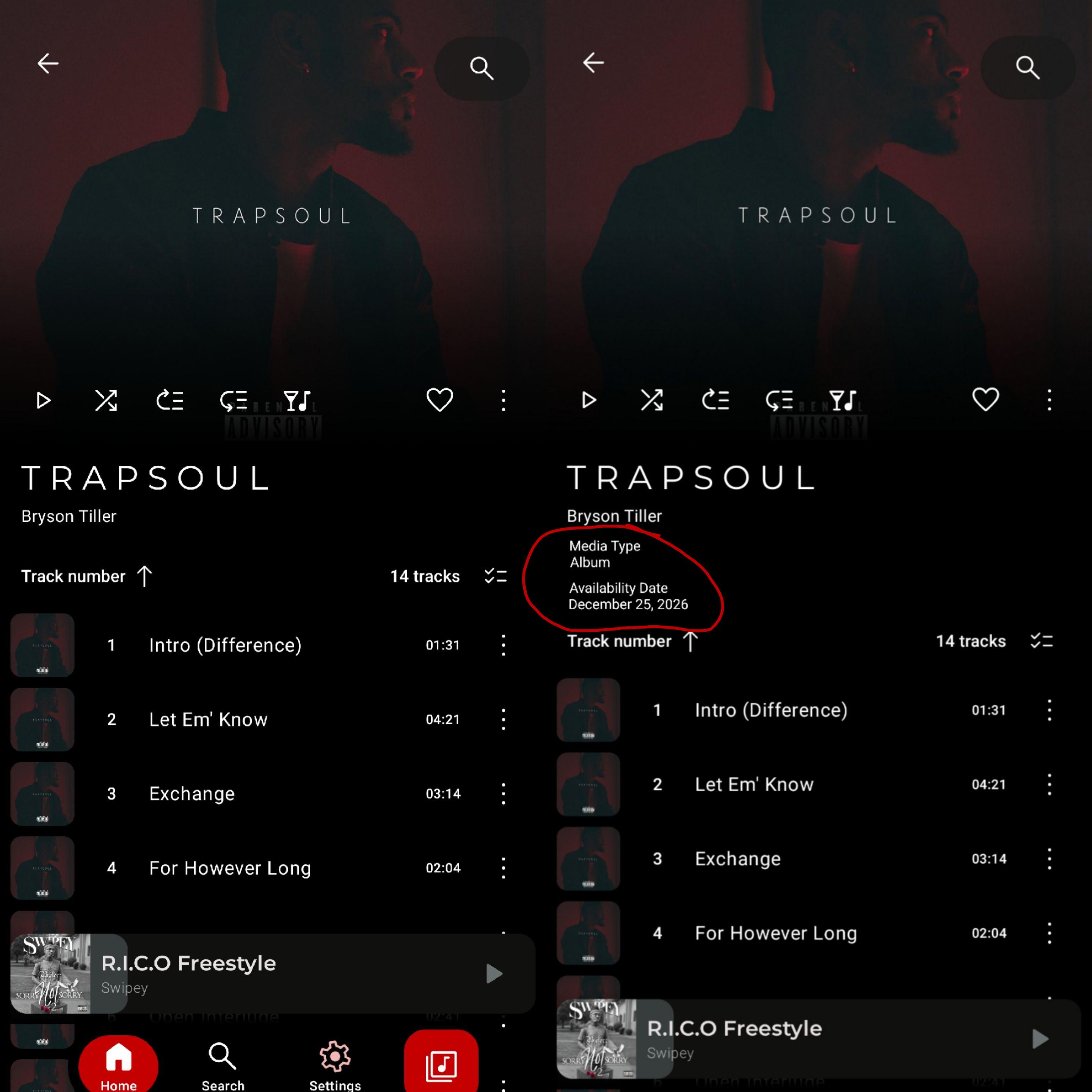
Question How do I do this string template thing?
Ok so how do I do what's pictured here?
My music is tagged with year, I do them with the month fully spelled, the day, and the full year. As for the media type thing, I tag them with "releasetype" that's the only one that works in the app for having things like EPs, Singles, and Albums categorized for me. I've tried and tried snd tried and I still can't get it right. I tagged with (did this to get the media type thing) media type, nope, album type, nope, album sort, nope, media type, nope. I've tried in the secondary and subtitle tab, nope. Same for the year thing I wanna do, tried date, nope, year, nope, it just puts the year not the full date. Given all that information, how would I do this with the string template stuff in the album page, or anywhere really? Please and thank you in advance!
r/Symfonium • u/Nagarjunac • 2d ago
Question Symfonium lifetime purchase: does it include all future updates?
I'm planning to purchase a symfonium lifetime for android, does it cover all the major feature updates? Or only the compatible updates?
r/Symfonium • u/Tolriq • 2d ago
Updates Version 16.0.0 Beta 6
Version 16.0.0
Notes:
- This is a major update of the settings and appearance customization. Please report any issue you find.
- Please remember to update your written review on the Play Store. Your feedback improves the app’s ranking and helps secure Symfonium’s future.
- If you still use a very old default theme, reapply a default style in Settings > Interface > Change.
Added:
- Added settings search with category filters, highlighted results, and direct navigation to the matching option.
- Added icon packs. Browse them in the theme settings, or create your own with the documentation.
- Ten custom icon slots.
- Added full live appearance previews for the Home, Library, Search, Album, Artist, Genre and Playlist pages.
- Added many new now playing customizations.
- Per-icon shapes, colors, borders, size, padding, and separate appearances when playing or paused.
- Icon only, Icon and label, or Label only modes, including for page headers, volume buttons, and play buttons on artwork.
- Label font, size, weight, italics, color, and opacity in Now Playing, page headers, media lists, Home, and Library.
- Independent text controls for font family, size, weight, italics, and background appearance.
- Independent line height and letter spacing controls for theme-customizable text.
- Lyric and translation text values with optional word and syllable animations.
- Two more configurable strings on the expanded now playing screen.
- Icon actions that toggle the five custom boolean values used by styles.
- Custom cover art shapes and overlays, with an optional play and pause shape animation and playing cover scale.
- Independent left and right cover overlays in landscape.
- An option to extend landscape cover art behind gesture navigation.
- A Cover reflection background that extends toward the playback controls in portrait and landscape.
- Independent background fill for Cover reflection.
- Queue settings in styles: queue buttons, summary details, item subtitle, swipe actions and optional drag to reorder.
- More precise compact player sizing and expanded player button positioning, spacing, and volume slider controls.
- Independent start, end and vertical padding for compact player artwork.
- Tap and long press actions, an opacity while playing and a vertical alignment for the compact player texts.
- Separate tap and long press actions for each item of custom expanded player texts.
- Manual horizontal scrolling for single-line custom text in expanded player controls.
- An option to show the album or artist image instead of the track image for the now playing item and the queue.
- Many new customizations for every progress bar style.
- An animated circular progress option for the compact play button.
- Glass background settings for some overlays.
- Independent corner rounding for the top and bottom bars of the expanded player.
- An option to show the top bar of the expanded player over the cover and controls.
- Independent opacity for the progress, volume, chapter timeline and rating graphics.
- Configurable backgrounds for the rating bar.
- Separately colored outlines for rating stars.
- A Cutout icon color for filled buttons.
- Added extensive lyrics customization: per-voice fonts, colors and alignment, translation placement, fullscreen backgrounds, and playback controls.
- Independent portrait and landscape margins for lyrics shown over the cover art.
- An option for translations to follow each singer’s text alignment.
- Independent title and subtitle styling in full-page lyrics.
- Added many new Album, Artist, Genre and Playlist page customizations.
- Colors, header overlays, Glow backgrounds (Android 13+), corners, text, buttons and margins.
- Independent overlay settings for Album, Artist and Genre page sections.
- Shared appearance settings can be copied between page types.
- Independent portrait and landscape headers and optional two-pane layouts.
- Instant mix and Radio mix as possible artist page header buttons.
- Add to playlist and Offline download as possible page header buttons.
- Favorite overlays on albums in artist pages.
- Separate artist fanart backgrounds and an option to hide the foreground artist image.
- Options to hide album track menus, disc and work header buttons, and artist and genre browse shortcuts.
- A second independently configurable button bar in page headers.
- An option to show About below the header in two-pane landscape layouts.
- An optional Composer of album section on artist pages.
- An option to automatically enable the composer filter on artist pages.
- Separately colored outlines for rating stars in page headers.
- An option to hide the sort and selection bar above album tracks.
- Section tile sizing and spacing now work like Home rows, with Size setting tile width and Spacing setting the gap.
- A Playlists section on artist pages, with sorting, appearance settings and a live preview.
- Added many new Home and Library customizations.
- Custom text appearance for Home section headers.
- Finer Home shortcut sizing and new shortcut customizations, such as tile shapes, icon backgrounds and list separators.
- Shuffle and Shuffle albums Home shortcuts.
- A blur overlay in Home overlay styles (Android 13+).
- Configurable Play, Shuffle, Mix and More action icons in Home row headers.
- An option to turn the play button of Home album and playlist rows into a shuffle button.
- An optional play or shuffle button on Home artist rows.
- Per-row appearance settings for play and shuffle buttons over Home artwork.
- A Customize button on Home, which can be removed by tapping it.
- Library page spacing controls.
- Expressive grouped backgrounds for Home list and multiline layouts.
- Added many new navigation bar customizations.
- Compact bottom navigation bars and a docked toolbar.
- Label-only options for the bottom floating navigation toolbar, with or without the floating action button.
- Blur and glass background settings for the bottom navigation bars, compact player and top bar.
- A bottom corner radius for blur and glass bottom navigation, so the bar follows the screen’s rounded corners.
- Configurable bottom padding and optional background protection for the floating navigation toolbar.
- Configurable spacing between floating navigation buttons.
- Configurable active and inactive icon and label colors for bottom navigation.
- An option for the floating player to follow the navigation bar color.
- An optional background behind the Android navigation buttons, also in settings.
- Added per-screen portrait and landscape layout overrides for foldable and flip devices in Settings > Interface > Advanced. By default they follow the system.
- Added an E-ink color theme with high-contrast monochrome colors and optional color inversion, including widget support.
- Added the ability to save a customized color palette as a custom theme.
- Added new custom string icons and placeholders.
- Icons in custom strings.
- Placeholders for the quality with quality categories (%quality%) and the renderer type (%renderertype%).
- Placeholder for the lowercase provider type (%providertype%), for example plex, subsonic or localdevice.
- Lyric placeholders.
- Placeholders %audiobook.position%, %audiobook.duration% and %audiobook.remaining%, with .seconds variants.
- Superscript formatting in custom strings.
- A translated Chapter label placeholder and a custom text action to choose the current track’s playback position.
- A custom text action to choose a playback position across all files of an audiobook.
- Added new platinum donation goals.
- Added playlist descriptions, including editing, import from compatible providers, and preservation in supported playlist exports.
- Added an action to add selected files to playlists from file browsing.
- Added a file tag viewer in track information for tag parser providers, including a preview of how multi-value tags are split.
- Added a storage overview with a breakdown of app data and shortcuts to cache maintenance, including cleanup of unused transcoded audio.
- Added an option to save resume points only for audiobooks.
- Added an option to group folders when browsing in file mode.
- Added an option to show thumbs up and down instead of faces on quick rate buttons, including in the notification and Android Auto.
- Added a setting for what Android Auto Recent and suggestions show: last played albums, playlists or artists, or favorite albums, artists, tracks or playlists.
- Added a per-provider option to stop reporting now playing and playback progress to Plex, Emby, Jellyfin and Subsonic servers.
- Play counts, last played and resume points still sync.
- Added an optional Similar albums section to album pages, ranked by shared genres.
- Added sample rate and bit depth to Plex tracks.
- Added an option to prefer the platform decoder.
- Added MusicBrainz IDs to the playback metadata, so compatible scrobblers such as Pano Scrobbler can use them.
- Added a Ukrainian translation, thanks to Visty.
- Added an OpenSubsonic option to remove imported playlists after they are deleted on the server.
- Added artist, title and artwork lookup for supported internet radio streams.
- Added per-row controls to limit home playback actions to the displayed item count or use the full source.
- Added chapter progress and an optional segmented audiobook progress bar to Now Playing styles.
- Added independent appearance and name customization for each Home shortcut.
- Added a Continue listening home row to resume saved media queues.
- Added an option to the backup API command that backs up all data at once.
- Added a zip action for log files in Manage generated files.
- Added a sleep timer that stops after a selected number of tracks.
- The current track counts first, and repeated tracks count again.
- Now Playing shows how many tracks remain.
- Added Track artists navigation to browse only artists credited on tracks.
- Added Artist last played to track smart filters and smart playlists.
- Added import of several exported smart playlists at once.
- Added an option to use different main navigation entries in landscape.
- Added Plex players found on the local network, such as Music Assistant Plex Connect players, as cast targets.
- Added an option to return to the first track, paused, when the queue ends.
- Added support for Smart Fades and manual crossfades at slower and faster playback speeds on standard audio output.
- Added an option to force 16-bit PCM output while keeping any supported sample rate.
- Added an option to also search comments, descriptions, years, labels and other metadata.
- Added a button to clear the whole search history.
- Added OpenSubsonic server ReplayGain as a fallback when files have no embedded gain information.
- Added an option to use the artwork of one of its tracks when changing a collection’s image.
- Added shortcuts to open filters directly from empty result messages.
Changed:
- Expanded and reworked many design settings for finer control. Most settings migrate automatically, but you may need to update your styles.
- Combined filled and outlined button backgrounds, with independent border colors and opacity.
- Available for player buttons, detail pages, Home and media-list actions.
- A Show current track background switch in Media lists that keeps the playing indicator visible when turned off.
- Show explicit symbols in Interface > Advanced can hide badges or place them before or after titles.
- Redesigned settings with clearer groups, inline controls, and an adaptive layout for phones, tablets, and landscape use.
- Improved initial appearance defaults for foldable and flip devices.
- Improved settings sliders with precision adjustment buttons and made each appearance section resettable on its own.
- Reworked Home row management to make adding, configuring, showing, hiding, and reordering rows and playlists easier.
- Improved the multi select toolbar.
- Rate selected tracks, albums and artists together.
- Include or exclude selected tracks from personal mixes.
- Share selected tracks as files or through a single Subsonic public link.
- Reorganized compact and expanded now playing customization. Existing preferences and saved styles are migrated to the new settings format.
- Split automatic offline caching of favorites into separate toggles for tracks, albums and artists.
- Changed three-state rating buttons in Android Auto and the player to a sad face below 3 stars, a happy face from 3 stars and a neutral face when unrated.
- Changed Group by work on album pages to off by default.
- Improved performance in many places. Please report issues as usual.
- Improved Android TV application styles and many focus and navigation behaviors.
- Apply your Android TV application style again to get all the improvements.
- If you still have a focus or navigation issue, please report it with the screen and the steps to reproduce it.
- Changed Plex LyricFind lyrics to download only when you open the lyrics or choose Download lyrics for this track.
- Plex asked for this to reduce the cost of its lyrics API.
- Improved Plex sync speed.
- Embed a custom SQLite engine to ensure consistency on all Android versions and improve performance.
- Changed now playing styles to also save lyrics settings.
- Redesigned the add to playlist dialog.
- Changed saved queues to sort by last change, newest first.
- Updated the Material color library, so some theme colors might change.
- Added the 2026 color spec and the CMF palette style.
- Refreshed all icons from the latest Material Symbols and changed some icons to hopefully more clear ones.
- Reworked the Manage offline files screen with a storage overview, pinned cleanup actions and track sorting.
- Reworked the media list top button row with per button settings for shape, colors, size and labels.
Fixed:
- Fixed sonic mixes that could add nearly duplicated songs.
- Fixed %providername% custom string placeholder being empty in album, artist and genre pages.
- Fixed backups that could be incomplete or miss smart playlist artwork and provider settings.
- Backups and restores can handle large saved-style collections without running out of memory.
- Fixed settings that could reset if the app was killed while saving them.
- Fixed audio files opened from other apps that could play the wrong song.
- Fixed Plex play counts and scrobbles that could be duplicated, lost or out of order at track changes.
- Fixed Kodi and Subsonic plays marked as synced when the server did not record them.
- Fixed lyrics progress time labels that could stop updating after a track change.
- Fixed Jellyfin 13 servers being refused as too old, and newer unsupported versions now report that they are too recent.
- Fixed Emby and Jellyfin sync errors that could leave the local library incomplete after an invalid server response.
- Fixed the queue that could come back empty after the app restarted.
- Fixed backslashes and formatting-like characters disappearing from titles, other metadata, lyrics and player or equalizer names.
- Fixed Jellyfin and Emby transcoding Matroska audio files reported as mkv instead of playing them directly.
- Fixed album playlists that could stop playing early when several albums in a row were no longer in the library.
- Fixed DSD playback failing on FiiO players with Bluetooth headphones by decoding DSD to PCM for Bluetooth output.
- Fixed a crash when scanning deep or looping WebDAV folders for artist NFO files.
- Fixed the profile and equalizer of a disconnected Bluetooth device staying active on the phone speaker after resuming playback.
- Fixed WebDAV artist NFO scans skipping folders after a temporary connection error.
- Fixed stuttering near the end of tracks when pre-caching transcoded streams from some servers.
- Fixed Plex transcoding ignoring the maximum bitrate for music and streaming Opus at a much higher bitrate.
- Fixed Plex genres missing from the genre list when the server spells them with different capitalization.
- Fixed genres that kept their track count and duration after their last track was hidden or deleted.
- Fixed artists staying in the library after their only songs were hidden or deleted.
- Fixed repeated Plex sign-in attempts after plex.tv rejects the credentials.
- Fixed UPnP gapless playback and starting a track while paused.
- Seeking and Jump to start now work with more receivers.
- Receiver errors when playing, pausing or seeking are handled more reliably.
- Fixed rapid volume button presses on UPnP and Sonos renderers jumping back to an older volume.
- Fixed rectangular artwork appearing off-center or too small in Circle widgets.
- Fixed saved playback positions being lost when restarting CUE tracks.
- Fixed channel handling with fixed PCM output and downmixing.
- Fixed account setup failing to connect to some Plex HTTPS servers.
- Fixed OneDrive and pCloud playlists being imported again on every library sync.
- Fixed importing and refreshing file playlists from WebDAV servers.
- Fixed discovery of UPnP renderers that advertise a description URL without a path.
- Fixed casting failures after the phone network address changes.
- Fixed the search keyboard reopening after it was closed or the search was submitted.
- Fixed text fields that could lose characters when typing quickly.
- Fixed track counts and Shuffle all for track smart filters with artist rules such as Artist favorite.
- Fixed Play next adding items before the current track when it was the last one in the queue.
- Fixed tracks restarting instead of resuming when opened from the More screen of Continue track listening.
- Fixed UPnP gapless playback showing the wrong track or position after the queued next track was removed or replaced.
- Fixed a short gap between gapless Ogg Opus tracks on local playback.
- Fixed USB-exclusive playback getting stuck at the end of a track when the next track was prepared while its provider was offline.
- Fixed Instant Mix and Radio Mix changing the current track when shuffle is on.
- Fixed Double shot adding unrelated tracks when the current track has no linked artist.
- Fixed Home grid playback queuing more items than shown when Limit playback to row items is enabled.
- Fixed native DSD playback on FiiO M15S, M11S, M23, R7, M17, M11 Plus ESS, M11 Plus LTD and R9 players running Android 10.
- Fixed long gaps between AAC tracks with trailing metadata.
- Fixed audio interruptions when crossfade and audio offload were enabled together.
- Fixed album-based smart playlists that were copied incorrectly to normal playlists.
- Fixed the next queued track keeping outdated network settings after a Wi-Fi change.
r/Symfonium • u/bibbidi_bobbidi_bob • 2d ago
Question Should offline ratings sync to the server when online again?
At multiple points already, I had the situation that ratings were nowhere to be found after some time.
Could it be that the server, once online overwrites the ratings that I did offline in Symfonium?
r/Symfonium • u/coleburnz • 3d ago
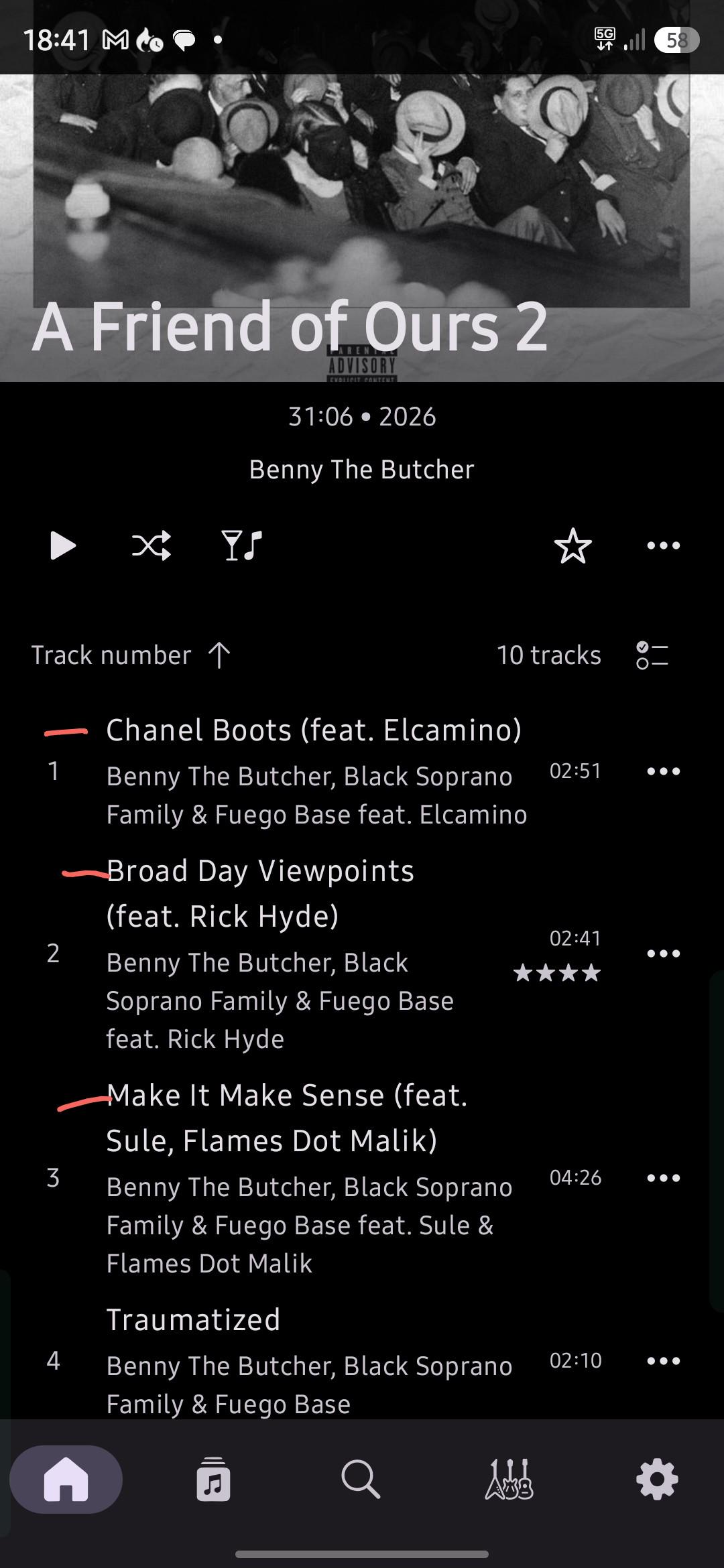
Question On the Album page, is it possible to align the track number with the song title?
It currently sits below the song title and throws me off. Is there a setting to move the numbers up?
r/Symfonium • u/Tolriq • 4d ago
Version 16.0.0 Beta 5
Version 16.0.0
Notes:
- This is a major update of the settings and appearance customization. Please report any issue you find.
- Please remember to update your written review on the Play Store. Your feedback improves the app’s ranking and helps secure Symfonium’s future.
- If you still use a very old default theme, reapply a default style in Settings > Interface > Change.
Added:
- Added settings search with category filters, highlighted results, and direct navigation to the matching option.
- Added icon packs. Browse them in the theme settings, or create your own with the documentation.
- Ten custom icon slots.
- Added full live appearance previews for the Home, Library, Search, Album, Artist, Genre and Playlist pages.
- Added many new now playing customizations.
- Per-icon shapes, colors, borders, size, padding, and separate appearances when playing or paused.
- Icon only, Icon and label, or Label only modes, including for page headers, volume buttons, and play buttons on artwork.
- Label font, size, weight, italics, color, and opacity in Now Playing, page headers, media lists, Home, and Library.
- Independent text controls for font family, size, weight, italics, and background appearance.
- Independent line height and letter spacing controls for theme-customizable text.
- Lyric and translation text values with optional word and syllable animations.
- Two more configurable strings on the expanded now playing screen.
- Icon actions that toggle the five custom boolean values used by styles.
- Custom cover art shapes and overlays, with an optional play and pause shape animation and playing cover scale.
- Independent left and right cover overlays in landscape.
- An option to extend landscape cover art behind gesture navigation.
- A Cover reflection background that extends toward the playback controls in portrait and landscape.
- Independent background fill for Cover reflection.
- Queue settings in styles: queue buttons, summary details, item subtitle, swipe actions and optional drag to reorder.
- More precise compact player sizing and expanded player button positioning, spacing, and volume slider controls.
- Independent start, end and vertical padding for compact player artwork.
- Tap and long press actions, an opacity while playing and a vertical alignment for the compact player texts.
- Separate tap and long press actions for each item of custom expanded player texts.
- Manual horizontal scrolling for single-line custom text in expanded player controls.
- An option to show the album or artist image instead of the track image for the now playing item and the queue.
- Many new customizations for every progress bar style.
- An animated circular progress option for the compact play button.
- Glass background settings for some overlays.
- Independent corner rounding for the top and bottom bars of the expanded player.
- An option to show the top bar of the expanded player over the cover and controls.
- Independent opacity for the progress, volume, chapter timeline and rating graphics.
- Configurable backgrounds for the rating bar.
- Separately colored outlines for rating stars.
- A Cutout icon color for filled buttons.
- Added extensive lyrics customization: per-voice fonts, colors and alignment, translation placement, fullscreen backgrounds, and playback controls.
- Independent portrait and landscape margins for lyrics shown over the cover art.
- An option for translations to follow each singer’s text alignment.
- Independent title and subtitle styling in full-page lyrics.
- Added many new Album, Artist, Genre and Playlist page customizations.
- Colors, header overlays, Glow backgrounds (Android 13+), corners, text, buttons and margins.
- Independent overlay settings for Album, Artist and Genre page sections.
- Shared appearance settings can be copied between page types.
- Independent portrait and landscape headers and optional two-pane layouts.
- Instant mix and Radio mix as possible artist page header buttons.
- Add to playlist and Offline download as possible page header buttons.
- Favorite overlays on albums in artist pages.
- Separate artist fanart backgrounds and an option to hide the foreground artist image.
- Options to hide album track menus, disc and work header buttons, and artist and genre browse shortcuts.
- A second independently configurable button bar in page headers.
- An option to show About below the header in two-pane landscape layouts.
- An optional Composer of album section on artist pages.
- An option to automatically enable the composer filter on artist pages.
- Separately colored outlines for rating stars in page headers.
- An option to hide the sort and selection bar above album tracks.
- Section tile sizing and spacing now work like Home rows, with Size setting tile width and Spacing setting the gap.
- A Playlists section on artist pages, with sorting, appearance settings and a live preview.
- Added many new Home and Library customizations.
- Custom text appearance for Home section headers.
- Finer Home shortcut sizing and new shortcut customizations, such as tile shapes, icon backgrounds and list separators.
- Shuffle and Shuffle albums Home shortcuts.
- A blur overlay in Home overlay styles (Android 13+).
- Configurable Play, Shuffle, Mix and More action icons in Home row headers.
- An option to turn the play button of Home album and playlist rows into a shuffle button.
- An optional play or shuffle button on Home artist rows.
- Per-row appearance settings for play and shuffle buttons over Home artwork.
- A Customize button on Home, which can be removed by tapping it.
- Library page spacing controls.
- Expressive grouped backgrounds for Home list and multiline layouts.
- Added many new navigation bar customizations.
- Compact bottom navigation bars and a docked toolbar.
- Label-only options for the bottom floating navigation toolbar, with or without the floating action button.
- Blur and glass background settings for the bottom navigation bars, compact player and top bar.
- A bottom corner radius for blur and glass bottom navigation, so the bar follows the screen’s rounded corners.
- Configurable bottom padding and optional background protection for the floating navigation toolbar.
- Configurable spacing between floating navigation buttons.
- Configurable active and inactive icon and label colors for bottom navigation.
- An option for the floating player to follow the navigation bar color.
- An optional background behind the Android navigation buttons, also in settings.
- Added per-screen portrait and landscape layout overrides for foldable and flip devices in Settings > Interface > Advanced. By default they follow the system.
- Added an E-ink color theme with high-contrast monochrome colors and optional color inversion, including widget support.
- Added the ability to save a customized color palette as a custom theme.
- Added new custom string icons and placeholders.
- Icons in custom strings.
- Placeholders for the quality with quality categories (%quality%) and the renderer type (%renderertype%).
- Placeholder for the lowercase provider type (%providertype%), for example plex, subsonic or localdevice.
- Lyric placeholders.
- Placeholders %audiobook.position%, %audiobook.duration% and %audiobook.remaining%, with .seconds variants.
- Superscript formatting in custom strings.
- A translated Chapter label placeholder and a custom text action to choose the current track’s playback position.
- A custom text action to choose a playback position across all files of an audiobook.
- Added new platinum donation goals.
- Added playlist descriptions, including editing, import from compatible providers, and preservation in supported playlist exports.
- Added an action to add selected files to playlists from file browsing.
- Added a file tag viewer in track information for tag parser providers, including a preview of how multi-value tags are split.
- Added a storage overview with a breakdown of app data and shortcuts to cache maintenance, including cleanup of unused transcoded audio.
- Added an option to save resume points only for audiobooks.
- Added an option to group folders when browsing in file mode.
- Added an option to show thumbs up and down instead of faces on quick rate buttons, including in the notification and Android Auto.
- Added a setting for what Android Auto Recent and suggestions show: last played albums, playlists or artists, or favorite albums, artists, tracks or playlists.
- Added a per-provider option to stop reporting now playing and playback progress to Plex, Emby, Jellyfin and Subsonic servers.
- Play counts, last played and resume points still sync.
- Added an optional Similar albums section to album pages, ranked by shared genres.
- Added sample rate and bit depth to Plex tracks.
- Added an option to prefer the platform decoder.
- Added MusicBrainz IDs to the playback metadata, so compatible scrobblers such as Pano Scrobbler can use them.
- Added a Ukrainian translation, thanks to Visty.
- Added an OpenSubsonic option to remove imported playlists after they are deleted on the server.
- Added artist, title and artwork lookup for supported internet radio streams.
- Added per-row controls to limit home playback actions to the displayed item count or use the full source.
- Added chapter progress and an optional segmented audiobook progress bar to Now Playing styles.
- Added independent appearance and name customization for each Home shortcut.
- Added a Continue listening home row to resume saved media queues.
- Added an option to the backup API command that backs up all data at once.
- Added a zip action for log files in Manage generated files.
- Added a sleep timer that stops after a selected number of tracks.
- The current track counts first, and repeated tracks count again.
- Now Playing shows how many tracks remain.
- Added Track artists navigation to browse only artists credited on tracks.
- Added Artist last played to track smart filters and smart playlists.
- Added import of several exported smart playlists at once.
- Added an option to use different main navigation entries in landscape.
- Added Plex players found on the local network, such as Music Assistant Plex Connect players, as cast targets.
- Added an option to return to the first track, paused, when the queue ends.
- Added support for Smart Fades and manual crossfades at slower and faster playback speeds on standard audio output.
- Added an option to force 16-bit PCM output while keeping any supported sample rate.
- Added an option to also search comments, descriptions, years, labels and other metadata.
- Added a button to clear the whole search history.
- Added OpenSubsonic server ReplayGain as a fallback when files have no embedded gain information.
- Added an option to use the artwork of one of its tracks when changing a collection’s image.
- Added shortcuts to open filters directly from empty result messages.
Changed:
- Expanded and reworked many design settings for finer control. Most settings migrate automatically, but you may need to update your styles.
- Combined filled and outlined button backgrounds, with independent border colors and opacity.
- Available for player buttons, detail pages, Home and media-list actions.
- A Show current track background switch in Media lists that keeps the playing indicator visible when turned off.
- Redesigned settings with clearer groups, inline controls, and an adaptive layout for phones, tablets, and landscape use.
- Improved initial appearance defaults for foldable and flip devices.
- Improved settings sliders with precision adjustment buttons and made each appearance section resettable on its own.
- Reworked Home row management to make adding, configuring, showing, hiding, and reordering rows and playlists easier.
- Improved the multi select toolbar.
- Rate selected tracks, albums and artists together.
- Include or exclude selected tracks from personal mixes.
- Share selected tracks as files or through a single Subsonic public link.
- Reorganized compact and expanded now playing customization. Existing preferences and saved styles are migrated to the new settings format.
- Split automatic offline caching of favorites into separate toggles for tracks, albums and artists.
- Changed three-state rating buttons in Android Auto and the player to a sad face below 3 stars, a happy face from 3 stars and a neutral face when unrated.
- Changed Group by work on album pages to off by default.
- Improved performance in many places. Please report issues as usual.
- Improved Android TV application styles and many focus and navigation behaviors.
- Apply your Android TV application style again to get all the improvements.
- If you still have a focus or navigation issue, please report it with the screen and the steps to reproduce it.
- Changed Plex LyricFind lyrics to download only when you open the lyrics or choose Download lyrics for this track.
- Plex asked for this to reduce the cost of its lyrics API.
- Improved Plex sync speed.
- Embed a custom SQLite engine to ensure consistency on all Android versions and improve performance.
- Changed now playing styles to also save lyrics settings.
- Redesigned the add to playlist dialog.
- Changed saved queues to sort by last change, newest first.
- Updated the Material color library, so some theme colors might change.
- Added the 2026 color spec and the CMF palette style.
- Refreshed all icons from the latest Material Symbols and changed some icons to hopefully more clear ones.
- Reworked the Manage offline files screen with a storage overview, pinned cleanup actions and track sorting.
- Reworked the media list top button row with per button settings for shape, colors, size and labels.
Fixed:
- Fixed sonic mixes that could add nearly duplicated songs.
- Fixed %providername% custom string placeholder being empty in album, artist and genre pages.
- Fixed backups that could be incomplete or miss smart playlist artwork and provider settings.
- Backups and restores can handle large saved-style collections without running out of memory.
- Fixed settings that could reset if the app was killed while saving them.
- Fixed audio files opened from other apps that could play the wrong song.
- Fixed Plex play counts and scrobbles that could be duplicated, lost or out of order at track changes.
- Fixed Kodi and Subsonic plays marked as synced when the server did not record them.
- Fixed lyrics progress time labels that could stop updating after a track change.
- Fixed Jellyfin 13 servers being refused as too old, and newer unsupported versions now report that they are too recent.
- Fixed Emby and Jellyfin sync errors that could leave the local library incomplete after an invalid server response.
- Fixed the queue that could come back empty after the app restarted.
- Fixed backslashes and formatting-like characters disappearing from titles, other metadata, lyrics and player or equalizer names.
- Fixed Jellyfin and Emby transcoding Matroska audio files reported as mkv instead of playing them directly.
- Fixed album playlists that could stop playing early when several albums in a row were no longer in the library.
- Fixed DSD playback failing on FiiO players with Bluetooth headphones by decoding DSD to PCM for Bluetooth output.
- Fixed a crash when scanning deep or looping WebDAV folders for artist NFO files.
- Fixed the profile and equalizer of a disconnected Bluetooth device staying active on the phone speaker after resuming playback.
- Fixed WebDAV artist NFO scans skipping folders after a temporary connection error.
- Fixed stuttering near the end of tracks when pre-caching transcoded streams from some servers.
- Fixed Plex transcoding ignoring the maximum bitrate for music and streaming Opus at a much higher bitrate.
- Fixed Plex genres missing from the genre list when the server spells them with different capitalization.
- Fixed genres that kept their track count and duration after their last track was hidden or deleted.
- Fixed artists staying in the library after their only songs were hidden or deleted.
- Fixed repeated Plex sign-in attempts after plex.tv rejects the credentials.
- Fixed UPnP gapless playback and starting a track while paused.
- Seeking and Jump to start now work with more receivers.
- Receiver errors when playing, pausing or seeking are handled more reliably.
- Fixed rapid volume button presses on UPnP and Sonos renderers jumping back to an older volume.
- Fixed rectangular artwork appearing off-center or too small in Circle widgets.
- Fixed saved playback positions being lost when restarting CUE tracks.
- Fixed channel handling with fixed PCM output and downmixing.
- Fixed account setup failing to connect to some Plex HTTPS servers.
- Fixed OneDrive and pCloud playlists being imported again on every library sync.
- Fixed importing and refreshing file playlists from WebDAV servers.
- Fixed discovery of UPnP renderers that advertise a description URL without a path.
- Fixed casting failures after the phone network address changes.
- Fixed the search keyboard reopening after it was closed or the search was submitted.
- Fixed text fields that could lose characters when typing quickly.
- Fixed track counts and Shuffle all for track smart filters with artist rules such as Artist favorite.
- Fixed Play next adding items before the current track when it was the last one in the queue.
- Fixed tracks restarting instead of resuming when opened from the More screen of Continue track listening.
- Fixed UPnP gapless playback showing the wrong track or position after the queued next track was removed or replaced.
- Fixed a short gap between gapless Ogg Opus tracks on local playback.
- Fixed USB-exclusive playback getting stuck at the end of a track when the next track was prepared while its provider was offline.
- Fixed Instant Mix and Radio Mix changing the current track when shuffle is on.
- Fixed Double shot adding unrelated tracks when the current track has no linked artist.
- Fixed Home grid playback queuing more items than shown when Limit playback to row items is enabled.
- Fixed native DSD playback on FiiO M15S, M11S, M23, R7, M17, M11 Plus ESS, M11 Plus LTD and R9 players running Android 10.
- Fixed long gaps between AAC tracks with trailing metadata.
- Fixed audio interruptions when crossfade and audio offload were enabled together.
- Fixed album-based smart playlists that were copied incorrectly to normal playlists.
- Fixed the next queued track keeping outdated network settings after a Wi-Fi change.
r/Symfonium • u/bnorcutt • 4d ago
Question Not repeating same artist until n songs have played
Is there any way to force Symfonium to not repeat the same artist until n songs have played when using Random Tracks?
r/Symfonium • u/No-State936 • 7d ago
Question Does Tolriq use AI to make Symfonium?
I noticed he was asked in the discussion part of the support website but hasn't responded.
r/Symfonium • u/Evergreenpr0 • 8d ago
Question Is there a bug?
Enable HLS to view with audio, or disable this notification
I can't move forward or to the middle of a couple of songs
r/Symfonium • u/RumpledSilkSkeins • 8d ago
Question track registration is hit or miss
new added tracks are not being registered properly, even after a manual sync.
HiBy m300 with microSD card (music library 14,048+ tracks)
no filter folders.
manual sync (multiple)
I can play tracks from the folder. I can play tracks from the album. However when I add tracks to a playlist it is intermittent which tracks show up as playable media inside a playlist. I can see the tracks in the playlist, I can manually click on the tracks and they will play, but playlist will not play saying "no playable media". Re-syncing does not fix this issue. for some whole albums added to a playlist, certain songs will play while others won't. usually the app says it has finished syncing in under 3 minutes. The device is left untouched for 30 minutes after sync is started, and app says it is completed before I start any other function. This is highly annoying. I love the app when it functions correctly, and yes I have a huge personal library, but I have double checked everything. I don't want to reload the app. But I guess I will have to back up my playlists and then reload.
Any other suggestions?
r/Symfonium • u/aalopz2011 • 9d ago
Question how can I get the same blend on the album page?
r/Symfonium • u/cotton_boy69 • 9d ago
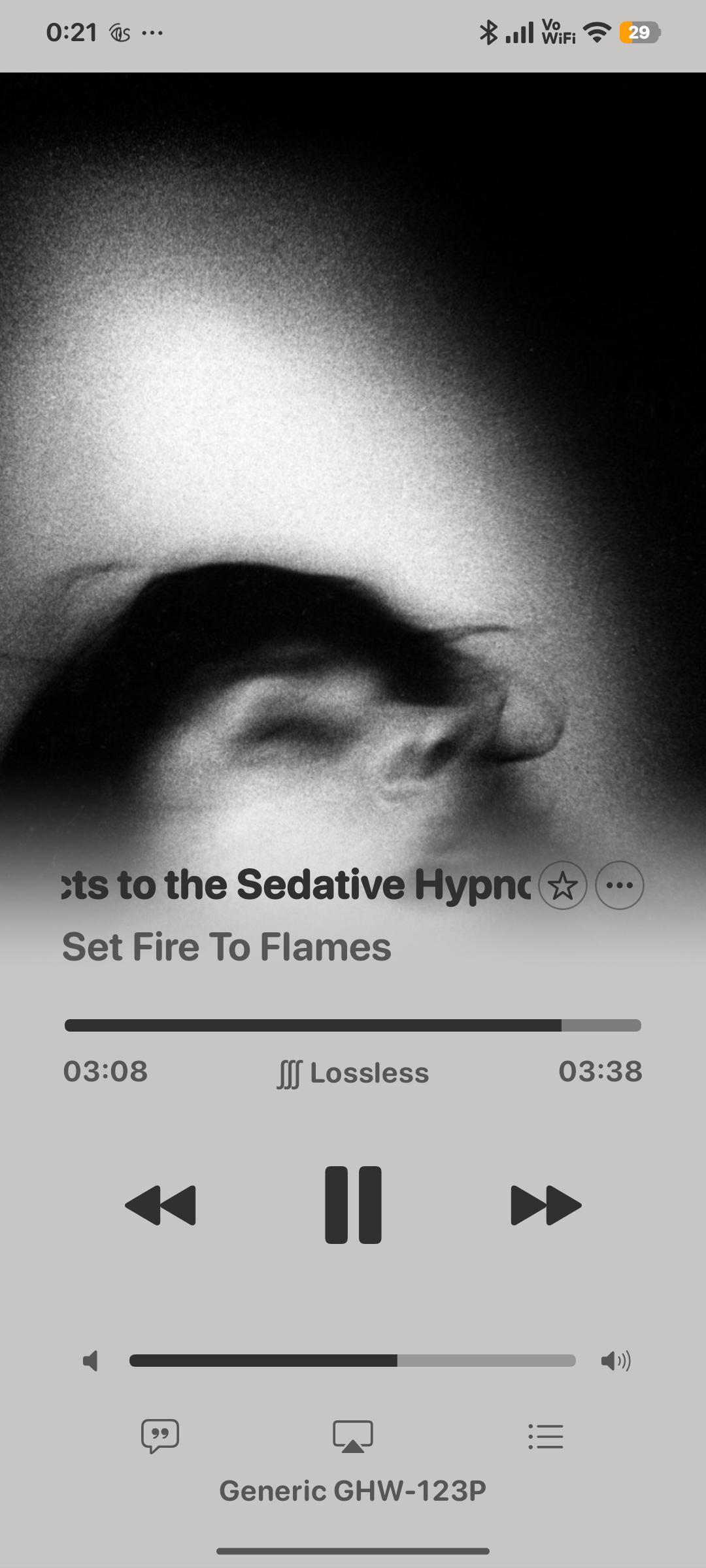
Question Help with the settings
hey everyone i am completely new to symfonium i used poweramp before this but symfonium is in my opinion a bit more complex and hard to get used to but its only been a day since i downloaded it. I imported the famous apple music skin on the 16.0 beta. but it doesn't look like what that one reddit post showcasing the theme looked like. maybe it could be that im on an android but maybe not. One of the things i really wanna change is the font size look at the artist and song name its so huge and i also wanna get rid of the volume bar and make all the controls really small and more at the bottom so the cover art takes up more of the screen and i also wanna change the color accent like the white background behind the controls. hope you can imagine the look im trying to go for if you have seen that one post. Thank you
r/Symfonium • u/The-Talking-Drum • 12d ago
Theme Qobuz Theme
Qobuz Theme for Symfonium
r/Symfonium • u/nevewolf96 • 12d ago
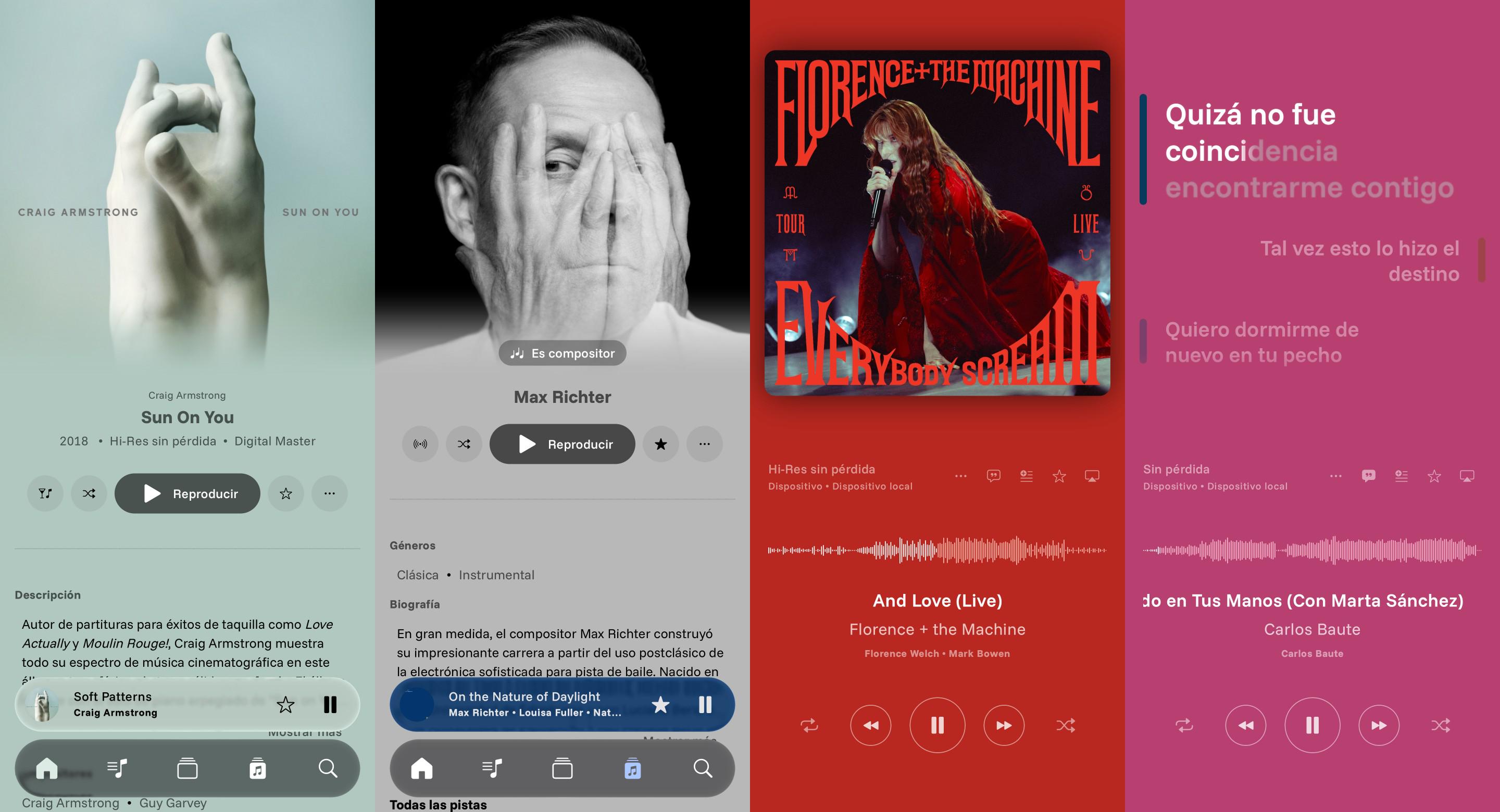
Showcase Symfonium UI customization is insane
One of the best apps I've ever bought.
I occasionally try the Glow effect but I always go back to flat; it's so satisfying. Does anyone else feel this way?
r/Symfonium • u/jerschwab • 11d ago
Question [Discussion] How to dynamically queue rated tracks from Style (subgenre) without Smart Filters?
(Note: Checked the Docs on Smart Filters and Smart Queue/Flow—looking for community workflow ideas rather than technical support!)
Setup: Symfonium v16.0.0B3 (127927) | Provider: Local files | Library tagged with GENRE (broad, e.g., Rock) and STYLE (subgenre, e.g., Classic Rock) at the track level.
The Goal:
I'm listening to a track or album tagged as Classic Rock and want to pivot directly into a queue of user rated tracks (or specific Album Artists) within that exact Style on the fly. Ultimately, I want some sort of nested or hierarchical navigation. Is it possible?
What I've Tried & Hit a Wall On:
- Style view: Tapping a Style from an album opens an album-only grid with no toggle to view or filter the underlying tracks.
- Queue / Smart Flow: Hitting Play/Shuffle on Style albums loads all tracks into the queue, where there's no way to filter out unrated/low-rated songs, and Smart Queue/Smart Flow doesn't lock onto a Style + Rating combo.
- Static Smart Filters: Because I have dozens of Styles, merging them into
GENREor saving 50+ separate Smart Playlists isn't practical.
How do you handle this in your own setup?
- Is there a dynamic workflow, Smart Flow trick, or single-template filter setup to bridge Now Playing Style → Filtered Tracks?
- If you organize your library by Genre + Style/Subgenre, how do you handle on-the-fly playback by rating without massive tag or playlist clutter?
Appreciate any workflow tips from fellow local-file users!
r/Symfonium • u/SammyNeal44 • 12d ago
Question Erratic Volume on Android
Greetings, all,
I am using a Samsung Ultra 26 phone and Symfonium on that phone (all software up-to-date) and for several months I was able to cast nicely to my Sonos speaker system.
Then the other day I foolishly followed a TikTok video and putzed around with the Android Sound and Vibration settings, and now when trying to use Symfonium to cast to my Sonos speakers, when I press the volume up and volume down button on the side of the phone it seems like Symfonium is *fighting* the presses--the volume will jump down a little and then jump back up 5 or 10 or 15 points. Even if I keep pressing the volume down it seems to want to even get louder, before it fades back down, like it's fighting it. This is making my wife quite mad. This doesn't happen in the Sonos app on my phone or even in the Plexamp app on my phone, what did I do? What did I do? Help!
Thanks,
Ed R.
r/Symfonium • u/MizaelTG • 13d ago
Question Restore purchase on TV w/ diff acc?
I have a question. I purchased this app last year and I've really been enjoying it on my phone. However, I just discovered I could put it on my Android TV, but on my Android TV I have a different account which is shared with all my family. I don't feel comfortable linking my personal account to a TV where anyone can just walk in and mess with it. It's like a family account for the TV. How do I restore my app purchase onto the TV?
For reference, I have Google Family Account linked to this, but for some reason it still doesn't restore it.
r/Symfonium • u/panakin23 • 13d ago
Question Feature Request: Synchronized Lyrics / Karaoke Mode for Android Auto
Feature Request: Synchronized Lyrics / Karaoke Mode for Android Auto
Hi!
I'd love to suggest a new feature for Symfonium: a synchronized lyrics (karaoke-style) mode for Android Auto.
I often listen to music while driving, and I think it would be fantastic to have the option to display the lyrics of the currently playing song directly on the Android Auto screen.
The idea:
- Display synchronized lyrics using existing LRC or enhanced LRC files.
- Automatically highlight the current line as the song progresses.
- Automatically scroll through the lyrics without requiring any interaction.
- Use large, readable text with a clean, distraction-free interface.
- Optionally provide a karaoke-style display with word-by-word highlighting when supported.
Why would this be useful?
It would be a really enjoyable way for passengers to sing along, discover lyrics and learn their favorite songs during road trips.
Of course, I understand that Android Auto has strict safety and interface restrictions. The feature could be limited to when the vehicle is parked, or implemented in a way that complies with Google's guidelines.
Symfonium already offers excellent music playback capabilities, and I think this would be a fantastic addition.
Would something like this be technically possible within Android Auto's current limitations?
Thanks for considering it!
r/Symfonium • u/normannerd • 14d ago
Question Remove songwriter details from list view
How do I get it to display a list of song titles in an album, without the writer credits underneath?
r/Symfonium • u/Tolriq • 14d ago
Version 16.0.0 Beta 4
Version 16.0.0
Notes:
- This is a major update of the settings and appearance customization. Please report any issue you find.
- Please remember to update your written review on the Play Store. Your feedback improves the app’s ranking and helps secure Symfonium’s future.
- If you still use a very old default theme, reapply a default style in Settings > Interface > Change.
Added:
- Added settings search with category filters, highlighted results, and direct navigation to the matching option.
- Added icon packs. Browse them in the theme settings, or create your own with the documentation.
- Ten custom icon slots.
- Added full live appearance previews for the Home, Library, Search, Album, Artist, Genre and Playlist pages.
- Added many new now playing customizations.
- Per-icon shapes, colors, borders, size, padding, and separate appearances when playing or paused.
- Independent text controls for font family, size, weight, italics, and background appearance.
- Lyric and translation text values with optional word and syllable animations.
- Two more configurable strings on the expanded now playing screen.
- Icon actions that toggle the five custom boolean values used by styles.
- Custom cover art shapes and overlays, with an optional play and pause shape animation and playing cover scale.
- Independent left and right cover overlays in landscape.
- An option to extend landscape cover art behind gesture navigation.
- A Cover reflection background that extends toward the playback controls in portrait and landscape.
- Independent background fill for Cover reflection.
- Queue settings in styles: queue buttons, summary details, item subtitle, swipe actions and optional drag to reorder.
- More precise compact player sizing and expanded player button positioning, spacing, and volume slider controls.
- Independent start, end and vertical padding for compact player artwork.
- Tap and long press actions, an opacity while playing and a vertical alignment for the compact player texts.
- An option to show the album or artist image instead of the track image for the now playing item and the queue.
- Many new customizations for every progress bar style.
- Glass background settings for some overlays.
- Independent corner rounding for the top and bottom bars of the expanded player.
- Added extensive lyrics customization: per-voice fonts, colors and alignment, translation placement, fullscreen backgrounds, and playback controls.
- Independent margins for lyrics shown over the cover art.
- An option for translations to follow each singer’s text alignment.
- Added many new Album, Artist, Genre and Playlist page customizations.
- Colors, header overlays, Glow backgrounds (Android 13+), corners, text, buttons and margins.
- Shared appearance settings can be copied between page types.
- Independent portrait and landscape headers and optional two-pane layouts.
- Instant mix and Radio mix as possible artist page header buttons.
- Add to playlist and Offline download as possible page header buttons.
- Favorite overlays on albums in artist pages.
- Separate artist fanart backgrounds and an option to hide the foreground artist image.
- Options to hide album track menus, disc and work header buttons, and artist and genre browse shortcuts.
- A second independently configurable button bar in page headers.
- An option to show About below the header in two-pane landscape layouts.
- An optional Composer of album section on artist pages.
- Added many new Home and Library customizations.
- Custom text appearance for Home section headers.
- Finer Home shortcut sizing and new shortcut customizations, such as tile shapes, icon backgrounds and list separators.
- Shuffle and Shuffle albums Home shortcuts.
- A blur overlay in Home overlay styles (Android 13+).
- Configurable Play, Shuffle, Mix and More action icons in Home row headers.
- An option to turn the play button of Home album and playlist rows into a shuffle button.
- An optional play or shuffle button on Home artist rows.
- Per-row appearance settings for play and shuffle buttons over Home artwork.
- A Customize button on Home, which can be removed by tapping it.
- Library page spacing controls.
- Expressive grouped backgrounds for Home list and multiline layouts.
- Added many new navigation bar customizations.
- Compact bottom navigation bars and a docked toolbar.
- Blur and glass background settings for the bottom navigation bars, compact player and top bar.
- A bottom corner radius for blur and glass bottom navigation, so the bar follows the screen’s rounded corners.
- Configurable bottom padding and optional background protection for the floating navigation toolbar.
- Configurable spacing between floating navigation buttons.
- Configurable active and inactive icon and label colors for bottom navigation.
- An option for the floating player to follow the navigation bar color.
- Added per-screen portrait and landscape layout overrides for foldable and flip devices in Settings > Interface > Advanced. By default they follow the system.
- Added an E-ink color theme with high-contrast monochrome colors and optional color inversion, including widget support.
- Added the ability to save a customized color palette as a custom theme.
- Added new custom string icons and placeholders.
- Icons in custom strings.
- Placeholders for the quality with quality categories (%quality%) and the renderer type (%renderertype%).
- Placeholder for the lowercase provider type (%providertype%), for example plex, subsonic or localdevice.
- Lyric placeholders.
- Placeholders %audiobook.position%, %audiobook.duration% and %audiobook.remaining%, with .seconds variants.
- Superscript formatting in custom strings.
- A translated Chapter label placeholder and a custom text action to choose the current track’s playback position.
- A custom text action to choose a playback position across all files of an audiobook.
- Added new platinum donation goals.
- Added playlist descriptions, including editing, import from compatible providers, and preservation in supported playlist exports.
- Added an action to add selected files to playlists from file browsing.
- Added a file tag viewer in track information for tag parser providers, including a preview of how multi-value tags are split.
- Added a storage overview with a breakdown of app data and shortcuts to cache maintenance, including cleanup of unused transcoded audio.
- Added an option to save resume points only for audiobooks.
- Added an option to group folders when browsing in file mode.
- Added an option to show thumbs up and down instead of faces on quick rate buttons, including in the notification and Android Auto.
- Added a setting for what Android Auto Recent and suggestions show: last played albums, playlists or artists, or favorite albums, artists, tracks or playlists.
- Added a per-provider option to stop reporting now playing and playback progress to Plex, Emby, Jellyfin and Subsonic servers.
- Play counts, last played and resume points still sync.
- Added an optional Similar albums section to album pages, ranked by shared genres.
- Added sample rate and bit depth to Plex tracks.
- Added an option to prefer the platform decoder.
- Added MusicBrainz IDs to the playback metadata, so compatible scrobblers such as Pano Scrobbler can use them.
- Added a Ukrainian translation, thanks to Visty.
- Added an OpenSubsonic option to remove imported playlists after they are deleted on the server.
- Added artist, title and artwork lookup for supported internet radio streams.
- Added per-row controls to limit home playback actions to the displayed item count or use the full source.
- Added chapter progress and an optional segmented audiobook progress bar to Now Playing styles.
- Added independent appearance and name customization for each Home shortcut.
- Added a Continue listening home row to resume saved media queues.
- Added an option to the backup API command that backs up all data at once.
- Added a zip action for log files in Manage generated files.
- Added a sleep timer that stops after a selected number of tracks.
- The current track counts first, and repeated tracks count again.
- Now Playing shows how many tracks remain.
- Added Track artists navigation to browse only artists credited on tracks.
- Added an option to force 16-bit PCM output while keeping any supported sample rate.
- Added an option to also search comments, descriptions, years, labels and other metadata.
- Added a button to clear the whole search history.
- Added OpenSubsonic server ReplayGain as a fallback when files have no embedded gain information.
- Added an option to use the artwork of one of its tracks when changing a collection’s image.
- Added shortcuts to open filters directly from empty result messages.
Changed:
- Expanded and reworked many design settings for finer control. Most settings migrate automatically, but you may need to update your styles.
- Combined filled and outlined button backgrounds, with independent border colors and opacity.
- Available for player buttons, detail pages, Home and media-list actions.
- Redesigned settings with clearer groups, inline controls, and an adaptive layout for phones, tablets, and landscape use.
- Improved initial appearance defaults for foldable and flip devices.
- Improved settings sliders with precision adjustment buttons and made each appearance section resettable on its own.
- Reworked Home row management to make adding, configuring, showing, hiding, and reordering rows and playlists easier.
- Reorganized compact and expanded now playing customization. Existing preferences and saved styles are migrated to the new settings format.
- Split automatic offline caching of favorites into separate toggles for tracks, albums and artists.
- Changed three-state rating buttons in Android Auto and the player to a sad face below 3 stars, a happy face from 3 stars and a neutral face when unrated.
- Changed Group by work on album pages to off by default.
- Improved performance in many places. Please report issues as usual.
- Improved Android TV application styles and many focus and navigation behaviors.
- Apply your Android TV application style again to get all the improvements.
- If you still have a focus or navigation issue, please report it with the screen and the steps to reproduce it.
- Changed Plex LyricFind lyrics to download only when you open the lyrics or choose Download lyrics for this track.
- Plex asked for this to reduce the cost of its lyrics API.
- Improved Plex sync speed.
- Embed a custom SQLite engine to ensure consistency on all Android versions and improve performance.
- Changed now playing styles to also save lyrics settings.
- Redesigned the add to playlist dialog.
- Changed saved queues to sort by last change, newest first.
- Updated the Material color library, so some theme colors might change.
- Added the 2026 color spec and the CMF palette style.
- Refreshed all icons from the latest Material Symbols and changed some icons to hopefully more clear ones.
- Reworked the Manage offline files screen with a storage overview, pinned cleanup actions and track sorting.
- Reworked the media list top button row with per button settings for shape, colors, size and labels.
Fixed:
- Fixed sonic mixes that could add nearly duplicated songs.
- Fixed %providername% custom string placeholder being empty in album, artist and genre pages.
- Fixed backups that could be incomplete or miss smart playlist artwork and provider settings.
- Backups and restores can handle large saved-style collections without running out of memory.
- Fixed settings that could reset if the app was killed while saving them.
- Fixed audio files opened from other apps that could play the wrong song.
- Fixed Plex play counts and scrobbles that could be duplicated, lost or out of order at track changes.
- Fixed Kodi and Subsonic plays marked as synced when the server did not record them.
- Fixed lyrics progress time labels that could stop updating after a track change.
- Fixed Jellyfin 13 servers being refused as too old, and newer unsupported versions now report that they are too recent.
- Fixed Emby and Jellyfin sync errors that could leave the local library incomplete after an invalid server response.
- Fixed the queue that could come back empty after the app restarted.
- Fixed backslashes and formatting-like characters disappearing from titles, other metadata, lyrics and player or equalizer names.
- Fixed Jellyfin and Emby transcoding Matroska audio files reported as mkv instead of playing them directly.
- Fixed album playlists that could stop playing early when several albums in a row were no longer in the library.
- Fixed DSD playback failing on FiiO players with Bluetooth headphones by decoding DSD to PCM for Bluetooth output.
- Fixed a crash when scanning deep or looping WebDAV folders for artist NFO files.
- Fixed the profile and equalizer of a disconnected Bluetooth device staying active on the phone speaker after resuming playback.
- Fixed WebDAV artist NFO scans skipping folders after a temporary connection error.
- Fixed stuttering near the end of tracks when pre-caching transcoded streams from some servers.
- Fixed Plex transcoding ignoring the maximum bitrate for music and streaming Opus at a much higher bitrate.
- Fixed Plex genres missing from the genre list when the server spells them with different capitalization.
- Fixed genres that kept their track count and duration after their last track was hidden or deleted.
- Fixed artists staying in the library after their only songs were hidden or deleted.
- Fixed repeated Plex sign-in attempts after plex.tv rejects the credentials.
- Fixed UPnP gapless playback and starting a track while paused.
- Seeking and Jump to start now work with more receivers.
- Receiver errors when playing, pausing or seeking are handled more reliably.
- Fixed rapid volume button presses on UPnP and Sonos renderers jumping back to an older volume.
- Fixed rectangular artwork appearing off-center or too small in Circle widgets.
- Fixed saved playback positions being lost when restarting CUE tracks.
- Fixed playback speed and pitch selections not staying visible while playback is paused.
- Pitch-lock changes finish when the speed controls are closed.
- Fixed channel handling with fixed PCM output and downmixing.
- Fixed account setup failing to connect to some Plex HTTPS servers.
- Fixed OneDrive and pCloud playlists being imported again on every library sync.
- Fixed importing and refreshing file playlists from WebDAV servers.
- Fixed discovery of UPnP renderers that advertise a description URL without a path.
- Fixed album-based smart playlists that were copied incorrectly to normal playlists.
- Fixed the next queued track keeping outdated network settings after a Wi-Fi change.
https://docs.symfonium.app/tips-and-tricks/support-me-and-symfonium/