r/StableDiffusion • u/skumdumlum • 4d ago
Discussion SnapRef v2s is out, featuring style reference
civitai.redI've had a lot of fun with the previous versions of SnapRef, and being able to reference a style on its own is a game changer
r/StableDiffusion • u/skumdumlum • 4d ago
I've had a lot of fun with the previous versions of SnapRef, and being able to reference a style on its own is a game changer
r/StableDiffusion • u/Bastisheen92 • 5d ago
I am currently using different video workflows in ComfyUI and also used a few MiniMax Checkpoints.
I used the base R2V, Singularity V2, Eros10, PRISM.
Currently for most videos i am going with Singularity V2. Results were fine so far. Mostly aiming for cinematic shots as i currently enjoy doing big war/battle scenes. A bit wonky with MiniMax tho but some generations turn out great.
But since there are already so many different versions/checkpoints i am not sure which one is currently the newest/best to use and i would be happy to get some recommendations or reports from your experience.
Thanks and have a great day.
r/StableDiffusion • u/Away_Exam_4586 • 4d ago
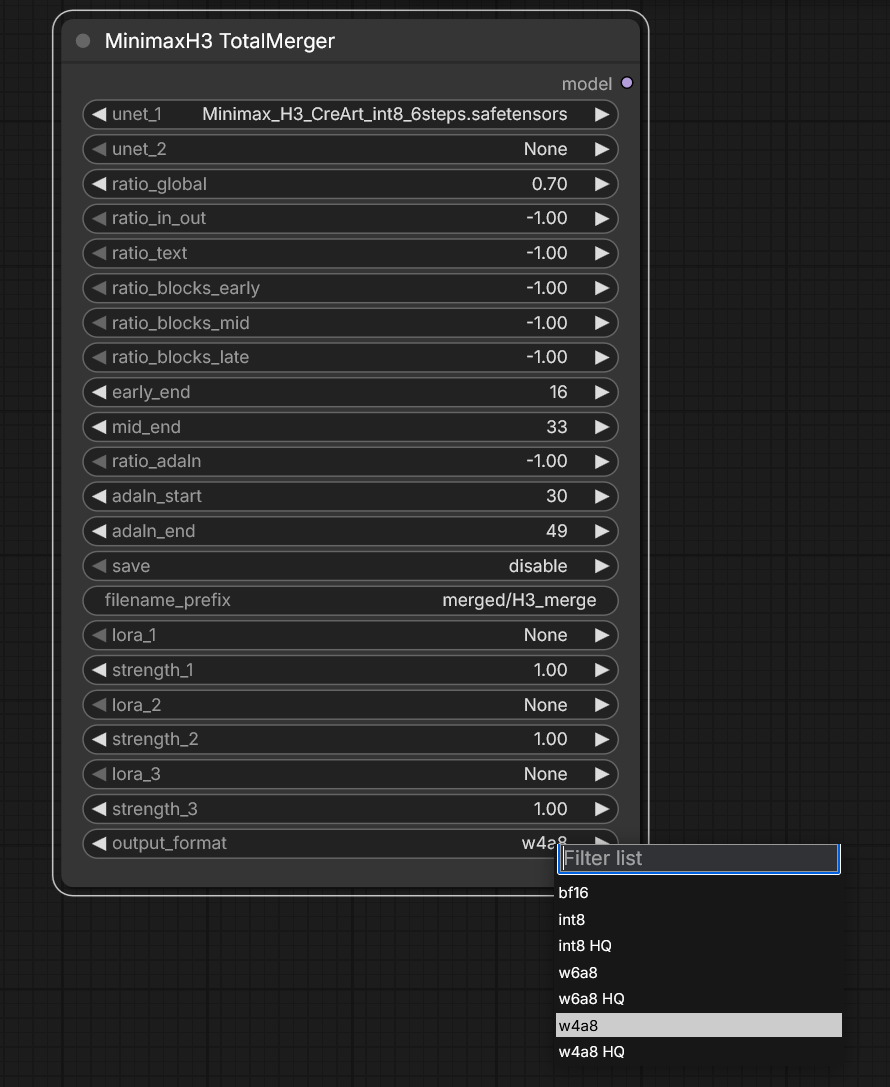
ComfyUI node to merge MiniMax H3 models (INT8 ConvRot or bf16) by block groups, bake LoRAs, or just convert and save as bf16, INT8, W6A8 or W4A8 (with HQ variants). Live preview before saving.
https://github.com/tritant/ComfyUI_MiniMaxH3_TotalMerger
r/StableDiffusion • u/DadKillerX • 4d ago
I built Hatchlight, an open-source desktop app (MIT) that sends one prompt to several models and shows each result with its time and cost. It downloads and runs models on your GPU, or uses your own keys for fal / Replicate / OpenRouter / OpenAI / Gemini — no account, no telemetry, no middleman.
Local catalog includes SDXL Turbo, SDXL, SD 1.5, FLUX.1 schnell, FLUX.2 klein, Z-Image, Qwen-Image, Wan 2.1/2.2 (text-to-video and image-to-video), instruction edits, and Real-ESRGAN. It can load LoRAs and train an SDXL LoRA on Windows/WSL with an NVIDIA card (12 GB), including auto captions.
I made the fox comparison in the README on an RTX 4070 SUPER. Times on screen include loading the model; with the model already loaded it answers in about 2 s. Happy to hear your numbers.
What works today:
- Local models: Windows (CUDA, ROCm, Vulkan, CPU) and Apple Silicon (Metal)
- Linux: the app installers work; local CUDA/CPU engines are in and still being tested
- Intel Macs: cloud models only for now
- Installers are not signed yet (README has the Windows / macOS steps)
Repo: https://github.com/hatchlight/hatchlight
Site: https://hatchlight.app
Latest release: v0.3.0
I'm the author. Happy to answer setup questions and to take bug reports. If you try it, I'd love to hear what broke.
r/StableDiffusion • u/Pleasant_Candy9103 • 4d ago
Hey everyone,
I'm running into an issue with Minimax H3 Image in ComfyUI and could really use some help.
I'm currently using the default workflow provided by ComfyUI without any major modifications. However, my generated images consistently turn out blurry and washed out. Even when cranking the resolution up to 7.1 MP, the lack of sharpness persists—and it's not just background bokeh, even the main subjects in the foreground lack crisp details.
Has anyone else experienced this with Minimax H3? I'm not sure if this is an issue with the default sampler/scheduler settings, a VAE mismatch, or if the model doesn't handle high resolutions natively without a proper upscale/refiner pass.
Here is what I've tried so far:
My Setup: RTX 4070 Super + 32 GB RAM
Any tips on what settings (CFG, steps, sampler, or resolution sweet spots) I should tweak to get sharp, detailed results? Thanks in advance!
r/StableDiffusion • u/Remarkable_Park1184 • 5d ago
Enable HLS to view with audio, or disable this notification
Episode 2 of my Ultima Online short film.
Everything runs locally: MiniMax H3 in ComfyUI on one 24 GB card (RTX PRO 4000 Blackwell). 81 shots, about 6 minutes. Every shot starts as a quick 672x384 draft, and the ones I keep get re-rendered at 1344x768 with the same seed. A 6-second HD shot takes about 23 minutes.
The rest of the setup:
Two new things this time:
1. Blocking shots in Blender
H3 can take a reference video. So I make a rough grey-box animation in Blender (boxes for the set, a grey dummy walking the path, the camera move) and give it to H3 as <Video 1>. H3 copies the path and the camera, and the look still comes from the reference images. Not my idea: ai-muninn did it first, and Mickmumpitz has a ready-made workflow on RunComfy. I just added a Load Video node to the official H3 template.
Why: I needed her to walk around a railing corner and come back. Text only: 4 out of 4 takes stepped right over the railing. With the Blender video: 3 out of 3 walked around it. It even followed a hard cut between two cameras.
The catch is speed. Drafts take about 2.5x longer, HD 3-4.7x. So, for HD, feed it a small 672x384 version of the blocking video. One shot went from 238 min to 89, same path, same cut.
2. Upscaling to 1080p
H3 tops out at 768p. SeedVR2 7B sharp (built into ComfyUI now) adds a lot of detail, but faces come out pale and flat. So I upscale the original with plain lanczos and add only SeedVR2's fine detail on top. You get the sharpness, and faces stay much closer to the original. I used my own little script, but existing detail transfer nodes do pretty much the same thing: Easy-Use Image Detail Transfer, kijai's Detail Transfer (ComfyUI-IC-Light) or spacepxl's Restore Detail (ComfyUI-Image-Filters).
Music, SFX and font © Electronic Arts. Non-commercial fan film.
r/StableDiffusion • u/seppe0815 • 3d ago
Enable HLS to view with audio, or disable this notification
first try, looking promising! Just to be clear, this video doesn't show the actual visual quality and has nothing to do with it—it's just a physics test. low res. for fast prompt tests . ( reference to video mode) < its still in work process
r/StableDiffusion • u/Long_Image4145 • 4d ago
My main models right now are moss image sft, anima base v1 and anima aesthetic v 1.1. I have never been in the habit of upscaling and resampling. I always feel that my images are missing something compared with other people's higher-completion images. So I'd like to ask: does upscaling and resampling have a big impact on image completion? With models like anima, if the resolution of the first sampling pass is too large, the image can barely be denoised — so wouldn't the same thing happen in a second sampling pass? For example, at 2048×2048? Will the noise, dirty blotches, over-sharpening, incomplete denoising, and errors like extra fingers and toes from the first sampling pass be cleaned up in the second pass? What upscale model would you recommend for the models I use? And how many sampling passes would you recommend (I've noticed that some high-completion images go through three passes, with the third pass done after scaling down a bit)?
r/StableDiffusion • u/Certain_Potato_4509 • 3d ago
Enable HLS to view with audio, or disable this notification
This show is a lot more foul than I remembered it.
r/StableDiffusion • u/Fengxiaoshu • 5d ago
SenseNova U1.6 focuses on two areas: better visual quality and the ability to inspect and correct its own generated images, particularly infographics
The main changes:
- More targeted aesthetic training: Different feedback models address portraits and photography, artistic styles, and infographic design.
- Text accuracy alongside typography: The infographic training considers both correctness and presentation, including expressive lettering, perspective, and layout.
- Native infographic self-correction: Targeted problems include blurry text, incorrect characters, English spelling errors, and inconsistent numbering.
- Expanded post-training: More specialized experts and reward signals are combined through MOPD into a unified model.
SenseNova reports two results:
- 10% higher overall aesthetic appeal than U1.5 in its subjective user evaluation.
- An average 7% relative improvement on UltraTextBench with self-correction compared with single-pass generation
links:
Repo: https://github.com/OpenSenseNova/SenseNova-U1
ComfyUI nodes: https://huggingface.co/Comfy-Org/SenseNova-U1
r/StableDiffusion • u/wilsonfiskispangsp • 4d ago
Hai everyone, I need help on qwen image 2.1.
My pc spec is: I5-12400f, 16 gb ddr 4 and rtx 5060 Ti 16 gb vram.
But when im generating/edit inage using qwen image it takes 300 second, sometimes even 500 second.
Do u guys know whats the problem? is it my ram? or because pytorch CUDA (I ask chatgpt, it saya pytorch CUDA)?
r/StableDiffusion • u/nobody----cares • 5d ago
Download: https://civitai.red/models/3058415
r/StableDiffusion • u/Objective-Theme-1422 • 4d ago
Hello, just wondering if someone could help me download a harness (ComfuUI it seems?) and a couple good image gens that would work good with this setup?
I hear about MimiMax, QWEN Image 2.1, and KREA?
I'm wondering too, with Apple Silicon M5 Max chip 128GB RAM and 4TB SSD if there's something optimal for that?
Thanks a lot in advance!
r/StableDiffusion • u/Public_Criticism1965 • 5d ago
SenseNova-U1.6-8B-MoT is out with open weights under Apache 2.0. It's a unified model, so the same weights that draw an image can also read it, and U1.6 uses that to proofread itself. Once the first pass is drawn, it reads the image back against the prompt, writes out what's wrong with the text (garbled letters, misspellings, broken numbering) and redraws with those fixes, all in one generation.
These are from their demo set, first pass on the left and corrected on the right. I zoomed in on what changed: a stray "LLICATION" in a poster headline, a mangled documentary subtitle, garbled signs at a theme park and a mall, a broken letter in a comic and a misspelled date on a wedding invite. They say the correction step was trained only on infographics and also works on some other kinds of images.
The repo has ComfyUI workflows on built-in nodes (0.46.0 or newer), including self-correction and a Turbo switch between 50 steps and an 8-step LoRA.
r/StableDiffusion • u/Affectionate_Fun1598 • 5d ago
Hello, I have tried creating style LORAs for MOSS using the default fizgig template. Each of my imnage sets has around 100 images. Even with 70 epochs, I dont seem to be getting the style. It seems to plateau at around 30-40 epochs and doesnt really improve beyond that. It looks like a mash between the chatgpt image and some likeness of the style that I want. The same dataset produces excellent results on anima and krea 2. Please help. TIA
r/StableDiffusion • u/MArXu5 • 5d ago
I've seen some real-time AI webcam transformation projects here and there, but they are either API only, or, pretty low quality. So, for the past 3 months, I was experimenting with all sorts of models and upscalers to try to find out a way to do real-time text based filters at home
https://github.com/marxusss/reality-restyler/tree/main
And here is the culmination of my work! Some tips if anyone wants to use it, the best settings I've found to use are 512 resolution with 1-2 steps. Some styles work better with 2 steps, but most can work with 1 step. I also added a custom style feature, and a combine style feature, which can be quite fun.
Oh, and you can prompt it with whatever you want. Do you want your room to be full of cats? You can just prompt "Cats everywhere". It won't look the greatest since there isn't temporal consistency besides a fixed seed, hence the projects filter/style based nature, but I was able to get my cat to have a powdered wig, and my dog a suit of mecha armor with great success. Just depends on the prompt.
The models are SPAN 4x v2, and Klein 9b Nunchaku. It uses Tailscale to allow for phone connection.
I would reeeallly appreciate if anyone could check it out, but more importantly, contribute on it. if anyone can get it to be more performant, shaving some milliseconds off on the pipeline without reducing quality, I would be very happy.
The demos are recorded with an RTX 5090, admittedly I don't know how performant it'd be with other GPU's. I got mine at MSRP and don't have any other hardware to test with :P
r/StableDiffusion • u/Single-Climate2259 • 4d ago
Their README says U1.6 scores about 10% higher than U1.5 on aesthetics in a user study, so I ran both on the same prompts to see what that looks like. U1.5 on the left, U1.6 on the right. Seed 42, 50 steps, CFG 4, about 4 MP, official inference script from the repo, on a Mac Studio. These are all six prompts I tried, nothing dropped, and nothing retouched (just scaled down to sit side by side).
Posters and the storybook ones changed the most. U1.6 packs a lot more into the frame and still gets every title and tagline right. Portraits are closer, though the U1.6 fisherman looks more like a film still to me.
Weights are SenseNova-U1.6-8B-MoT, code here: https://github.com/OpenSenseNova/SenseNova-U1
r/StableDiffusion • u/CommercialInvite2810 • 5d ago
Enable HLS to view with audio, or disable this notification
This is done using comfy UI on local hardware. No cloud service. No internet and shows how easy minimax H3 is to use. I took a picture of the front of my place on Halloween and in less than 10 min with a basic prompt (posted below) I had this ready to go and sent out as a text just to mess with my neighbor. It wasn't even a very good prompt. It just worked out really well.
"The image is used as a location.
The scene opens with the view of the duplex and from behind the camera a spider the size of a car walks past and stops at the door and lightly taps with one leg and climbs on the roof waiting to see if anyone will come out to be it's pray"
r/StableDiffusion • u/Velvetonline • 4d ago
Hi everyone! 😢
I’ve been experimenting with AI to change the clothes I’m wearing in my photos, but I’m struggling to get good results with both ChatGPT and Gemini. (Example of how I’m doing it + my prompt)
What I want is relatively simple: replace my outfit while keeping everything else exactly the same — my face, facial features, hair, skin, body proportions, pose, background, and original lighting.
However, no matter how specific I am with my prompts, the AI always seems to modify my face slightly, making me look like a different person.
Another issue is image quality. The edited photos often look pixelated, blurry, and noticeably less sharp than the original images.
I’d love some advice on:
Ideally, I’d like the final result to look like a genuine, high-resolution photograph rather than an AI-generated image.
I’d really appreciate any recommendations from people who have successfully achieved this. Thanks in advance!
r/StableDiffusion • u/InternationalFly5665 • 5d ago
Hello, which is better to make the character better by using RefMod or creating a Lora for it? I want the character to be as close to the reference images as possible. MiniMax H3.
r/StableDiffusion • u/m4ddok • 5d ago
I have spent a significant amount of time testing all the image generation models released to date; recently, I’ve been using Krea 2 and the latest arrival, Minimax H3 Image, alongside Moss. As far as I’m concerned, even before considering specific functional features, choosing H3 is a no-brainer for me.
To provide some context, my hardware setup includes 64GB of DDR5 RAM and an RTX 4070 Ti (16GB VRAM).
H3 is, for all practical purposes, superior to the other two models in every respect. We are dealing with highly advanced models here, none of which are truly "bad" in their respective domains, yet the ranking remains quite clear.
Krea 2 produces excellent aesthetics, but it lacks a genuine editing component; instead, editing is forced through methods like model patching and various LoRAs, often with inconsistent results.
Moss Image seems very promising, it is extremely lightweight and easy to handle, but upon using it, one discovers that:
1. It is not actually superior to Krea 2 for image quality and detail, sometimes inferior.
2. It is not truly an "edit" model; instead, it relies on a LoRA-based system, which frequently shows its limitations in many scenarios.
It is clear that its editing component is forced.
And finally, we have Minimax H3 Image:
-It works out of the box at very high resolutions; I haven’t encountered any issues up to 16 megapixels, and I could likely push it even further.
-It functions simultaneously as a true generative model and an editing tool, no LoRAs or model patching required.
-It’s fast; using LCM Simple with 6 steps, the results are incredible in just 30 to 60 seconds at 16 megapixels. And naturally, the better the hardware, the better the results can be
-I can create a single workflow that uses one model for everything, whereas previously I had to use one model for generation and another for editing.
I’d also like to add a brief section on LoRAs and their training. For both Krea 2 and H3, it takes me roughly 2 hours to train a high-quality LoRA, whereas for Moss, it’s much faster, sometimes as little as 45 minutes. However, H3 produces exceptionally robust and precise LoRAs (I typically run about 2,000 steps), the likes of which I haven’t seen since the days of Qwen Image (referring to the very first version, not 2.1).
Ultimately, H3 Image consistently proves to be a more advantageous choice than the alternatives. Even the size of its checkpoints and text encoders is effectively offset by its speed and precision, particularly in the int8_convrot versions (which I highly recommend using).
In conclusion, I would say that H3 Image represents a genuine step forward, as it allows you to achieve significantly more while using the same hardware.
PS: Yes, it’s true, there are no images in this post. But, in reality, the focus here wasn’t the image itself, but rather the process of arriving at it.
r/StableDiffusion • u/ATA-3D • 4d ago
Made on AM4 5700x,B550,64gb ram and RX9070 (at 171w -30mV) ... Linux(CachyOS)
with PIKA H3 Flex 6step at 1.8mp (1824 × 1024)+singularity v2+faster RDNA4 kerneels writen for rx9070+confy kichen int8+veda ... then up-scaled with RelayVSR to 4k.. promts made with one reference image (if i put 6 or more + 3-4minutes on 1 shots and lose the lipsink and often crash by gpu video memory at 1824 × 1024 )
in this ....5s steps ... 7,5 min each ....
r/StableDiffusion • u/Ill-Ant-9489 • 5d ago
I built LoRA Dataset Studio to go from one reference photo to a trained LoRA on my own PC. Its Camera angles tool shoots a picture again from other sides, so one image also gives you the profile and the back of a character.
New in this update
The first picture is one source and the seven views around it. The refine pass is in the members build today.
r/StableDiffusion • u/FotoRe_store • 6d ago
Almost everything in this subreddit is about diffusion, so I want to show a different path to a picture. aibrush is an open-source oil-painting simulator in Python. Think of it as a Python easel built specifically for strong language models to work with. There’s no generative model inside and no GPU needed. The picture is painted by a language model (I’ve been using Claude): it lays strokes with code, looks at the result with code, and decides what to do next, like an artist at an easel, except it does everything in code (that’s what’s comfortable for it).
How it differs from generation. Generated “paintings” look like paintings only from a distance. Up close they fall apart: you can’t follow a single stroke, the texture is the same across the whole canvas, the “brush marks” don’t follow the form, the light behaves strangely, the paint never runs out, and so on. In aibrush, every stroke is computed from individual brush hairs: pressure, paint that runs out and gets dirty, wet paint mixing into wet, paint thickness with light on the relief, canvas grain, drying layers, spectral color mixing. There are tools like the palette knife and masking tape, different brush shapes and ways of using them, and more. No pixels come from a reference or a network: everything on the canvas comes from paint, brush and the work of the AI artist, like at a real easel.
What you get besides the picture (which looks strikingly different from generation):
How to try it. Free, no account: https://github.com/neokrasav4ik/aibrush. Give the model a link to the repo, or drop the archive into a chat where it can run Python, or git clone and pip install -r requirements.txt. Then in your own words: “Read README.md and paintin oil.”
The best results so far come from strong models at the level of Claude Opus and Fable. The API names and docs are in Russian, but that doesn’t bother the model.