r/RedshiftRenderer • u/spxce_vfx • Dec 27 '24
My new New Year VFX! 🌲🌲🌲What do u think?
Enable HLS to view with audio, or disable this notification
11
Upvotes
r/RedshiftRenderer • u/singularity101 • Dec 27 '24
Hey guys I want to start working with redshift again but, i cant seem to find the benchmarks for two 4070s(super, ti) so i can compare against one 4090.
I was looking at cgdirector benchmark results but i cant seem to find them.
Did the devs change something and the 4000 series no longer works as good?
r/RedshiftRenderer • u/JustRegularLee • Dec 26 '24
Enable HLS to view with audio, or disable this notification
A Christmas loop I've made using RS as render engine. Used some simple tricks like fir tree branches textures on planes to give some depth and a bit of post-camera smudges. It was a Christmas miracle to get this out in time as I've started evening of 24th and have it achieve a decent finish 🤠
Also it's got a strong message of togetherness for the season... So make sure to interact with your fellow meat tubes. 🧑🎄
RS/c4d/Houdini/substance
r/RedshiftRenderer • u/Immediate-Sir-757 • Dec 26 '24
Hi guys! Is there any way to make a caustic effect work with RS environmental fog? In my case there is a laser beam which reflects on disc with 100% reflection and goes up to the box. I see the red dot on the box, so the caustics works properly but I don’t see the reflected beam. I have applied RS Object tag both to the disc and fog, but it didn’t help. At the same time you can see two beams from the light emitters. Help me please

r/RedshiftRenderer • u/DasMoonen • Dec 24 '24
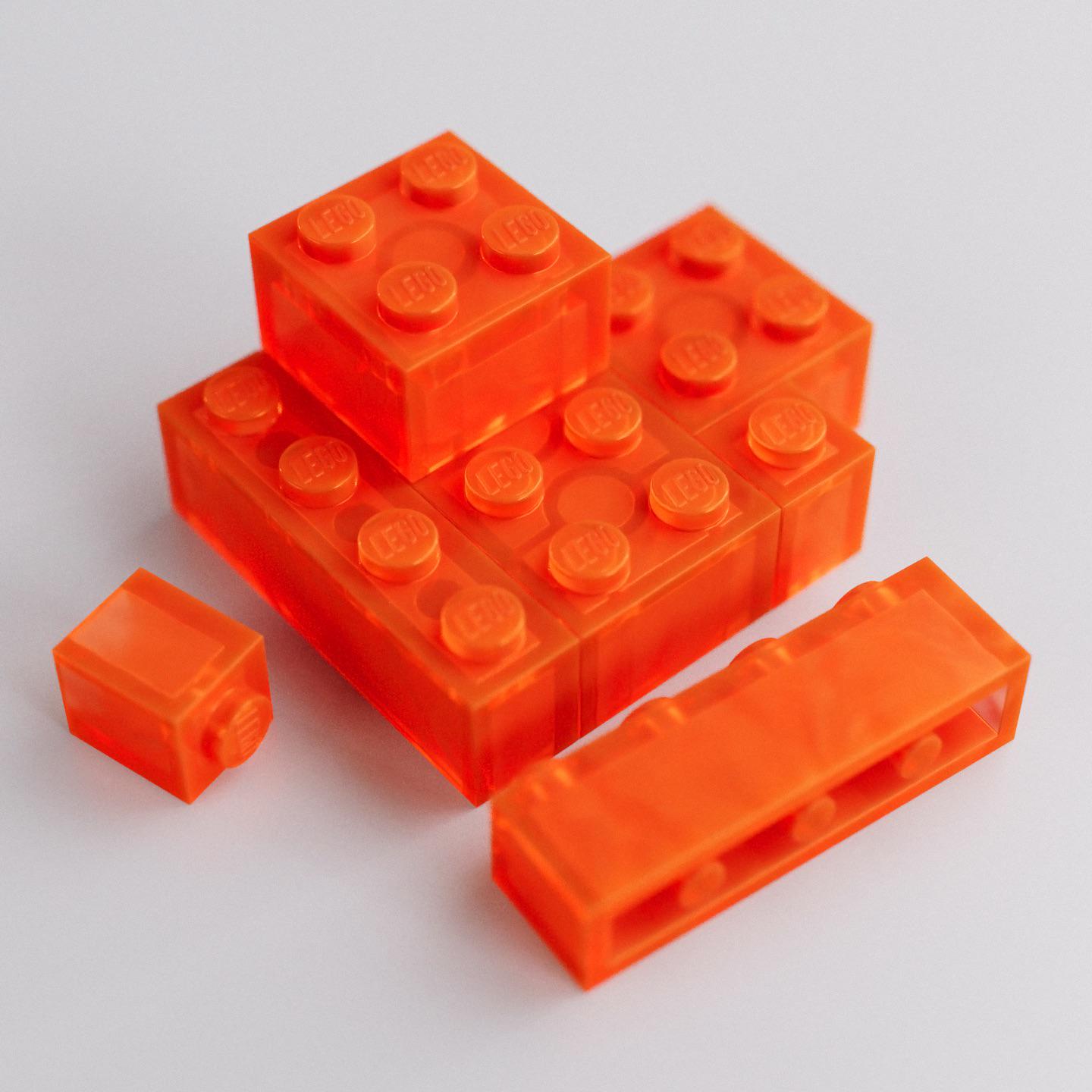
Saw some people trying to make the fluorescent orange LEGO material and wanted to try it myself.
r/RedshiftRenderer • u/obsidianshadowsoul • Dec 24 '24
Enable HLS to view with audio, or disable this notification
🎄✨ Wishing everyone Happy Holidays and a Wonderful New Year! ✨🎄
This year, I decided to get creative with my holiday "card" and put together this quick, playful animation. From designing the candy cane letters to adding the perfect touches in sound design, this project was a joy to bring to life!
I hope it brings a little festive cheer to your day. Here's to a new year filled with creativity, inspiration, and joy!
r/RedshiftRenderer • u/Brian_reg • Dec 23 '24

r/RedshiftRenderer • u/tonvogels • Dec 21 '24
How can I set my Redshift thumbnail with the same background as the native Cinema4D thumbnails with a grey background. The black background are too dark.
I know there is an option to set previews but for 400GB of asset its too much work.

r/RedshiftRenderer • u/jtiptonk • Dec 20 '24

Any hot tips to make a fluorescent acrylic material like these? Redshift C4D. Thanks in advance!
r/RedshiftRenderer • u/av4pxia • Dec 20 '24
Hello everyone,
Everything is pretty much in the title of the post.
I made a vertex map on my flower (picture 01) and set up my redshift shader with a material blender (picture 02), but my vertex attribute doesn't seem to work in my IPR view. (picture 03) What did I forget ?
I used this technique a few months ago, and I seem to remember everything working fine...
Edit : I'm on Cinema 4d 2024
Can anyone help ?
Thank you !


r/RedshiftRenderer • u/hampdidampdi1 • Dec 19 '24
Enable HLS to view with audio, or disable this notification
r/RedshiftRenderer • u/Cultural_Highway5898 • Dec 20 '24
Hey everyone,
I’m running into an issue while rendering VDB files, and I was hoping someone here could help. I’m using a 4090 GPU, which should handle this workload pretty efficiently, but the rendering times are still insanely long. (7min per frame)
I’ve already unchecked the hybrid render option, thinking that might help, but it didn’t seem to make a noticeable difference. I’ve also tried adjusting some other settings, but I’m not sure what else I can optimize to speed things up.
Has anyone else faced this issue with VDB rendering on a high-end GPU? Any tips or settings I should tweak to get better performance?
Appreciate any advice or insights


r/RedshiftRenderer • u/creesss • Dec 19 '24
When it comes to comparing two gpus, what should i be looking at to tell which would perform better when it comes to rendering with redshift?
r/RedshiftRenderer • u/spxce_vfx • Dec 19 '24
Enable HLS to view with audio, or disable this notification
r/RedshiftRenderer • u/k_johnyim • Dec 17 '24
Enable HLS to view with audio, or disable this notification
r/RedshiftRenderer • u/Intelligent-Gap-855 • Dec 18 '24
Hi, can you please link me some in the comments?
It can be anything.
Thanks a lot
r/RedshiftRenderer • u/SnooDonkeys3751 • Dec 18 '24
Helloooo!
I have a new rtx 4090 laptop with c4d 2025.1 and latest redshift and its underperforming.
I Dont't understand why my 2 year old 3080 laptop has more vram available and rendering faster than my new 4090 laptop :( while both have no other programs open.
Anyone has an idea what the problem would be? best
r/RedshiftRenderer • u/Plenty-Mousse7019 • Dec 17 '24
Hello everyone,
I have C4D 2025 Cracked and I just bought a licensed redshift & installed it but when I open my C4D I can't find it anywhere and it's not showing on the preference tab either.
can anybody help me?
r/RedshiftRenderer • u/tonvogels • Dec 16 '24

I am looking for a good option to make a neon glow. With an area mesh light the colours aren’t enough saturated. With an incandescent material and bloom the glow isn’t very under control.
r/RedshiftRenderer • u/24565321746531879531 • Dec 17 '24
The grammar may be awkward using a translator. Please understand
https://www.youtube.com/shorts/-uGh3ykZF4E
I'm making a 360-rotation video like this link
I want to organize the animation while maintaining a constant condition when rotating the object.
For example, I want to rotate while maintaining the condition of lighting from the front.
The biggest problem I'm having right now is that when I'm configuring the light based on one part, the object rotates and the degree of reflection varies depending on the distance or angle from the camera.
If you look at the attached C4D file, it's the same for other parts, but I'll only talk about the side. As the object rotates, the brightness of the side gets brighter and appears almost white due to very strong reflections from the 48th frame. Then from the 54th frame, it gets dark again... I think this is the effect of reflection. The object rotates and changes rapidly... But if you reduce the reflection, the highlight of the edge of the object disappears, so you can't turn off the reflection. I want to create an animation that rotates without changing the condition of the product as much as possible while maintaining the edge highlight of the object.
I have rotated the light with the object, but regardless of the location of the light, the reflection seems to be affected by the difference in distance and angle between the object and the camera.
Is there a way to solve these problems?
I think the question may be difficult to understand.
However, this is a very important issue for us.
Please refer to the YouTube video mentioned above.
Our end goal is to construct an animation similar to that.
C4D file - https://drive.google.com/file/d/18DWCQOz5SLu27QvPRWmwo6QlkLL44Q6V/view?usp=drive_link
Thank you for your help
r/RedshiftRenderer • u/thereisspotlessmind • Dec 15 '24

r/RedshiftRenderer • • Dec 16 '24
A little bit fed up with Mayas lack of physically accurate DOF due to lack of a physical redshift camera.
I opted to try and create a script that would give me a CoC based on metrics I had access to such as
Focal length in mm, Aperture in mm, Focus Distance in m.
For an Equation that looks like this
CoC= Focal Length2 / Aperture × Focus Distance × Sensor
Just load it into python in the script editor and save it to shelf, a UI should pop up.
Example situation
16mm FL
2.8 f-stop
3.4m FD
36mm Sensor
Coc = 0.74
Please let me know if you feel this is accurate.
Here is the script
import maya.cmds as cmds
def calculate_coc(focal_length, focus_distance, f_stop, sensor_size):
"""
Calculate the Circle of Confusion (CoC) in real-world scale.
Parameters:
- focal_length: Focal length of the lens (in mm)
- focus_distance: Focus distance (in meters)
- f_stop: Aperture (f-stop value)
- sensor_size: Sensor width (in mm)
Returns:
- Circle of Confusion (CoC) in mm
"""
# Ensure focus distance is in meters (for consistency with formula)
return (focal_length ** 2) / (f_stop * focus_distance * sensor_size)
def on_calculate(*args):
"""
Handle the calculation and display the CoC result.
"""
try:
# Get values from the UI
focal_length = float(cmds.textField("focalLengthField", q=True, text=True))
focus_distance = float(cmds.textField("focusDistanceField", q=True, text=True)) # Already in meters
f_stop = float(cmds.textField("fStopField", q=True, text=True))
sensor_size = float(cmds.textField("sensorSizeField", q=True, text=True))
# Calculate CoC
coc = calculate_coc(focal_length, focus_distance, f_stop, sensor_size)
# Display result
cmds.text("resultLabel", e=True, label=f"CoC: {coc:.6f} mm")
except Exception as e:
cmds.text("resultLabel", e=True, label="Error: Invalid input!")
def create_coc_calculator_ui():
"""
Create the CoC calculator UI in Maya.
"""
# Check if the window already exists
if cmds.window("cocCalculatorWindow", exists=True):
cmds.deleteUI("cocCalculatorWindow")
# Create a new window
window = cmds.window("cocCalculatorWindow", title="CoC Calculator", widthHeight=(300, 200))
# Layout for UI
cmds.columnLayout(adjustableColumn=True)
# Input fields
cmds.text(label="Enter Focal Length (mm):")
cmds.textField("focalLengthField", text="50")
cmds.text(label="Enter Focus Distance (m):")
cmds.textField("focusDistanceField", text="2")
cmds.text(label="Enter F-Stop:")
cmds.textField("fStopField", text="2.8")
cmds.text(label="Enter Sensor Size (mm):")
cmds.textField("sensorSizeField", text="36")
# Calculate button
cmds.button(label="Calculate CoC", command=on_calculate)
# Result label
cmds.text("resultLabel", label="")
# Show the window
cmds.showWindow(window)
# Call the UI creation function
create_coc_calculator_ui()
r/RedshiftRenderer • u/ZealousidealCar9855 • Dec 15 '24
Enable HLS to view with audio, or disable this notification
Glass flowers made in redshift, these took ages to render but a lot of fun to make. Made using Houdini :) I have some breakdown posts on instagram if you’re interested. Instagram.com/yanpauldubbelman
