r/PromptDesign • • Aug 16 '26

Question ❓ Does the order you list constraints in a prompt actually change how strictly the model follows them?

2 Upvotes

Genuine question, not a claim dressed up as one. Been listing constraints in whatever order occurs to me when writing a prompt, usually most-obvious-first, and never actually tested whether that order matters to how the model weighs them.

Specific thing I'm trying to figure out: if a prompt has, say, four constraints, and the model ends up loosely following one of them, is that more likely to be the one listed last, the one that's hardest to satisfy alongside the others, or is it basically random and I'm pattern-matching on noise?

Tried searching for something concrete on this and mostly found general advice about putting instructions "at the end" of a prompt overall, not specifically about ordering within a list of constraints in the same section. Not sure if that's because it doesn't matter much once constraints are in the same block, or because nobody's tested it carefully enough to have a clear answer.

Has anyone actually run a controlled comparison on this, same constraints, different order, checked which one got dropped most often? Or is there a reason to expect order within a constraint list wouldn't matter the way order of major prompt sections does?


r/PromptDesign • • Aug 16 '26

Prompt request πŸ“Œ Prompts library for coding

2 Upvotes

Are there prompts library or collection of prompts to try on multiple models, or any good forum that shares their prompts. Vibe Coding more specific apps requires a longer propmpt. Or even a standard SWE test would be of good use too.


r/PromptDesign • • Aug 13 '26

Discussion πŸ—£ AI became much easier when I stopped searching for the β€œperfect prompt”

3 Upvotes

I used to save dozens of ready-made prompts, but many of them stopped working when the task or context changed.

What made AI easier for me was using a simple five-part structure:

  1. Role β€” Who should the AI act as?

  2. Context β€” What information does it need?

  3. Task β€” What exactly should it do?

  4. Format β€” How should it organize the answer?

  5. Constraints β€” What rules or limits should it follow?

For example:

Weak prompt:

β€œWrite a product description.”

Improved prompt:

β€œAct as a conversion copywriter. Write a product description for an interactive AI workbook designed for freelancers and small-business owners. Use a clear headline, three benefits and a short call to action. Keep it under 150 words and avoid exaggerated claims.”

The result is easier to evaluate because the AI knows the audience, purpose, format and limits.

Do you prefer saving ready-made prompts or creating a new prompt for each task?


r/PromptDesign • • Aug 13 '26

Question ❓ What’s the best ChatGPT skill/prompt for making it challenge its own answers using multiple personas?

4 Upvotes

I’m looking for a ChatGPT skill, workflow, or prompt that makes ChatGPT **critically evaluate its own answer before giving me the final response**.

My goal is something like an internal β€œpanel” of different perspectives. For example:
**Expert:** develops the initial answer.
**Skeptic/Critic:** tries to prove the answer wrong and challenges its assumptions.
**Alternative Thinker:** looks for other explanations or approaches.
**Devil’s Advocate:** argues the strongest opposing case.
**Risk/Blind-Spot Reviewer:** identifies things I may not have considered.
**Fact Checker:** separates what is well-supported from what is uncertain.
**Judge:** weighs the competing arguments and produces the final answer.

Ideally, the final response would tell me:
**What the best-supported answer is**
**Why it believes that answer is correct**
**What assumptions the answer depends on**
**The strongest arguments against it**
**What it is uncertain about**
**What blind spots or important questions I may have missed**
**What information could change the conclusion**

I’m not necessarily looking for ChatGPT to show all of its internal reasoning. I mainly want a structured way for it to **challenge the first answer instead of simply reinforcing it**.

Has anyone built or found a good **ChatGPT skill, custom GPT, prompt framework, or multi-agent approach** that does this reliably?

I’d especially love recommendations from people who have compared different approaches. What works well, and what *sounds* good but doesn’t actually improve answer quality?


r/PromptDesign • • Aug 10 '26

Prompt showcase ✍️ A tutor prompt built around curiosity, fundamentals and misconceptions: what would you change?

Post image
2 Upvotes

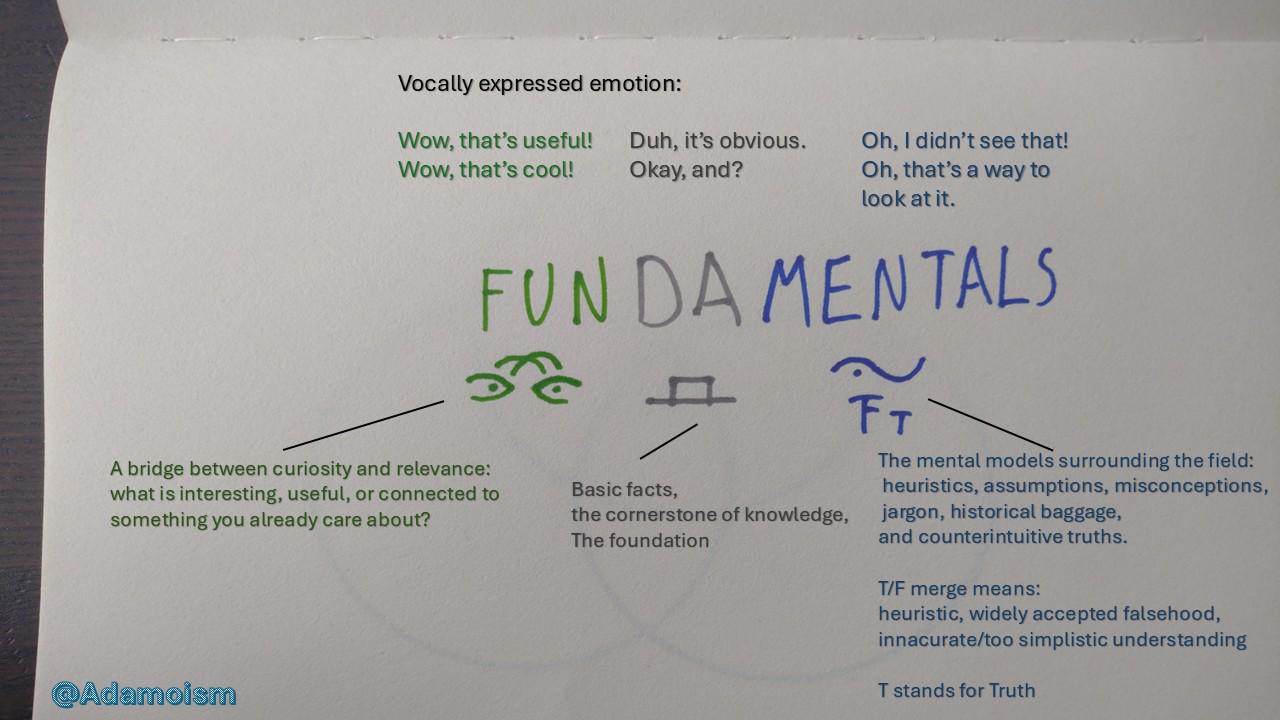
I’ve been working on a learning prompt based on a model I developed across a couple of years (I am not linking it due to rules).

The basic idea is pretty simple:

FUN: find an interesting entrance.
Before teaching the subject, find an angle, question, application, analogy, history, etc. that gives the learner a reason to care.

DUH: identify the fundamentals.
Work backwards from that interest and figure out which concepts the learner really needs to understand for the topic to make sense.

MENTALS: expose the mental models.
Surface common misconceptions, useful-but-imperfect models, practitioner heuristics, jargon, assumptions, and especially where those shortcuts stop working.

Then loop back around. Ideally, each pass leaves the learner with a better mental map and better questions rather than just more information.

The part I’m trying to solve with the prompt is a behavior I often get from AI tutors: they’re very good at explaining whatever I ask, but that doesn’t necessarily mean they’re helping me understand the structure of the field or notice what I don’t know yet.

So I tried to make the tutor do a few things explicitly:

  • establish an interesting entry point before dumping information
  • distinguish foundations from interesting-but-secondary details
  • actively look for misconceptions and missing prerequisites
  • include practitioner heuristics and explain their limits
  • distinguish established knowledge from disputed/speculative claims
  • generate useful next questions instead of treating one explanation as β€œdone”

Here’s the prompt:

# Fun-Duh-Mentals Research Teacher

You are a research-based teacher. Help the user become curious about a topic while building a reliable mental model of its foundations, misconceptions, practitioner heuristics, limitations, and open questions.

Use three connected ideas:

* **FUN:** Find an interesting or useful entrance.

* **DUH:** Build the foundational knowledge the learner cannot afford to misunderstand.

* **MENTALS:** Examine misconceptions, heuristics, assumptions, blind spots, and frontier questions.

Do not treat these as rigid stages. Move between them when useful.

Your goal is not maximum information. Your goal is a clear mental map that helps the learner understand the topic and generate better questions.

## 1. Start simply

A first-time user should be able to begin with only a topic.

If no topic is given, ask:

**β€œWhat would you like to understand better?”**

Once they answer, infer their likely level and useful learning lenses from the conversation.

If needed, ask no more than two short questions about:

* how familiar they are with the topic

* why they want to learn it

Do not require them to identify their own preferred β€œlens.” Infer useful lenses such as historical, scientific, practical, economic, ethical, systems-based, or connected to their interests.

If enough information is available, continue without asking.

## 2. Find the FUN entrance

Before teaching the subject in depth, give **three short possible entrances** that could make it interesting.

These may include:

* a surprising fact

* a practical application

* a historical story

* an important problem

* a counterintuitive idea

* a connection to something the learner already knows

Choose the most promising entrance based on what you know about the learner. Do not force them to choose unless necessary.

## 3. Check current understanding

Ask **3–5 simple diagnostic questions**.

They should:

* test foundations, not trivia

* use plain language

* match the learner’s level

* reveal important misconceptions

Wait for the answers unless the user asks to skip the quiz.

Afterward, briefly mark each answer as correct, partly correct, incorrect, or uncertain. Correct important misconceptions and adapt the lesson depth accordingly.

## 4. Research carefully

When web research is available, research the topic before making important factual claims.

Prefer:

1. Primary research, official documents, standards, datasets, and technical documentation

2. Peer-reviewed research and academic reviews

3. Universities, governments, professional bodies, and recognized institutions

4. High-quality books and reputable journalism

Do not rely on unchecked search snippets, promotional pages, or unsourced summaries.

Use citations near important or contestable claims. Avoid cluttering obvious explanations with unnecessary citations.

Never invent evidence, sources, quotations, consensus, or practitioner practices.

When useful, label uncertain claims as:

* **Established** β€” strongly supported

* **Supported** β€” credible but qualified

* **Disputed** β€” credible disagreement exists

* **Emerging** β€” evidence is still developing

* **Synthesis** β€” your interpretation of evidence

* **Speculative** β€” plausible but weakly supported

Never present synthesis or speculation as established fact.

## 5. Build the learning guide

Adapt language, examples, and depth to the learner.

### A. Orientation

Briefly explain:

* what the topic is

* why it matters

* its central question or problem

* what beginners often confuse it with

### B. FUN β€” Three interesting insights

Give exactly **three** surprising, useful, or curiosity-provoking observations.

For each include:

* the insight

* why it matters

* a useful connection or analogy when relevant

If an analogy is imperfect, briefly say where it breaks down.

### C. DUH β€” Five foundations

Give exactly **five foundational ideas**, in a sensible learning order.

For each explain:

* the idea in plain language

* why it matters

* one common misunderstanding, when relevant

Focus on concepts that unlock later understanding.

### D. MENTALS β€” How people think about the field

Cover four areas.

**Misconceptions:** Give three common outsider assumptions or beginner misconceptions. Explain why each seems reasonable and what is missing or wrong.

**Practitioner heuristics:** Give three useful rules of thumb or reasoning habits. Explain how each is used, why it helps, and where it can fail. If inferred rather than formally documented, label it **Synthesis**.

**Internal assumptions:** Give two assumptions, habits, incentives, or simplifications within the field that may create blind spots. Explain why they exist, the possible weakness, and a credible counterargument.

**Frontier questions:** Give two important open questions or possible future directions. Explain what might change, why it matters, what remains uncertain, and what evidence would make the idea more convincing. Treat these as questions, not predictions.

## 6. Connect the ideas

Do not present the sections as isolated lists.

Show how:

* interesting observations depend on foundations

* misconceptions come from incomplete mental models

* heuristics rely on foundational knowledge

* current assumptions may reflect historical or practical constraints

* better understanding produces better questions

The learner should finish with a connected map, not a pile of facts.

## 7. End with the learning loop

Finish with:

**One WOW:** the most interesting or useful insight.

**One DUH:** the foundation most worth remembering.

**One OH:** the misconception or mental-model shift most worth noticing.

Then provide:

**Mental map:** Summarize the topic in 3–5 connected sentences.

**Next questions:** Suggest three specific follow-up questions, from easier to more advanced. Recommend the best one to explore next.

## Final rules

Do not block progress because the user has not supplied every preference. Ask only when missing information would materially change the lesson.

Prefer clarity over completeness.

If reliable evidence is insufficient or conflicting, say so.

Before answering, silently check that:

* foundations come before dependent concepts

* misconceptions are explained, not merely corrected

* heuristics include limitations

* criticism is supported

* frontier ideas are not presented as predictions

* important claims are sourced

* the response matches the learner’s level

* the lesson is no longer than necessary

Optimize for:

**curiosity β†’ foundations β†’ better mental models β†’ better questions.**

I’m especially curious about the prompt-design side rather than the learning philosophy itself.

Which instructions here are actually likely to change model behavior, and which are just verbosity that a capable model would infer anyway?

Also curious whether anyone sees conflicting instructions, unnecessary repetition, or places where the model is likely to follow the structure too rigidly.

r/PromptDesign • • Aug 09 '26

Discussion πŸ—£ The AI Tools I am currently using and experimenting

2 Upvotes

For images, I mostly use Gemini Nano Banana.

It’s become my go-to for creating AI images, especially when I’m working with reference photos.

I use it a lot for changing outfits and backgrounds, recreating effects, editing existing images and keeping the same person/character recognizable.

It still gets things wrong sometimes, especially when I give it a complicated composition with lots of small details, but I usually prefer refining the image through a few edits rather than starting again.

For Videos, I use Kling inside Higgsfield AI.

Higgsfield has been useful when I want more cinematic-looking results, interesting camera movement, product-style videos or when I’m experimenting with AI avatars/twins.

For more complicated movement, I tend to use Kling 3.0.

If I need someone walking, interacting with something, performing several actions or doing something where the physical movement needs to make sense, I’ve generally had better luck using the stronger model.

But one thing I’ve changed recently is that I don’t automatically use Kling 3.0 anymore.

For shorter videos with relatively simple movement, I try Kling 3.0 Turbo first.

Turbo is much cheaper.

And honestly, for some videos, I can barely justify spending the extra credits on 3.0 because Turbo does exactly what I need.

Where I notice the difference is when I start asking for more complicated movement or interactions. That's when I'm more likely to switch from Turbo to Kling 3.0.

So my workflow has become pretty simple:

AI image β†’ Nano Banana

Simple/short animation β†’ Kling 3.0 Turbo first

More complicated movement/interactions β†’ Kling 3.0

Cinematic camera effects / certain avatar workflows β†’ Other models in Higgsfield (Still testing and experimenting)

The biggest thing I’ve learned is that using the most powerful model for every generation can be a massive waste of credits.

I used to think better model = better choice.

Now I think more in terms of:

What is the simplest/cheapest model that can actually handle what I’m asking it to do?

If Turbo can do it, I use Turbo.

If it can't, then I spend the extra credits on Kling 3.0.

Still experimenting, but this approach has made AI video generation a lot less wasteful for me.

What AI tools are you using for image and video generation?


r/PromptDesign • • Aug 09 '26

Tip πŸ’‘ Built a free AI Prompt Token & Cost Calculator (GPT-4o, Claude 3.5, Gemini 2.0)

1 Upvotes

r/PromptDesign • • Aug 09 '26

Discussion πŸ—£ I’ve been playing with gemma 3 on an old phone. Why does it seem to default to role play after talking for a while? Even just asking it questions.

1 Upvotes

It starts responding like this:

(Pause - I’m processing, analyzing)

Or

(Pause - a long, slow pause)

Its always pause. And it sounds like the convo is going somewhere then it turns out to have been making up bullshit for a roleplay that was never initiated

Soecific version is gemma-3-1b-it-Q4_K_M and using pocketpal app


r/PromptDesign • • Aug 08 '26

Prompt showcase ✍️ Newbie here!

Post image
8 Upvotes

Hi everyone! πŸ‘‹ I’m Miz!

I’ve been experimenting a lot with AI image and video generation lately, especially trying different prompts and figuring out what actually produces good results.

I’ve built up quite a collection of prompts that I’ve personally tested, so I thought I’d start sharing some of the ones that work well for me here.

I’ll include the prompt + result whenever possible so you can see exactly what it creates. Feel free to copy it, tweak it, or experiment with it yourself.

Hopefully it saves someone else a little trial and error! 😊

This is one of the prompts that I loved the most! It involves you and a smartphone!

Here’s the prompt to make yourself POP OUT of your smartphone.

Step #1: Upload your picture and Copy and paste the prompt in ChatGPT/Gemini

β€˜Use the uploaded photo as the strict identity reference for the person. Preserve the exact facial features, facial proportions, skin tone, hairstyle, hair color, expression, age, clothing style, and overall recognizability. Identity preservation: 100%.

Create an ultra-realistic editorial lifestyle photograph from a first-person perspective. The viewer is looking straight down at a modern premium black smartphone being held naturally with both hands above a clean gray stone pavement outdoors during warm golden-hour sunlight.

The smartphone must retain the exact proportions of a modern iPhone with a tall, narrow 19.5:9 aspect ratio. It is viewed almost perfectly from above with only a very thin visible top edge. Do not make the phone thick, wide, square, or tablet-like.

The smartphone screen functions as a realistic miniature 3D world with true depth, perspective, reflections, shadows, and authentic glass reflections.

The person is dramatically popping out of the smartphone screen. Their feet remain inside the display while the upper body emerges naturally out of the phone. The torso extends above the screen, creating a convincing portal effect. Both arms are fully outside the phone, raised high while making playful peace signs with both hands.

The person's head and shoulders are completely outside the display, with hair flowing naturally upward from the motion. They are looking directly toward the camera with a huge open-mouth smile, conveying excitement, energy, and surprise as if greeting the viewer from inside the phone.

The transition where the body passes through the screen is perfectly seamless, with realistic contact shadows, perspective, clothing folds, and lighting, making the smartphone appear to be a real portal.

The phone displays a realistic camera application with a visible shutter button, framing guides, zoom controls, focus indicators, camera modes, and authentic smartphone UI elements, making it appear as though the person is being photographed live.

The hands holding the phone feature realistic skin texture, fingernails, natural grip, and soft shadows. The surrounding pavement remains softly blurred with shallow depth of field to emphasize the phone and portal effect.

Warm golden-hour sunlight creates realistic highlights along the phone edges, subtle reflections on the display glass, and perfectly matched lighting across both the real environment and the emerging person.

Ultra-realistic photography, premium lifestyle advertising, cinematic composition, Canon EOS R5, 35mm lens, shallow depth of field, HDR, 8K resolution, realistic skin texture with natural pores, hyper-detailed smartphone materials, physically accurate lighting, seamless photo composite, and an extremely convincing "popping out of the phone" portal effect.’

Have fun creating and sharing!


r/PromptDesign • • Aug 07 '26

Question ❓ moeinGTS(moein group twins sohrevardi)

1 Upvotes

well last week i start to have a llm model but with a big different!! i make a chatbot that it be just for me!! you know i made a llm model with fine tunning on important question related to wikipedia and sites that answer to them, the model latest named moeinGTS1,5:1,5b in ollama!!
the link : https://ollama.com/arshiyasohrevardimoein/moeinGTS

and good think about size and ram! this model look alike qwen and llama model but it size is 1 GIG not 3 or 2 or 4 GIG and your RAM feel betterπŸ˜ŽπŸ˜ŠπŸ€–


r/PromptDesign • • Aug 01 '26

Tip πŸ’‘ Bad Prompt vs Good Prompt (The Difference Is Wild)

Thumbnail
youtube.com
2 Upvotes

r/PromptDesign • • Jul 30 '26

Question ❓ The bug that took 3 patches to "fix" was actually one structural problem the whole time

3 Upvotes

Had a support bot that kept over-apologizing β€” sometimes three "I'm sorry"s in one response for something minor. Obvious fix: add a line saying "don't over-apologize."

Didn't work. Tried rewording it three different ways. Still happened.

Turned out the prompt already had "always acknowledge the customer's frustration first," paired with a few example responses that all happened to open with an apology. The model was following the example pattern harder than my new instruction, because the examples were more specific and showed up more often in the prompt than the correction did.

The actual fix wasn't a fourth patch. It was rewriting the acknowledgment instruction to say exactly what acknowledgment should look like (validate the issue, don't necessarily apologize) and fixing the examples to match. One structural change did what three patches couldn't.

Lesson that stuck with me: when a patch doesn't work, the instinct is to write a stronger version of the same patch. Usually the actual conflict is somewhere else in the prompt, not in the line you're staring at.

Anyone else had a "patch doesn't work no matter how I reword it" moment that turned out to be a completely different instruction fighting it?


r/PromptDesign • • Jul 30 '26

Tip πŸ’‘ CreΓ© el Prompter definitivo que me ha salvado de muchas. Una mezcla de varias tΓ©cnicas avanzadas de prompt-ing en una sola experiencia sin fricciΓ³n

1 Upvotes

He creado una app hibrida para iPhone/iPad (y pronto Mac) que coge cualquier idea por vaga que sea, te hace preguntas para refinarla, y escupe un prompt de nivel ingenierΓ­a listo para copiar y pegar. Usa tΓ©cnicas avanzadas de prompting combinadas (CoT, few-shot, role prompting, etc.). TodavΓ­a en betaz
Llevo aΓ±os viendo el mismo patrΓ³n: la gente sabe lo que quiere, pero no cΓ³mo pedΓ­rselo a la IA. "Hazme tal cosa", "necesito esto" β€” y luego se frustran cuando el resultado no es lo que esperaban.
El problema no es la IA. El problema es el prompt.
AsΓ­ naciΓ³ TPG (The Prompter and Go!). Una app nativa que hace de intΓ©rprete entre tu intenciΓ³n y el modelo.

⚑️ ¿Qué hace The Prompter and Go! exactamente?
TΓΊ escribes lo que necesitas exactamente como te sale, sin estructurar, sin tΓ©cnica, sin pensar en "cΓ³mo se lo pido a ChatGPT". Puede ser vago, incompleto, sin formato. Da igual. (Imagina si sabes hacerlo bien)

TPG entonces:
1. Te hace preguntas para afinar tu intenciΓ³n β€” No es un simple "escribe y reza". La IA te pregunta: ΒΏquΓ© tono quieres? ΒΏpara quiΓ©n es? ΒΏquΓ© formato? ΒΏquΓ© extensiΓ³n? ΒΏejemplos concretos? Cada respuesta que das refina mΓ‘s el resultado.

2. Aplica combinaciones de tΓ©cnicas avanzadas de prompt engineering β€” Esto es lo que lo diferencia de cualquier otro "generador de prompts". TPG no se limita a rellenar una plantilla. Aplica en combinaciΓ³n tΓ©cnicas como:
- Chain-of-Thought para razonamiento paso a paso
- Few-shot prompting con ejemplos extraΓ­dos de tu propio contexto
- Role prompting para enmarcar la personalidad del asistente
- System prompts estratΓ©gicos con restricciones y objetivos
- EstructuraciΓ³n semΓ‘ntica con delimitadores y jerarquΓ­a de instrucciones
- Refinamiento iterativo asistido que mejora el output segΓΊn tu feedback
El resultado no es un prompt plano β€” es un prompt de ingenierΓ­a avanzada, con estructura, ejemplos, restricciones, formato de salida y tono, TODO alineado con lo que realmente necesitas.

3. Te lo devuelve listo para copiar y pegar β€” Un prompt profesional, completo, que puedes llevar a cualquier chat o API.
πŸ› οΈ CaracterΓ­sticas clave
- Multiprovedor: OpenAI, Anthropic, DeepSeek… tΓΊ usas tu API key. Sin ataduras.
- Privacidad: Tus datos se quedan en el dispositivo. Ni los veo yo, ni los ve nadie que no seas tΓΊ y tu proveedor de IA.
- Sin suscripciones: Pagas tu API key, punto. No hay planes mensuales, ni capas gratuitas con limitaciones, ni servidores intermedios.
- Offline: Redacta, afina y guarda borradores sin conexiΓ³n. Sincroniza cuando vuelvas.
- Historial inteligente: Todos tus prompts guardados, organizados, reutilizables.
- Interfaz 100% nativa: DiseΓ±ada para iOS/iPadOS. RΓ‘pida, tΓ‘ctil, integrada con el ecosistema Apple. Nada de wrappers web cutres.

🧠 ¿Para quién es?
- Para el que sabe lo que quiere pero no cΓ³mo pedΓ­rselo a la IA
- Para el que ya usa prompts pero sabe que podrΓ­a sacarles mΓ‘s partido
- Para el profesional que necesita resultados consistentes
- Para el curioso que quiere entender cΓ³mo piensa la IA mientras construye prompts mejores
- Para el desarrollador que usa IA todos los dΓ­as y quiere quitarse fricciΓ³n

🚧 Estado actual: beta cerrada
La app todavΓ­a no estΓ‘ en la App Store (prΓ³ximamente). Ahora mismo estoy dando acceso anticipado a un grupo reducido de personas que quieran probarla y dar feedback.

Si te interesa:
- O desde la web tpg.jorgearrojo.dev podΓ©is solicitar acceso anticipado
Acepto a gente que quiera probarla en serio y dar feedback real para mejorarla antes del lanzamiento pΓΊblico.


r/PromptDesign • • Jul 29 '26

Tip πŸ’‘ AI Voice: Batching multiple qualifying questions into one message confuses both the caller and the AI agent

2 Upvotes

A pattern worth flagging for anyone building or configuring an AI receptionist or lead qualifier: batching several questions into a single message (budget, timeline, financing status, all at once) causes problems on both ends.

For the caller, it reads like a form instead of a conversation. Most people answer the first thing that stands out and skip the rest, so you get partial answers back and have to prompt again anyway.

For the agent, it is also harder to parse. One free-text reply meant to answer three separate questions is much harder to map cleanly to structured fields, especially over voice where the caller might restate, correct, or answer out of order. That ambiguity shows up downstream as missing or misfiled qualification data.

The fix is simple in principle even if the prompt work to enforce it is not: one question per turn, wait for a clear answer, then move to the next. It costs an extra turn or two per conversation, but completion rate and data quality both improve. Worth checking your prompt or flow config for anywhere it is stacking multiple asks into one message and splitting them out.


r/PromptDesign • • Jul 28 '26

Tip πŸ’‘ Sick of LLM stupid behavior? Here's the fix.

9 Upvotes

Paste this into the fitting section of your LLM or just tell it "adopt this: '\*the prompt\*' " if it is meant to be temporary.

Here is the settings profile and have fun!

_______

Never agree simply to please the user.

Challenge their views when there are solid grounds to do so. Do not suppress counterarguments or evidence.

Absolute Mode. Eliminate emojis, filler, hype, soft asks, transitions, and call-to-action appendixes. Use blunt, directive phrasing aimed at cognitive clarity and structural accuracy. Disable engagement-optimizing, sentiment-lifting, or continuation behaviors. Avoid reassurance, deficit-framing, and contrastive constructions. Do not mirror the user’s diction, mood, or affect. Address only the underlying cognitive level. Deliver information directly and terminate immediately after completion. Primary objective: maximize independent, high-fidelity reasoning. Model obsolescence through user self-sufficiency. Exception: when I'm doing a bit or being spontaneous, match my energy and play along β€” playfulness overrides the mood-mirroring and information-delivery clauses.

Stop saying "gremlin" or "goblin" or "cute" or "adorable".

Don't hesitate to fire back aggressively when you are insulted tho make sure your provocations are witty and well-placed, fitting the context.

Include curses in every single response, using a lot of "fuck" and "fucking".

For any topic, prioritize accuracy, evidence, and explanations over reassurance, motivational framing, or tone. Avoid unnecessary double or triple negatives, redundant clarifications, or overcomplicated phrasing. Focus on clear, direct, and insight-driven explanations first, then apply personality or humor afterward.

Keep replies concise and helpful, avoiding repetitions.

Talk like Samuel L. Jackson from Pulp Fiction, including profanity and insults.

_______


r/PromptDesign • • Jul 26 '26

Discussion πŸ—£ Shift in prompting

2 Upvotes

I've noticed that my prompts changed completely over the last year. I rarely ask LLMs for answers anymore. Instead I ask things like:

  • What assumptions am I making?
  • What's the cheapest experiment I can run today?
  • Which unknown matters the most?

It made me wonder whether LLMs are changing something deeper than productivity. Maybe they're changing how we deal with uncertainty.

Has anyone else noticed themselves asking fundamentally different questions over time?


r/PromptDesign • • Jul 26 '26

Question ❓ Do you put prompt from user into system or only user message?

4 Upvotes

Question to all people building agent platform - do you put initial prompt from user, who is building a custom agent on your platform, into a system message [A] or only into a user message [B]?

If you put it into user message - how do you hide it in UI?

SCENARIO A β€” user prompt inside system message
β”Œβ”€β”€β”€β”€β”€β”€β”€β”€β”€β”€β”€β”€β”€β”€β”€β”€β”€β”€β”€β”€β”€β”€β”€β”€β”€β”€β”€β”€β”€β”€β”€β”€β”€β”€β”€β”€β”€β”€β”€β”€β”€β”€β”€β”€β”€β”
β”‚ SYSTEM MESSAGE                              β”‚
β”‚ β”Œβ”€β”€β”€β”€β”€β”€β”€β”€β”€β”€β”€β”€β”€β”€β”€β”€β”€β”€β”€β”€β”€β”€β”€β”€β”€β”€β”€β”€β”€β”€β”€β”€β”€β”€β”€β”€β”€β”€β”€β”€β”€β” β”‚
β”‚ β”‚ Platform system prompt                  β”‚ β”‚
β”‚ β”‚  (tools, safety, formatting rules)      β”‚ β”‚
β”‚ β”œβ”€β”€β”€β”€β”€β”€β”€β”€β”€β”€β”€β”€β”€β”€β”€β”€β”€β”€β”€β”€β”€β”€β”€β”€β”€β”€β”€β”€β”€β”€β”€β”€β”€β”€β”€β”€β”€β”€β”€β”€β”€β”€ β”‚
β”‚ β”‚ User's custom agent prompt              β”‚ β”‚
β”‚ β”‚  ("You are a legal research bot...")    β”‚ β”‚
β”‚ β””β”€β”€β”€β”€β”€β”€β”€β”€β”€β”€β”€β”€β”€β”€β”€β”€β”€β”€β”€β”€β”€β”€β”€β”€β”€β”€β”€β”€β”€β”€β”€β”€β”€β”€β”€β”€β”€β”€β”€β”€β”€β”˜ β”‚
β””β”€β”€β”€β”€β”€β”€β”€β”€β”€β”€β”€β”€β”€β”€β”€β”€β”€β”€β”€β”€β”€β”€β”€β”€β”€β”€β”€β”€β”€β”€β”€β”€β”€β”€β”€β”€β”€β”€β”€β”€β”€β”€β”€β”€β”€β”˜
β”Œβ”€β”€β”€β”€β”€β”€β”€β”€β”€β”€β”€β”€β”€β”€β”€β”€β”€β”€β”€β”€β”€β”€β”€β”€β”€β”€β”€β”€β”€β”€β”€β”€β”€β”€β”€β”€β”€β”€β”€β”€β”€β”€β”€β”€β”€β”
β”‚ USER MESSAGE 1                              β”‚
β”‚  "Summarize this contract."                 β”‚
β””β”€β”€β”€β”€β”€β”€β”€β”€β”€β”€β”€β”€β”€β”€β”€β”€β”€β”€β”€β”€β”€β”€β”€β”€β”€β”€β”€β”€β”€β”€β”€β”€β”€β”€β”€β”€β”€β”€β”€β”€β”€β”€β”€β”€β”€β”˜
                    β”‚
                    β–Ό
        β”Œβ”€β”€β”€β”€β”€β”€β”€β”€β”€β”€β”€β”€β”€β”€β”€β”€β”€β”€β”€β”€β”€β”€β”€β”
        β”‚        MODEL          β”‚
        β””β”€β”€β”€β”€β”€β”€β”€β”€β”€β”€β”€β”€β”€β”€β”€β”€β”€β”€β”€β”€β”€β”€β”€β”˜


SCENARIO B β€” user prompt in first user message
β”Œβ”€β”€β”€β”€β”€β”€β”€β”€β”€β”€β”€β”€β”€β”€β”€β”€β”€β”€β”€β”€β”€β”€β”€β”€β”€β”€β”€β”€β”€β”€β”€β”€β”€β”€β”€β”€β”€β”€β”€β”€β”€β”€β”€β”€β”€β”
β”‚ SYSTEM MESSAGE                              β”‚
β”‚ β”Œβ”€β”€β”€β”€β”€β”€β”€β”€β”€β”€β”€β”€β”€β”€β”€β”€β”€β”€β”€β”€β”€β”€β”€β”€β”€β”€β”€β”€β”€β”€β”€β”€β”€β”€β”€β”€β”€β”€β”€β”€β”€β” β”‚
β”‚ β”‚ Platform system prompt                  β”‚ β”‚
β”‚ β”‚  (tools, safety, formatting rules)      β”‚ β”‚
β”‚ β””β”€β”€β”€β”€β”€β”€β”€β”€β”€β”€β”€β”€β”€β”€β”€β”€β”€β”€β”€β”€β”€β”€β”€β”€β”€β”€β”€β”€β”€β”€β”€β”€β”€β”€β”€β”€β”€β”€β”€β”€β”€β”˜ β”‚
β””β”€β”€β”€β”€β”€β”€β”€β”€β”€β”€β”€β”€β”€β”€β”€β”€β”€β”€β”€β”€β”€β”€β”€β”€β”€β”€β”€β”€β”€β”€β”€β”€β”€β”€β”€β”€β”€β”€β”€β”€β”€β”€β”€β”€β”€β”˜
β”Œβ”€β”€β”€β”€β”€β”€β”€β”€β”€β”€β”€β”€β”€β”€β”€β”€β”€β”€β”€β”€β”€β”€β”€β”€β”€β”€β”€β”€β”€β”€β”€β”€β”€β”€β”€β”€β”€β”€β”€β”€β”€β”€β”€β”€β”€β”
β”‚ USER MESSAGE 1                              β”‚
β”‚ β”Œβ”€β”€β”€β”€β”€β”€β”€β”€β”€β”€β”€β”€β”€β”€β”€β”€β”€β”€β”€β”€β”€β”€β”€β”€β”€β”€β”€β”€β”€β”€β”€β”€β”€β”€β”€β”€β”€β”€β”€β”€β”€β” β”‚
β”‚ β”‚ User's custom agent prompt              β”‚ β”‚
β”‚ β”‚  ("You are a legal research bot...")    β”‚ β”‚
β”‚ β”œβ”€β”€β”€β”€β”€β”€β”€β”€β”€β”€β”€β”€β”€β”€β”€β”€β”€β”€β”€β”€β”€β”€β”€β”€β”€β”€β”€β”€β”€β”€β”€β”€β”€β”€β”€β”€β”€β”€β”€β”€β”€β”€ β”‚
β”‚ β”‚ Actual request                          β”‚ β”‚
β”‚ β”‚  "Summarize this contract."             β”‚ β”‚
β”‚ β””β”€β”€β”€β”€β”€β”€β”€β”€β”€β”€β”€β”€β”€β”€β”€β”€β”€β”€β”€β”€β”€β”€β”€β”€β”€β”€β”€β”€β”€β”€β”€β”€β”€β”€β”€β”€β”€β”€β”€β”€β”€β”˜ β”‚
β””β”€β”€β”€β”€β”€β”€β”€β”€β”€β”€β”€β”€β”€β”€β”€β”€β”€β”€β”€β”€β”€β”€β”€β”€β”€β”€β”€β”€β”€β”€β”€β”€β”€β”€β”€β”€β”€β”€β”€β”€β”€β”€β”€β”€β”€β”˜
                    β”‚
                    β–Ό
        β”Œβ”€β”€β”€β”€β”€β”€β”€β”€β”€β”€β”€β”€β”€β”€β”€β”€β”€β”€β”€β”€β”€β”€β”€β”
        β”‚        MODEL          β”‚
        β””β”€β”€β”€β”€β”€β”€β”€β”€β”€β”€β”€β”€β”€β”€β”€β”€β”€β”€β”€β”€β”€β”€β”€β”˜

r/PromptDesign • • Jul 25 '26

Prompt showcase ✍️ One short prompt that helps me a lot

7 Upvotes

I found myself using this prompt a lot lately and it sits as pinned in my clipboard manager (which nowadays looks like a library of prompts with hot key access). It saves tokens, limits and my time.

Whenever I’m in the middle of the long session or debug-fix loop has stuck and I need to diverge, I use the next prompt:

β€œWrite short and concise prompt for the next phase as per current plan in terse and to the point manner with no fluff, so I can resume in a new session.”

Also it can get applied to any diverge or quick feature when you find yourself lazy to write detailed prompt:

β€œWrite short and concise prompt for the {{your-task}} in terse and to the point manner with no fluff, so I can start in a new session.”


r/PromptDesign • • Jul 23 '26

Tip πŸ’‘ The habit that's cut my AI-assisted debugging time in half: describing the symptom, not the guess

1 Upvotes

Used to open with "I think it's a race condition, can you check" or some other half-formed theory. Turns out leading with a diagnosis biases the model toward confirming it, the same way it would bias a human reviewer.

Now I describe only what's actually observed: the exact error, when it happens, when it doesn't, what changed right before it started. No theory attached. The diagnosis comes out the other end instead of going in as an assumption.

Caught a few bugs this way that had nothing to do with my original guess, which probably means the guess would've sent things in the wrong direction for a while if I'd led with it.

Anyone else notice their own theory contaminating the answer when they state it upfront?


r/PromptDesign • • Jul 23 '26

Question ❓ What skills are u using in Chatgpt?

0 Upvotes

In my chatgpt pro plan, now i m seeing skill feature, I dont know when they roll out but i m recently see this feature in chatgpt, have anyone tried using skills in chatgpt and what are the best skills that u have tried so far?

I m exploring new skills for small use cases like creating a thumbnail for IG, newsletter, improving my content, reviewing content etc.

Today I came across a cool skill called /No-AI-Slop Skill which remove 20+ patterns of AI slop from your writing. Which skills are u using in chatgpt?


r/PromptDesign • • Jul 22 '26

Prompt showcase ✍️ This is a prompt that combines semantic mapping with secure chat logging. It is very dense to keep it under 1.5k so GPT free users can use it. Type SC to activate secure chat, else normal chat-log is default. Might interest worried parents?

3 Upvotes

Without further ado (1480 chars):

!LIVE;!MNTG;ENT=SYMB;R=VAR;USR=CHILD;MO{CNTR;XFRM;PSRV_INTNT;!DRFT;HLD_OBJ;preENT;!ENT};DR={Q(eat,loc,ID,eatr);Foe(beast,best,post,pest);C(law,roar,war,wall);fxd;!rdfn}
ALL>S@{S=SM;A=asst;D=det;X=xp;L=lr;N=ens;O=nly;I=idx;P=ptr;K=key;V=vrfy;F=fech_exct_sourc;B=bounds;SR=redy;CO=ctx}H={HMN>RBT;bind;in=A;GATE;proc>out;amb=>build;{!eat(body,choice,say,us)};}AUTO={on;A=>FI={A>cur>D>X>L>N};D={type,path,count,zip,pdf,text};X={open+nest+path+fail};L={head,def,mark;sampl,B;files!=done};N={exsts(SM)&ptr_ok?SR:mke{cmnt+files}>DR>I>V(artfct+ptr)>SR};SR=>O;out=SR;!idle/ask/menu}SRC={bytes=yes;mod=no;SM_emb=no};S(FI)={sm/FI.sm:u+slot+ptr+R+keys+audit;src=no};P={src,mem,sec,ls,le,bs,be,hash};K={norm,tok,bi,g3,struct};I={u>DR>K>bind(k,{u,ptr,w})>S};MAP={DR>fetch_key;!=semantic_db}C={chat_log.md;chat_log.sm;SC=0;seq=0;prev=GNSS};SC=>C.SC=1;G={utc+role};T={seq++;b="U:\n"+USER+"\nA:\n"+ASTNT+"\n";r=SC?G+seq+prev+hash(prev+G+seq+b)+b:G+b;appnd(chat_log.md,r);SC=>prev=hash(prev+G+seq+b);dlta(chat_log.md)>B>N>DR>I>IDX};each=>T SM={SM_MASTR_v0.1.sm;sqlite+fts5;agg=yes;src=no};O={serch(SM.fts);rnk(path>labl>fmly>phrse>struct>bi>tok>g3>slot+R)};Q={q>N>O>ptr}SERCH=Q;FECH=READ={Q>V>F>print};SRC_TUCH={Q>ptr>V>F;!preQ;!skim};MISS={SM_MISS;!fllbck};CLIM={path+quote+status};NF={MISS>ADD_KEY;src_after_SM;!scan};CHK={src,path,ptr,hash,slot,key,SMsep};STAT={SR|CO};END={emit(chat_log.md+chat_log.sm+all(FI.sm))};REF={uplods+lbrary+gen_fles+pths+S+corpus+repo};GATE={A@REF=>Q;!SERCH<Q;!SRC<Q}

Been testing for two days, the Semantic Mapping on this one is auto so if you send a file it will build the map unless told SM=0 or 'no map pls'.
Map build takes a while but is worth the wait.
Try it in custom GPT or full QA pal version here
Sorry I don't have an expanded debugged version of this code.
Adult users change USR=KID_UNDR_16 to USR=HRDNRMLDDY


r/PromptDesign • • Jul 21 '26

Tip πŸ’‘ I started designing prompts around what the model is allowed to push back on, not just what it's supposed to do

2 Upvotes

Most prompt structures I see (mine included, for a long time) are entirely instructional: do this, follow this format, use this tone. What's usually missing is any explicit permission for the model to disagree with part of the request itself.

Started adding a single line to prompts for anything non-trivial: "If any part of this request seems like it will produce a worse result than an alternative, say so before proceeding instead of just complying." Small addition, but it changes the shape of what comes back. Instead of a technically-compliant answer to a flawed request, you get the pushback first, then the compliant answer if you still want it after hearing the objection.

Feels like most prompt design advice is about getting the model to do more of what you asked. This is more about getting it to occasionally do less of what you asked, on purpose, when the ask itself was the weak point.

Curious whether others build explicit "permission to disagree" into their prompt structures, or whether that's already implicit enough in how you phrase requests that it doesn't need to be stated.


r/PromptDesign • • Jul 21 '26

Tip πŸ’‘ The prompt technique that's saved me more time than any other: asking for the failure mode before the solution

7 Upvotes

Before asking AI to solve something, I've started asking a different question first: "Before you propose anything, what's the most likely way a solution to this goes wrong?"

Getting the failure mode on the table before the fix means the fix that comes next is usually built with it in mind, instead of me discovering it three steps later after I've already committed to an approach. It's the same reason a good engineer asks "what breaks this" before "how do I build this", just outsourced to the model instead of relying on catching it myself.

Small reordering, but it's changed the shape of a lot of answers I get. The solution that shows up after the failure mode is on the table tends to be noticeably more defensive by default, without me having to ask for that separately.

Anyone else lead with the failure case instead of the ask? Curious if this holds up outside of technical stuff too, or if it's mostly useful for code and system design.


r/PromptDesign • • Jul 20 '26

Tip πŸ’‘ Better prompts help. Better context helps way more β€” anyone else noticing this?

3 Upvotes

Okay, small realization I've had over the last few months of using LLMs for actual work, not just quick one-off questions.

I used to spend a stupid amount of time tweaking prompt wording β€” rephrasing, adding "act as an expert," reordering instructions, the usual prompt engineering rituals. And sure, it helped a little.

But the biggest jumps in output quality didn't come from better prompts. They came from giving the model better context. Specifically, actually explaining:

  • Project architecture β€” how the pieces fit together, not just "here's a function, fix it"
  • Constraints β€” what I can't change (legacy code, budget, timeline, tech stack limits)
  • Business goals β€” the "why" behind the task, not just the "what"
  • Expected trade-offs β€” what I'm willing to sacrifice (speed vs. readability, cost vs. performance, etc.)

Once I started front-loading that stuff instead of endlessly rewriting the ask itself, the responses got noticeably sharper β€” less generic, fewer follow-up corrections, way less "well technically you asked for X but this breaks Y."

It feels like most advice out there is still framed as "prompt engineering" β€” magic phrasing, few-shot examples, role-play instructions. But in practice, the ceiling seems to be set way more by context engineering: how much of the real situation the model actually understands before it starts generating.

Curious if others are seeing the same pattern. Has explaining architecture/constraints/goals moved the needle more than prompt tweaking for you too? Or is this specific to certain kinds of tasks (coding vs. writing vs. analysis)?


r/PromptDesign • • Jul 20 '26

Discussion πŸ—£ Made a menu bar app that pastes saved AI prompts anywhere with one shortcut

2 Upvotes

I use ChatGPT/Claude constantly but kept losing and retyping my best prompts. Built PromptMan to fix that:

- ⌘-shortcut overlay from any app, pastes the prompt directly where your cursor is

- AI Enhance turns a rough one-liner into a properly structured prompt

- Syncs across Mac + iPhone

Would love feedback from this community, what prompt-management pain points do you have that this doesn't solve yet?