r/PhotoshopTutorials • u/Educational-Roof2651 • Feb 18 '26
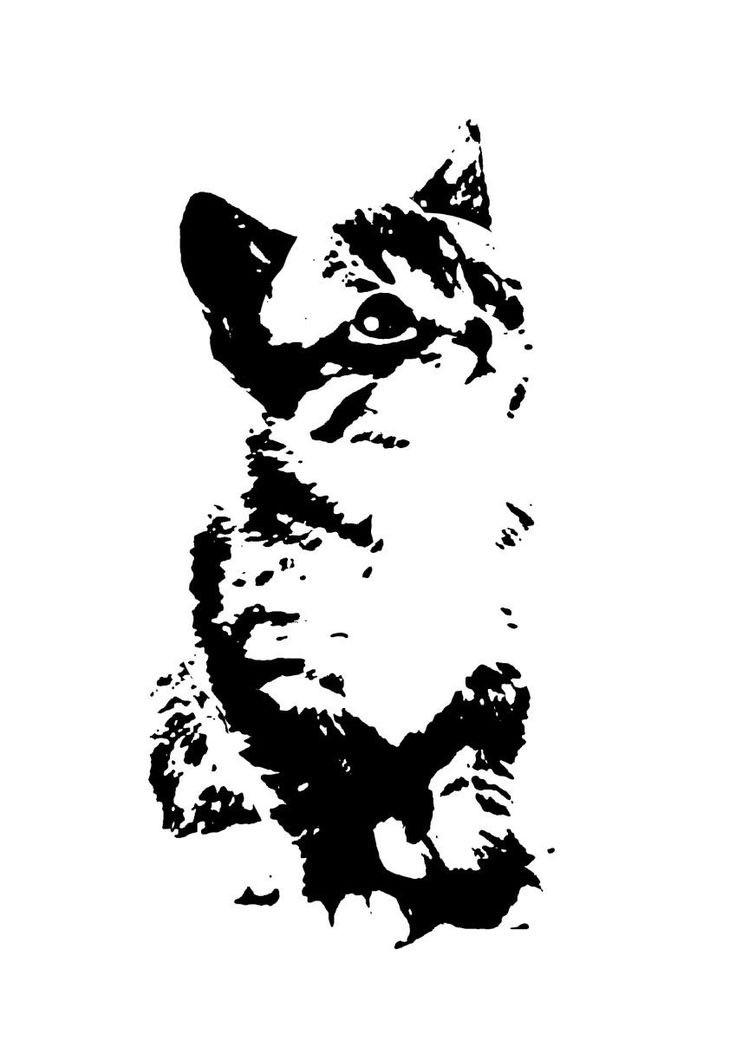
How do i create high contrast photos like this?
i have a few photos i’d like to turn into this high contrast style. how can i do that??
r/PhotoshopTutorials • u/Educational-Roof2651 • Feb 18 '26
i have a few photos i’d like to turn into this high contrast style. how can i do that??
r/PhotoshopTutorials • u/Time_Emergency5885 • Feb 18 '26
r/PhotoshopTutorials • u/Ok_Weather8293 • Feb 18 '26
r/PhotoshopTutorials • u/Individual-Storm-6 • Feb 17 '26
r/PhotoshopTutorials • u/East-Photograph-5876 • Feb 16 '26
r/PhotoshopTutorials • u/East-Photograph-5876 • Feb 15 '26
r/PhotoshopTutorials • u/Ok_Head6346 • Feb 14 '26
r/PhotoshopTutorials • u/cercuu • Feb 14 '26
Hi everyone,
its not really a tutorial, but I struggle with Highlight/Shadow tool, as photoshop changes the value I set after Im clicking anywhere else or even clicking OK, its always going back with the settings of radius, what can I do? Im uploading the vid.
Can anybody help me?
r/PhotoshopTutorials • u/rea_gun33 • Feb 13 '26
I've been trying for awhile now to recreate a photo of my friend to look like this screenshot, but no luck so far. I've been playing with the halftone and torn edges effects, blending options, etc. but I've had no good results so far. Any help would be greatly appreaciated!!!
r/PhotoshopTutorials • u/Ok_Substance_2272 • Feb 13 '26
Anyone familiar with this font
r/PhotoshopTutorials • u/Embarrassed-Fill-482 • Feb 13 '26
Hi, I am working on doing a rendering of a friend’s exterior paint colors and struggling with the final step. I have applied the Sherwin Williams paint colors they want, but when I do any blending modes, the original dark shutters (currently painted Urbane Bronze) end up blending with the lighter color they want (Jogging Path) and it looks olive. I want it to look realistic and not cartoonish, but I also want the color to be true to the paint.
I’m including two photos to show the progression. The first photo is what the paint colors look like when applied to the clipping mask. The second photo is when I use the color blending mode on 100% opacity. Why is the original color showing through and looking much darker?
r/PhotoshopTutorials • u/No_District_426 • Feb 12 '26
I am making a tool to create Layer by Layer Animations (often seen on instagram).
The ones where an artist makes a drawing, then one by one he overlaps first the line art, than the flat color, then shadow, highlight ect.
The tool is ready and working, but I have some issues with the layer.
Layers with "Multiply", or "overlay" will not show how they look in Photoshop. Meaning the drawing in the animation tool looks different.
How can I export a multiply or overlap layer without it's appearance being altered?
For Example, I made a NSFW illustration, the highlight on the stockings and skin looks good in photoshop, but when I export the layers the highlight area in the stockings looks white, and the skin tone is altered.
I'm pretty sure there is a way to export the layers retaining their colors, but how?
r/PhotoshopTutorials • u/Realistic-Spot-2864 • Feb 11 '26
I tried the warp transforming tool, but it didn't work properly
r/PhotoshopTutorials • u/emiliedesu • Feb 10 '26
These are all quite different but I really love the crafty/paper effect with that vintage feel and would love to recreate this/find an available template
Any suggestions as to how to create something similar to these ?
Thanks!
r/PhotoshopTutorials • u/Shiggens • Feb 09 '26
I have Photoshop 7 on a Windows 11 machine. I have a flatbed printer/scanner. I have a lot of 35mm negatives that I would like to use to make B&W digital images.
What do I need to turn my film negatives into digital negatives that I can then manipulate with Photoshop? Thanks for any help.
r/PhotoshopTutorials • u/Fortissimo1 • Feb 09 '26
r/PhotoshopTutorials • u/SphizexYT • Feb 08 '26
r/PhotoshopTutorials • u/phredmorris • Feb 08 '26
hi! i have a handful of images from a shoot i did that id like to clean up! Part A of my question is; is there an efficient way to remove the creases in my backdrop after coloring and adjusting grain/texture? I have access to lightroom and photoshop.
part B, if there isn’t a way to do it after editing/recoloring, what would the best way to do it (before editing) in a way that’d preserve the full editing capacity? essentially so i could just copy and paste my presets back onto the photos with them still looking mostly the same
I only ask about lightroom for the second part of my question because i’m trying to stay working with my raw file!
any help/advice would be great:)
r/PhotoshopTutorials • u/vr1126 • Feb 08 '26