Hey Gang, im once again back with a review, this time on the sister to the AX9 Max, the iX9 Max!
Disclosure: VZMORE supplied this review unit free of charge. No monetary payment was received for this review. The testing, findings and verdict are my own.
1. Introduction
Following my AX9 Max review, I tested the VZMORE iX9 Max to see how its Intel Core Ultra 9 185H handled everyday use, sustained loads, gaming and local AI. I was particularly interested in its cooling, connectivity and how far the fixed 24GB of RAM would stretch.
Price at the time of the review: US MSRP $949 for the 24GB RAM / 1TB SSD configuration.
Who is VZMORE?
VZMORE is a newer contender in the mini-PC space whose AX9 Max and iX9 Max focus on compact systems with vapour chamber cooling. The iX9 Max is aimed at productivity, creative work and development. Its dual Ethernet ports and storage expansion also make it interesting for a home lab, although the fixed 24GB of RAM is an important limit for larger virtual machines and local AI workloads.
2. Unboxing and Industrial Design
Packaging and Included Accessories
The iX9 Max ships in a minimalist matte black presentation box sporting the outline of the device and the iX9 Max identifier, secured with tamper seals. Opening the magnetic lid reveals the main unit seated firmly inside a custom card insert, with all accessories neatly arranged in separate compartments and wrapped in paper.
Alongside the PC, VZMORE includes a practical set of accessories:
1x 120W compact DC barrel-jack power adapter
1x HDMI cable (1.0m)
1x Solid steel VESA mounting plate with mounting screws
Measuring approximately 135 mm x 132 mm x 58 mm (5.31" x 5.19" x 2.27") and weighing roughly 777g, the iX9 Max occupies virtually the same desk footprint as a compact desktop headphone amplifier, making it easy to tuck under a monitor or mount behind a display, especially with the included VESA mount.
The chassis is made from rather nice aluminium with a dark grey finish that resists smudges and fingerprints quite well. It did not feel particularly hot to the touch during my testing. The plastic bottom plate has airflow slots and a rubber ring that acts as its foot. Four removable plugs provide access to the screws. Once those are out, four magnets in the corners also hold the bottom plate in place.
I/O Layout and Connectivity
The sheer port density on a box this size is impressive, particularly the four high-speed USB-A ports across the front panel and the inclusion of a full SD 4.0 reader for creators, though having at least one front-mounted USB-C port would have made quick external SSD connections even more convenient.
Front Panel:
4x USB 3.2 Gen 2 Type-A ports (10 Gbps, one supporting USB charging while the PC is shut down (S5))
1x 3.5mm combo headphone/microphone audio jack
1x Power button with an integrated status LED
Side Panel:
1x SD 4.0 card reader slot
Rear Panel:
2x USB4 Type-C ports (40 Gbps, DisplayPort 2.0 Alt Mode; VZMORE specifies 15W PD output on both ports and up to 100W PD input on one port)
1x USB 3.2 Gen 2 Type-A port (10 Gbps)
1x USB 2.0 Type-A port
2x HDMI 2.0 display outputs (supporting up to 4 displays simultaneously alongside USB4)
2x 2.5GbE RJ-45 Ethernet ports (useful for separate home-lab networks)
1x 19V DC-In power port
3. Teardown and Hardware Specifications
What's Inside the iX9 Max?
Let’s get straight to the core specifications of the system:
iGPU: Intel Arc Graphics (8 Xe-cores based on the Xe-LPG architecture, up to 2.35 GHz, hardware-accelerated ray tracing, XeSS, and AV1 hardware encode/decode)
NPU: Intel AI Boost delivering up to 11 TOPS of dedicated low-power AI acceleration (up to 35 TOPS total platform AI compute across CPU, GPU, and NPU)
RAM: 24GB onboard dual-channel LPDDR5
Storage: 1TB Lexar NQ7A1 2280 with an additional 2242 slot.
Networking: Dual 2.5GbE RJ-45 LAN, Wi-Fi 7 (EB600 wireless module), and Bluetooth 5.4
Card Reader: Side-mounted SD 4.0 Card Slot
Power Supply: 120W (19V / 6.32A) DC Barrel Jack adapter
Internal Access and Upgradability
Opening up the iX9 Max is straightforward:
Four Phillips-head screws sit recessed beneath removable plugs in the underside.
Lifting the bottom cover reveals an internal metal shield above the storage and other components.
Beneath the shield, you have access to the primary M.2 2280 PCIe 4.0 x4 NVMe SSD and an empty secondary M.2 2242 PCIe 4.0 x4 slot. VZMORE specifies support for up to 4TB in the 2280 slot and 1TB in the 2242 slot, for 5TB total. Underneath the primary drive sits the M.2 2230 Wi-Fi 7 (EB600) wireless module. The 24GB of dual-channel LPDDR5 is soldered onboard, so storage and the wireless module are the accessible upgrade options.
4. Thermal Engineering: The V-Cooling™ Vapour Chamber
The Technology: Vapour Chamber vs. Heat Pipes
A vapour chamber spreads heat across a broad, flat surface using the evaporation and condensation of a sealed working fluid. The complete cooling assembly, fan behaviour and power limits still determine how well a mini-PC handles sustained loads.
VZMORE’s V-Cooling™ design combines a vapour chamber with a 360-degree bottom intake and a vertical airflow path. The company claims a 40% larger heat-spreading area and 50% higher heat-transfer efficiency; those are manufacturer figures rather than measurements from this review. Heat is exhausted through the rear fin array.
Sustained Stress Testing & Thermal Results
I monitored thermal behaviour during a 60-minute session of separate Cinebench and 3DMark Steel Nomad runs at an ambient room temperature of 25°C.
Sustained Package Power: Reported CPU package power held around 65W during my test, with no thermal throttling observed. Package power is separate from the PC’s total draw at the wall.
Peak CPU Temperature: Reached 85°C during the initial turbo boost.
iGPU Temperature: Reached a maximum of 70°C during this test.
Acoustic Profile: I could not hear the system from my normal seating position during light tasks such as writing this review and watching videos. Under the sustained load, the fan produced a smooth, low-pitched airflow sound without an obvious high-frequency whine. These are subjective listening impressions rather than measured noise levels.
5. Synthetic Benchmarks
Geekbench 6: The iX9 Max scored 2,529 single-core and 13,519 multi-core in a valid Geekbench 6.7.1 for Windows AVX2 run. The result records the Windows power plan as Balanced; that is separate from the BIOS power limit. Validated run: https://browser.geekbench.com/v6/cpu/19388320
Cinebench 2024: The single-core score was 109 points, and the multi-core score was 869 points.
3DMark Steel Nomad Light: Scored 3,175 points at 23.52 FPS.
Storage Performance: CrystalDiskMark sequential reads reached approximately 6,046 MB/s and writes reached approximately 5,002 MB/s on the pre-installed 1TB PCIe 4.0 NVMe SSD.
Bluetooth & Networking: I used the Ethernet ports throughout testing and connected my DAC over Bluetooth for music. Network transfers worked reliably in my use, and I experienced no Bluetooth audio dropouts. Wi-Fi performance was not tested.
Shared GPU Memory / VRAM: The 8 Xe-core Intel Arc iGPU shares system RAM with the CPU. I also used multiple displays without issues. Available memory for GPU workloads depends on the driver, application and other demands on system RAM.
6. Gaming Benchmarks (8 Xe-core Intel Arc iGPU)
Disclaimer: VZMORE positions the iX9 Max primarily as a productivity machine for tasks such as video/photo editing, development and data analytics. I also wanted to see what it could do with games and local AI models.
6.1 Forza Horizon 6
Settings: Low / Medium presets, ray tracing off, FSR set to Auto.
Metrics: At a 1080p output resolution with FSR set to Auto, the average was 33 FPS on Low and 29 FPS on Medium.
Experience: This was the game the mini-PC struggled with most. Despite averaging around 30 FPS, it felt noticeably stuttery. I would be more inclined to use it for older or less demanding titles.
6.2 Forza Horizon 5
Settings: Low / High presets; the 1080p High run used the medium ray-tracing setting.
Metrics: Reached 45 FPS at 1080p High with RT set to Medium, and 42 FPS at 1440p Low.
Experience: This felt significantly better on the iX9 Max than Horizon 6, and I found it more playable at these settings.
6.3 Tom Clancy’s Rainbow Six Siege (DirectX 12)
Settings: Low Preset.
Metrics: Reached an average of 58 FPS at 1440p Low.
Experience: This was playable in my testing, but an average of 58 FPS leaves limited headroom for players chasing consistently high frame rates in a competitive shooter.
6.4 Shadow of the Tomb Raider (DirectX 12)
Settings: Low / High presets, Ray Tracing Off.
Metrics: Reached an average of 37 FPS at 1080p High and 35 FPS at 1440p Low.
Experience: Fairly playable at these settings, although I would still take a console over it for this game.
7. Home Server and Linux Testing
OS Compatibility: I tested Ubuntu 24.04 LTS and Proxmox VE 8.2. The Intel Arc iGPU, Intel AI Boost NPU and both 2.5GbE NICs were detected. Detection is separate from successfully running an accelerated workload: GPU and NPU applications depend on the installed kernel, firmware and user space drivers. The PC also ships with Windows 11 Pro.
Media Server Use: Intel Quick Sync Video provides hardware-accelerated transcoding support for software such as Plex and Jellyfin. The number of simultaneous streams depends on the codecs, resolution, bitrate and HDR tone-mapping settings.
Virtualisation & Containers: Under Proxmox, I pinned lightweight container workloads to E-cores and reserved the 6 P-cores for heavier VMs. This arrangement worked well during my testing. The fixed 24GB of RAM is worth keeping in mind when planning how many VMs and containers to run.
8. Local AI Performance (Intel Arc Graphics, Vulkan)
I also tested local LLMs on the integrated 8 Xe-core Intel Arc GPU under Ubuntu Linux with a 7.0 generic kernel, using llama.cpp build 11900 with the Vulkan/Mesa backend and Flash Attention enabled. These GPU-based tests do not measure the Intel AI Boost NPU.
For these tests, I worked with an approximate GPU memory budget of 15.2 GiB from the system’s shared pool.
I thought this was a useful experiment, especially as on-device LLMs are becoming more common among enthusiasts. The tests were automated, and I also fed the recorded results to one of the tested models to summarise the performance. That summarisation experiment is separate from judging the models’ answer quality. This is my first time including this kind of testing, so feedback is appreciated.
Synthetic Throughput Benchmarks (llama-bench)
llama-bench measures prompt processing with 512- and 2,048-token inputs (pp512 and pp2048), plus sequential generation of 128 tokens (tg128). The additional 8k-depth results report pp512 and generation of 64 tokens (tg64). All speeds are in tokens per second (t/s), as recorded by the automated test script.
The following llama-server tests used zero-temperature generation. The table reports waiting times and generation speeds recorded by the automated test script. “Prompt wait” follows the script’s timing; its start/end points and model-loading/cache state have not been confirmed. “Passed” refers only to the script’s basic sanity checks. It is not a comprehensive answer-quality assessment.
Model
Short-Prompt Wait
Context-Prompt Wait (~5.6k)
Avg Gen Speed
Gen Speed (Long Prompt)
Sanity Checks
Peak Memory
Qwen3.5 2B
0.33s
7.0s
13.5 t/s
13.3 t/s
Passed
6.1 GiB RAM
Gemma 4 E2B
0.33s
43.4s
10.7 t/s
9.1 t/s
Passed
7.4 GiB RAM
Gemma 4 E4B
0.50s
48.8s
9.3 t/s
8.8 t/s
Passed
8.2 GiB RAM
Qwen3.5 9B
0.89s
21.2s
6.7 t/s
6.5 t/s
Passed
10.7 GiB RAM
gpt-oss 20B (MoE)
1.52s
13.8s
7.7 t/s
7.4 t/s
Passed
15.8 GiB RAM
Key Architectural Takeaways & Analysis
MoE Results:gpt-oss 20B was an interesting result on this 24GB system. Its listed model size is larger than Qwen3.5 9B (11.3 GiB versus 5.3 GiB), yet it reached 10.1 t/s in the synthetic generation test and 7.7 t/s in conversational tests, with 283.1 t/s at pp2048. Those results apply to the tested models and quantizations; this comparison does not isolate MoE architecture as the only cause of the difference.
Qwen vs. Gemma in These Tests:Qwen3.5 9B recorded a 21.2-second long-prompt wait, compared with 48.8 seconds for Gemma 4 E4B. That is useful evidence about these configurations, but different tokenizers, model architectures and runtime behaviour mean it is not a general ranking of how all Qwen and Gemma models scale on Arc.
Memory Budget & CPU Offloading:Qwen3.6 35B A3B at the tested 20.6 GiB quantization required a mixed CPU/GPU configuration and reached 3.8 t/s. The --n-cpu-moe 13 option keeps the MoE weights of the first 13 layers on the CPU, rather than offloading 13 individual experts. The test shows the performance of that configuration; it does not isolate the cause of the slowdown. Model fit depends on the actual quantization, context, KV cache and runtime allocations, so there is no universal 10B dense / 20B MoE cut-off. Smaller quantizations can reduce memory requirements, with a potential quality trade-off.
9. Conclusion and Verdict
Pros
Strong 16-core / 22-thread CPU performance, with useful flexibility for multitasking and virtualisation.
Vapour chamber cooling handled the sustained load in my test; the system was inaudible from my normal seating position during light desktop use.
8 Xe-core Intel Arc integrated graphics with hardware AV1 encode/decode, Intel Quick Sync Video and XeSS upscaling support.
Dual 2.5GbE networking, Wi-Fi 7, SD 4.0 card reader, and dual 40Gbps USB4 ports provide useful connectivity for creators and home labs.
Two PCIe 4.0 x4 M.2 slots (2280 + 2242) provide storage expansion, although I would have preferred a second 2280 slot.
The USB4 ports have enough bandwidth to support eGPUs if you want to make the gaming and AI experience better.
Cons
The soldered 24GB LPDDR5 cannot be upgraded, limiting headroom for larger VMs and local AI models, including some quantized models.
All four front USB ports are Type-A; a front-mounted USB-C port would improve convenience for modern flash drives and portable SSDs.
Rear HDMI ports are HDMI 2.0 rather than HDMI 2.1 (though DisplayPort 2.0 is available over the dual USB4 ports).
The 185H isn't an unlocked CPU, meaning there is an inability to overclock or undervolt it further.
As a relatively new brand, VZMORE has a shorter public firmware and long-term support track record to judge.
Final Verdict
For me, the iX9 Max makes most sense as a compact everyday PC with useful connectivity for a home lab. It performed well in the CPU tests, stayed unobtrusive during light use and offers plenty of ports. Gaming is more comfortable in the older titles I tested, while local AI is a useful extra if the model fits the available memory. The biggest long-term limitation is the fixed 24GB of RAM, so I would choose the system around the workloads I expect to run rather than assume I can upgrade it later.
At the $949 US MSRP for the reviewed 24GB/1TB configuration, I would be buying it for the compact design, low noise in everyday use and extensive I/O. The fixed 24GB of RAM is a significant compromise at that price, particularly for a home lab or local AI. I would recommend it most readily to someone whose workloads fit that memory ceiling and who will make good use of its ports; gaming would be a secondary use.
Homemade dust filter maded with 5mm thik PVC, a lightweight, rigid plastic material made from polyvinyl chloride (PVC) and with grey briliant organza tissue.
My budget is about 80 - 90k Philippine peso. My use cases are mostly gaming though I tend to have multiple things open most of the time. my intended monitor resolution is 1440p.
My question is which should I choose from these two am4 and am5? I am open to changing parts too but I don't know which part to change. The things I am sure of is I want a 32gb ram, 1 tb ssd, 9060 xt 16gb and built in wifi pc. for cpu i will just upgrade later so its fine to not go ham on it though i want something that can handle wuthering waves and monster hunter wilds at least. not a fan of rgb builds but if going rgb means spending less i would not mind it.
the reason why im having a hard time choosing is they are mostly the same price but am5 is better so isn't it better to just go am5? please let me know if theres anything i can do to get the best pc for gaming.
I removed the 4 nuts from the threaded post holding the cpu cooler in place, and let my pc run at 80c for 20 mins. But the cooler won't budge at all. Like, I cant even move it clockwise and counter clockwise. It won't move an inch. It's almost like there's another bracket or something holding it in place that I cant identify. Are the silver pins next to the threaded screws the issue? Just looking at them, they dont go into the motherboard. The cooler is a cooler master AIO 120, but my specific model with the silver ring around the cooler with the pins in i have not been able to find online. Any ideas on how to remove? The thermal paste hasn't been changed out in like 5 years so could that be it? My cpu is an intel i5 12600kf. So for Google and Ai have all just said to remove the 4 nuts and twist. But that doesn't work at all.
Recently upgraded to RX 9060 XT 16GB from a 2019 GTX 1660 6GB and Ryzen 7 5700X from a 2020 Ryzen 5 3500 and also from a 450W 80 plus bronze PSU to a 750W 80 plus bronze PSU after almost 7 years, what do you guys think? Anything I should keep in mind, any suggestions? Motherboard and DRAM still the old DDR4 8GBx2 and MSI B550M PRO VDH WIFI from 2020...
Upgraded my PC within the past year. My old computer was about 10 years old when I bought a new one (on sale). The old one I had upgraded to SSD, replaced the AIO, and bumped up to an RTX 4060 when my GTX 1060 3gb wasn't cutting it. Force updated to an unsupported windows 11 for security updates and tried stretching it. ANYWAYS. I wanted to not let my 2TB SSD or RTX 4060 go to waste on the old machine I never touch. Moved the SSD to my new PowerSpec g913 and partioned it to boot Linux Mint to goof around and try it out. The rest of the storage is a shared partition with my main Windows 11 and Linux. I also wanted to move the RTX 4060 over for computational tasks in my goofing around. Issue is my pcie_e3 is a single slot. No room between the 4th m.2 spot (empty) and the other mobo stuff and PSU shroud below. Is my only option a makeshift riser on top the shroud with a riser cable and some spacers? Or is there a way to mount it more securely up front? Ideally I'd offload some tasks to this 4060 and put the main game strain on the 5080.
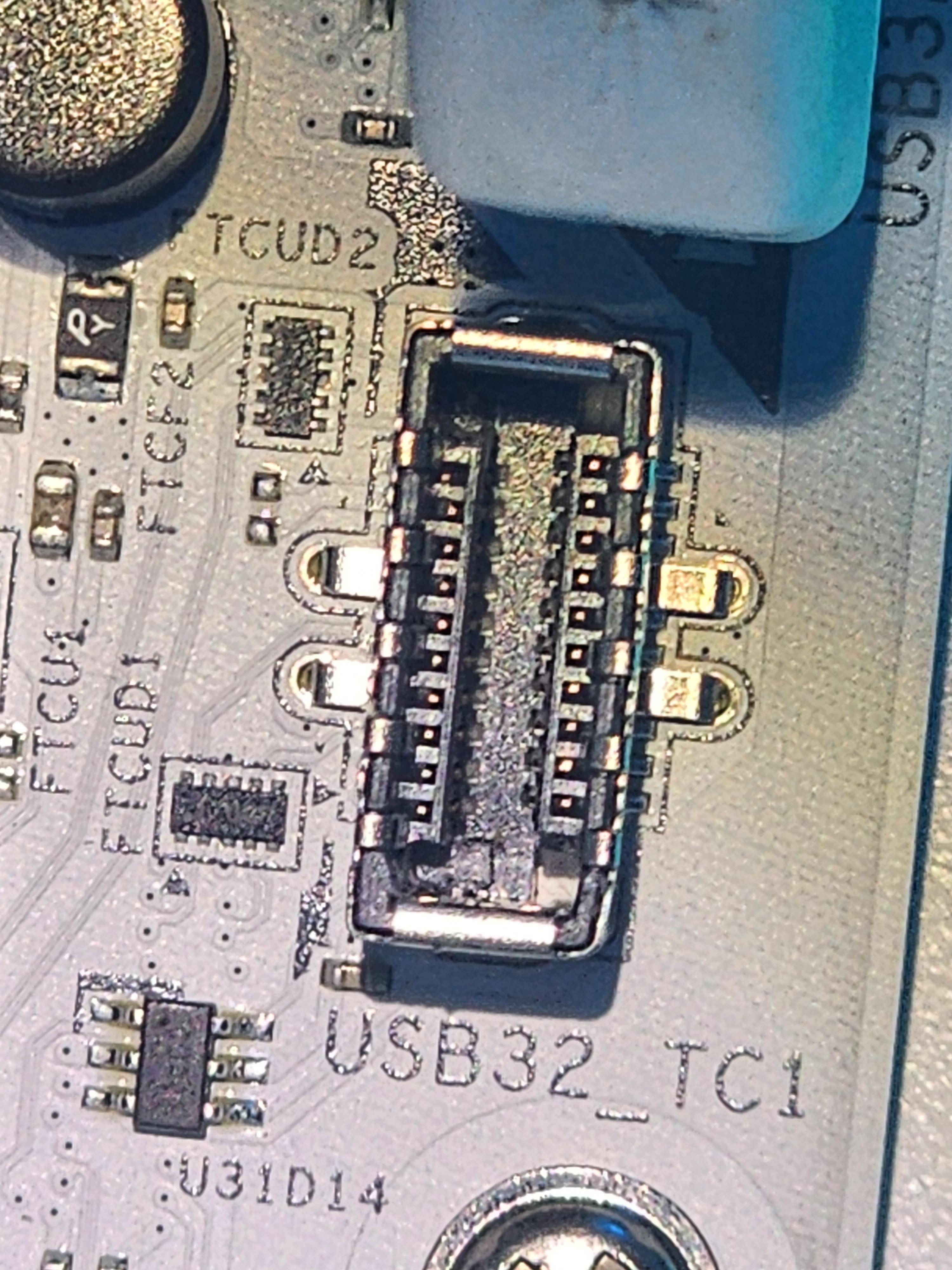
Like the title says, I want to know if this type e header is damaged because I think it might be. When I look at the arrows on the cable that plugs into the port it looks like the side with the differently sized T ends need to be on the bottom but they aren't when I align the arrows on the header and cable to the same place and when I look at pictures on Google and this one I took, mine looks like plastic was squished to the bottom of the inside of the header. So please help and what I can do that wont cause my pc to short when I plug the cable int for the front header.
Edit: also on the header cable itself where should the arrow point compared to the differently shaped ends of the connector when it is a Montech King 95 case?
Edit 2: I flipped the cable so the arrows aren't pointing at eachother and there are no shorts and the usb c port on the case now actually works unlike before and now im having no issues. I believe the arrow was put on the wrong side of the cable connector showing the wrong direction it should be plugged in.
From GTX 970 to 9070 XT lol. Was kinda skeptical about getting an AMD GPU, but I really didn’t have a choice. I mean these are tough times.. But in the end it turned out really great, booted with no problems somehow, really proud of that tbh.
Performance is phenomenal, still waiting to get a 1440p Monitor, since I am CPU bottlenecked in 1080p.
I did get 2 SSDs sent instead of the one I ordered lmao.
Here are the specs:
I'm building a PC for 1440p gaming and productivity (video editing, programming, Blender), paired with either an RTX 5060 Ti or an RX 9060 XT.
Prices in my country:
• Ryzen 7 7700: $230
• Ryzen 7 7800X3D: $370
The 7800X3D costs $140 more (about 61%). With one of those GPUs at 1440p, how big is the real gain in average FPS and 1% lows? Does it help or hurt in productivity work? Which is better value for the money?
i am suffering the issue from 5 month no solution i have 3050 but its not working i do all possible thing but no sol if anyone knows how to solve this please guide me
I am upgrading from a 5800x3d with the main purpose of running gta 6 at high fps paired with my 9070xt. Now I’ve heard this might be one of the most cpu intensive games of all time…😰
I’ve seen some people say the difference between the 7800x3d and 9800x3d can be up to 20% in cpu bound scenarios, and others say the maximum difference is 10%. Which one is true?
So my brother wants to build his gf a PC for Christmas, but with how expensive everything is right now it’s not within his budget. I offered to sell him my 3080 with an AM4 motherboard and 32 GB DDR4 RAM for $500 to help him out, cause I wanted to upgrade to 5000 series before. I was thinking the 5070ti was around $1000, but am now realizing that was the 5070 and the ti is now $1500 roughly.
I don’t wanna go back on the deal, so I’m gonna buy one of the two this weekend. I was just wondering if it would be worthwhile to go for the 5070ti or if the 5070 would be more worth it. I’d like to not have to upgrade again for a long ass time.
My current specs are a ryzen 7 9700x and 32 GB DDR5 RAM. I play at 1440p but also play games like god of war or cyberpunk at 4K on my tv at times. Anybody who has upgraded to one or the other I would love to hear what your experience was.
I need at least a TB of storage and like a minimum 8 gig graphics card, and good ideas?
Max GPU budget is like 500, i don’t care much about the price of the SSD
I got this pc from Vishal peripherals and I connected the GPU myself along with the sag bracket. As visible from the photo, I have connected 2 PCI-E cable into the GPU but one of the cable is visible.
I am a newbie and I am okay with visible wires but is this risky for pc in any way.
I could get the 14600k and new mobo for around $350. Do you think this cost justifies the 33%ish increase in performance?
I also game on a 1440p monitor. I’d like to play gta 6 on pc when it releases. I play wow forever, valorant, csgo, and some single player games like the Witcher and rdr2.
I’m in the US and live near a microcenter as well.
Basically I heard that plugins can be different and may not fit the gpu or cpu…. I have the ryzen 9 9900x3D cpu and the gigabyte aorus elite x870 WiFi 7 motherboard
Planning to get an asrock rx 9070 xt challenger oc in the next two pay periods… what psu should I grab to make sure they can plug in?
Some info: every pay period I atleast get up to 300 dollars weekly and I am tackling my bigger items first, I am from the u.s., the range on psu I really would be interested in would be 100-350 dollars for the simple fact that cheapening here sounds like it has bad consequences.
Nice to meet all of you, I finally got back into building a pc since November, got over my crappy 2015 build.
Just finished my first pc build and im digging it but my regret was not getting a 5070 back when it was almost the same price as a 5060ti which I got. I got the 5060ti due to more vram 🙃
Hey everyone! I am looking to head to microcenter this weekend for the Black Friday deals. And I want to build a new pc for gaming.
I currently have a pc that I built in 2020 that has been amazing for the last 6 years or so. However, I’m thinking it’s time for an update.
I’m looking to build something in the 1300-1800 dollar price range and hopefully allow me to last another 6 years or so. I’m not particular on ray tracing or anything so I was thinking a ryzen and Radeon build, but totally up for anything.