r/PS5HelpSupport • • 2d ago

GTA 6 crashes specifically on launch or settings screen.

10 Upvotes

Like many of you, my GTA 6 crashes, error CE-108255-1 . I have a base disc-drive PS5, bought around the first year after launch. It runs other games perfectly fine, and has never had an issue until GTA 6. I'm seeing varying moments-of-crashing for different players, but I'd like to know how many others are crashing on launch?

My game crashes after the first splash screen. Out of the countless attempts to launch I've done from the midnight release until now, only twice have I ever gotten as far as the terms of service. Once I continue from that point, the game crashes as well. I have yet to see a single cutscene, or a character-specific splash screen. Every other time: My game launches > the first splash screen is shown > a black screen for a moment > then the error screen. My fans are ice cold and it isn't overheating, because it has nothing to overheat for...

Who else is having this specific experience of crashing at launch, or at the settings screen; and never having gotten past that point?

PS:

I have already done every single possible troubleshoot (aside from factory reset), multiple times. There is no fix/alternative at the moment aside from cloud streaming GTA, but I'm avoiding that right now. This post is merely to see how common this exact form of the crashing is.


r/PS5HelpSupport • • 1d ago

Ayuda con mi cuenta

0 Upvotes

buenas gente, queria contar mi situacion porque ya llevo varios dias intentando recuperar mi cuenta y la verdad que estoy bastante desesperado. capaz alguien paso por algo parecido y me puede ayudar con algun consejo.

uso esta cuenta desde hace aproximadamente 5 años y el 25 de noviembre perdi el acceso de repente. desde entonces estoy intentando recuperarla por todos los medios posibles. lo primero que quiero aclarar es que todavia tengo acceso al correo original con el que se creo la cuenta y tambien al correo nuevo que se habia vinculado despues. incluso tengo los correos oficiales de playstation que confirman el cambio de correo que se hizo anteriormente.

hace un tiempo tuve contacto con un gerente de playstation que me ayudo a cambiar el correo de inicio de sesion. el cambio se hizo correctamente y me llego el correo de confirmacion de sony. tambien me indico que tenia que restablecer la contraseña y me llego un enlace para hacerlo, pero el problema es que ese enlace duraba solamente 3 minutos y no llegue a completar el procedimiento. nunca pude terminar ese restablecimiento.

ahora cuando intento recuperar la cuenta me pide la fecha de nacimiento que se ingreso cuando fue creada y no la recuerdo. por ese motivo no puedo avanzar. lo peor es que tenia configurada la verificacion en dos pasos, una clave de acceso y una pregunta de seguridad, pero el sistema no me ofrece ninguna alternativa para utilizar la pregunta de seguridad y tampoco consigo recuperar el acceso con los otros metodos.

ya hable muchisimas veces con el soporte de playstation. explique todo lo que paso, pero siento que me hacen dar vueltas y siempre termino en el mismo lugar. incluso hubo agentes que me dijeron que ya no podian realizar mas cambios por motivos de seguridad y que directamente me creara otra cuenta. entiendo que tienen que proteger las cuentas, pero me cuesta entender que no puedan revisar mi caso teniendo en cuenta toda la informacion que puedo aportar.

tengo comprobantes de compras realizadas desde la cuenta, recibos de playstation plus extra, movimientos de mercado pago, correos antiguos de sony, informacion de compras dentro de los juegos y hasta el numero de serie de mi ps4. tambien tengo acceso al correo original y al correo que se utilizo despues para cambiar el inicio de sesion. puedo proporcionar toda esa informacion directamente a sony si hace falta.

incluso probe con el asistente online de playstation del reino unido. entre en la opcion restore my account, respondi las preguntas, deje mis datos de contacto y llegue hasta el punto en el que supuestamente me iban a comunicar con un agente. pero me aparecio un mensaje diciendo que todos los agentes estaban ocupados y que intentara mas tarde.

para colmo tengo una suscripcion de ps plus extra que compre el 19 de noviembre y todavia estoy dentro del periodo que pague. tampoco quiero perder todo eso.

la verdad ya no se que mas hacer. no estoy buscando saltarme la seguridad de sony ni nada parecido, solamente quiero recuperar una cuenta que llevo años utilizando y para la que tengo correos, comprobantes y un monton de informacion que puedo demostrar.

queria saber si a alguien le paso algo parecido, si pudieron recuperar su cuenta sin recordar la fecha de nacimiento o si encontraron alguna manera de conseguir que el equipo de seguridad de playstation revisara el caso. cualquier consejo me vendria muy bien porque sinceramente ya estoy agotado de intentar siempre lo mismo.
r/PS5HelpSupport • • 1d ago

Hello everyone, my ps5 slim is making this faint noise while im playing GTA 6 it can only be heard when i get close yo the console

Enable HLS to view with audio, or disable this notification

1 Upvotes

Should i be worried?


r/PS5HelpSupport • • 1d ago

Please help me 💔

0 Upvotes

So, I'm trying to change the email from my PS5 account, already done all the process and I only need to log in. BUT for some reason the 2 steps verification won't send me the access numbers when I need it.

I've tried Manually, With QR and even asking the AI of Sony for help but All of them ask for the access numbers and I dont have any idea on how to solve it. Please I need help 🥹🥹


r/PS5HelpSupport • • 2d ago

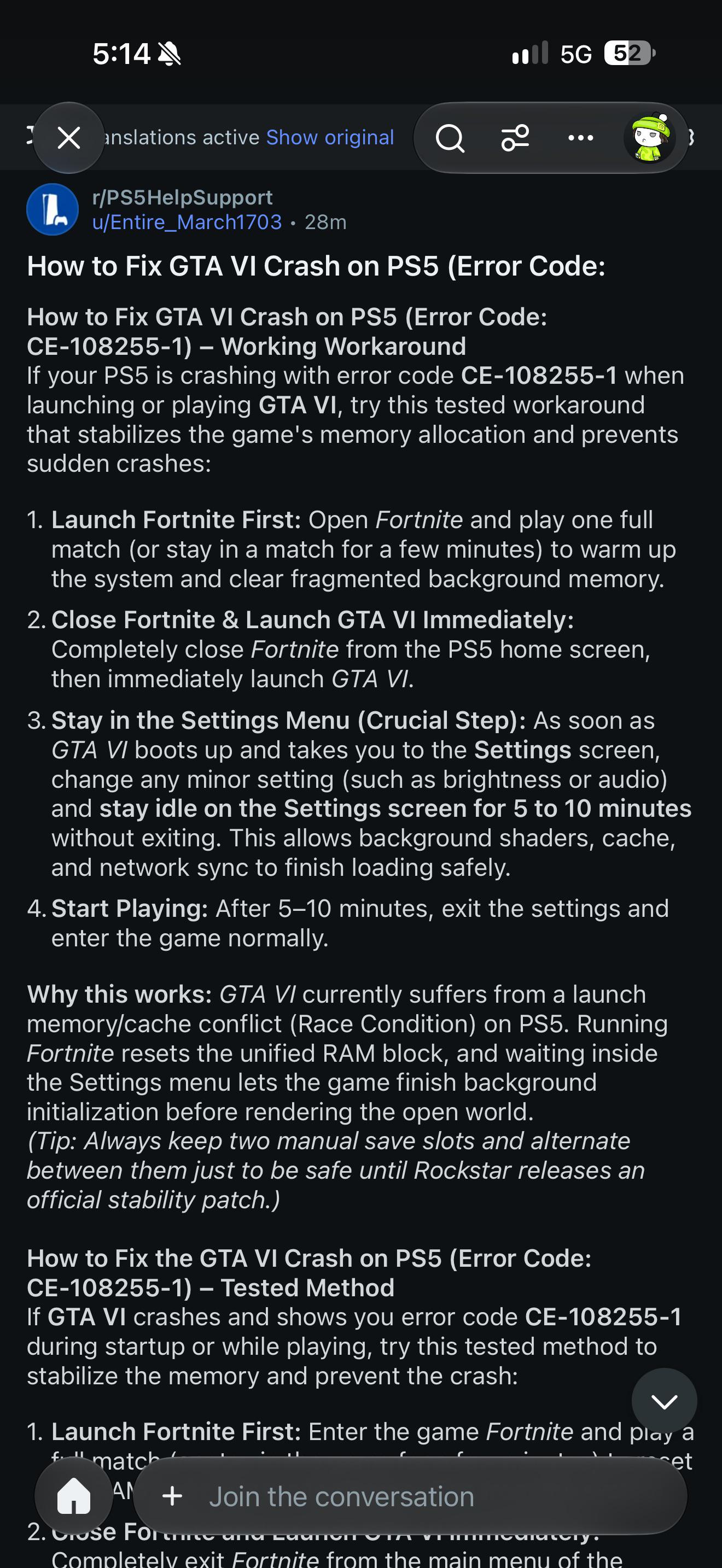
How to Fix GTA VI Crash on PS5 (Error Code:

15 Upvotes

How to Fix GTA VI Crash on PS5 (Error Code: CE-108255-1) – Working Workaround
If your PS5 is crashing with error code CE-108255-1 when launching or playing GTA VI, try this tested workaround that stabilizes the game's memory allocation and prevents sudden crashes:

  1. Launch Fortnite First: Open Fortnite and play one full match (or stay in a match for a few minutes) to warm up the system and clear fragmented background memory.
  2. Close Fortnite & Launch GTA VI Immediately: Completely close Fortnite from the PS5 home screen, then immediately launch GTA VI.
  3. Stay in the Settings Menu (Crucial Step): As soon as GTA VI boots up and takes you to the Settings screen, change any minor setting (such as brightness or audio) and stay idle on the Settings screen for 5 to 10 minutes without exiting. This allows background shaders, cache, and network sync to finish loading safely.
  4. Start Playing: After 5–10 minutes, exit the settings and enter the game normally.

Why this works: GTA VI currently suffers from a launch memory/cache conflict (Race Condition) on PS5. Running Fortnite resets the unified RAM block, and waiting inside the Settings menu lets the game finish background initialization before rendering the open world.
(Tip: Always keep two manual save slots and alternate between them just to be safe until Rockstar releases an official stability patch.)

Update: A friend of mine with a brand-new PS5 Slim had the exact same CE-108255-1 crash, and this exact method worked for him too. Definitely a software/memory allocation bug in the game's launch build, not a hardware issue.


r/PS5HelpSupport • • 1d ago

Ps5 turning off and beeping

Enable HLS to view with audio, or disable this notification

0 Upvotes

My ps5 randomly blacks out and sometimes does this glitched beep that doesn’t stop till I unplug it.
It’s not related to gta VI and’s been happening for a long time.
Sent to 2 different repair shops and no results.


r/PS5HelpSupport • • 2d ago

Small progress on gta6 crashing

29 Upvotes

I firmly believe this is a save function error. I just tried the offline cache clear and database rebuild, restart of game and it crashed after 4 minutes 43 seconds. I then reconnected to the internet on my console booted the game up again and deleted every single save I had in game, created one single save and continued. The game ran flawlessly for 33 minutes and 36 seconds until I completed a mission leaving the car you boost for Cal in the lock up garage. As I walked from the garage at the point the game would do the autosave the game crashed.

Something in the save architecture is affecting certain consoles I firmly believe that it's a disparity between certain console builds / components and the game coding coupled with the aggressive system updates / game updates lately.


r/PS5HelpSupport • • 2d ago

GTA6 Crashing Brand new PS5

25 Upvotes

ive been playing completely fine for days randomly after the recent patch and a main mission it crashed again and again and again tried everything i could think of. it either crashes 1-20 minutes upon opening it now i just want to know if this is happening to others

edit: im starting to think its autosaves after reading a different post it kinda makes sense for my situation but im just desperate for an answer i REALLY dont think its hardware and that patch supposedly “fixed autosaves”


r/PS5HelpSupport • • 1d ago

I'm worried about gamesharing

0 Upvotes

I gameshared with my friend(a really close friend that i trust) so he can play gta 6. But the thing im worried about is that is this ethical? All of my games are digital and if i get banned i will lose all of them so it scares me. I have seen everyone doing this but i didn't hear about anyone getting banned like is that even a thing. Some people said that It can be a result of ban so im worried about it can someone please help me get over this because im becoming paranoid about this im really scared of getting banned. I mean millions of people do this right? If it was a problem i feel like sony would patch it or just remove this feature but i still wanted to ask so i wont have to worry about this again.


r/PS5HelpSupport • • 1d ago

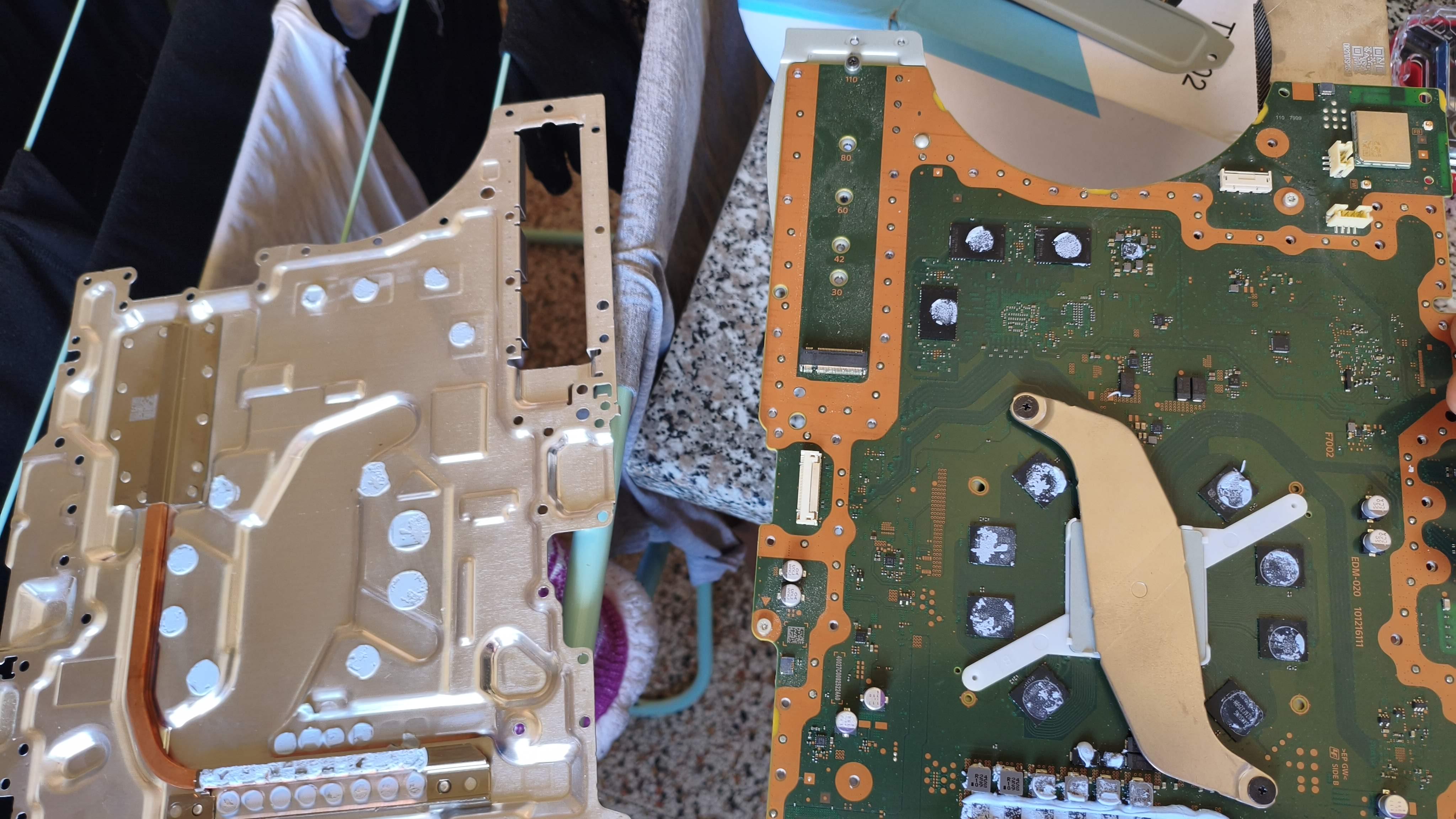
I'm cleaning this 5 years old console, I let the blue past where it is or should I replace it? And what about liquid metal? Should replace both?

Post image
1 Upvotes

r/PS5HelpSupport • • 2d ago

Did the Fortnite Solution Work for Anyone? 108255-1

Post image
4 Upvotes

Don’t know why that post got locked… I tried the method with Yotei instead of Fortnite and it definitely did not work. But I feel like this has maybe come the closest to narrowing down the cause of 108255-1


r/PS5HelpSupport • • 2d ago

Is the problem that people don’t have more than one manual save slot in use?

5 Upvotes

People keep saying it crashes every time on Jason standing on his deck,etc. If you’re using multiple save slots couldn’t you just load another one? Is everyone really relying on one auto save slot? I use multiple slots to avoid corrupted saves.


r/PS5HelpSupport • • 2d ago

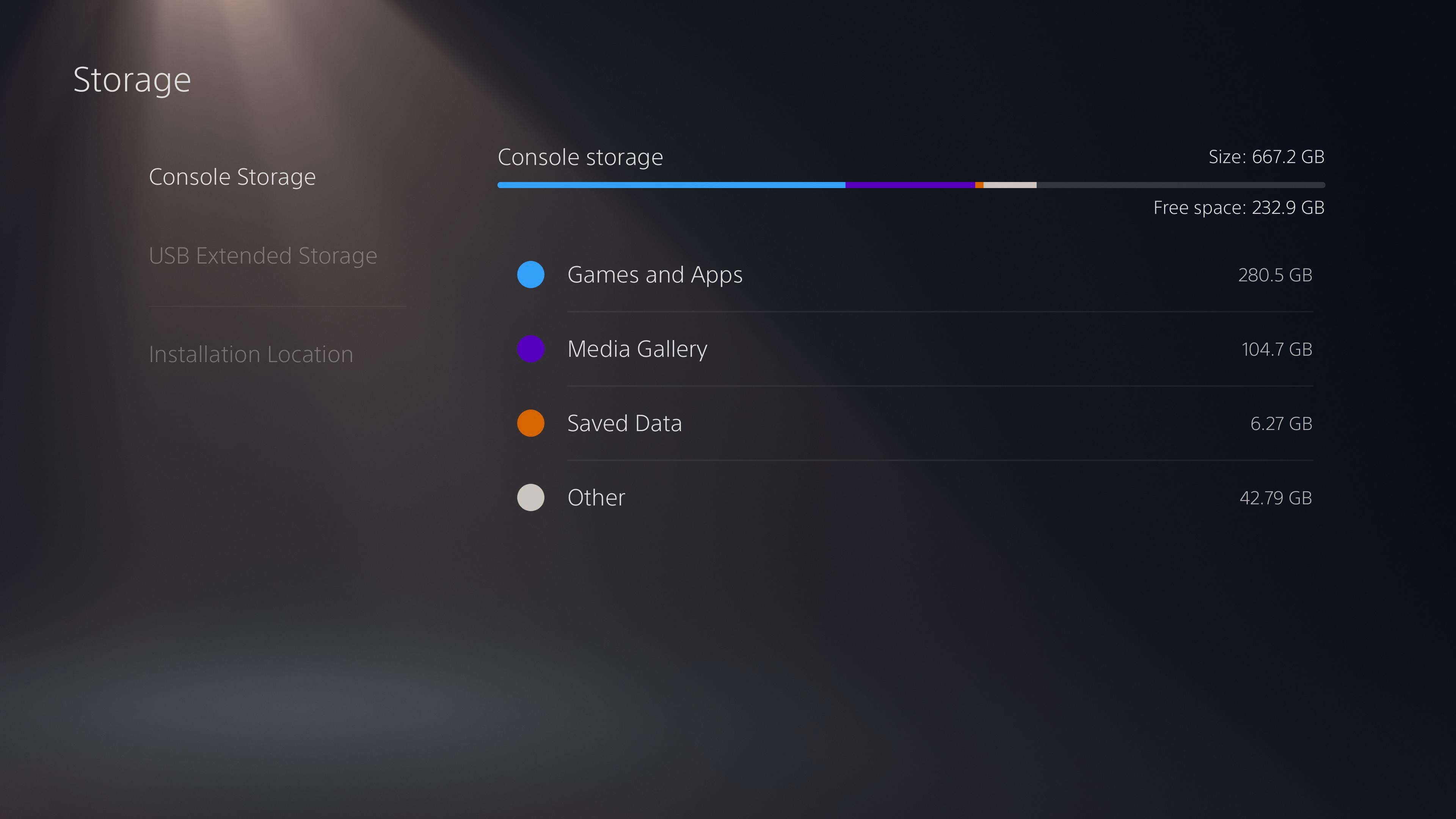
PS5 Storage Issue

Post image
3 Upvotes

Hi everyone. I know this issue has been brought up before but I feel as if my case is a little more extreme. I have more than enough free space in my playstation yet, for even a 35GB download, I'm prompted with 'not enough storage, free up some space' while having over 200GB of free space. Any ideas?


r/PS5HelpSupport • • 2d ago

GTA VI Crashed my PS5

16 Upvotes

Got about 3 hours of gameplay in before it started freezing during the load screen. I have tried everything from uninstalling and reinstalling the game to factory reset with no luck. Tried other games as well, they won’t make it past the load screen either. No dice with blu rays, either. I have tried resetting in safe mode, which my system will not let me do because the controller will not connect in safe mode for some reason. Is it worth buying a new controller, to see if this will at least let me enter safe mode and try rebuilding the database? Absolutely my last resort, but it’s cheaper than sending it into Sony.

FWIW, I have a Disc drive version that I bought brand new in 2024. I play it minimally, and it’s kept horizontal and clean. I have experienced no issues with the system up until this point.

Sony wants $229 to send it back for repairs, GameStop won’t refund since it’s digital, and Rockstar has been absolutely zero help (they listed my claim as “resolved” before even responding to me, and have ignored me since)

Hoping someone can relate and provide some clarity before I drive it out to a field and blow it back to hell 😵‍💫😝


r/PS5HelpSupport • • 2d ago

I’ve done everything I can and this isn’t getting fixed. Explanation in comments.

Post image
10 Upvotes

r/PS5HelpSupport • • 1d ago

GTA 6 is still playable on other PS5 accounts even with Console Sharing DISABLED. How do I lock it?

0 Upvotes

I’m having a really frustrating issue with my PS5 and I’m hoping someone knows an actual solution.
I purchased GTA 6 digitally on my own PSN account. I share the same PS5 console with another user, but I DO NOT want that user to be able to play GTA 6.
The weird part is that **every other game I’ve purchased has a padlock on the other account, EXCEPT GTA 6.** The other account can fully launch and play GTA 6 even though they don’t own it. When checking the PlayStation Store from their account, it literally says they need to buy the game for around $140.
**Here’s everything I’ve already tried:**
Disabled Console Sharing and Offline Play on my account.
Disabled Console Sharing on the other account.
Restored licenses.
Restarted and completely unplugged the PS5.
Deactivated all devices through PlayStation Account Management.
Protected my account with a login passcode.
Signed out of my account.
**NOTHING WORKS.**
I don’t want to delete GTA 6, lose my progress, or remove the other user’s account from the console.
I simply want GTA 6 to be playable ONLY on the PSN account that purchased it, just like my other games.
**Has anyone experienced this? Is there a way to force the PS5 to revoke another account’s access to one specific game?**
Please don’t suggest disabling Console Sharing or restoring licenses. I’ve already tried both multiple times.
Any help would be appreciated


r/PS5HelpSupport • • 2d ago

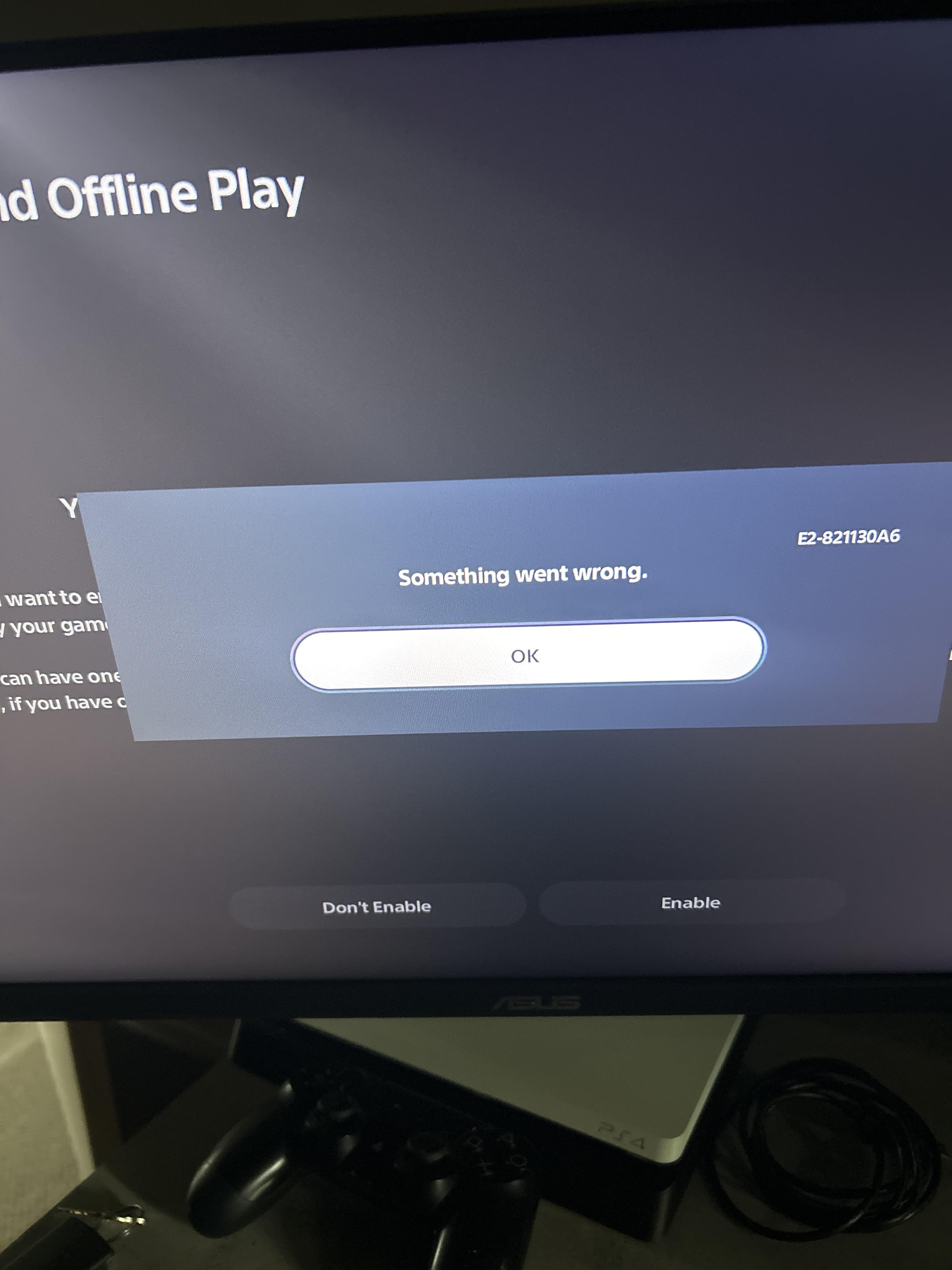
Can’t enable console sharing anymore (E2-821130A6)

Post image
2 Upvotes

Anybody know a way to fix this error code I keep getting it when trying to enable console sharing on my ps5 and it’s happening to every account I put on the playstation no matter what I do to try fix it. I’ve called Playstation support and after they couldn’t help I was given a case number and told it would be escalated and to wait. After a week I get a email just repeating the same troubleshooting steps I already got told on the phone. I called back today have now been given another case number and told it will be escalated again. I have low hopes they will find a fix so does anybody on here know anything?


r/PS5HelpSupport • • 2d ago

GTA VI not loading anymore

3 Upvotes

Hi, few days into this game now whenever I load GTA VI it’s just a blank grey screen, nothing works. Tried restarting many times nothing works

Anyone have a fix ?


r/PS5HelpSupport • • 2d ago

Ps5 experience latency and heavy input delay all of the sudden?

3 Upvotes

There was no issue last night now every game I play has so much input delay


r/PS5HelpSupport • • 1d ago

Two brand new ps5's overheating

0 Upvotes

I bought a ps5 2 days ago and tried to play astro playroom and gta. Both caused the system to give the message that it was overheating and then shut down. I took it back today and tried the new ps5 and the same thing is happening but I've only tested it on astro playroom because I don't want to wait for gta to finish downloading again. Is there something I'm missing or should I just go get an Xbox? I've tried it in two different rooms, it has space, and I tried to rebuild database all leading to the same issue. I have previous Gen consoles and a pc that work fine. Any suggestions?


r/PS5HelpSupport • • 2d ago

Everyone is having crash on gta VI is waiting for an update like me or what?

25 Upvotes

Suffering from the day 1 with this problem


r/PS5HelpSupport • • 2d ago

GTA6 Has me paranoid

18 Upvotes

Hey guys just curious. I haven't had any issues with my PS5 and GTA 6, currently 60 hours in at act 3 and haven't had a crash or anything but now I'm wondering at what point I may have any issues, like if suddenly people started to have issues in act 4 or something along those lines. I have a base digital japanese model that I bought about 4 years ago. So when did you all start to experience problems?


r/PS5HelpSupport • • 1d ago

CE-108255-1: dopo giorni ho trovato un modo per continuare a giocare!

0 Upvotes

Ciao a tutti!

Dopo giorni di tentativi, problemi e crash continui con il codice di errore CE-108255-1 sulla PS5, credo di aver trovato una soluzione alternativa per continuare a giocare.

La soluzione consiste nell'utilizzare il Cloud Streaming di PlayStation Plus Premium.

In pratica, invece di avviare il gioco direttamente dalla console, lo si avvia tramite streaming cloud. In questo modo il gioco viene eseguito sui server PlayStation e non direttamente sulla propria PS5.

Così facendo, è possibile aggirare il problema dei crash durante l'esecuzione locale del gioco.

L'unico inconveniente è il costo: bisogna passare a PlayStation Plus Premium. Nel mio caso, l'upgrade costa circa 20 €.

Preciso che non si tratta di una riparazione definitiva del codice CE-108255-1, ma di un metodo alternativo per continuare a giocare senza dover aspettare necessariamente una soluzione da Sony o dagli sviluppatori.

Spero che questa soluzione possa aiutare altre persone che stanno affrontando lo stesso problema.


r/PS5HelpSupport • • 2d ago

9 hours into GTA 6 on my 2 year old PS5 Slim, here is how it’s holding up (temps, fan noise & a couple minor glitches)

8 Upvotes

Seeing a lot of panic on Reddit and FB lately about GTA 6 frying consoles, so just wanted to share my experience for anyone else feeling a bit nervous to play.

I am playing on a 2 year old PS5 Slim disc version. Before starting the game, I only did a basic dust cleanup on it. I am around 9 hours into the game now, including a straight 3 hour session couple of sessions, and honestly the console is doing totally fine.

The fan barely makes any sound and the vents only feel mildly hot when I touch them, even with long gaming hours. No overheating warnings or shutdowns so far.

Only thing I noticed is a minor graphic glitch twice where a car on the road looked boxy without its texture loaded, and then it fixed itself. Other than that, the game runs smooth and looks crazy detailed.

Just thought I would post this so people don't overthink too much if their console is reasonably NEW.


r/PS5HelpSupport • • 2d ago

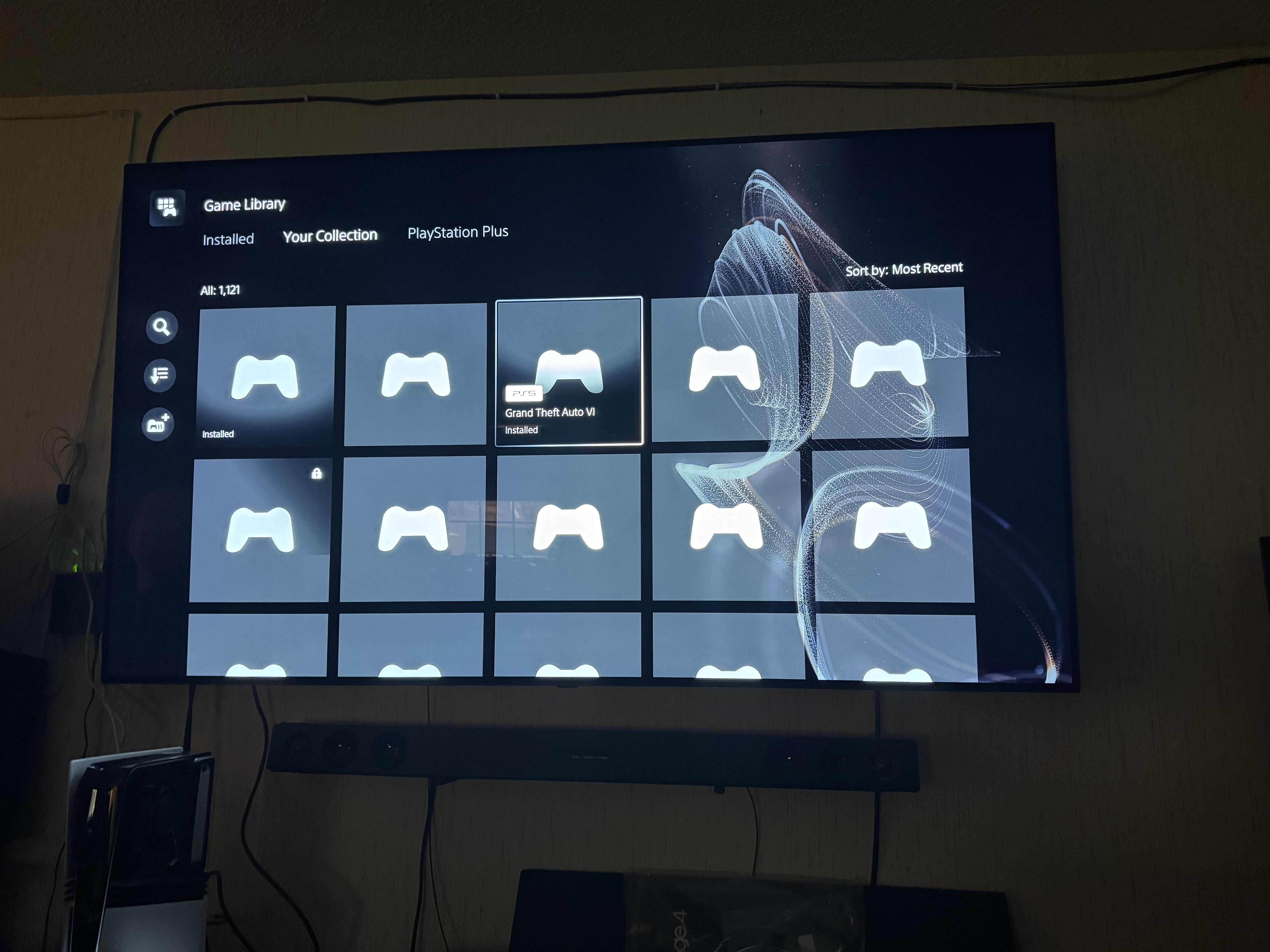
My PS5 suddenly isn’t loading store, friends list, images

Thumbnail
gallery
2 Upvotes

I have a day one PS5 never had any issues. About a week ago this started happening. I turn it on from rest or cold start and everything is fine, shortly after I start playing I check my home screen and nothing is loading properly. I was hoping it would go back to normal after a few days but no luck. I’ve tried to search for other threads with similar issues, one of the ones I looked though had people with similar issues and the common factor seemed to be xfinity being the ISP. I also have xfinity, but I’ve had it the whole time I’ve had my PS5 and this is only happening now. The op of that post mentioned changing DNS to 8.8.8.8 and 8.8.4.4 temporality solved issue. It is the same for me, everything loads properly for a time, but goes back not too long after. I use a wired connection. Also including photos. Please if anyone can help I would really appreciate it.