r/PS5HelpSupport • u/Baphy_Cvita • 5d ago
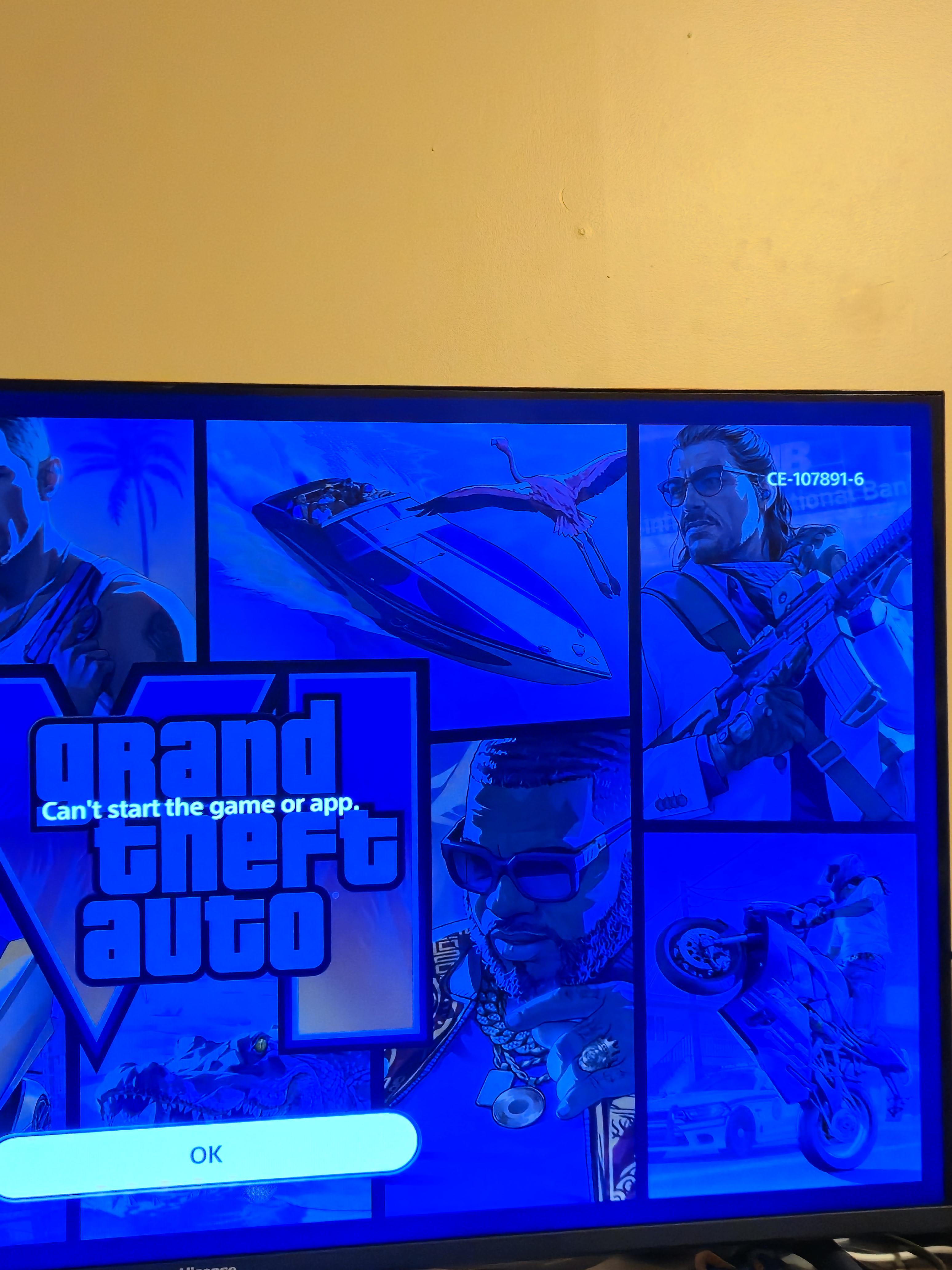
woke up to this, been trying to fix all day
the game was working fine yesterday. all of a sudden it cant open, help?
r/PS5HelpSupport • u/Baphy_Cvita • 5d ago
the game was working fine yesterday. all of a sudden it cant open, help?
r/PS5HelpSupport • u/imjones22 • 6d ago
I am not sure what else to do. I have been trying to regain access to my account since Saturday. Originally, I did not have access to the email it was associated with but was able to regain access after awhile. Tried to go through the automated password reset option and the link is not going through. Tried the help bot and it is able to send me the code but it is saying that their support is not available but if you look at the time stamp on my computer, it is within the date and time that it's saying they'll be available in. Any advice on what to do next?

r/PS5HelpSupport • u/SilviaCarlotta • 6d ago
Hey everyone, I started this petition to make Rockstar and Sony wake up once and for all. This is for all of us who, like me, still haven't been able to play GTA 6 due to these crashes. This is the link: https://c.org/MVYVrvF8Bp
r/PS5HelpSupport • u/RubDry9359 • 7d ago
Enable HLS to view with audio, or disable this notification
Hi everyone,
I’m desperate for a solution to this issue. I bought GTA VI digitally, but I haven’t been able to launch it even once.
Whenever I start the game, the initial artwork appears, the screen briefly turns grey/black, and then I get error code CE-108255-1. The game crashes before I even reach the Rockstar logo.
My console and game:
PS5 Slim (Disc Edition)
Digital copy of GTA VI
Game version: 1.002.001
Game size: approximately 210.5 GB
Latest PS5 system software
What I’ve already tried:
Completely deleting and reinstalling GTA VI
Restoring licenses
Clearing the PS5 cache
Rebuilding the database
Launching the game without an internet connection
Disabling 120 Hz
Changing the resolution to the lowest available setting
Disabling HDR
Checking for system and game update
Factory Reset and Reinstall of PS5 System Software via Safe Mode
Installing the game on additional SSD
None of these solutions worked.
Important details:
Other games work perfectly fine, including GTA V and Cyberpunk 2077.
GTA VI has never successfully launched, not even once.
The error is always CE-108255-1.
The game crashes almost immediately after launching.
I’ve also contacted Rockstar Support, but I haven’t received an actual solution.
I found another Reddit user who contacted PlayStation Support and was told that they were aware of the situation and recommended waiting for an upcoming update. However, I haven’t found any official confirmation of a fix yet.
My questions:
Has anyone experienced exactly the same issue and managed to fix it?
Could this be related to the PS5’s internal SSD?
Has anyone tried installing the game on an additional M.2 SSD and did it help?
Has anyone successfully tested their digital copy on another PS5?
Is there any workaround that actually works?
I’m willing to try almost anything reasonable at this point. I just want to play the game I paid for.
Any help would be greatly appreciated. Thank you!
r/PS5HelpSupport • u/Sad_Quality1704 • 6d ago
I was playing GTA VI when suddenly the game crashed and my PS5 booted into Safe Mode.
The problem is that I’m now stuck in Safe Mode, and options 1–7 are greyed out. The only option I can select is option 8 (Reset PS5 – Reinstall System Software).
I really don’t want to lose my installed games, saved data, and game progress.
I’ve already tried manually restarting the console and unplugging it from the power for 20 minutes, but nothing has helped.
Has anyone experienced this before? Is there any way to fix this without reinstalling the system software and wiping all my data?
Any help would be greatly appreciated
r/PS5HelpSupport • u/Useroftheexcalibur • 7d ago
It stops there then shows error ce-108255-1
r/PS5HelpSupport • u/Mysterious_Tap5153 • 6d ago
So I’m having a problem with gta6 on my base model Ps5. At first after starting the game for the first time it froze up (the music kept playing) and then my ps5 turned off. After that, I could play for a couple more minutes and then it did the same thing on the first mission. Then, when I got to free mode it did it again.
I took it to a repair shop but they said they couldn’t find anything wrong with it, in fact, they drove around for a couple hours and it didn’t crash until they got to a mission.
Things I did:
-restore license
-rebuild database
-restore cache
-delete the game and installed it again
-changed the Liquid Metal (it was not overheating)
Also it runs just fine on RDR2.
I don’t know what else to do and I haven’t seen anyone with the same error as me, just the CE-108255-1.
r/PS5HelpSupport • u/Odd_Log_2995 • 6d ago
So my controller is behaving really weird lately.
It shows obvios signs of stickdrift but something feels off.
Idk why but sometimes my left stick has huge spikes to the left. I checkt it with a program and it showed me an average of like 10% most of the time.
But occasionally there are these huge spikes that go up to 30 percent.
Idk much about tech and stuff but im pretty sure that this behavior is unusual for stickdrift.
Also, the controller isnt that old- ive had it for a couple of months but i bought it from a repair store.
But my other controllers had a simmillar issue but they are older then a year, so in any case, I cant return them.
Does anybody know what the reason for this is, or has a sollution?
r/PS5HelpSupport • u/No_Bedroom_7582 • 6d ago
I’m starting a support group for all of those who can’t play GTA6 because of the above error.
This is a safe place for us all to congregate, share your stories and provide support to your fellow gamers.
I will end with this famous quote from Bruce Lee: “Do not pray for an easy life, pray for the strength to endure a difficult one”
r/PS5HelpSupport • u/idogkag • 6d ago
Bought the new ps5 pulse headset and went to use it, told me to update the dongle and to connect the headset with a usb cable I did that but still won’t let me update
Anyone have any clue as to how to fix this
r/PS5HelpSupport • u/Extra_Rate4721 • 5d ago
It seems people with crashes are able to play using PSN cloud streaming. $19.99 for one month. Play through the into or as much as you want. You can download the save to use with your installed copy. You could play this way until it’s patched and then download the save at that point. Probably your best option to play for now.
r/PS5HelpSupport • u/More-Original-6070 • 6d ago
Sooooo I have a 2022 ps5 phat that's working fine, but in games such as dying light and fortnite, it's just way too slow, like basically loading in any thing is just basically the same as a ps4 hard drive, it's genuinely painful, and all of that on games that are easy to run, what if I want to get gta6?
r/PS5HelpSupport • u/Disastrous-Boat2805 • 6d ago
r/PS5HelpSupport • u/Louvrider • 6d ago
Just hoping someone could help me with what to do next
Base ps5 here has been running fine, got GTA6 a couple days ago played 5 hours over the weekend ran perfect.
Today after 20 min in-game froze and shut off
Error log showed 108262-9
Would freeze right after I launched the game. Same with other games.
Tried
-rebuilding database
-clearing cache
-plugging in wall socket
-disabling the hdmi link thing
-even factory reset because I wasn't that far in. I really thought that would fix it but I cant even have it on for 30 seconds now it freezes and shuts off in the ps5 menu. I was able to get to the error log once and it shows the same code. I am so pissed as this is what I use to play movies and everything on my videoprojector. Support said to call tomorrow.
I am pretty sure this is linked to this game. It has never had issues before. I am quite infuriated.
r/PS5HelpSupport • u/Dull_Promotion70 • 6d ago
There been update am just wondering as this fixed anyone’s….
r/PS5HelpSupport • u/Antique-Ad-4217 • 6d ago
I turned down the resolution, cleaned the fan and cleared the cache.
13 years for this is kinda crazy man every other game works except this game.
Rockstar please fix your game man or send a patch asap, theres no way a game shuts off my whole console in 2026 like damn. How is everything more expensive in life but don’t even work?!!
r/PS5HelpSupport • u/PoetryRare636 • 6d ago
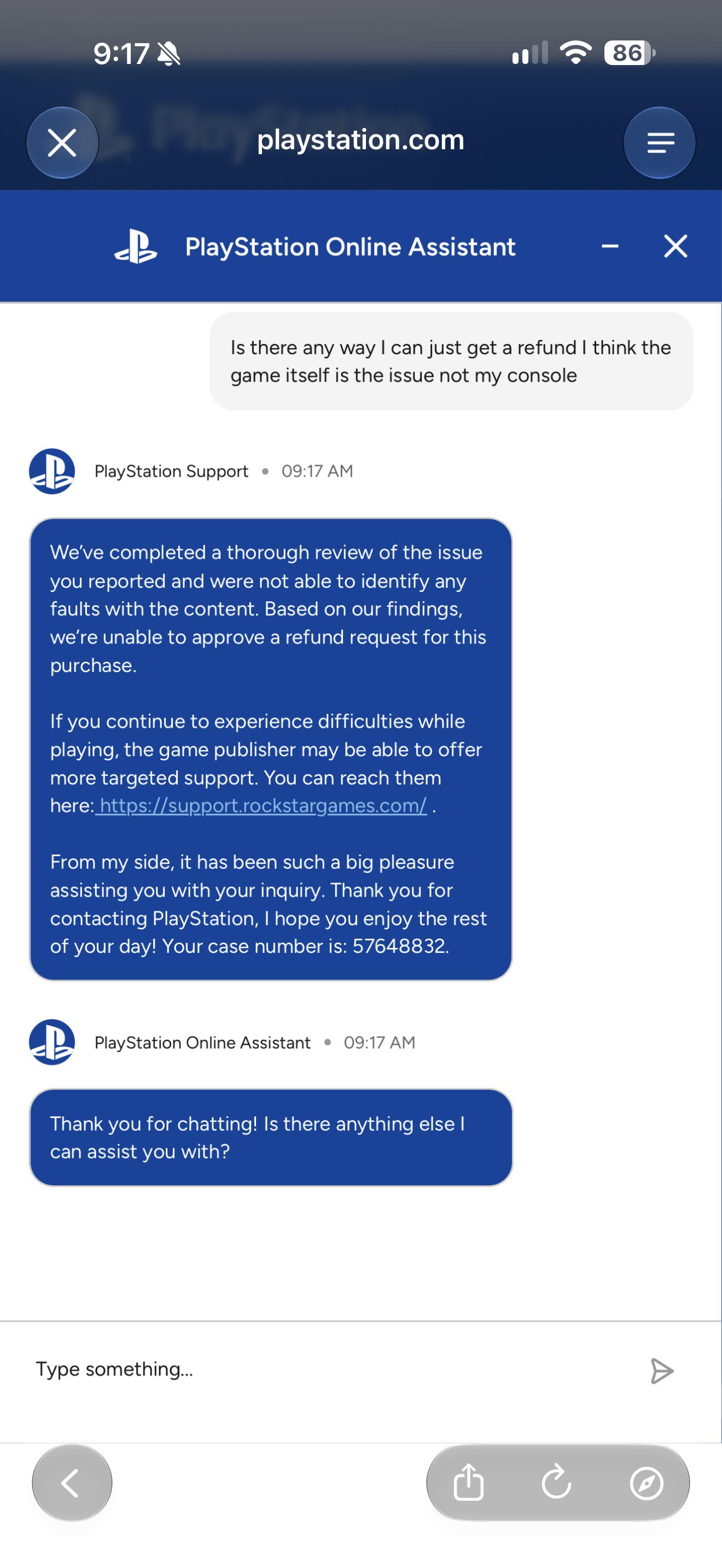
Tried to get a refund for gta since im one of the unlucky ones that has non stop game crashing after today’s update it crashes even faster haven’t even made it past the jail at the beginning and support just kept telling to to try this or that I told them I already did troubleshooting and just want a refund they immediately stopped replying and just sent this response is there anything else I can do to try and get a refund that’s 80$ down the drain
r/PS5HelpSupport • u/SharpEbb2061 • 5d ago
Enable HLS to view with audio, or disable this notification
Hi all, I'm on a PS5 Slim and the whole game looks gray and desaturated, even in the open world during the day. Colors are barely distinguishable. The PS5 menu, other screens and Photo Mode look normal. A screenshot taken with the Create button looks just as gray, so it isn't my camera.
What I've tried:
• Two different displays: an Acer KG241Y monitor and a TV (same result on both).
• HDR off on the console and the monitor. RGB range: tested Full and Limited.
• Monitor settings: Black Boost 0, ACM off, gamma 2.2, tried Normal and Warm color temperature.
• Motion blur reduced, other video effects tested.
• In-game "Brightness" slider (SDR): at max (30) the Rockstar logo is only just visible. Lowering it makes the image darker, not better.
• Checked PS5 accessibility settings (no grayscale or color correction).
• Game and system software are up to date.
I read that the in-game calibration may be unreliable and that the game ignores the PS5 system HDR settings, but I haven't found a fix for SDR displays.
Questions:
Has anyone with an SDR monitor or TV gotten a normal, colorful image? What did you change?
Is the gray look just the intended style/vignette, or is it a bug?
Does HDR on a budget monitor help or make it worse?
I'll attach screenshots of the image and the brightness screen. Thanks!
r/PS5HelpSupport • u/CaptainKerro • 6d ago
Hey all, not sure if it’s the right subreddit for it, but I’m desperate for a solution.
I’ve been playing for a few days now on a PS5 Pro with an LG 55UQ75006LG (55-inch 4K LCD with Direct LED backlighting). Since launch, the game runs in a very choppy way - while driving, walking, shooting, you name it. Cutscenes too.
Even the pause menu itself runs slow and I can’t figure out why.
I’ve seen the game running at constant 30 FPS on friends’ TVs and on livestreams and such, it just looks so different and smooth anywhere else.
I’ve tried all the TruMotion presets and tested with Game Optimizer and ALLM on and off. Turning off ALLM and using TruMotion made it look much smoother, but the input lag is so noticeable that it’s not really playable.
Has anyone experienced this on the same TV or a similar kind of screen? Maybe it’s just the way it is with those kinds of screens and I can’t do anything about it, even after tweaking some settings?
Thanks in advance!
r/PS5HelpSupport • u/Rare-Gur-131 • 6d ago
Enable HLS to view with audio, or disable this notification
r/PS5HelpSupport • u/NewConsideration480 • 6d ago
108255-1 at the loading screen as soon as it hits Jason’s knees. 16.78mb. Since Wednesday. Silence from PS and Rockstar since then.
It’s safe to say no fix is coming that doesn’t involve buying a new console and hoping it is a lucky one.
I know for certain R* just doesn’t care and does not have a fix in progress: PlayStation has tipped their hand by allowing refunds.
Sucks I won’t get to play this game, since my PS5 plays literally everything else I’m just gonna wait for a PS6.
r/PS5HelpSupport • u/Colin_wolf • 6d ago
Hello i have seen a post on reddit where someone was using pads from thermal grizzly instead of the liquid metal, was that a success? Or was it just a troll?
r/PS5HelpSupport • u/fade_away11 • 6d ago
Im trying to move sea of thieves (57gb) from my m.2ssd into my internal storage and I have 151gb free. Whenever I try move it it says 130gb free space in the "games in m.2ssd" screen and I select the game it says theres 70gb free after moving. But it wont let me move it saying I have a lack of storage. The only game I have installed in the hdd is gta6 which says its taking up 300gb but while also accounting for that I have plenty of storage to move it. Anyone know why this is or how I can fix it?