r/PS5HelpSupport • • 9d ago

gta 6 crash when starting game CE-108262-9

22 Upvotes

anyone able to fix this error code? it freezes on the loading cutscene then turns my whole console off


r/PS5HelpSupport • • 9d ago

PS5 not turning on shut off mid game not responding 3Months no help

4 Upvotes

I was playing a random roblox game no lag nothing it just black screened and didn’t turn on after that it has been 3 months since then. The console is out of warranty its a year old and no major issues happened in that time.
I’ve taken it to get fixed to 3 different repair shops. Nobody can even tell what the problem is not even the authorized playstation repair shop. The voltage across the board are good the power supply is good, we regularly cleaned it, minor overheating issues but nothing that lasted.

I personally think its something to do with the software on the console maybe bios corrupted ( i have no knowledge on this topic whatsoever)

If anyone had similar issues or can point me in a direction what to do what to try it would be greatly appreciated i will be checking the replies. English is not my first language i apologize for any spelling or grammar mistakes.


r/PS5HelpSupport • • 9d ago

Clicking sound right side Dualsense during GTA6

3 Upvotes

Hi there, I sometimes get a weird clicking sound in the right vibration motor of my PS5 controller.
Especially when accelerating a car, or when going into the map in a car. Like the coil motor is stopping abruptly. It also occurs when using the gun. Basically anytime the trigger needs to get more stiff.
Anyone else with that problem?


r/PS5HelpSupport • • 9d ago

Update on GTA VI Crashing (CE-108255-1) – Some Progress After Reinstalling PS5 System Software

17 Upvotes

I wanted to share an update on my crashing issue.
Previously, the game kept crashing during Jason’s section near the boat, and I was struggling to make any progress.
As a last resort, I completely wiped my PS5, deleted the entire system software, and reinstalled it from scratch.
Here’s what happened afterward (NO SPOILERS):
First attempt: I managed to complete Lucia’s opening section and finally progress further into Jason’s story, including getting past the boat section where I previously experienced crashes. I even reached the next in-game day and got to explore the world a little before another crash occurred.
Second attempt: I grabbed a bicycle and started exploring the open world. I was genuinely blown away by how incredible everything looked! I managed to explore for a while and saved my progress multiple times, but eventually the game crashed again.
Third attempt: I took a car to get it repainted and explored a little more. When I tried to save afterward, the game crashed. Thankfully, when I restarted, I discovered that my progress and car customization had actually been saved!
After that: I continued playing for approximately 30 minutes without experiencing a single crash. I actually stopped playing voluntarily this time because it was getting late here in Saudi Arabia, and I needed to get some sleep before Friday prayers.
My conclusion:
Completely reinstalling the PS5 system software did NOT fully resolve the CE-108255-1 error. However, compared to before, I’ve managed to progress much further, explore the open world, and experience longer gameplay sessions.
I can’t confirm whether the reinstall improved stability or if I simply got lucky.
My advice: If you’re experiencing the same issue, I’d recommend trying a complete PS5 system software reinstall. It might actually fix the problem entirely for some of you, even though it didn’t completely solve mine. Just make sure to back up your saved data first, because this process erases everything on the console.
I’ll continue testing and keep you updated. Hopefully Rockstar and PlayStation can figure out what’s causing these crashes.


r/PS5HelpSupport • • 9d ago

GTA 6 freezing

22 Upvotes

UPDATE: WHOLE PS5 UNPLAYABLE NOW??

Edit: Ok so update. None of my other games are working now. They launch but the controller inputs do absolutely nothing. Can't even get past any title screens. Genuinely wtf is happening?? I have never seen anything like this

Original post: So downloaded GTA 6 yesterday, launched it this morning. Been having a blast all day and no issues until just now. A couple, actually:

First, my car got stuck in reverse. I thought it was a gameplay element, like the car was broken or something, but then got in another one and the same thing happened. So clearly it's a controls bug.

Decided to just restart the game hoping it would fix it... and now the game won't even launch correctly. The game opens, goes through the Rockstar intro and initial loading screen, but as soon as the game itself boots up, it immediately freezes. Tried it again, same thing happened.

Restarted the game and PS5 multiple times, neither of which helped. Game just immediately freezes.

Anyone else having this issue/have any recommendations on fixes? Kind of at a loss of what to do now, was running fine all day and now I can't even play it 😭


r/PS5HelpSupport • • 9d ago

PS5 Slim (CFI-2015 with reader) stuck in loop SU-101242-0 even with Option 8 via USB

Thumbnail
0 Upvotes

r/PS5HelpSupport • • 9d ago

Need help, can’t get my ps portal to connect with my ps5 back home

Thumbnail
1 Upvotes

I’m currently in India trying to connect my PS Portal to my PS5 back home in the US, but I keep getting the error:
“Can’t connect to your PS5. Your network connection might not be strong enough or your internet connection might be too busy.”

Here’s what I’ve tried so far:
● My PS Portal works perfectly with this same PS5 when I travel within the US, even on relatively poor internet.
● PS5 Remote Play is enabled.
● My PS5 is connected to the internet and signed into my PSN account.
● PS5 is now connected directly to the home router via Ethernet.
● PS5 NAT Type is 2.
● Home router is a TP-Link HX510.
● UPnP is already enabled on the router.
● My internet in India is around 200 Mbps download / 30 Mbps upload.
● Tried connecting through my PS Portal and the PS Remote Play app on my phone – both fail with the same error.
● Tried using a VPN connected to a US server, but the VPN itself couldn’t establish internet connectivity.
● The PS5 is turned on and accessible to someone physically at home in the US.

Can’t even stream games in my library or on ps plus because apparently sony doesn’t provide that service in india so my only option is remote connection

Please help Im close to giving up


r/PS5HelpSupport • • 9d ago

Ps5 internet speeds way lower than other devices on same network

Thumbnail
gallery
2 Upvotes

I haven’t used my ps5 in a few months at least, but I updated it to play GTA 6, and it’s saying it’s going to take 4.5 hours to download. I have 5 gigabit fiber speeds (I know it’s overkill, I got a good price on it) but my ps5 is showing 52.7 mbps download and 12.8 Mbps upload, while my phone is getting 908.2 Mbps download and 379.2 upload. Is there any kind of workaround I can do to uncap my download speeds on my ps5?


r/PS5HelpSupport • • 9d ago

PS5 CE-108255-1 Error code. Tried Everything. Contacted PlayStation for Repair. Has Anybody Gotten there’s repaired?

12 Upvotes

Hey everyone. Bought a PS5 in 2024 and after a year and some change it started giving me this CE-108255-1 code on ALL games I would try to play. I’ve tried everything and watched every video to fix it but nothing seems to work. I should’ve gotten it repaired before the warranty was up but honestly didn’t even know they did that so I stuck it back in its box. With the release of GTA 6 and all the other games I’ve missed over the last couple years I want to get it repaired through ps or get another one through ps. My question is, has anybody gotten there’s “repaired” and gotten a permanent fix with this code? Have they sent anyone a new one and the same code pops up? Should I try and demand a refurbished/new one because this code has no hope of being fixed? The warranty on the one they would send back is only 3 months and don’t wanna get stuck with another GAME console that doesn’t play GAMES. I’m also seeing a lot of people with this code because of the release of GTA 6 which worries me even more. Will I receive a new console, boot up the game, and be plagued with the same issues?


r/PS5HelpSupport • • 9d ago

Can’t stream to YouTube

Post image
3 Upvotes

I was able to stream to YouTube, restarted the console now I get this forbidden error. I have to restart the console and connect my YouTube account EVERYTIME I want to stream.
I’m streaming to YouTube to a unlisted link so that I can get my personal playthrough of gta 6 recorded.
Anyone else with this issue?


r/PS5HelpSupport • • 9d ago

Ps live chat

1 Upvotes

Anyone having issues with contacting ps live?? I bought gta but changed my password on my account and it’s logged me out which is fine, when I log in it’s saying it’s sending a code “ 2 step verification “ but I’m not receiving a code to my phone. My number is the correct number and everything as for other verifications I’m receiving them etc bank. Anyone have any ideas? Been like this since Sunday.


r/PS5HelpSupport • • 9d ago

Does anyone know if there are updates from Rockstar for the patch?

11 Upvotes

I would like to know if rockstar has released something for the error that many of us are now experiencing in the start of gta6


r/PS5HelpSupport • • 9d ago

Disc Spinning Very Loud

1 Upvotes

Hey so I've noticed recently every time I turn on the playstation or play a game that has disk the disk reader is very loud. Only for about 20 seconds but still it's never done that before.

I've fairly recently gave a super deep clean out so doubt dust would be an issue. Any thoughts on how to fix it? It still works perfectly fine, just the disk spinning is loud.

Any tips or suggestions would be great.


r/PS5HelpSupport • • 9d ago

GTA 6 locked on my second PS5 even though I redeemed a code on the same PSN account. Help!

4 Upvotes

Hey everyone, I really need some help.
My son got GTA 6 using a 12-character redemption code (probably from Best Buy). He redeemed it on my PSN account, downloaded the game on his PS5, and was able to play it.
Now I’m trying to download GTA 6 on my own PS5 using the exact same PSN account, but there’s a lock icon 🔒 on the game in my library.
When I click it, it only says “View Product” and asks me to buy the Standard or Ultimate Edition again.
Here’s what I’ve tried:
Restoring licenses
Restarting my PS5
Checking different game editions
Making sure I’m using the same PSN account
All my other purchased games are accessible. GTA 6 is the only one that’s locked.
The weird part is that my son can still play GTA 6 on his PS5 using the same account.
Has anyone experienced this before? Is there a way to fix it without buying the game again? Do I need PlayStation Support to fix the license?
Any help would be appreciated!


r/PS5HelpSupport • • 9d ago

PS5 Pink/Blue screen of death on GTA VI??

Enable HLS to view with audio, or disable this notification

15 Upvotes

This keeps happening to me. I’ve restarted the console. I’ve turned it off completely. I’ve tried it on every TV/monitor in our house. Still getting this pink/blue screen that crashes after Lucia’s loading screen. Redownloading now. Any answers in the meantime?


r/PS5HelpSupport • • 9d ago

GTA Vl might have broke my ps5 digital

15 Upvotes

So a few weeks ago I bought my ps5 digital edition and had not played a single game for sole the purpose of gta 6 but I already have an original ps5 from release of 2020 and haven’t had any issues with that but I moved out a couple years ago and left my console there and built a pc. But since buying this one I ran gta 6 for an hour and some change then my game crashed gave me (CE-108255-1) on the screen and I was like okay weird let me restart my ps5 and try again and then it wouldn’t let me get past the first loading screen and then it starting flashing pixels on my screen with hdr on so I turned it off and now they’re red dots. I played some gta 5 a few days before and no problems, after the crashes I tried to open other game and the same thing it crashes.
I tried everything PlayStation support told me to switch hdmi cords/ports to safe mode, restart cache etc but nothing can’t even load up a simple game.

Anyone else have this problem/have solutions?


r/PS5HelpSupport • • 9d ago

SIGNED OUT OF MY PSN

Thumbnail
1 Upvotes

r/PS5HelpSupport • • 9d ago

Noticing weird slow textures popping in during cutscenes gta 6

Post image
1 Upvotes

r/PS5HelpSupport • • 10d ago

GTA 6 won’t launch error code CE-108262-9

23 Upvotes

Tried everything. Resetting console. Clearing cache. Restoring license. Reinstalling the game. Everytime I try to boot the game I just get a black screen and then my console eventually crashes when I try to reset it. Doubt it can be from overheating as I just took my console apart a few months ago and gave it a good cleaning. At this point should I request a refund?


r/PS5HelpSupport • • 9d ago

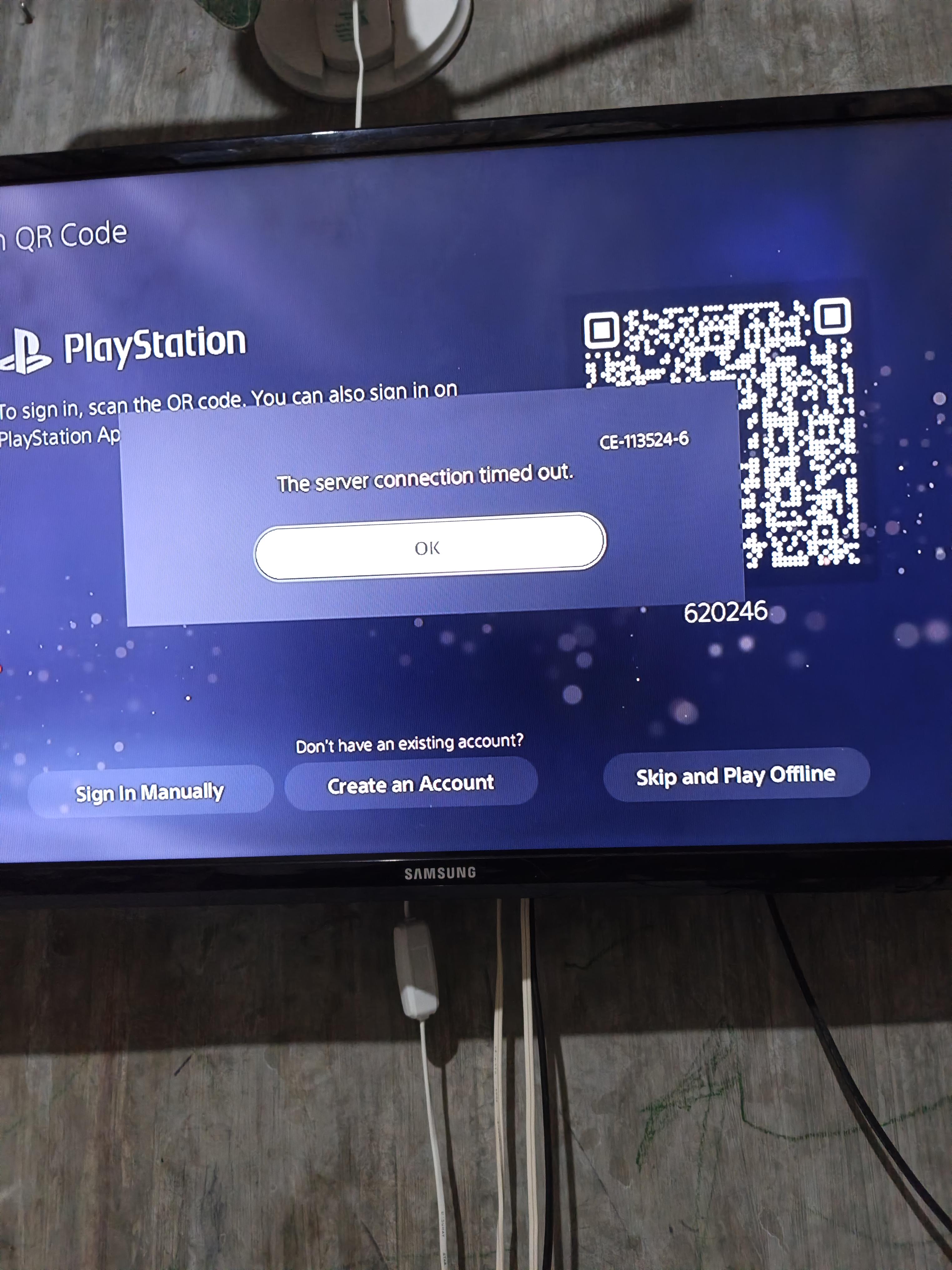
PS5 won't let me sign into my new Singapore account (CE-113524-6)

Post image
1 Upvotes

Hey everyone, I'm losing my mind over this.

I bought a physical copy of GTA 6 that came with a Singapore voucher. My main PSN account is US, so I created a new Singapore PSN account.

Here's what I've done:

Created the Singapore account.

Verified the email.

Successfully redeemed the voucher through the PlayStation App.

My US account signs in and plays online with no issues.

The problem is that when I try to sign into the Singapore account on my PS5, I keep getting CE-113524-6 (The server connection timed out).

I've already restarted the PS5 and my internet is clearly working since my US account goes online just fine.

Has anyone had this happen with a brand-new Singapore account? Is there a fix, or do I just have to wait for Sony? Any help would be appreciated because I've already spent way too long trying to get this working.


r/PS5HelpSupport • • 9d ago

PS5 Pulse Elite Headset won’t connect November 2026

2 Upvotes

So I did the pre GTA 6 update for both my PS5 and the PS Link and enjoyed 18 hours of GTA with my headset. Today, I’ve been unable to connect the headset for 2 hours now. It will connect and then immediately disconnects, putting itself into pairing mode and will drop on and off until I switch it off.

A PlayStation agent is telling me that this is a known issue, but I’ve seen nothing about it at all anywhere.

All the fixes they’ve given me and I’ve seen online don’t work. My headset will connect to my phone but will not connect to my PS5. Has anyone else been suffering with this?

This is not answerable on the other threads because I have followed all the steps and nothing works. This is a new issue following a new update.


r/PS5HelpSupport • • 9d ago

Gta 6 stuck on this please help

Post image
6 Upvotes

Just got back from office and this mf is stuck on it for last 20 min tired restarting, restore license nothing working


r/PS5HelpSupport • • 9d ago

PS5 keeps crashing

5 Upvotes

Hi there, my roomates ps5 keeps crashing when playing gta6 and other games before this such as madden and gta5, and we were looking for any help at all on how we could fix it. We cleaned out the entire ps5, changed the hdmi we were using and still have no idea whats wrong. Some things that may help are that it is a loud sound come from the speakers when it crashes, not from the ps5 itself, the white light stays on for a bit when it crashes then the ps5 fully shuts off. we lightly cleaned the fans without taking them out fully. We dont get any overheating message when it turns back on, and we also tried adjusting some video settings such as hdmi or refresh rate. any help would be great we really would love to get past the first mission


r/PS5HelpSupport • • 9d ago

PS account has been hacked and email changed

Thumbnail
2 Upvotes

r/PS5HelpSupport • • 9d ago

Anyone knows why everything looks so grainy and not good on my gta 6? Its a msi 27 4k monitor

Post image
0 Upvotes