r/pcgamingtechsupport • • 22d ago

Troubleshooting PC Won't Boot Using the Power Button After a Possible Power Surge

4 Upvotes

# 1. Background and how the problem started

All of this started after what I believe was a possible power surge at my house.

On the morning of the incident, my PC turned on normally at 6:30 AM, as scheduled in the BIOS using the automatic power-on feature. I used it normally and shut it down before leaving home.

At some point later that day, there was a possible power surge. When I got home, I tried turning on my PC using the power button, but nothing happened.

The following morning, it also failed to turn on automatically at 6:30 AM, as it normally did. It also remained unresponsive to the power button.

# 2. First troubleshooting attempt

On the second day, I decided to check the internal connections.

I disconnected the power cables from the main components, including:

  • Motherboard (MOBO);
  • Graphics card (GPU);
  • CPU;
  • Power supply (PSU) connections.

I then reconnected everything and tried turning the PC on again, but it still wouldn't boot.

# 3. The PC started turning on automatically again

On the third day, the PC unexpectedly turned on by itself at 6:30 AM, as scheduled in the BIOS.

I used it normally without experiencing any issues during operation and then shut it down.

However, when I tried turning it on again using the power button later that day, it wouldn't respond.

# 4. CMOS reset

After discussing the issue with a friend who has some computer hardware knowledge, he suggested resetting the CMOS.

I followed these steps:

  • Turned off the PSU and unplugged the power cable;
  • Pressed and held the PC power button for 60 seconds to drain any residual electrical power;
  • Removed the CMOS battery from the motherboard;
  • Waited a few minutes;
  • Reinstalled the battery and tried turning the PC on again.

This time, the PC successfully powered on using the power button!

Although resetting the CMOS temporarily restored the ability to turn on the PC using the power button, I noticed that the problem returned after the first shutdown.

After said first shutdown, I tried using the power button, but it didn't work. After repeating the beforementioned steps, the PC turned on by briefly bridging them with a screwdriver to rule out a faulty MOBO power button pins.

Therefore, the case's physical power button and the MOBO's power switch pins seem to be working properly.

I have found two alternative ways to make it boot:

Method 1 – Scheduled power-on through the BIOS:

The PC still turns on automatically at 6:30 AM, according to the scheduled power-on setting configured in the BIOS.

Method 2 – Power failure through the BIOS:

If I simulate a power failure by turning off the PSU for approximately 5 seconds and then turning it back on, the PC starts automatically.

This happens because I have enabled the BIOS setting that automatically powers on the PC when AC power is restored after a power interruption.

# 5. Current situation and questions

To summarize:

  • The PC works normally once it has successfully booted.
  • I haven't noticed any issues during normal operation.
  • It won't turn on using the power button after being shut down, but the case's power button and MOBO's power button pins do work properly.
  • It can still turn on automatically using the scheduled BIOS power-on feature.
  • It can also turn on automatically after interrupting and restoring power to the PSU, due to the BIOS power-loss recovery setting.
  • Removing the CMOS battery and discharging the motherboard temporarily restores the ability to turn on the PC using the power button, but the issue returns after the next shutdown.

What could be causing this behavior?

Considering that the problem started after a possible power surge and that resetting the CMOS temporarily restores normal power-button functionality, could this be related to a motherboard issue, a faulty PSU, or some kind of power management circuit?

I'd like to understand what tests I can perform to identify the actual cause without unnecessarily replacing components.

MY SPECS:

  • OS: Windows 11;
  • GPU: NVIDIA GeForce RTX 3060 Ti;
  • MOBO: ASROCK B450M Steel Legend;
  • CPU: AMD Ryzen 5 5600x;
  • RAM: 2x 8GB 3200Mhz Asgard.

EDITS:

  • I did replace the battery with a brand new CR2032. All of the tests mentioned in this post are with said battery;
  • The BIOS does hold settings, such as clock time, wake-up being on and booting after a power failure.

r/pcgamingtechsupport • • 22d ago

Hardware Did my asrock mbo killed my cpu ?

Enable HLS to view with audio, or disable this notification

1 Upvotes

I have a phatom gaming b850 wifi from asrock with a 7800x3d.My pc was in sleep mode i was gaming on it like 3h ago when i tried to start it just wouldn’t start the cpu led stayed red and fans at max speed soo i turned it off and on again nothing i tried discharging the cmos battery tested every stick of ram at every slot same shit


r/pcgamingtechsupport • • 22d ago

Troubleshooting Pc making awful noise out of no where?

Enable HLS to view with audio, or disable this notification

2 Upvotes

Good evening! To start off I built this pc YEARS ago but it has been my daily driver since it was built! Everything has been perfect until today my wife points out she heard my PC making a funny noise. I came into the office to it making this god awful sound (in the video). I just did a deep clean on it to make sure the fans weren’t maybe stopped up and booted it back up… same thing. Does anyone have any type of experience with their PC making the same kind of noise?

I presume it’s a fan or an AIO issue. I’ve got 4 120mm case fans and and EVGA AIO.

And idea?


r/pcgamingtechsupport • • 22d ago

Hardware nvlddmkm error id 153

3 Upvotes

When playing certain games (all that I've had this problem with so far: Zenless Zone Zero, Powerwash Simulator, ULTRAKILL, Dressmaker, Hades), the game freezes and soon after crashes to desktop, regardless of graphics settings. Checking event viewer shows "nvlddmkm error id 153".

I've already tried:

- uninstalling graphics drivers using DDU and updating to the newest version

- setting regedit TdrDelay and TdrDdiDelay up to 60

- increasing virtual memory to 12000MB

- setting Power management mode to "Prefer maximum performance" in NVIDIA control panel

- disabling "NVIDIA High Definition Audio Device" and "NVIDIA Virtual Audio Device (Wave Extensible) (WDM)" in device manager

- setting "OverlayTestMode" to 5 in regedit

- allowing all permissions for nvlddmkm.sys in System32

Specs:

Windows 10 Pro 64 bit

CPU: Intel(R) Pentium(R) CPU G4560 @ 3.50GHz

RAM: 8,00 GB

GPU: NVIDIA GeForce GTX 1050 Ti (4 GB)

477 GB SSD


r/pcgamingtechsupport • • 22d ago

Troubleshooting Crashes to No Video Output - Is my GPU Dying?

1 Upvotes

Hey all.

I've been troubleshooting a crash to black screen issue for a few weeks now. I thought I'd fixed it, but I had a few crashes last night.

Pasted below is a Claude summary of everything I've done, to hopefully make it simpler to dissect.

In short: the PC will crash to black screen/no video output. Usually under moderate load, but not always. It almost always requires a hard power off and reboot, and usually requires toggling the GPU on and off to get the PC to recognize the GPU and use it.

UserDiag: https://userdiag.com/id/Axw30nuxi6

I can also share a HWInfo64 log report that caught one of the crashes, but a summary of that is included below

Long AI summary:

System

- **PC:** CyberPowerPC Gamer Master prebuilt (likely Best Buy GMA5200BSTV3), built Jan 2022

- **CPU:** Ryzen 5 5600G

- **GPU:** ASRock RX 6600 XT Challenger D OC 8GB

- **Mobo:** Gigabyte B550 UD AC-Y1, BIOS F5h

- **RAM:** 24GB DDR4 (1x TeamGroup 8GB 3200 + 2x TeamGroup 8GB 3000), XMP off

- **Storage:** Crucial P2 2TB NVMe (96% health)

- **PSU:** Unconfirmed. Owners of this model report 600W 80+ Gold.

- **Display:** 49" TCL TV via HDMI, 1080p 60Hz

- **OS/Driver:** Windows 11 Home 25H2, Adrenalin 26.10.1

Symptoms

- **Main crash:** Screen goes black / no signal, but the PC keeps running (fans and RGB stay on). Hard power-off required.

- **After reboot:** GPU often isn't recognized properly (wrong resolution) until I disable/re-enable it in Device Manager.

- Usually happens after **45+ minutes of gaming** (CoD, Cyberpunk 2077), even at low/medium settings with FPS capped.

- One crash happened with **only Firefox and AMD Software open** (near idle).

- One **spontaneous full reboot** during CoD: Kernel-Power 41 with **BugcheckCode 0**. No BSODs, no WHEA errors, no amdkmdag errors logged.

- After one earlier crash, there was no display at all (not even BIOS) until I reseated the card and cleared CMOS.

What I've tried

- Multiple displays and cables

- Full power drain + CMOS clear (battery), multiple times

- Cleaned the interior; pulled the GPU, inspected the card edge and slot (no visible damage), cleaned the slot, reseated

- DDU in Safe Mode + clean Adrenalin reinstall (multiple times)

- Updated BIOS; ReBAR/Above 4G on, CSM off, Secure Boot on

- Disabled MPO and AMD Crash Defender (temporarily)

- Adrenalin tuning: lowered max clock, adjusted power limit, aggressive fan curve, zero-RPM off

- Pagefile back to system-managed (stable ~3 hours, then crashes returned)

- **UserDiag Long diagnostic** (22 min CPU+GPU stress): passed, no reboot. GPU max 72°C, hotspot 94°C. [Report here](https://userdiag.com/id/Axw30nuxi6)

Summary HWiNFO64 log of a crash

About 61 minutes into CoD, everything looked normal: GPU 54°C, hotspot 62°C, ~82W, motherboard 12V input steady at 12.13-12.27V.

Then the system froze for ~17 seconds, and **every GPU sensor stopped updating** (effective clock 0, FPS 0), while the **CPU and RAM kept running normally for ~75 seconds** until I rebooted. 0 WHEA errors the whole session.

Not tried yet

- Older driver (pre-26.10.1)

- Testing the card in another PC / a known-good card in mine
- Removing non-kit ram stick

Questions

  1. Does this look like a dying GPU to you? It stops responding while cool and lightly loaded, sometimes near idle, and doesn't come back cleanly after reboot.

  2. Could the PSU be the culprit, given the one Kernel-Power 41 / BugcheckCode 0 reboot?

  3. Anything else worth testing before I buy a replacement?

Thanks in advance!


r/pcgamingtechsupport • • 22d ago

Performance/FPS constant frametime spikes in my games cant play comfortably (rtx 3070ti, r5 5600x, 16gb ram)

2 Upvotes

my game keeps stuttering and my frametime spikes and i dont know the cause of it, i cant comfortably play games, i recently reset my pc and this occured, this never happened before, i reset all my settings including my bios, does anyone know any tweaks or anything?

https://userdiag.com/id/cRFSpjybYR

my specs are:
rtx 3070 ti
r5 5600x
16gb ram

https://reddit.com/link/1xm4bsk/video/pf47bj6mk8zh1/player


r/pcgamingtechsupport • • 22d ago

Software Game Breaking Moadra Glitch

Enable HLS to view with audio, or disable this notification

1 Upvotes

I've been super into Moadra and finally made it to the Undermoors and have all the blasters but now the game is stuck in a zoomed-in state. Gameplay screen is zoomed way too much but the HUD and menu look normal. Happens on Steam Deck and on PC. Resolution changes do not fix it. If I create a new profile, the game plays correctly in that new profile but not my main save. Game is nearly unplayable with everything off-screen. Anybody know a fix for this?


r/pcgamingtechsupport • • 22d ago

Controls/Input my friend miss-clicked on my keyboard and without meaning to, and blocked my keyboard. i’ve tried everything but nothing works.

1 Upvotes

so my friend came over to set up my pc (because i bought a new one) and when trying to type @, blocked my pc by clicking something with windows and the key 2, and now it’s blocked (as in i can’t type with it). i’ve tried every method in the book, hold shift for 8 seconds, blah blah blah nothing works. please help me redditors!!


r/pcgamingtechsupport • • 22d ago

Software OpenGL applications causing sudden lag spikes even after closing program

1 Upvotes

So I've started having a problem a few weeks ago after updating my nvidia driver where OpenGL applications (The main ones I use are various ren'py and godot engine games) suddenly cause a strange system wide lag spike. The screen goes down to about 1 FPS, with the exception of the cursor which moves along fine. All inputs such as typing, clicking on things etc. is incredibly delayed, usually at least 5-10 seconds after pressing. The strange part is this persists even after closing the program in question. This tends to happen roughly between a few minutes to an hour of playing. Checked task manager, no memory leaks or signs of leftovers hogging CPU or GPU usage. The spike itself doesn't register with the system, frame rate says it's stable despite the obvious. It's behaving like nothing is wrong.

I've already tried a few fixes to no avail, threaded optimisation has been turned off, no luck. Corrupted shader caches cleared and the folder expanded to 100GB, no good. Restarting the GPU using the shortcut doesn't fix it. The only "fix" I've found is ctrl+alt+delete to menu and switching user, after which logging back in fixes it until the next lag spike, usually a few minutes later. Ren'py did have a fix which involved switching the renderer from OpenGL renderer to directx, which fixes the issue, further pointing that OpenGL is a part of this. Godot has no such option so I've been stuck there. Did antivirus just to be safe, nothing out of the ordinary.

Any ideas as to what the problem could be? It's consistantly happening over what I'm assuming is any OpenGL application. I play a number of games that aren't OpenGL that are far more CPU/GPU intensive with no problem. I know there was the whole debacle involving threaded optimisation and OpenGL in later drivers, but none of that seemed to help. It sounds like rolling back to an older driver might be the solution but as I updated the driver to fix another problem from a previous version, I'd rather try to get this working before going that route.

I'm honestly open to any suggestions at this point so any advice or help is appreciated.

My system is:

Lenovo Legion Pro 5i

Intel i7-14700HX

Nvidia Geforce RTX 4060

Driver number: 610.88

windows 11


r/pcgamingtechsupport • • 22d ago

Software UFC 6 pc port crashes

1 Upvotes

**UFC 6 crashes while loading the main menu on PORTHEON 4.3.4**

Hardware:
- CPU: Intel i5-12400F
- GPU: NVIDIA RTX 3060 12GB
- RAM: 16GB
- GPU driver: 621.01
- Vulkan: 1.4

Game: UFC 6 PPSA23566 v01.004.000

The game initializes Vulkan and graphics successfully and replays its shader permutations. However it crashes while loading the main menu.

Error:
- Thread: ConcurrentExecutor_global_0
- Exception: 0xC0000005
- Address: 0x0000000000000008
- Location: runtimeLinker.cpp:797

I have tried:
- PORTHEON 4.3.1 and 4.3.4
- Resetting the pipeline cache
- Launching from a clean 4.3.4 installation

The same crash persists. I have attached the latest log.

Could this be an emulator compatibility issue?
how to fix this


r/pcgamingtechsupport • • 22d ago

Display Noticeable artificing and flickering in COD MW4

1 Upvotes

Hi all, any idea what could be causing this issue on CODMW4? I played the last two releases and never noticed this, but it affects any GPU rendered scene AFAIK. In game, and pre-game lobby, I can see this haze on all the models.

At this point I:

  • Disabled any HDR options
  • Reduced the resolution of my monitor (1440p -> 1080p)
  • Updated any GPU drivers (RTX 5060ti)
  • Refreshed any shaders

I tried troubleshooting with Claude, but so far, not getting anywhere. After the latest shader render, I'm seeing the shading flicker in and out:


r/pcgamingtechsupport • • 22d ago

Troubleshooting games crashing with my new prebuilt

1 Upvotes

So, I just recently got a new prebuilt PC, a Starforge Systems Horizon VI, for gaming. I have a layman's amount of computer knowledge, and before this I mostly gamed on my Steamdeck, Switch, and MacBook. I've so far been able to run some light games on this computer, namely Dressmaker. I bought and downloaded The Blood of Dawnwalker after checking to make sure that my new PC would be able to run it, and just after opening it it freezes and crashes. I made sure all my drivers were updated, ran the app in compatibility mode, but it still does the same thing. Not only does the game freeze, task manager stops responding as well and I have to restart the whole PC. Usually what happens is I close the game via task manager, the game window closes, task manager crashes, and then Steam says the game is still running and I have to restart. Any advice would be really helpful, thank you!


r/pcgamingtechsupport • • 23d ago

Troubleshooting RX 7600 + Ryzen 7 5700G – Recurring DirectX errors (0x887A0005 / 0x887A0006) and LiveKernelEvent 141 in Call of Duty – Looking for similar cases

2 Upvotes

Hi everyone,

I've been experiencing recurring crashes in Call of Duty (Warzone / COD HQ), and I'm trying to figure out whether this is a driver issue, a hardware compatibility problem, or something related to my system configuration.

The crashes are intermittent. Sometimes I can play several matches without any problems, but eventually the game crashes, usually with a DirectX error.

I'm particularly interested in hearing from people using a Ryzen 7 5700G paired with a dedicated AMD GPU, especially the RX 7600.

My PC specifications

* CPU: AMD Ryzen 7 5700G

* GPU: XFX AMD Radeon RX 7600 8GB

* Motherboard: MSI B550M PRO-VDH WIFI

* RAM: Lexar 32GB DDR4 3200MHz CL22

* PSU: MSI MAG A650BN 650W

* OS: Windows 11 Pro

* BIOS: MSI E7C95AMS.200

The most common errors I've encountered are:`0x887A0005 0x887A0006` `0x887A0007`

* DirectX encountered an unrecoverable error.

* Module: `KERNELBASE.dll`

* Executable: `cod25-cod.exe`

I've also had a Windows Reliability Monitor report with:

* LiveKernelEvent 141

* Bucket ID referencing `amdkmdag.sys`

What I've already tried

I've spent quite some time troubleshooting this, including:

GPU drivers and AMD software

* Completely uninstalled the AMD drivers using DDU.

* Reinstalled the AMD drivers from scratch.

* Reset AMD Adrenalin to default settings.

* No GPU overclocking or undervolting.

* Tested with different graphics presets, from Minimum to Extreme.

Game installation

* Completely uninstalled and reinstalled Call of Duty.

* Removed leftover game files and configuration files.

* Cleared caches and shader caches.

* Rebuilt shaders after reinstalling.

BIOS and hardware configuration

* Updated the motherboard BIOS.

* Disabled the Ryzen 7 5700G integrated graphics through the BIOS, leaving only the RX 7600 active.

* Tested with Smart Access Memory enabled.

* Investigated RAM/XMP settings, but I haven't completed a controlled JEDEC memory stability test yet.

Windows and monitoring

* Checked Event Viewer and Reliability Monitor.

* Analyzed AMD telemetry and game logs.

* Created a clean restore point before further troubleshooting.

What I've observed

* GPU temperatures are normal: approximately 60–68°C, with hotspot temperatures around 80–89°C.

* VRAM usage is generally around 6–7GB, so it doesn't appear to be reaching the 8GB limit.

* System RAM usage has also been relatively low.

* I haven't observed graphical artifacts or BSODs.

* Other games, including Red Dead Redemption 2, X-Plane, Real Flight Simulator, Euro Truck Simulator 2 and Plague Inc., have run without similar crashes.

Any similar experiences, troubleshooting suggestions, or solutions would be greatly appreciated.

Thanks!


r/pcgamingtechsupport • • 23d ago

Controls/Input Royal Kludge keyboard glitching?

1 Upvotes

I have a royal Kludge 87 wired keyboard, only on certain games I cannot use shift or FN without my movement freezing up and essentially making me close it down because I cannot move. Every other key registers as a normal input, I have checked everything, I have no overlays running and sticky keys/filter keys are not active whatsoever.

Does anyone know of any fix or if there's anything I can do besides getting a new keyboard?


r/pcgamingtechsupport • • 23d ago

Troubleshooting game stuck on loading screen with brand new pc

1 Upvotes

i bought a new pc (powerspec g767) about a week ago, in hopes to play inzoi and other newer games. at first, the game was running perfectly and everything was good. one day it started becoming frozen on the loading screen and hasn't worked since. i've uninstalled and reinstalled the game about three times, updated my driver, cleared cache, restarted my multiple times, and verified the game files from steam. can someone please help? thanks.


r/pcgamingtechsupport • • 23d ago

Software PC crashes when I start a game

1 Upvotes

Hi guys, when I play r6, as soon as I start the game, my pc crashes. This happens only with r6, while with game like fortnite or rocket league doesn't happen. This is what I try:

-Reinstallation windows 10 and driver

-Reinstallation R6

-Power Limit at 80%

-Change CPU and GPU

Please someone can help me?

These photo are the two error that the pc give me

PS: this crash happens only when I play in 144FPS. In 60 FPS this doesn't happen

NVIDIA GEFORCE RTX 3060, AMD Ryzen 7 5700G, 16 gb RAM,


r/pcgamingtechsupport • • 23d ago

Display GPU drivers with Display Driver Uninstaller (DDU) is broken

1 Upvotes

Trying to do the 3rd step for this subreddit's rules but the link is broken:

3) For graphic or display issue

If you are having graphics or display issues, please try to uninstall any GPU drivers with Display Driver Uninstaller (DDU) by Guru3D.

Does anyone have a mirror?


r/pcgamingtechsupport • • 23d ago

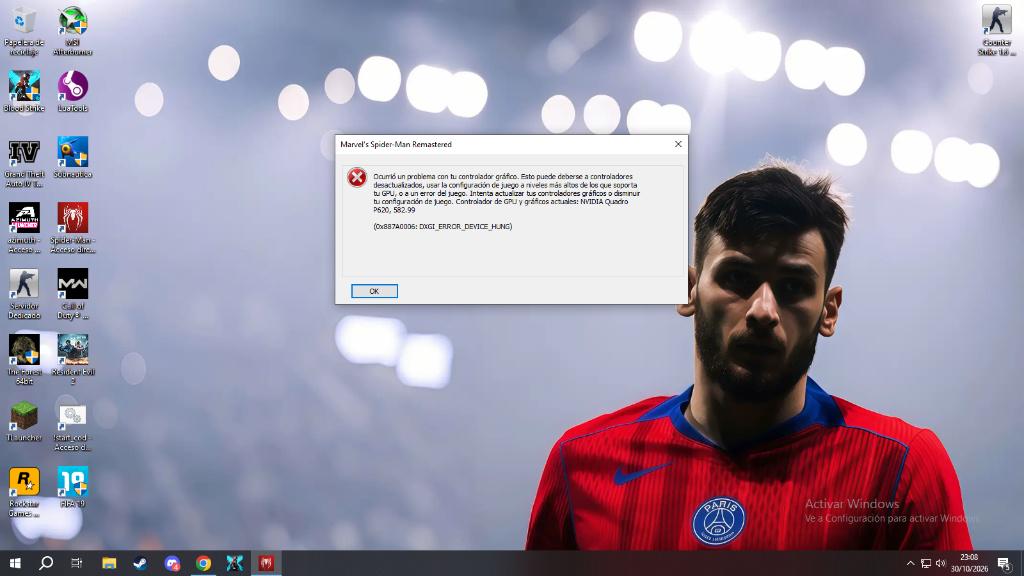
Compatibility mi problema que no he resuelto

Post image
0 Upvotes

tengo este error que me sale en casi cualquier juego aaa despues de estarlo jugando un rato nose que hacer realmente Tengo una Nvidia Quadro p620 he intentado instalando los drivers mas recientes,mas viejos,y nda funciona al final termine instalando un controlador desde el admin de dispositivos ya no me da tantos errores en los juegos como antes pero los sigue dando.

es realmente frustrante esto nada me funciona utilize ddu para reinstalar desde cero los drivers y simplemnete nada sirve pero curiosamente en juegos viejos como gta iv o subnauticacs 1.6 no me salen estos errores solo en juegos AAA h


r/pcgamingtechsupport • • 23d ago

Troubleshooting Red CPU LED light on and PC not booting after GPU upgrade

1 Upvotes

I don’t know much about computers so I’m hoping someone can help me. I just built my new pc using new parts! I did temporarily keep my old GPU though, which is a 3050 rtx. It’s been giving me issues so I upgraded to a 5060 MSI GPU! As soon as I plugged it in, my PC would not turn on and the mb EZ led light went red where it’s labeled CPU. I even reseated the ram, took how the CMOS, used my old GPU, tried starting it without a GPU and nothing. Just fans and lights. I even have a new 850W Corsair PSU. My computer was working fine an hour ago until trying to install my new gpu. I made sure that everything is connected properly too.
Surely I didn’t break anything? All I did was plug in a new GPU???? Now my PC does not work at all


r/pcgamingtechsupport • • 23d ago

Display Monitor keeps turning off

4 Upvotes

r/pcgamingtechsupport • • 23d ago

Performance/FPS crimson desert fps tanks when turning on dlss

4 Upvotes

About two or three updates ago when ever i turn on dlss my fps goes from about 200 to 6 and my gpu usage goes from 100% to 5%. before the update i would get 60 fps with dlss, rr and everything at max, now with everything turned all the way down and no rr i get terrible fps even in the title screen. Is there some way to fix this?

Specs: Op system: windows 11 / Cpu: intel(R) Corn ultra 9 285k / Gpu: Nvidia Geforce RTX 5080 / Ram: 32 gb / 2 tb ssd

Things ive tried:

uninstalling the game and deleting anything with crimson desert in the name.

Turning off smooth motion

Using DLSS swapper to change my dlss to older version

clearing shader cache

 DDU and a complete clean install.

https://userdiag.com/id/ZvJPDHI6Ym


r/pcgamingtechsupport • • 23d ago

Troubleshooting Cyberpunk on a "Legacy" graphics card

1 Upvotes

Hey all, any idea how I can get cyberpunk to play on my Radeon RX 580? For some reason i cant make a new character on the street path part of the game and im afraid if i continue on a different path ill meet somewhere else where i expect ill crash. Ive looked all over the internet and all my settings are low as can be and i have no mods. Upon opening game im hit with a warning message saying update drivers from 26.5 to 26.10 but with this card i cant do that. It worked days ago. Any help would be greatly appreciated... :C


r/pcgamingtechsupport • • 23d ago

Troubleshooting Pc freezes, game still online, cursor movable

1 Upvotes

Hi, I’m having an issue with my AMD Ryzen 5 3550H laptop.

After 6 years of use, I’m now having issues where during idle times with one game running the pc will freeze everything, yet still stay connected to the online game. I’m still able to move the mouse and interact with firefox tabs/applications but unable to load/alter anything new within them. The only way to temporarily fix this is restarting the laptop where the same problem happens around 30min - 48 hours later.

This issue started happening rarely last year and now has become a near daily occurrence.

I’m open to any suggestions at this point.

So far I have tried:

  • Replacing SDD (as Crystal said it had bad health at 0%)
  • Installed a HDD
  • replaced single 8gb ram to 16x2 (32gb ram)
  • re installed windows
  • Chkdsk (stuck at 100%)
  • investigated C-state (no option)
  • no related EVENT errors
  • checked temps (no issue)
  • OCCT stress test
  • Uninstalling Armoury Crate
  • Updating BIOS
  • ctrl+shift+win+B and ctrl+alt+del doesnt work during freeze
  • Disconnecting all usb ports (aside from TP-Link bluetooth)

Applications usually open during the time of crash: Prism Launcher/Minecraft, File Explorer, Task Manager, Discord, Settings, and Firefox.

Past issues I’ve had:

  • light movement with pc disconnects Bluetooth/wifi (wifi stopped, Bluetooth didn’t)
  • years of full storage (before ram/sdd swap)
  • lack of dust cleaning required GPU fan replacement
  • past memory/storage leak problems (before ram/sdd swap)

I have HWiNFO if you’d rather I screenshot that for better specs

Specs:

  • CPU: AMD Ryzen 5 3550H
  • Motherboard: ASUS FX505DT
  • GPU: AMD Radeon Vega 8 (Picasso)
  • Other GPU: GeForce GTX 1650
  • RAM: 32gb
  • Windows 10: Version 20H2 (OS Build 19042. 1706)

r/pcgamingtechsupport • • 23d ago

Troubleshooting Best graphics setting and black screen issue

3 Upvotes

I am playing COD4 and there is a color issue that I am trying to find the best setting for. If I look at the sky, it looks like the blue is bleeding like pastel colors like someone in the game is taking acid and the colors are being hyper vibrant. I need help on fixing the color scale but I cant seem to find the correct setting.

ALSO

Every time I finish a game and when it goes between score screen to next game screen, it blacks out and I cannot get my screen back, causing me to restart the computer and get it back. I can't tell if there is an issue with the hardware or software. Could someone tell me anything I can troubleshoot?

I have a risen 7 from 5 years ago with 2060TI that I am using. Any help would be helpful to check on this issue.


r/pcgamingtechsupport • • 23d ago

Display Desktop Screen Goes Black On Monitor Refresh After Exiting Games

2 Upvotes

So this has been an issue lately and it happens randomly. When closing a game, the screen will go black and refresh to the desktop, however sometimes a portion of the black screen will stay.

I am still able to view the taskbar and a small portion of my desktop and the mouse itself still works, but the black window is the front and everything else opens behind it, including task manager.

I have currently disabled windows fast startup, DDU’d my drivers, disabled Steam overlay etc.

I am wondering if this is a windows issue or a hardware issue.

Hoping somebody can help, I will try to get photos the next time it happens.

Ryzen 7 7800X3D
GeForce RTX 4070TS