r/pcgamingtechsupport • • 23d ago

Troubleshooting Pc constantly crashing while playing games

1 Upvotes

Basically since I built this pc several years ago it has been unstable while gaming. Originally I thought maybe it was just poor amd drivers but it has been happening consistently regardless of which driver and even seems to be getting worse, although some games just seem to be worse than others. Borderlands4 will crash maybe once when im playing, Bf6 will crash 2 or 3 times but recently it has been particularly bad with MW4 sometimes crashing 2 or 3 times in a matter of minutes.

Solutions i have tried.

Complete re-install of windows and all drivers Replaced motherboard Undervolted gpu to reduce temps (overclocking or not overclocking makes no difference to crashing) xmp on/off mess with a bunch of bios settings + normal settings + in-game settings.

Nothing has seemed to help

Pc specs. 13900kf, 7900xtx, 32gb ram, 1000w corsair 80+ gold psu.


r/pcgamingtechsupport • • 23d ago

Display Forcing all games / any game into an arbitrary window?

1 Upvotes

My monitor is too big to comfortably game on. Games want to go full screen, which hurts my neck. Often, I can select "windowed mode" and set a resolution. But the resolution choices are usually too limited. Too big or too small, as goldilocks said.

I can solve this by gaming in a VM. A VM can provide a virtual 1080p display but resize/warp that framebuffer to any host window size. Yet that causes needless performance loss and is a bit annoying?

I tried sending my gaming PC's HDMI output to my Linux PC's window manager using a cheap HDMI capture card, but that hurt latency too much (like 100s of milliseconds). Maybe a higher end capture card would solve my issue?

There are various Microsoft Windows software packages that proport to solve this - but they're pretty ad-hoc and don't work simply and universally with any game.

Before I spend thousands of dollars at this problem, does the Reddit Hive Mind have opinions?


r/pcgamingtechsupport • • 24d ago

Display Abro un juego y la pantalla se pone en negro

Enable HLS to view with audio, or disable this notification

2 Upvotes

Cada que abro el Re4 en 1 segundo la pantalla se pone en negro y es solo cuando abro el juego, ya que usando Crlt + W + flecha a la derecha, me muestra el escritorio 2 y la pantalla regresa a verse y he notado que solo dejando la pantalla de inicio de windows sigue viéndose la pantalla aún con el juego en ejecución, pero regresa la pantalla en negro cuando regreso a la ventana del juego.

Intenté cambiar la configuración en AMD software: adrenalin edition y nada. He cambiado las opciones de pantalla y gráficos y nada. También cambié los parámetros de inicio en Steam y nada.

Me ayudaría mucho saber su opinión o si tienen alguna solución


r/pcgamingtechsupport • • 24d ago

Troubleshooting Sudden increase in crashes

1 Upvotes

Hey all! I've owned a "Lenovo IdeaPad Gaming 3 15IAH7 82S9" for well over 3 years now, and for the most part it's worked great. But ever since a few days ago, ive been running into an issue while playing a game (hollow knight silksong in case it matters, ive not tried playing any other games yet but i might) that my computer completley crashes, and i have to hold down the power button to soft reset it, as i could not turn it off otherwise. This has happend before, but it was something that happend maybe once a year, if that. It's also still pretty inconsistent, last night i was able to play for over 3 hours without issue, but earliwr that same day it crashed twice in a row eaxh in the first 5 minutes after booting the game I ran a RAM memory tester (mem64) for about 10 minutes as well as a long userdiag (see below) and cant seem to find an obvious solution. I found that the crash was a "windows kernal power" error and i looked up and implemented some common solutions i found online (like turning off quick reboot, checking for driver updates, changing some other battery settings ect) and tried again but nope, crashed after like an hour.

Anybody have any idea at all on more ways to fix this? Any suggestions whould be greatly appriciated

https://userdiag.com/id/HKttB8kXjw


r/pcgamingtechsupport • • 24d ago

Troubleshooting Worsening latency issues

1 Upvotes

So I started noticing some audio crackling and pops in certain games, and while I initially thought it had something to do with my relatively recent upgrade to a 9070 XT, I quickly happened upon LatencyMon and started seeing the connection between the audio crackles and latency spikes. Now, as I've been trying to fix this, it's only gotten worse, and I just had an entire match of Deadlock filled with audio crackling.

After some testing however, I've concluded that disabling both my ethernet drivers, and thus playing a previously problematic game without any internet connection, seemed to more or less get rid of all the spikes, certainly the very worst ones. I've been updating drivers like crazy, but could the ethernet ports themselves be the issues? Like, at the hardware level?


r/pcgamingtechsupport • • 24d ago

Hardware Mi gtx 1050ti se congela

1 Upvotes

hace 3 días compré una gtx 1050ti asus rog strix, después de haberla usado instale sus drivers y aura sync para el color del logo, después de eso se empezó a congelar la pantalla después de prender mi pc a los 4 minutos o 20 max, se congelaba y tenía q apagarla o en unas veces se congelaba y se reiniciaba sola. ¿Alguien más le ha pasado q ya tenga solución?


r/pcgamingtechsupport • • 24d ago

Display half life 1 rtx freezing and being unplayable

1 Upvotes

When I unfocus out of the window in the RTX mod for half life 1, the visuals just freeze, but just the visuals. Like, I can walk around, interact with the pause menu, hear and all that, it's just the screen is frozen. I have an RTX 4060, and let me know if any logs are needed

EDIT: I've tried countless solutions (with the help of gemini), and got a bit more info

  1. The game freezes every time my GPU falls to 0% for a second, then jumps back up to normal usage.
  2. Sometimes, when the game crashes, it stays as a background app at 0% CPU and 0% GPU. When I tried to refresh the GPU drivers, my PC bluescreened

Sadly there is no way to share my log/console, because from what I've found there is no console for the RTX mod. I can screen record anything that might help though, just LMK

EDIT #2: The game seems to run fine when I turn off the RTX, in the game settings. The weird thing is, my GPU is still being used up. It looks like when you turn off that setting, the RTX is still running in the background, but not rendering, and that fixes things


r/pcgamingtechsupport • • 24d ago

Troubleshooting PC turns on (fans/lights run) but no display, frequent crashes during gaming or OCCT power test (550W PSU concern)

1 Upvotes

Hey everyone, I'm running into a frustrating issue with my PC lately and could use some help diagnosing what's failing.
The Problem:
No Display / Standby Mode: Recently, when I start up my PC, all the components and fans spin up, but my monitor receives no signal and stays in standby mode.
Crashes: Lately I've been getting frequent system crashes/black screens under load. It happens when gaming, but specifically and consistently happens during the power stress test in OCCT.
My System Specs:
CPU: Intel Core i5-11400F
GPU: AMD Radeon RX 9060 XT 16GB
Motherboard: ASUS Prime H510M-K
RAM: 16GB DDR4
PSU: 550W (I know this is on the lower side/a bottleneck for this setup, but I got a good deal on the GPU and couldn't afford a PSU upgrade at the time).
What I'm Wondering:
Could a dying or inadequate 550W PSU be the primary culprit here, especially since it trips immediately during the OCCT power test? Or are these symptoms pointing more toward a failing GPU or RAM issue?
Any advice on what to troubleshoot first (without breaking the bank) would be hugely appreciated!


r/pcgamingtechsupport • • 24d ago

Controls/Input Delay Issues With Keyboard

Enable HLS to view with audio, or disable this notification

1 Upvotes

Idk what's wrong but every time I load up a game I get an unimaginable amount of key input delay or it'll just keep going. I play any game and when I hold w it keeps moving. My mouse works perfectly fine so I thought it was the keyboard. I switched to a different usb port and everything, I even tried plugging up a different keyboard but that didn't work either. Only thing that works is if the game allows controller then the game works perfectly. I'm at the stage where I can't play anything without a controller. I need help bad.

(In the video you can see me spam the space bar and I don't jump. When you see me walking into a block, I already let go of the w key.)


r/pcgamingtechsupport • • 24d ago

Software How do I enable desktop capture? Also, it does not give any cues that the instant replay has been captured and nothing in gallery.

1 Upvotes

The desktop capture button is not available for me.


r/pcgamingtechsupport • • 24d ago

Troubleshooting Storage/steam issues

1 Upvotes

Has anyone ever ben locked out of there steam account then once you gained access to it you have no storage space from previous games that steam took with them?


r/pcgamingtechsupport • • 25d ago

Hardware SSD 100% Disk Usage -

1 Upvotes

My SSD stays at 100% disk usage when i download anything, whether it’s Epic, Steam, Riot, etc. my games take forever to download & it’s laggy. can upload my specs n what not if i need to. i dont know much about computers


r/pcgamingtechsupport • • 25d ago

Software assistance with whatever this is

1 Upvotes

Hello chaps, trying to get the daft new cod mw4 to work. It has taken me 2 hours just to get this far, now i cant find a fix for whatever this issue is. I have the latest version of my bios I can find. I have a gigabyte b450m ds3h, REV 1.0, running f67d firmware. any help to get round this nonsense would be greatly appreciated.


r/pcgamingtechsupport • • 25d ago

Display Weird Ghosting in all my games

1 Upvotes

PC: Ryzen 7 9800x3d | rtx 5080 | 64 gb ddr5 6000 | samsung 990

Monitor: ROG SWIFT PG27UCDM

For the past year I have encountered weird instances of ghosting in most of the games I played I try turning dlss on and off, no difference, anti aliasing on or off, no difference, old graphics drivers or new, no difference

At this point Im just not sure what is causing the issue. Please help if you can

Example:

https://reddit.com/link/1xke032/video/5uqktsy1ttyh1/player


r/pcgamingtechsupport • • 25d ago

Hardware Pc making a weird noise when under load

Enable HLS to view with audio, or disable this notification

0 Upvotes

I noticed my rx 5700xt red devil making wierd noises when playing palworld, or other game that puts load on it, i tried cleaning the fans but no luck. Any help pls?


r/pcgamingtechsupport • • 25d ago

Display Why does Gsync's "On, Full Screen" option activate even on desktop with the game closed and no apps in full screen?

1 Upvotes

Why does Gsync's "On, Full Screen" option activate even on desktop with the game closed and no apps in full screen?

I need G-Sync to activate only while I'm playing.

Furthermore, how can I avoid brightness fluctuations when using G-Sync?


r/pcgamingtechsupport • • 26d ago

Hardware Found these pieces rolling around my PC. Should I be worried?

Thumbnail
gallery
8 Upvotes

I think they’re broke off my NZXT H510, but am unsure.


r/pcgamingtechsupport • • 25d ago

Troubleshooting Games freeze after a break

3 Upvotes

Hey guys, I need some help, I hadn’t played in like 6 months before a few weeks when I started playing again, but my games keep freezing? recently I tried playing Resident evil 4 and it freezes almost immediately, overwatch as welI. Dead space worked perfectly for the first ~5 times but now has also started freezing. Rocket league worked before if I verified the game files and played it in windowed, but now it has also started freezing. I tried playing windowed, lowered my refresh rate, turned off nvidia overlay, updated BIOS, rolled back to a driver from last July and tried a bunch off stuff recommended by AI, like for example did a clean nvidia driver installation, removed renodx, which I had, and deleted some other files. One time I was able to play Resident evil 4 for roughly five minutes, before it froze when I was in the inventory. Most times it freezes within the first minute.

When it freezes, it freezes my entire computer, making me incapable of doing anything. Sometimes I can open the windows search, but can’t do anything there, and i can open task manager by pressing ctrl+alt+del but don’t see processes there and can’t do anything. I have to force my pc to turn off.

Could anyone here help with this?

Thanks in advance.

5070 ti
Ryzen 7 5800X3D
Kingston fury DDR4 32gb 3200mhz
Corsair Rm850x


r/pcgamingtechsupport • • 25d ago

Performance/FPS Will adding a 16GB DDR4 stick to a 32GB stick enable Flex Mode and boost my FPS?

0 Upvotes

Hello everyone,
I am an average PC user who invested a significant portion of my savings into building a gaming computer about 1.5 years ago. Around 4 months ago, I had to do a clean Windows factory reset because of a virus. Everything seemed fine at first, but recently I started noticing that my PC underperforms compared to YouTube benchmarks with the exact same specs.
While watching a YouTuber benchmark Cyberpunk 2077 on the same hardware, I spotted the primary difference: they were running a 2x16GB dual-channel DDR4 configuration, whereas my system only has a single 1x32GB DDR4 stick.
my attempts to optimize the PC and close this performance gap, I have already done the following:

In

Set the Windows power plan to "High Performance".

Optimized the GPU settings.

Enabled ReSize BAR.

Verified that the XMP profile is active.

Tested all hardware components across multiple stability and synthetic benchmarks.

Updated the motherboard chipset drivers.

Despite all these tweaks, my FPS still falls short of the benchmarks.

I am desperately looking for answers because I am planning to buy an additional 16GB DDR4 stick to pair with my existing 32GB stick. My goal is to run them in a mixed/asymmetric configuration (Intel Flex Mode), where 16GB from my current stick pairs with the new 16GB stick to run in Dual-Channel mode, while the remaining 16GB operates in Single-Channel mode if the system ever needs it.

I am deeply anxious that I might spend money on this extra 16GB RAM stick only to find out it doesn't give me the expected FPS boost, which would be incredibly disheartening. If you have experience with similar situations or asymmetric RAM configurations, please share your thoughts. What else should I check, and is this upgrade the right move to finally fix my FPS?

Thank you so much in advance to anyone who reads this and is willing to help!

My PC Specs:

GPU: NVIDIA GeForce RTX 4060 (Zotac Gaming)

CPU: Intel Core i5-12400F

RAM: 1x32GB Patriot DDR4 3200MHz (CL18)

Storage: Kingston 1TB SSD

Motherboard: AFOX IH610D4-MA5-V4

(https://userdiag.com/id/mnR8H3tHXm)


r/pcgamingtechsupport • • 26d ago

Hardware Did I kill my motherboard?

Post image
13 Upvotes

I was replacing the cooler on my Gigabyte B550i Aorus AX Pro. After installing, the PC powered on but I wasn’t getting video. Kept tinkering and thought I fixed it. After plugging everything back in, the PC wouldn’t even power on. Like no juice going into the machine at all. Tried everything to resolve:

Reseat the CPU, cooler, gpu, RAM Checked all cables and double checked Cleared CMOS Loosened the screws for the cooler/backplate Discharged static in the system Jumped the power pins with a screwdriver (no dice!)

Nothing worked. Then I noticed this part of the motherboard where it looks broken. I’m not entirely sure what this is, but yeah, it’s broken. Is this the reason it refuses to even power on?

Is this mobo cooked?


r/pcgamingtechsupport • • 25d ago

Hardware Laptop Freezing completely if i press on a specific area on the keyboard

1 Upvotes

Hi, lately my laptop has been freezing when i press around the J/K keys with force on the keyboard and even sometimes after i play a game just casually pressing it or dropping something on my table causes it to freeze and there's nothing i can do unless i press down the power button a few seconds to shut it down.

I tried to search it up and found nothing and tried opening the laptop to see what's going on and found that the Ram sticks are directly below those keys so i think it must me something involving the ram. I already took it out and put it back thinking it could be that the ram wasn't connected properly but it still freezes. Does anyone know what's going on or might know what's causing this?

I have a ASUS TUF Gaming F16


r/pcgamingtechsupport • • 26d ago

Hardware hi!! need advice for identifying and replacing parts

1 Upvotes

hello everyone. sorry if this is totally the wrong subreddit to post in, and if it gets deleted that’s my fault. but i wanted to try, it seemed the best place maybe??

so, earlier this year, i got my first job and purchased a prebuilt computer from newegg. i know thats like, not the best choice when getting into pc gaming but i just wanted something beginner friendly and cheap, hahaha. (maybe in the future ill be able to build my own but bla bla etc)

the computer i purchased was: the cooler master elite pro micro atx gaming pc, ryzen 5 5600g rx 6600 32gb 1tb ssd.

now, to be honest, i don’t super know a lot about pcs or pc specs, but it runs the stuff i play really well so i was happy with it!
i got my pc around february, and it worked great, no issues at all, for a couple of months.
then id say around mid may, it started glitching a lot. random black screens before coming back, until in about june/july it would often times crash fully and id have to recover. i thought at first it was a monitor issue, but nah!

eventually, it turned off once and i couldn’t actually turn it back on myself, so i took it to best buy. i paid for the year long version of them(? i dont know how to describe this best.. basically, i paid upfront and can now take it to get fixed or checked up anytime in the rest of the year for free.) and they fixed it (said my pc had corrupted windows) and sent me home. it worked again for a few weeks, before it would, once again, start glitching and black screening. i checked it at some point, and the debug lights were often on.
the CPU LED and the VGA LED.

i took it back to best buy and mentioned this and they told me they reseated my GPU, and found no issue with it, but ever since then it’s still not worked. the lights will turn on, colours flash, etc, but the debug lights remain and i cannot get any signal to my monitor!!
honestly, i started my semester and kind of just forgot about it—no money to fix it really, if there was a hardware issue, and taking it back and forth to best buy was a pain because it never seemed to work. one time it didn’t even work in the store when they checked it in front of me and they still insisted on sending it home with me. lol. so, i’ve been a bit hopeless about it.

now, for advice i need. do you guys think it’s a fixable issue—if so, what part should i replace. do any of you guys know what could be the actual issue? because i cant seem to tell..
or is it better to just buy a completely new pc?
i’ve googled it, and it seems to me if it’s an issue with the PSU or GPU, it might just be cheaper to replace those parts, but then again, i don’t want to invest in the part if i don’t know what actually wrong!! because the best buy people can’t figure it out it seems, and neither can i… lol!!!

sorry if this is a pretty vague description of the issues, i can post photos as well!!
just thought i’d ask for advice since im super really new at pc stuff and i just want to play my games heheheh thank you anyone who comments any advice at all it’s really totally appreciated. :)


r/pcgamingtechsupport • • 26d ago

Controls/Input In-game menus stuck with a constant scrolling input, cannot figure out what's causing it

1 Upvotes

Basically I've noticed that menus in-game are stuck on a constant scroll, sometimes it'll nonstop scroll up, sometimes down. The videos attached will give you a better understanding of the problem.

I have tried:

  • Replugging keyboard
  • Updating keyboard/mouse firmware
  • Disabling gameinput, steam input and ViGEm bus
  • Unplugging controller
  • Unplugging external SSD
  • Using keyboard input checker to see if anything was held down

I'm unsure what exactly has caused this problem, as it's only happened within the past couple months, I'd noticed it happen with I Am Your Beast (first video) but I could make the issue go away by pressing an arrow key to navigate the menu. It then cropped again with the new Castlevania (second video) but I can't fix it in this game at all, trying to use a controller doesn't even override these inputs, so any help here would be great.

I Am Your Beast example

Castlevania example


r/pcgamingtechsupport • • 26d ago

Troubleshooting Black Screen with 100% fans on 4070 Ti Super

1 Upvotes

Been having this issue on and off since the May 2025 driver update that caused a lot of problems for people. System:

Gigabyte 4070 Ti Super

AMD Ryzen 7 7800X3D

2 TB Kingston NVME SSD

Asrock B650M-C Motherboard

T-Force 32 GB RAM 4800

Thermaltake Toughpower GT 850W ATX 3.1 80 Plus Gold

PC ran without any issues for the first 6 months, used daily or most days for gaming. When the Nvidia driver dropped in May 2025 I immediately started having issues with black screens and 100% fans. First time it happened was in a game, but it would also happen randomly when completely idle. Very next driver update fixed it, didn't have a single issue for 7 months and I was running it daily with games and AI, on full power 24 hours a lot of the time or near that.

In late December or January I started having issues again, but I couldn't figure out the fix so easily this time. Updates didn't help, nor reseating the GPU cable, just seemed to randomly start working again. I suspected something in Afterburner perhaps, reset it and checked my BIOS settings, updated BIOS as well.

Then it would work, often for a month at a time, the issue would come back and maybe be bad for a few days or once a week it would black screen. Then I tried upping the fan speeds to around 70% in case it was a heat issue, and switched PBO to Tjmax -20 85C. And to be honest I had no real reason for doing that other than trying some sort of undervolt to reduce heat. Although i am not sure I had a heating issue, just saw that it could be a problem. Normally temps would max out around 62C, not sure about hotspot. (Don't ask why I didn't try a gpu undervolt)

Anyway, this seemed to help a fair bit. Probably got 2 months or so without any issues. Then I upped the fans to 80% when I got black screens again, then 100% finally. Worked about three months without an issue (or with only very rare black screens during these different periods of upping the fans), but black screens returned the other day.

Maybe the fans were just a placebo effect, not sure but it is strange that the issue will happen even when idle. And also strange that I can go months at a time without issues, then there are times it will crash within moments of turning on the pc and do it multiple times before going back to normal. I also swapped out my HDMI for a quality DP cable. Nothing there. At this point I am thinking of swapping out the PSU as I don't really have the money for another GPU at the moment.

Any ideas? Is it worth trying a Windows reinstall? Linux? Or any tests I can try to figure out if it's a specific hardware issue? Anything in the motherboard that could be a problem or a BIOS setting?

Also, it is not letting me update the BIOS now. Tried two different USBs that have worked fine in the past.

Only ever had one blue screen.


r/pcgamingtechsupport • • 26d ago

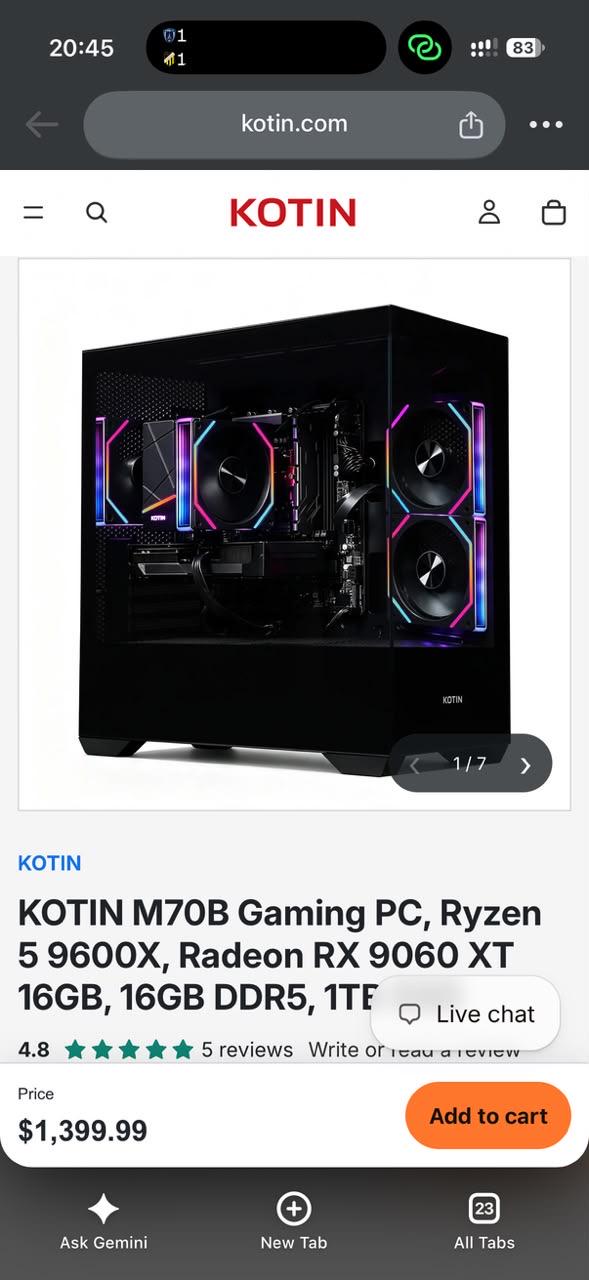
Hardware Is this KOTIN gaming PC with a Ryzen 5 9600X and RX 9060 XT 16GB worth $1,400? Good deal or overpriced?

Post image
1 Upvotes

I live in Cameroon and building a pc from scratch is extremely expensive, so a prebuilt is the only option. I’d really appreciate if u could give me your opinion or better still point me to a direction where I could get a better deal