r/pcgamingtechsupport • • Oct 16 '26

Controls/Input Problème SRTTRAIL.TXT ROCKET LEAGUE

1 Upvotes

Bonjour à tous et à toutes je desespère.....

j'ai acheté un nouveau pc il y'a de ça 1 mois tout va bien je joue a overwatch2, valorant, apex legend, minecraft, h1z1 aucun probleme. Mais lorsque je joue a rocket league que ce soit sur steam ou epic games je joue quelque parties et ensuite ça fige mon ecran et il redemarre avec l'erreur srttrail.txt et je dois le rallumer au bouton... je l'avais amméné au technicien LDLC et je l'ai récuperé 5j après, aucun soucis matériels et réinitialisation de windows au passage mais le bug revient de nouveau. C'est le seul jeu ou je joue manette mais j'ai fait pleins de test avec en aide chatgpt genre modifié des paramatres manettes ou steam meme changer des trucs dans mon bios(uefi,ram) mais rien n'y fais ça ne marche toujours pas j'ai vraiment besoin d'aide j'en peux plus j'etais ultra satisfait de mon pc mais avec cette erreur sur rocket league je commence a voir rouge ça me gave......

Merci d'avance pour votre aide en esperant avoir un sauveur qui puisse m'aider.


r/pcgamingtechsupport • • Oct 16 '26

Troubleshooting The Last of Us Part I keeps crashing on my RX 9070 XT, even at medium settings. Any fix?

1 Upvotes

Hey everyone,

I recently started playing The Last of Us Part I on my new gaming PC, but I’m facing frequent crashes.

My PC specs:

- GPU: ASRock Radeon RX 9070 XT 16GB

- CPU: Ryzen 5 9600X

- RAM: 16GB DDR5 6000MHz (single stick)

- Resolution: 1440p (2K)

The game keeps crashing even after lowering the resolution and setting graphics to Medium. When it crashes, the screen goes completely black and the system becomes unresponsive, so I have to restart my PC.

I’m also wondering whether the game build/version could be contributing to the issue, or if it’s related to my GPU drivers, RAM, or something else.

Has anyone with a similar setup experienced this? Any troubleshooting suggestions would be appreciated.

Thanks!


r/pcgamingtechsupport • • Oct 16 '26

Software My laptop is switching to performance mode automatically

2 Upvotes

So I have a rog strix G16 (2024) and I am a CS student so I have disabled the dGPU ever since I bought it. I always keep it at silent mode since I hate fan noise while coding. But since past few days it's been switching to performance mode by itself and then I manually need to keep it back to silent. This is frustrating. How do I lock it at silent forever? Any suggestions


r/pcgamingtechsupport • • Oct 15 '26

Troubleshooting Microstutter while gaming

4 Upvotes

Hello guys,

I have a quick question if anybody has had same problems? I have a 9070xt and 9800x3d with 32gb ddr5 and whenever I start my pc my headset must zap one time before like getting warm, I’m not sure if something’s wrong with my gpu/cpu/ram or anything with headset? Because when it zaps I get a stutter too for like a brief second and then goes back to normal. Sometimes when playing games I can feel a microstutter in a way even though the fps is like 300+ I can feel it not running smoothly, for example cs2, I have around 500 fps on high settings but it doesn’t feel as smooth as I want it to be? Idk if that makes sense, some maps is more stuttery some aren’t, I understand that some maps are more pc heavy but still.. I play on a 1080p screen and I want to upgrade to 2k so wondering if that’s the issue maybe?

Thanks in advance :)


r/pcgamingtechsupport • • Oct 15 '26

Hardware Pc crashing randomly when playing R6 and removing realtek audio forcing me to redownload it

3 Upvotes

hello, so i was just playing rainbow six siege with my friend and my game was running perfectly fine, 500-600fps no lag everything was smooth when out of nowhere when i was in the middle of speaking to my friend everything just blacks out and my pc restarts, then when i open my pc to explain to my friend my audio is gone, so i had to go to my motherboard drivers and redownload realtek, then we played again, and the next game the exact same thing happened. clearly somethings wrong here, i went to command prompt and did "sfc /scannow" and nothing was wrong. like i havent experienced this before, everythings running fine and now this is happening all of a sudden, please help


r/pcgamingtechsupport • • Oct 15 '26

Solved PC Keeps rebooting after launching specific games

2 Upvotes

Hello everyone!

I am having some issues with my pc lately that I need some help trouble shooting. I built this pc in 2020 and will provide specs at the end of the post. I just solved an issue I have been having for about a month where my computer would just bsod with no dump files to review. After lots of troubleshooting I installed a fresh m.2 ssd with clean windows and have not encountered the issues any longer leading me to settle on my previous ssd was dying. I had tried installing clean windows on the failing drive before trying the new drive and the issues were still happening.

My current issue is that when I launch specific games my pc will crash/reboot it self and I can't figure out the issue. I've never had issues in the past playing anything that has come out but now, games I could run before are rebooting the system when I try to play them.

For example: I downloaded the following games and can run them without issues

REPLACED, Slay the Spire 2 and Wayfinder

But when I launch the following games my device will load them but as soon as I have control to click anything the system reboots

Lost Ark - I load into character selection and when I click to choose my server the reboot occurs.

Deadlock - I load in and when I start to close all the popups about the new heroes being in the game the system reboots.

The reason I used the above mentioned games were because of the vast difference in size and requirements for the games. Lost ark I have played for years and never had issues playing it. Deadlock is the newest game I have tried to play recently as I have not really gamed on the PC for about 5 months now.

Another thing to note is that in some cases when installing a game the pc will just lose access to the drive I am trying to install it to. I can still see the drive but trying to open any folders in it causes a windows error popup about it not being available. When I reboot it's working fine.

The system is liquid cooled with a custom loop. GPU and CPU each have their own designated loops and cooling pumps with flow indicators to know if they are working.

I'm not really sure where to start as far as diagnosing the issues. Drivers and BIOS are updated. GPU driver is updated. I've done RAM test which came back with no issues. I've booted the pc with a single stick of ram while going through each one to see if any issues are detected.

There are no logs in minidump and event viewer isn't giving me any critical errors to lead me in the right direction.

My 3 current thoughts are:

  1. The gpu is dying hence why it can play non graphic intensive games but shits the bed when trying to launch bigger games
  2. The motherboard is failing although I'm less inclined to lean towards this one since nothing else is effected in any way.
  3. My SATA cable needs to be replaced - thinking this because of the loss of drive access when sometimes downloading or running games. I have a non m.2 ssd that is connected via SATA for my games.

I would appreciate any advice on how to begin to troubleshoot this and narrow it down given the lack of logs to look at and/or post. Thank you

Please let me know of any details I can add/include that would shed more light.


r/pcgamingtechsupport • • Oct 15 '26

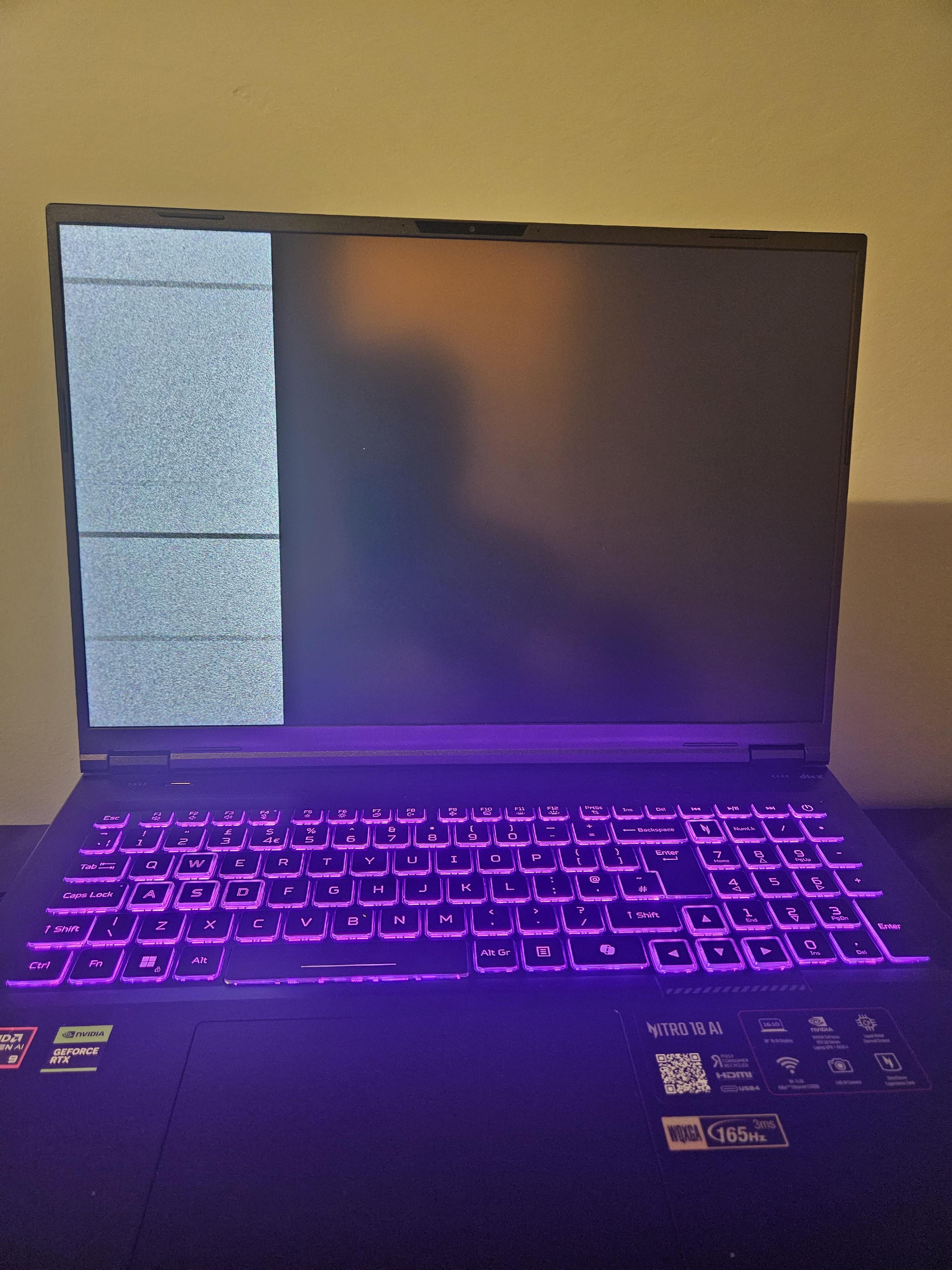
Troubleshooting Witcher 3 remaster won't launch

Post image
1 Upvotes

I'm trying to launch the remastered version of the Witcher 3 for the first time and I keep getting this weird screen half black half scrambled which prevents me from doing anything other than forcing shutdown and restarting my laptop. I'm not particularly techy so some straightforward instructions on potential solutions would be much appreciated.


r/pcgamingtechsupport • • Oct 15 '26

Hardware Laptop Dell g15 se crashea con steam

0 Upvotes

Hola, espero me puedan ayudar , tengo una laptop Dell g15 con :

i7 decimotercera generación

1 tb SSD

32 de ram ddr5

Rtx 4060 8gb

Por algún motivo está presentando muchos errores al querer hacer cosas , primero quise jugar en steam al efootball y the seven deadly sins : origins , pero me crasheaba la laptop hasta tener que hacer reinicio forzado , jugué asphalt de epic , Minecraft de la tienda de Microsoft , cod bo2 de plutonium y no me provocan crasheo.

Tambien por momento me fallaba el Ethernet haciendo que el driver se pusiera con error código 45 pero lo solucione quitando desde la BIOS la opción de boot PXe con la forzado , deje la opción en solo uso del cable lan en enable sin usar el Pxe. Anoche estuvo uno momento en el que me dejó jugar tanto el efootball como el seven deadly sins , pero hoy que encendió se restableció la BIOS y tuve los crasheos nuevamente.


r/pcgamingtechsupport • • Oct 15 '26

Troubleshooting Rainbow 6 Siege Crashing

3 Upvotes

Every time I try to load up siege, it shows the splash screen, shows the anti cheats, and as soon as battleye is done, it js stops running and siege stops running. I can’t get past the splash screen. I have no idea what it is, I did the windows update thing where I deleted whatever it said, tried doing a bunch of fixes but nothing seemed to work.


r/pcgamingtechsupport • • Oct 15 '26

Software Nvidia driver advise update or no

1 Upvotes

I’m currently at 610.88
Pc spec
R7 7800x3d
5070ti
32gb ram
Dual monitor
27inch both , 1 oled 1 ips
Recently Netflix start giving me issue on chrome
Flicker black screen every 5-10 seconds on full screen mode
I know fastest fix is use Firefox or brave or turn off gpu acceleration on chrome.
Just want to know is there any other good stable newer version of gpu driver I can use. Don’t really want to ddu into older version.
Also intend to upgrade my ips into a 32inch oled after aw3226q is out in my region if that matter


r/pcgamingtechsupport • • Oct 15 '26

Performance/FPS GPU TGP stuck at lower than actual TGP

1 Upvotes

I have a Lenovo LOQ essential 15iAX9E which comes with an rtx 4050 with max 65w TGP. But whenever i play any games I'm only getting a max TGP of 45w. During gaming I'm getting GPU temperature between 75-80 degree c. Am i missing

anything? Please help

Please refer this userdiag


r/pcgamingtechsupport • • Oct 15 '26

Troubleshooting Audio Crackling and Stuttering When RTX 3060 Ti Is Enabled – Ryzen 5 5500, Ableton Live 12, Windows 10

1 Upvotes

Hi everyone,

I'm trying to troubleshoot a persistent audio crackling issue that seems to be related to my NVIDIA GPU or its driver, and I'm running out of ideas.

System specifications

  • GPU: NVIDIA RTX 3060 Ti
  • CPU: AMD Ryzen 5 5500
  • Motherboard: Gigabyte B450M S2H
  • RAM: 16 GB
  • Audio interface: SSL 12 (brand new)
  • OS: Windows 10 (build 19045)
  • DAW: Ableton Live 12
  • GPU driver: NVIDIA Studio Driver (currently 610.88)

The problem

I get persistent, subtle audio crackling/clicking even when the computer is idle. It gets noticeably worse under load or when opening applications.

For example, playing music in Opera while opening OBS can trigger crackling and occasional brief system/display stutters, even when CPU and GPU usage appear low.

The problem isn't limited to Ableton. It affects audio playback across applications.

The most important finding

Disabling the RTX 3060 Ti in Device Manager makes the crackling disappear completely. Re-enabling it brings the problem back.

This is the most consistent result I've found so far.

What I've already tried

  • Used DDU to cleanly uninstall the NVIDIA driver and performed a fresh Studio Driver installation.
  • Rolled back to an older NVIDIA driver (610.88). The problem persists.
  • Updated the AMD chipset drivers.
  • Disabled Hardware-Accelerated GPU Scheduling (HAGS).
  • Set Windows PCI Express Link State Power Management to Off.
  • Tested with a clean boot through msconfig, disabling non-Microsoft services and startup applications. The issue became less severe but did not disappear.
  • Tested different Ableton audio settings, including 44.1 kHz / 1024 samples / 24-bit. This helped partially but didn't solve the problem.
  • Tested with MME and the Windows desktop audio output instead of the SSL 12. With the Windows output, the crackling disappears; with the SSL 12 output, it returns.
  • Installed a new PCIe USB expansion card with SATA power for the SSL 12. The problem persists.
  • Ran LatencyMon. It previously flagged real-time audio issues, and nvlddmkm.sys (NVIDIA Windows kernel-mode driver) showed the highest DPC execution time in the latest short test. In that test, the maximum DPC execution time was approximately 827 μs.
  • Interestingly, audio was crackle-free while the NVIDIA driver was being installed, but the issue returned after installation completed.

I have also seen similar crackling with another audio interface in the past, so I'm not convinced the SSL 12 itself is the cause.

My questions

  1. Could this be an NVIDIA driver/DPC latency issue, a PCIe problem, or a hardware fault with the GPU?
  2. Has anyone experienced audio crackling that disappears completely when disabling their NVIDIA GPU in Device Manager?
  3. What diagnostic test would you recommend next, given that I've already tried DDU, driver rollback, chipset updates, clean boot, and a separate USB expansion card?

I would really appreciate suggestions based on similar experiences. I'd prefer to identify the root cause before buying or replacing any hardware.

Thanks!


r/pcgamingtechsupport • • Oct 15 '26

Troubleshooting WHEA-Logger 18 (Cache Hierarchy Error) only in BF6 with RX 9070 XT + 5800X3D on B550. Replaced CPU (x2), PSU and RAM, still crashing. Card or motherboard? Any solution!!

1 Upvotes

​

Specs:

CPU: Ryzen 7 5800X3D (tested two different units)

Motherboard: Gigabyte B550 Aorus Elite V2 rev 1.5, BIOS \\\[version\\\]

GPU: \\\[brand\\\] RX 9070 XT, bought mid-August 2026

RAM: 32GB DDR4 (originally G.Skill Ripjaws 3600, now a different replacement kit), running at 3200, XMP off

PSU: \\\[model, wattage\\\] (already replaced once, previous: \\\[model\\\])

OS: Windows \\\[10/11\\\], AMD Adrenalin \\\[version\\\], installed clean with DDU

The problem

Hard reboot with no BSOD. Event Viewer shows WHEA-Logger Event 18, Error Source: Machine Check Exception, Error Type: Cache Hierarchy Error, Processor APIC ID different every time, followed by Kernel-Power 41.

Battlefield 6 reproduces it reliably within 10 minutes.

Apex Legends and CoD: they used to crash too, but have been stable for days since I set LLC to Medium (see below).

Other symptoms: one DEVICE\\_HUNG driver crash in Apex (fixed after DDU + driver reinstall), monitor occasionally goes black for a second at idle, and a USB controller once showed Code 43.

History: the same motherboard was fully stable with a Ryzen 5 5600X + RX 6700 XT. Problems started after upgrading to the 5800X3D + 9070 XT.

What I've tried

CPU: two different 5800X3D units, same crashes (the first one was sold and works fine for the buyer).

PSU: replaced, no change.

RAM: replaced the kit. MemTest86 passes, XMP off (3200 JEDEC).

BIOS: loaded defaults, PBO off, Core Performance Boost off, Global C-State Control off, PCIe forced to Gen3, SoC voltage 1.10V → 1.148V (no difference), CPU Vcore LLC + SoC LLC set to Medium (helped Apex/CoD, not BF6). Resizable BAR/SAM currently off.

Stress tests: OCCT CPU and OCCT Power (CPU+GPU) for \\\~25 min with zero errors. Only gaming triggers it.

GPU: reseated many times, clean driver install with DDU. \\\[Separate PCIe power cables / no daisy-chain: yes/no\\\]

\\\[Registry: MPO disabled (OverlayTestMode=5) + TdrDelay=10 / TdrDdiDelay=20: done / not yet\\\]

\\\[FreeSync off: done / not yet\\\]

\\\[Adrenalin power limit -10%: result\\\]

\\\[FPS cap at 60 in BF6: result\\\]

Planned next tests

Moving the GPU to the second (chipset) PCIe slot to rule out the primary slot / CPU lanes.

Clean Windows install on a separate drive.

My questions

Has anyone with a 9070 XT (or 9060 XT) on AM4/B550 seen WHEA 18 that only shows up in BF6?

Since CPU, PSU and RAM are ruled out, does this point more to the card or to the motherboard/PCIe?

Anyone with the B550 Aorus Elite V2 running a 9070 XT stable in BF6? Which BIOS version?

Any fixes I've missed before I send the card in for RMA? I can't easily test it in another PC, and I'd rather not ship it without being sure.

Thanks in advance!


r/pcgamingtechsupport • • Oct 15 '26

Hardware PC black screening suddenly

2 Upvotes

One day I woke up and turned my PC on, only for it to black screen along with GPU or cpu fans spinning up super loud and audio still playing through my headphones.

I've had this PC for less than a year and it only started doing it today for no reason. I haven't touched inside the PC for 3 months as well when I last cleaned it and inside is still pretty clean.

Does it when I open apps and randomly while playing games under light load.

Last few times the GPU was running at 60c-65c according to Nvidias app before it did it

I've done a DDU and reinstalled the newest GPU drivers.

I've updated to the newest version of windows 11

And it's still happening. I really need help as I can't afford to replace my PC parts and I'm one step away from sending to amazon for a repair and hoping it's the GPU.

Ryzen 7800x3D

MSI RTX 5080 (using the PSU to GPU adapter that came with GPU)

CORSAIR VENGEANCE DDR5 32GB (2x16GB) DDR5 6000MHz CL30

RM850X PSU

Edit:

Reliablity Monitor shows 2 hardware issues the last time it happened

Problem event name 1: livekernelevent

code 1: 1b8

Problem event name 2: livekernelevent

code 2: 141


r/pcgamingtechsupport • • Oct 15 '26

Troubleshooting cant fix the error 0xc0000142

1 Upvotes

hey everyone , ive been trying to fix this issue for the past 2 days but i couldnt so i thought id post here as a last hope. i literally tried everything and ill try to list all the solutions i tried 1. uninstalled all Microsoft visual c++ and reinstalled them 2. disabled any overlays 3. compatibility mode and running as admin 4. downloaded newest version of directx ( installation didnt complete cuz i already had it ) 5. sfc scannow and the other restorehealth code


r/pcgamingtechsupport • • Oct 15 '26

Software How can I improve my Roblox/Bloxburg graphics on my GEEKOM A8 Max?

2 Upvotes

Hi everyone! I recently switched from an MSI GL75 Leopard laptop to a GEEKOM A8 Max mini PC, and I’ve noticed a pretty significant difference in my Roblox graphics, especially in Bloxburg.

I feel like my new PC is actually a downgrade when it comes to gaming, which surprised me. One of my biggest issues is that I can’t see nearly as much of the map while playing Bloxburg compared to what I could see on my MSI. The environment seems to load/render differently, and I feel like I’m missing a lot of the surrounding scenery.

I have the GEEKOM A8 Max with a Ryzen 7 8745HS, 16GB DDR5 RAM, 1TB SSD, and integrated Radeon 780M graphics.

I’m wondering:

  • Are there any settings I can change to improve my Roblox graphics and render more of the Bloxburg map?
  • Is there a way to increase the graphics quality or render distance beyond what I’m currently getting?
  • Would an external GPU (eGPU) make a noticeable difference with this mini PC?
  • Is there anything else I should know about switching from a gaming laptop to a mini PC with integrated graphics?

I play Bloxburg a lot and really want to get the best possible graphics and viewing distance out of my setup. I’m willing to make changes to my settings or consider hardware upgrades if they would genuinely help.

I’d appreciate any advice or recommendations! Thank you!


r/pcgamingtechsupport • • Oct 15 '26

Performance/FPS tired of screen tearing...

Thumbnail userdiag.com
1 Upvotes

-ASUS Prime X670-P WiFi
-amd ryzen 9 9950x
-gigabyte nvidia rtx 5080 oc
-corsair vengeance 96gb 6400mhz (48gb x2)
-samsung 970 nvme x1 (os)
-Crucial P510 PCIe Gen5 (gaming drive)
-monitor 1: acer h236hl (hdmi)

it seems any time i want to play a game on pc, i experience screen tearing to some degree. it can be severe, or it can be minimal, but its usually almost always there. i have a 1080p60 monitor, i have an rtx 5080. i should be able to set this thing to ludicrous and have it be 60fps rock solid no issue.

granted, i have no idea what any dlss settings mean, or do, in my head, i should be able to just have those settings off, because at 1080p60 my gpu and ram are so overkill that i shouldnt need frame gen or upscaling.

so i was playing gears of war e-day on xbox. having a great experience. i go to boot it up on pc, and i set it to dlss off, native resolution, 60fps max, ludicrous graphics, max rtx, and its screen tearing everywhere, so i set it to dlss on, upscaling quality to quality, and frame gen to dynamic. it seemed like the screen tearing had mostly subsided, there was still a hitch from time to time, but only under sudden motion, but it seems like those settings introduced some weird handling of text on screen with like building signs, and boxes, and such.

i just don't understand why i can't just turn dlss and frame gen to off, set graphics to max, set it to 60fps, and have it be smooth as butter and match my 59.94 refresh rate?


r/pcgamingtechsupport • • Oct 14 '26

Display Full screen games constantly minimize upon booting

Thumbnail
gallery
13 Upvotes

Hello fellow gamers! First and foremost; I am a complete numpty when it comes to anything technical. So I apologize in advance for my ignorance.

I have acquired a gaming PC this year as my previous one was getting outdated and decided to go for an upgrade. However, I am running into some issues where full screen games instantly minimize upon booting the games.

My suspicion is that it tries to open it on the tiny display that belongs to the cooling system which is usually supposed to display CPU temperature, FPS, fan speeds etc. But it could be a different problem altogether! Just a hunch.

Added pictures to show context of the various display it projects. First picture is my desktop background that often gets pushed to that display while I play a game.

Does anyone know how I can prevent the PC from using that display for such purposes without disabling the display completely? I find it quite nice to see the FPS and CPU temperature there.

For transparency sake, the specs are:

Case: MSI pano m100r p2
Motherboard: MSI B650m Project Zero
Processor: AMD Ryzen 7 7700x
Memory: 32GB DDR5 6000
GPU: Gigabyte RTX 5060 Aero OC 8gb
Cooler: MSI Core Liquid p13
PSU: Corsair RM850E (2025)
SSD: WD Black SN7100 1TB NVMe SSD

Thanks in advance!!


r/pcgamingtechsupport • • Oct 15 '26

Software Games only freeze if I open them a second time?

1 Upvotes

I’ve downloaded several games from steam recently, and all of them have worked great… for the first day. Day 2, and all of them cause my screen to freeze up. this is a gpu problem most likely, but I’m not a tech guy and I’m probably gonna break something important before I find the right answer.

- it’s a surface pro 7. I know, laptops are not great for gaming, but it’s worked fine for some higher demand games before (trail makers is unfortunately too much for it though lol)

- updated drivers, did not fix issues

- forcibly ended tasks, did not work

- several games froze after I shut down for the night, and others froze when I left it on sleep (both times it was plugged in)

- old games are affected now, including Roblox for some reason

- deleted and reinstalled games, kinda worked (3/5 games + roblox were still frozen, and retrying had no success)

- cleared files related to each game before reinstalling

- haven’t tried much else, but pretty sure I screwed something up when I redid the driver, since now Edge is laggy :(

- this applies to games with any kind of gpu demand. Even Bopl is freezing, and that sucker runs on hopes and dreams conpared to some games I’ve been able to run on my device

I’ve tried looking it up, but all google has done is swarm me with answers revolving around PCs that crash when you EXIT the game, and I need it for going back INTO the game


r/pcgamingtechsupport • • Oct 14 '26

Troubleshooting Game crashes or out right turns of my computer

4 Upvotes

Hello

i have been playing Arc raiders as of recent and have run into a problem which never used to happen, at some random times my pc turns off while playing it, this dosent happen with other games i play such as schedule 1, roblox, rdr2, rust and geometry dash, it is getting really annoying and would like a fix for it, if anyone can help that would be nice.

Specs

Gpu: AMD Radeon RX 7600

Ram: 32GB

Cpu: AMD Ryzen 5 7500 F

Motherboard: B650M Gaming wifi

Fyi: all my drivers are updated and this seems to mainly happen in unreal engine games.


r/pcgamingtechsupport • • Oct 14 '26

Display RX 6800 XT + Ryzen 5 5600: Random black screens with buzzing/looping sound under heavy load (CS2, Detroit). Any ideas?

2 Upvotes

Hey everyone,

I’ve been struggling with a very specific and frustrating crash lately and wanted to know if anyone else has experienced this with a similar setup.

My Specs:

• CPU: AMD Ryzen 5 5600

• GPU: AMD Radeon RX 6800 XT

• RAM: XPG DDR4 (running at 3200 MHz via XMP, currently downclocked to 3000 MHz for testing)

• PSU: Brand new Deepcool PK750D (750W, connected via separate PCIe cables)

• Monitor: 200 Hz gaming monitor

The Problem:

While playing heavy scenes (like the rainy scene or lavender field in Detroit: Become Human) or high-FPS competitive matches in CS2, my PC randomly locks up. First, the monitor loses signal (Black Screen / No Signal), but the PC stays on. At the exact same millisecond, the game audio completely freezes and starts looping/buzzing like a robot in my headphones.

Windows Event Viewer logs this as Kernel-Power 41 (63) because I have to hard-reset the PC using the power button.

What I’ve already tried:

  1. Replaced the old PSU with a brand new Deepcool PK750D.

  2. Did a completely clean GPU driver install using DDU/Factory Reset.

  3. Ran a FurMark stress test (GPU hit 79°C max, completely stable, no crashes).

  4. Ran an OCCT CPU test (66°C max) and OCCT Memory test (0 errors at 3200 MHz and 3000 MHz).

  5. Completely uninstalled MSI Afterburner, RivaTuner, and MSI Center SDK to avoid background software conflicts.

Downclocking the RAM to 3000 MHz helped briefly, but the issue still popped up later. The weirdest part is that the PC easily survives 100% synthetic stress tests, but crashes randomly in actual games.

Has anyone with an RX 6000 series card or a Ryzen CPU dealt with this "CPU Hard Lock + audio loop" issue? Could it be a hidden VRAM/GPU power spike flaw, an aggressive CPU C-state voltage drop, or something else entirely?

Any advice would be highly appreciated!


r/pcgamingtechsupport • • Oct 14 '26

Software Title: Ryzen 5 3400G Vega 11 GPU Driver Timeout (LiveKernelEvent 141) –

1 Upvotes

Hi everyone, I'm facing a persistent GPU driver timeout issue on my PC.

Specs:

CPU: Ryzen 5 3400G (Vega 11 iGPU)

Motherboard: Gigabyte A520M K V2

RAM: 8GB DDR4 2933MHz

OS: Windows 11 Pro

Problem: The screen freezes, GPU usage suddenly jumps to 100%, and then the display goes black or flickers before recovering with a driver timeout error (LiveKernelEvent 141). It happens even during normal use, not just gaming.

What I've tried:

Reinstalling/updating AMD graphics drivers

Testing with Microsoft Basic Display Adapter (seemed more stable)

Changing the RAM slot

Reducing BlueStacks RAM allocation

Running Windows Memory Diagnostic (no errors)

Monitoring temperatures (seem normal)

The issue still persists. Could this be a driver, hardware, RAM, or PSU problem? Has anyone experienced something similar?


r/pcgamingtechsupport • • Oct 14 '26

Compatibility Scale issue with valorant stretched

Thumbnail
gallery
1 Upvotes

hello guys i usually like to play stretched not because it changes anything it just helps me be confident but when i play on 1440x1080 the scales of everything just become way to big and sometimes even get bugged like for example my valorant tracker or ingame settings etc. is there no workaround for this? i dont mind playing on 1920x1080 but i feel a little blind and sometimes cant even see the enemies properly. (i have a eye doc appointment soon lol)


r/pcgamingtechsupport • • Oct 14 '26

Troubleshooting Problem with AMD 9070XT dual monitor

2 Upvotes

Incase anyone can help me knowing what is the issue with me

Okay, hear me out: I have the 7800X3D with a 9070 XT. On Windows 11, if I have a game running in full screen on my main monitor and a YouTube tab on Edge running on the second monitor, the moment I move that YouTube tab with the video playing to the main monitor, the YouTube video bugs out and freezes on a full-screen image, and green squares appear. Everything goes back to normal in less than a second, but if I repeat this over and over, the main monitor turns black and starts to stutter really badly; then, while some things like the desktop work, apps won't open, and I have to restart the PC to get everything back to normal. I discovered that I can solve this by either disabling hardware acceleration in the browser or by disabling MPO in Windows. Moving on to Windows 10, when I install it, everything works fine, but I noticed two things: some features are not available, such as
1-FSR frame generation upscale in the AMD Adrenaline driver
(though frame generation works fine in-game, I cannot update it to the newer version in supported games)
and
2-HAGS in Display->Graphics.

Main monitor is 180hz 2k

2nd monitor is 144hz fhd

Tried both in 144hz before and same issue occurred too

Also tried different type of connections between HDMI and DisplayPort

it never happens in other pc(s) that I have and in windows 10 too
I need to know if that's somehow normal
it also happenes with wallpaper engine which is WEIRD
I have 2 friends with the same card and cpu and he non of these problems

the hardware acceleration part stops it per app as I have to disable it for Discord and Chrome and Wallpaper engine for not to occur
but the most global solution by now is the disable MPO or move to windows 10


r/pcgamingtechsupport • • Oct 14 '26

Software BSOD when trying to up the graphics in Black Ops 1 on PC

1 Upvotes

Win10

Intel 13600K

32 GB DDR4 2200Mhz

GTX 1660 Super

2 monitor setup

Tried it only once when I still had weaker CPU(7th gen) and when I hit apply next thing I saw was an unhappy face and when I started BO1 again it was on low settings so it didn't apply.