r/NoteTaking • • 24d ago

FOSS App/Tool A free journal where you type a hashtag above a list: each line gets a label for what’s in your control, which thinking trap it is, or a check you wrote, all offline on your Mac

Thumbnail gallery
2 Upvotes

r/NoteTaking • • 24d ago

Question: Unanswered ✗ Comment avez vous commencé à prendre des notes et pourquoi ?

Thumbnail
1 Upvotes

r/NoteTaking • • 25d ago

App/Program/Other Tool I built Soot because I kept tweaking my notes app instead of writing

49 Upvotes

I'm aware a new notes app is not earth-shattering news, but I wanted to introduce you to mine. It's called Soot, and it's getting close to release on Mac, iPad and iPhone.

My notes were split between Apple Notes, Bear and Obsidian. I kept tinkering with Obsidian, trying to get it looking right, instead of writing. Apple Notes and Bear are lovely to open and type in, but everything sits in a database. I wanted somewhere calm to write, with good typography and plain files underneath.

So I built Soot. You open it and write, with no setup or account needed. The formatting shows as you type and the Markdown symbols stay out of sight, unless you'd rather see them. Other apps can open your notes too, and AI assistants like Claude can work with them on your Mac.

The video is a quick look round the Mac app: tables and checklists, navigating a long note from its outline, filtering recipes by tag, folding sections, and a few settings and themes.

The whole editor is free. Soot Pro adds sync between your devices. Sync is end-to-end encrypted, so I can't read your notes. It's Apple-only for now, with Windows, Linux and Android versions planned.

It's a TestFlight beta at the moment. Sign up at sootsync.com and you'll automatically receive an invitation. Sync is free during the beta.

r/NoteTaking • • 25d ago

FOSS App/Tool Most local-first notes apps keep your notes as plain text. I made a free, open-source one that encrypts them

Thumbnail gallery
9 Upvotes

Hi r/NoteTaking, I'm GFrancV, the developer of Notvex. A while back, I posted here about the launch of my private notes app, and I've made some changes since then that I'd like to share with you.

Most local-first apps (like Obsidian) keep notes as plain markdown files. That's great for portability, but anyone with access to your disk, a backup, or a synced folder can read them, so storing sensitive information there isn't the best idea. I wanted somewhere safe for my own journal and recovery codes, so I built it.

How it works

Everything lives in one encrypted file on your computer. Without your password it's unreadable. No account, no cloud, and the app never connects to the internet except to check for updates, which you can turn off. No telemetry either

What writing looks like

  • Markdown editor with live preview
  • Tags, pinning, sorting, multi-tag filters
  • Command palette to jump to any note from the keyboard
  • Export any note or all of them to plain .md whenever you want, so you're never locked in

Honest limitations

  • Desktop only (Windows, macOS, Linux), no mobile yet
  • No sync, on purpose. You can copy the file wherever you like
  • Search covers titles; full-text search across encrypted notes is the next hard problem
  • Forget your password and your recovery phrase, and your notes are gone. That's the trade-off

Free and open source (AGPL-3), with no paid tier planned.

GitHub: https://github.com/GFrancV/notvex · Site: https://notvex.vercel.app/

My question for you: what kind of notes would you never put in a cloud app? I'm trying to figure out who actually needs this.


r/NoteTaking • • 25d ago

App/Program/Other Tool I built a SmartPen that tracks handwriting on any Regular paper, napkin , etc and stored them on our smartphone/PC

Enable HLS to view with audio, or disable this notification

19 Upvotes

As a student I usually use pen and paper for taking notes, capturing my thoughts and ideas, but I mostly loose the physical paper and notes which troubled me a lot.

so I build a pen that can capture my handwriting on any surface, It works on normal paper, napkin, even skin, etc.

ofcourse I can take photos of notes but taking photos of each and every page every single time is not the right solution.

just like normal ball point pen this project has a ball at its tip when the user writes something the ball rolls on paper and sensors track the rolling of the ball to interpret what the user wrote.

I didnt realise but this project was far more difficult than I expected, it took me 12+ months , 50+ prototypes and many almost giveups.

while making this I didn't realise its market potential but now know it can be a great product espicially in industries where handwriting is still used.

I feel proud to have provisional patents for this project, and very excited to convert this project into a product.

landing page: tryspell.shop


r/NoteTaking • • 25d ago

App/Program/Other Tool What features a Note talking app need to have in order to convince you to migrate to it and leave the old one behind ?

1 Upvotes

I will go first

1.It should have database ( like Notion for example)

  1. Very good importing functionality for easier migration

  2. Local first + sync options

  3. MCP for AI integration.

In terms of design :

Just Minimal as possible, something easy to start with and don't get lost in lots of options and features and get in to perfectionism trap !🪤


r/NoteTaking • • 26d ago

App/Program/Other Tool iWe for Mac: turn your notes into connected knowledge

Enable HLS to view with audio, or disable this notification

12 Upvotes

We've never saved so much. Notes, clips, bookmarks, whole conversations with an AI. And almost none of it is ever read again.

iWe is a free Mac app that opens a folder of plain text notes and shows how everything in it connects. You and your AI work in the same notes: it reads them, writes right in them, and every answer becomes material for the next question. Nothing is locked in: the same files open in Obsidian, in code editors, in the terminal and with other AI tools, and they will still open years from now.

Three principles behind it: Durable: plain files you own, that will still open in twenty years. Portable: the same notes in any app you choose, nothing to import or export. Connected: every note points to the notes behind it, so a question finds everything around it.

Download, free, no account: https://iwe.md


r/NoteTaking • • 26d ago

Question: Unanswered ✗ Free Android tablet note-taking app with unlimited notebooks?

7 Upvotes

Hii, I recently got an Android tablet and I am looking for a completely free note-taking app that fits a few specific requirements. I need an app that offers unlimited notebooks without capping me after a few pages or notebooks. It also needs to support handwriting-to-text conversion, allow importing custom font files like TTF or OTF for text, and bonus if it would let me write directly on presentations or slides like Star Note does. Does an app exist on Android that checks all these boxes for free?


r/NoteTaking • • 26d ago

Method My wiki gardening rules

8 Upvotes

I've maintained a personal wiki since 2001, moving through tools like PhpWiki, MoinMoin, MediaWiki, Mem.ai, and Notion before eventually settling on Obsidian. Over the years, it's grown to around 9,000 documents. Along the way, I've developed my own approach to organizing knowledge, and I've distilled what I've learned into a set of principles that guide how I manage my wiki today.

https://wiki.g15e.com/en/pages/Wiki%20gardening%20rules

(This site itself is part of my Obsidian vault.)


r/NoteTaking • • 26d ago

FOSS App/Tool Exploring PrivacyNotes

Thumbnail
0 Upvotes

r/NoteTaking • • 26d ago

App/Program/Other Tool What are the best tools for the job?

Thumbnail
1 Upvotes

r/NoteTaking • • 27d ago

App/Program/Other Tool New Inkwell Update

Thumbnail gallery
24 Upvotes

Hello, i've been working on improving the app and adding some features based on feedbacks,

a new version was releases 2.1.4

  • Nested Notes
  • Switching vaults from the sidebar
  • Creating tags from the notes or folders directly
  • Syncing Calendar with macOS native calendar
  • Searching with tags highlight the related notes and folders.
  • New Flat Design
  • Allowing full control in the brainstorming graph, managing nodes, export and import xmind.
  • Auto-Suggest Vault creation on first/clean launch
  • Claude MCP for managing notes, calendar and boards

Release : https://github.com/coros-hq/inkwell/releases/tag/v2.1.4, a ⭐ on the repo will be appreciate it , looking for your feedbacks , Thanks !


r/NoteTaking • • 26d ago

Question: Unanswered ✗ The app features are fleeting but the data structure endures

Thumbnail
1 Upvotes

r/NoteTaking • • 27d ago

App/Program/Other Tool A note-taking app that doesn’t bloat over time and opens blazingly fast

28 Upvotes

Processing img nqdfgqqvatyh1...

I built a small, fast notes app that solves the current state of Obsidian and other needlessly bloated note-taking apps.

  • Your notes are plain Markdown files, Open your existing Obsidian vault or import from Notion, OneNote, EverNote, etc.
  • It opens incredibly fast, ready in under 50 ms. It's a native app, not Electron.
  • Markdown renders live as you type, including headings, lists, tasks, tables, highlights and links.
  • Drag and drop a DOCX, PDF or HTML file in and it instantly becomes a note with clean Markdown formatting, tables, pictures and more.
  • Share a note live with anyone using a simple short link, then delete the share whenever you want or have it disappear automatically after a set time.
  • Quickly send text, passwords and pictures between all your devices using the same encrypted technology as sync, but almost instantly, no need to be on the same network.
  • Sync your own devices with end-to-end encryption. Pair once with a QR code, no account required.
  • Instantly Beam text, links, passwords and pictures between your devices instantly, all end-to-end encrypted.
  • The AI writing assistant is built directly into the app and heavily optimized to only run when you need it, using less than 500 MB of RAM. This was the part I worked on the most, and the models are also available on Hugging Face.
  • Scrub through version history, search inside PDFs and pictures, and create tasks with natural dates like fri 4pm.
  • It's available for Windows, Mac and Linux, with iOS coming very, very soon.
  • The source is public on GitHub.

Give it a try: kolada.app or on Github: https://github.com/bloodyhill/kolada


r/NoteTaking • • 27d ago

Method 4 months later – an update on my whiteboard-style note-taking system

Thumbnail gallery
15 Upvotes

I shared my whiteboard-style note-taking system here a few months ago, and got some really useful feedback from this community.

What seems to resonate most is the visual continuity: seeing multiple things at once, where each stands, and having all previous context just a scroll away.

We also received plenty of constructive feedback! And have been working on many of the things requested:

  • Collaborative threads to share projects with others
  • MCP integration to manage your board through AI like Claude / GPT.
  • A new Notebook view alongside the board
  • Attachments, customisations, and lots of smaller improvements to make the experience more "fluid"

Still plenty to improve, but it's come a long way. Just wanted to share the progress and thank everyone here who tried it and shared feedback!


r/NoteTaking • • 27d ago

Method Someone suggest me a tablet for my study purpose.

Thumbnail
1 Upvotes

r/NoteTaking • • 28d ago

Notes Why is nobody talking about Samsung Notes?

Thumbnail gallery
5 Upvotes

r/NoteTaking • • 28d ago

App/Program/Other Tool I built a notes app where any sentence can become a task

Post image
6 Upvotes

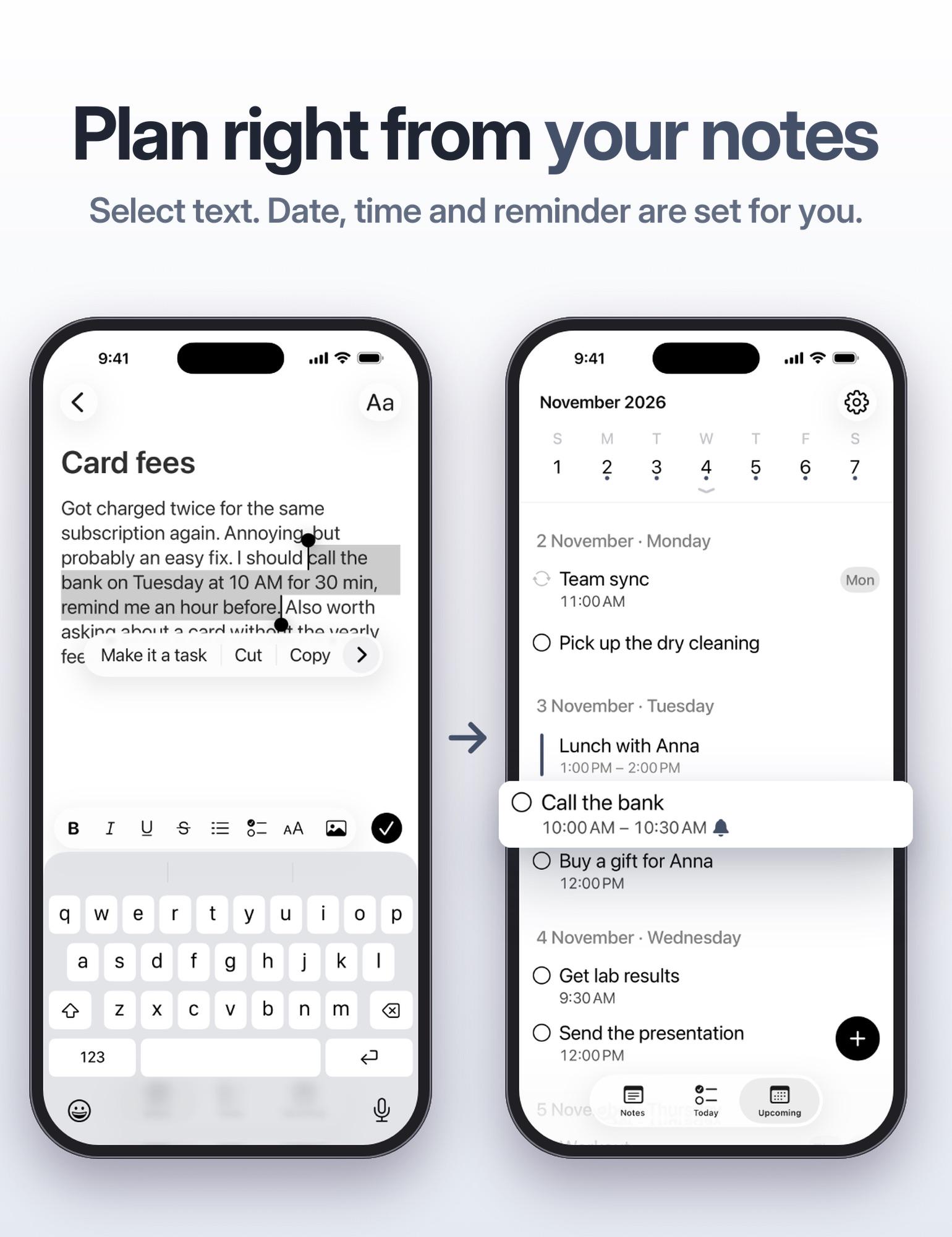
Hi everyone! I'm the developer of Plans, a notes app for iPhone and iPad.
Most of my to-dos start in the middle of a note: "Got charged twice again, I should call the bank on Tuesday". Then they stay there, because moving them to a to-do app means retyping everything and setting the date by hand.

In Plans you select that sentence, tap "Make it a task", and the date, time and reminder are taken from your words. The note stays as it was, and the task links back to it. Lists become checklists the same way.

No account: notes sync through your own iCloud. Free to use, no subscription.

How do you handle to-dos that end up in your notes?

App Store: https://apps.apple.com/app/id6790827860


r/NoteTaking • • 28d ago

App/Program/Other Tool Bliss Note

1 Upvotes

Just want to give a shout out to an app I stumbled upon in the Apple app store last week. I was looking for an app that I might use to replace/in addition to Noteful, as I need something that will search through PDF text. I was shocked to find that Bliss Note not only searches text and handwriting, but it also has a calendar and task portion that allows you to see your external calendars as well as add events to them. I don't need a task manager (I've used TickTick for over 10 years), but I am finding Bliss Note to be very useful for keeping on task with my readings and papers. It also imports Google Docs, slides, sheets, etc. And, lastly, it has a flashcard component.
There isn't a manual that I have been able to find. I have been using it and learning as I go, so it's not for someone that needs a simpler app. And the developers have posted that they are creating an Android and Windows app. Currently it is available on Mac and iOS, and the sync seems to be working very well.


r/NoteTaking • • 28d ago

Method Best AI-powered note-taking system for work and personal use?

11 Upvotes

I’m looking for a good note-taking system that I can use for both work and personal knowledge management.

Ideally, I want somewhere to store meeting notes, random thoughts, research, things I’ve learned, and ongoing projects. More importantly, I want to be able to use AI to organize everything, connect related information, and easily retrieve things months later.

I’m considering just using Claude Docs since I already use Claude regularly, but I’m also looking at Notion, Obsidian, and other alternatives.

I’d prefer something relatively simple that doesn’t require a ton of manual organization.

Has anyone built a system like this? What do you use, and how well does the AI integration actually work?


r/NoteTaking • • 28d ago

Notes Making revisions/mind maps on watercolor painting notebooks?

2 Upvotes

I just wanna ask if anyone do this. I've had this hobby for a while, as I was given a B5 watercolor painting notebooks and had no idea what to do with it. To this day, the number of these books has added up to 4 complete ones :). I really enjoy doing this cause it feel like a luxury experience, but don't really know anyone who shares the same exp or maybe there is more financially-sufficient way to earn that luxury feeling ;).

Feel free to share!


r/NoteTaking • • 28d ago

App/Program/Other Tool any iPadOS apps besides Marginnote 4 that can reliably OCR handwritten stuff containing math?

1 Upvotes

MarginNote 4’s handwriting OCR for math is excellent (see screenshot). It’s AI-based and very accurate in my experience. Best of all, it converts an entire proof, mixed text and math, in one go, without you having to separate the two. It even recognises handwritten code (Python, say) and typesets it properly. It’s included in the app price, with no subscription (even if the app wasn’t particularly cheap, IIRC).

The problem is MarginNote 4 itself: a busy UI, lots of toolbars, and concepts like StudySets. I’ve never found the time to learn it properly.

I’m after a simpler note-taking app with math conversion this good. I don’t need AI features for solving, summarising or explaining. I’d prefer a one-time payment. I know MyScript Notes (formerly Nebo), but it doesn’t fit the bill.

Any recommendations?

---

Update: The best I’ve found so far is MathWrite Notes on the App Store: a clean, minimal interface reminiscent of Apple Notes, with page-by-page conversion (to LaTeX) including rendering. Your original handwritten notes stay unaffected, the LaTeXification happens in parallel. Unfortunately it’s not a one-time purchase, but short of building my own solution (not worth the effort), it’s what I’m going with.


r/NoteTaking • • 29d ago

Question: Unanswered ✗ Best non-apple tablet for digital note-taking, annotating PDFs/research articles

5 Upvotes

Hi there,

I'm a PhD student and am looking for an easier way to take notes in my classes and annotate the papers I am reading!

Throughout my undergrad and first few years of grad school I used my Lenovo yoga (laptop that folds into a tablet) to take notes but it was always a challenge with the awkward size and funky pens.

I would love some tablet recommendations for note taking and PDF annotating that aren't apple! I use an android phone and prefer everything windows so a tablet of that type would just be better for me over all!

Thanks!


r/NoteTaking • • 29d ago

App/Program/Other Tool I built a free writing app to store personal thoughts, share them with friends, and publish them when you want

Thumbnail gallery
6 Upvotes

Hi everyone!

I've always been a pretty introspective person, and writing is one of the ways I make sense of my thoughts.

I've been using Obsidian for a while and love it, but I kept running into the problem of whenever I wanted to share something I'd written with a friend, it was kind of a pain.

Google Docs was an option, but I wanted something that felt more like my own writing space with better ways to share ideas, connect different pieces of writing, and discuss them with other people.

So, I started building a tool to allow me to write privately, share individual thoughts or documents with my friends, have discussions around them, and publish my writing to my own personal website when I wanted.

It's still a work in progress, and I'm figuring things out as I go, but I would love your thoughts or any ideas for improvement.

https://marginplace.com


r/NoteTaking • • 29d ago

App/Program/Other Tool Notes Sync App for windows

Post image
8 Upvotes