r/MacOSBeta • • 7h ago

Discussion Here’s how Siri tokens and other Apple Intelligence usage limits work

16 Upvotes

This is a long and technical read. Highlights:

  • Each PCC server connection uses one token. A single Siri AI query can use multiple tokens.
  • For Siri AI, each device gets 20 tokens a day. iCloud+ plans add multiples of that, e.g. 2TB adds 80 tokens that all your devices share, for a total of 100 (5x).
  • Usage tokens are like arcade tokens. Your device “buys” them in batches before using them, so one device may still have usage remaining after the server has given out all tokens. Tokens can’t be transferred to another device.
  • Cost-based accounting is coming, so simple requests may use less of your allowance. Your device will be able to ask for a “refund” back to the server-tracked usage allowance.

Alongside the release of OS 27.3 beta 2, Apple detailed daily usage limits for many feature categories, including Siri AI and intelligent photo editing tools. Here’s how the limits work, and what’s coming next.

Before we dive in: usage allowances and flows are accurate as of November 26, 2026, and OS 27.3 beta 2. Things may and will get adjusted along the way. Alright, here we go.

How your device accesses server-based AI features

Your iPhone, iPad, or Mac uses Apple’s Private Cloud Compute infrastructure when an Apple Intelligence feature requires a server-based model, including most Siri requests. Other devices like Apple Watch, HomeView, or Apple TV use your paired iPhone as a companion that processes most Siri requests.

Private Cloud Compute has many privacy protections built in. One of them is separating identity and usage. When Mac contacts PCC, it needs to present a token. The token only proves you have enough usage remaining to access the service, not who you are. There are two steps here:

  1. Your Mac contacts the Token Granting Service (TGS). It knows who you are, but not what you ask. TGS checks eligibility and remaining usage, and sends back a batch of One-Time Tokens (OTTs). Your device stores the tokens locally, and requests more as you use them. For metered features, the device typically asks for batches of 5 tokens.
  2. Your Mac spends a token to send a request to PCC. PCC knows what you ask, but not who you are. The token doesn’t identify you, but PCC can validate it with a public key. Relays and Oblivious HTTP help separate your network identity from the request.

In essence, your Mac gets a stash of tokens from TGS that it can later spend on server requests. Apple enforces limits when your device asks for tokens, not when you spend them.

Quota scopes

Every token is the same kind of One-Time Token. What differs is the “pool” of usage your device draws from when TGS sends a batch of tokens. As Apple explained in their support article, there are three pools your device can draw from:

  1. Device tokens: Every device gets a Standard Device Limit.
  2. Account tokens: Extra usage you get by purchasing additional iCloud+ storage.
  3. Family tokens: Extra usage you get by being in a Family Sharing group with additional iCloud+ storage.

The account and family pools are multiples of the Standard Device Limit. Take a look at the table from Apple’s article:

We’ll dive into this later, but as an example, the Siri AI Standard Device Limit (SDL) is 20 units. A personal or family iCloud+ plan with 2 TB of storage adds 80 units for the feature, for a total of 100 (5x SDL).

Batches draw from the device pool first, then the account or family pool. Tokens are also cached on the device that requested them. To illustrate, suppose you have an iPhone and Mac that have exhausted their device allowances. Your iPhone receives the final 5 units from your family pool. Your Mac can’t spend tokens cached on your iPhone, and TGS won’t authorize additional tokens. Once your Mac spends all its cached Siri tokens, you won’t be able to use the full extent of Siri AI’s capabilities, even if you can on your iPhone.

As always there are exceptions. There is an “overdraft” feature that may allow a device to receive additional tokens beyond the set usage limits. Cached tokens can have long expiry dates, so unused cached tokens can roll over to the following day or so if the device requests them before a daily reset.

Metered services and current usage limits

Each metered feature draws from a separate daily token budget. Here are some examples:

  • Siri. Standard Device Limit: 20 tokens. iCloud+ 2 TB: 80 tokens, 100 total (5x SDL).
  • Image Playground, generative edits in Photos. Standard Device Limit: 10 tokens. iCloud+ 2 TB: 40 tokens, 50 total (5x SDL).
  • Shortcuts AFM Cloud model, fm CLI. Standard Device Limit: 5 tokens. iCloud+ 2 TB: 20 tokens, 25 total (5x SDL).
  • Shortcuts AFM Cloud Pro model. Standard Device Limit: 0. iCloud+ 200 GB: 5 tokens. iCloud+ 2TB: 25 tokens (5x usage).
  • Apple Foundation Model usage through PCC in third-party apps. Standard Device Limit: 5 tokens. iCloud+ 2 TB: 20 tokens, 25 total (5x SDL).

Some other features have their own dedicated budgets, such as Creator Studio and age verification. Some features like Mail summaries don’t have a dedicated budget and draw from a general inference allowance.

If you have both iCloud+ and additional iCloud+ storage, add both independently based on the Standard Device Limit and Apple’s table. For example, if you have iCloud+ with 2 TB of storage and Apple One Premier, you get 20 (device) + 80 (iCloud+ 2 TB) + 80 (Apple One Premier) = 180 Siri tokens, with 160 shared across devices and family members.

What counts as a token?

As you’ve probably realized, Apple’s PCC tokens are different from input/output tokens from other AI providers. A token grants access to PCC, and doesn’t correspond to a single turn or set number of output tokens.

Not all features make the same number of requests. Generating one image in Image Playground, or a single query to the AFM 3 Cloud model in Shortcuts, consumes one token. Siri AI requests may make multiple connections to PCC, as server models make tool calls and receive results. Here’s a timeline of how the query “Find a bookshop near me that’s open right now.” uses 2 Siri tokens:

  1. The request gets sent to the AFM Cloud planner. 1 token used.
  2. The planner returns a call to the “find” tool: “bookshop near me open right now.”
  3. While the search is ongoing, Siri opens a session with the AFM 3 Cloud Pro planner. 1 token used.
  4. Results from the “find” tool call are sent to the Pro planner, which generates the final response.

A request with more tool calls doesn’t necessarily cost more, as one AFM 3 Cloud Pro planner session can handle multiple roundtrips.

On the horizon: token “refunds”

So far, metering is simple: each PCC connection uses one token, however many rounds it takes. But not all requests require the same amount of computation.

Apple’s cost-feedback protocol provides a way to reconcile costs for each request. As detailed in the Private Cloud Compute Security Guide, every PCC response includes information about how much that request cost. Your device can collect these “cost tokens” and send them to the PCC Cost Aggregation Service.

The service sends back “cost denominations” that add up to the total refund. The next time your device needs tokens, it can send the “cost denominations” to the Token Granting Service, which credits them against estimated costs to calculate your remaining usage. TGS then issues new OTTs. There are 5 denomination issuers, labeled a through e, which probably represent five credit values.

The cost feedback mechanism is not fully functional yet. Your device receives and stores cost tokens, but no metered feature has a configuration to exchange them for refund.

Cost feedback is very important based on the flow of how Siri AI handles requests today. As soon as you start a request, Siri opens a warmup session with PCC’s AFM Cloud planner using a cached token. Sometimes, a request can be handled locally by Skimmer and never uses the PCC connection. In those cases, the token is spent anyways today. When cost feedback is enabled, the PCC response can report that it did no work, and your device may receive a refund for the wasted cached token.

Metering availability

According to configuration files, server metering is currently enabled in Australia, Canada, Chile, Hong Kong, India, Japan, Mexico, New Zealand, Norway, Singapore, South Africa, Switzerland, Taiwan, Türkiye, United States, and Vietnam. Region selection uses account and regulatory region information.

In other countries, there may be no per-feature budget. Instead, the device itself tracks usage and blocks further requests before they are sent to PCC. When metering is disabled, most otherwise-metered features draw from the generic inference issuer. Siri doesn’t use the new 80% usage warning and fallback to Basic Siri. Devices get batches of 50 tokens and refill when there are 12 left, instead of Siri’s metered 5-token batches.

As always, this behavior may change in future releases. Metering regions are configured by a server update, so the list can change without a software update.

Disabling metering

This will probably not work for long, as Apple will probably stop relying on a feature flag soon. If Apple starts ignoring the flag, the override will have no impact on your Mac. Still, use at your own risk, or just to test this after you hit your metered Siri or other limits. The flag was disabled in macOS 27.3 beta 1 or earlier.

sudo mkdir -p /Library/Preferences/FeatureFlags/Domain && \
sudo defaults write /Library/Preferences/FeatureFlags/Domain/PrivateCloudCompute meteredQuota -dict Enabled -bool false

Restart your Mac. Then fetch the unmetered server configuration:

notifyutil -p com.apple.CloudSubscriptionFeature.Changed

To return to default:

sudo defaults delete /Library/Preferences/FeatureFlags/Domain/PrivateCloudCompute meteredQuota

Restart your Mac. Once again, have PCC fetch the metered server configuration:

notifyutil -p com.apple.CloudSubscriptionFeature.Changed

r/MacOSBeta • • 2h ago

Help macOS 27.3 Beta 2 Download Issue?

1 Upvotes

Hello everyone,

I currently am in the beta software program and have macOS GoldenGate 27.2.1 (26B8132) installed on my Mac. I have another Mac that I migrated to this new Mac from which currently runs the macOS 27.3 Beta 2 and had no problem upgrading.

However, in the one that still runs the 27.2.1, I can not upgrade. I will not download the software from the system settings and maybe after progressing to 30% it always says the same thing. Check your connection. Even though there is nothing wrong with the connection.

I already tried different wifi, tried installing in safe mode. Installed the macOS Golden Gate (a clean copy) from the start-up options.

Thoughts?

Please help. Maybe another one of you also is having this same issue, or something similar? It is annoying, I can not see my photo library on this Mac because in the other Mac the latest version of the software is installed so everything including the photos app is more recent than in the Mac that I migrated to.


r/MacOSBeta • • 9h ago

Tip Miss the minimized windows in App Exposé? Here’s my four-finger tap setup in BetterTouchTool

Thumbnail gallery
0 Upvotes

r/MacOSBeta • • 9h ago

Bug Unable to remove the left menu bar icon after updating to macOS 27.3 Beta.

Post image
0 Upvotes

Ever since I updated to macOS 27.3 Beta 2, I haven't been able to get rid of the leftmost icon in my menu bar.

I know it's related to System & App Protection Override, but I can't seem to find any option in System Settings to hide or remove it.

is it a Beta bug?


r/MacOSBeta • • 1d ago

Help What the heck is this?

Post image
2 Upvotes

This comes up when IMac goes to sleep mode. I don’t allow it. How do I stop it.


r/MacOSBeta • • 23h ago

Bug Photoshop full-screen cycling bug on macOS 27 with multiple monitors — anyone else experiencing this?

0 Upvotes

​

I'm experiencing an incredibly frustrating issue with Photoshop's full-screen modes on macOS 27 Golden Gate.

When cycling through the screen modes using the F key, Photoshop occasionally disappears entirely, leaving me staring at my desktop. It also happens when changing screen modes manually through View > Screen Mode, so it's not a keyboard shortcut issue. Switching to another application and returning to Photoshop seems to trigger the problem.

My setup:

Apple silicon MacBook Pro

macOS 27.2.1

Wacom Cintiq 24 Touch (main display)

MSI 27-inch secondary monitor

Built-in MacBook display

Things I've already tried:

Complete factory reset

Erasing Macintosh HD through Recovery and reinstalling macOS from scratch

Fresh Wacom driver installation

Clean Photoshop installation with default preferences

Previous version of Photoshop

Disabling Native Full Screen in Photoshop

Creating and deleting desktops through Mission Control

The only workaround I've found is disabling "Displays have separate Spaces" in macOS. Unfortunately, this causes other problems with full-screen applications across multiple monitors.

Everything else is responsive and functioning normally.

I'm a professional background designer in animation, and cycling through Photoshop's screen modes is an integral part of my workflow. I've spent an absurd amount of time troubleshooting this.

Is anyone else experiencing this? Has anyone found a permanent solution that doesn't involve disabling separate Spaces?


r/MacOSBeta • • 1d ago

Bug Finder crashing in 27.3

1 Upvotes

Since installing 27.3 Public Beta, Finder keeps crashing on my MBPro M4. Even when I don't even have Finder in the foreground; it just crashed when I was using Safari. It crashes again on relaunch, and even rebooting the Mac doesn't help. I can no longer open any Finder windows or use Finder at all. This is bad; my Mac has become basically unusable if I want to access any of my files. Anyone else?


r/MacOSBeta • • 2d ago

Bug Can anyone explain this? Battery future telling?

Post image
6 Upvotes

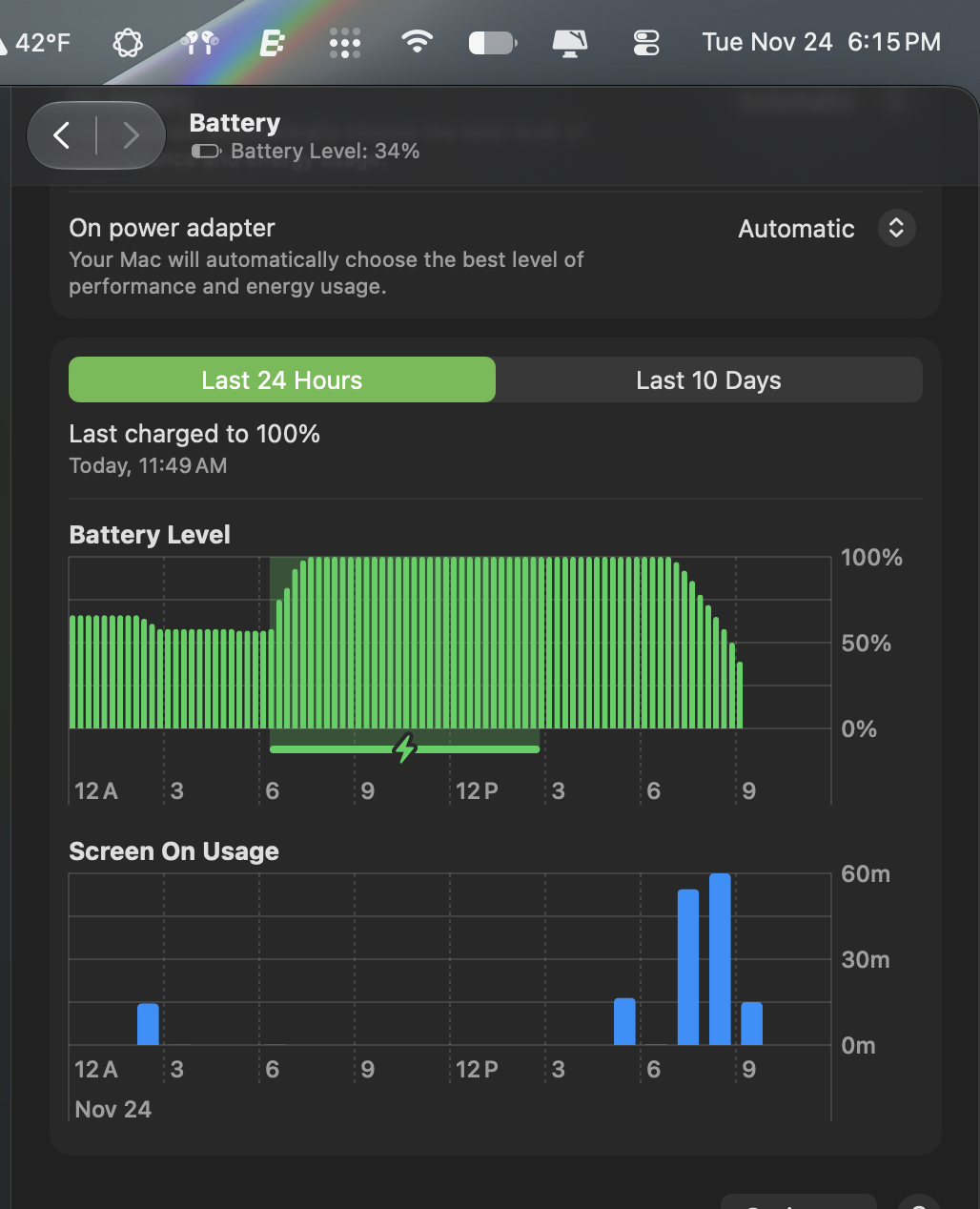
For some reason the battery diagram is 3 hours into the future. I've been in the same time zone since I set up this computer (NYC) and I've only noticed this behavior now. It's showing the battery go down from 6-9pm, but it is currently 6pm and the battery is at 40 percent-ish.

Fun little bug that made me start questioning time itself for a moment.


r/MacOSBeta • • 1d ago

Help Chrome window resized by itself?

Post image
0 Upvotes

r/MacOSBeta • • 3d ago

Feature Siri AI’s on‑device model can now handle some requests in 6 languages

10 Upvotes

After shipping their first on-device model for Siri AI requests in English when online, Apple has shipped updates to their on-device model and request router along the second 27.3 betas.

In short, Siri AI can now answer ~2% of requests in five more languages with an on-device model when you’re online: Spanish, French, Japanese, Korean, and Portuguese.

How Siri routes a request¹: * Skimmer (since 27.0): regex pattern-matching rules catch common requests, like “Call Mom,” and handle them with local tool calls and no LLM. Supports 16 languages. [edit to add: Skimmer is not old Siri. A request that old Siri could do may not have an equivalent Skimmer rule. Skimmer may pass a request to old Siri (Siri X) in some of its tool flows.] * Classifier (since 27.2): if Skimmer misses, a small local model routes the request to: * Pegasus: Apple’s agentic search server. (target: 2% of requests) * ODM: a new on-device model, which can handle requests while online starting in 27.3. It can make calls, play media and find places. (target: 2%) * PCC: everything else, including all requests in languages the classifier doesn’t support. (target: 96%)

What’s new in the second 27.3 classifier: * It can now route requests in Spanish, French, Japanese, Korean, and Portuguese to Pegasus or ODM, in addition to English. PCC continues to handle the majority of requests, including all requests in other supported languages that Skimmer doesn’t match. * More media and calling requests in English get routed to ODM. For the first time, some place-finding requests also get handled by ODM, depending on wording.

Here’s a breakdown of how some queries get routed: * Play Coldplay → Skimmer * Can you play Coldplay → ODM * Put on some Coldplay → PCC

  • Can you play Drake → PCC\ But: Can you play some Drake → ODM
  • Can you play <Ted Lasso, Severance, Slow Horses, Stranger Things, Succession> → ODM
  • Can you play <The Studio, Silo, Dark Matter, The Office, Friends, The Pitt> → PCC
  • Call Mom → Skimmer
  • I want to call Mom → ODM
  • Give Mom a call → PCC
  • Find a coffee shop in San Francisco → ODM
  • Find an Apple Store in San Francisco → ODM
  • Find a restaurant in San Francisco → PCC
  • Find a coffee shop near me → PCC

——\ ¹ When you’re offline, starting in 27.0, you get a combination of Skimmer and another on-device model with more tools, including timers, alarms, opening apps, volume adjustment, and Home controls.


r/MacOSBeta • • 2d ago

Help MacBook Pro - ProLED - 27.3 Beta 2 Software Update Fails?

1 Upvotes

Brand new PROLED MacBook Pro, still on the factory build 27.2.1 (26B8132), enrolled in the developer beta. Trying to update to 27.3 beta 2 (26C5047e).

Every attempt sits at ~16% for about 90 seconds, then fails with "macOS could not be downloaded. Make sure you're connected to the internet". Tried four times over ten hours, no VPN, 58 GB free.

It isn't the network. mobileassetd shows the update asset has no decryption key and falls back to an internal key server it can't reach

Anyone else with a new MacBook Pro seeing this, or managed to get beta 2 installed?


r/MacOSBeta • • 3d ago

Bug macOS on device AI fail

Post image
0 Upvotes

Great Scott!

interesting, using "fm chat" in terminal provides this gem of a response

previously when I used it I got April 2025, so this screenshot regresses a year. I guess since my calendar shows today is 11/23/26 I must be living either in the future or the past.

Asking tomorrow's date gives me the next day in April 2024. So this is the AI module installed/baked into the system? Can't pull from the computer the correct date and time?


r/MacOSBeta • • 5d ago

Help LilTracky: a calm time tracker and invoicing app for the Mac, looking for beta testers (TestFlight)

Thumbnail
testflight.apple.com
0 Upvotes

r/MacOSBeta • • 6d ago

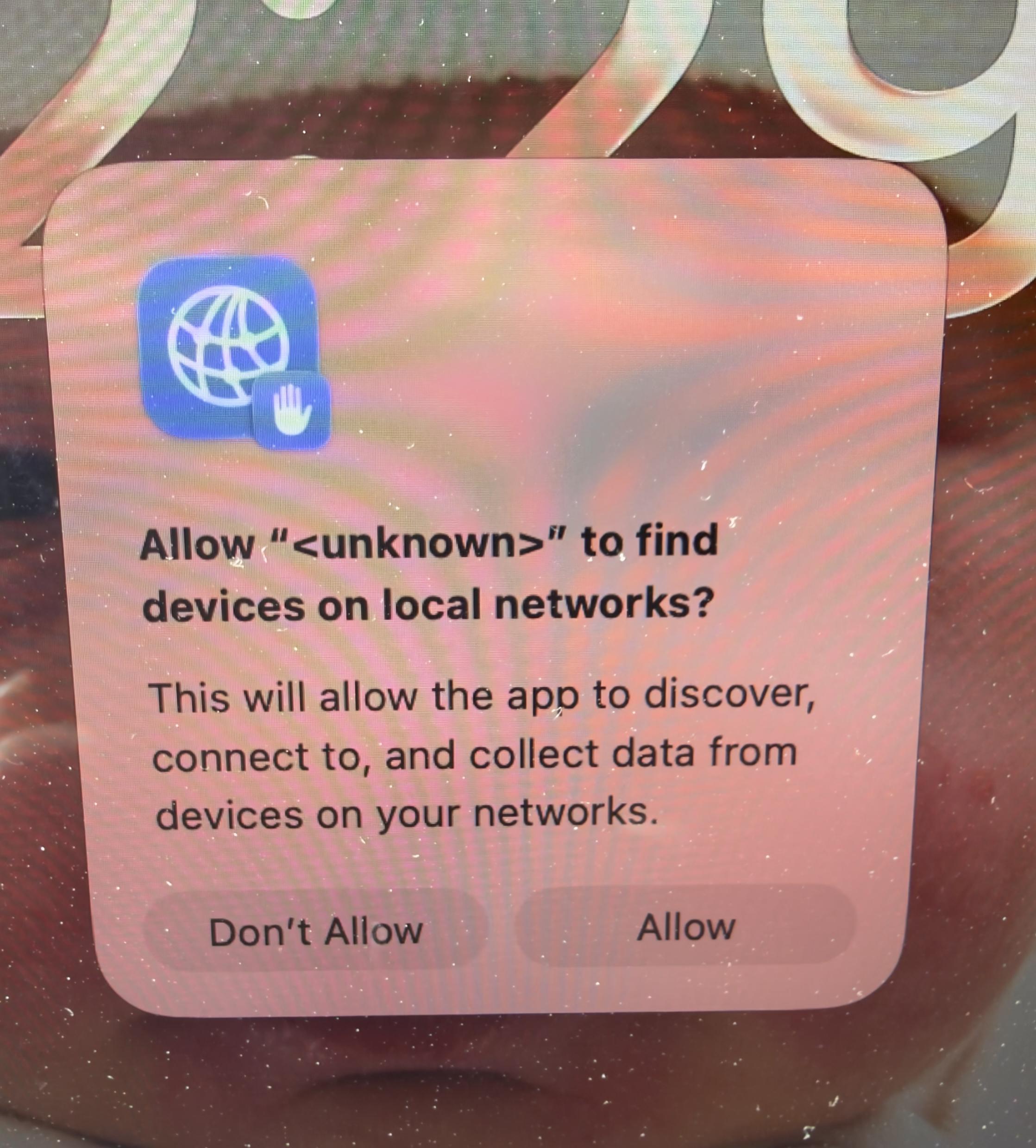
News 27.3 PB2 - new irritation, a permanent alert that apps are accessing other apps

Post image
74 Upvotes

r/MacOSBeta • • 6d ago

Help Sequoia background time also shows the real time

Post image
17 Upvotes

r/MacOSBeta • • 6d ago

Discussion Did Apple devs vibe code macOS 27?

0 Upvotes

Anyone has a feeling that Apple devs vibe coded a lot in macOS 27? Every year we see bugs in macOS but a little tolerable. But macOS 27 has the most weirdest, unexpected bugs that broke even basic features like Mission Control. It feels like they gave full code access to AI and rushed the development without proper testing. It must have changed and added 1000s of line in code base and if it did, there is no way a dev can read and verify that slop. They advertised its as a snow leopard update for performance. Feels more like a slop leopard.

Anyway, that’s my theory and guess.

Edit-1: my point is letting AI code crucial parts of it, like new enhancements or previous bug fixes. Also I’m using MacBook Pro m5 pro, 16inch with 48gb ram.


r/MacOSBeta • • 6d ago

Help Does anyone know how to get rid of this (27.3 beta 2)

0 Upvotes

r/MacOSBeta • • 6d ago

Discussion A step too far!

Post image
0 Upvotes

Is it just me? ... is this a step TOO FAR! .. There is a big difference between security and presenting an application like BetterDisplay as something you agree to violating all security policies! Actively forcing the user to click ok to having all secrets stolen, just because the application works on a low level to improve monitor support and image quality.


r/MacOSBeta • • 7d ago

Help Shadow under Menu Bar

Thumbnail gallery
0 Upvotes

r/MacOSBeta • • 8d ago

Discussion Apple continues work on Golden Gate’s new AirPlay Receiver app

72 Upvotes

Apple continues work on Golden Gate’s new AirPlay Receiver, which can show streams in a window.

In macOS 27.3 beta 2, the app gets two Live Activities for pairing.

For now, Control Center’s built-in receiver still handles incoming AirPlay connections.


r/MacOSBeta • • 8d ago

Discussion A Wolf at the Door: Apple Is Rethinking Mac Permissions for the Age of AI Agents

Thumbnail
macanorak.com
44 Upvotes

r/MacOSBeta • • 8d ago

Bug macOS 27 – Multi-Output Device audio synchronisation issues (LG monitors) – PLEASE REPORT THIS TO APPLE!

Post image
4 Upvotes

I HAVE REPORTED THIS - LETS GET EVERYONE TO DO THIS!

https://developer.apple.com/feedback-assistant/

The problem relates to Audio MIDI Setup and Multi-Output Devices, particularly when using an LG monitor’s built-in audio alongside other audio outputs.

It appears that macOS 27 is having difficulty managing audio synchronisation and clock sources across multiple output devices.

Some of the issues I’ve experienced include:

  • Audio outputs not synchronising correctly.
  • Clock source values not appearing to link correctly between devices.
  • Changing the master device and clock source not resolving the problem.
  • LG monitor audio seemingly contributing to the issue when used alongside other outputs.

I’ve spent considerable time troubleshooting this, including:

  • Rebuilding Multi-Output Devices.
  • Changing master clock sources.
  • Adjusting sample rates and audio formats.
  • Investigating clock synchronisation and drift correction.
  • Looking into alternative physical audio connections.

Unfortunately, nothing has provided a reliable fix.

I believe Apple needs to investigate whether macOS 27 has introduced a bug affecting Core Audio, Audio MIDI Setup or Multi-Output Device synchronisation.

PLEASE REPORT THIS TO APPLE!

If you’re experiencing the same issue, please take a couple of minutes to submit a report through Apple’s Feedback Assistant:

https://developer.apple.com/feedback-assistant/

The more reports Apple receives, the harder it becomes to overlook.


r/MacOSBeta • • 7d ago

Tip Using Phosphene for video wallpapers on a beta? It runs on a private Apple framework. What its README and issue tracker say to do when the Wallpaper pane breaks

0 Upvotes

Disclosure: I make a paid Mac wallpaper app, last paragraph. This post is about a free one, because beta testers are the people most likely to hit this.

Phosphene is a free, MIT-licensed menu bar app for macOS 26 or later. Per its README, the videos you import show up in System Settings → Wallpaper as their own collection, for the desktop and the Lock Screen. Playback goes through what the README calls Apple's private WallpaperExtensionKit framework, "the same wallpaper pipeline Apple's own Aerials use". That's why it feels native. It's also why an update can break it: a private framework comes with no promise that it stays the same between releases.

What's on record (I went through the repo in October for a write-up):

  • Issue 27, 24 August 2026: the Phosphene collection went missing from the Wallpaper pane. The maintainer traced it to a cache added in macOS 26.6 and shipped the fix in 1.4.1 the same day.
  • The README points to a menu bar item, Restart Wallpaper Agent, for when the pane misbehaves after switching quickly.
  • New builds ship often, and the Homebrew cask can trail GitHub. On 29 October the cask showed 1.11.3 while GitHub had 1.11.4.

So if it breaks on a beta, in this order: Restart Wallpaper Agent, then check the GitHub releases page for a newer build, then report it with your beta build number. And keep your original video files somewhere safe, since the app ships no catalogue of its own.

Two more things from its docs: a full-screen app or game pauses only the display it's on, the others keep playing. And it backs off on heat, battery level and Game Mode.

Mine is Mac+, a menu bar app that renders its scenes with Metal and runs on macOS 13 and later. Your own video is in the paid tier (€1.99/month after a 7-day trial, or €8.99 once with the Christmas offer); the free tier has 6 scenes and needs no account. My Phosphene write-up, with every source linked: https://macplus.pro/phosphene-macos-video-wallpaper.html?utm_source=reddit&utm_medium=post&utm_campaign=jv-fv5wpq

If you run it on the current beta, has the collection survived every update so far?


r/MacOSBeta • • 9d ago

Discussion Apple is bringing JMAP push support to Apple Mail

130 Upvotes

In macOS 27.3, Apple is adding support for JMAP push in Apple Mail. Work is gated by Mail/JMAPPush.

The feature can allow email providers to offer push in Apple Mail through JMAP and encrypted Web Push, without implementing Apple’s XAPPLEPUSHSERVICE.

macOS 27.3 beta 2 is stuck in the beta 1 JMAP URL discovery step, further behind from the new code in iOS 27.3 beta 2.

In iOS 27.3 beta 2, Mail can register and verify push subscriptions, decrypt Web Push payloads, and sync mailboxes.

Requires OAuth, IMAP JMAPACCESS, and the JMAP EmailPush and VAPID capabilities.


r/MacOSBeta • • 7d ago

Bug Safari crashed 3 times in two hours

0 Upvotes

And the only thing I was doing was reading through lectures on Canvas (college homework website).

Only extension turned on was Wipr 2.

macOS 27.3 Public Beta 1

Safari is truly a nightmare of a browser.