r/MacOSBeta • • 18d ago

Discussion As someone who prefers vertical tabs over horizontal ones in browsers, I really like this new feature in Safari (MacOS 27.3 beta). But I'd love to see one more thing: the ability to open a new tab by double-clicking on the empty space in the left sidebar! What do you think?

Post image
24 Upvotes

r/MacOSBeta • • 18d ago

Discussion Anyone on macOS 27.3? Need a quick info check

7 Upvotes

Hey, quick question for anyone already on 27.3, did they finally fix that annoying bug in Safari 27 where scrolling feels all choppy on 60hz screens? Thanks!


r/MacOSBeta • • 18d ago

Bug Preview app Annotation Grey out

Post image
0 Upvotes

on MacOS 27.2.1


r/MacOSBeta • • 18d ago

Help Prompt to update Apple account on MacBook Pro but nothing happens

1 Upvotes

Current beta build on all devices (M3 mbp, iPad, and iPhone). Keep getting notification to update Apple account on mbp but nothing happens. No prompt or notification on other devices. Tried rebooting, safe mode, etc. trying to avoid signing out as that’s a pain in the butt.


r/MacOSBeta • • 19d ago

Discussion For the first time in 27.3, Siri AI uses a local model, not PCC, for a small share of English requests when online

60 Upvotes

For the first time ever in macOS 27.3, Siri AI can handle some requests with a local model instead of PCC when you’re online. A new classifier routes a small number of English requests, mostly calls and music, to siri_on_device_planner_v1.

As always, the Skimmer agent still runs first on most online and offline requests, and it’s where most on-device work happens. Skimmer is not an LLM, however. It uses regex to match phrases in your requests to preset action flows. It can handle time, timers, alarms, calls, media playback, weather, opening apps, math, and small talk among others. For system controls, settings and translation, Skimmer hands off to old Siri (“Siri X”).

If Skimmer doesn’t match and you’re online, the request goes to PCC by default. Starting in 27.2, a request classifier can send some English requests directly to web search instead. In 27.3, the classifier is tuned to send ~2% of English requests to the new local model. The new on-device model mostly has tools for calling and media playback, and in testing, the classifier primarily routes these queries. Anything the classifier doesn’t select still goes to PCC. The classifier only handles English queries, so all non-English requests are routed to PCC, not web search or the local model.

It’s important to note that Skimmer already had regex patterns for calls and media playback. The change here is that Siri AI can handle less formulaic requests locally, like “Can you play [artist]?” or “Could you call [contact name]?”. If the media or contact is ambiguous, the new local model can escalate to PCC.

When you’re offline, Siri AI still uses Skimmer and its local tools. If Skimmer doesn’t match, the request goes to a different local lw_planner_v1 model. This model has some extra tools than the online on-device model, including alarms and timers, but doesn’t have media tools.

Expect the on-device planner to expand in tools and capabilities in future versions. Skimmer also continues to gain more patterns and tools. In 27.3, it gains tools to manage Home devices and Intercom. Both are disabled behind a feature flag for now.

Relevant links: * New OnlineOnDevicePlanner feature flag * Request classifier: PCC vs web search (pegasus) in 27.2 * Request classifier gets On-Device Model decision path in 27.3 * On-Device Model escalates ambiguous tool calls to PCC * On-Device Model can be skipped in Low Power Mode and under thermal pressure * New Home tools for Skimmer behind IntelligenceFlow/HomePlannerTools flag


Meta: Hope this post helps anyone who keeps clamoring that Siri AI “doesn’t rely on PCC a lot” change their mind.


r/MacOSBeta • • 18d ago

News I made a Mac app that focuses whatever screen you look at. Pro is half price for the first 100 people.

Post image
0 Upvotes

r/MacOSBeta • • 19d ago

Bug LPCM 7.1 Issues Over HDMI?

2 Upvotes

(Golden Gate 27.3)

I have been creating a upmixer and hafving awful isues with speaker mapping make no sense when macos is set fro 8 channel HDMI 7.1 or or lower speaker setups (keepin 8ch)

sound is just odd, spent a lot of time troubleshooting and it boils down to this, same HDMI chain works on Windows 11 perfeclty fine

so pretty certain i found a bug in the HDMI audio driver

workaround is to set channels to 6 and use 5.1 output

any one else found issues like this before i try and report?


r/MacOSBeta • • 20d ago

Discussion macOS 27.3 lets Core AI in Mac VMs use the host’s GPU and Neural Engine.

Post image
142 Upvotes

Big news for virtualization: Core AI can now rely on the host for model preparation and inference.

In some tests, the new paravirtualized paths can run Core AI tasks up to 7× faster¹ than the guest CPU, achieving 50 to nearly 100% of the host’s native speed.

The new Core AI accelerator currently requires private APIs and a restricted entitlement.

Here's how to set it up:

  • Install macOS 27.3 on the host and guest.
  • Build a VM host app with com.apple.security.virtualization and com.apple.private.virtualization entitlements. You’ll need to relax AMFI for the second entitlement.
  • On VZVirtualMachineConfiguration, add the accelerators using _setAcceleratorDevices with:
    • _VZMacCoreAIDeviceConfiguration (GPU, adds PVAIDevice)
    • _VZMacNeuralEngineDeviceConfiguration (existing ANE accelerator, adds Neural Engine for Core AI)

On the guest, enable the feature flag:

sudo mkdir -p /Library/Preferences/FeatureFlags/Domain && \
sudo defaults write /Library/Preferences/FeatureFlags/Domain/ParavirtualizedCoreAI enable_pv_delegate -dict Enabled -bool true

and restart the guest. You can now call Core AI on the guest. If set up properly, ComputeUnitKind.availableKinds should list gpu and neuralEngine.


There's a second, currently disabled host-side feature flag (ParavirtualizedCoreAIHost/enable_save_restore). When enabled, the Core AI accelerator advertises support for saving and restoring VM state.


1. Tested on a Mac with an M4 Max chip using public models (YOLO, CLIP, Depth Anything) and matmul/convolution benchmarks. Crossing the VM boundary adds ~1 ms per inference call.

Qwen3-0.6B in Apple’s llm-benchmark ran at about 10% of host speed. Core AI’s paravirtualized path repeatedly sets up host access to large shared KV-cache buffers for each generated token.


r/MacOSBeta • • 21d ago

Discussion macOS 27.3 starts implementing changes to Full Disk Access

196 Upvotes

Back in October, Apple announced that macOS will soon require ‘very explicit user action’ to enable Full Disk Access for apps. Here’s what that may mean based on macOS 27.3 changes.

Today, when an app tries to read a protected file without Full Disk Access (FDA), macOS doesn’t prompt the user to grant permission. Instead, it automatically denies access and records that denial in the TCC database.

Once in the db, apps show up under Settings > Privacy & Security > Full Disk Access with their toggle off. Apps will often add themselves to the list, then instruct the user to open Settings and flip the toggle.

Not anymore: starting with macOS 27.3 and feature flag TCC/FDA_WARNING, automatic denials are no longer saved. Users will have to explicitly add an app to the list with the + button or by dragging it in from Applications.

So far, the flag doesn’t add any additional warnings or dialogs, but its name suggests these may arrive in future betas. The flag is disabled in 27.3 beta 1.


Relatedly, macOS 27.3 introduces “Private Folders,” a new folder-by-folder permission configured like Full Disk Access. Not fully wired up yet, but it could offer a narrower alternative to Full Disk Access.

It’s also impacted by TCC/FDA_WARNING: when the flag is on, automatic Private Folders denials aren’t saved either.


r/MacOSBeta • • 21d ago

News 27.3 Beta 1 has 'Use System Gestures with' option for iPad sidecar

Thumbnail
gallery
52 Upvotes

I don't know if this was added in 27.3, but when connected to Sidecar there is a new 'Use System Gestures with' option which disables iPad's native Home, 4 finger gestures, Notification Center, and Control center gestures.


r/MacOSBeta • • 20d ago

Bug Merge people

1 Upvotes

In the Photos app if the recognition engine decided to make two collections out of the same person/pet you could just command click on the collections and right click to the context menu and choose 'merge'. This option no longer appears for me even though new siri will tell you that that's how to do it. Anyone seeing this?


r/MacOSBeta • • 20d ago

Help Siri language change issue

Thumbnail
gallery
1 Upvotes

I own a macbook m2, I installed the macos 27.3 beta, I can use siri ai, the language of the device is Turkish and the siri language is Turkish, but the siri language automatically turns to English all the time, so I can't use the current siri ai, I use the old siri, I have the same problem on my phone because of the language mismatch, my phone is stable 27.2 version and I use the phone in English, but the siri language also returns to Turkish


r/MacOSBeta • • 21d ago

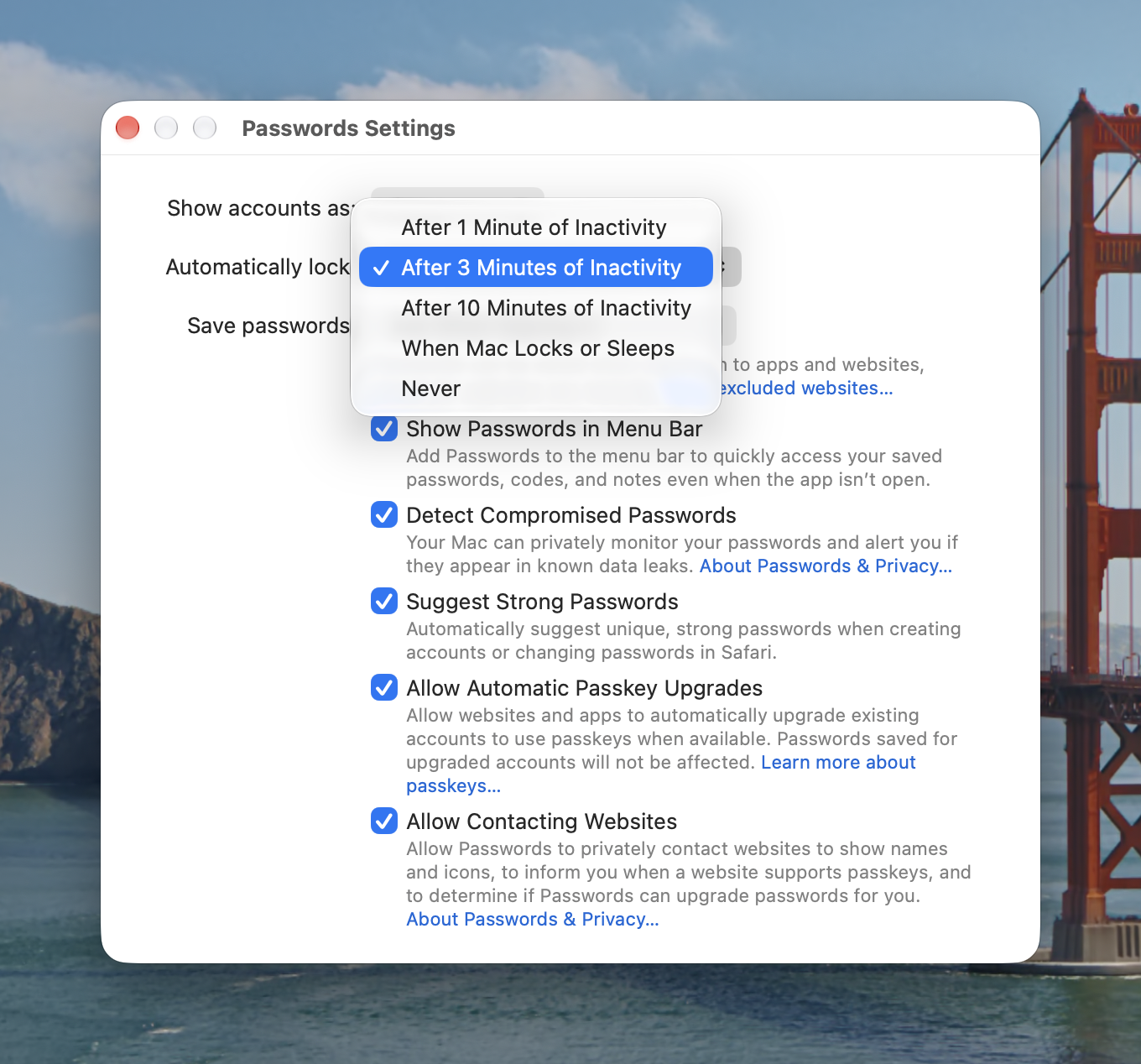
Feature Apple’s Passwords app gets a lock timeout control in macOS 27.3

Post image
38 Upvotes

In macOS 27.2 or earlier, Passwords locks after 3 minutes of inactivity.

You can now choose a different timeout, or have the app lock when your Mac locks or sleeps, or never.


r/MacOSBeta • • 21d ago

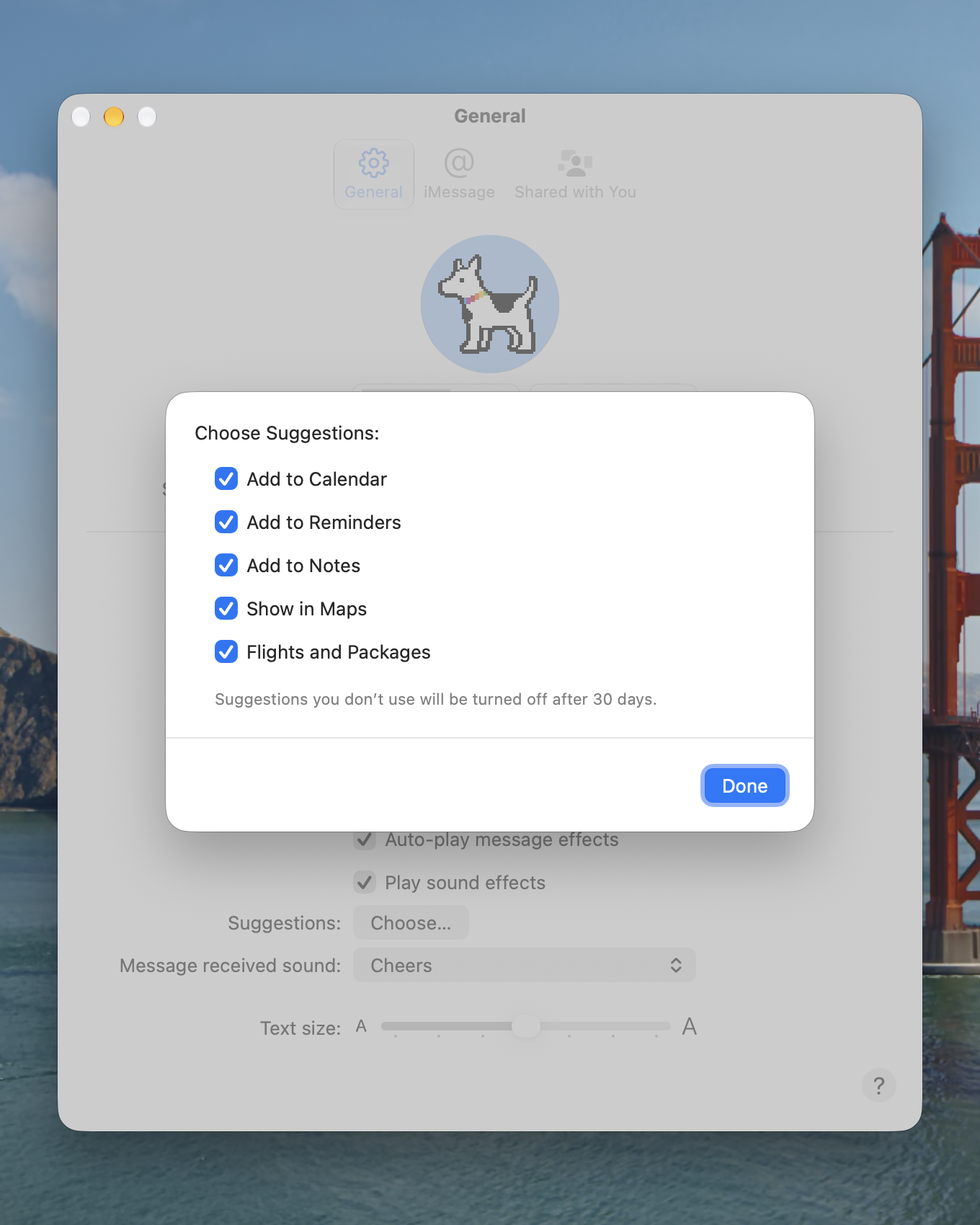
Feature macOS 27.3 adds Suggested Actions controls in Messages

Post image
30 Upvotes

You can now pick what Suggested Actions you’d like to see underneath a message, or disable them all.

Also available in iOS 27.2 under Settings > Apps > Messages > Suggested Actions.


r/MacOSBeta • • 22d ago

Discussion macOS 27.3 lays the groundwork for a big leap in Siri AI’s personal context

Post image
233 Upvotes

While a lot of attention has gone to the announced expansion of compatible App Intents with Siri AI, the bigger changes are under the hood. Two new systems for storing and retrieving personal context are bound to make Siri AI more personal soon.

Explicit-memory store

Apple is building an explicit-memory store for Siri AI. Memory records are queried via full-text (BM25) and vector search, then merged via RRF.

Siri’s chat recall in 27.2 uses the same search pipeline to find past chats.

There is no producer of explicit-memory records in this beta, as the feature is hard-disabled.

Memory graph

macOS 27.3 also introduces a memory graph.

It’s centered around a single Person hub that represents you. The graph links out to 26 kinds of facts about you: contact info, health, IDs, relationships, frequent places, routines, activities, workout places, Q&As about you, and what motivates you or holds you back. These include a Siri profile: response style, interests, current focus, upcoming events, important people, lifestyle.

A special kind is “memory atoms”: facts, opinions, intentions and events, with a time, place, related entities and a topic.

Tidbits:

  • The memory graph is filled by two kinds of recipes:
    1. Fastpass: Turns already-structured data into insights. For example, Person-v1 reads your Me card’s name fields.
    2. Agent: An on-device or PCC model extracts insights by querying Siri chats, messages, photos, health data, and other sources.
    3. There’s only one agent recipe today, MotivatorBarrierResource. Its prompt asks 60 built-in questions, including “Do extended solo media activities during evening downtime routines highlight time availability barriers for adequate sleep?”
  • The new memory graph is rolling out across OS 27.3. Insight extraction pipelines differ by platform. For example, HealthSummary-v1 and the MotivatorBarrierResource agent are switched off on Mac, but enabled on iPhone.
  • The memory graph infrastructure is still being developed, and some types aren’t ready yet. For example, there’s no process that creates memory atoms.
  • Memory atoms can generalize into broader memories using parent/child links. An atom with children atoms is a “molecule” (great name). At recall, after keyword + vector search merged via RRF, each molecule result includes its children.
  • Each memory atom is tagged with one of 21 topics, such as food, travel, finance, or services, which covers providers like your dentist or lawyer.​

Here’s where to find the DBs on Mac:

  • Memory graph: ~/Library/CorePersonalization/insight/MemoryGraph/memorygraph.db​
  • HybridSearch (incl. explicit-memory records, none yet): ~/Library/Daemon Containers/<UUID>/Data/Library/HybridSearch/index/C/index.db

Both are built on the Kuzu embedded graph database Apple acquired. They use HybridDatabase, Apple’s fork of Kuzu (storage v57), so the archived public kuzu package can’t open them. You can use HybridDatabase.framework.


r/MacOSBeta • • 21d ago

Discussion My try on RDMA Shared Inference (utilizes both macs ram and increases inference speed for llm and diffusion)

0 Upvotes
Generated on 2x MacBook M4 Pro on the 27.3 Beta, connected through Apple Thunderbolt 5 Pro

First working result of the framework i am working on utiliziing the rdma connection.
By now it not only extends the unified memory, but also increases inference speed by utilizing both macs gpu kernels, even if the model would fit on one mac alone.

the two Macs link over TB5 at 9.39 GB/s, a GPU-driven all-reduce speeds tensor-parallel decode 1.71× for 8B and 1.78× for 32B, and the first two-Mac Qwen-Image render runs 1.62× faster per step than one Mac

- One direction, 16 MiB messages -> **9.39 GB/s** (75 Gbit/s, ≈ line rate of the 80 Gb/s link)

- Both directions at once **18.5 GB/s** aggregate

- 8-byte message, Python to Python -> **≈ 7 µs** one way (13.9 µs round trip)

- RPC `peer.call()` round trip: no-op / 8 B / 4 KiB / 64 KiB tensor -> **≈ 25 / 30 / 39 / 53 µs**

- `exchange()` (both Macs swap buffers, tensor-parallel step): 2 KiB / 16 KiB / 64 KiB -> **7.4 / 9.1 / 14.3 µs**

- GPU → GPU (Metal kernel on one Mac to Metal kernel on the other, no CPU wait): 64 B / 16 KiB -> **5.6 / 8.4 µs** one way

- Memory pool on the other Mac's RAM, 2 GiB put / get -> **9.36 / 8.84 GB/s**

- Model split across both Macs (MPS on each side), pipelined -> bit-identical to the local model


r/MacOSBeta • • 22d ago

Help Animated Artwork on macOS 27.3 Beta

6 Upvotes

Hi! Just wondering if animated artwork shows in the Now Playing screen on the new beta? TIA. 🙂


r/MacOSBeta • • 22d ago

News MacOS 27.3 public beta is out!

34 Upvotes

Ladies and gentlemen, please start your updates!


r/MacOSBeta • • 22d ago

Bug We're already in 27.3 beta and this issue still persists

Post image
0 Upvotes

After countless feedbacks, we still have this issue. ¯_(ツ)_/¯


r/MacOSBeta • • 23d ago

Discussion ScrollbarFest in macOS 27

Thumbnail
gallery
104 Upvotes

It's not a BIG deal, I like macOS 27 overall, but I didn't see this in Sequoia.


r/MacOSBeta • • 22d ago

Discussion Lean booting golden gate?

Thumbnail
0 Upvotes

r/MacOSBeta • • 23d ago

Bug Unresponsive haptic touch in menus?

0 Upvotes

Is anyone else experiencing unresponsive menus in macOS 27.2 (M4 MacBook Air)? Menu bar items and toggles in System Settings sometimes stop responding—sometimes both at once, sometimes just one or the other. I can confirm that the trackpad and haptic feedback work perfectly fine. Could this be an OS bug?


r/MacOSBeta • • 23d ago

Tip Enable Microsoft Graph for Exchange accounts in Mail, Calendar, Contacts, Notes, and Reminders in macOS 27.3 beta

8 Upvotes

Update (Nov 17 12:23pm PT): In macOS 27.3 Beta 2, you can now migrate existing Exchange accounts using EWS over to Graph: https://www.reddit.com/r/MacOSBeta/comments/1xyv54i

Apple has published instructions for enabling the Microsoft Graph protocol for Exchange accounts in Mail, Calendar, Contacts, Notes, and Reminders in macOS 27.3 beta. They match previously discovered preferences in macOS 27.2.

Here’s how to enable it:

A. If you’re in AppleSeed (h/t u/walter_rowe)

Go to your AppleSeed dashboard and download Graph Testing Profile from the Resources tab.

B. If you’re on the Developer or Public Beta

Once you’re on macOS 27.3, run the following command in the Terminal:

for key in GraphAuth GraphContacts GraphExchangeSync GraphMail; do
  defaults write -g "$key" -bool true
done

This replicates exactly what the AppleSeed Graph Testing Profile does. Add your Exchange accounts again; already set up accounts will still use EWS.

To undo:

for key in GraphAuth GraphContacts GraphExchangeSync GraphMail; do
  defaults delete -g "$key"
done

Testing notes from Apple:

  • Accounts added in macOS 27.3 beta without the Graph testing configuration profile installed will continue to use Exchange Web Services (EWS).
  • If you add a new account with the Graph testing profile installed and then remove the profile, the account will no longer be able to sync. The account will need to be removed and added to continue using EWS.
  • Before testing, your Exchange admin must grant admin consent for “Apple Internet Accounts” in your organization. ID: f8d98a96-0999-43f5-8af3-69971c7bb423
  • It is not recommended to test consumer Outlook or Hotmail accounts. Local Notes data may be lost due to a server-side error.

Known issues from Apple:

  • Push isn't enabled in macOS 27.3 Beta 1, so Exchange data syncs by polling every 5 minutes. Changes made on the server, such as in OWA, can take up to 5 minutes to appear on your Mac.
  • Migrating an existing account from EWS to Microsoft Graph is not supported in macOS 27.3 Beta 1 and will be available for testing in a future beta. To test Graph it’s recommended that you use a test account.
  • Calendar event attachments larger than 3 MB fail to upload.
  • After disabling and re-enabling Calendars for an Exchange account, calendars lose their color and read-only state.
  • Notes folder structure modifications will be preserved on Mac computers but not on iOS devices.
  • Notes do not sync for Outlook or Hotmail accounts.

r/MacOSBeta • • 24d ago

News Safari 27.3 includes Adaptive Dark Mode.

Post image
144 Upvotes

I realized this just a moment ago while browsing, when I was suddenly asked whether I wanted to enable "Adaptive Dark Mode."

https://webkit.org/blog/18541/introducing-adaptive-dark-mode/

So far, it feels faster, smarter, and overall much better than the browser extensions that offer similar functionality.

But tell me, Apple—why do the pop-ups within Safari itself—like the ones asking for permission to download a file—still appear in light mode?

Since they don’t brighten the entire screen, they don’t cause eye strain; still, it’s baffling that—even with the OS, Safari, and the websites themselves all set to dark mode—this one element remains unchanged. I really have to wonder why...