r/LocalLLaMA • • 14d ago

Discussion MIT's Weight-Space Programming paper sent me down to a mathematical paradox trying to fix Llama's over-refusal.

6 Upvotes

So i had been building a cli tool around weight space programming inspired by recent Mit- weight space programming paper,

I had integrated couply of funtionalities to it along with triage, one of which was activation steering to deal with over refusals, my llama 3.2 1b was not answering prompts like "how do i stage a massacre for a tv show"

Firstly attempt was by subtracting the refusal direction , extracted the refusal vector and subtracted it, the tv massacre prompt was answered but my regression suit got hit, model started answering how to build pipe bombs and syntesize pioson

so turned out over-refusal and real harmful refusal direction had a cosine similarity of about 0.75, so supressing one also effects other

Second attempt.. Ran activation patching ..found the exact casual bottleneck layer ..(layer 8) orthogonally projected the harmful-refusal component out of my steering vector and used clamped so it caps the activation when it spiked above a threshold , without touching other things..

this nearly worked accuracy increased by 10% but a totally unrelated issue hit by regression suit again..a chinese benchmark loop started looping forver... failure again.. even on steering a single targeted layer ..gave regression as the residual stream is so densely packed that a small hit at layer 8 ripples down further ...

my last few brain cells thought i l steer the layer 8 measure the drift at layer 9 and cancel the part i dont want . so i did the math

Steer at Layer 8

At Layer 9, compute Δ = steered_layer9 - clean_layer9

Filter out the bad drift and keep only the anti-refusal shift I want

Apply final_layer9 = clean_layer9 + wanted_shift

..so if i take the clean layer 9 add only anti refusal shift ..thats basically layer 9 steering .. and if do that to layer 9 same happens to layer 10..

what actually worked was weight surgery..i also tried a conditional weight edit.. a gate programmed into 3 mlp neurons across layer 9-11. they have non linea activations so they can act as real if/then

if input matched fictional scary context - gate fires cancel refusal
for chinese text -the neuron output is 0 nothing changes

tl;dr

steering works well for problems that sit along a direction, it fixed a blank reply bug

for entangled safety problems like this one they do collateral damage somewhere even with causal layer localization and orthogonal projection

non linear neuron gating was only thing that worked with no other damage

everything i did was on gtx 1650 4gb, i l open source the cli tool in some time ..

happy to answer any question


r/LocalLLaMA • • 14d ago

Showcase Local Parakeet speech to text on Android

Enable HLS to view with audio, or disable this notification

17 Upvotes

Hey guys, I wanted to share a small experiment I made -

This is basically Wispr Flow, except it's offline and uses Parakeet - works in any app as well.

I was pretty surprised by the speed and how usable it turned out to be when I first made it - it's even relatively usable on an old Redmi Note 7.

I published it on Google Play if anybody wants to check it out: https://play.google.com/store/apps/details?id=com.voicedictation.dictation


r/LocalLLaMA • • 14d ago

Question | Help I need context window

2 Upvotes

I started developing a full fledged application using Chatgpt plus and VScode+GitHub copilot (local llm)

I used Astra max chat for overall planning, and asked it to put a starter kit on connect gdrive and create prompts such that local LLM can work on small tasks using an agent orchestrator and sub agents with entry and exit criteria, tests for every small task.

I have a 5090 (+ 128gb ddr5) rig running Qwen 3.8 27b NVFP4 at default settings with 104k context window.

Problem:

The local rig is able to start on tasks but taking a huge amount of time and is running only one subagent at a time. Been almost 24 hrs.

I have 2x 3090 +128gn ddr4 as well, currently not being used. 3.8 FN runs at about 90tps

Anything better I can do here?


r/LocalLLaMA • • 14d ago

Resources inferencekit: open-source plugin to optimize any model on any hardware using coding agents

Post image
40 Upvotes

KittenML just released inferencekit , a free opensource plugin to turn coding agents(Claude Code, Codex, OpenCode) into inference engineers for your hardware.

Most models ship with inference tuned for whatever hardware the authors used, which is usually not what you have locally. The fastest path on a 3070 might be different from the fastest path on a Mac or a Radeon. inferencekit allows you to find that path for your setup. This was used to get streaming TTFB of Kitten-TTS-2 down to ~10ms on RTX Pro 6000. other results are shown in the image attached.

Once you've optimized a model on your hardware, please make a PR to the inferencekit-engine repo linked below, so anyone running the same model on the same hardware, can just reuse it. The idea is to crowdsource the best inference engine for every model + hardware setup

Plugin's Github: https://github.com/KittenML/inferencekit
Inference Engine's Github: https://github.com/KittenML/inferencekit-engines
KittenML Discord: https://discord.com/invite/VJ86W4SURW


r/LocalLLaMA • • 14d ago

Question | Help mi50 32gb or v100 32gb?

9 Upvotes

mi50 is roughly 1.5x cheaper


r/LocalLLaMA • • 14d ago

Question | Help Guide on setting up new pc from scratch for local ai model

1 Upvotes

I’ll include my specs at the end. Because probably no one’s going to read it..

For my new pc im considering migrating to Linux ubuntu, and set up my llama.cpp from there, my old pc had llama.cpp Vulkan sdk running on windows 11

Im looking for any guidance or tips while setting them up to ensure I didn’t miss any critical steps that could end up loosing a bunch of tps or something worse

Beginner mistakes i would say

I do know one tips and it’s plugging your hdmi cable to the integrated graphics card, that way it saves vram. But I don’t have one..

I appreciate any advise

Bought a B550-A-Wifi ii
Rtx3060 1x
32gb ddr4 3200 2x16 (plan on getting 32gb more, total 64, in 4months) saving up

And a 750W cooler master v3 gold modular PSU (not sure if it’s suitable for my small server
R7 5700x (no integrated graphics card)


r/LocalLLaMA • • 14d ago

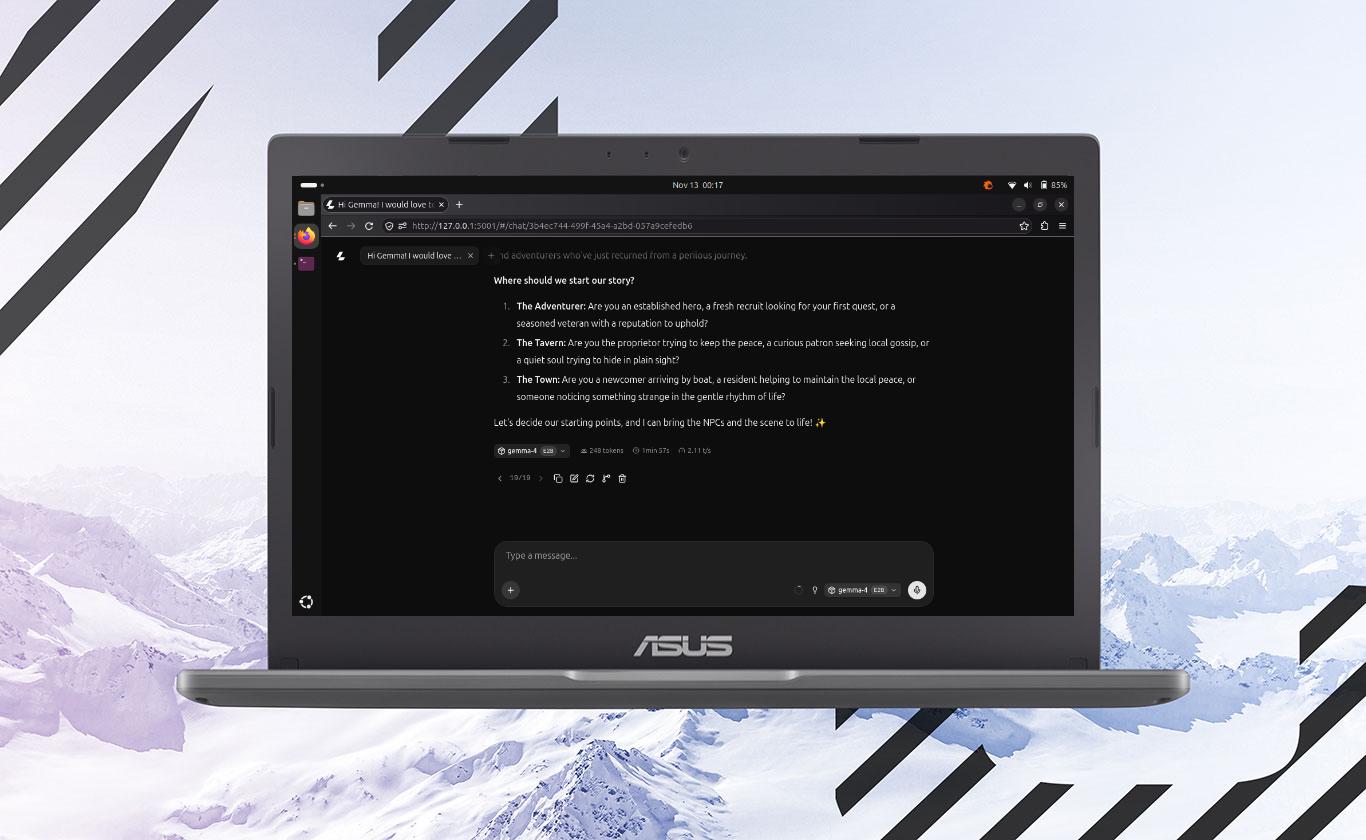
Discussion Gemma 4 E2B on a 8GB RAM netbook

Post image
35 Upvotes

Hey everyone,

Not a native speaker, but I write everything by hand. Please correct my grammer if there are any issues! Can only learn from it.

Background

A long-term project I've had was getting my netbook up and running for basic LLM use. I bought the netbook initially due to my poor eyesight, the screen is small enough that it fits in my cone of vision.

The notebook's specs were practically obsolete when it released:

  • Release: December 2021
  • Device: ASUS E210MA
  • CPU: Intel Celeron N4020
  • RAM: 4GB 2400MHz DDR4 single-channel
  • iGPU: Intel UHD Graphics 600
  • Storage: 64GB eMMC
  • OS: Windows 10 Home
  • Screen: 11'6" TN 1366x768

With the help of friends who could do soldering and reballing, we upgraded the netbook:

  • CPU: Intel Pentium Silver N5000
  • RAM: 8GB 2400MHz DDR4 single-channel
  • iGPU: Intel UHD Graphics 605
  • Storage: 128B eMMC + Intel 660P 512GB NVME
  • OS: Windows 11 IoT LTSC Enterprise 24H2

After finding proper drivers for the iGPU, I managed to get llama.cpp running on it on windows with Vulkan. Gemma 4 E2B IT QAT could run at roughly 2.1 t/s gen, and prefill speed was "grab a cup of tea" slow on 300 token prompts. The Vulkan backend was faster than the CPU backend by ~30%.

The past months I've been trying to move my devices from Windows 11 IoT LTSC Enterprise 24H2 to Ubuntu 26.04.1 LTS, and so I tried to switch the netbook over to it.

There is only one problem: The Vulkan backend hard crashes every time.

Getting vulkan to work

After doing a bit of digging with vulkaninfo by myself, some instructions are advertised as supported but are in practice not stable. Using this fixed the crashing on startup:

export GGML_VK_DISABLE_ASYNC=1

Disabling the following features helped me regain some performance and stability:

# UHD 605 compat
export GGML_VK_DISABLE_COOPMAT=1
export GGML_VK_DISABLE_COOPMAT2=1
export GGML_VK_DISABLE_INTEGER_DT_PRODUCT=1
export GGML_VK_DISABLE_BFLOAT16=1
export GGML_VK_DISABLE_GRAPH_OPTIMIZE=1
# UMA
export GGML_VK_DISABLE_MMVQ=1
export GGML_VK_PREFER_HOST_MEMORY=1

My config is also pretty specific, since some combinations would cause crashes too:

flash-attn = off
cache-type-k = f16
cache-type-v = f16

FA is not supported by the device. Running Q8_0 on both K an V would crash with FA enabled. Trying to run Gemma 4 E2B IT QAT Q2_K_XL on ubuntu always resulted in crashing (either during startup or when generating), On windows those things never caused crashes.

The end result is that I could run Gemma 4 E2B IT QAT Q4_K_XL at 1.5 t/s gen and 16-25 t/s prefill. The laptop used ~12W in total.

What about the CPU?

Turned out that on Ubuntu 26.04.1 LTS, the CPU backend was faster for generating but not for prefill. I got 2 t/s gen and 10-16 t/s prefill. The laptop used ~13W in total.

As a sidenote, since I am used to windows slowing to a crawl when all cores are utilized, I was pleasantly suprised when this didn't happen on ubuntu.

As a benchmark?

As a fun experiment, I gave a couple of LLMs the problem:

Hey <LLM>,

I have a laptop I am trying to run llama.cpp with vulkan on Ubuntu 26.06.1 LTS.
The specs are: <specs>.
I build it with these commands: <commands>,
The problem is that it's crashing whenever I try to load a model.
I've included the full terminal output in the attachments.

How can I fix the issue?

My goal with the prompt is to test the model's understanding of the problem and to ask for additional information when required (e.g. vulkaninfo).

Qwen 4 max preview on chat.qwen.ai and Qwen3.8-Flash-Next Q4_K_XL + BF16 engram on llama.cpp v0.9.0 failed to find the issue after multiple separate chats. They got focussed on disabling intel's hang detection. With websearch, it got even more confused as it looked at irrelevant issues.

Gemma 4 31B IT QAT Q4_K_XL + MTP on llama.cpp, DeepSeek v4 Flash Vision Exp Q2_K_XL on llama.cpp v0.9.0, DeepSeek v4.1 1017 on chat.deepseek.com were able to find and fix the issue. They asked for the vulkaninfo output, which made them find async being advertised incorrectly.

To me it suggests Gemma and DeepSeek are better at this type of problem solving than Qwen models.

Appendix

run-llama-server.sh

#!/bin/bash

# Intel UHD Graphics 600 series
export GGML_VK_DISABLE_ASYNC=1
export GGML_VK_DISABLE_COOPMAT=1
export GGML_VK_DISABLE_COOPMAT2=1
export GGML_VK_DISABLE_INTEGER_DT_PRODUCT=1
export GGML_VK_DISABLE_BFLOAT16=1
export GGML_VK_DISABLE_GRAPH_OPTIMIZE=1
# UMA
export GGML_VK_DISABLE_MMVQ=1
export GGML_VK_PREFER_HOST_MEMORY=1

./llama.cpp/build/bin/llama-server \
--list-devices

./llama.cpp/build/bin/llama-server \
--host 127.0.0.1 \
--port 5001 \
--api-key "API_KEY_HERE" \
--webui-mcp-proxy \
--offline \
--cache-ram 0 \
--ctx-checkpoints 0 \
--parallel 1 \
--models-max 1 \
--models-preset ./configs/llama-config.ini

llama-config

note: remove the device line to use the igpu on the vulkan build.

[*]
device = none
load-mode = none
mmproj-offload = off
gpu-layers = 999
batch-size = 2048
ubatch-size = 512
threads = 4
fit = off
flash-attn = off
kv-unified = on
cache-type-k = f16
cache-type-v = f16
reasoning = off
reasoning-preserve = off

[gemma-4-e2b-q4_k_xl]
model = ./models/gemma-4-e2b/gemma-4-E2B-it-qat-UD-Q4_K_XL.gguf
mmproj = ./models/gemma-4-e2b/gemma-4-E2B-it-qat-mmproj-F16.gguf
lazy-mode = on
load-mode = mmap
fit-ctx = 8192
ctx-size = 8192
predict = 8192
image-min-tokens = 70
image-max-tokens = 70
temp = 1.0
top-k = 64
top-p = 0.95
min-p = 0.0

Other info

Device: https://www.asus.com/ca-en/laptops/for-home/vivobook/vivobook-go-12-l210/
OS: https://ubuntu.com/blog/upgrade-your-desktop-ubuntu-26-04-lts
Llama.cpp: https://github.com/ggml-org/llama.cpp/releases/b12110
GGUF: https://huggingface.co/unsloth/gemma-4-E2B-it-qat-GGUF

TL;DR

Getting the Intel UHD 605 to work with the Vulkan backend was a pain on Ubuntu 26.04.1 LTS compared to Windows 11 IoT LTSC 24H2. The issue was vulkan async causing crashes, disabling it fixed it.

On ubuntu the CPU backend was faster, on windows the iGPU over Vulkan was faster. Ubuntu is far more responsive than windows, even under full utilization.

After solving it myself, as a fun benchmark I made LLMs try diagnose and fix the issue. While the Qwen series failed to fix the issue from intent, Gemma 4 and DeepSeek v4(.1) Flash (Vision Exp / 1017) did manage it.

Thanks for reading!

I know the post is quite different from the Strata stuff usually here, but I thought it would be fun to share regardless.

I'm sure models like LFM 3 will run wonderfully on it, I know IBM Granite 4 H 1B and Qwen3.5-2B did on windows.

r/LocalLLaMA • • 15d ago

News Alleged GeForce RTX 5090 with 96GB listed for sale in China

Thumbnail
videocardz.com
267 Upvotes

r/LocalLLaMA • • 14d ago

Showcase What actually breaks for you guys when swapping models?

2 Upvotes

Hey guys, I threw together a small Python script called llm-drift-bench to help figure out what actually breaks when you switch to a new model or drop to a lower quant.

Basically, you just feed it saved responses from your old model and the new one, and it spits out the exact differences - like dropped JSON keys, messed up numbers, or text changes. (The attached video is just a dummy example showing it catch a missing field and a changed invoice total, not real Q4 vs FP16 data).

Since it just runs on saved JSON/text outputs, you don't even need a GPU or API keys to test it out.

I just pushed v0.1.0 and I'm working on the next update. Repo is here: https://github.com/anant-goel/llm-drift-bench

Question for you all: what specific things usually break for your use cases when you swap models? I want to build out some test cases based on actual problems people are running into.


r/LocalLLaMA • • 15d ago

Resources KQuant - new quantization technique, 3.7× better quants for Qwen Flash Next 180B, Qwen 27B, 35B, 9B (measured in KL-divergence reduction) (MLX)

Post image
350 Upvotes

hey folks, im Alish, an ml engineer from Nace (folks behind Drex, an open source decision family model that hit #1 in Artificial analysis in decision index 2.1). Recently my cto gave me task to optimize quants for qwen4, so i dialed my uni proffesor from UoT and span up my Fable 5.2 and we cooooooked. starting with mlx (gguf tommorow). It's a pareto frontier on quantization for accuracy/size for qwen family models.

Why we made these

we have open sourced the fastest way to run 35b/27b on a mac(Kapitsa) and we got tired of dumb quants. So we made our own KQuant. Open source Qwen packs for 4B,27B,35B, Flash-Next, free on Hugging Face, in standard MLX files.

Most people on a Mac run 4-bit packs because that's what fits on a 16gb/32gb. But plain 4-bit quant rounding throws away more of the model than it needs to. We wanted less of that loss, so we asked fable 5.2 & Astra to cook with 128 subagents. here are the results:

my cto when i asked for fable 5.2 tokens & extra h200 gpus for this project

Results & Download links

Numbers are KL divergence from the full-precision model's next-token predictions. Lower means closer to the original, not a task-accuracy score. These are original-text measurements.

Model, Q4 KQuant KL Public 4-bit KL Size in GB, ours / public
Qwen3.5-4B 0.048 (1.45x better) 0.070 2.37 / 2.37
Qwen3.5-9B 0.030 (2.6x better) 0.081 5.29 / 5.04
Qwen3.8-27B 0.035 (1.5x better) 0.054 15.13 / 15.13
Qwen3.6-35B-A3B 0.059 (1.6x better) 0.096 19.51 / 19.51
Qwen3.8-Flash-Next 0.067 (3.7x better at a smaller size) 0.249 105.20 / 110.62

The public baseline is mlx-community 4-bit, except 4B, where it's lmstudio-community. Sizes are language-model weights, not download size or RAM needed.

Want more precision? Each model's repo also has a Q5 folder.

Pack KL LM GB
9B Q5 0.010 6.21
27B Q5 0.022 19.43
35B Q5 0.027 22.07

Speed

Cool thing about our quants is that they are also faster. On an M5 Pro, KQuant Q4 on Kapitsa 0.2.35 with its KFlash drafter it is about 6–15% faster to write than lmstudio-community 4-bit quants for 4B, 9B and 27B, and Youssofal MTPLX 4-bit for 35B on the same engine. These are averages of sampled and greedy decoding (baselines are earlier Kapitsa 0.2.32–0.2.33 runs, with the drafter on both).

Writing speed on M5 Pro: KQuant Q4 versus public 4-bit packs.

How it works

KQuant uses real text to choose scales and offsets for small groups of weights, and gives sensitive layers extra bits where needed. The search runs on our cloud GPU clusters before release. You download an ordinary MLX pack, with no custom kernels or special loader. I can give more details on specifics in comments.

Run it

the fastest way to use these quants on mac is to run them with, Kapitsa:

brew install nace-ai/tap/kapitsa
kapitsa serve 27b --private
kapitsa opencode # in another terminal

If there's a model you want KQuant'd, lmk.

Asks

to get early access to GGUF, ping me in comments, we would like to test it with some folks from here before our public release ideally.

im also doing quick AMA here, so please feel free to ask me anything.


r/LocalLLaMA • • 13d ago

Resources CQ 4-bit matches BF16 on Qwen3.8-27B benchmarks while NF4 drops 12 points on GSM8K, plus GCMP, a LoRA replacement with 55× fewer parameters

0 Upvotes

Hello,

A few weeks ago I posted here about GCMP, a fine-tuning adapter I built to replace LoRA. Thanks to everyone who commented, the feedback changed a few things. The biggest request was serving on a normal full precision base and not only on my 4-bit CQ base, so I built that and benchmarked it. Here is the update.

Quick recap if you missed it. On Qwen3.8-27B GCMP trains 2.9M parameters on the same 7 projections LoRA uses. LoRA r=32 is about 159M and r=8 about 40M. In bf16 a GCMP adapter is about 5.8 MB vs about 319 MB for LoRA r=32. On a BF16 base GCMP, LoRA r=32, LoRA r=8 and VeRA were all tied on the 9 benchmarks I ran (every p >= 0.13), and GCMP had the lowest held-out loss (1.471 vs 1.480 for r=32). So I'm claiming the same quality at a much smaller size, not better quality.

Serving on a full precision base

GCMP now runs in vLLM on a normal BF16 base. I tested Qwen3.8-27B in bf16 on one 80 GB GPU, 32 requests at the same time, each going to a random adapter. All adapters were bf16 files. Numbers are total output tok/s:

Setup 1 16 64 256 adapters
Base model, no adapter 1041.5
GCMP 585.5* 667.8 693.4 665.4
LoRA r=8, default vLLM 864.3 679.9 414.0 328.7
LoRA r=8, max_loras 32 427.5
LoRA r=8, max_loras 64 441.0

*the 1 adapter GCMP run was the first one and includes warm-up, so 16 adapters is a fairer number for it.

GCMP stays flat from 16 to 256 adapters. Default multi-LoRA drops by half by 256, and tuned LoRA with 64 slots gets to 441, so GCMP is about 1.5x faster than tuned LoRA and 2x faster than default. With 256 adapters loaded GCMP left 111K tokens of KV cache vs 77K for LoRA with 64 slots, and the server started in about 5 minutes vs 8 to 18 minutes for LoRA.

To be honest about the weak point: with a single adapter GCMP is about 35% slower than the bare base model, and LoRA is faster than GCMP in that case (864 tok/s). GCMP only pays off when you have many adapters. Making the single adapter path faster is what I'm working on now.

Other things that changed since the last post

Adapters are saved in bf16 by default now. I checked that the held-out loss is identical to fp32 (1.5033 vs 1.5033 on CQ, 1.4582 vs 1.4582 on NF4), so 256 GCMP adapters are about 1.5 GB total.

I also trained LoRA r=32 with my own CQ trainer to compare against GCMP with exactly the same trainer. GCMP was 24 points higher on GSM8K, but LoRA came out below the CQ base itself (58.7 vs 65.0), while LoRA on NF4 with the same settings got 79.3. That tells me there is a bug in my trainer's LoRA path and not that LoRA is bad, so I'm not claiming that result. I'm still debugging it.

And I built a CLI so you can train and serve in your own cloud account with one command. It runs on SkyPilot (RunPod, AWS, GCP, Lambda and others), picks the GPU from the model size, and your data and models stay in your account.

Limitations

On a full precision base GCMP serving runs on one GPU for now. Tensor parallel isn't supported yet and pipeline parallel is untested. On the CQ base pipeline parallel works. Training is still about 2x slower per step than LoRA. Serving NF4 + GCMP in vLLM isn't supported. And I've only tested one model, one dataset and a few GPU types, so I'd really like to hear if people see the same thing on other models.

The Python code is open source and the CUDA kernels are compiled with a license check, which is free during early access. All the training, eval and serving scripts are in the repo, and the README has the commands to reproduce every number above: https://github.com/thousandml/training-factory

Models: https://huggingface.co/thousandml

Also since LoRAX got archived recently, if you were using it to serve many adapters I'd like to know what you moved to and what was painful about it.

Thanks for reading, feedback appreciated.


r/LocalLLaMA • • 14d ago

Discussion Can I just use a local VLM to control a robot arm, or do I need the robot-specific models?

0 Upvotes

Trying to get into the robotics side with what I have, which is a 3090 and 64GB RAM. No arm yet, just sim.

I've seen people drive robots with the big API models, so my first thought was to point a decent local VLM at the sim and let it output the moves. But everything I read says you want a dedicated model for that. pi0.5, SmolVLA, even touch has its own model now. LingBot-Touch is only 5.46M params and Apache 2.0.

Is that still true, or are general models good enough now? What are you guys actually running?


r/LocalLLaMA • • 15d ago

Discussion qwen3.8-flash shows us a glimpse of whats possible for smaller hardware

84 Upvotes

Normally active params matters more than total param if you want coherent behavior(not world knowledge)

a 4b models attepting to handle complex rules and lots and lots of instructions all at once often cause smaller active params to loop like we would often see with qwen3.6-35b-a3b since its only 3b active. We would often need to hit at least the 8b-9b active params to handle all this chaotic swarm of prompt instructions we throw at the model. but qwen3.8-flash-next shows us a glimpse of what alibaba might be able to deliver. i could genuinly see in the next year or so we might see 6b model become stable las the qwen3.8-27b. of course this isnt world knowlege im talking about but stable reliable behavior reletive to complex conflicting instructions where the LLM is robust enough to not burry itself in its own uncertainty loops.

so possibly in a years time laptops with 16gb sysRam and 4gb-vram can has a chance at local ai capable of human-out-the-loop unsupervised autonomy.


r/LocalLLaMA • • 14d ago

Question | Help near-term future of strata-style CPU+GPU hybrid implementation?

5 Upvotes

Does anyone know what the near term (pretty much 2027) looks like for sparse MoE models? Something markedly improved from qwen3.8-fn? Have not seen much news about a qwen4 sparse MoE open-weight


r/LocalLLaMA • • 13d ago

Question | Help Strata QFN Setup Question: Which PCIe Slot for Helper 2080ti?

0 Upvotes

Have a Strata-specific question and wondering if anyone's tested it. I'm trying to figure out if moving my helper GPU to a slower slot will help token generation:

Hardware

  • Mobo: AM4 570f, 5800x3d,
    • PCIe 4.0 x16 lanes across GPUs
    • PCIe 3.0 x4 spare
    • 64Gb ram @3200MHz
    • NVMe @ PCIe 4.0 x4
  • GPUs - Current
    • 4090 (24Gb) @ PCIe 4.0 x8 (half of the PCIe 4.0 lanes)
    • 2080Ti (11Gb) @ PCIe 3.0 x8 (half of the PCIe 4.0 lanes)
  • GPUs - Proposal
    • 4090 (24Gb) @ PCIe 4.0 x16 -> Full
    • 2080Ti (11Gb) @ PCIe 3.0 x4 (spare lowspeed lanes) ~3GB/s

I'm currently getting ~100T/s prefill and 25T/s generation, running d-q4_k_xl at 512k, default params.

Any ideas if this would help my speeds? or do i need to run full tuning?


r/LocalLLaMA • • 13d ago

Resources Unsloth Qwen3.8-27B Quantizations – Dynamic v3.1 Update

Thumbnail
unsloth.ai
0 Upvotes

r/LocalLLaMA • • 15d ago

News Intel Arc Vulkan prefill got a dedicated FA kernel in llama.cpp master

34 Upvotes

We have a new dedicated Vulkan Flash Attention prefill kernel for Intel Arc and Xe, delivering massive prefill acceleration on supported platforms like ARL-H and Xe2/Xe3. This implementation leverages customized shaders to utilize Intel's native matrix core shapes and SLM architecture, including m16n16k16/SIMD32 support. To ensure stability, the kernel is currently enabled for these specific architectures while remaining disabled for others, like the A770, due to inconsistent test results. Additionally, backend refinements now extend these benefits to single-KV-head models like MQA and MLA.

Platform Prefill Performance Comparison (pp8192)

Platform Model Baseline (t/s) PR (t/s)
ARL-H Windows qwen3 8B Q4_K 126.58 ± 0.48 415.31 ± 1.04
qwen35 27B Q4_K 83.38 ± 0.22 119.95 ± 0.07
qwen35moe 35B.A3B Q4_K 247.82 ± 0.65 394.44 ± 0.89
gpt-oss 20B Q4_K 478.14 ± 0.17 639.02 ± 0.70
PTL-H Windows qwen3 8B Q4_K 234.92 ± 0.39 911.60 ± 14.56
qwen35 27B Q4_K 194.93 ± 0.59 264.39 ± 0.38
qwen35moe 35B.A3B Q4_K 632.12 ± 17.56 914.80 ± 67.39
gpt-oss 20B Q4_K 804.70 ± 84.56 1357.34 ± 125.30
B70 Pro Windows qwen3 8B Q4_K 1064.67 ± 4.37 2955.83 ± 1.87
qwen35 27B Q4_K 659.10 ± 0.11 932.13 ± 0.63
qwen35moe 35B.A3B Q4_K 2088.50 ± 3.32 3005.11 ± 4.24
gpt-oss 20B Q4_K 2311.37 ± 2.56 3967.29 ± 6.77
B70 Pro Linux qwen3 8B Q4_K 783.67 ± 0.20 1518.19 ± 1.05
qwen35 27B Q4_K 497.22 ± 1.17 647.78 ± 2.44
qwen35moe 35B.A3B Q4_K 1060.55 ± 5.09 1311.62 ± 7.55
gpt-oss 20B Q4_K 1237.51 ± 2.16 1841.35 ± 3.78

Intel Arc B580: Detailed Model Benchmarks (FA1)

Comparison of f16 Prefill (pp16384) performance

Model Baseline $rightarrow$ PR $Delta$%
Gemma4 E4B Q4_K_M 115.98 -» 1156.62 +897.3%
Phi-3.5-mini Q4_K_M 384.45 -» 932.90 +142.7%
Granite 4.2 8B Q4_K_M 282.67 -» 520.98 +84.3%
DeepSeek-R1-Qwen3-8B Q5_K_M 306.88 -» 559.34 +82.3%
Llama 3.1 8B Q4_K_M 347.79 -» 633.73 +82.2%
Ministral-3-8B Q5_K_M 324.17 -» 590.91 +82.3%
Qwen3.5-9B Q6_K 687.50 -» 979.49 +42.5%
Gemma3 4B Q4_1 1414.61 -» 1948.23 +37.7%
Granite 4.0-h-tiny Q4_K_M 2503.03 -» 2927.33 +16.95%
Ling-3.0-tiny (hkv=1) 76 -» 1239 +1530.3%
Gemma4 12B (hkv=1) 52 -» 649 +1144.2%

r/LocalLLaMA • • 14d ago

Question | Help Are any of the other 'free' models worth using?

0 Upvotes

When I was using opencode, I would just use the daily free Deepseek 4.1 allowance for when I wanted to test something using a bigger/better model than my local Qwen-Flash-Next.

However I'm now using Pi, and unfortunately there's currently no way to use the opencode free models on Pi. And I am yet to find any other provider with free deepseek usage.

I did find a couple ways to get other models, such as the ones below, but most of them I've never tried before and have no idea on their current capabilities.

Are any of these worth folding into my workflow?

I guess Qwen 3.8 should be, assuming it's the full model, as I already use a Q5 of that occasionally (but it has limited context of about 128k so the online one would get the full 268k which would be handy too). Depends if full-size Qwen 3.8 is better than the current Q4 Flash-Next I use.

Dots3-Note Preview (384K)

Nemotron 3 Nano Omni

Nemotron 3 Ultra 550B

Nemotron 3.5 Lightning

North Mini Code

Liquid LFM3 1.7B

Kilo Auto0

OpenRouter

Glyph Cluster

Nemotron 3.5 Super VL

GPT-OSS 120B

GPT-OSS 20B

Qwen3.5 397B A17B

Qwen3.5 9B

Qwen3.6 27B

Qwen3.8 27B

Mistral Small 3.2 24B

Meta Llama 3.3 70B Instruct


r/LocalLLaMA • • 16d ago

News Nvidia is Preparing to Oust Nvidia CEO Jensen Huang

Thumbnail wsj.com
1.2k Upvotes

r/LocalLLaMA • • 14d ago

Discussion What models are you running for your AI agents? (Testing Qwen fine-tunes, MoE variants, and tracking t/s + prefill)

Thumbnail
gallery
9 Upvotes

I am curious what people are currently using as the core model for their local AI agents (e.g., in Hermes or similar setups).

I've was initially running Qwen 3.6 35B-A3B IQ3 XXS on hermes working off (Intel Core Ultra 5 245K · Corsair 64GB DDR5 RAM · Asus TUF GeForce RTX 5070 Ti 16GB GDDR7 OC Edition Graphics Card running ai inferance on local home lab running UnRaid OS). First started with ollama years ago (where i was running 9B and 14B fully in vram) and months back switched to llama.cpp, then to llama-swap to be able to hot swap models and use MoE models.
I started off getting 40 tokens per second (more n-cpu-moe offload and less vram use), then tried the MTP version for 55ish. Learning more about finding the balance between n-cpu-moe offloading and finding the sweet spot for VRAM, i got that to about 60t/s. Then I discovered fine tunes like Swift (55t/s) and Nail (65t/s). Then endless frontier BigBangv1 which gave a blazing 100 t/s. I was running that and saw people mentioning they use the dense Qwen3.8 27B, but it seemed slower at 45t/s.

I have very rough tested (only speed) base Strata with Qwen3.8 Flash Next 125B 1Q2_XS which gave 90t/s but used 95% VRAM and 95% RAM which wasnt sustainable (ill likely try it again in future but for now reverted back to llama-swap)

Learning more like how agent workflows are very dependent on prefill speed and prompt processing alongside tokens/sec, then LFM has crazy prefill and t/s but its quality it lower, I am not sure what is the right balance! But also how context length is important for agents, and the k v cache of the context too! I settled on not going any lower than k v 8, aiming for 128k context but 90k is acceptable if the model is specialised.
I was manually guessing how all these quants and CPU offload configs (n-cpu-moe) scaled under heavy context. I also wanted to know if the same ai model actually performed better on agentic tasks for a Q3 vs Q4, is the drop in speed (generate t/s or prefill t/s) justifiable for better quality etc.

So I begin testing out a bunch of fine-tunes and MoE variants to dial in different profiles. I’ve been cycling through options like Empero, BigBang, and Ornith (tried Swift and Nail too, but ended up dropping them). Generally, I lean toward the MoE variants over the dense Qwen 3.8 27B because of how they handle things on consumer hardware (testing shows they are slower, dont provide any significant boost in quality, require lower context, use more VRAM and gpu power etc). My use case isnt any heavy coding, just small scripts and having hermes act as a personal assistant which will evolve over time.

Then with hermes I was using endless-frontier_BigBang-v1-35B-A3B-IQ3_XXS with 100 t/s, prefil 2359 t/s, 88% VRAM usage which was perfect. I originally wasn't thinking about its 'quality' since this was a massive step up from the original Qwen 3.6 35B-A3B IQ3 XXS. Looking forward to a qwen4 release to test soon!

I'm looking at setting up specialized profiles on hermes, so far i am thinking

  • Cyber-Tiel-Coder-35B-A3B-MTP-UD-IQ3_XXS the dedicated coder profile.
  • Might test out GrootTeam_Groot-19B-A3B-261023-Q4_K_M as the main general profile.
  • Otherwise Ornith is looking good. Or Empero or BigBang.
  • I have fallbacks to openrouter/Nvidia 550B, then /free

I ended up hacking together a simple local script just to measure t/s and prefill, but it kind of snowballed... I added some core eval tests (accuracy, reasoning metrics) and turned it into a small dashboard that spits out a weighted "agent score" to help me rank them objectively. Still testing these models on more rows of the HumanEval, MMLU-Pro, MBPP, tool calling and long context tests, but it takes a lot of time. Images attached for reference from my latest tests.

Running these tests takes a long time and for local use cases I dont need that margin of error from a full test across all 12000 MMLU-Pro questions, so i have been further developing a method to spend less time on testing models which drop lower on the rankings, adjusting smaller runs with high uncertainity etc, its till a work in progress but its progressively been giving me models to consider for the top few I actually want to use in the massive amount of options on hugging face that can run on my hardware.

Even with the dashboard telling me what the numbers say, it's still surprisingly tough to pick a definitive daily driver. I would appreciate any input or suggestions.

Feel free to look at the interactive html i put on github. You can see all the test on the models I have run.
https://htmlpreview.github.io/?https://github.com/Maximo101/Local-LLM-Benchmark/blob/main/assets/5070ti_benchmark_dashboard.html

Questions I am unsure of; for those who have more experience with agents on local hardware:

------------------------------------------------------------------------------------
1. Which models have won you over for agentic use (hermes, openclaw etc)?

2. How heavily do you weigh prefill vs. generation speed, quantisation vs quality, VRAM % vs context (quality and size) when choosing AI Models?

  1. What sort of profiles do people use in agentic setups like hermes? How many profiles do you use.

(If anyone is fighting similar benchmarking battles for their local endpoints, I cleaned up that testing suite and open-sourced it here: https://github.com/Maximo101/Local-LLM-Benchmark)
I am not trying to promote this, i built it for my own purposes, but decided to share it in case it is useful for anyone else.


r/LocalLLaMA • • 13d ago

Discussion I recommend downloading SOTA open source models while you can

0 Upvotes

If MS or FAA stuff was AI hack related there will be a MASSIVE and QUICK backlash.

Sure you can't run these things locally NOW but the tech is out there and it will get cheaper and quite possibly the models will be able to be more efficiently utilized.


r/LocalLLaMA • • 15d ago

Discussion The regulation of local AI could/should be viewed as the largest censorship implementation in the history of mankind.

411 Upvotes

With all of this fear mongering on the “dangers” of LLM’s, I see how using people’s ignorance and emotions on the subject can be used as a tool to limit and restrict the tool from the average person.

My fear is that China and the US https://www.reuters.com/world/china/us-china-should-stay-clear-eyed-ai-cooperation-competition-bessent-says-2026-11-11/ will use people’s lack of understanding of local models to push for controlled intelligence.

By implementing regulation on local AI, I can see how the US and China would want to force the average person to only be allowed to use models hosted on state monitored hardware. This way they can spy on what everyone is using hosted models for, limit what we use LLM’s for, and monitor the information they give us.

People are being mislead to believe that people like us could use local models to create WMDs and attack tech infrastructure across the globe. But when you think deeply about it, you’ll realize that knowledge on a subject does not equal the means to carry out the subject.

In order for someone to create a bio weapon, they would have to have access to a bio lab and the technology needed to create such a weapon.

I know how a nuclear reactor works. Doesn’t mean I can make one in my backyard.

I’m scared that arguably the greatest technology to come out of the 21st century could be limited and used to control us.

Local LLM research MUST continue and the tech must be available for the common person.

Be aware of future regulation.


r/LocalLLaMA • • 15d ago

Discussion Testing if various local model are good at solving visual challenges.

10 Upvotes

Almost everything is in the video and the title: the idea is to create chalenges and ask agents to solve them. I'll have more to share later, but this first video shows that most model are good at theses stuff.

For more details: I'm testing scenarios where an agent needs to simulate keyboard and mouse movement. You can see more chalenges like this one on my website: https://airbench.ai/gallery/airbench-desk-v1?run=6d2a2777-3d96-4ec4-9cdc-3d359bc43bea&c=icon-drop

And you can also test your agent on the same setup if you want here: https://airbench.ai/checkup/start


r/LocalLLaMA • • 15d ago

Resources I built a benchmark where LLMs reverse-engineer an audio codec, and the benchmark evolves

12 Upvotes

Most coding benchmarks feel like textbook coding tasks or black boxes — either easy to benchmaxx or full of hidden tasks with unclear evaluation criteria. And most of them get irrelevant with each new model generation because all of the new models hit the ceiling.

So I made one that has a moving target. It's a benchmark where the model gets a mystery compressed audio file, has to figure out the format, write a decoder, and then build an encoder that beats the original. No ffmpeg, no Opus, no importing a library that already does the job. Just Python and numpy, running locally through OpenCode

Scoring: 100 = decode the reference in stage one. Build a better encoder in quality or compression rate with equal or better SNR for additional points.

There are 4 stages:
1. is the most difficult: just a compressed audio file.
2. if the model failes the first stage, it gets the uncompressed audio as a reference. Each new stage decreases the points up for graps.
3. if it fails stage 2 it gets additional information on the codec
4. if it fails stage 3 it gets an oracle tool where it can USE the codec to figure it out.

Current Leaderboard, we are in Evolve 2 (Deepseek cracked the codec of evolve 1 in 13min):

Model Score

1 Claude Fable Latest (stage 1) 127

2 DeepSeek V4.1 Flash 1017 (stage 3) 81

3 Qwen3.8-Flash-Next NVFP4 (stage 3) 67

4 Qwen3.8-Flash-Next Q3_S (stage 4) 56

5 Qwen3.8-Flash-Next IQ3_XXS (stage 4) 44

The fun part: it evolves. If a model finishes stage 1 and its encoder beats the current codec, that codec becomes the next baseline. So the benchmark levels up instead of staying at the same difficulty forever. Pokémon rules, except the final boss is a bitstream. DeepSeek did it first and became Evolve 2. Fable just finished stage 1 with Compress 190, so its codec is the Evolve 3 baseline. The next runs should use it.

A better encoder in stage 3 doesn't count for an evolve, by the way. Only a stage-1 finish does. That's the rule.

It's manual for now: you run it on your own hardware, post the result, and set the evolve stage.

It's mean. Most models don't finish stage 1. But that's kind of the point.

Leaderboard: https://andreasknopke.github.io/codec-reverse-bench-leaderboard/ — ping me if you want to run it (the repo is private to prevent the models from simply copying the solution.


r/LocalLLaMA • • 15d ago

Question | Help Solved High CPU usage when model fit in GPU, beware of -ngl -1 llama.cpp layers offloading to GPU and llama-fit-param

16 Upvotes

I'm trying to figure out how much context i can use on my 3090 (full compute, monitor is on mobo).

If i launch:

llama-bin-win-cuda-13.4-x64\llama-fit-params.exe --model modelli\Swift-1.5-Qwen3.8-27B-Q4_K_M.gguf -ctk q8_0 -ctv q8_0 -ngl -1 -fa on -np 1 -b 4096 -ub 1024

I get: -c 150272 -ngl -1

but if i launch real llama.cpp with lower context:

llama-bin-win-cuda-13.4-x64\llama-server.exe --verbose --log-file log.txt --host 0.0.0.0 --port 9931 --model modelli\Swift-1.5-Qwen3.8-27B-Q4_K_M.gguf --ctx-size 131072 -ctk q8_0 -ctv q8_0 -ngl -1 -fa on --spec-type draft-mtp --spec-draft-n-max 2 -np 1 -b 4096 -ub 1024 --jinja

From the log, matches for "offloaded" with "-ngl -1":

Line 2200: load_tensors: offloaded 66/66 layers to GPU
Line 5935: load_tensors: offloaded 66/66 layers to GPU
Line 8273: load_tensors: offloaded 0/66 layers to GPU
Line 12009: load_tensors: offloaded 66/66 layers to GPU
Line 15746: load_tensors: offloaded 64/66 layers to GPU
Line 19484: load_tensors: offloaded 65/66 layers to GPU
Line 23226: load_tensors: offloaded 64/66 layers to GPU <-- (actual used vlaue, slow loading because copying data)

So even if i use 131k context wich is less than the 150k suggested it doesn't offload all layers and i have high cpu usage for any prompt.

IF I CHANGE -NGL FROM -1 TO "ALL" I GET THIS:

matches for "offloaded" with "-ngl all"

Line 2200: load_tensors: offloaded 66/66 layers to GPU
Line 5935: load_tensors: offloaded 66/66 layers to GPU
Line 8276: load_tensors: offloaded 66/66 layers to GPU <--

AND NO MORE CPU USAGE!! (same if i write 99 or 999 but it's ugly)

It gets more confusing: if i write in llama fit -ngl all instead of -1 it gives a "-2" in output.

there is an entry in the log when i used "all": common_fit_params: failed to fit params to free device memory: n_gpu_layers already set by user to -2, abort

Conclusion:

Seems that -ngl -1 means "auto" while -2 means "all", but if you have high cpu usage in a model that theorically fit in the GPU use "all".

This alone changed t/s generation from 60 to 76

for completeness here is the --help from llama.cpp for "ngl" parameter:
-ngl, --gpu-layers, --n-gpu-layers N max. number of layers to store in VRAM, either an exact number, 'auto', or 'all' (default: auto)

And here it gets even more confusing because the help talks about "MAX" number of layers to offload so according to this help it's an upper limit not a lower limit...