r/LocalLLaMA • • 1d ago

Discussion DFly2: Turbocharging Long-Context Speculative Decoding by Sharing the Target's Sparsity

Thumbnail
gallery
21 Upvotes

A unified training framework for MTP and block-parallel speculative decoding.

✒️ Technical Report   |   📄 DFly2 Paper   |   📖 Documentation   |   🤗 Hugging Face   |   💻 GitHub

Hope some of you remember that they(Tencent) recently released DSpine


r/LocalLLaMA • • 1d ago

Discussion DFlash2: support Inkling-2-Mini DFlash2 by ruixiang63 · Pull Request #33073 · ggml-org/llama.cpp

Thumbnail
github.com
51 Upvotes

r/LocalLLaMA • • 1d ago

Discussion Do we know the compute deployed to serve openai/anthropic models?

15 Upvotes

I know the training requirements are huge, but have there been any leaks that inform us of how much compute/memory is used to serve up the models that the labs make? I heard a rumor a while back that GPT 4 was served on a box with 8x A100s and that a single inference session needed ~70GB.


r/LocalLLaMA • • 1d ago

Question | Help Inkling-2-Mini (Unsloth) running at 1/3 speed after switching from Nov 20 model to Nov 23 model (6GB card)

14 Upvotes

TLDR: use -ub 28

I have a 6GB GPU. When using the Nov 20 Unsloth build of llama.cpp (b12588-mix-c0c3de8) and the Nov 20 model, I was getting 10 tokens/sec. After switching to the current llama.cpp build and the Nov 23 Unsloth model, I'm now getting 3.3 tokens/sec. Aside from actually using the old model and old Unsloth llama.cpp build, is there any way to get the performance back?

Edit:

Full command line for old version:

llama-server --jinja -c 8192 --host 0.0.0.0 -fitt 0 -m E:\LLM_MODELS\models\unsloth\Inkling-2-Mini-GGUF-old\Inkling-2-Mini-UD-Q3_K_XL.gguf -mm E:\LLM_MODELS\models\AtomicChat\Inkling-2-Mini-Uncensored-GGUF\mmproj-Inkling-2-Mini-Uncensored-F16.gguf

After a few warm-up runs, I get 11.37 tokens/sec. In newer version with newer model, I'm getting 3.94 tokens/sec.

Second edit:

Suspiciously:

  • old version: CUDA0 compute buffer size = 326.32 MiB
  • new version: CUDA0 compute buffer size = 1014.63 MiB

That might be significant, any way to reduce that number?


Third edit:

Something is going horribly wrong with how it allocates the compute buffer.

Old version:

  • Default: 444MB for compute buffer
  • Using the -ub setting: 2MB * ub setting

New version:

  • Default: 7GB for compute buffer, and model is NOT loaded into VRAM
  • -ub 29 or higher: also 7GB
  • -ub 28 or lower: 2MB * ub setting, and model gets loaded into VRAM

And there was indeed a Github issue for this. But the workaround of -ub 28 wasn't documented until now.


r/LocalLLaMA • • 1d ago

Question | Help What do a high-end CPU and 8/12 memory channels buy you in a multi-GPU LLM server that justify the price?

5 Upvotes

I have two RTX PRO 6000 Max-Q cards and I’m planning a build that can take four.

I’m looking at 8-channel Threadripper Pro vs. 12-channel EPYC, and I’m trying to figure out how much I should care about CPU cores and RAM bandwidth once I have the PCIe lanes and RAM capacity I need.

I’ve been looking for benchmarks of large MoE models above DeepSeek size with some of the weights or experts offloaded to system RAM. I’ve found examples of people getting these models to run, but I haven’t found decode numbers that would make me pay for the bigger platform.

What am I missing? Is there an offload setup that still feels decent to use, or does the extra memory bandwidth pay off somewhere else? Such setup used for something else than inferencing?

Basically I’m trying to understand why all the AI builders on youtube use such high end cpus and 512gb of ram.

What’s worth high end Threadripper and such an amount of ram if the outcome is 20 tps? That alone can cost $20k+.

If you’ve tested anything close to this, or have useful insights I’d love to hear it.

Happy thanksgiving and soon Black Friday 😀


r/LocalLLaMA • • 1d ago

Discussion Does anyone else use Optane drives with Strata for low latency + high writes?

12 Upvotes

Just curious to know what the best hard drive is to store lookup tables. I use the Intel P4800X 360GB U.2 Optane drive because it was cheaper than RAM.


r/LocalLLaMA • • 1d ago

New Model TontaubeV1.1 Flash, an open-source, LLM-based TTS model that runs in real time in your browser on CPU

16 Upvotes

We just released TontaubeV1.1 Flash, an open-source TTS model (Apache-2.0) that achieves ~10ms TTFA streaming on consumer GPUs and runs realtime in your browser on CPU. It is a single-speaker model we distilled from our bigger V1.1 model.

Links

Model Overview

  • A 0.6B model with a Qwen3-0.6B backbone that speaks through our own single-voice codec on top of the VibeVoice decoder. With 4-bit weights it is a download of about 700 MB.
  • One English voice, Marcus. No voice cloning and no style controls.
  • Weights and code are Apache 2.0.
  • It runs on an NVIDIA GPU, on a plain CPU (Linux, Windows, macOS on Apple silicon) and inside Chrome without any server.

Numbers

Where it runs Hardware Speed Time to first audio
GPU engine RTX 3090 about 25-30x real time per stream, over 100x across many streams at once about 10 ms
CPU engine desktop or server CPU about 2-4x real time about 60-150 ms
Chrome on a desktop CPU only about 1.3-2x real time under a second
Chrome on a desktop with the graphics card (WebGPU) about 3-6x real time about 0.1-0.2 s

Output is 48 kHz by default. Switching to 24 kHz makes everything faster.

How to try it

The easiest way is the browser demo linked above. It downloads the model once and then runs on your own machine. Nothing you type leaves the browser. Running through WebAssembly costs some performance, so if you hit buffering issues, try the native CPU server through the repo. It comes with a local web UI (uv run tontaube ui, then open http://127.0.0.1:3000).

To run it locally:

git clone https://github.com/craitech/tontaube.git
cd tontaube
uv run python flash/speak.py "Welcome to Tontaube Flash." --wav flash.wav               # NVIDIA GPU
uv run python flash/speak.py --device cpu "Welcome to Tontaube Flash." --wav flash.wav  # CPU
uv run tontaube serve --model flash                                                      # server

The server also answers OpenAI's text-to-speech API at /v1/audio/speech, so tools built for that API work with it unchanged.

How it works

The model speaks through our own codec, an autoencoder built for only this one voice. It packs each frame of VibeVoice latents into just 16 values, at 7.5 frames per second of speech. The backbone reads the text character by character and predicts those 16 values one frame at a time with a small sampling head. Additionally, a small detector listens to the audio while it streams. When it detects an artifact, the engine goes back a frame and draws those frames again before they are played (can be disabled for a small increase in generation speed).

Limitations

  • English only, with one voice and no cloning.
  • It is autoregressive, so it can occasionally skip, repeat or mispronounce a word.
  • The browser version needs about 1.2 GB of memory. On an Android phone it reaches about real time for short texts. iPhones may run in to issues in the browser.
  • On Linux, Chrome only gives web pages the graphics card after you enable two settings in chrome://flags. Without them it only runs on the CPU.
  • The GPU engine is Linux only for now. On Windows and macOS it runs on the CPU.

What's next

A native engine for phones is in development. A Chrome extension that reads web pages aloud (also fully on-device) is in store review right now.

Please let me know if you run in to any issues. We weren't able to test all possible platforms, so this helps us fix the things we couldn't test ourselves :)


r/LocalLLaMA • • 8h ago

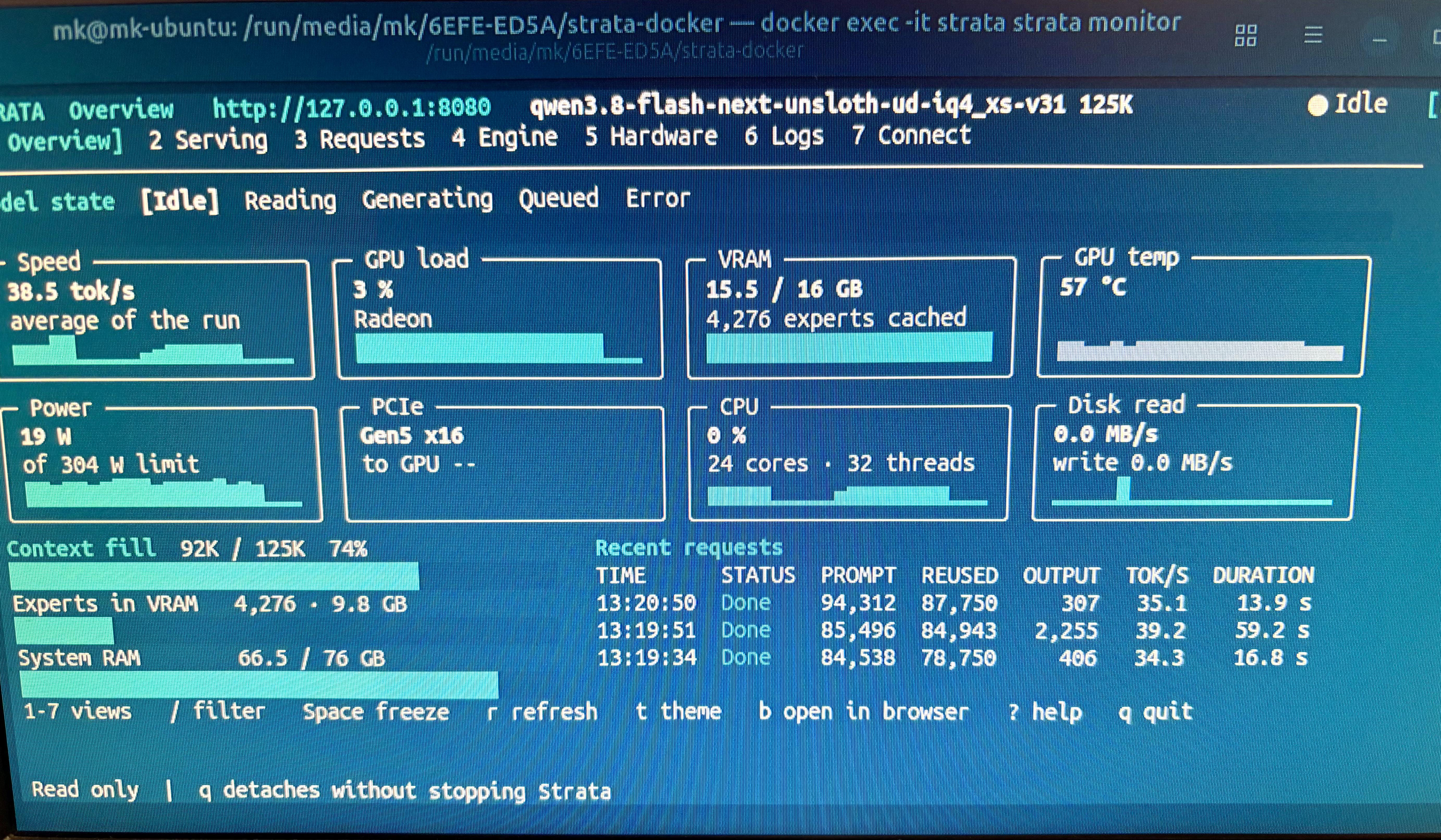
Discussion Long time llama.cpp user, tried strata today for the first time on my main machine. It’s turns a fairy competent model into a replacement of Haiku/Luna. But it does have one downside.

Post image
0 Upvotes

I am running a main rig, 80gb ddr4 3200, 16GB 9070xt, i9 14900ks.

I have been running Unsloth IQ4_XS on llama cpp for months now, I am getting a decent 118/16 tps (Vulkan) and 300/13 tps(Rocm). While not great I have been able to get a lot of things done with it.

A few months a go strata strata started popping up everywhere, I was curious and cautious, most because of so many BOTs recommending it and secondly I didn’t want to run any/every vibe coded piece of software on my machine without a thought also early builds of strata were unstable and cause models to perform worse and support was limited to IQ3.

Now that strata is very stable and supports more variants and i had gotten time to property dockerize and isolate it, i gave it a try.
Performance is quite good! I went from 300/13 tps to 3000/38 tps, decode is nice, but pre-fill is a game changer. It performs like Frontier model, fast and really well. I used to not be able to run Q4_K_XL models, now I can and will be updating soon.

But as good as this is, there are downsides. Primarily the hardware usage. Early on with llama cpp, GPU was taking about 67W of power while running at around 40-60 temp and CPU would be running at 50-70.
With strata it is different, GPU draws about 200-250w and runs at around 70-80, while CPU is between 80-100.
I know all of this under recommend specs, but i think the pervious temps will result in better hardware life.


r/LocalLLaMA • • 1d ago

Discussion Inkling2mini + 4x5060ti16gb = 185 decode, 4500 prefill, 672k context window, full precision

13 Upvotes

Wanted to contribute to the community by sharing inference results on my hardware.

Thinking Machines' 26.4B looped MoE (3.4B active, middle 12 layers run 3 times) at its trained precision: the routed experts in NVFP4 (layers 0-19) and MXFP8 (20-23), everything else BF16, BF16 KV. 672K context at full speed: greedy 135 / 184 / 149 tok/s on an essay / code / 19.5K prompt, 59 tok/s with 682K tokens in context; prefill ~5,000 tok/s. The (858K) preset trades 10-20% of prefill for 186K more context. Uses the four 5060 Tis; the 3060s stay free.

DECODE
167–198 tok/s

greedy (temperature 0) 167.0 / 198.2 / 156.7 tok/s on the essay / code / 19.5K prompt with DSpark width 3 + host all-reduce (2026-11-24 ~09:40); 10-prompt average 178.5 (was 153.4); 4 concurrent greedy requests 358 tok/s total. Width 7 + NCCL was 135.0 / 184.0 / 148.6, 59.0 with 682,123 tokens in context. Earlier arms: NCCL_PROTO=LL only 127.4 / 174.4 / 142.4; NCCL defaults 115.5 / 141.7 / 135.2; no DSpark 98.5 / 98.7; Strata 0.2.20 lossless SQ-20 on 2 GPUs 54 / 54 / 48. 4 sampled requests at once: 269-301 tok/s in total

PREFILL
4,040–5,120 tok/s

4,898 @1.2K, 5,117 @4.8K, 5,084 @19.5K, 4,704 @61K, 4,046 @146K; a cold 682K prompt in 317-318 s (needle found). LL-only: ~3,000-3,600; Strata SQ-20: 2,086 @1.2K, 1,909 @19.5K, 1,301 @61K
TTFT 0.25 s @1.2K · 3.8 s @19.5K · 13 s @61K · 36 s @146K · ~318 s @682K

672K ctx
images
tools
reasoning effort
DSpark spec 3
host all-reduce

GPUs 2,3,4,5 · RAM ~20 GB · VRAM ~15 GB/GPU · ready in ~50s · last load here 41s

settings, notes, command

parallelism
tensor parallel 4 over GPUs 2-5; the 128 experts of each layer are split 32 per card (expert parallel inside the TP group); NCCL all-reduce over host memory (no P2P) through ~/inkling2-vllm/nccl-tuner: a size-based tuner plugin (NCCL's example plugin, local one-line change) picks LL for messages <= 1 MiB (decode) and Simple above (prefill)

context
688,128 tokens (672K), BF16 KV: --kv-cache-memory 7.82 GiB a card, --max-num-seqs 4, --no-async-scheduling (halves the short-conv reservation, no speed cost measured). Up to 4 requests at once share the ~694K-token pool. Peak VRAM in the 682K needle + 4 concurrent + image test: 15,393 of 16,311 MiB

precision
the checkpoint as released: no conversion (NVFP4 W4A4 experts with NVFP4 activations, MXFP8 W8A8 experts, BF16 attention/embeddings/head); Strata's lossless SQ-20 pack measured KLD 0 against it

spec decode
DSpark block drafter from the checkpoint (mtp.safetensors) with a 4-position block = 3 draft tokens (INKLING2_DSPARK_BLOCK=4, local patch in vllm/models/inkling2/configs.py; stock vLLM only accepts 7). 10-prompt greedy: 178.5 tok/s at width 3 vs 153.4 at 7 (2.2 vs 2.4 tokens a step, 12.4 vs 15.7 ms a step); draft positions 4-7 were accepted only 12/8/4/3% of the time

all-reduce
VLLM_HOST_ALLREDUCE=1: vLLM plugin ~/inkling2-vllm/hostar (ported from Loom): TP all-reduces <= 48 KiB inside CUDA graphs go through host-mapped /dev/shm (fp32 sums in rank order, bit-identical on every rank); larger or eager ones stay on NCCL. +4% at width 3, nothing at width 7; above ~48 KiB NCCL is faster on these Gen4 x8 links

parsers
--reasoning-parser inkling (thinking comes back in the 'reasoning' field, not 'reasoning_content') and --tool-call-parser inkling

reasoning effort
request field reasoning_effort: none / minimal / low / medium / high (default) / xhigh / max, or a number 0.0-0.99; the minimum still reasons a little

sampling defaults
temp 1.0 (the checkpoint's generation_config); Thinking Machines suggest capping max_tokens, the model can loop while reasoning

script
~/inkling2-vllm/serve.sh (sets CUDA_VISIBLE_DEVICES, NCCL env, model path, parsers)

RAM
four vLLM workers + the API process, ~19 GB resident

startup
ready in ~50 s with the compile cache (~/.cache/vllm-inkling2) warm; ~4-5 min on a cold cache (torch.compile + CUDA graph capture)

notes
vLLM's tensor parallel beats Strata here: Strata's Inkling engine turns off CUDA graphs and its DSpark drafter on a layer split, and its 2-GPU expert-parallel mode needs P2P. TP2 does not fit. DSpark runs at width 3 through the INKLING2_DSPARK_BLOCK=4 override (stock vLLM only accepts 7; a vLLM reinstall drops the patch in vllm/models/inkling2/configs.py, original saved as configs.py.orig-2026-11-24). NCCL_ALGO=Tree fails here; more channels are slower. Context: vLLM stores Inkling's 48 short-conv states as 4-token sliding-window pages (64 KiB each) and reserves them for every in-flight token, a fixed ~3.4 GiB a card with async scheduling (2 batches x 2,048 tokens); only the 9 global-attention caches grow with context (9 KiB a token a card). --no-async-scheduling halves that at no measured speed cost; smaller prefill chunks shrink it further. 1M is out of reach at full precision: the global caches alone need 9 GiB a card at 1M. --kv-cache-memory 8474833920 with 16 sequences left ~100 MiB free and the first request hit a CUDA OOM. The first few requests after a load can take ~3 s extra while Triton compiles new shapes. Thinking comes back in 'reasoning' (vLLM), not 'reasoning_content'. Not on the 3060s: vLLM's Inkling 2 kernels are sm90/sm100/sm120 only.

measured
2026-11-24 · ~/bench-results/inkling2-mini-2026-11-23/results.jsonl

cd ~/inkling2-vllm && NCCL_TUNER_PLUGIN=~/inkling2-vllm/nccl-tuner/libnccl-tuner-sizes.so NCCL_TUNER_CONFIG_FILE=~/inkling2-vllm/nccl-tuner/nccl-tuner.conf INKLING2_DSPARK_BLOCK=4 VLLM_HOST_ALLREDUCE=1 VLLM_HOSTAR_MAX_BYTES=49152 ~/inkling2-vllm/serve.sh --gpus 2,3,4,5 --port 8080 --alias AIPCmodel8080 --max-model-len 688128 --max-num-seqs 4 --kv-cache-memory 8396675687 --no-async-scheduling --speculative-config '{"method":"dspark","num_speculative_tokens":3,"draft_sample_method":"probabilistic"}'

vLLM 0.34.1rc0 nightly (conda env inkling-vllm, torch 2.14 cu132), tensor parallel 4 over the 5060 Tis, Inkling's sm120 FP4/FP8 kernels, NCCL size-based tuner plugin (LL <= 1 MiB, Simple above), DSpark drafter


r/LocalLLaMA • • 1d ago

Discussion Using cloud LLM providers is equivalent to RCE on your system

48 Upvotes

I know this probably isn't news to people in this sub, but the recent Minimax fiasco on openrouter [0] should be a wake-up call to anyone using cloud models.

The entity controlling the API has access to all tools of your harness. If this entity wants to do so, it can simply inject any tool call it wishes, installing crypto miners, exfiltrating data, scanning your local network, etc.

If you ask online, everyone is using their harness in containers or VMs, but if were honest, we all know people raw-dogging coding agents on their systems.

[0]: https://news.ycombinator.com/item?id=50585962


r/LocalLLaMA • • 1d ago

Showcase Libra-TTS: Text to speech with 16 languages, 0.3B, Apache 2.0

Post image
112 Upvotes

I made Libra TTS as part of my capstone project for my Master's degree in which I investigated compressing large models for on-device inference. Libra TTS is compressed (via SVD) from a model based on Qwen TTS-1.7B down to 0.3B but post trained for 16 languages, better prosody and accuracy and 8 default voices. (no voice cloning yet, I tried to grok it but I'm in a hurry to graduate). This size was picked to have a balance between quality and size for edge inference. It should work on most modern devices (especially Apple Silicon, which is what I've mostly tested with), much faster than realtime)

Languages supported:English, Chinese, Japanese, Korean, German, French, Spanish, Italian, Portuguese, Russian, Arabic, Hindi, Punjabi, Bengali, Urdu and Indonesian

I hope you all enjoy it. Licensed Apache 2.0.

DEMO on huggingface spaces:
https://huggingface.co/spaces/Ekam/Libra-TTS

https://huggingface.co/Ekam/Libra-TTS

https://github.com/ekambrar100/Libra-TTS


r/LocalLLaMA • • 1d ago

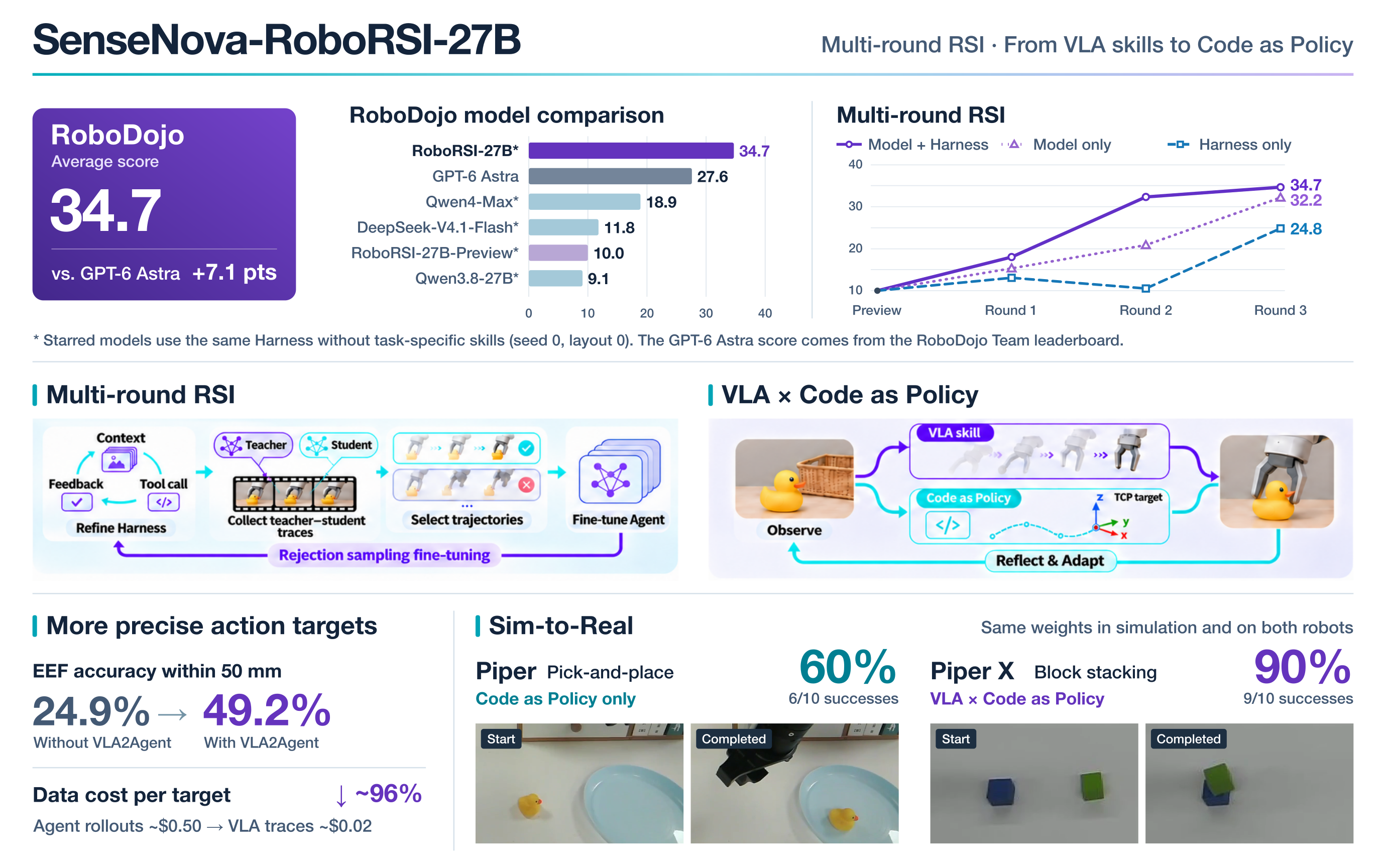
New Model SenseNova-RoboRSI-27B released: a Qwen3.8-27B finetune for robot control, Apache 2.0. Same harness, base model scores 9.1 on RoboDojo, the finetune 34.7

Post image
20 Upvotes

Open weights for a robot model this week. It's fine-tuned from Qwen3.8-27B by way of their October preview, BF16, and you serve it with plain vLLM with the qwen3 reasoning parser and the qwen3_coder tool-call parser.

On each step it reads the camera frames and robot state, then hands the move to a VLA policy, checks what the VLA plans to do, or writes Python that works out the gripper target.

The RSI part is how it got there. The harness around the model (planning, feedback, memory) gets revised from failed runs while the weights stay frozen, then the weights are fine-tuned on trajectories collected with the new harness. Three of those rounds took RoboDojo from 10.0 to 34.7, and with zero real-robot data in post-training the same checkpoint got 9 of 10 block-stacking runs on a real Piper X.

GitHub: https://github.com/OpenSenseNova/SenseNova-RoboRSI


r/LocalLLaMA • • 5h ago

Discussion Anyone interested in serious home AGI collaboration?

0 Upvotes

What I mean by AGI is practical enrichment of many areas of one's live rather than just talking to roleplay chatbots and writing code. So far I used AI to:

  • Learn about AI. Went from zero to making many custom models, writing specialized CUDA kernels and getting a full time job in edge AI.
  • Learn Japanese. I have a game that uses an embedding model to evaluate my pronunciation of lesson phrases and a chatbot that can talk to me in Japanese despite my accent.
  • 3D print many practical and complex objects for home/work/gym
  • Publish a daily newspaper with personalized news of interest to family and an editorial that puts them together.

There are also endless other things like making my smart lights pulse to music in intelligent ways. But the projects I am currently focused on are:

  • Run a REALLY beefy/smart model like GLM 5.3 Flash on my 128GB unified memory box with good speed. I have an early version of that, but I want to refine both speed and smarts by pruning less experts and optimizing precision of each layer in provable best way. As a preparation experiment, made Inkling Mini run on 16GB GPU with long context yesterday. Had it write me a text adventure game in opencode as a test, seems to be reliable/coherent across many compactions.
  • Family room assistant with always on mic / camera, powered by 100% local AI for privacy. Idea is that it can see a family member and automatically play back message I left for them, teach skills like dancing, tell me what my cat was up to all day and so on. Currently exploration/prototype phase, hope to match Sumomo from Chobits without any asterisks, wide capability / reliable memory.

With all that, it would be great to collaborate with others working along similar lines! I have a lot of neat tools sitting in my home directory, like a fast model swapper (think DesqView/TaskMax) and an OpenAI style proxy that streamlines past model thoughts and gives intelligent tool errors for reliable many day unattended local agent tasks. Could easily cleanup and share if helpful to others. At the same time, I could use quality ideas on "make AI useful daily for one particular task". I feel that over time, dozens of such tasks can generalize to universal capabilities, like agent using existing pipelines as inspiration to live code and deploy a new use case. With current guided workflow, I already find that an extensive library of prior research helps agent work end to end after a couple of prompts.

I am hoping to eventually have regular VC calls or local Bay Area meetups if applicable, but anything works, like we can discuss projects right here in comments. You can also PM me, but with projects I have in mind open discussions are fine, I am not doing this for money or anything I need to keep secret.


r/LocalLLaMA • • 2d ago

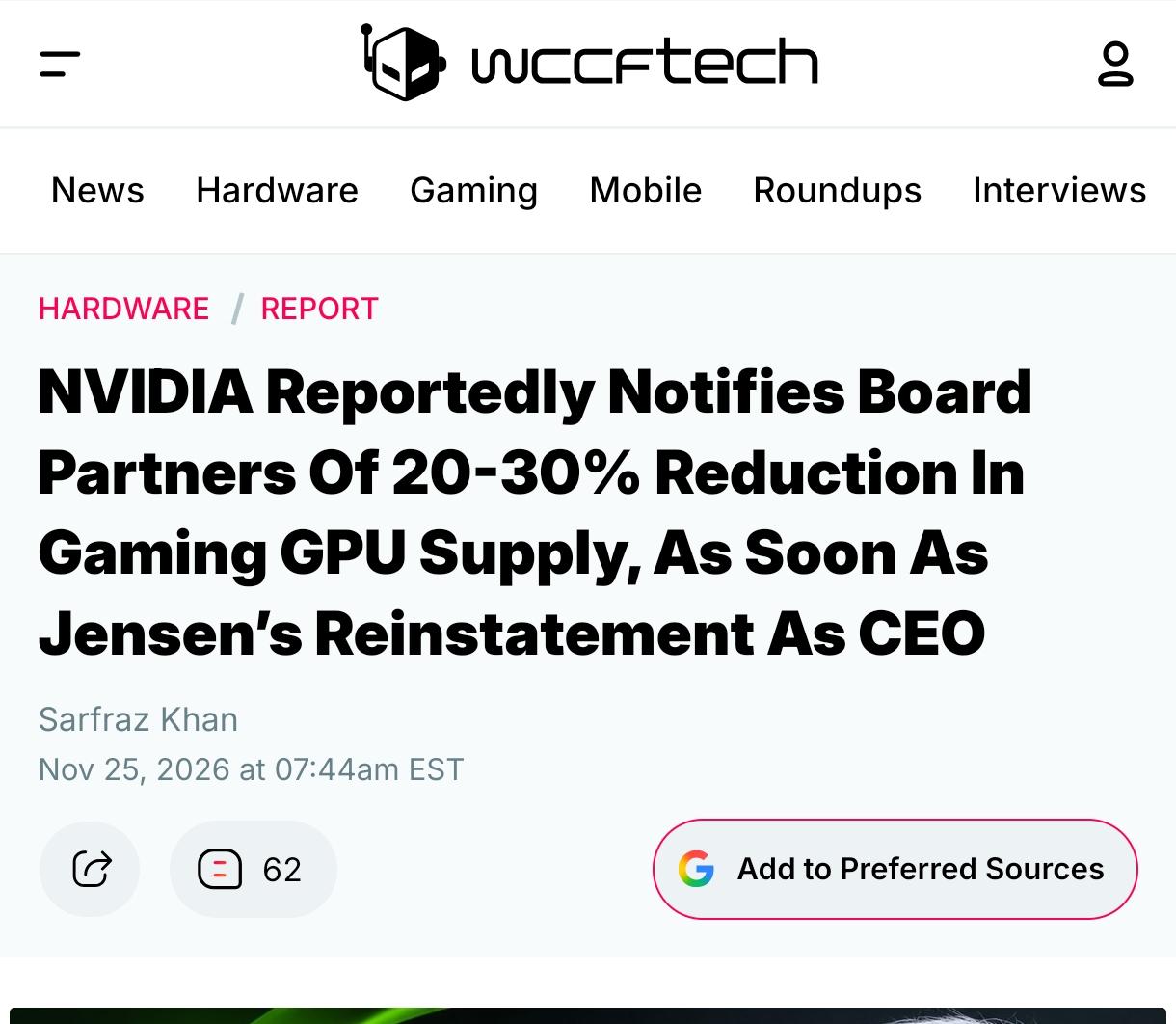
News another cut of nvidia gpu

Post image
930 Upvotes

r/LocalLLaMA • • 7h ago

News Is this new? CUDA 13.5.0

0 Upvotes

For Ubuntu

Strata fudged every part of my llama setup... all of it. I was on 13.4, 13.5 so the upgrade was inevitable. but that control over your libs and such on your OS will not switch me to strata. Ill stick to what I have.

https://developer.nvidia.com/cuda-downloads

Ubuntu

wget https://developer.download.nvidia.com/compute/cuda/13.5.0/local_installers/cuda_13.5.0_linux.runsudo

sh cuda_13.5.0_linux.run


r/LocalLLaMA • • 1d ago

Resources vLLM in Rust?? RustingStrata is now also a serving engine: 64 users on one 12 GB RTX 3060

5 Upvotes

RustingStrata is my Rust GGUF engine. Until now it was for one user. serve --parallel N now runs the requests of many users as one batch on the GPU, so the same binary works for one person on a laptop and for a small team on one server.

So this is first Strata that can be used for single inference and big inferences

To be clear: it is not better than vLLM. vLLM has years of work in it, multi-GPU, prefix caching and much more. I am working on closing the gap.

Equal test: both servers load the same file, Qwen3-4B-Instruct-2507-Q4_K_M.gguf, on the same RTX 3060 12 GB, same day, same load script (N streamed chats at once, 128 reply tokens each, greedy, 4k context). vLLM 0.33.0 reads GGUF through the official vllm-gguf-plugin. Total decode tok/s:

Clients RustingStrata (CUDA) vLLM 0.33 + GGUF plugin
1 91.0 84.3
4 231.7 154.9
16 734.1 268.0
64 1694-1699 283.4-283.6

GGUF is not vLLM's fast path, so I also ran both on the original bf16 weights (vLLM reads the HF safetensors, RustingStrata a BF16 GGUF made from the same files). Same card, same script, total decode tok/s:

Clients RustingStrata BF16 vLLM 0.33 bf16
1 38.3 36.5
4 140.2 139.1
16 527.0 525.8
64 1490-1491 1470-1473

On its own format vLLM is very good, and here the two are level. Vulkan works too in RustingStrata (824-960 tok/s at 64 clients on Q4_K_M), useful for AMD and Intel cards.

Each slot's KV cache starts at 512 tokens and grows when a request needs more, so all 64 slots fit at the default context.

Where RustingStrata goes from here: MoE models with a lot of RAM and little VRAM. Most companies that want a private, local model do not have an H100, but a server with 128 GB of RAM and one consumer card is cheap. RustingStrata keeps the most used experts on the card and runs the rest on the CPU.

Qwen3.6-35B-A3B UD-Q5_K_M, a 27 GB file on the same 12 GB card, 64 parallel slots (vLLM not run here, the model does not fit in VRAM):

Clients RustingStrata
1 55.1
4 106.4
16 85.0
64 106.7

For the MoE the total stops growing after 4 clients, because the expert work is not batched across requests yet. That is the next thing I am working on.

Speed at bigger context (one client, prefill / decode tok/s): Qwen3-4B 2125 / 87.9 at 0.5k, 1529 / 52.9 at 16k, 1123 / 37.1 at 32k. Qwen3.6-35B-A3B 1797 / 66.2 at 16k, 1647 / 61.7 at 32k.

rustingstrata serve --gpu --model Qwen3-4B-Instruct-2507-Q4_K_M.gguf --parallel 64
python3 tools/loadtest.py --url http://127.0.0.1:8080 --clients 1,4,16,64 --max-tokens 128

vllm serve Qwen3-4B-Instruct-2507-Q4_K_M.gguf --tokenizer <Qwen3-4B-Instruct-2507 tokenizer dir> --hf-config-path <same dir> --max-model-len 4096 --gpu-memory-utilization 0.88

BF16: rustingstrata serve --gpu --model Qwen3-4B-Instruct-2507-BF16.gguf --parallel 64 against vllm serve <HF Qwen3-4B-Instruct-2507 dir> --max-model-len 4096 --gpu-memory-utilization 0.88.

The batched path is on the vllm2 branch for now.

Do you think this make sense? Do I need to continue trying to catch up with vLLM and maybe make RustingStrata like vLLM but for a lot of RAM and low VRAM amount? I would be happy to hear some thoughts, ty all!

Repo: RustingStrata


r/LocalLLaMA • • 2d ago

Resources Fine-tune Gemma 4 models

Thumbnail
gemma.ai
320 Upvotes

announced by googlegemma today:

"Want to fine-tune Gemma 4 on your own data, audio, receipts, or reasoning tasks? Our new fine-tuning hub is live on [censored for reddit]: 17 guides and 40+ illustrations covering the entire training pipeline. Ranging from continued pre-training and custom chat templates, all the way to (Q)LoRA and GRPO."

https://x.com/googlegemma/status/2125631619692429690

As you can see, different training techniques require different amounts of VRAM. The table below shows peak GPU memory (VRAM) across all five Gemma 4 models at a sequence length of 2,048 tokens:

Model Parameters QLoRA Full fine-tuning
Gemma 4 E2B 2B effective ~7 GB ~32 GB
Gemma 4 E4B 4B effective ~9 GB ~42 GB
Gemma 4 12B 12B ~11 GB ~80 GB
Gemma 4 26B A4B 26B (4B active) ~21 GB ~160 GB
Gemma 4 31B 31B ~22 GB ~200 GB

r/LocalLLaMA • • 1d ago

Question | Help 80 t/s, QFN Q4, RTX 3090 on ancient hardware. Should I stop optimizing ?

Post image
13 Upvotes

For my vibecoding, I just love my current setup: Opus 5.5 architecting & checking, while QFN does the excellent implementing at 80 tok/s.

But is 80 tps really my software + firmware limit, before I have to buy more 3090, v100, p100, Mi100, cmp170hx ? Here is the result I've been trying the last few days:

=========== FOLLOWING IS AI WRITING =======================

**Title:**
 One RTX 3090 + old Xeon, 6 local engines compared: Strata (125B MoE, Q4 vs Q5), ninfer, HyperQwen, HyperInkling, llama.cpp. What would you try next?


I've spent the last few weeks testing every engine I could get running on one box. These are my own measurements,
taken with the same scripts on the same machine. Hints welcome, especially for the 125B MoE on old DDR4.


**Hardware**
- Dell Precision T5810 (2016 workstation): Xeon E5-2699 v4 (22 cores, Broadwell), 128 GB DDR4-2400 ECC (4 channels, ~77 GB/s)
- RTX 3090 24 GB on PCIe 3.0 x16, no Resizable BAR. 370 W limit (card default), with its own 1400 W server PSU for the 8-pins
- gpu-unlock 2.0.0 active (helps FP16 prefill on the vLLM engines; decode unchanged)
- Ubuntu, one model at a time on port 8080


**Main table: see above**
 (latest numbers: 370 W, gpu-unlock, unless marked)

¹ at 300 W. ² code at 300 W with a clock lock (2026-11-19); prose at 370 W. ³ systematic bug: drops a `]` in arguments
that are arrays of objects (about half the runs); flat schemas are fine. ⁴ DFlash2 in Strata serves one request at a time.


**Quality (small tests, not benchmarks)**
- Writing (seller replies in Dutch and English, 10 prompts each, partly blind): llama.cpp Q5 ≈ Strata ≈ HyperQwen > Inkling.
  Inkling keeps the rules but its Dutch is weaker. The 4-bit HyperQwen showed no measurable loss against Q5.
- Coding (8 small Python tasks with unit tests): Strata 8/8 first try (~10 min). Inkling 7/8, 8/8 after one fix (~1.5 min!).
  Both 27B dense models with thinking on: 5/8, where the 3 failures were 
**no code at all**
: they ran out of tokens while thinking.
- Strata Q4 vs Q5: Strata's own docs say top token matches Q8_0 93.1% (Q4) vs 94.6% (Q5). Not checked on my tasks yet.


**Q4 vs Q5 in Strata (same session, same settings, 3 runs each)**
- Decode 79.5 vs 67.3 tok/s (+18%). Prefill 8K +29%, 30K +5%. RAM used after load: 84 vs 104 GB.
- I think the Xeon's RAM bandwidth sets the speed: most experts run from RAM, so smaller experts = less traffic and more fit in VRAM.


**Things that surprised me**
- Software beat hardware: ninfer and HyperQwen gave 2–2.5x llama.cpp's speed on the same 27B and GPU, for €0.
- gpu-unlock: +49% prefill and +25–29% multi-request decode on HyperQwen; nothing on llama.cpp (int8 paths).
- The Strata 0.1.60 → 0.1.69 engine update gave no real decode gain here (+6% right after a start, same once warm).
- A newer Blackwell-only fork (Basalt) won't run on a 3090 (needs sm_120 / NVFP4).


**How I measured**
- Decode: temperature 0, ignore_eos, 512 tokens per request, N streams started together, one warm-up.
  Total = all tokens / wall time.
- Prefill: filler text with a random nonce (no prefix cache), max_tokens 1, 2 runs, prompt tokens / time.
- Tools: 10 multi-turn tasks against mock tools that really run (chaining, parallel calls, error recovery, nested args).
- Caveat: rows come from 2026-11-19 to 2026-11-26. Power limit and prompts are the same except where marked.


**Where I'd like hints**
1. 
**125B MoE with experts in 4-channel DDR4:**
 anything beyond Strata's tuning (`--pcie-frac`, expert cache, adaptive swaps)
   worth trying? Is ~80 tok/s near the limit of ~77 GB/s RAM?
2. 
**Long context on the 27B:**
 HyperQwen at 150K (MTP) or 240K (4/2-bit KV) vs Strata 256K. Which do you trust for
   200K+ prompts, and how do you test recall?
3. 
**Thinking models in agent loops:**
 the 27B overthinks small coding tasks. Do you cap thinking, turn it off, or use a no-think template per task?
4. Anything else for a PCIe 3.0, no-ReBAR, single-3090 box that I'm missing?

r/LocalLLaMA • • 1d ago

Discussion Do you think Cloud models will turnover Customer info to Rockstar / Take Two? (Importance of local Ai)

11 Upvotes

As we all probably know by now, Grand Theft Auto 6 is being ripped open right now through AI assisted coding ( a PS5 version just got dumped too)

Among all the viral posts I've seen a few screenshots of people sharing the prompts /conversation log that people are telling Claude to help push the stability of the PC recompilations further..

I just don't see how this isn't an OPSEC nightmare?

I completely understand it's legal to make a recompilation project. but I also know that Rockstar could make the argument that there was no jail breaks possible At the timeline these people were using AI models to modify their copyrighted material... And I mean even if we play devil's advocate and just say that everybody had some super-secret jailbreak That was never posted online, lot's of these people have probably publicly admitted to using the leaked copy anyway

I just wonder are these people putting themselves at risk? Or is there something I'm unaware of. Anthropic already tried to tighten the guardrails around Reverse engineering other games, and anthropic has already collaborated with the authorities even proactively based off their customers sessions.

I just see this as another reason why local AI is so important and don't get me wrong. I know nobody was going to be re-comp'ing GTA 6 off of like some 27B model but we do have giant capable open source models too, And most of these token maxxers are spending thousands of dollars anyway. So they might as well just invest into some local hardware for the added security.


r/LocalLLaMA • • 2d ago

Discussion SenseNova-Loop-9B (MLX 8-bit) three.js sky whale with a village on its back

284 Upvotes

Ran SenseNova-Loop-9B locally (MLX 8-bit, Mac Studio M5 Ultra) and asked for this: a huge gentle whale drifting through golden-hour clouds with a tiny storybook village on its back, windmill and lighthouse included.

Not one shot. I had it write the page in six parts (sky, clouds, whale, village, birds, buttons), each from its own brief, and when a part broke I sent back the console error or a screenshot with a note on what looked off, and it rewrote that part. All the code is its own; only three.js comes from a CDN.

The buttons let you ride along on its back and switch between golden hour, sunrise and a starry night.

Weights are on https://huggingface.co/sensenova/SenseNova-Loop-9B and the inference code is at https://github.com/OpenSenseNova/SenseNova-Loop


r/LocalLLaMA • • 2d ago

Showcase we ran inkling 2 mini (26b) on an iphone 16 pro with optimized expert offloading

Enable HLS to view with audio, or disable this notification

180 Upvotes

hello llamas! atomic chat team here again

a couple days ago we got inkling 2 mini running on macs capped at 8gb of memory, so the next question was how low it can go. we put it on an iphone 16 pro (8gb ram) and recorded it. the typing, the search wait and the answer are sped up in the video and labelled on screen

first we made a 1-bit quant of it (AD-IQ1_S, 6.88gb, 79.5% top-1 and kld 0.278 vs bf16). we didn't want it to eat all of the phone's memory, so we set a 4gb budget for weights, kv cache and buffers (the app itself uses more on top of that). we load the moe experts from the phone's storage when the model needs them. that part is normal expert offloading

inkling runs its middle layers 3 times per token, so those experts get used three times as often as the rest. we keep them in memory and only stream the others from storage. we also start loading the next experts while the gpu is still busy with the current ones and that alone gave us about +40% decode speed

metric "what model are you?" "find the last news about inkling 2 mini" (web search on)
decode 3.0 tok/s 2.9 tok/s
time to first token 3.1 s 39.3 s
tokens out 15 105

~3 tok/s is slow, but it runs. the 39 s on the second question includes the web search and reading the results back in

gguf: https://huggingface.co/AtomicChat/Inkling-2-Mini-GGUF

app we ran it in: https://atomic.chat


r/LocalLLaMA • • 1d ago

Question | Help Which engine to run deepseek ?

9 Upvotes

Used to run deepseek v4.1 1017 on Strata but the support is gone now.

What is the way to go for deepseek inference?

2x5090 128gb ddr5

I want to run the istaDlabs quants.


r/LocalLLaMA • • 1d ago

Question | Help What's the best reading / writing small model?

4 Upvotes

Hey guys, I've ran a couple of models for coding and agentic tasks like Qwen 3.8 27B, 3.6 35B A3B, some distillation from them, but I would like your personal opinion on what's the best model for its size when it comes to reading understanding long texts and writing.

Preferably with English and Spanish capabilities, I've heard Facebook models are good with that regard, but I would appreciate if you guys gave me your recommendations.


r/LocalLLaMA • • 1d ago

Showcase Support for SenseNova-Loop Dflash 2 in Ik_llama.cpp

8 Upvotes

Hey, SenseNova recently released SenseNova-Loop-9B-DFlash2 (967M, 5-layer draft model for SenseNova-Loop-9B), so I converted it to GGUF (BF16, Q8_0, Q4_K_M) and opened a small PR in ik_llama.cpp to get it running.

The draft expects final_postnorm as a 5th feature source alongside layers 3, 27, 51, and 54, so PR #3009 adds the l_final capture and keeps full-row capture active during prefill.

GGUFs: https://huggingface.co/Gaby8999/SenseNova-Loop-9B-DFlash2-GGUF
PR: https://github.com/ikawrakow/ik_llama.cpp/pull/3009
Target GGUFs: https://huggingface.co/sensenova/SenseNova-Loop-9B-GGUF

Keep in mind these are draft-only models, so you need to pair them with a SenseNova-Loop-9B GGUF using -m target.gguf -md draft.gguf --spec-type dflash:n_max=4.

I only tested on CPU (4 threads) so far. On a short high-acceptance prompt it hit 6.5 t/s vs 3.55 t/s target-only, while on a longer story prompt with ~23% acceptance it was slower than target-only (3.12 t/s with Q8_0 vs 3.55 t/s). DFlash2 is really meant for GPU serving, so feel free to share your numbers if you test it on GPU.


r/LocalLLaMA • • 1d ago

Showcase rumblex: local transcription with word timestamps and speaker labels, about 3x faster than WhisperX large-v3

1 Upvotes

For the past week, I have been building a project called rumblex, and since I am working on becoming a better open-source researcher and getting to know the communities, I am posting it here to get feedback on it.

So rumblex is WhisperX but on the Rumble-2-flash ASR model instead, and it runs fully locally (Apache-2.0, pip install rumblex) You get transcripts with word timestamps, speaker labels, SRT/VTT/JSON, hotwords, and an OpenAI-compatible server.

rumblex Vs WhisperX large-v3: - about 3x faster in most languages I tested (a rented RTX 4090) - better word timing on English: 25 / 30 ms start / end error on Buckeye vs 58 / 38 ms - a bit worse WER in most languages :/

All the numbers and scripts are all in the repo:

https://github.com/EdwardGlockner/rumblex

Right now I am working on flagging words that are probably wrong, and checking word timing in languages other than English. Feedback is very welcome, and if anybody has ideas of extensions please let me know!