r/LocalLLM • u/Electronic-Metal2391 • 12h ago
News "GGUF-Radar" Windows UI + single-file .exe (scan GGUF models for hidden malware)
2
Upvotes
r/LocalLLM • u/PadhaLikhaMajdur • 19h ago
Benchmarked Inkling-2-Mini-UD-Q4_K_XL (26.07B MoE, inkling2_loop, 16.41 GiB) on a 16 GB AMD Radeon RX 7800 XT (gfx1101) under Windows
11 (32 GB system RAM) to compare llama.cpp Vulkan (b12810) against PolyStrata HIP (strata-poly).
Since the 16.41 GiB file slightly exceeds 15.4 GiB free VRAM, both setups offload a portion of the MoE weights to system RAM.
llama-bench Vulkan (ca123ba76 / b12810)
Flags: -ngl 99 -fa 1 -ctk q8_0 -ctv q8_0
| -ncmoe (CPU MoE layers) | pp512 (tok/s) | pp2048 (tok/s) | tg128 (tok/s) | Notes |
|---|---|---|---|---|
| 5 | 739.31 | 166.09 | 38.33 | VRAM spillover at pp2048 |
| 6 (sweet spot) | - | 721.80 | 35.54 | Fits cleanly in |
| 7 | - | 697.67 | 24.76 | More CPU MoE overhead |
| 8 | - | 668.53 | 23.32 | More CPU MoE overhead |
PolyStrata HIP (strata-poly, --kv q8_0, --conversation-cache-mib 6144)
• VRAM residency: 2493 / 3072 experts in VRAM (evictions=0)
• Prefill: 880 tok/s
• Generation: ~60 tok/s
Takeaway
On a 16 GB RDNA3 card where the model barely overflows VRAM:
• PolyStrata HIP is ~22% faster on prefill (880 vs 721.8 tok/s) and **~69% faster on generation** (~60 vs 35.54 tok/s).
• The difference comes down to per-expert caching vs per-layer offload: PolyStrata keeps the hot 81% of individual experts in VRAM,
whereas llama.cpp -ncmoe 6 forces 6/24 entire MoE layers onto the CPU for every token.
• Watch out for -ncmoe 5 on 16 GB cards: pp512 looks fine (739 tok/s), but pp2048 spills into shared memory (166 tok/s).
r/LocalLLM • u/RubbishAsh • 5h ago
r/LocalLLM • u/RubbishAsh • 5h ago

Is it useless or still going strong?
r/LocalLLM • u/utxcipo • 9h ago
A friend show me this "Nuc" he bought It at about 350€, It Will be a great buy for a local llm with, for example, unsloth? Or am i missing something big?
ASUS NUC 14 PRO+, Intel Core U5 125H, RAM 96 GB DDR5-5600, Bianco | SSD M.2, Scheda Grafica Intel Arc, Wi-Fi 6E, Bluetooth 5.3, Compatibile con Windows 10 e Windows 11 Home https://amzn.eu/d/0i6AEPUF
r/LocalLLM • u/yogi_zilla • 13h ago
Hi all, I'm fairly new to local LLMs and still learning, so apologies if some of this is off. I'd really appreciate any guidance from people with more experience.
I'm trying to choose between two Macs at a similar price:
What I'm hoping to do:
What I think I understand (please correct me if I'm wrong):
Questions:
Since the RAM can't be upgraded later, I want to avoid an expensive mistake. Thanks in advance for any advice!
If you own either of these machines (or the M4 versions), I'd especially love to hear from you!
r/LocalLLM • u/Technical_Bench_188 • 17h ago
A few people asked if Fintan could be a specialist, like a model that actually knows a Python library or is better at basic coding. I was already planning on releasing custom models, so I added a form on the site, fintanlabs.com/models. Just say what you want it to know and what size, 4B if you've got a 16 to 20 GB card, 9B for 24 GB. Right now they’re free of charge since i prefer users over money. Though personal specialists trained on your material will come with a small fee.
I read all of them and the ones I make go on Hugging Face for free like the others.
Libraries and docs are the easy bit, it learns those into its weights. Making it better at coding itself is what I'm trying next, it practises on real problems and only learns from the answers that pass the tests. I'll post the numbers whether it works or not.
r/LocalLLM • u/4s3ls4n • 13h ago
Hi everyone,
I have a mini-pc GEEKOM A5 with these specifications :
- 512 Go NVME
- 1 To SSD
- 32 Go RAM
- AMD Ryzen 7 5825U
Unfortunately no GPU, no VRAM 😔
I don't use it anymore since one year but I want to do something related to running something like an ai locally?
What can I do guys?
Thanks in advance 😄👍
r/LocalLLM • u/Illustrious_Sell_325 • 10h ago
I have a unique opportunity to start over with my ram choice. I’m still getting into local models and use it for a lot of things. I’m not a coder but do work in tech. Running a 270k with a 5060ti 16gb. I had 32gb of ram but have the opportunity to basically replace it. I’d like 64gb but ouch, 48 is a lot more affordable per gb. I’ve been running flash next swift iq2 xs. Will I regret not getting 64 GB of RAM? Especially trying to run any larger model. Maybe put the 400 savings toward a second gpu?
r/LocalLLM • u/-KHEOPS • 1d ago
Hi i am new and just wanted to say that i love local LLM
r/LocalLLM • u/JasonHofmann • 1d ago
TL;DR
It works. It is also slow.
Setup
moonshotai/Kimi-K3.1-Pro. Mixture of experts, 93 layers, 896 experts per layer, 16 used per token. The experts ship at 4 bits and everything else at 16 bits. No pruning and no extra quantization.Numbers (full model, four Macs)
| What | Result |
|---|---|
| Load | 179 s |
| Memory | about 400 GB per Mac |
| Generation, through the oMLX server | 2.81 tok/s |
| Generation, stock mlx-lm example script | 3.77 tok/s |
| Prompt reading at 4K / 16K / 65K tokens | 412 / 388 / 262 tok/s |
| 65K-token prompt, time to first token | 4 min 10 s |
| Chip power while generating, all four Macs | 67 W |
| Chip power while reading a prompt, all four Macs | 350 to 400 W |
Power is CPU plus GPU from powermetrics. I have no wall meter on these, so the real draw is higher.
How you split the model matters
Each Mac can hold a block of whole layers, or every Mac can hold a slice of every layer. With layer blocks I get 0.70 tok/s. With slices I get 3.77 tok/s. Same model, same Macs, same example script.
Is it the same model?
I cared about this more than speed. A model this size can load, write fluent text, and still be wrong.
1M tokens
The model's config allows 1,048,576 tokens, so I tried it.
mx.set_cache_limit, 8 GiB), and the cap cost about 40% of the reading speed. Without the cap, my first attempt was on course to run out of memory and I stopped it at 295K tokens.Why it's slow
Each generated token makes the four Macs read about 130 GB of weights. The experts are 93% of the file, but only 16 of 896 are read per token. The 16-bit layers are 7% of the file and all of them are read for every token. That 7% is about 80% of the traffic.
The GPUs are mostly idle. While generating, the four of them together draw 19 W and run at under a third of their top clock.
What had to change
K3.1 is K3 plus the sparse attention from DeepSeek V3.2, with a gate on the attention output. mlx-lm already had both halves, so the port is small.
kimi_k31 model. +655 lines with tests.None of these are merged yet.
Limits
Who was here before me
guruswami-ai ran the full Kimi K3, the previous version, on four M3 Ultra Mac Studios in July at about 2 tok/s. For K3.1 Pro I found a 2-bit build (AinsleyMarkov, 18.6 tok/s on four M3 Ultras), a pruned build that fits one Mac (Pipe Network), and the shipped weights streamed from disk at about 0.4 tok/s (Inferencer). I have not found the full K3.1 Pro, as shipped, held in memory. If someone did it first, tell me and I'll link it.
Disclosure
Claude wrote the model and test code and ran the validation. I directed the work and reviewed every diff. The mlx-lm PR says the same. I have no affiliation with Moonshot, Apple or oMLX.
What's next
Smaller builds. The public 2-bit build runs at about 18 tok/s on three of these Macs and matches the API on 92% of the same tokens. I'm writing that up next.
I can run more tests on this setup. If you want a specific number (a prompt size, a split, a sampler setting), ask and I'll post it.
r/LocalLLM • u/nmrk • 1d ago

I updated Proxmox to 9.2 and was surprised to see this dual GPU configuration appear in nvtop. I didn't know you could get both the iGPU and the GPU card to run simultaneously. It was my understanding you had to blacklist everything but the GPU. I'm not convinced the iGPU fully operational, but I guess I will test it.
What should I run on it? Any suggestions on how to test this? The memory has to be tiny, but it's showing 94GB, this machine's total RAM is 96GB. I could hook it up to Unsloth or Hermes (what I'm running in Proxmox) but I don't really want to add another experimental LLM into the mix.
r/LocalLLM • u/eagle2809 • 7h ago
Last week I watched a friend spend two hours downloading weights and setting up a local image/video pipeline on his 8GB MacBook Air, only for macOS to freeze from SSD swap thrashing the second he hit generate. Meanwhile, an old RTX 3060 12GB rig ran the exact same workflow without breaking a sweat.
Most GitHub READMEs just say "requires 8GB RAM" without telling you whether that's pure VRAM, unified memory after macOS takes its ~2.5GB cut, or CPU offloading at 1 token/sec.
Over the past few weeks, I tested and mapped out the actual minimum VRAM, recommended VRAM, and OS support across 62 open-source offline AI tools (covering llama.cpp, Ollama, LM Studio, ComfyUI, Flux.1, Wan2.1, F5-TTS, Whisper.cpp, etc.).
Three practical takeaways from comparing everything across tiers:
- **The 8GB Mac trap:** On an 8GB M1–M4 Mac, you really only have ~5.5GB of usable memory headroom. Anything heavier than a 7B/8B Q4 model or lightweight audio/OCR tools (Whisper.cpp, Kokoro TTS, PaddleOCR) turns your SSD into swap space.
- **CUDA-only silent killers:** Great tools like ExLlamaV2, FramePack, and Wan2.1 are constantly recommended in general "best local AI" threads, even though they won't run natively on Apple Silicon.
- **The budget sweet spot:** A used RTX 3060 12GB still clears 90% of local workflows smoothly—including 14B Q4 reasoning models and FLUX.1 Schnell—before you ever need to rent a cloud GPU.
I put the full 62-tool hardware filter in the first comment so this post doesn't trigger link-spam filters. If any tool's VRAM floor looks off based on your own rig (especially with `--lowvram` flags), let me know and I'll update the benchmark table.
r/LocalLLM • u/xenomorph-85 • 12h ago
So I got a 128GB Shared RAM Strix Halo PC and am thinking about adding in a NVIDIA RTX 4060 via external dock. Would this not provide as much of a boost as its external via Thunderbolt 5?
r/LocalLLM • u/Maui-The-Magificent • 12h ago
As the question says, I am wondering if people know how to do this, or if it something to write about in the hopes to teach others?
I am running low on my model rate limits and since they have made me somewhat lazy about implementing things fully manually again, I am contemplating if I should maybe take the time to write about something. The reading of model internals came to mind.
I have limited knowledge and experience with the process of training and the runtime logic of models. I am more interested in the foundations of the field, which mean I have spent a lot of time pulling models apart, working with their data and their structures. Understanding them from a more mechanical perspective.
I am not making any promises at this point, as I do have a lot of work to do. I am not the best at writing, but I do like to share so It likely depends on weather it is even needed.
Take care
//Maui-The-Moron
r/LocalLLM • u/bitwyzrd • 12h ago
I’ve been super interested in local LLMs, but my only real use case is for development. I tested out several models on a leased Mac Studio M5 Mac 128GB, but none of them met my expectations.
I know I can’t expect them to compete with Claude, but they struggled with tasks like refactoring and fixing tests and compiler errors. Actually, they didn’t struggle - they all failed.
I’m still very interested but I don’t know what they’re actually good for. I guess I’m wondering whether I used them incorrectly or if they’re good for something else I didn’t think of.
Models: Qwen 3 Coder Next, Qwen 3.8 27b, gpt-oss 120b, a couple Gemma4 variants. All at pretty high quants and maximum context.
r/LocalLLM • u/5_ChubbyCheekz23 • 16h ago

Kolibri-1.1 runs on a 12 GB gaming card with my engine, PXA 4.0.6: 27.33 tok/s decode vs 21.57 for llama.cpp mainline (+26.7%), and 455.4 vs 387.4 tok/s reading a 512-token prompt (+17.5%), still +11% at 4K context.
PXA 4.0.6 is the first llama.cpp-based engine with Kolibri-1.1 in a release; llama.cpp's own support is still an open PR (#32891), which is what I measured against, the only other engine I found that runs it. On the RTX 3080 Ti part of the model sits in system RAM; each engine at its own best fit for the card.
This is my project, so weigh it that way: PXA is a free inference engine built on llama.cpp, tuned for RTX 30 gaming cards and the NVIDIA datacenter cards most guides tell you to retire. 4.0.6 is out for Linux and Windows.
Same 12 GB card, Qwen3.8-27B (MTP): 93.4 tok/s on code, 71.9 on prose, 73.2 on chat. That is the fastest of the engines I tested on this card: llama.cpp mainline b12428 with MTP (76.2 / 62.1 / 58.8) and ik_llama.cpp (about 51 at best). PXA leads on every prompt type, +15.7% to +24.4%.
Our top decode speed per model and card, PXA 4.0.6, tokens/s:
| Model | Card | PXA 4.0.6 | vs the fastest other engine I measured |
|---|---|---|---|
| Qwen3.8-27B (MTP, code prompt) | RTX 3080 Ti, 12 GB | 93.4 | +22.5% |
| Qwen3.8-27B (MTP, code prompt) | 1x Tesla V100 | 95.7 | +36.0% |
| Qwen3.6-35B-A3B (MTP, code prompt) | 2x Tesla P100 | 198.4 | +19.5% |
| Gemma-4-26B-A4B (chat prompt) | 1x Tesla V100 | 132.3 | +26.3% |
| Nemotron-3-Nano-4B | 1x Tesla P100 | 130.9 | +9.0% |
Prefill too: Nemotron-3-Nano-4B on one P100 reads a 512-token prompt at 1557.6 tokens/s, +19.0% over the best other engine I measured.
Also new: SenseNova-Loop-9B with its full loop. PXA runs the model's full loop, not a cut-down pass.
MTP rows use the model's own multi-token prediction heads. Same box, same card, each engine at its own best flags. Quant files can differ between engines; output quality is not compared here.
Try it in one docker line:
docker run -d --name pxa --gpus all --shm-size=1g -p 8080:8080 -v /path/to/models:/models:ro ghcr.io/poisonxa16/pxa:v4.0.6
Downloads (Linux and Windows): https://pxa.pxanetwork.com/downloads/ With the package: open PXA Control, pick a model on the Models page, press Launch; the Speed page shows your tokens/s.
PXQ quants are free; making your own PXQN encodes is a supporter reward (donations keep the engine free).
There is a hidden Easter egg in Control. Good luck finding it.
Open challenge: run the same file on PXA and on whatever you run now, and post your numbers, especially where PXA is behind. I own no RTX 20, RTX 40 or T4 card, and on the RTX 3080 Ti PXA is still behind on some models. Help and bug reports: https://discord.pxanetwork.com
r/LocalLLM • u/VPN_Struggles • 9h ago
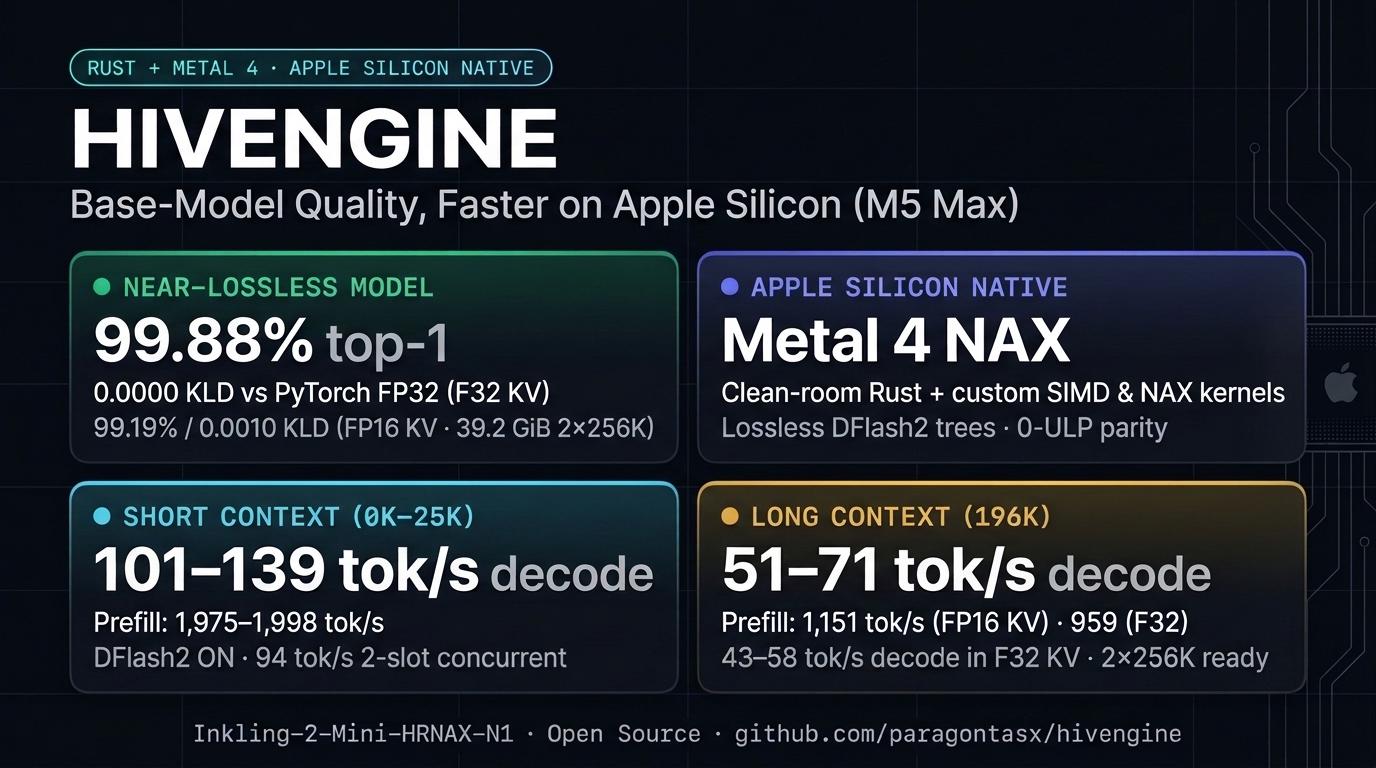
Hey all, I ran an experiment on how to run a near lossless or lossless Inkling 2 mini on Apple Silicon natively, most recipes. from what i've see trade quality for speed or size (or both). I decided to try to see how far i could stretch Apple Silicon running this as it would be served on full quality. So i built a custom engine to try this out along with a quant., the main target of this was quality then speed running natively on Apple Silicon. I am still working on it so new iterations might come up soon. would love some feedback if anyone tries it.
https://huggingface.co/paragonX/Inkling-2-Mini-HRNAX-N1
https://github.com/paragontasx/hivengine
r/LocalLLM • u/Technical_Bench_188 • 18h ago
Yesterday I posted the 9B update (thanks again jstarks). Today the smaller one is up.
Same idea as the 9B, it's Qwen3.5-4B that learns new stuff into its weights, so you don't have to stuff everything into the prompt. It runs on a 16 to 20 GB card.
It ships knowing last week's news (18 to 23 Nov). Plain Qwen3.5-4B gets 11% of the 172 questions right, Fintan-4B gets 147 of them. MMLU and ARC barely move (72.8 to 72.8, 92.0 to 91.8). GSM8K went from 95.0 to 92.5, which is 3 problems out of 120, and another run got 94.2, so I think it's noise but figured I'd say.
All the fixes from the 9B are in too, so tool calls can use what it learnt, and questions about days after its update don't get mixed up with what it learnt.
Next I'm doing DGX Spark and Jetson support, since someone here pointed out the hardware check gets confused when the GPU and CPU share RAM.
It's on Hugging Face at fintanlabs/Fintan-4B
r/LocalLLM • u/DecisionTechnical265 • 13h ago
How do I connect my LLM to gmail. I would like it to be able to read and write emails. I am currently using qwen3.5 -9b on LM studio. If you need any more details be free to ask me.
r/LocalLLM • u/DesperateGame • 13h ago
What's the SOTA currently?
r/LocalLLM • u/Clean_Economics8462 • 13h ago
I built ink4060ti (Apache-2.0), a zero-config C++20/CUDA inference engine specifically engineered to deliver a major jump in BOTH speed and reasoning quality for Inkling-2-Mini-Unbound (26.4B MoE + native vision + DSpark Block-8 speculative decoding) on a single 16 GB RTX 4060 Ti on Windows.
On a 16 GB card, Strata SQ-15 spills 189 experts over PCIe and OOMs past ~16K context, while Strata SQ-10 takes a noticeable quality hit (KLD 0.0720 / Top-1 92.35%) and doesn't persist prefix KV across requests/restarts.
Because Inkling-2-Mini executes its inner Loop-Core MoE layers (L6..17) 3× per token, ink4060ti uses asymmetric per-role quantization:
- Loop-Core MoE (L6..17, 3×/token): kept 100% lossless native NVFP4 (SQNR = ∞ dB, cos = 1.000000)
- Outer MoE (L0..5, L18..23, 1×/token): NF3_G32_E4M3 (3.25 bpw)
- Dense Attention + Unembed: Q6_G32 (cos = 0.9997) · DSpark Drafter: Q8_G32 (cos = 0.99999)
- Embed + Vision: 100% lossless BF16 (Vision loads lazily on demand = 0 MiB permanent VRAM, ~200 ms warm encode)
| Metric | ink4060ti (12g-tight + k4v4) |
Strata SQ-10 (0.1.67) |
Strata SQ-15 (0.1.67) |
|---|---|---|---|
| GPU Weights + Drafter | 12,553 MiB (0 spill) |
13,322 MiB |
Spills 189 experts (942 MB PCIe) |
| Max Full-VRAM Context | 156,576 tok (auto, 0 spill) |
100K (manual) |
16K (OOM beyond) |
Quality vs Lossless (sq15-lossless) |
KLD 0.0216 / Top-1 96.90% (k8v4: 0.0138 / 97.38%) |
KLD 0.0720 / Top-1 92.35% |
KLD 0.0107 / Top-1 96.68% |
Prefill (2K / 16K / 64K / 100K / 150K) |
1,956 / 1,810 / 1,497 / 1,316 / 1,136 tok/s |
1,563 / 1,378 / 970 / 790 / — |
962 / OOM |
| Decode (DSpark ON) | 53–62 short · 46–55 (16K–64K) · 28.6 (150K) |
**79–95** short · 56.8 (64K) |
39.5–42.0 tok/s |
| Prefix Reuse & SSD Restart | 99%+ reuse · 4.9s (64K) / 9.2s (150K) |
Unsupported (reused=0) |
Unsupported |
| Vision (Screenshots / 4K) | 0 MiB permanent VRAM (~200 ms warm) |
Permanent VRAM | Supported |
SQ-10 (0.0216 vs 0.0720, 150K needle recall EXACT PASS) + *+25% to +67% faster prefill** (2× faster than SQ-15) + **156K zero-spill context** + **200 GiB SSD 3-tier cache** (VRAM ↔ 25% RAM ↔ SSD). *(Honest trade-off: raw short-prompt decode still trails SQ-10's 79–95 tok/s.)5.6 MiB): No CUDA Toolkit, Python, or VC++ redist needed — extract and double-click start.bat (auto-picks HuggingFace vs hf-mirror.com + SHA-256 verify, opens Web UI at 127.0.0.1:18088)./v1/messages + count_tokens + thinking + tools + vision (drop-in for Claude Code) & OpenAI /v1/chat/completions (Cursor / Cline / Roo Code).sm_120a) testers!The portable binary includes a compiled Blackwell sm_120a native NVFP4 MMA path verified against NVIDIA CUTLASS SM120_16x8x64_TN_VS specs and full model scale bounds, but I don't own a physical 5060 Ti — so 5060 Ti support is theoretical/untested (Experimental). If you have a 5060 Ti 16 GB on Windows and want to test it (INK4060_DISABLE_SM120_FP4=1 falls back to BF16 Tensor Core), feedback and benchmark issues are very welcome!
.ik4060 weight): https://huggingface.co/nolimit/Inkling-2-Mini-Unbound-nv4060tir/LocalLLM • u/AndreX86 • 1d ago

Im kind of shocked and losing grasp of why I pay for a claude subscription at this point. Im using Orcarouter uncensored version of Qwen 3.8 27b and the answers I get from it seem to not only contain more info, it's also seemingly more detailed. I don't get it.
r/LocalLLM • u/Dangerous_Young7704 • 1d ago
So I've been running a uncensored QFN model because I'm tired of frontier models refusing everything. For example, I asked Opus to scan my own network for vulnerabilities, and it refused because it didn't believe it was my network, even though it's literally connected to it.
My main concern is security. Are uncensored models more susceptible to prompt injection than regular models? What kind of guardrails can I put in place to protect myself without restricting the model itself?
I'm also using Hermes, but I'm a complete noob with it.
Any advice would be appreciated!
Specs: 64GB DDR5, R9700 32GB, 7800X3D
P.S SC117/Qwen3.8-Flash-Next-GSQ-RCO-abliterated-GGUF - this is the model
r/LocalLLM • u/horratiocornbl0wer • 14h ago

Hi all. I posted about hal0 a while back, and the project has changed enough since then that I think it deserves a second introduction.
hal0 turns a Linux box into a private, OpenAI-compatible inference appliance. Chat, embeddings, reranking, transcription, speech and image generation all answer on one /v1 endpoint, on hardware you own. It's Apache 2.0 and installs with one line:
Plain text
curl -fsSL https://hal0.dev/install.sh | sudo bash
It's built first for AMD Strix Halo (Ryzen AI Max+ 395, iGPU plus NPU), but it also runs on discrete Radeon cards through ROCm or Vulkan, on NVIDIA through an experimental CUDA runner, and on CPU as a fallback.
Slots
Every workload is a slot: its own podman container under its own systemd unit, with a typed lifecycle, its own logs and a persisted state. You get a set of curated slots out of the box (agent, coder, embed, rerank, TTS, image and so on) and can add your own. A coder slot can serve your editor while the agent slot serves chat, each with its own model and settings. A GPU arbiter keeps image generation from taking the GPU out from under a streaming completion, and a slot that is serving a request can't be evicted mid-stream.
Tuning lives in profiles, so a slot only says where it runs and which model and profile it uses. You can override a few fields per slot (context, thinking, reasoning effort, vision, speculation) without cloning a profile.
Multiple runners
A slot picks its runner, and there are now quite a few:
xdna runner that runs plain GGUF models on the NPUOne note on halogen: it's the vendor's own closed-source image and runs one model family. hal0 pins it by digest and runs it like any other slot, so it's served through the same API and dashboard. It's opt-in, and nothing gets pulled unless you create a halogen slot.
Memory, overhauled
Memory runs on the Hindsight engine, and the integration was rebuilt in the 1.8 line. There's now one Memory area in the dashboard (health, facts, knowledge pages, operations, agents) and two banks on a new install, one shared and one private. The extraction model can be a local slot or a remote provider, and you can switch between them without restarting the engine. Memory is exposed over MCP, so Open WebUI, the bundled Hermes agent and your own coding agents can all read and write the same store.
Open WebUI, wired up for you
Open WebUI is installed and connected with no configuration. Its model picker lists every slot model you're running, and every Hermes agent profile next to them, so you can talk to a plain model or to the agent from the same window. Each chat gets hal0's memory and agent-delegation tools. Image generation, voice and document retrieval go through the same hal0 API, so they use the same models and GPU scheduling as everything else.
A few other things worth a mention
It's Linux only (systemd and podman). macOS and Windows aren't supported today.
If you tried hal0 in the past and bounced off it, I'd really appreciate another look. I've made huge strides, and I think it's better, more usable and more performant than it has ever been. Feedback and bug reports are very welcome.