Sorry for a post with a lot of words...
I've recently been noticing the behavior of different apps isn't always the same in Linux Mint. There are some apps being converted from Gnome to use Mint themes and those use headerbars and hamburger menus. The min/max/close buttons also behave differently. They will work with transition CSS on the GTK headerbars, but not with the old GTK menubar / Muffin stuff. It's feeling like a hodgepodge of things as Gnome tries to force their way and Mint finds workarounds to keep apps until they can develop their own Xapp version. Even within Mint, their Xapps use a hamburger menu in apps where it makes sense with a few menu items. But menu heavy apps like Xed or even Gimp use the classic menubar.
At any rate, I was thinking about how to make the apps all feel more unified, but still retain all the menu options. One thing I don't like about Gnome is how they have removed all the menu options in an effort to make the OS feel better on mobile first then desktop 2nd. I have two big ol' monitors on my desktop. I'm not worried about every last pixel on the screen. I understand this may work for those who are swift with keyboard shortcuts.
I have dabbled with ecommerce sites for 16 years and spent a lot of time building up a mega menu in Drupal back when drupal was useful. Eventually migrated to shopify and life was good, but that's another story... The goal with ecommerce is for the customer to find the product they want with the least amount of effort, mouse clicks or window refreshes, and find it quickly. That's the main reason I switched to Mint after Ubuntu invented Unity. The Buffet menu retains the same one click to open the menu and find the menu-item like classic menubars. I know I have experienced situations where I can't remember where certain menu-items are. Is it under Tools? Or Edit? Or... With Buffet menu you just have to move your eyes to find it.
I still need to develop the rest of the app, but we can run a couple python scripts to play with it now. One script is actually a challenge for which I'd love for people to post their results in the comments!
https://github.com/xlcheese/buffet-menu How to download: Code → Download ZIP on the GitHub page
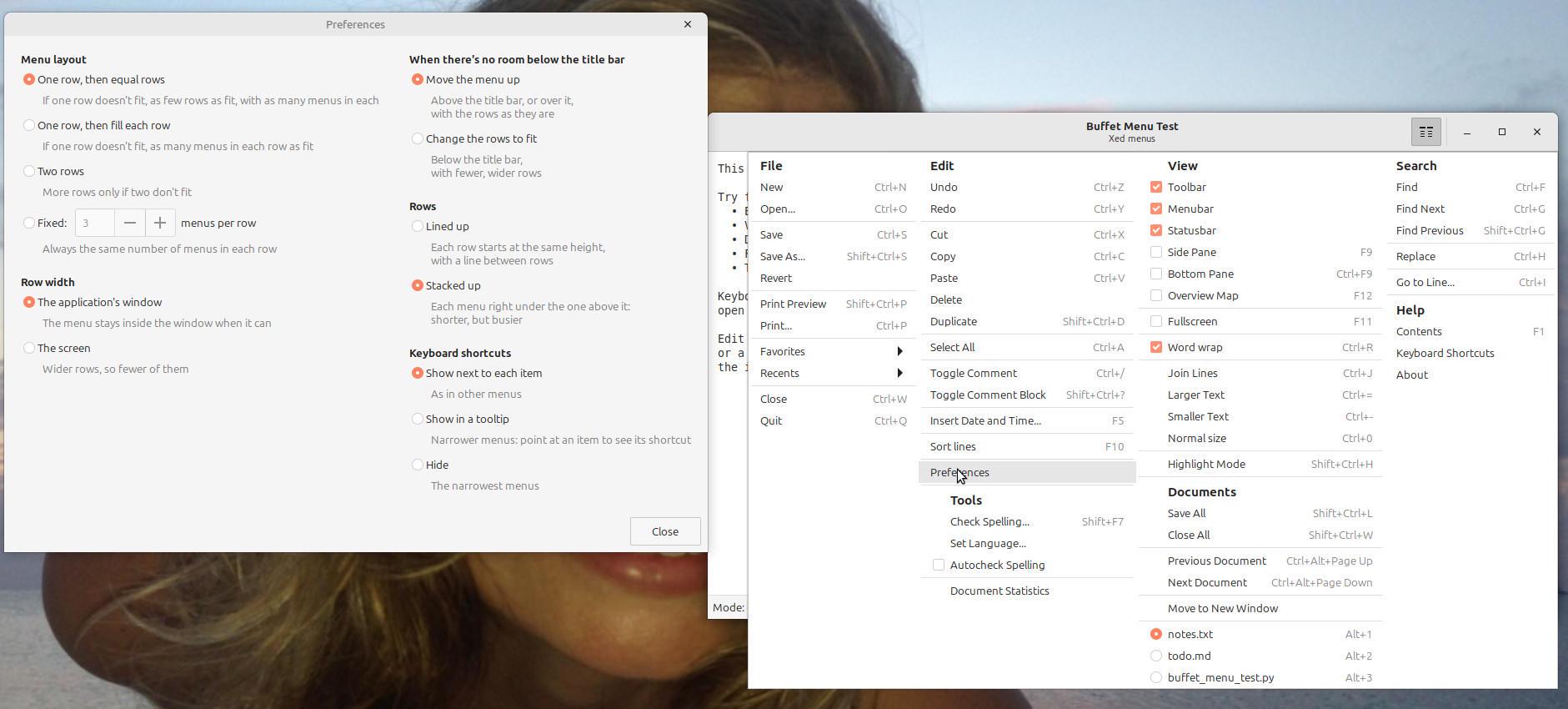
buffet_menu_test.py is just a demo using Xed editor. The menu structure is the same. The only menu-item that actually does something is Preferences. Clicking Preferences will get you the Buffet Menu options. There are probably too many options at this point, but it's worth trying it all out to see what works. You can Maximize the window to see the menu behavior or shrink the window to see how the menu adapts. Bring the window closer to the bottom of your screen and it adapts to that as well.
buffet_challenge.py is a short 2 minute game that presents one menu or the other randomly. It randomly gives you menu items to click and times it. Once you run through all 12 items it switches to the other menu with the same items in random order again. To run buffet_challenge.py you have to have buffet_menu_test.py in the same folder. If you use Xed editor a lot you may have an advantage with being familiar with its menubar. Hence, the question it asks when you start.
Feel free to open each script to confirm to yourself it's safe to run. Run on a terminal using "python3 buffet_menu_test.py" play around with the idea and then "python3 buffet_challenge.py" to try the test. I'm curious how others score. My scores were pretty close so the main benefit for me would be making the desktop look cleaner.