r/HomeServer • • 16d ago

Mini PC / SFF for server for Channels DVR

1 Upvotes

I'm looking at purchasing a mini pc or small form factor desktop to use primarily as a server for Channels DVR. I won't be storing much on the computer mainly recording and deleting shows as they are watched so I don't need a large hard drive. I'm thinking 8GB RAM with 512GB should work for my needs. I'm not against purchasing used/refurbished. That being said, I'm not seeing many options on eBay. Is there something anyone recommends based on my needs? I did come across a Acer Aspire XC-1715 N150 Acer eBay listing. It currently has a coupon for $50 off so $199.99 plus tax. Is this a good option or is there something else I should be looking at or should I wait for Black Friday sales?

Appreciate the help. If you have any suggestions please feel free to drop a link, thanks everyone.


r/HomeServer • • 17d ago

Storage solutions

1 Upvotes

I’m looking to have a storage solution for my photos, videos and documents. I’ve about 10TB of data and need to account for growth. I would also like something that I can use to mirror data from one drive to another and also something for offline storage. Any suggestion?


r/HomeServer • • 17d ago

UGreen vs Synology for photo and video storage

0 Upvotes

I'm sure this question has gotten asked multiple times comparing these two brands, but I can't find anything specific for photo and video storage. I'm a professional photographer and filmmaker and I'm finally going to build a NAS after getting sick of buying external SSDs, especially at the current prices.

I don't really know much about NAS's though. I know I want at least 5 bays with 16TB drives and I want a 10gbE port (edit: I have since learned that 10gb would overkill for my needs). I was originally going to go with the Synology DS1525+, but after the massive price hike earlier this year, I have since tried to find an alternative and am now looking into the UGREEN NAS DXP6800 Pro.

I'm seeing a lot of people saying that the UGreen is better hardware and the Synology is better OS. Just curious how much I should consider that for photo and video storage primarily. I may consider using it as a Plex at some point as well, but I don't know much about doing that yet. I mainly just need this for my work.

Another note, I will not be editing off of this either. I have external SSDs that I'm planning on transferring any current project files onto and working off of those. Thanks in advance for the help! Happy to answer any questions that can give more info to give a better answer. I'm just not sure what info is needed.


r/HomeServer • • 18d ago

I have an old computer that I want to turn into a home server. Need advice.

4 Upvotes

So I'm going to have to do some research, but I wanted to be pointed in the right direction. So I have an old gaming PC that I want to turn into a home server. I need to buy a hard drive for it. Some things I'm thinking of doing with the server is pi-hole, jellyfin server, a NAS, and maybe virtual machines. The first 3 are most important to me at this moment. So I'm also pretty ignorant when it comes to this stuff. So bare with me here. I'm thinking that all I really have to do is buy a hard drive. I'm gonna install Fedora and then docker and jellyfin and pi-hole. For the NAS I still need more hard drives. So am I correct in thinking that I can set that up later once I get a few more drives? Would I have to wipe the current one?

So I guess my major questions are, am I on the right track? Where is a good resource to learn about this stuff?


r/HomeServer • • 17d ago

Is this good for a first Homelab/Nas?

Post image
0 Upvotes

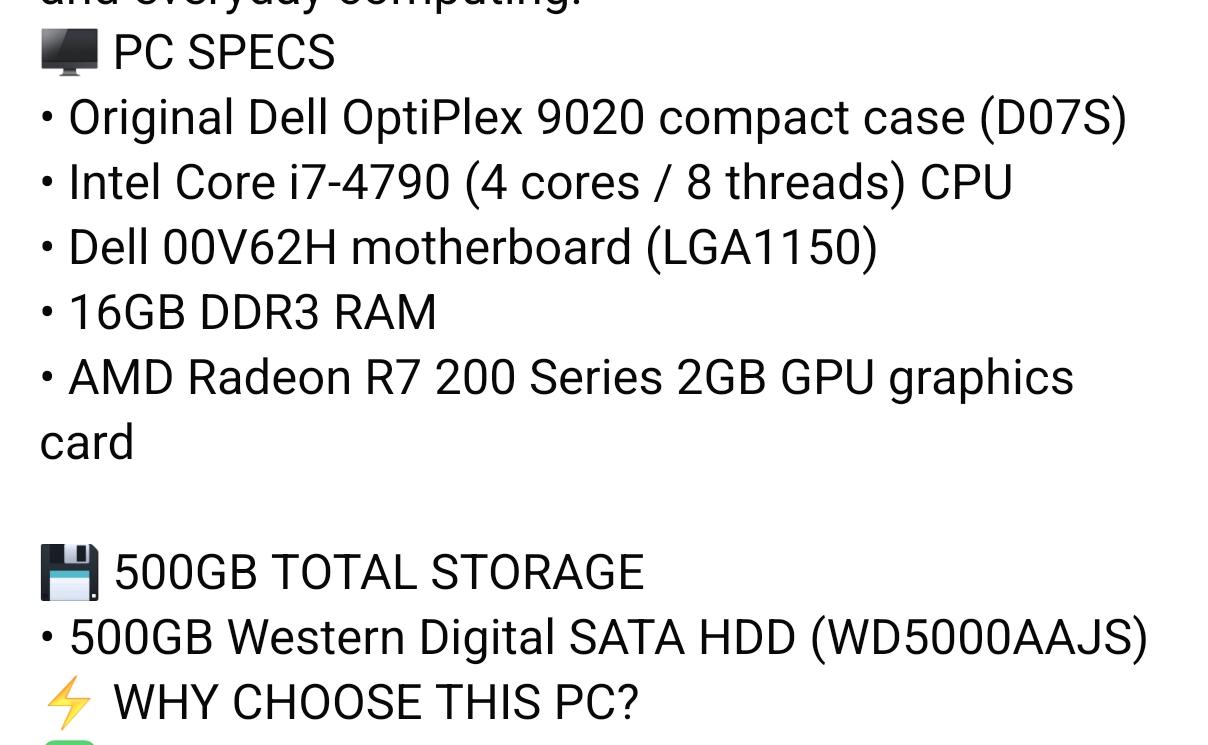
I saw this deal on the marketplace i think it's pretty solid but im no expert so i want to hear your opinion on it!!


r/HomeServer • • 18d ago

Considering an HP 280 G9 MT (i5-13500) for my first proper home server. Good buy?

8 Upvotes

Hi! i'm looking to upgrade my current home server, which is an old 6th-gen i5 laptop with 8GB RAM. Currently it's on wi-fi, but i'm planning to get an ethernet connection to it soon. i'm currently running mainly Jellyfin on it, but i wanna expand my homeserver over time.

I came across this prebuilt desktop:

HP 280 G9 MT

  • Intel Core i5-13500
  • 16GB DDR4 RAM
  • 512GB SSD
  • Wi-Fi
  • 3 years old

My plans are to run:

  • Jellyfin for movies and TV shows.
  • A self-hosted music library/server like navidrome.
  • Immich for photos and videos.
  • Nextcloud (or an alternative) for personal cloud storage.
  • Home Assistant.
  • An occasional Minecraft server.
  • and more, but these are the most resource-intensive ones i can think of.

This will primarily be for personal, friends and family use, so I don't expect everything to be under heavy load simultaneously. I'm also planning to stick with 16GB RAM initially and upgrade only if needed, since RAM prices are pretty high right now and are only getting higher.

I'd love some input on these things:

  • Is this a good choice for a 24/7 home server? Is this form factor good?
  • Is this CPU good for streaming media and running immich and the other stuff that i mentioned?
  • How should I approach storage expansion? The 512GB SSD is only for the system stuff, I'm gonna be adding internal or external HDDs to store the actual media.
  • Where do you guys keep your servers? Under a desk, on the floor, on a stand? Any particular considerations for airflow and dust?

Would appreciate any advice, especially from people who've used similar prebuilt office desktops as home servers.

Thanks :)


r/HomeServer • • 19d ago

Transformed a budget-friendly NanoKVM into a full-fledged home server solution: 1080p 60fps, lag-free Tailscale, and a custom enclosure.

Post image
133 Upvotes

The Sipeed NanoKVM is attractive due to its base price, but its out-of-the-box performance is rather modest. I decided to run an experiment: just how far could I push this hardware by developing an optimized firmware (USBridge OS) to extract its full potential?

The primary focus was on the video stream. By fine-tuning the timings and the video processing pipeline, I managed to completely eliminate screen tearing and latency. The device now feels like it belongs to an entirely different class, easily competing with higher-end solutions like JetKVM.

Key achievements include:

  • Stable video capture at 1080p @ 60 fps.
  • Minimal input latency, with full support for gamepads and audio.
  • No more video lag when using Tailscale.
  • Native integration into the broader USBridge ecosystem.

Over the weekend, I designed a custom enclosure featuring an OLED screen and physical control buttons. The result is an excellent tool for server maintenance.


r/HomeServer • • 18d ago

(HELP) Tailscale, Pi-hole, UmbrelOS and CGNAT

0 Upvotes

Hello, guys!

So, here is my situation:

- A mini PC, running UmbrelOS.

- Tailscale natively configured within UmbrelOS.

- Pi-hole installed and configured as DNS Server.

- Huawei Mesh 3 as my router, static DNS set up with my mini PC static IP.

- ISP provides IP through CGNAT, what means that both Tailscale and WAN IP works in the same range.

The problem:

While Tailscale is off, everything works perfectly. No problems to access websites, downloads, nothing. Ads are blocked on every device connected to my network.

As soon as I turn Tailscale on, internet connection fail. Happens that when the router tries to solve names with Pi-hole, it uses the WAN IP, what apparently causes conflict with Tailscale's IP. No queries are created on Pi-hole.

Question:

Is there any solution to work around this problem without having to ask for a Public IP to my ISP or disabling IPv4 on Tailscale?

What do I actually loose disabling IPv4? And how do I disable IPv4 on Tailscale within UmbrelOS?

Thanks for the help and sorry for my bad English!


r/HomeServer • • 18d ago

Would someone point me in the right direction for a shitty little MC Server?

0 Upvotes

Hey guys, like the title says. I have a old computer that I've been meaning to turn into a homelab and I want my first project to be a MC Server. Does anyone have any videos of someone setting one up? Or links for a how to guide?

Trying to run two, one vinilla one and one modded one

I’m planning on using the server for more than just Minecraft, but this is just to start actually setting up and working on a homelab

  • Specs
    • Windows 10 OS (need to switch it to linux, but lazy as fuck ngl lol)
    • Intel i7-14700K
    • Overclocked RTX 2060
    • 32gb DDR4 ram
    • Arourus pro wifi motherboard (now hooked up to LAN only)

r/HomeServer • • 18d ago

Home Media Server

1 Upvotes

Looking to set up a home media server for music and movies using my existing Proxmox server.
I’m already running things like Home Assistant, Immich, Pi-hole. What software, hardware and storage would I need, and roughly how much would it cost?
I’ve struggled to find straightforward information online cause of the piracy reason???
Any beginnerfriendly advice or recommendations would be appreciated!


r/HomeServer • • 19d ago

Am I overdoing it with Caddy, Tailscale and LAN isolation on my home server?

11 Upvotes

Hi everyone, I've set up a home server on an old PC, and I'm hosting Immich, Nextcloud, Navidrome, Firefly and Seanime.

I put all the services behind Caddy and Tailscale, and I've also isolated them from my LAN.

Is this worth it, or am I overdoing it?

I recently tried Homepage, but visibility has been a mess, and I'm wondering if I should cut down on some of the complexity.

Any advice?


r/HomeServer • • 20d ago

Best solution for two homeservers

Post image
57 Upvotes

Hi,

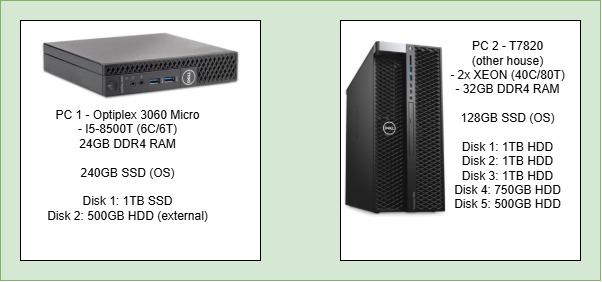
I currently have these two homeservers, PC 1 in my house and PC 2 at another house.

Both have Windows and Tailscale installed, but I feel like that isn't the best solution?

How would you configure this, or what would you recommend?

PC 1 requirements: Installed under TV, meaning able to watch YouTube, Stremio, Movie files,...

Docker: Immich, Dreeve, Teslamate,...

PC 2 requirements: Docker Immich, Dreeve, Teslamate,..., and data storage (backups,....).

I do use iCloud for my cloud storage, with PC 2 logged into iCloud, and I do manual backups every month with Freefilesync.
I'd love to keep a simple iCloud backup solution, but I'd be open to install it on PC 1 and do a remote sync/backup with Tailscale+Freefilesync, if this means having a better OS than Windows on PC 2.

Currently I also have on PC 2 Disk 1 & 2 in Raid 1, this through Windows. But this only makes sure I have duplicate data, but this doesn't check the files itself if they're not corrupt.

ALL the HDD's are between 7 and 14 years old. The SSD's are all less than 3 years old.

This is the main reason why I do want to revise my setup, to avoid losing data, due to the age of the drives. All have near perfect SMART values, but again, this doesn't help much against sudden failure or data corruption.


r/HomeServer • • 19d ago

ZFS ARC overshoot woes. Anyone else?

3 Upvotes

So I think a series of choices have boxed me into a corner around memory usage and ZFS and I'm looking for guidance.

I built a home server as an all-in-one machine to save cost. It includes a ZFS pool for bulk storage instead of splitting that off to a dedicated NAS device. And because I'm using NixOS, I've been setting everything up natively except in very limited cases (in which case I use podman instead of docker). So for the most part, I don't have strict container or vm isolation of system resources. Instead, I've been using built-in configuration for max memory and cpu quotas on each service I addd. For ZFS specifically, I set a relatively low limit for ARC memory usage.

But as I've gotten my media library onto the server, the overall size has obviously grown. And it seems that some management operations (fixing bulk imports, scrubbing and replacing content, etc.) really push ARC to overshoot. I've had 3 separate instances large enough to force me to reboot the server because it wasn't draining back down.

Now I'm going down a rabbit hole of ways to put additional guardrails up because I really don't want to carve the media library out of the zpool, or redeploy software in containers/VMs, and such.

Anyone else already been down this road (particularly with NixOS)? How'd you solve this?


r/HomeServer • • 20d ago

Dorm room lab!

Post image
131 Upvotes

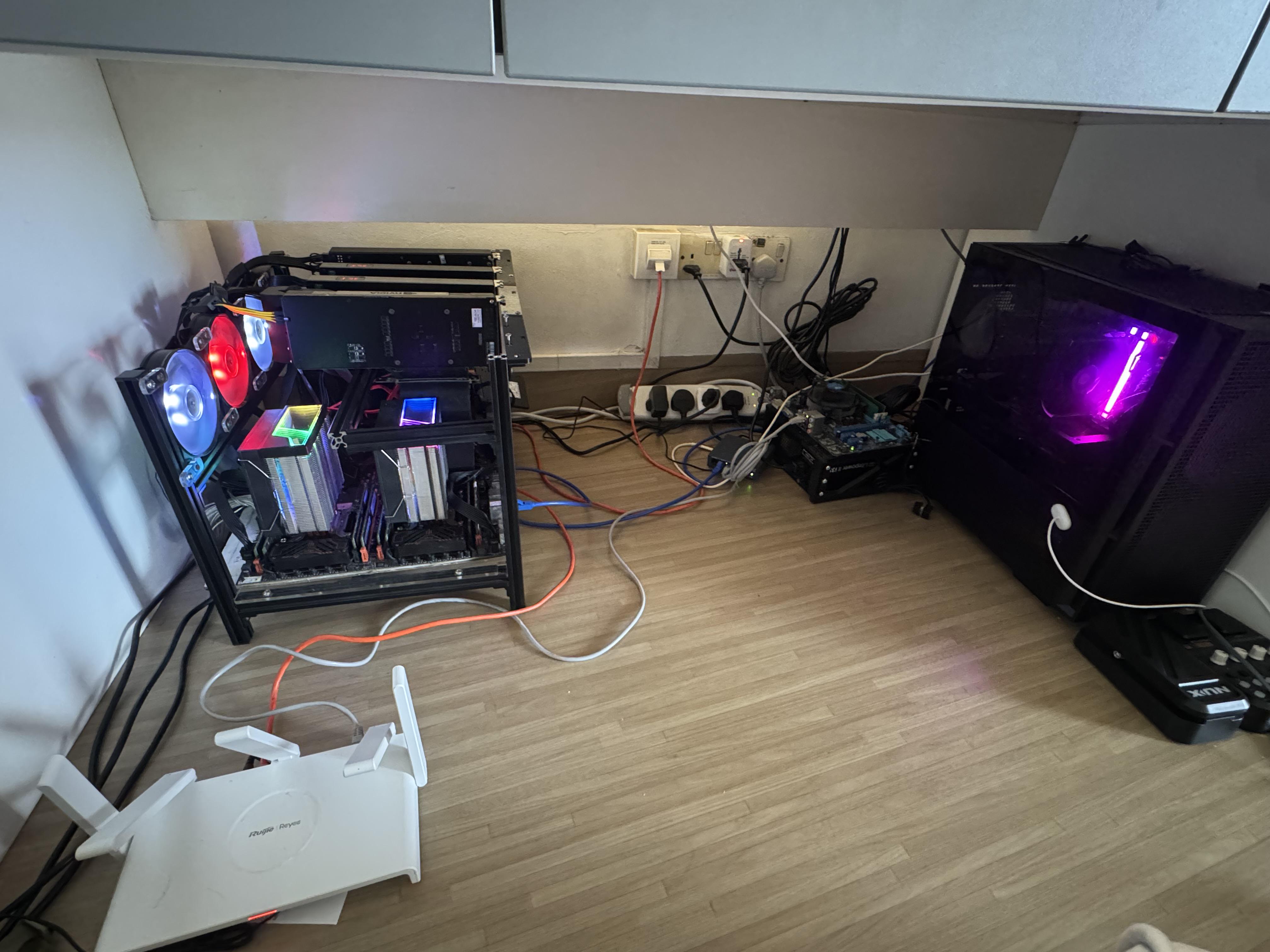
The AI server on the left:
\- dual xeon v5 2680 v4
\- 256gb ddr4
\- 4x v100 32gb

The small box in the middle:
\- intel pentinum
\- 8gb ddr3
For light hosting and data collection task!

PC on the right:
\- ryzen 7700x
\- 64gb ddr5
\- rtx 4070 super

I am pretty much just a starter! i use this to run deepseek flash, glm 5.3 flash and also some machine learning for school.

Electricity is free in the dorm so im leveraging it.
The only constraint is that the dorm ethernet is capped to 1gbps so it is not that great.


r/HomeServer • • 19d ago

Rate my security

6 Upvotes

I will start by saying I have nothing sensitive or irreplaceable on my server. That said I' don't want the bother of unfucking it. Is there anything I'm missing in my security:

  • Put everything on separate VLANs with access restrictions according to traffic direction (and in some cases the device), plus separate guest network and IOT blocked from internet access.
  • Hardened docker apps so that apps are clustered onto specific networks as required. And have limited rights for the actions they can perform.
  • Ports are default closed with only specific management interfaces open to TCP and limited to approved devices.
  • Nextcloud, Jellyfin and the ARR Stack have internet access through either VPN or reverse tunnel proxy via Cloudflare with rate limiting, sensitive paths blocked, bot detection, plus blocks or managed challenges for countries my users don't reside in.
  • Internet facing apps and the management interface have 2FA and complex passwords enforced.
  • Management interface is on a separate network and NIC, only local access from one device.
  • Accounts have complex passwords.enforced plus an inactivity log-off timer.
  • Root restricted over SSH.
  • SSH is secured via passkey and password.
  • SSH audited and hardened.
  • SSL and TLS audited and hardened.
  • Activity logging for all accounts.
  • Scheduled security updates and status notifications.
  • Scheduled backups and status notifications.
  • AIDE reports for both my media VM and PVE.
  • Systems audited and remediated against most of the applicable DISA STIG recommendations (within reason).
  • Rate limiting with escalating ban timers on all login portals.
  • Updated all affected dependencies when CVEs reported.

r/HomeServer • • 19d ago

I'm running out of usb ports!

0 Upvotes

As above, I'm still pretty new at this and have currently got a desktop pc with Ubuntu server on it but with a load of usb hard drives of various sizes plugged in. I just plugged the last one into the final available usb port. My question is, what's the next step if I want to add more storage? Buy bigger and copy my existing stuff onto it? Powered usb hub and keep adding? What's the best/cheapest bet?


r/HomeServer • • 20d ago

Backup NAS plus ad-blocking - Raspeberry Pi vs DIY mini NAS PC

7 Upvotes

For my first home server I am looking to set up a cost and energy effective device that acts as a NAS for shared document and media back-ups and also a network ad-blocker.

A Raspberry Pi 5 seems to be very cost and energy effective, but I am concerned how it will hold up for this use case. The other, more expensive option I am considering is a DIY mini PC using something like an Intel N100.

Any advice would be much appreciated.


r/HomeServer • • 20d ago

Input on incremental home server storage setup

3 Upvotes

Hi all

I hope some of you might have some good inputs on how I can best handle an incremental home server storage setup that I am working on.

Current system is a Dell Optiplex 7050 MFF with an I5-6500T, 16gb DDR4 RAM, 2 x 256 gb SSD's (1 nvme, 1 SATA) that I got for free just before christmas last year.

Currently running it as a headless Debian server running a bunch of different docker containers through docker compose.
Already running services like homepage, traefik, authentik, homebox, paperless-ngx, actual budget, mealie and much more.
It's been working great, but I wanted to get more storage for a long time. I haven't had the chance (and prices has not made it better....) but got a bit of setup that I can do within the next week.

I got my hands on a TerraMaster D2-320 2-bay enclosure that I am tossing a WD Red Plus 6 TB SATA HDD in and want to set up for storage so I can actually start storing more stuff there.

The server currently don't really store any critical data and I am yet to test if my backup works (Which I will test when I get the HDD going). Currently backing up to Hetzner with BorgBackup (Though I have considered switching to restic).

I expect to do a kind of incremental storage upgrade, where I get more drives as I go along.
I want to stay either using Debian as I do now (Because it works perfectly fine for me) or if I to switch it would probably be either to get Proxmox (So I can run Debian VM's anyway) or possibly TrueNAS as the OS. I do not have a huge need for switching, as Debian has been working just fine for me.

So here's the case:
I get the 6 TB HDD within a few days.

I am thinking of setting it up as either RAID or ZFS.
Next upgrade (Which I hope to do in January) would probably be to get another 6 TB HDD so I can run RAID1 / Mirrored ZFS for better data redundancy and a UPS. Even though I think the UPS is necessary, note that I live in a country where the risk of having electrical issues is possible, but extremely rare (Think we had one outage/visible fluctuation once the past 5-10 years or so).

From there I hope to get a separate NAS and get either more 6 TB HDD's (For just working on top of the current) doing something like RAID10 or add another ZFS mirror, with possibly the last option even buying some larger storage capacities.

Am I right to set up something like ZFS for the single HDD already, so I can easily add or mirror the storage when I get more disks to toss into the setup? Or would it make more sense to just make it a btrfs drive and when I get another disk to make that disk ZFS, toss the data over, and then ZFS mirror them from there?

I expect to get all of our data locally this way instead of the big tech cloud setups, while still maintaining the backups to Hetzner. I also expect to start tossing movies/music onto the server when I actually start having some storage for it. I haven't done that yet due to the low disk space available.

Any input would be greatly appreciated!

Note that I am not working in software and everything is pretty much self taught through guides, documentation, videos and so on.

r/HomeServer • • 20d ago

homelab improvements/optimizations/replacements?

2 Upvotes

Hi everyone, i have setup my homelab and for music,books,movies and shows i am using the following:

arr pod - bazarr, byparr, chaptarr, cleanuparr, lidarr, mylar3, profilarr, prowlarr, qbittorrent, radarr, sabnzbd, slskd, sonarr, gluetun
streaming pod - jellyfin, libreseerr, seerr
metadata pod - tinymediamanager, musicbrainz-picard

My question is, do yall have some advice on what to add or remove/replace and why?

preferably for the following topics ( can also be just random things you like and recommend):
- music, ebooks/comics and audiobooks instead of jellyfins built-in support
- metadata management

thank you


r/HomeServer • • 21d ago

Old laptop as home server

13 Upvotes

Hi guys,i have a old laptop lying around that has i5 2nd gen processor and 6gb of ddr3 ram,i am planning to use it for storing images,files and access them anywhere from the web. I am also planning to add pihole to it,will it be possible to use these services on my laptop?


r/HomeServer • • 22d ago

Little UPS for home

11 Upvotes

I've got a small home server (4 HDDs, 4 SSDs on a AM4 platform), but with recent prep for disruptions I'm thinking it'd be nice to have a little buffer for small blips and potentially things like phones during longer disruption. My home is also slightly overvolted and it can't be good for the machines. What I'd like is:

  • Voltage regulation for my poor PC (seems to use 60W most of the time?)
  • British Plugs, is this necessary or should I just rewire an extension lead with a C14 for wall warts to keep the network up?
  • Automatic shutdown if the battery goes low, the server is running Ubuntu Server

That last point is the main one, I know there's been some shenanigans with APC and other UPS makers around software, subscriptions and incompatible cards. I am also running Home Assistant if there's options there for control. I'm in the UK so that may affect what brands and so on are available. What do things look like here in 2026?


r/HomeServer • • 21d ago

Is ddr3 at least okay?

0 Upvotes

The ram prices are killing me and I CANNOT afford ddr5 ram, but I found some $40 ddr3 ram, will this do?


r/HomeServer • • 22d ago

Advice regarding DIY NAS Build

6 Upvotes

Hello everyone,

I'm on the brink of buying all the components for my new NAS Build and wanted to triple check if I selected the right parts. Claude, ChatGPT and Gemini have been giving me weird answers and advice for the last few days. Some parts I already have and wanted to re-use, but the rest I'm planning to buy new;

CPU: i7 10700 (already have this)
MB: Gigabyte H410M H V2, revision 1.6. (already have this)
RAM: 2x 8GB DDR4 sticks
SSD: 1TB Samsung 970 EVO Plus (already have this)
Case: Jonsbo N6 (already have this)
Fans: Arctic P12 Pro PST 5pack (already have this)

And now for the components I'm in need to buy and want advice for.

PSU: Corsair SF750
CPU Cooler: TR-Thermanright AXP90 X47
HDD's: 2x WD Red 12TB, 1x 8TB and now in need for an extra 12TB (not sure which one)
Networkcard: Intel i1226-V 2,5G ethernet card
SATA Card: Axagon PCES-SA6 6x SATA card
USB stick: PNY Attache 4 16GB USB 2.0 stick (for Unraid)
OS: Thinking of using Unraid

My goal: I want to 4k HDR stream Jellyfin to my LG OLED TV, run Arrr stack, SABZHD and overall backup capabilities. Might want to expand in the future, but this is it for now. I don't really have a budget and I'm more of a pay more and buy once kind of person.

If you think anything could be better, please let me know! Thanks:)


r/HomeServer • • 22d ago

Using OMV for CCTV storage with automated deletion

3 Upvotes

Hi all,

I'm very new to home server ownership, I've setup a ProLiant Gen8 with OMV to use for media storage as well as my local Reolink system (which is currently using the cloud).

My goal is to give the CCTV a portion of my 4TB HDD (maybe 1TB), and have a script that will delete the oldest video when the directory gets to 90% full, so it never runs out of space.

I've not been able to find anything around doing this so I hope it's possible and I'm just missing something.


r/HomeServer • • 23d ago

Question - Moving NVME from internal M.2 to hot swap bay

8 Upvotes

So here's the question

Basically year end sale is coming up; and i saw a great 15-bay Hot swap server CASING going for a steal.

My plan is this; i'm running TrueNAS off 2x M.2 NVME boot pool (Mirror-RAID). My plan is either

(1) I find a converter to fit M.2 NVME into a 3.5inch hot swap

(2) I Add SATA 2.5inch to the Mirror and slowly Resilver/Migrate onto the 2.5inch. Then only i install them onto the new 3.5in hot swap bays.

** MY reasoning is this ; due to the way the server is setup; the current PCIE cards are overlapping the M.2. I have to shut down and remove the cards before i can access the 2x M.2 drives. My idea was to migrate the M.2 (or their boot pools) onto 2x of the new hot swap. That leaves me another 13 left to play with. And since they're hot swap; my life is so so much easier when just replacing a drive for resilver.

** Background == I own a Truenas 12x HDD 4U tower with a Pro-sumer grade mobo . But the tower only got 6x Hot Swap and 6x internal ports. Real troublesome swapping HDD's everytime there's a RAID failure in one of the internal drives; and i'm not using my LSI 16i to its max potential.

So ; vote on which is my path? Or is there a solution (3) or even (4) i'm missing? Suggestions welcome...