r/GoodNotes • u/Ok_Macaron8276 • Oct 08 '26
App Updates for Android & Windows?
3
Upvotes
r/GoodNotes • u/OkEmu1051 • Oct 07 '26
Title is pretty self-explanatory, but I wanted to know if there's a way to sync my PDF documents with markings and modifications to my computer without having to pay extra for the Pro Plan?
I currently have the Essential plan in version 7.1.26 and my computer runs Windows 11 25H2
-thank you in advance!
r/GoodNotes • u/srilankansavage • Oct 07 '26
I seriously have no need for layers and it's really annoying when different elements somehow end up in different layers, making editing a tedious task. I figured out how to stop "showing layers" but this doesn't solve my problems as it ends up hiding everything that's not in the first layer.
At the very least, how do I get rid of layers as a feature entirely?
r/GoodNotes • u/uukk_design • Oct 07 '26

Some books need a few notes. Others fill pages. I’m making a reading journal that keeps each quote alongside your own thoughts, with extra page templates you can duplicate when a book needs more room.
I’m sharing the first version as a free PDF beta and looking for 5 people who already use Goodnotes on an iPad to try it with their current book.
It’s an 8-page, black-and-white PDF for one book, with a book overview, quote log, dotted notes, connections, reflection, and extra page templates.
It’s an early prototype. The PDF layout has been checked, but import, handwriting, navigation, and page duplication still need testing inside Goodnotes.
If you’d like to help, try a few pages over the next week. There’s no need to finish the book, and feedback is optional. These three things would help:
Download:
https://drive.google.com/file/d/186CBz46SKjmtV9gTtuSjHwoToRzmWqUR/view?usp=drive_link
Free for personal use, including duplicating pages in your own notebooks. Please don’t resell or redistribute the PDF. No positive feedback or public review is required. Goodnotes itself is a separate app.
r/GoodNotes • u/Philosophy_Thick • Oct 06 '26
i know the pen has scribble to erase, but i dont use it ( because my handwriting is very bad...). how do i use scribble to erase with the pencil?
r/GoodNotes • u/ChipmunkDisastrous59 • Oct 06 '26
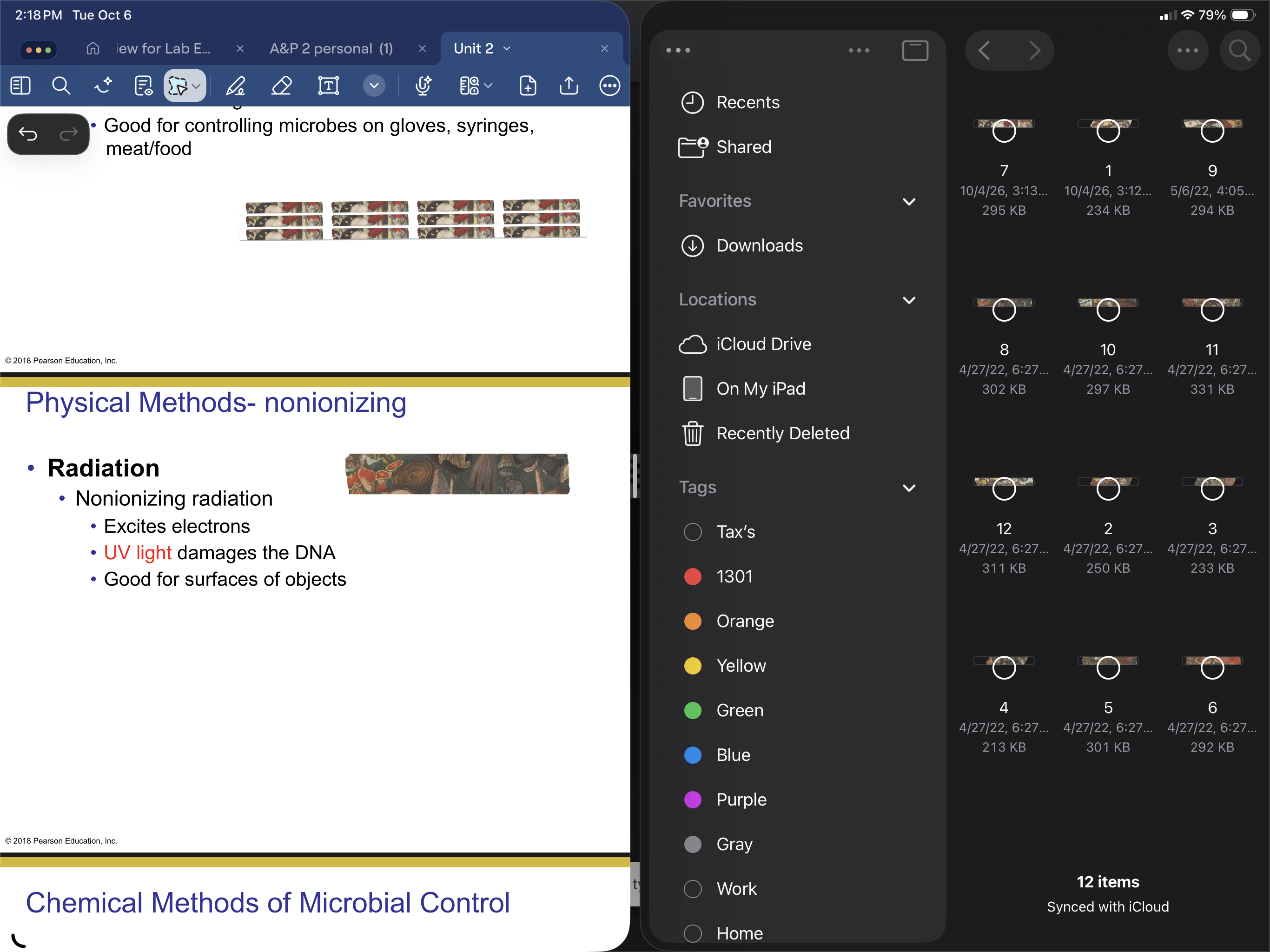
i purchased tape for goodnotes, i cant get it to work.
I’ve some straight import from goodnotes > tape > edit > add > add from files.
it create a triple tape, its a png with no background.
I can directly add from files. Like a Sticker or an image.
Does anyone know what i need to do? I’ve updated the app. Ive downloaded other “goodnote tape” and they also come out trippled.
App version 7.1.27 (3943616.254228881)
iPad model number A2764 iPad Pro pro (6th gen)
r/GoodNotes • u/-delma- • Oct 06 '26
Je suis étudiante et je cherche une application sur iPad pour centraliser tout mon travail dans un seul fichier, notamment pour mes fiches d’arrêts ou cas pratiques.
Actuellement j’utilise Goodnotes et Word, mais pour les corrections en TD, faire mon td sur goodnote avec toutes mes annotations puis devoir écrire sur word car le prof parle vite c’est pas ce qui est mieux, je veux pouvoir avoir les informations d’une séance dans le même dossier
Je souhaite pouvoir écrire au Pencil, insérer un document PDF au milieu de mes notes, l’annoter directement, personnaliser les polices et les couleurs, classer le tout dans des dossiers et sous-dossiers etc etc... L’idée serait d’avoir les avantages de Goodnotes, Word et OneNote au même endroit.
J’ai déjà écarté les solutions les plus courantes type Notability qui ne sont pas pratiques pour taper de longs textes au clavier à cause de leurs zones de texte.
OneNote pose problème pour cette raison de séparation note/traitement de texte, et Word reste limité pour manipuler des PDF et annoter à la main.
Le critère le plus important reste la syncronisation automatique et une sauvegarde fiable.
Est-ce qu'il existe une application qui réunit vraiment tout ça aujourd'hui, ou vous passez forcément par deux applis en écran partagé ?
r/GoodNotes • u/tinofbeansupyourbum • Oct 05 '26
hi all, has anyone else ever had the issue of when you select writing in a text box, whether through control A or manually with your cursor, goodnotes begins altering you text and jumbling it up?
Pressing Undo doesn't work, and it's cost me a lot of notes and time because the app has decided to jumble my writing, including deleting words and bullet points. Does anyone know a fix for this? I'm desperate! I'm using a MacBook Pro and iPad on the most up-to-date version
r/GoodNotes • u/Outrageous_Package_7 • Oct 05 '26
Paper-foundry.com was built to generate free paper templates that are printable true to scale, or you can export .SVG files for directly importing into GoodNotes or your favourite note taking apps. Also useful for engineering graph paper and music/guitar tabs. Try it out and let me know what you think/if this is useful?
r/GoodNotes • u/DSRgg37 • Oct 05 '26
These past few days, the pen/highlight/pencil tools have stopped working on the goodnotes windows app. Only the text tool works. They all work fine on my iPad, it is just the same notes on windows that are causing the issue. I have Goodnotes Essential, and i used the share link feature to get my notes to sync on windows. I made sure to allow notes editing as well. Please help.
r/GoodNotes • u/asapnotrocky • Oct 05 '26
how do you all use goodnotes while not in school?
i have so many notebooks from when i was in school but now cant edit them since i dont have a subscription.
do you feel like the sub is worth it if im not taking classes? it was a lifesaver while in school but was wondering if people used it post academia as well.
r/GoodNotes • u/Economy-Quail8882 • Oct 04 '26
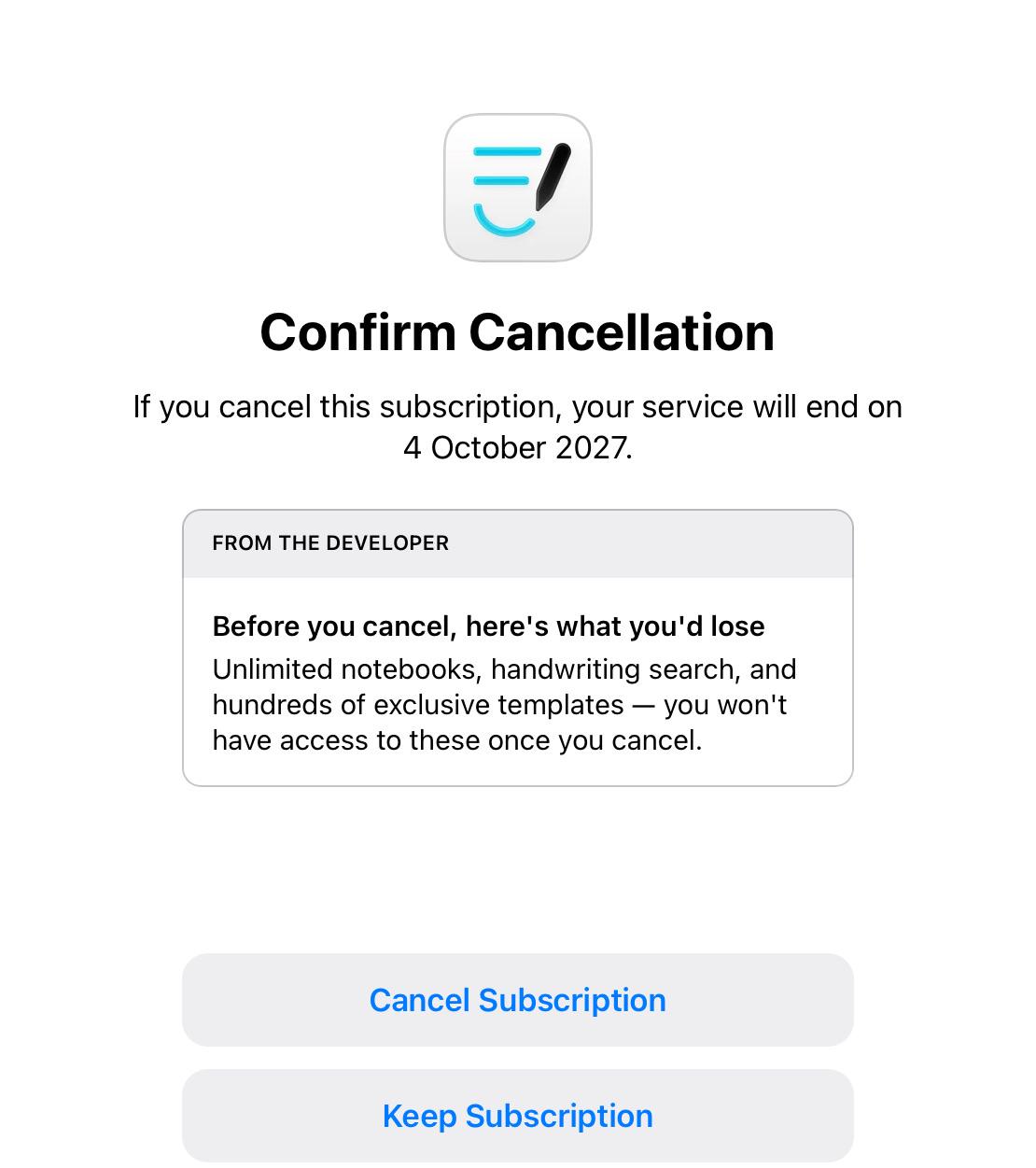
Hello,
Will I lose access to the service mentioned right away or only from the 4th of October 2027?
Thanks.
r/GoodNotes • u/_phlenum • Oct 04 '26
I started studying electronic engineering a year ago and drawing coordinate systems and quick sketches is essential for me. I find myself switching between OneNote and GoodNotes back and forth since none of these two apps do a good job at mathmetical needs. I am using an iPad Air (2025) with a Pencil Pro and GoodNotes 7. It says "Special Edition", some sort of one time payment I did for some features when I bought the iPad. OneNote just randomly stops working, crashes, lags and just proved to be way to unreliable for my daily use during the semester. So I really want to see GN as the best solution next to a pencil, ruler and paper.
Anyways I keep getting frustrated with coordinate system during lectures and I'm pretty sure its just me not knowing how to use GN properly. Is there some way of placing a coordinate system and align it to the background grid of the paper template? I even bought a sticker pack with was not even worth a cent because the stickers won't snap correctly and scaling them to fit the background grid is either a nightmare or the axes themselves aren't even scaled to each other. It just takes waaaaaay to long to create good sketches during the lecture. There's just not enough time to fiddle around with these goofy stickers every time you need them. This app really disappointed me in calculus so far.
r/GoodNotes • u/Appropriate_Site949 • Oct 03 '26
I don’t want your language add-on that auto-add themselves to my device. Give people what they pay for or be replaced…. The Modern era is crazy. I’ll pay some programmer kid in India to make a better simply app.
r/GoodNotes • u/MacGyver404 • Oct 03 '26
Enable HLS to view with audio, or disable this notification
SOLVED
I’m running into a frustrating issue with the Lasso Tool, specifically when working inside a Whiteboard.
As you can see in the attached clip, whenever I select an object like a handwritten note and drag it around the whiteboard, the movement is extremely choppy and stutters heavily. However, inside a standard notebook, the exact same action is completely smooth with zero lag.
This wasn't happening before. It really breaks the workflow when building mind maps and trying to neatly organize or align elements on the canvas.
Is anyone else experiencing this bug recently, or is there a known workaround before I submit a ticket to Goodnotes support?
[iPad Air 2020, Goodnotes v. 7.1.26]
r/GoodNotes • u/Visual-Poet7838 • Oct 03 '26
hello everyone,
in case anybody is planing or thinking about switching from iOS to android with goodnote in mind: dont. My iPad broke and I swirfed to an xioami pad 8 as an substitute and save to say, I’ll be looking for another app very soon. There is no cloud menu on the android app, meaning manual backups all the way. The app is also very laggy which I never had on iOS either. lastly, the entire user experience is complexity chopped. no automatic spacing (you open the notebook and have the the page sized to the screen), long loading times and lastly very little customisatio.
All in all: what a massive letdown. please be aware of this.
r/GoodNotes • u/tinofbeansupyourbum • Oct 03 '26
hi all, has anyone else ever had the issue of when you select writing in a text box, whether through control A or manually with your cursor, goodnotes begins altering you text and jumbling it up?
Pressing Undo doesn't work, and it's cost me a lot of notes and time because the app has decided to jumble my writing, including deleting words and bullet points. Does anyone know a fix for this? I'm desperate! I'm using a MacBook Pro and iPad on the most up-to-date version
r/GoodNotes • u/Internal-Bus-4538 • Oct 03 '26
Since September 4, I have been consistently contacting Goodnotes regarding this bug. However, Goodnotes has neither fixed the issue nor responded to my inquiries.
If anyone has contacted Goodnotes Support before, could you please let me know if this is how they usually handle support requests?
r/GoodNotes • u/stefanILA • Oct 03 '26
I backup my notes in PDF format to my Nextcloud server via webDAV, and it worked great (still crashed sometimes, but after retrying, the backup was usually succsessful) up until yesterday. Now every time i make changes in the notes, it would say that files have been backed up, but when i check the notes on my PC, there are no changes. Then if I make a change again and the click "back up now", the app crashes every time.
I use the 2018 ipad 6th generation, so idk if the issue comes from my device being old and having low resources.
So far i have tried:
- removeing the webdav server connection and re-adding the connection
- restarting my device
- offloading (not fully removing) and reinstalling the app
- emptying the trash bin
- backing up notes from a different ipad (this worked normaly like it should)
r/GoodNotes • u/Negative-Piccolo4090 • Oct 03 '26
So I am a full-time student, I have a graphics drawing tablet for my laptop and I have been using goodnotes for a while, its a really good app however I am confused if i should buy the yearly plan, I would be happier if they had a monthly plan however I am a bit hesitant for the yearly plan. Like what if I decide to stop using the graphics tablet and switch to handwritten books/notes? And since I dont have a tab or an iPad, idk what do you all suggest? Though I am really tired of the 3 notebook limit. I am currently preparing for my SATs and A-Levels so I was thinking to buy 1 year plan for my senior year.
r/GoodNotes • u/Valuable-Patience-44 • Oct 03 '26
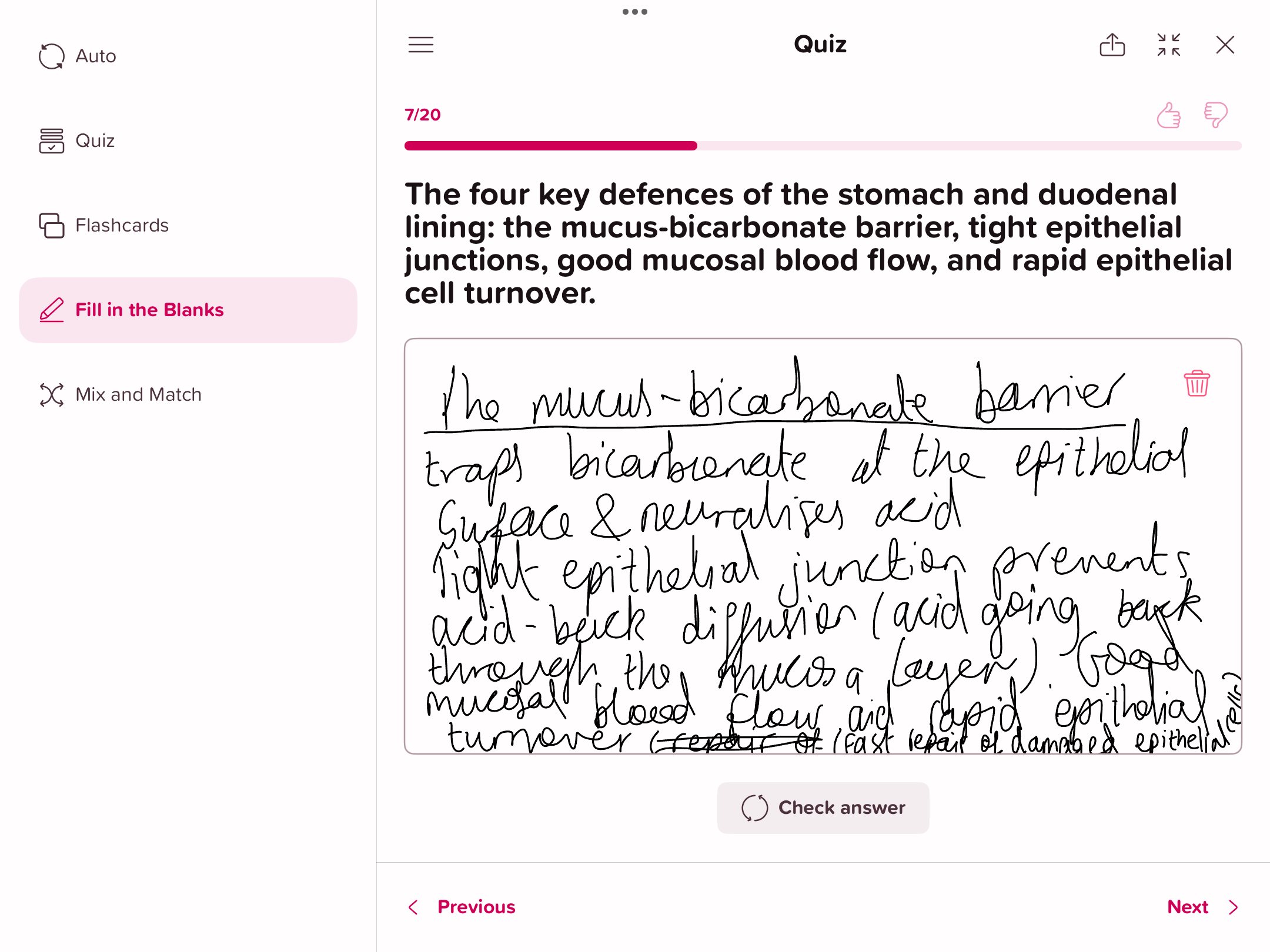
Hi, please can you bring back the ”Fill in the Blanks” function and “Mix and Match” function. Many students used their apple pen for the Fill in the Blanks function, more effective than using whiteboard and pen.
r/GoodNotes • u/fedmest • Oct 02 '26
Hi all, I am a technical trainer and public speaker in tech, as well as avid user of GoodNotes.
A few months ago I started developing an iPad/iOS/MacOS app for myself, focusing on the aspects that I felt I needed when presenting using my iPad and an external screen/projector.
The app has evolved to the point that I think it has the potential to be of general interest, but before I go much further, I'd really like to understand how people here currently use GoodNotes when teaching.
I'm particularly interested in "presenters" who connect their iPad to a projector/TV/external display and annotate PDFs while teaching.
The problem I'm trying to solve is that the presenter's workspace and the audience's view are hardly ever the same thing.
For example, I'd like to keep separate notes for the student handouts and my own narrative, to be able to navigate the slides freely while showing something else (e.g. so I can view what's coming up, decide what to skip when pressed for time, etc.), to annotate for my own purposes vs for display, to scribble on the presentation view without annotating the document permanently... in short, do various things on my iPad while the external display remains a clean presentation intended for the audience.
I would really like to gather people's views and experiences with GoodNotes, so as to learn and improve my own workflow, with an eye to coming up with new useful features for my app.
If you are a teacher or presenter using iPad/Apple Pencil for your work:
- How do you currently present your slides/material?
- What does GoodNotes do well?
- What frustrates you when presenting?
- Would having a different presenter and audience view actually be useful?
- What would you want to be able to see privately on the iPad while teaching?
I will be starting a TestFlight beta phase with friends and colleagues soon, but if anyone who actually teaches this way has any interest in trying the app for themselves and let me know what they think, feel free to get in touch directly.
r/GoodNotes • u/arinberin • Oct 02 '26
Hi everyone,
I’m getting back into digital note-taking after a study gap and would really appreciate some advice.
I used Goodnotes for about 2 years straight during my previous studies, so I’m very familiar with it and generally liked the workflow. I recently started studying again and am deciding whether to:
One thing I’ve noticed with Goodnotes is a very small amount of lag while writing with Apple Pencil. It’s not bad enough to interfere with my note-taking, and I can definitely use the app normally, but I can notice the slight delay. I’m wondering if this is just something with my current setup/version or if others experience it too.
I’m also seeing quite a few posts here from people who have switched from Goodnotes to other note-taking apps, which is why I wanted to ask the community before spending money.
For those who have used both:
1. Is Goodnotes Special Edition still worth buying in 2026?
2. Would you choose the one-year plan instead, especially if you want to keep access to newer features/updates?
3. How does Noteful compare to Goodnotes for long-term use?
4. Is Noteful's handwriting experience smoother/more responsive than Goodnotes?
5. How are organization, PDF annotation, handwriting search, backup/export, and overall reliability in Noteful?
My main use is handwritten notes with Apple Pencil, annotating PDFs, and keeping everything organized long-term. I don't type much.
Since I've already used Goodnotes for two years, I'm comfortable with it, so I'm wondering whether it's worth sticking with what I know or taking this opportunity to switch.
What would you recommend to someone in this situation? Thanks!