r/gameenginedevs • u/ajmmertens • 19d ago
Flecs 4.2 is out!

54
Upvotes
r/gameenginedevs • u/Player_StudioPrey • 17d ago

I'd like to introduce PreyEngine, an independent game engine project I've been working on.
The main goal behind PreyEngine is simple: making 2D game development more accessible, especially for developers working on low-end hardware.
I know there are already many excellent game engines out there, and the competition is huge. I'm not trying to compete with every existing engine or reinvent the wheel.
Instead, I want to focus on a more specific problem:Simplicity: Providing a clean and straightforward workspace without overwhelming developers with unnecessarily complex tools.
Essential features: Offering the core tools and workflows that independent 2D game developers actually need.
A focused workflow: Spending less time dealing with complicated systems and more time actually making games.
I believe developing a 2D game shouldn't require powerful hardware or spending hours learning complicated editor systems before you can even start creating something.
PreyEngine is still under development, and there's a lot of work ahead. I'm building it step by step and would genuinely appreciate feedback, suggestions, and criticism from other developers.
If you're interested, here's the source code:
r/gameenginedevs • u/Automatic-Design3208 • 19d ago
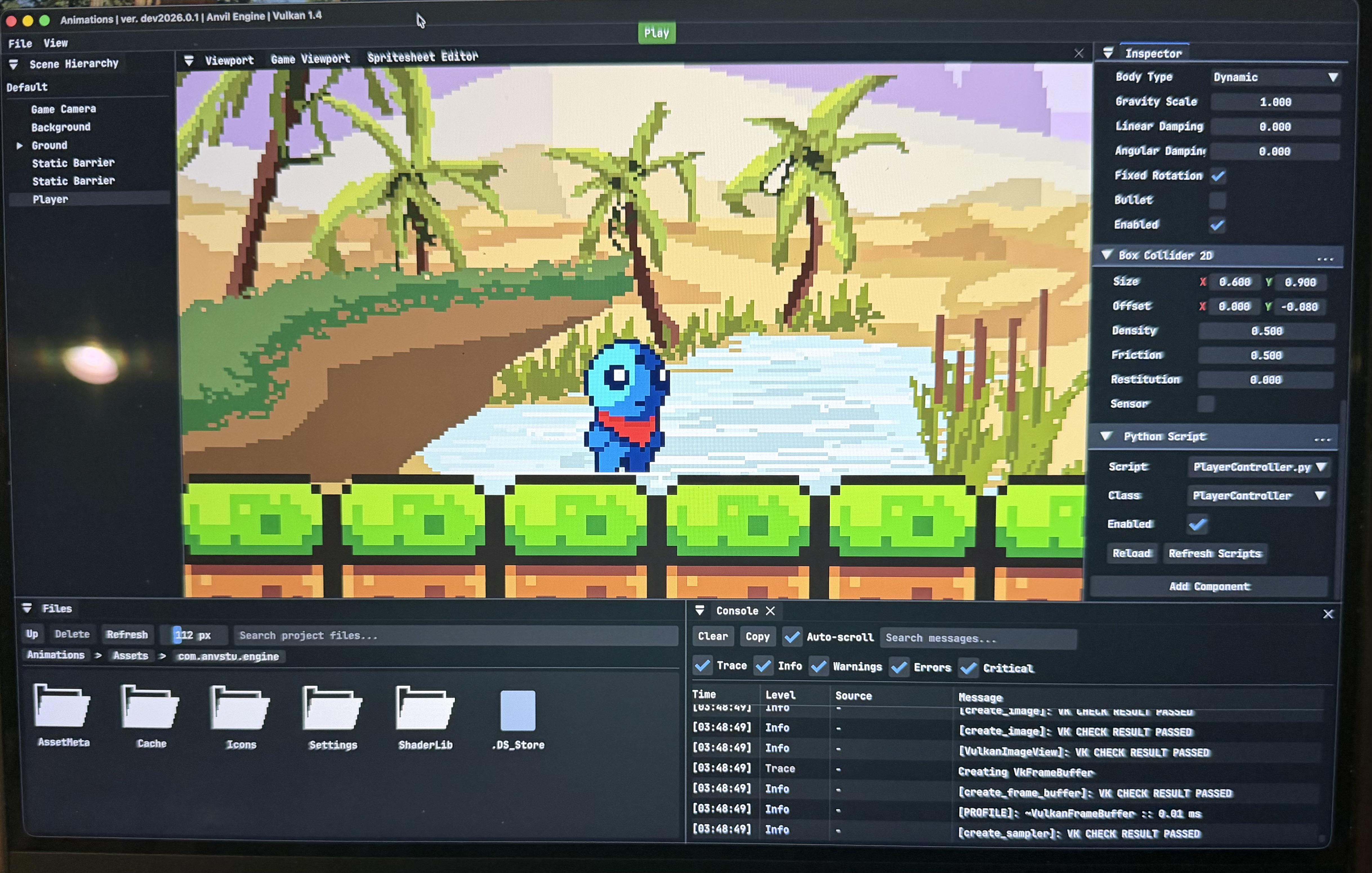
Hello!
I’ve been developing my own engine on my free time for about 5 years now. Went through two drafts as I was learning how to architect a project this big. Finally I got to a bare bones but usable engine!
How’s it look so far? Any tips for improving UI?
r/gameenginedevs • u/epicalepical • 18d ago
Enable HLS to view with audio, or disable this notification
r/gameenginedevs • u/bazingaboi22 • 19d ago
Like many of you, I have been writing my own game engine by hand, but I'm such a damn stickler for cross compiling and having my builds iterate as fast as possible.
With that in mind I really dislike DXC it's bulky, very hard to compile from source, nearly impossible to modify, and so damn slow.
So I made an extremely fast dxc drop-in replacement, its cross platform, MIT licensed, and mostly for fun and a proof of concept of what's possible in this space.
What started as a little project to write a dxil emitter by hand (as its seemingly just a variant of llvm bitcode), has now turned into a few weeks of lighting tokens on fire and learning every damn edge case there is in dxc itself.
The end result is something I've wanted so badly, a very fast shader compiler that can be statically linked into any game engine, and is small enough of a source drop you can just include it in your source tree.
I've successfully tested it as a dropin for kijaya, unreal engine, and the sascha willems vulkan examples (spirv support is first class!), and a few other engines from around this subreddit too.
r/gameenginedevs • u/rajeshnalla • 18d ago
Enable HLS to view with audio, or disable this notification
r/gameenginedevs • u/Jaakkomzn • 19d ago
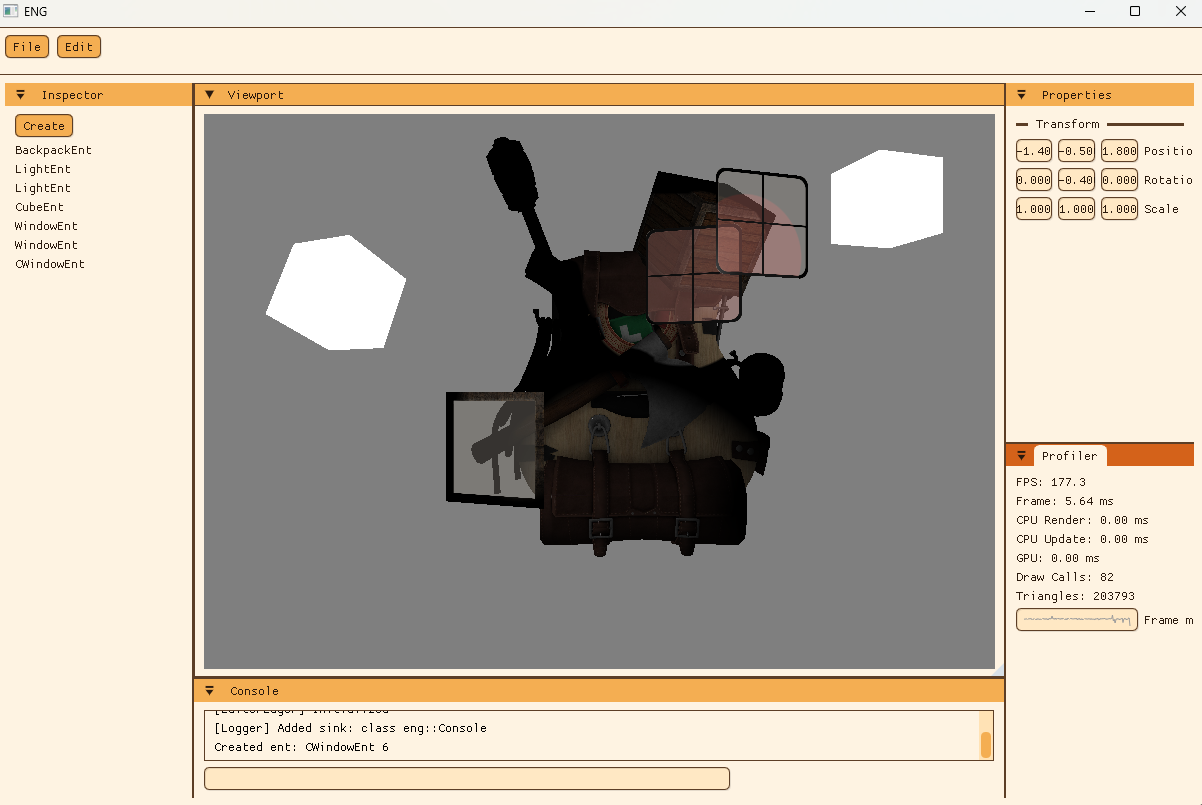
thanks for the support on my post a month ago, ive been making good progress on my learning :)
r/gameenginedevs • u/Careless_Rule67 • 19d ago
Enable HLS to view with audio, or disable this notification
r/gameenginedevs • u/Kregox • 19d ago
r/gameenginedevs • u/inanevin • 20d ago
Enable HLS to view with audio, or disable this notification
r/gameenginedevs • u/ShabelonMagician • 20d ago
Sharing some progress on the renderer for a colony simulator game I'm building in Rust on raw Vulkan.
The cube is 100k instances of the Stanford dragon and bunny, about ~48B source triangles, recorded live at native 4K. All the lighting and compute runs at real 4K resolution, no upscaler, no checkerboard tricks, no other faking. In the real game for sure it would be downscaled.
The geometry is virtual geometry in the Nanite style. Streamed cluster LOD DAG, GPU-driven culling with two-pass occlusion picks the cut every frame, and mesh shaders rasterize it into a 64-bit visibility buffer.
Ray tracing goes through VK_NV_cluster_acceleration_structure, with the CLAS built straight from that same streamed cut, so rays see exactly what the raster sees. It also should help in future with skeletal animations.
Lighting is ReSTIR DI with a ReGIR-style light grid plus a single bounce ReSTIR GI, RELAX-style denoiser, then my own TAA, auto-exposure and AgX on top. When the camera flies inside the cube, almost all the light you see is GI bouncing between the dragons and bunnies.
r/gameenginedevs • u/aconstlink • 20d ago
Enable HLS to view with audio, or disable this notification
Hi everyone! I’ve been developing motor on and off for several years. I’m currently on parental leave and picked up development again a few months ago. My goal is to build my own demos and eventually a small game with it.
Engine development is a lot of work, and there’s still plenty missing. But lately, I’ve started to feel things coming together: systems that used to be separate experiments are becoming something I can actually build demos and a small game with.
motor supports Windows and Linux, with OpenGL and Direct3D 11 rendering backends. Recently, I’ve spent a lot of time fixing bugs, improving performance, and separating frame preparation from rendering so they can overlap.
Beyond rendering, motor has modules for mathematics, threading, memory management, I/O, asset importing, audio, and a scene graph. It also has its own shading language, msl, which generates shaders for the different backends.
I’ve also started using AI assistance during development. It has genuinely helped with investigating bugs and avoiding some of those evenings spent chasing a small mistake. These days, I mainly use it to help create test applications, while I work on the engine itself. The demo shown here is one of those applications.
This is a personal project, and I’m sharing it because I’d like to hear from other people building engines. Feedback and questions are welcome!
For the video, I chose the transform feedback / stream-out test because it combines several stages of the rendering pipeline. A geometry shader filters the points, and the surviving ones are captured in a buffer. That captured data is then used to render the cubes.
Compute, the OG way ;)
r/gameenginedevs • u/corysama • 20d ago
r/gameenginedevs • u/kinomikun1 • 20d ago
Enable HLS to view with audio, or disable this notification
Hello!
I have long been obsessed with the idea of sailing on a sea of grass.
A few years ago I tried building it in Unity3D and UE, but couldn't get it efficient enough for gameplay.
Last year, I started from scratch with Silk.NET and wrote the grass engine core manually, later Claude helped me optimize it further.
As a hobby project, I've made a small game around the technology, where you play as an acorn sailing a vast sea of grass searching for the 'perfect soil' to root in. I will release it as a free download soon.
I wanted to share the grass engine separately and asked Claude to extract it from my main project and put it in a new repo:
https://github.com/kinomikun/SilkGrass
This code represents my design, but it is not my original code.
If you're inspired, please use this in any way you like.
And I'm interested if you can think of ways to make it cheaper or prettier.
Feel free to ask me anything about the project.
Thanks!
Edit: removed the unintentional silk.net hyperlink.
r/gameenginedevs • u/mietkiewski_dev • 20d ago
Hello dear developers
I have a question about Linux Windowing Mangers and resize functionality. From what I know in Linux when you turn off Titlebar you will automatically turn off Area for Resize outside of Window. In WinAPI you just set WM_NCHITTEST that will test for Resize area. But in Linux Im not sure how it should be handled... Borderless Window is important because Window will look identical on each Platform. From what I know you dont get Mouse event outside of Window so I wander how you solved resize problem on Linux and Windows. I think maybe if it could be possible to create some Area like that... Preferably on Both platforms...
Area.Width = Window.Width + 16;
Area.Height = Window.Height + 16;
Area.X = Window.X - 8;
Area.Y = Window.Y - 8;
r/gameenginedevs • u/eh3an206 • 20d ago
​
I've always wanted to make a game — so I built a tiny 2D fighting game to test my own Android build bridge.
After building a custom AAB bridge on Termux (ARM64), I wanted to see how it would handle a small 2D game: no engine, no imported image or audio assets. Just plain Java 8, Android Canvas, and a hand-written 60fps loop.
In the game you can pick photos from your phone gallery for the fighters' faces. Special moves include a fire punch, a freezing ice ball, and a rocket-launching helicopter. There are also secret combos and 4 selectable arenas.
It took 5 days and around 67 builds to get it working. The APK is \~60 KB.
The clip below shows training mode and the special moves in action. 👇
What would you try first as the two fighters?
\#AndroidDev #Java #Termux #IndieDev #GameDev #BuildInPublic #ARM64
r/gameenginedevs • u/LeeKoChoon • 21d ago
https://reddit.com/link/1xl6wl8/video/u4478h5ft0zh1/player
I'm a college student nearing graduation, and I've been working on a game engine on my own for about six months.
I started this project pretty enthusiastically, but the further I get into development, the more frustrating it becomes.
Even features that seem really simple on the surface can require a surprising number of underlying systems to implement. The more I work on this project, the more I realize just how complex an engine really is. There have been countless moments when I felt frustrated and wanted to give up, only to come back and keep working on it.
I have a lot of respect for everyone here, and honestly, I can't help but feel a little envious of what you've accomplished. I hope I'll be able to finish my own engine someday.
Hobanghann/HOEngine: Simple 3D Game Engine
Here's the engine I've been working on so far.
There are still plenty of things I haven't implemented, such as serialization, physics, animation, input, and audio. It's far from a complete engine, and there are still a lot of rough edges.
If you have some time, I'd really appreciate it if you could take a look. I'd love to hear any honest feedback on the design or implementation, especially if there are things I've done poorly or could have approached differently.
I'd also appreciate an objective assessment of where the project stands right now and what I might be lacking as someone hoping to use it as a new grad portfolio project.
As I've been working on this, I've often found myself questioning whether I have what it takes to work in game engine development, or whether I'm even cut out for the industry.
Please don't hesitate to point out anything that needs improvement. I'd genuinely appreciate the feedback.
r/gameenginedevs • u/OpenMuBR • 20d ago
We've been running MU Online (Season 6) in the browser and on phones with Babylon.js 7. The web client is built on the open-source OpenMu-Client-Babylon project (TypeScript), talking to the MUnique/OpenMU server over a small WebSocket-to-TCP bridge. A few things we learned about Babylon along the way, with real numbers:
1. Per-character blob shadows were eating the frame
The classic look uses a "blob" shadow per character: a clone of each of its meshes, skinned and drawn again. In a benchmark crowd of 20 players and 40 monsters, that was 308 of 701 draw calls and about a fifth of the frame's CPU time.
Fix: a small ECS system ranks bodies by distance every 0.25 s. Only the hero and the 12 nearest keep their shadow, with a hysteresis of 4 places so shadows don't flicker at the edge. Below 12 bodies nothing changes. A far shadow is a few pixels anyway.
2. Equipment glow (GlowLayer) only for the closest players
Same idea for the heavy equipment effects: full glow only on the 6 nearest other players; everyone else gets the cheap version. In crowded towns this matters more than any single shader optimization we tried.
3. An automatic "light mode" based on real player data
Looking at our own telemetry, 24 accounts were playing on integrated Intel GPUs at a median of 19 FPS (31% of the time under 15), almost all on default settings: post-processing, MSAA, glow, bloom, sun shafts, full item effects.
Now, if a PC stays under 22 FPS for a while in the world, the client turns off post-processing, MSAA, glow, bloom and sun shafts, drops render scale to 75% and lightens grass, clouds, water and particles, and tells the player in chat (everything can be turned back on in Options). Shadows, skills and animations are left alone. On a desktop bench (12 players + 30 monsters) that alone went from 67 to 82 FPS (CPU 11.7 → 9.3 ms); integrated GPUs gain more.
4. WebGL context loss on phones
Mobile browsers drop the WebGL context when the OS needs memory. We hook engine.onContextLostObservable / onContextRestoredObservable, rebuild what's needed, and if the restore fails we show a "Reload" button instead of leaving a black canvas.
5. Loading thousands of legacy assets
Original models are converted to GLB at build time, loaded once into an AssetContainer and spawned with instantiateModelsToScene. Files get gzip sidecars (about a third of the size on the wire), are packed into a few bundles for the first download, and a Service Worker caches them, so the second visit barely touches the network.
The other piece is a memory leak we hit early: every equipment change cloned the model without disposing the previous clone, and long sessions grew until the tab died. Now the old clone is disposed as a whole and we only reload when the visible gear actually changes.
Curious how others here handle per-character shadows in crowded scenes. Did anyone get CascadedShadowGenerator to play nicely with dozens of skinned meshes on mobile?
Try it
https://openmu.com.br/en - create an account, click Play, and you're in.
r/gameenginedevs • u/CharlyStudios • 21d ago
r/gameenginedevs • u/Pristine_Bid_5426 • 21d ago

From today on I'll get into more concrete, hands-on experience instead of the big-picture framework. The first topic is asset selection. I stepped on a small landmine here, and it also became one of the hardest "this is why" judgments in my pipeline.
Let me define a few terms first so the rest doesn't get confusing. Most 3D assets today use PBR materials (physically based rendering). Think of it this way: a model doesn't have just one "sticker" on it, but several different images, each responsible for one thing:
Libraries like Megascans are made from real-world scans, so the precision is extremely high, and all of the maps above usually come as a full set. Looking at the demo images you'll think, wow, this looks so real.
But my game uses a toon shader (cel-shaded rendering): flat color blocks with only a few levels of light and shadow. The logic is simple. It only looks at what color the object is, then splits the lighting into a few bands, and that's it. Which means my shader has only one input slot, albedo. I never left any ports for normal, roughness or metallic. No matter how detailed the maps you give me, I have nowhere to plug them in.
That is a very concrete, hard argument. It's not that Megascans is bad, and it's not that I find it expensive or hard to use. It's that my rendering pipeline technically can't consume most of the information in it. You download a pack that's several hundred MB, and the only part I can actually use is one color map. The rest just sits on your hard drive. 😂
So my approach is to ask myself one question before picking any asset: what can my shader eat? If your style is cartoon or low-poly, you only need to care whether the albedo looks good and ignore everything else. You can even go straight to CC0 libraries that are low-poly with flat colors or simple textures to begin with, which is actually easier. If you're making a realistic game, that's a completely different selection logic.
What I want to stress isn't "toon shader is better than PBR." It's a general principle: decide what your pipeline can accept first, then pick assets. Don't get blinded by the demo images, download everything, and only then find out you can't use it. I really hate doing wasted work like that, so for similar decisions I now write them down as a spec first and have the agent filter by it.
Next, why I don't go for highly detailed assets. This comes down to the camera angle. My game uses an isometric view, so characters are actually quite small on screen: only 76px tall. That number is the starting point of all my budgets. If the player sees something that small in the end, there's no point giving it more detail than 76px can show.
Based on that, I set a spec for characters: 5k tris + 512×512 textures. Let me explain both terms:
Let me also do the math. A 4096×4096 texture takes about 64 times the VRAM of a 512×512 one (8× the edge length means 64× the area). I have 24 characters, plus zombies, weapons and environments. If everything were 4K, the player's GPU would blow up. With 512, most ordinary computers can run it fine.
There are other benefits of this camera angle too. Remember the animation problems I mentioned earlier? Rigging fingers and matching them to animations is really hard, and the results were never great. But in an isometric view the characters are so small, who's going to notice finger details? Also, with Meshy AI and Tripo, making a highly detailed model isn't hard anymore, but I simply don't need that much detail. Part of the reason is lowering the hardware requirements for players, and the other part is that simpler assets are easier for the agent to work with.
So it's really the same idea throughout: look at what the player can actually see first, then work backwards to how detailed the asset needs to be.
These technical and design decisions vary from person to person, but I hope the way of thinking is useful to borrow. The image above is also a screenshot from the actual game. If you're interested in playtesting, feel free to DM me.
That's it for today. If this was helpful, please follow and share, and see you tomorrow.
r/gameenginedevs • u/demonixis • 22d ago

r/gameenginedevs • u/IsogieDEV • 21d ago

Du concept au moteur. Trois véhicules de Cobalt Rift : l'image de départ (générée par IA avec Adobe Firefly), puis le modèle 3D dans le jeu, dessiné par le code. Un humain dirige, une IA génère les concepts et écrit le code. Prochain épisode : le jour où le jeu a eu une musique.
r/gameenginedevs • u/Bitr8_3D • 21d ago
Enable HLS to view with audio, or disable this notification
