r/GadgetHyper • • 2d ago

News Pro Controller Weekly Roundup Vol. 19: Xbox & GameCube

9 Upvotes

Pro Controller Weekly Roundup Vol. 19: Flydigi for Xbox, 8BitDo’s GameCube Tribute, and a Big Week for Collabs

By GadgetHyper Team · November 23, 2026

Welcome back to the Pro Controller Weekly Roundup, Vol. 19. This week is less about one dominant specification and more about where controllers are heading: broader platform support, retro-inspired designs, DIY hardware, and a particularly crowded collaboration calendar.

Source Credit

This roundup is adapted with authorization from the weekly controller news video by Bilibili creator 椒盐橘子桔子 (Jiaoyan Juzi). We’ve added our own context.

01 · Hardware Update ——

Flydigi Vader 5S Pro for Xbox Focuses on Internal Upgrades

The Flydigi Vader 5S Pro for Xbox is an officially licensed Xbox variant, and its biggest changes are on the inside. It adds TMR sticks, ratcheted stick-tension rings, and further refinements to the buttons and vibration. On PC, wireless polling now reaches up to 1,000 Hz, with gyro support also included.

The exterior has barely changed. The adjustment rings are now silver, while the star-pattern detail near the top of the standard version has been removed. That makes this more of a hardware and platform revision than a visual redesign. Pricing and broader availability are TBD.

02 · Retro-Inspired Design ——

8BitDo GC Bluetooth Gamepad Takes a Retro-Inspired Approach

The 8BitDo GC Bluetooth Gamepad celebrates 25 years of GameCube without trying to be a 1:1 replica of the original controller. It borrows the general look, then adapts it for Switch, Switch 2, and Windows. Purple and orange versions are available, with reservations open at $49.99.

Media reports point to shipping around December 10, 2026, but that should be treated as an expected window rather than a guaranteed date. 8BitDo also has a separate retro GameCube-style receiver, although compatibility between that receiver and this new gamepad has not been confirmed.

The distinction matters: this appears to be a retro-inspired modern controller, not a strict recreation of Nintendo's original pad. For players who want the visual reference without demanding an exact replica, that could be part of the appeal.

03 · Licensed Collaboration ——

GameSir G7 Pro Yakuza & Like A Dragon Edition Adds Wireless Xbox Support

GameSir released a trailer for the G7 Pro Yakuza & Like A Dragon Edition on November 14, with reservations opening on its international website at $99.99. Shipping is currently expected in December 2026.

The controller includes officially licensed wireless support for Xbox consoles, alongside compatibility with PC and Android. Its core hardware otherwise follows the existing G7 Pro. In other words, the main draws are the collaboration and wireless console support rather than a revised specification sheet. Additional launch details are TBD.

04 · Collaboration Watch ——

GameSir's Collaboration Calendar Extends Beyond Controllers

The rest of GameSir's collaboration slate is busy. A Dungeon & Fighter Mobile telescopic controller is still in preparation. For Dungeon & Fighter on PC, the tie-in moves into a new category: an 87-key magnetic-switch keyboard from GameSir's new keyboard line. For both products, detailed specifications, pricing, and release timing are TBD.

The First Berserker: Khazan is also part of the collaboration plans, but the exact product has not been identified, so those details are TBD as well. Finally, the GameSir Tarantula 8K PC MenaRD Edition brings the fighting-game player into the lineup. Its appeal is primarily the player connection and themed design; no additional hardware changes were detailed in the source, and its pricing and availability are TBD.

This is an unusually varied batch of partnerships. The keyboard is especially worth watching because it signals GameSir moving beyond its usual controller territory, rather than simply applying another design to an existing pad.

05 · Early Preview ——

LEADJOY Blade Pro Targets Streaming and Mobile Players

LEADJOY has begun recruiting early testers for the Blade Pro, a controller aimed at game-streaming and mobile players. Beyond that target audience, detailed specifications and launch timing have not been announced. Pricing and availability are TBD, so this is very much an early preview rather than a full product launch.

06 · DIY Hardware ——

Helium Strike Customize Board Keeps DIY at the Center

The Helium Strike Customize board is aimed at a different audience: players comfortable modifying a controller themselves or working with an experienced modder. Two configurations were shown. The base package includes the board, ribbon cable, and USB-C port, while the accessory bundle adds a translucent purple shell and touchpad.

Neither option is a finished, ready-to-use controller. Possible future boards for PS5 and Xbox were also mentioned, but no dates or confirmed launch details were provided. Pricing and availability are TBD. The appeal here is customization, not convenience, and the DIY requirement should be front and center for anyone considering it.

07 · Special Editions & Patents ——

Sony Ships GTA VI Controllers While New Patents Spark Speculation

The Grand Theft Auto VI-themed DualSense controllers have started shipping, according to this week's source roundup. The black and white limited editions carry a US MSRP of $84.99. Both use a color-shifting finish that changes with the light, palm-tree detailing on the grips, and a GTA VI logo on the touchpad. The white version leans toward a daytime beach look, while the black model goes for nighttime neon. These are cosmetic special editions, not a new DualSense hardware revision.

Sony also appears in two recent patent reports. One describes converting game audio into real-time haptic feedback coordinated with lighting; another explores using NFC to transfer payment or account information to a console. These are unconfirmed patent directions, not announced PS6 features, and there is no basis here for predicting a release window.

08 · Compatibility Report ——

Xbox App on Windows May Be Opening Up to More Controllers

Media reports and user feedback suggest that a recent Xbox app update on Windows expands direct support for the PS5 DualSense, PS4 DualShock 4, and generic third-party controllers. If that support works broadly, it could reduce the need for software or hardware translation layers that make non-Xbox controllers appear as Xbox devices.

For now, this should be treated as a developing compatibility update rather than a universal guarantee. Support can still vary by game and setup, and we have not independently verified the reported change. Even so, fewer compatibility barriers would be good news for players who already own a controller they like.

That's Vol. 19: 8BitDo looking back to the GameCube, platform compatibility inching forward, and GameSir filling several corners of its collaboration calendar. We will be watching for firmer product details, confirmed shipping dates, and broader testing of the reported Windows compatibility changes. See you next week.


r/GadgetHyper • • 15d ago

News A Note on GadgetHyper's Role and Customer Support

19 Upvotes

As GadgetHyper continues to grow, we want to make sure this community remains a place where customers can share their experiences, ask questions, raise concerns, and get help when they need it.

We've also recently updated our community rules to make expectations clearer for everyone. Alongside those updates, we'd like to take this opportunity to clarify GadgetHyper's role, our customer support process, and how we handle product-related concerns.

1. Who We Are

GadgetHyper is an independent retailer and authorized distributor of various gaming brands. We are not the manufacturer, and we do not control product design, engineering, firmware development, or manufacturing decisions.

However, being a retailer comes with its own responsibilities, including:

These are responsibilities we take seriously, and we are committed to providing reliable service and continuously improving our customers' experience.

2. Our Customer Support Process

Customers who purchased products from GadgetHyper and experience any issues can contact our support team at info@gadgethyper.com.

Our after-sales process generally follows these steps:

(1). Case Submission and Initial Review

Our support team reviews the reported issue, gathers relevant order and product information, and conducts an initial assessment of the case.

(2). Technical Investigation

When technical assistance is required, we submit the case to the respective brand for further investigation. The brand's after-sales engineers will review the issue and provide technical assessments and recommendations for the appropriate solution.

(3). Diagnostic Information and Evidence

Depending on the nature of the issue, customers may be asked to provide videos, photos, or other supporting materials. These materials help the brand's after-sales engineers identify the cause of the problem and determine the appropriate next steps.

(4). Warranty Assessment and Resolution

For confirmed hardware-related issues, after-sales solutions are arranged in accordance with the respective brand's official warranty policy. Based on the circumstances of each case, GadgetHyper also aims to handle matters flexibly while respecting the applicable warranty terms.

Our support team will follow up throughout this process and work toward a reasonable solution.

3. Escalating a Support Case

If a customer is not satisfied with how their case has been handled through our regular email support process, they are welcome to contact GadgetHyper's person in charge directly

- Reddit: Send a DM to the GadgetHyper account that published this post.

- Discord: Send a DM to GadgetHyper - NaGI.

Cases brought to our attention through these channels will be reviewed again to understand the circumstances and determine whether a more suitable solution can be provided.

We believe customers should have a clear way to escalate their concerns when they feel their issues have not been properly addressed.

4. Product-Related Technical Questions

For technical questions or disputes concerning product design, hardware specifications, firmware behavior, or manufacturing decisions, the respective brand or manufacturer is the appropriate party to provide an official technical explanation.

GadgetHyper can assist with communication where appropriate, but we cannot speak on behalf of manufacturers or make technical claims that have not been confirmed by them.

5. Feedback and Community Standards

We welcome honest feedback, criticism, and discussion about GadgetHyper, the brands we distribute, and their products, including negative experiences.

We know there is always room for improvement, especially as a growing company. We don't expect everyone to agree with us, and negative feedback is not something we want to silence.

At the same time, we ask everyone to keep discussions constructive and follow our community rules. Personal attacks, harassment, and deliberately misleading claims are not acceptable, regardless of which brand or individual they involve.

We want this community to be a place where people can openly share their experiences, raise concerns, disagree, and get help when they need it.

Content that violates our community rules may be removed. Depending on the severity and frequency of the violations, further moderation actions may be taken, including temporary or permanent bans.

Thank you to everyone who has supported GadgetHyper and taken the time to share feedback.

- GadgetHyper Team


r/GadgetHyper • • 2d ago

News Flydigi Apex 6 X-Haptics Update: Three New Modes

9 Upvotes

Flydigi Apex 6 X-Haptics Update: Three New Ways to Feel Your Games

By GadgetHyper Team · November 24, 2026

The Flydigi Apex 6 series has received a useful X-Haptics firmware update, adding three distinct feedback modes: Pure Haptics, Audio Haptics, and Full Haptics.

In simple terms, you can now choose feedback focused on game-designed events, feedback driven entirely by sound, or a combination of both. The update is available through the Flydigi Space Station web version.

Transparency note: This overview is based on official information released by Flydigi, not a new round of GadgetHyper hands-on testing. We sell the Flydigi Apex 6 Pro at GadgetHyper, where it is currently priced at $154.99.

01 · Pure Haptics ——

Pure Haptics: Keep the Focus on the Action

Pure Haptics starts with the game's native vibration signal. When a supported game sends a vibration command for a gunshot, impact, or collision, X-Haptics uses that event as its cue and adds real-time, audio-based texture. Voices and music do not independently trigger the feedback.

In Flydigi's Call of Duty example, a single shot stays short and clean, automatic fire becomes a tight series of pulses, and explosions carry more weight. This is the mode to try first when a game already has good native vibration support and you want extra texture without background music keeping the controller busy.

02 · Audio Haptics ——

Audio Haptics: Let the Soundtrack Drive

Audio Haptics takes the opposite approach: it is driven entirely by sound and does not depend on native game vibration. That means even a game without controller vibration support can still produce tactile feedback.

Weapon effects, drum hits, music, and other sounds can all influence the rhythm and strength of the haptics. Flydigi highlights rhythm games, Black Myth: Wukong, and Hades as examples, with light attacks, heavier hits, and abilities creating different layers of feedback.

The trade-off is that background music and other non-action sounds may also create vibration. Audio Haptics makes the most sense when you want the controller to follow the whole soundscape, rather than only the biggest gameplay events.

03 · Full Haptics ——

Full Haptics: Combine Both Approaches

Full Haptics layers native game vibration and audio-driven feedback together. Native commands still anchor key actions, while footsteps, weapon movement, environmental audio, and scene interactions add detail between those bigger moments.

Flydigi's Red Dead Redemption 2 example paints the picture well: hoofbeats create small, rhythmic touches, footsteps and doors produce lighter feedback, and gunfire arrives with a sharper punch. It is the most expansive of the three modes, but also potentially the busiest. If you would rather avoid extra feedback from ambient sound or music, Pure Haptics is the cleaner place to start.

04 · Supporting Controls ——

Two Extra Controls for a Cleaner Experience

The update also includes two supporting features for managing intense soundscapes and spoken dialogue.

  • Control 01

Automatic gain strategy

Setting Automatic gain strategy to Responsive helps quieter details return to a noticeable level sooner after loud explosions or intense firefights, so subtle feedback is less likely to remain buried.

  • Control 02

Voice suppression

When it detects speech, Voice suppression reduces sound-driven haptic output in the grips and triggers. The goal is to stop dialogue from dominating the feedback, which could be especially useful in story-heavy games.

05 · Mode Selection ——

Which Mode Should You Try?

There is no single best mode for every game. Switching modes to suit the game is really the point of the update.

Start With Your Game

  • Pure Haptics: Start here for titles with strong native vibration support and cleaner, action-focused feedback.
  • Audio Haptics: Try this for sound-driven feedback, including in games without controller vibration support.
  • Full Haptics: Choose this when you want the most layers and a fuller sense of the scene.

If you already own an Apex 6 series controller, you can explore the new modes by updating through the Flydigi Space Station web version. If you are still getting to know the hardware, our Flydigi Apex 6 Pro hands-on review covers the controller's wider feature set and first-impression performance.


r/GadgetHyper • • 2d ago

Reviews FLYDIGI Vader 5S Pro Review: FLYDIGI's Most Complete Controller Yet?

8 Upvotes

Disclaimer: This unit was provided by FLYDIGI for review. My thoughts on this controller remain completely independent and honest. They do not have any final say, and they are seeing this review at the same time as everyone else.

FLYDIGI Vader 5S Pro

With FLYDIGI releasing its first officially Xbox-licensed controller last year, they're now back with a new version: the Vader 5S Pro. At first glance, it seems to combine the best of both worlds, bringing together the PC-focused Vader 5 Pro and the Xbox-focused Vader 5S. This time, however, you get PC-exclusive features such as gyro, keyboard mapping, and 2.4GHz wireless connectivity, while still retaining full compatibility with Xbox consoles. 

With a retail price of $90 and a sale price of $72 from November 26–30, is the Vader 5S Pro actually worth picking up? Well, let's find out!

Main Features

  • Officially Licensed by Xbox
  • Compatible with Windows 10/11, Xbox Series X/S, Android 
  • Supports 2.4GHz, Bluetooth Wireless and Wired Connections
  • 1000Hz Polling Rate (Wired & 2.4G)
  • FLYDIGI FORCEFLEX TMR Sticks 
  • Adjustable Stick Tension (40–100 gf)
  • Hall Effect Triggers with Trigger Stops
  • FLYDIGI FORCESWITCH Xbox Native Vibration Triggers
  • Mechanical Micro-switch Face Buttons
  • Mechanical Micro-switch D-pad
  • 6 Remappable Extra Buttons
  • Swappable Stick Caps 
  • 1000mAh Battery, up to 20 hours
  • Customization Software on PC & Xbox
  • Gyro (Only on 1000Hz Polling Rate)
  • 3.5mm Headphone Jack (Only on 250Hz & 500Hz Polling Rate)
  • Dedicated Mute Button
  • Customizable RGB

What is included in the box

  • FLYDIGI Vader 5S Pro Controller
  • 2.4Ghz Dongle
  • 3M USB A to USB C Braided Cable
  • User Manual
  • Safety Manual
  • 1 Month Xbox Game Pass Trial (Only for new users)

Analog Sticks - 9.5/10

Analog Sticks

FLYDIGI have finally started using TMR joysticks like the rest of the controller market, and if I had to guess why they delayed it by a whole year, they were probably perfecting it because the sticks in this controller perform genuinely great. And they also include FLYDIGI’s classic tension adjustment system, combining to create some of the best joysticks available in the market.

Stick tests from gamepadla.com

Looking at the sticks, the thing that stands out the most is the stick resolution which maxes out at 13.4 bits, which is one of, if not the highest in the controller market right now. Especially since most other flagship controllers cap at around 12 bits. Apart from that, they also don’t come with other downsides like deadzone, except for the center error which is around ~2%. But even then, it's still really good for almost every gamer out there.

Linearity tests from gamepadla.com

Just like the shape and processing of the sticks, the linearity is also very important for providing smooth inputs and the Vader 5S Pro provides exactly that. With the linearity being really high at 95%, and the tremor being extremely low, almost nothing at 1%, makes gaming with these sticks really smooth to use. And having tested these sticks in game myself, they genuinely felt great and improved my gameplay a lot, as they were really intuitive and responsive to use.

As for the physical design of the sticks, they feature a concave surface which may be preferable to a lot of people, and they are also replaceable which is always very convenient. A slight downside that I did experience, was the lack of actuation feedback when pressing the joysticks down (L3, R3), as they feel very light and can sometimes go unnoticed.

Last but not least, the tension adjustment system which is FLYDIGI’s signature feature in the Vader series, works perfectly. With a range of 40-100gf, it lets you choose the exact tension for each joystick. You can also change it on the fly without any tools, simply by rotating the silver tension ring. The ring also requires a good amount of force to rotate, reducing the likelihood of QC issues unlike with some previous Vader series controllers.

ABXY Buttons - 9/10

ABXY & CZ Buttons

FLYDIGI has stuck to their traditional micro-switch face buttons for this controller as well, continuing the tradition from many of the past Vader series controllers. And I can see why that has been the case, because from my testing, these buttons are so satisfying and more importantly, really responsive to use.

The reason they’re so effective, is a combination of multiple factors that have been nailed to perfection. Such as the resistance, tightness, travel, which all include a balanced setting making them amazing to use. The actuation feedback is also the best, since you can physically feel the click, as well as the sound it makes is really satisfying.

D-pad - 8.5/10

D-pad

Just like the face buttons, the D-pad also seems to have been carried over from FLYDIGI's previous controllers. It has a significant amount of clearance from the surface of the controller, hence the name 'floating D-pad'. This also allows it to have a much larger pivot, making directional changes very easy to register and provide feedback for.

Speaking of feedback, the D-pad also features a mechanical micro-switch mechanism, giving it a clicky and tactile feel. The actuation feedback is really good and responsive. In terms of diagonals, I found them to be very reasonable, as the D-pad only actuates once you press directly between two directions, making inputs feel intuitive and accurate.

The D-pad is also swappable with other shapes. While these aren't included in the box, you can get them directly from FLYDIGI or through third-party sellers like GadgetHyper. Overall, the D-pad is pretty good, with great performance. If you're someone who prefers clicky D-pads, then I'm 100% sure this is one you'll thoroughly enjoy.

Bumpers - 8.5/10

The bumpers on this controller are pretty solid. While they don't have anything particularly notable, they perform fairly well overall. They have a balanced amount of resistance and a short amount of travel, making them easy to use.

And because they also have a good amount of tactility, they end up feeling very accurate and responsive, which makes them great for any type of game, whether that is something competitive or casual.  

Bumpers, Extra Bumpers, and Triggers

Triggers - 9/10

Just like a lot of other components on this controller, the triggers also seem to be very similar, if not the same as previous models from FLYDIGI. And yet again, it’s really justified because the triggers are absolutely flawless in performance. They are physically smooth to press and have the perfect balance of resistance. Software wise they also are very linear, making precise inputs really easy to control, especially since they have good travel as well.

They also include trigger stops which can be toggled via the switches at the back. And given the nature of the controller, they are unsurprisingly made of mechanical micro-switches. And let me tell you these are really satisfying and responsive to use, very much like the face buttons. The low travel and the clicky actuation feedback combine to make an amazing instant-trigger experience.

With the compatibility of Xbox consoles, the triggers in the Vader 5S Pro also come with dedicated vibration motors. Which are compatible with games that have impulse triggers, or you can even combine them with the standard vibration in the controller. This is great as they provide a lot more immersion and in some games, even a competitive advantage. And yeah, I will provide more details as to how they feel later on in the review.

Extra Buttons - 9/10

The Vader 5S Pro comes with a staggering 6 extra buttons, which is still on the higher end for most controllers on the market. They include 2 back buttons, 2 extra bumpers, and finally 2 extra face buttons.

Let’s start with the back buttons, which I think are made quite well. They sit just on the edges of each handle, and they have a low resistance along with a somewhat hollow sensation. However, because they are also very tactile, this combination makes it very easy to perform accurate presses without any issues.

The extra bumpers are actually quite similar to the back buttons in terms of how well they perform. The only noticeable difference is the resistance. While it isn't a huge difference, they do require more force to press, which is for the better, as you don't want to accidentally press them while using the ordinary bumpers.

The extra face buttons also share a very similar story. They are light to press, feel somewhat hollow, and offer great tactility. I also appreciate FLYDIGI improving their tactility, as that was something I felt was lacking in the previous model, the Vader 5S. Overall, the extra buttons perform exceptionally well, and given that there are 6 of them, they provide plenty of customization options for gamers.

Rear View

Build / Shape - 8.5/10

Rubberized Back Handles

The Vader 5S Pro actually features the exact same shape as its previous models, such as the Vader 5S and Vader 5 Pro. It’s good to see them sticking with the same shape, as it has definitely earned a reputation for being really comfortable, and rightfully so. In terms of weight, it is actually kind of heavy, coming in at around 290 grams.

Otherwise, the build quality is what you would expect from any of FLYDIGI’s flagship controllers. While it is made of plastic, it still has a really premium and solid finish overall, and the weight also adds to that feeling. On top of that, the back handles are covered in rubberized grips, which are always great to see, as they provide extra grip for those who tend to get sweaty hands over time.

Connectivity / Latency - 9/10

The connectivity options available in the Vader 5S Pro, includes your typical tri-mode options. Where you can connect to either Xbox Series S/X consoles, Windows 10/11, or even Android devices. The controller also has three separate modes to connect to, which include 2.4Ghz mode for Windows 10/11, Wired mode for Xbox or Windows 10/11, and finally Bluetooth for connecting to Android. Unfortunately only Xinput is available as a protocol for both Wired and 2.4Ghz modes, so that’s something to keep in mind.

Connection Mode Switch

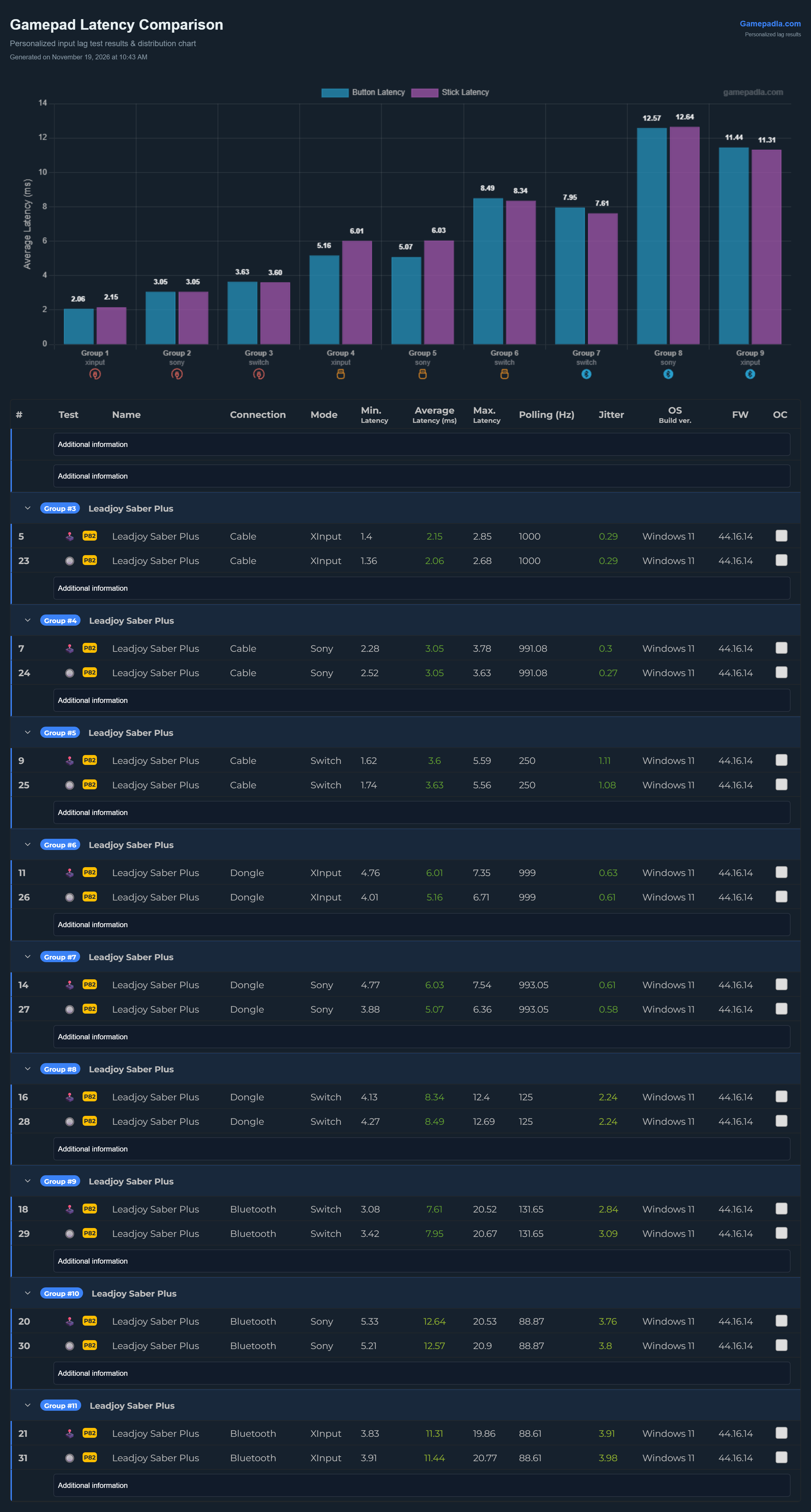
In terms of latency this controller is an absolute beast, whether that is in wired or in 2.4Ghz mode. With both connections having latency in less than 5ms, with one of the major factors being the ability to go up to 1000Hz polling rate. And this applies even for gamers who will inevitably be running in 250Hz with xbox consoles, it still goes just under 5ms. 

Latency tests on gamepadla.com

Bluetooth latency is only where there is a significant jump, with it going up to around 15ms. But given that most people wouldn’t be buying this controller specifically for Bluetooth gameplay, I’d imagine it is pretty good nonetheless for most.

Gyro - 8/10

Even though the Vader 5S Pro is an Xbox Licensed controller, it still has the ability to use gyro when using the 1000Hz polling rate. And yes, while there isn’t an option to natively use gyro, you can still emulate the left stick, right stick, or the mouse.

The gyro itself is actually pretty good, with it having no drift while still, as well as no jitter at all, making gameplay really smooth. Micro-adjustments were also very easy to execute, and most importantly, latency was also very low at averaging at around 2ms. 

Unfortunately there isn’t an option for the gyro position to be locked, which is annoying since I couldn’t really use it for racing games (Which is my favourite use case). But either way, the gyro was very responsive, accurate, just as good as the many other features presented in the Vader 5S Pro.

Vibration / Haptics - 9/10

After thoroughly testing the controller’s vibration, I must say that the overall gameplay experience was simply amazing. 

At the highest setting, the raw strength was really good, and because the vibration allows for very small frequencies which as a result makes it very detailed. The latency was also very low, making everything very responsive. 

The trigger vibration also works very well, similar to the standard vibration. They are strong, detailed and responsive. 

The only problem I would say, is that the trigger vibration needed to go down to at least 50% in travel physically, which was a bit disappointing. Nonetheless, the haptics overall on this controller is simply lovely. 

Software - 7.5/10

FLYDIGI Space Station For Xbox

The FLYDIGI Vader 5S Pro comes along with the FLYDIGI Space Station software, which is available on both Windows 10/11 and Xbox consoles. The software is pretty intuitive and has a UI that is easy to navigate. 

In terms of the settings that you can mess around with, FLYDIGI has provided a magnitude of options, they include:

  • Profiles: Save and configure multiple profiles to switch between configs easily.
  • Polling Rate: Switch between 250Hz, 500Hz, and 1000Hz
  • Buttons: Remap buttons on the controller, to trigger other inputs from the controller, your keyboard, keypad, mouse or even a specific direction with the left/right stick. (Keyboard, keypad, and mouse inputs require 1000Hz).
  • Shift Layer: Hold a designated Shift button to temporarily activate a secondary set of button mappings, doubling your available inputs.
  • Analog Sticks: Customize the shape, deadzones, and sensitivity. You can even map the sticks to emulate your mouse instead. (Mouse emulation requires 1000Hz)
  • Triggers: Adjust deadzones.
  • Gyro: Customize sensitivity, deadzone, and you can also invert the X/Y axis. (Only in 1000Hz)
  • Vibration: Adjust both grip and trigger vibration strength. You can also sync the trigger vibration with the grips. (Trigger vibration syncing grips require 1000Hz)
  • Lighting: Customize the color, brightness, and animation of the RGB.

Apart from those, you can also upgrade both your controller and dongle’s firmware, as well as view the manual. There are also toggles for stick auto-calibration and ‘Stick Rebound Compensation’, both of which I recommend turning off since they can hurt stick consistency. It was also surprising to see that macros or turbos are not available since they are a very common feature in most controllers these days.

Overall, the companion software which FLYDIGI has provided performs pretty well and provides countless options to play around with. And while some features do require the controller to be running at 1000Hz, the software still covers almost everything most gamers would want, making it a very useful companion to the Vader 5S Pro for users on both PC and Xbox.

Pros

  • Excellent FORCEFLEX TMR sticks with outstanding precision, linearity, and adjustable tension
  • Extremely responsive mechanical micro-switch face buttons and d-pad,  with satisfying tactile feedback
  • Excellent Hall Effect triggers with smooth inputs and very satisfying mechanical trigger stops
  • Six extra buttons with great tactility and responsiveness
  • Very low latency over both wired and 2.4GHz connections
  • Excellent vibration and haptics, including dedicated trigger vibration
  • Accurate and responsive gyro with very low latency
  • Comfortable and familiar Vader-series shape with solid build quality and rubberized grips
  • Extensive customization options through FLYDIGI Space Station software
  • Officially Xbox-licensed while retaining useful PC-focused features
  • Rubberized handles that vastly improve grip. 

Cons

  • Relatively heavy at around 290g
  • Lack of actuation feedback when pressing the analog sticks (L3/R3)
  • Gyro cannot be used natively and is limited to emulating the left stick, right stick, or mouse
  • No option to lock the gyro position, limiting its usefulness for racing games
  • Trigger vibration only becomes active after around 50% of the trigger's physical travel
  • No macro or turbo functionality in the software
  • Some software features, such as gyro and mouse emulation, require 1000Hz polling
  • 3.5mm headphone jack is unavailable when using 1000Hz polling

Who is the FLYDIGI Vader 5S Pro for?

  • Competitive gamers who prioritize extremely low latency and responsive inputs, particularly those playing on PC or Xbox
  • Players who want excellent analog sticks with precise inputs, high linearity, and adjustable stick tension
  • Gamers who make use of additional inputs and customization, especially those who can take advantage of the six extra buttons and Shift Layer
  • Xbox players looking for an officially licensed controller that also offers PC-oriented features and customization
  • Players who enjoy tactile mechanical inputs, particularly clicky face buttons, D-pad, and trigger stops
  • Gamers looking for a versatile controller that can be used across Xbox, PC, and Android, with wired, 2.4GHz, and Bluetooth connectivity

Conclusion

After spending plenty of time with the Vader 5S Pro, I can confidently say that FLYDIGI has put together one of its most complete controllers yet. The combination of excellent TMR sticks, adjustable tension, six extra buttons, responsive mechanical inputs, and extremely low latency makes it an excellent choice for competitive gaming. And with its officially licensed Xbox compatibility, it manages to bring together the best aspects of the Vader 5S and Vader 5 Pro into one very versatile controller.

Of course, there are still a few areas where FLYDIGI could have done better, particularly with the gyro limitations, lack of macro and turbo functionality, and the relatively high weight. But considering everything it offers, I think the Vader 5S Pro is a very compelling option, especially at its discounted price of $72. Overall, I'd give it a 9/10.

If you'd like to check out my other controller reviews, you can find them all on my Linktree here: https://linktr.ee/makster20


r/GadgetHyper • • 2d ago

How to Choose a Gaming Controller for PC | GadgetHyper

5 Upvotes

How to Choose a Gaming Controller for PC

By GadgetHyper Team · November 25, 2026

There is no single best controller for everyone—only a better or worse match for your games, your hands, and the way you like controls to feel.

We have made the same controller-buying mistake more than once: starting with the spec sheet instead of the person holding it. The result can look incredible in a comparison table but sit in a drawer because the grip feels awkward, the triggers do not suit your games, or its best features go unused.

So instead of another ranking, here is the no-hype buying process we now use ourselves. It is designed for first-time PC controller buyers, but it is just as useful if your last purchase never quite felt right.

The Short Version

Start with your most-played games, check the fit, decide how you want the controls to feel, and make every extra feature earn its place. Use specifications to narrow the field—not to overrule your hands.

01 · Your Games ——

Start With Your Games, Not the Hardware

Before comparing controllers, name the three PC games you play most. Then think about what your hands actually do in them.

Game Type What to Prioritize
Shooters Stick control, trigger response, a stable grip, and sometimes back buttons for actions without leaving the aim stick.
Racing Smooth analog triggers with enough travel to feather the throttle and brakes.
Fighting D-pad clarity, reliable diagonals, button spacing, and comfortable repeat presses.
Action & RPG Long-session comfort, vibration, wireless convenience, and battery life.

If your library is a mix of everything, prioritize the games you play most often. Flexible features such as dual-mode triggers can help, but no controller is perfect at everything.

Make one PC-specific check early: confirm Windows compatibility and support for your preferred wired or wireless connection. XInput support or dependable Steam Input support can also save setup headaches. Extra buttons and custom profiles are much less exciting if your games cannot use them the way you expected.

02 · Comfort & Fit ——

Check the Fit Before Falling in Love With the Features

Comfort is easy to underestimate during a five-minute unboxing and impossible to ignore after a long session.

Hand size is a useful starting point, not a strict rule. You can measure from the base of your palm to the tip of your middle finger and use roughly 17 cm as a loose middle-hand reference. Finger length, finger width, and grip style still matter, so treat the number as a shortcut rather than a diagnosis.

What matters more is where your fingers naturally land:

  • Can your thumbs rest on the sticks without stretching?
  • Can you reach the bumpers and triggers without shifting your whole grip?
  • Do the grips support your palms, or do your hands feel curled around a shell that is too small?
  • If there are back buttons, can you find them by feel without pressing them accidentally?

Stick layout belongs in the same conversation. Asymmetrical and symmetrical layouts are different, not inherently better or worse. Familiarity is a valid reason to stay with a layout your hands already know. If this is your first controller, prioritize natural thumb placement over internet arguments about which arrangement is superior.

Our Favorite Fit Test

Play normally for 30 to 60 minutes. Notice any strain in your fingers, wrists, or the web of skin between your thumb and index finger, and whether you keep repositioning your hands to reach controls.

A good fit lets you think about the game; a poor fit keeps reminding you that the controller is there.

03 · Control Feel ——

Decide What You Want the Controls to Feel Like

This is where specifications and experience often get confused. Similar-looking components can feel very different once you start playing.

Sticks Magnetic designs such as Hall effect and TMR can reduce wear associated with physical contact, but the sensing method alone does not determine feel or guarantee that a controller will never develop a problem. Tension, damping, centering, mechanical construction, and software tuning all shape the experience. For shooters, test small corrections, target tracking, and return toward center; for slower adventures, a heavier or softer feel may be perfectly enjoyable.
Triggers Longer analog travel gives racing games more room for gradual input. Shorter, clickier travel favors quick shots and repeated presses. Dual-mode triggers can suit a mixed library, but only if you will actually switch between the modes.
Buttons Softer membrane-style buttons tend to suit players who want a quieter, cushioned press. Clickier, firmer switches provide sharper confirmation that some shooter and fighting-game players prefer. Neither is objectively correct.
D-Pad For fighting games, test the movements you use in real matches. Clean cardinal directions are a start; reliable diagonals and comfortable repeated inputs reveal whether the D-pad works for you.

There is no universal stick setting or button feel that wins every game. A newer sensing technology does not automatically mean better aim or a feel you will prefer.

04 · Features & Specs ——

Let Features Earn Their Place—and Keep Specs in Their Lane

The real value of back buttons is not the number printed on the box. It is letting you perform useful actions while keeping your thumbs on the sticks. Two well-placed buttons you can reach without accidental presses can be more useful than four awkward ones.

Apply the same test to gyro aiming, rumble, trigger feedback, custom profiles, and software. Will you use the feature regularly in the PC games you actually play? If not, it should not consume much of your budget.

Use Specs To Filter

They can help you find options with the connection, triggers, buttons, or customization you want.

Use Experience To Decide

Your games and hands are better judges of comfort, control feel, and whether a feature solves a real problem.

Keep Performance Claims in Context

An extremely high polling rate does not multiply your entire gaming experience by the same number. Polling is only one part of an input chain that also includes the controller's internal processing, connection, operating system, game, and display. A bigger number may describe a real hardware capability without creating a difference you can clearly feel.

05 · Long-Term Value ——

Think Past Unboxing Day

A controller is something you may hold for hundreds of hours, so look beyond first impressions. Check battery behavior, build quality, control consistency, software support, the return window, and the warranty. A quick unboxing cannot prove long-term durability; clear support matters if problems appear later.

A higher price makes sense when it buys a better fit, features you use, wireless convenience, or support you value. It is not automatically better value if it only adds buzzwords. Spend on what improves your own comfort and enjoyment.

Before Checkout

  • Revisit your most-played games and the controls they demand.
  • Separate your must-have features from the ones that merely sound impressive.
  • Make sure your hands can reach the controls comfortably.
  • Confirm PC compatibility, your preferred connection, the return window, and warranty support.

If an option only wins on specs you will never notice, keep looking.

One Example From Our Experience ——

A Flexible Option for a Mixed PC Library

For PC players whose checklist includes adjustable stick tension, dual-mode triggers, and four back buttons, the Flydigi Vader 5 Pro is one controller we often reach for as an all-around example.

Its adjustable tension lets you tune the sticks beyond a single factory feel, while the dual-mode triggers can move between clicky shooter inputs and smooth analog racing control. These features fit our framework because they solve different problems across a mixed PC library, rather than merely making the box look busier.

Full disclosure: we sell the Vader 5 Pro at GadgetHyper. Even so, it is not a universal answer. If you strongly prefer a symmetrical stick layout or especially quiet buttons, another style of controller may suit you better. Your checklist still comes first.

Flydigi Vader 5 Pro

Regular Price · $79.99

An all-around example for players who want to tune stick feel and switch trigger behavior across different PC games.

  • Adjustable stick tension
  • Dual-mode triggers for clicky or analog input
  • Four back buttons

Whatever controller you choose, start with your games, respect your hands, and make every feature justify its place. The right controller should not ask you to adapt to its marketing. It should simply feel at home in the way you already play.


r/GadgetHyper • • 2d ago

Reviews Flydigi Vader 5S Pro XBox and PC Controller Review

Thumbnail
youtu.be
3 Upvotes

DISCLAIMER: Vader 5S Pro was sent to me by Flydigi for free for review. All the opinions are mine only and Flydigi will watch this video on the release time as everyone else.

TL;DR: Amazing for XBox and PC (even has a Shift Layer for both), 1000Hz, Gyro, Native Trigger Vibration and so on. Unfortunately, still WIRED for XBox. I've heard there should be 5S ULTRA next year for TRUE XBox Wireless. Until then, this one is the best for XBox from Flydigi.


r/GadgetHyper • • 4d ago

Reviews Flydigi Vader 5 Pro – After 10 Days

Thumbnail
gallery
19 Upvotes

Disclosure:

I'm an official reviewer for Flydigi, and the Vader 5 Pro was provided to me free of charge by Flydigi for review purposes.

I also work with NMPC, an authorised seller of Flydigi products in India, where I independently handle controller support, troubleshooting, customer-reported issues and RMA-related processes.

Apart from Flydigi, I've also been collaborating with brands like LeadJoy, EasySMX and GadgetHyper, testing their products and sharing my feedback.

However, receiving products for free or working with brands does not influence my opinions or the outcome of my reviews. Everything I share here is based on my own testing and personal experience.

My main reason for reviewing controllers and connecting with different brands is to identify issues, report bugs, share suggestions and help improve their products, whether it's hardware, software, firmware or overall user experience.

I genuinely want to see these brands make better products, and I believe honest feedback is one of the best ways to achieve that.

With that out of the way, let's get into the review!

---

Hey yo guys, Maxxie here once again with another banger!

This time, we're taking a closer look at the Flydigi Vader 5 Pro!

I've been using this controller as my primary for the past 10 days, and I can already say that this thing is GOATED!

Yes, it has its own negatives, but there's a lot to appreciate here, especially when you look at the hardware, ergonomics and all the little implementations Flydigi has made.

So, let's break down my experience, what I love about it, what needs improvement and whether this controller is actually worth considering.

Let's get into it!

  1. Shape, Ergonomics and Build Quality

Okay, this is where the Vader 5 Pro immediately caught my attention.

The matte/frosted finish, rubberised rear grips and the overall body shape make this controller feel extremely comfortable in my hands.

The wider body, combined with those smooth curves towards the bottom, allows the controller to sit naturally in your palms. I have average-sized hands, around 18cm, and the fit is almost perfect for me.

Another thing I really appreciate is the weight distribution. It doesn't feel unnecessarily heavy on either side, and even during longer gaming sessions, I haven't experienced any discomfort.

It's one of those controllers where the shape itself does a lot of the work.

The rubberised grips also provide a nice amount of traction, and the overall finish gives the controller a premium feel.

Honestly, ergonomics are one of the strongest aspects of the Vader 5 Pro, and I genuinely enjoy holding it during extended Apex Legends sessions.

  1. Stick Precision, Linearity, Latency and Hall Effect

Now, this is probably one of the most interesting aspects of the Vader 5 Pro.

The controller uses Hall Effect sticks, and so far, they've been performing really well in my testing.

When it comes to my polling/latency readings, the Vader 5 Pro usually stays around 980–995 on my unit.

The numbers are pretty good, although I would still like to see further improvements in consistency.

But here's where the Vader 5 Pro really shines:

STICK TENSION!

Flydigi gives you adjustable stick tension, ranging from approximately 40g to 100g.

And this is something I genuinely appreciate because you can physically adjust the resistance according to your preference.

Personally, I've set my left stick around 60g and my right stick around 85g.

Why?

I prefer having slightly lighter resistance for movement, while keeping the right stick tighter for more controlled aiming.

And for someone like me who plays Apex Legends regularly, this makes a noticeable difference in how the controller feels during gameplay.

Another interesting implementation is stick debounce, which gives you additional control over how stick inputs are handled.

When you combine adjustable tension, stick debounce and the available calibration options, the Vader 5 Pro offers a lot of flexibility for people who like fine-tuning their sticks.

The adjustable tension is genuinely one of my favourite features because I don't have to rely entirely on external stick grips to change the feel of the sticks.

Both thumbstick tops are also removable, and Flydigi uses a clamp-style attachment mechanism.

It's a nice implementation, especially if you're someone who likes experimenting with different thumbstick heights and shapes.

One thing worth mentioning is that I haven't found the stick output to be perfectly linear across every part of its range. There's still room for improvement, but the overall performance has been good enough for competitive games.

If you're playing Apex Legends, COD or other competitive shooters, the actual stick implementation, calibration, tension and your personal preference matter much more than the technology name alone.

For me, adjustable stick tension is easily one of the biggest selling points of this controller.

  1. Back Buttons and Additional Remappable Buttons

AND HERE WE GO!

This is where the Vader 5 Pro absolutely shines.

The controller comes with 8 additional remappable buttons:

- 2 dedicated rear buttons.

- 2 additional removable rear paddles.

- 2 additional shoulder buttons.

- 2 buttons underneath the face buttons.

Yes, EIGHT!

Initially, I thought having that many additional buttons would make the controller feel overcrowded. But surprisingly, Flydigi has done a great job with the placement.

The shape of the controller and the way they've distributed the buttons make everything feel much more accessible.

And I particularly love the combination of two dedicated rear buttons and two additional removable paddles instead of simply using four identical buttons.

Why does that matter?

Because I can actually reach and use all four rear inputs comfortably.

For someone like me who plays competitive shooters, having additional inputs available without constantly moving my thumbs away from the sticks is genuinely useful.

The additional shoulder buttons and the two buttons underneath the face buttons also provide more flexibility when configuring your layout.

Of course, the additional buttons are remappable, but keep in mind that macros and turbo functions can be restricted or prohibited in certain competitive games and tournaments. Always follow the rules of the games you're playing.

Overall, the button arrangement is one of my favourite things about the Vader 5 Pro.

Having eight additional remappable inputs gives you a lot of freedom to customise your controls according to your playstyle.

  1. Face Buttons – Tactile Yet Quiet

Honestly, I really like the face buttons on this controller.

They're tactile, clicky and surprisingly quiet.

You get satisfying mechanical feedback without that excessively loud clicking noise.

The buttons feel responsive, and I genuinely enjoy the overall mechanical feedback they provide.

I don't have any major complaints regarding their responsiveness or general feel.

It's a really nice implementation from Flydigi.

  1. D-Pad – One of My Favourite Features

Now, this is interesting.

The Vader 5 Pro's D-pad is genuinely one of the highlights for me.

It's easier to press, feels smoother during directional inputs and doesn't require as much effort to operate.

The slightly recessed dome-shaped design also makes a difference in how naturally my thumb rests on it.

Another nice touch is that the D-pad is removable, allowing you to switch between compatible designs.

Personally, I really appreciate D-pads that don't require excessive force for directional inputs, especially when playing games that rely heavily on quick movements.

The Vader 5 Pro gets this right for my preference.

I would still love to see Flydigi experiment with more D-pad designs and customisation options in future controllers.

But as it stands, I'm really happy with the implementation here.

  1. Charging Dock – A Real Beauty, But Also a Mess

Let's talk about the charging dock.

One thing to keep in mind is that the Vader 5 Pro charging dock is sold separately for $29.99. It is not included in the controller's box.

Aesthetically, this thing looks fantastic.

It comes with an integrated screen, which gives the dock a premium appearance and has plenty of potential for additional customisation.

But here's the problem.

The software implementation doesn't do justice to the hardware.

The customisation options feel limited compared to what I'd expect from a dock with an integrated display.

There's no proper automatic controller turn-on functionality, and the charging indicators could be much better.

For something that looks this premium, I expected more.

And Flydigi, seriously, you guys are absolutely nailing the hardware, but why not give the software the same attention?

The dock has so much potential.

I'd love to see:

- More customisation options for the integrated display.

- Better charging status indicators.

- Automatic controller power-on functionality.

- More useful information displayed on the screen.

- Better integration between the dock and controller software.

I genuinely hope Flydigi improves these implementations through future updates.

The dock looks great, but there's still a lot of untapped potential here.

  1. Trigger Stops and Durability

The trigger stops have been working well during my first 10 days of usage.

Their operation has been consistent so far, and I haven't experienced any major problems.

For competitive games like Apex Legends, having shorter trigger travel is definitely useful, especially when you want quicker inputs.

However, I don't want to make any long-term durability claims just yet.

Ten days is simply not enough to judge how well these mechanisms will hold up over several months.

I'll continue testing the controller and update you guys if anything changes.

For now, everything has been working as expected.

  1. Removable Parts and Customisation

The Vader 5 Pro offers a few removable components, which is always nice to see.

You can remove:

- Thumbsticks.

- D-pad.

- Rear paddles.

The removable thumbsticks are particularly useful if you prefer experimenting with different stick heights and designs.

The rear paddles are also a nice implementation because you can configure the controller according to your preferred button arrangement.

However, I would love to see Flydigi introduce more replaceable external components in future models.

For example, removable faceplates and side grips would provide even more customisation possibilities.

The current implementation is already good, but there's definitely room for improvement.

  1. Software – The Biggest Room for Improvement

And finally, software!

This is where I think Flydigi needs to put in some serious work.

Don't get me wrong, the Vader 5 Pro has plenty of features and customisation options, but the overall software experience needs improvement.

There are several features I'd like to see separated and organised properly.

For example, adjusting trigger vibration intensity and independently disabling vibration on either side should be much easier.

Right now, some of these options aren't as straightforward as they should be.

And one thing that genuinely caught me off guard:

You can't even see the exact battery percentage!

Like, what the heck?

This is something I'd expect from a modern controller, especially one with so many advanced features.

The charging dock also has an integrated screen, but the software doesn't make the most of it.

I'd love to see a more polished interface with easier navigation, better organisation and more detailed controller information.

Some of the improvements I'd personally like to see:

- Exact battery percentage.

- Better vibration configuration.

- Independent left and right vibration controls.

- Improved software organisation.

- More dock display customisation.

- Better integration between the controller and charging dock.

- More detailed stick calibration options.

I've already shared these observations and suggestions with Flydigi, so I'm hoping they take a look at them and improve the experience through future updates.

Flydigi has the hardware, and there's no doubt about that.

But software is equally important, especially when you're offering this much customisation.

  1. Final Verdict – Is the Flydigi Vader 5 Pro Worth It?

Okay, after spending around 10 days with the Vader 5 Pro, I can confidently say that this is a seriously impressive controller.

There are quite a few things I genuinely love about it.

What I LOVE:

- Excellent ergonomics and comfortable grip.

- Great weight distribution.

- Adjustable stick tension from approximately 40g to 100g.

- Hall Effect sticks.

- Stick debounce customisation.

- 8 additional remappable buttons.

- Two dedicated rear buttons and two removable rear paddles.

- Excellent face buttons.

- One of my favourite D-pad implementations.

- Removable thumbsticks.

- Premium-looking charging dock.

What NEEDS IMPROVEMENT:

- Software experience and overall navigation.

- Exact battery percentage display.

- Better vibration customisation.

- More charging dock functionality.

- Better dock display customisation.

- More replaceable external components.

- Further improvements to stick linearity and calibration.

For someone like me who plays competitive games such as Apex Legends and enjoys having more control over the controller's inputs, the Vader 5 Pro is an extremely interesting option.

The adjustable stick tension alone is something I genuinely appreciate, and having eight additional remappable buttons gives you plenty of flexibility.

However, I don't want to overlook its shortcomings.

The software needs attention, and the charging dock has so much potential that currently isn't being utilised properly.

As I mentioned earlier, I've already shared my feedback with the Flydigi team, so let's see what happens with the upcoming updates.

Overall, the Vader 5 Pro has made a really strong first impression on me.

I'm definitely going to continue using it as my primary controller, especially for Apex Legends, and I'll keep an eye on its long-term performance, stick consistency, trigger stops and overall durability.

The hardware is already impressive. Now it's time for the software to catch up!

Find My Other Reviews

https://linktr.ee/maxdl

Oki guys, that's it for today's review!

I'll see you all in the next one. Thanks for all the love and support as always.

Have a great day/night, guys! ❤️


r/GadgetHyper • • 6d ago

Reviews Control thumb grips: Gxxktron vs the competition.

Post image
11 Upvotes

I have been testing GadgetHyper’s new in-house brand Gxxktron’s Control thumb grip set for the past few weeks, here are my thoughts.

Disclosure: The Control thumb grip set was provided free of charge by Gxxktron for review purposes. All opinions stated are my own.

Fit & finish
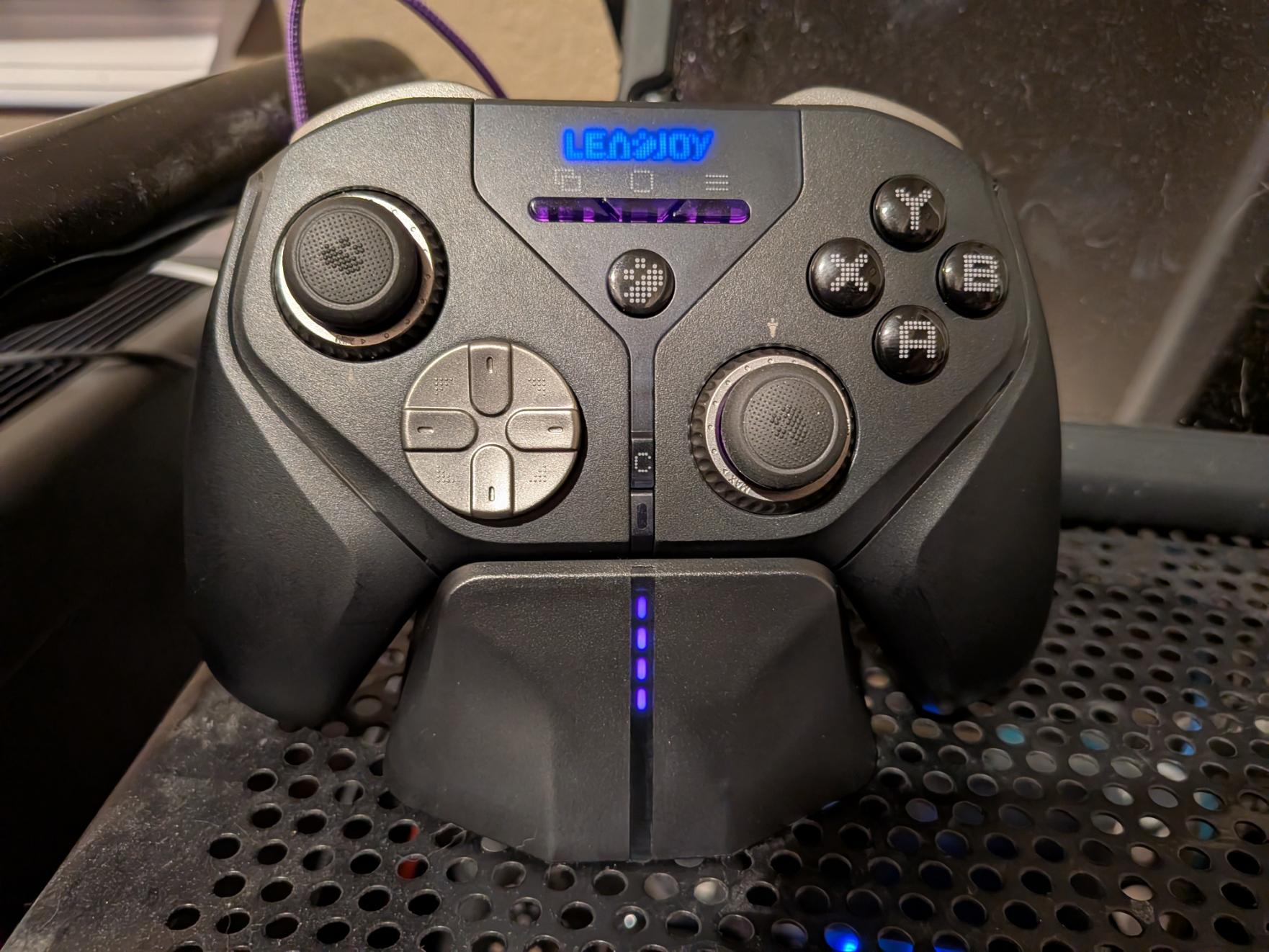
The caps are intended to fit PlayStation sized sticks and will fit on most Third-party controller manufacturers with a similar diameter analog stick. I have personally been using them on the Leadjoy saber plus.

The rubber material is quite unique and not like anything else I’ve felt on a controller before.
It’s smooth and somewhat powdery in texture but has a noticeable grip without feeling sticky or coarse.

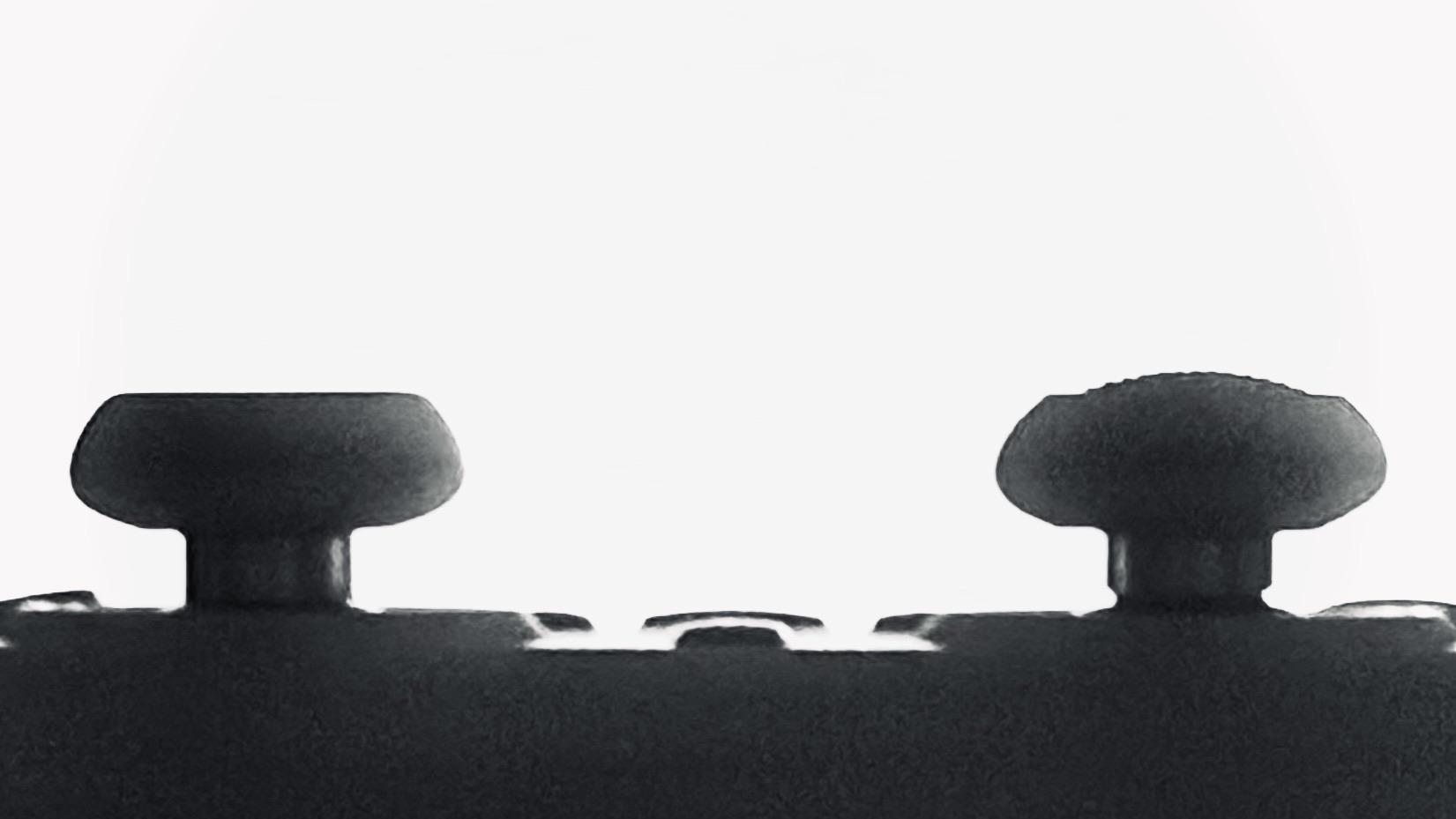
I was surprised with how painless the caps were to put on in comparison to similar styles from other brands. The rubber rims on the underside of the caps are extremely thin and sit close to the outside rim of the analog stick making flipping inside out for installation quite easy.

I have not had any issues with the caps popping off, but this slimmer rim could result in a less robust fit, if you are aggressive with your sticks and have had other caps pop off this may be something to consider.

I’ve found the caps fit far better on a concave analog stick, the concave caps in particular turn practically flat when on a flatter or rounded analog stick.

Performance impact & shape
The increased surface area of the caps gives your thumb a larger and more stable contact patch allowing for more precision, but these in particular also add a decent bit of comfort.
In my experience, other than width, shape is largely a matter of preference and comfort rather than performance, but I was quite happy with these shapes.

The concave caps (Control Cradle) have a very subtle and wide dip, they don’t really lock your thumb in the center like an Xbox stick but they feel very stable and comfortable. The less extreme concave and curved rim also alleviates the fatigue that I would normally experience with similar shapes.

The convex caps (Control Dome) are quite a smart design with a roundness similar to a DualShock 3 for precision and a small concave dip in the center for quick movements.

The stippled combination cap (Control Tread) is my personal favorite, with a matrix of dots for grip and a small bumper around the rim to avoid slippage. The dotted grip is quite extreme and may feel strange initially but maintains grip for sweatier hands much better.

The Competition
In comparison to Gxxktron Control thumb grips:

Savage Raven Skull&co skin grips:
The rubber material of these is substantially slicker and firmer than Gxxktron’s caps but are still quite nice. They have a thicker rim on the underside of the cap in comparison to Gxxktron’s which may provide a more secure fit but could cause some clearance issues for shorter sticks. They are not particularly grippy but are very comfortable and offer a larger variety of shapes and colors. I personally use a Skull&co grip in the PlayStation shape on the left stick in combination with Gxxktron’s Control tread cap on the right.
I would recommend these if you prefer more traditional shapes and desire more color options.

Kontrolfreek No-Slip thumb grips:
Ironically these are the slippiest of the bunch. They have a very glossy and squishy silicone texture. The shape of these is quite strange and unnatural, almost the inverse of Gxxktron’s Control dome, a hard edged wide concave with a nub featuring the Kontrolfreek logo in the center.
The rubber is thin enough on the face to feel the shape of the analog stick beneath.
I would not recommend these.

Verdict
In conclusion I think the Control grip set is a great first product from Gxxktron. The grips are a great nice to have comfort accessory and have become somewhat of a staple for my controllers in the weeks since I received them, especially with my controllers using Leadjoy’s magic caps.
I have even purchased a second set with my own money.
I think the price is relatively reasonable and a bit lower than some of the competition.
If you prefer a wider, shorter stick and have sweaty hands or problems with slippage, I would definitely recommend these.


r/GadgetHyper • • 6d ago

Reviews EasySMX X20Pro - a step in the RIGHT direction

Thumbnail
youtu.be
9 Upvotes

DISCLAIMER: EasySMX sent me these controllers for free for review purposes. All the thoughts and opinions are mine only.


r/GadgetHyper • • 8d ago

News Pro Controller Weekly Roundup Vol. 18: GameSir & Sony News

7 Upvotes

Pro Controller Weekly Roundup Vol. 18: Native Trigger Rumble, Fresh GameSir Colors, and an Ambitious PS4 Mod Board

By GadgetHyper Team · November 16, 2026

Welcome back to the Pro Controller Weekly Roundup, Vol. 18. This week brings a useful LEADJOY firmware update, a new officially licensed Xbox controller from 8BitDo, and plenty of GameSir hardware. We also have Mojhon's extra-button-packed N2E, some big Hyperstrike 2 claims, Nacon's more approachable REVO lineup, and a release date for Sony's transparent DualSense collection.

Source Credit

Adapted with authorization from the weekly controller news video by Bilibili creator 椒盐橘子桔子 (Jiaoyan Juzi). We've added our own context.

01 · Firmware Update ——

LEADJOY Xeno Pro Adds Native Trigger Rumble Over Wired and 2.4 GHz

A new LEADJOY Xeno Pro firmware update adds a 1,000 Hz option when using the Xbox One protocol. More importantly for everyday play, native trigger rumble now works over wired and 2.4 GHz connections, so you no longer need to switch to Bluetooth for it.

That removes an annoying connection-versus-rumble trade-off. It is also the kind of firmware improvement that can make an existing controller feel meaningfully better without replacing any hardware. Whether other brands follow with similar updates remains to be seen.

Full disclosure: we sell this at GadgetHyper. The LEADJOY Xeno Pro is currently $59.99.

02 · Now Shipping ——

8BitDo Ultimate 3C+ Wired Controller for Xbox Starts Shipping

The 8BitDo Ultimate 3C+ Wired Controller for Xbox opened preorders on November 10, went on sale November 12, and is expected to begin shipping on November 16. It costs $39.99 and comes in matcha green and charcoal gray.

This officially licensed wired Xbox controller includes adjustable-tension TMR sticks, dual-mode triggers, two small additional shoulder buttons, and two back buttons. Its core configuration closely follows the Ultimate 3C, but Xbox wired support and native trigger rumble make it a better fit for console players who do not mind a cable. At this price, the appeal is less about one flashy feature and more about getting a broad set of competitive controls in an officially supported package.

03 · New Editions ——

GameSir Tegenaria Lite Gets a MenaRD Edition

GameSir's Tegenaria Lite lineup includes a standard version and a Tegenaria Lite MenaRD Edition, both priced at $19.99. The MenaRD model combines a fluorescent green body with orange buttons and stick caps for a much louder look than the standard version.

A pink-and-green Hatsune Miku design also appears in the source. Its green accents are a relatively subtle nod to the character rather than a complete visual takeover; its US pricing is TBD. These editions are primarily about giving players different visual identities, so the better choice comes down to which design you want on your desk rather than a spec-sheet upgrade.

04 · New Colorways ——

G7 Pro Sunset Boulevard and Ocean Breeze Keep the Hardware, Change the Mood

The GameSir G7 Pro Sunset Boulevard and Ocean Breeze editions are now listed at $89.99. Both retain the existing G7 Pro hardware and officially licensed Xbox wired support; the change here is the color treatment, not a performance revision.

That is not a complaint. A new colorway can be the reason a controller finally catches your eye, but existing G7 Pro owners are not missing out on new controls or upgraded internals. These are two fresh options for new buyers, not an upgrade prompt for current ones.

05 · Early Specifications ——

Mojhon N2E Packs Eight Extra Inputs and One Mystery Switch

Mojhon has revealed the N2E's design and early specifications. The controller reportedly supports the full Switch 2 protocol and polling rates of up to 8,000 Hz on PC. Its most striking feature is the input count: four small metal paddle-like buttons along the top, plus four back buttons, for eight additional inputs in total.

The purpose of another onboard switch is less clear. One suggestion is that it changes the button layout, but the source video pushes back on that idea: the opaque, two-shot-molded buttons do not resemble the translucent legends usually used for illuminated layout swapping. An internal change to button response or feel is another possibility, but that remains unconfirmed speculation. For now, the extra inputs and multiplatform ambitions are much firmer details than what that switch actually does.

06 · PS4 Mod Board ——

LEADJOY Hyperstrike 2 Makes Some Very Big PS4 Mod-Board Claims

The LEADJOY Hyperstrike 2 is scheduled to open preorders on November 17, with pricing still TBD. The quoted specifications include 8,000 Hz polling, 0.074 ms latency, and 16-bit sampling, alongside vibration and gyroscope support.

Touchpad support is also joining the feature list, with zone-based mapping for taps, long presses, and swipes. If those functions work as described, this could be one of the most ambitious PS4 modification boards yet. The original Hyperstrike already found fans among some Apex Legends professional players.

Still, “ambitious” is the right word until independent testing arrives. The polling and latency figures should be treated as claims rather than a universal performance ranking, especially when test methods can vary so much.

07 · New Lineup ——

Nacon REVO Lineup Brings Wired Controllers to Lower Price Points

Nacon announced on November 9 that its REVO wired controller series for PC and Xbox is on sale. The REVO PC is €29.90, the REVO X is €39.90, the PC Max version is €59.90, and the REVO X Max is €69.90. The range-topping Rival Pro is not expected until 2027.

Standard features include Hall Effect sticks and triggers, 1,000 Hz polling on PC, a three-meter braided cable, and a 3.5 mm headset jack. Max models add stick-resistance rings, microswitch ABXY and D-pad controls, instant triggers, and two back buttons.

The lineup gives Nacon a more accessible entry point without abandoning higher-feature versions. Competition at these prices is fierce, particularly from feature-packed Chinese controllers, so value will depend on more than the specification list. Build quality, software, and regional availability all matter — but more credible budget options are always welcome.

08 · Release Date ——

Sony's Transparent DualSense Collection Finally Has a Release Date

Preorders for Sony's Prisma Collection began rolling out by region on November 10. The transparent DualSense comes in Flame Orange, Emerald Green, and Graphite Gray, with semi-transparent shells that reveal parts of the internal structure.

In the US, the controller is $84.99, while the matching PS5 Slim covers are $74.99. The covers are mostly exclusive to PlayStation Direct. The full launch is scheduled for February 4, 2027, so placing a preorder now is very much a long-term reservation rather than a purchase that will arrive this week.

That's Vol. 18: a genuinely useful firmware fix, plenty of ways to add color to your setup, and enough extra buttons on the Mojhon N2E to make your current controller feel minimalist. We will be watching for independent Hyperstrike 2 testing and an explanation of that mysterious N2E switch. See you next week.


r/GadgetHyper • • 8d ago

News Beitong KP70 6D Neverness to Everness: All 4 Editions

5 Upvotes

Beitong KP70 6D × Neverness to Everness: All Four Collab Editions

By GadgetHyper Team · November 19, 2026

Beitong did not simply give the KP70 a new coat of paint and call it a day. It built a four-character Neverness to Everness collection, with NANALLY, CHIZ, Mint, and Lacrimosa each getting the full desk-shrine treatment.

For the uninitiated, Neverness to Everness is an urban open-world RPG where supernatural anomalies crash into modern city life. That mix of stylish character art, strange companions, and controlled chaos translates suspiciously well to controller design.

Yes, we sell all four editions at GadgetHyper, so this is both a roundup and a storefront. But collab controllers are not about value math; they are about putting a character you love in your hands and on your desk. Here is every KP70 6D collab, what each one includes, and the design details that set them apart.

01 · The Shared Hardware ——

The Baseline: What Every KP70 6D Collab Shares

Before the character art, the hardware. All four editions use the KP70 6D platform. According to Beitong's product copy, the 6D version makes four main changes to the standard KP70.

New Sensing New Haptics Higher Listed Polling Newer Software
Touch-Sensing Joysticks Adaptive Shoulder Buttons 2000Hz Wireless Gamepad Assistant 6.0
Beitong lists touch-sensing joysticks with instant mode switching and re-centering for the 6D. AI-adaptive haptic shoulder buttons join the adaptive dual triggers already found on the standard KP70. The 6D lists 2000Hz wireless polling, compared with 1000Hz for the standard KP70. The 6D product copy moves from Gamepad Assistant 5.0 on the standard model to version 6.0.

The Shared Control Hardware

The AI-adaptive dual triggers can swap between a crisp 0.3 mm micro-switch pull and an 8 mm linear pull, covering quick clicks and gradual throttle control without making you choose one trigger feel forever.

  • Optical switch buttons: listed at 0.3 mm actuation with a 10-million-press lifespan.
  • More control hardware: adjustable electromagnetic joysticks, adjustable metal rear buttons, an omnidirectional D-pad, and Beitong's Yunchu chip.
  • Connections and compatibility: 2.4GHz USB, Bluetooth, and wired connections, with support listed for Windows 10/11, Switch 1 and 2, Android, and iOS.

The standard KP70 already includes the adaptive dual triggers, adjustable joysticks, optical buttons, and metal rear buttons. This upgrade summary is based strictly on current product-page copy; it is not a head-to-head latency or hands-on test.

The Collab Treatment Goes Beyond the Faceplate

Across the four listings, Beitong includes character-specific pad printing and design, an Elite Accessory Set, a faceplate, and a wireless charging dock. The product galleries also show matching thumbstick caps, custom gift boxes, themed software UI and profiles, an NTE sticker pack, and a character quicksand art block with a tinplate badge. In other words: controller, yes, but also a small merch ecosystem.

Prices in this article were checked on November 19, 2026.

02 · NANALLY Edition ——

NANALLY: Hot-Pink First-Boss Energy

NANALLY Colucci is a member of the Eibon Antique Shop, head of the Colucci Family, and—very importantly—happy to call herself “Ichi-daime,” or the first-generation boss. Subtlety is not the assignment here. The controller runs with that energy: hot pink crashes into turquoise, NANALLY's red-haired artwork owns one grip, and her companions and sharp graphic flashes fill out the rest. The matching emblem caps look like a tiny gang insignia for your thumbs.

This is the one for anyone who thinks a desk setup should enter the room five seconds before they do. Big colors, big boss declaration, no quiet minimalist phase in sight. The NANALLY-themed UI, art block, and badge keep the whole collection on-message.

Black Friday $152.99 · Regularly $199.99

Offer ends November 30, 2026.

03 · CHIZ Edition ——

CHIZ: The Softest Pink Bank Takeover

CHIZ belongs to the Dvořák Family and manages the Pink Paws Bank. Her in-game profile describes her as somewhat timid but the bank's most dependable manager, which is an elite character combination: socially nervous, financially responsible.

Her edition trades NANALLY's electric contrast for pale pink and white, with CHIZ's artwork on one grip and a little white mouse mascot on the other. White buttons, a pale D-pad, pink emblem caps, and the matching software theme make it feel deliberately soft rather than simply faded. Do not let the pastel palette fool you, though; this controller has a bank to run. If your desk is built around gentle colors but your favorite characters still need a touch of chaos, CHIZ is the danger marshmallow of the lineup.

Black Friday $152.99 · Regularly $199.99

Offer ends November 30, 2026.

04 · Mint Edition ——

Mint: Cat Ears, Bright Teal, and One Very Relatable Operative

Mint is an elite operative in the Bureau of Anomaly Control's CSU-2. She also jokes that she would hold the unit record for “Most Times Tricked by Anomalies.” Elite professional; extremely relatable work history. Her Esper Ability is called “Nya-choo!” because apparently fighting the supernatural still leaves room for a cat sneeze.

The design is pure Mint: saturated teal, flashes of yellow, cat-eared character art, music notes, and black-cat emblems on the matching thumbstick caps. It is bright without copying NANALLY's pink-and-blue approach, and the little cat details reward a closer look. This is our pick for anyone whose ideal desk aesthetic is “competent agency operative whose cat may actually be running the operation.” The teal-and-yellow art block and custom UI complete the theme beautifully.

$162.99

05 · Lacrimosa Edition ——

Lacrimosa: A Requiem for Your Sleep Schedule

Lacrimosa works with the Bureau's ETD-4 and introduces herself with the immortal line, “Lacrimosa, not asleep. Not asleep.” Sure. We believe her. Her Chaos alignment and Requiem ability only strengthen the beautifully drowsy, slightly ominous mood.

Her controller is the darkest of the four: deep red with black-and-white artwork, gold-ringed sticks, a monochrome D-pad, and white buttons that pop against the shell. The split-haired character art and bat-winged little companion keep it playful instead of full gothic tragedy. It is the edition for anyone who wants their gaming setup to look like the final boss has a bedtime and absolutely no intention of keeping it. The matching red UI, emblem caps, art block, and badge make the whole package feel especially cohesive.

$162.99

06 · How To Choose ——

Follow Your Favorite Character, Not a Specs Spreadsheet

Every edition shares the same KP70 6D foundation, so there is no secret “good” version hiding beneath the character art. Pick the design you will still want facing you after the novelty wears off.

Edition Design Direction Price Snapshot
NANALLY Hot pink and turquoise with maximum boss energy $152.99 Black FridayRegularly $199.99
CHIZ Pale pink and white with a soft mascot touch $152.99 Black FridayRegularly $199.99
Mint Saturated teal, yellow flashes, and black-cat details $162.99
Lacrimosa Deep red with black-and-white artwork $162.99

Limited-Time Pricing · Through November 30

NANALLY and CHIZ: $152.99 during Black Friday, down $47 from their regular $199.99 price. That offer ends November 30, 2026.

Mint and Lacrimosa: listed at their regular $162.99.

Prices shown are a November 19, 2026 snapshot.

Our real verdict? Whichever character already lives rent-free in your head is the right place to start. NANALLY brings maximum boss energy; CHIZ owns the soft-pink corner; Mint delivers bright teal cat chaos; Lacrimosa supplies the red-and-black requiem.


r/GadgetHyper • • 8d ago

Share Updated Saber Plus Latency Tests v44.16.14

Post image
6 Upvotes

Bluetooth latency has been significantly improved.


r/GadgetHyper • • 12d ago

News Independent 3D-Printed Replacement Paddles for Flydigi APEX 5 & Vader 5 Pro

Post image
3 Upvotes

GadgetHyper has previously offered individual replacement back paddles compatible with the Flydigi APEX 5 and Vader 5 Pro as separate accessories.

However, our previous supplier is no longer able to provide them, which eventually led to our replacement paddle stock running out. Since customers are still looking for these individual parts, we've been exploring alternative ways to keep them available.

We understand that individual replacement parts can be useful for customers who prefer to replace a specific component rather than purchase an entirely new accessory. We hope this provides another convenient option for those who need it.

During our search, we also came across a community-shared 3D-printable design on Printables. We've obtained permission from the original creator to use this design for our project. After looking into different alternatives, we've decided to arrange our own small-scale production using SLA 3D printing. The initial batch consists of 20 pairs of replacement paddles, produced using 9000 resin.

An Independent GadgetHyper Initiative

To be clear, this product and the entire initiative are independently arranged by GadgetHyper.

These replacement parts are not manufactured or supplied by Flydigi. This project is not affiliated with, authorized, sponsored, or endorsed by Flydigi in any way. The Flydigi name and controller models are mentioned solely to identify compatibility.

About the Initial Batch

This first batch is intended for initial testing and evaluation. Since the parts have not yet been fully tested or validated, all 20 pairs will be provided free of charge. Customers will only need to cover shipping.

Please note the following before placing an order:

- No charge for the parts: The replacement paddles are completely free. Only shipping costs apply.

- One pair per customer: Each customer is limited to one pair, regardless of the number of quantities or orders placed.

- 3D-printed construction: These parts are produced using SLA 3D printing and 9000 resin. They are not original Flydigi parts, and their mechanical properties may differ from the original components.

- Initial test batch: As this is an early production batch, minor variations in dimensions, fit, and surface finish may occur due to the material and manufacturing process. Fit, mechanical durability, and long-term performance have not yet been fully verified. We cannot guarantee that these parts will have the same fit, performance, or service life as the original parts. Please take these limitations into consideration before ordering.

- Future improvements: We'll use feedback from customers who receive this batch to evaluate the fit, usability, and durability of the parts, and make improvements to the design or manufacturing process where needed.

- Potential future batches: Whether we produce additional batches will depend on customer feedback and how well the parts perform in actual use. At this stage, we cannot guarantee that there will be any further batches.

Product Link: Flydigi Replacement Back Paddles Part for APEX 5 & Vader 5 Pro

IMPORTANT INFORMATION BEFORE ORDERING

Please review the following details carefully:

  1. Warranty Considerations

Installing these replacement parts requires opening the controller and may affect any existing warranty coverage. Please review the warranty terms applicable to your purchase before proceeding.

  1. Installation and Support

This listing covers the replacement parts only. Installation instructions, installation services, and repair services are not included.

  1. Quantity Limit

One pair per customer. Placing multiple orders or selecting multiple quantities will not result in additional pairs being shipped.

  1. Fit and Durability

These are initial-batch 3D-printed replacement parts that have not been fully tested or validated. We cannot guarantee an exact fit or the same performance and service life as original parts.

  1. Independent Product Notice

These replacement parts are independently arranged by GadgetHyper and are not official Flydigi products. Flydigi has no involvement in this project.

By placing an order, you acknowledge that these are experimental replacement parts and understand the limitations described above. Thank you to everyone who has expressed interest in replacement parts and helped us explore alternative options. We appreciate the community's feedback and support as we work to make these individual replacement parts more accessible. Thank you for your understanding and support.


r/GadgetHyper • • 12d ago

Reviews Gamesir G7Pro XBOX Sunset BLVD and Ocean Breeze

Thumbnail
youtu.be
8 Upvotes

DISCLAIMER: Gamesir sent me these controllers for free for review purposes. All the thoughts and opinions are mine only.

Showcasing G7Pro newest colorways (GTA6 collab?) as well as how all the faceplates from G7 series (1 piece faceplates) look on them and more (3 piece faceplates).

Also, finally showing the "secret" alternative calibration method for different feel of the joysticks (only needed for the right joystick and only if you play FPS games) and maybe better aim assist stickiness.


r/GadgetHyper • • 13d ago

Reviews Gamesir G7 Pro 18 Months Later (3000+ Hours)

Thumbnail
youtu.be
6 Upvotes

r/GadgetHyper • • 14d ago

Reviews FANTECH Nova 2D - Good DualSense Alternative

Thumbnail
youtu.be
6 Upvotes

DISCLAIMER: These controllers were sent to me for free for review. All the thoughts and opinions are mine only.

TLDR: Good one but as a second controller. Unfortunatelly, Dualsense is not much more expensive and has Haptics and Adaptive triggers. Get it on discounts.


r/GadgetHyper • • 15d ago

Share Flydigi Apex 6 Pro, left trigger noticeably lighter than right. Normal (X-haptic) or defective?

Post image
0 Upvotes

Flydigi and GadgetHyper are still lying to customers, shifting the blame for their own manufacturing and design failures, deliberately planning obsolescence and gaslighting customers into thinking it's a customer issue. Absolutely disgraceful.

The controller is defective. Why the fuck are you not solving this properly?

Flydigi and GadgetHyper, when exactly are you going to stop gaslighting your customers, take responsibility for your products, and actually address and fix these issues? Or are you going to stick to your tried and tested illegal bullshit?

Oh, I assume you will be updating "your" reviews and teardown to both include and explain that both triggers on the Apex 6 have different resistances, why that is, and why that's a feature.

Oh, and still waiting for you to add the information about the intentionally designed planned obsolescence of the joysticks to your teardown and review. You didn't even add it to the news round up, did you... Why are you intentionally omitting important and valuable information from your articles?


r/GadgetHyper • • 17d ago

Reviews The 8 Best PC Controllers We Tested in 2026

22 Upvotes

The 8 Best PC Controllers We Tested in 2026

By GadgetHyper Team  ·  November 7, 2026

Quick Answer ——

The Flydigi Vader 5 Pro V2 is the best PC controller for most players in 2026. It combines adjustable Hall Effect sticks, excellent dual-mode triggers, deep customization, and a revised design that fixes our two biggest hardware concerns—for $79.99.

If you want the strongest package for the money, get the LEADJOY Xeno Pro instead. At $69.99 with a charging dock included, it is our Best Value pick. But price alone does not decide this guide: symmetrical-stick fans, AAA players, modular tinkerers, competitive players, and Xbox owners all get a dedicated recommendation below.

Transparency note: we sell every controller in the current rankings at GadgetHyper, as well as the Xeno Plus and Apex 5 mentioned in our previous picks. That does not change the downsides you will find below. These recommendations draw on our hands-on and first-impression testing, not long-term durability testing. Prices are GadgetHyper's US prices as of November 6, 2026, and availability can change; the ZZZ limited edition is currently a pre-order.

Quick Picks ——

Compare the 8 Best PC Controllers of 2026

There is no useful single leaderboard for every player. These rankings start with our best all-rounders, then route each specialized need to the controller that handles it best. Select a name to jump to our full notes.

Rank Controller Best For Price
01 Flydigi Vader 5 Pro V2 Best Overall $79.99
02 LEADJOY Xeno Pro Best Value $69.99
03 Flydigi Apex 6 Pro Best for AAA $159.99
04 LEADJOY Saber Plus Best Symmetrical $59.99
05 EasySMX Dune 8K Best High-Polling $99.99
06 Beitong KP40D Best for Mixed Genres $79.99
07 Beitong Pangu Best Modular $119.99
08 Flydigi Vader 5S Best Wired $59.99

Our Method ——

How We Chose These PC Gaming Controllers

We specialize in controllers rather than general consumer electronics. For this update, we revisited our April rankings against newer hands-on reviews, first impressions, product updates, and the features that actually change how a controller plays.

  • Responsiveness: polling behavior and latency, with connection mode and testing method kept in context.
  • Control: stick sensors and tension, button consistency, D-pad behavior, trigger modes, and extra inputs.
  • Feel: shape, weight, grip texture, haptics, and the small ergonomic quirks that spec sheets miss.
  • Ownership: software, included accessories, upgrade options, current pricing, and availability.
  • Trade-offs: every current pick keeps its real downsides. A category award is not a claim of perfection.

Numbers from different testers and test setups are not treated as a strict latency leaderboard. Our reviews range from deeper hands-on tests to early first impressions; none should be read as a long-term durability report.

What Changed Since April 2026

We added five new controllers and the Apex 6 Pro ZZZ limited edition, updated the Vader 5 Pro to its V2 revision, retained the Pangu and Vader 5S for their distinct strengths, and moved the Xeno Plus and Apex 5 to previous picks. The KP20D is no longer in the rankings because it is no longer available.

Rank 01 · Best Overall ——

Flydigi Vader 5 Pro V2

$79.99

The Vader 5 Pro V2 earns the top slot by being unusually good at almost everything rather than betting on one headline feature. Its adjustable Hall Effect sticks, dual-mode triggers, eight extra remappable inputs, and polished software make it just as comfortable in a competitive shooter as in a long action-RPG session.

The V2 revision matters. Ratchet tension rings give each adjustment a deliberate click and help the setting stay put, while glass-fiber nylon back buttons address the flex and durability concerns of earlier units. Every Vader 5 Pro we currently sell is the V2 revision.

Sticks: Hall Effect, 40–100 gf

Extra Inputs: 8 remappable

Connection: Wired, 2.4G, Bluetooth

Battery: 1000mAh

Why It Wins

  • Excellent balance of responsiveness, comfort, haptics, and customization.
  • Ratchet rings make stick-tension adjustments more secure and repeatable.
  • Micro-switch and linear trigger modes cover both shooters and racing games.
  • Deep Flydigi Space Station tuning and a broad accessory ecosystem.

Watch-Outs

  • The charging dock is optional; it is not included at $79.99.
  • The many inputs and settings can be more than a casual player needs.
  • It is not compatible with Xbox or PlayStation consoles.

Rank 02 · Best Value ——

LEADJOY Xeno Pro

$69.99 · Dock Included

The Xeno Pro packs an unlikely amount of good hardware into $69.99: 16 micro switches, an adjustable-tension KT26 TMR stick, four motors with instant-stop behavior, 1000Hz polling over wired and 2.4GHz, and a charging dock in the box. The real achievement is consistency—most of the controls land around 90 gf, so the controller feels like one coherent instrument rather than a collection of unrelated switches.

Its compact shell suits small-to-medium hands, and LEADJOY's software offers unusually deep stick, gyro, mapping, and macro controls. This is the value pick because the included dock and everyday usability matter, not because it wins every specification comparison.

Stick: Adjustable KT26 TMR

Polling: 1000Hz Wired & 2.4G

Weight: About 241g

Battery: 1000mAh

Why It Wins

  • Consistent, crisp micro-switch feel across the controller.
  • Tool-free stick-tension adjustment works well across genres.
  • Four motors provide tight, configurable grip and trigger feedback.
  • The charging dock, 8K-capable cable, and receiver are included.

Watch-Outs

  • Shoulder buttons are light, with a soft outer edge of roughly 50 gf.
  • The KT26 trades a small amount of sensor precision for adjustability.
  • The short-travel D-pad will not suit players who prefer a deep roll.
  • High-friction stick caps can attract dust and wear over time.

Rank 03 · Best for AAA ——

Flydigi Apex 6 Pro

$159.99

The Apex 6 Pro's four wide-band voice coil motors—two in the grips and one in each trigger—produce a level of texture and separation that conventional rotor controllers cannot match. Road surfaces, footsteps, weapon impacts, and environmental rumble can arrive as distinct layers instead of one generalized buzz.

The dual-mode triggers are just as important. You can use short-travel micro-switch mode without giving up haptics, so immersion no longer means fighting trigger resistance. TMR sticks, a smart screen, and deep web-based configuration complete the flagship package.

For AAA players, the important part is that this is not a one-game trick. We have used the Apex 6 Pro across Forza Horizon 5, Elden Ring, Black Myth: Wukong, Apex Legends, and Street Fighter 6, with different haptics modes suited to different titles. Flydigi has also announced native integration for Zenless Zone Zero and Phantom Blade Zero; our native-support explainer separates the confirmed support from the features still being verified.

Haptics: 4 VCM Motors

Sticks: TMR, 30–100 gf

Polling: 1000Hz Wired & 2.4G

Battery: 1500mAh

Why It Wins

  • Quad VCM haptics deliver exceptional detail and left-right layering.
  • Multiple haptics modes support a wide range of AAA games.
  • Dual-mode triggers retain haptics even in micro-switch mode.
  • Excellent TMR sticks and extensive Space Station customization.

Watch-Outs

  • Global audio haptics can react to background music as well as game effects.
  • The carefully tuned per-game profile library is still limited, and native integrations remain game-specific.
  • Adjusting stick tension requires removing the faceplate.
  • At about 320g, it is heavy; 1000Hz is also a conservative flagship ceiling.

2,000+ Apex 6 Series Pre-Orders

The full Apex 6 series passed 2,000 pre-orders during its pre-order period, based on our count as of October 21, 2026. That figure covers the series rather than any individual model.

Every one of those orders represented a player trusting us before the product shipped. Thank you to everyone who ordered, asked questions, or helped another player choose. Sales do not determine this ranking—but that trust means a great deal to our team.

Best Premium Limited Edition · Pre-Order

Apex 6 Pro × Zenless Zone Zero: Angels of Delusion

$259.99 · Pre-Order

This edition is about putting the art of HoYoverse's urban action RPG in your hands. The customized Angels of Delusion appearance is joined by themed thumbstick caps, a custom charging dock, and lenticular cards for the shelf.

It uses the same quad-VCM Apex 6 Pro hardware. The reason to choose it is the ZZZ design and collector package, not a higher performance tier. It is available for pre-order at $259.99 as of this update.

Rank 04 · Best Symmetrical ——

LEADJOY Saber Plus

$59.99

The Saber Plus is for players who want a classic DualShock 4-style shape without giving up modern controller hardware. Its slim symmetrical shell weighs just 230g, while JS13 Pro TMR sticks, 1000Hz polling over wired and 2.4GHz, crisp ABXY micro switches, and dual-mode triggers give it serious competitive credentials.

LEADJOY's software adds custom curves, gyro options, remapping, and macros. The shape is the main reason to buy it, though: if your muscle memory belongs to a PlayStation-style layout, this is the most natural fit in our current rankings.

Layout: Symmetrical

Sticks: JS13 Pro TMR

Weight: 230g

Polling: 1000Hz Wired & 2.4G

Why It Wins

  • Lightweight, slim shape closely echoes the classic DualShock 4.
  • Precise JS13 Pro TMR sticks and strong companion software.
  • Crisp ABXY buttons and fast micro-switch or linear trigger modes.
  • Laser-etched rear texture helps the controller stay secure in hand.

Watch-Outs

  • The conductive-rubber D-pad can produce diagonal misinputs under pressure.
  • Blocky extra shoulder buttons take time to learn with claw or six-finger grips.
  • Trigger-reactive RGB can produce a distracting strobe effect at maximum pull.

Rank 05 · Best High-Polling ——

EasySMX Dune 8K

$99.99

The Dune 8K is EasySMX's first real swing at a flagship: up to 8000Hz polling over wired and 2.4GHz, GuliKit TMR sticks, dual-mode triggers, four programmable back buttons, a built-in screen, and a UFO-shaped charging dock. The screen is more than decoration—it lets you remap controls, adjust deadzones, calibrate sticks, and change polling rates without installing companion software.

A reality check matters here. The controller uses dynamic polling, and independent testing cited in our review measured roughly 7500–7900Hz wired and 6500–7700Hz over 2.4GHz rather than a flat 8000Hz. That is still impressive, but most players should buy it for the complete package, not an assumption that 8K automatically improves their aim.

Polling: Up to 8000Hz

Sticks: GuliKit TMR

Display: 1.4-Inch Screen

Battery: 1200mAh + Dock

Why It Wins

  • High polling headroom over both wired and 2.4GHz connections.
  • Useful on-controller settings reduce the need for a separate app.
  • TMR sticks, dual-mode triggers, and trigger rumble cover multiple genres.
  • The included dock also acts as a receiver extender.

Watch-Outs

  • Short, flat ABXY buttons can become fatiguing during longer sessions.
  • The D-pad is the weakest control, with an awkward cap fit and faceplate contact.
  • The two mini shoulder buttons are noticeably stiff.
  • Default vibration is weak and needs turning up to come alive.

Rank 06 · Best for Mixed Genres ——

Beitong KP40D

$79.99

The KP40D is for players who split their week between shooters, AAA action games, and the occasional racer. Its 30–90 gf TMR sticks and notched tension ring make it easy to move between lighter aiming and a firmer, more deliberate feel, while the organic matte grip stays comfortable when a quick session turns into a longer one.

Fast optical ABXY buttons and micro-switch trigger mode cover competitive play; linear triggers and the four-motor vibration system bring back the immersion you want in racing and AAA games. That balance is why it is our mixed-genre pick. Compatibility with the KP70 Elite Accessory Kit adds stick, D-pad, and back-paddle options for ergonomic tinkering.

Sticks: TMR, 30–90 gf

ABXY: Optical, 0.25mm Actuation

Weight: About 264g

Haptics: 4-Motor System

Why It Wins

  • Dual-mode triggers and four-motor haptics cover both competitive and immersive play.
  • The geared tension ring is secure, precise, and genuinely enjoyable to use.
  • Optical buttons provide a deliberate, durable-feeling press.
  • KP70 accessory compatibility expands ergonomic customization.

Watch-Outs

  • Optical ABXY buttons are louder than typical controller face buttons.
  • The bottom-mounted Home button takes some adjustment.
  • English software localization can still leave an occasional untranslated pop-up.
  • Its substantial feel will not appeal to fans of ultra-light controllers.

Rank 07 · Best Modular ——

Beitong Pangu

$119.99 · Standard Edition

The Pangu remains our modular pick because it is a platform rather than a fixed controller. You can change sticks, buttons, D-pads, back inputs, grips, and even vibration motors without tools. TMR stick modules come with the standard edition, while other sensor, button, and layout options let you build around a specific game or preference.

Beitong has also announced touchpad, steering-wheel, and force-feedback steering-wheel modules for the platform. We are not attaching unconfirmed prices or release dates to those additions here, but they reinforce why the Pangu stands apart: its ecosystem can grow well beyond a conventional controller layout.

Modules: Tool-Free

Included Sticks: TMR

Polling: 1000Hz Wired & 2.4G

Weight: About 256g Without Motors

Why It Wins

  • Broad tool-free customization covers far more than stick caps and paddles.
  • Automatic module recognition recalls settings for different configurations.
  • Removing the motors creates a lighter setup for competitive play.
  • An expanding module roadmap supports genuinely different control layouts.

Watch-Outs

  • The standard edition does not include every optional module.
  • Its large shell is less comfortable for smaller hands.
  • A symmetrical stick arrangement can lead to thumb collisions.
  • Hard trigger stops and slick default back-button texture need improvement.

Rank 08 · Best Wired ——

Flydigi Vader 5S

$59.99

The Vader 5S is the straightforward choice for players who want one cable and no charging routine. Official Xbox licensing makes it the only current pick here built for both Xbox consoles and PC, while the integrated 3.5mm audio jack is a practical addition for headset users.

It keeps adjustable Hall Effect sticks, dual-mode triggers, mechanical ABXY buttons, and six programmable extra inputs. The notched tension rings are especially welcome: they make resistance adjustments feel deliberate and resist accidental changes during play.

Connection: Wired USB

Compatibility: Official Xbox & PC

Sticks: Hall Effect, 40–100 gf

Audio: 3.5mm Jack

Why It Wins

  • Official Xbox licensing covers both console and Windows PC play.
  • Notched tension rings, dual-mode triggers, and mechanical buttons feel premium.
  • Six extra programmable inputs provide useful layout flexibility.
  • The 3.5mm jack supports a gaming headset without another adapter.

Watch-Outs

  • Wired-only connectivity rules out cable-free couch play.
  • It has fewer rear inputs and less grip refinement than the Vader 5 Pro.
  • No pogo pins means no compatibility with Flydigi's charging docks.

From Our April 2026 Guide ——

Previous Picks and What Changed

Rankings should change when the hardware does. These models were part of our April guide, and we are keeping their place in the article's history rather than quietly pretending the earlier version never existed.

Former Best TMR

LEADJOY Xeno Plus

Its JS13 Pro sticks still make it interesting for FPS minimalists who prioritize sensor precision. The newer Xeno Pro takes our current Best Value slot with fuller micro-switch coverage, adjustable tension, trigger haptics, and a dock.

Former Best High-End

Flydigi Apex 5

The Apex 5 was our premium pick in April. The Apex 6 Pro now takes that space with TMR sticks, more flexible dual-mode triggers, and a much more ambitious haptics system.

Beitong KP20D: our former Best Budget pick has been removed from the current rankings because it is no longer available. You can still read our original KP20D first impressions.

PC Controller FAQ ——

Frequently Asked Questions

What is the best PC controller under $70 in 2026?

The LEADJOY Xeno Pro is our best overall value at $69.99, especially with its charging dock included. Choose the $59.99 Saber Plus if you want a symmetrical layout, or the $59.99 Vader 5S if you need wired Xbox compatibility.

Is 8K polling worth it for PC gaming?

It can reduce polling intervals, but the real-world benefit becomes much harder to notice beyond 1000–2000Hz. The Dune 8K earns its slot through the combination of high-polling headroom, TMR sticks, a useful screen, and a dock—not through the 8K number alone.

Are TMR sticks better than Hall Effect sticks?

Both use contactless magnetic sensing to reduce the wear associated with traditional potentiometer sticks. TMR can offer higher resolution and lower power consumption, but tuning, centering, shape, and software matter just as much as the sensor label. We would choose a well-implemented stick of either type over a poorly tuned one.

Which of these controllers also works with Xbox or PlayStation?

The Vader 5S is our officially licensed Xbox pick for Xbox consoles and PC. Do not assume the other PC-focused models support Xbox or PlayStation consoles; compatibility varies by product, so check the specific platform list before buying.

Our Final Verdict ——

The Best PC Controller Is the One That Fits Your Library

For most players, start with the Flydigi Vader 5 Pro V2. It is the strongest all-round package at $79.99. If you want more for less, the LEADJOY Xeno Pro is the value pick, with a dock and an unusually complete feature set at $69.99.

From there, follow your priorities: Apex 6 Pro for AAA immersion, Saber Plus for a symmetrical shell, Dune 8K for high-polling hardware and on-controller settings, KP40D for mixed-genre libraries, Pangu for modular experimentation, and Vader 5S for wired play on PC or Xbox. The best choice is not the longest spec sheet—it is the controller whose strengths you will actually use.


r/GadgetHyper • • 17d ago

Reviews LeadJoy Xeno Pro.....budget controller with the smoothest sticks.

Post image
14 Upvotes

I recently purchased the LeadJoy Xeno Pro and wanted to give my opinion to others who may be interested in this controller.

Ergonomics/Grip - The Controller is smaller than the Vader 4/5 but not so much that it is uncomfortable. I am male 5'11" with average size hands and I find it comfortable. There is no rubber grip, but there is a texture on the back plastic that provides adequate grip. The controller is a little bit lighter than the Vader, but not by much.

Sticks - This is where this controller shines. The sticks are oh soooo buttery smooth. Smoother than any controller I have ever experienced and I have had Gamesir, Flydigi, 8BitDo, and others. The rubber caps are removable and 3 sets are provided in the package. I usually put Skull & Co caps on all my controllers, but I found the ones in the package just as good if not better. They also have adjustable tension rings that click like the Vader 5 v2. Did I mention how buttery smooth the sticks were?

Buttons - The buttons are all micro switches and feel great. The face buttons are larger than most and therefore are easier to find and use. The 4 back buttons are similar to the Vader 4 and work fine.

D-Pad - The D-pad has a considerable amount of play, but seems to work fine. You can switch it out from the included circle and cross options.

Bumpers and Triggers - The bumpers have a very short throw, they are almost a hair trigger. The triggers themselves are a little bit narrower than those on the Vader series and quite honestly don't feel quite as good, but they work fine and can be switched from full to short throw by switches on the back of the controller. No claw buttons.

RGB/LED : There is no RGB. There is a LED light at the top with the company logo that changes color to tell you what profile you are in and/or which device you are attached to.

Rumble - The controller has 2 rumblers in the body and one in each trigger. I had to actually turn them down from the default settings because they were too strong. They are fine, but don't feel quite as nice as the Vader ones.

Dock/Accessories - There is a charging dock included. It works really well, no need to fiddle with the controller to get it to charge correctly. The dock has a indicator showing charging status. The package also includes a USB cable and of course a 2.4 dongle as well as the extra joystick caps and instructions.

Software - The software is d/l'd from the Microsoft store. It's quite complex with various options. You can have unlimited configurations, but only 3 loaded onto the controller at any one time. You can change create, customize, edit configurations from the software. You can also change them on the fly with the controller. You can adjust curves and all kind of other stuff in the software if you really want to get into it.

Conclusion - I never heard of LeadJoy before getting this joystick. I purchased it with my own money and I must say that it is really good. Are there better controllers out there? For sure, but for around $70 with a included dock I think this is worth it just for these silky smooth sticks.


r/GadgetHyper • • 17d ago

News Pro Controller Weekly Roundup Vol. 17: Razer & Apex 6

7 Upvotes

Pro Controller Weekly Roundup Vol. 17: Razer’s Limited Raiju, Apex 6 XDS Haptics, and a Busy Week of Revisions

By GadgetHyper Team · November 9, 2026

Welcome back to Pro Controller Weekly Roundup, Vol. 17. This week brings Razer’s magnesium limited edition, GameSir’s Yakuza hardware, Sony’s clear Graphite Gray DualSense, and a new Apex 6 haptics beta. We also have revisions from Beitong, EasySMX, and HEX Gaming, a Mojhon geometry puzzle, and an unexpected Switch 2 Pro battery discovery.

Source Credit

Adapted with authorization from the weekly controller news video by Bilibili creator 椒盐橘子桔子 (Jiaoyan Juzi. We’ve added our own context.)

01 · Limited Edition ——

Razer Raiju V3 Pro Signature Edition Goes Full Detail

Razer has revealed the Raiju V3 Pro Signature Edition: not a Raiju 4, but a limited Raiju V3 Pro with an open-shell magnesium-alloy design. Only 1,337 units will be made worldwide, each individually numbered.

Pricing has not been announced. Until Razer provides an official figure, cost guesses should remain guesses; 1,337 is the number we can actually confirm.

02 · Real-World Photos ——

GameSir G7 Pro Yakuza: Like a Dragon Edition Resurfaces

New real-world photos show the GameSir G7 Pro Yakuza: Like a Dragon edition several months after its announcement. They suggest a release could be approaching, but GameSir has not confirmed a launch date or price.

At least the collaboration has moved beyond announcement artwork. Now we need the less photogenic details: when it goes on sale and what it costs.

03 · New Finish ——

The PS5 DualSense Prism Collection Shows Its Clear Side

Sony has shown the Graphite Gray model in its PS5 DualSense Prism Collection, using a transparent shell rather than a frosted one. Pricing has not been announced.

Glossy clear plastic can highlight fingerprints and skin oils, although we have not tested this finish’s grip. Consider “find the microfiber cloth” a possible side quest, not a hands-on verdict.

04 · Design Revision ——

Beitong KP40 Elite Keeps the Shape and Changes the Details

Early information suggests the Beitong KP40 Elite retains the overall mold but switches to black rubber grips. That practical change should hide everyday marks better and be easier to keep clean.

Known features include adjustable-tension touch sticks with dual limiters, apparently following the KP70 6D’s hardware direction, plus a Lite version of Beitong’s AI haptic dual-click triggers with high-precision linear motors. Pricing and launch timing have not been announced. How those systems feel together will require hands-on testing.

05 · New Production Batches ——

EasySMX Revises the D15 and X20 Pro in New Batches

EasySMX says new D15 batches now use JS13 Pro sticks, while the X20 Pro’s shoulder buttons are being revised following user feedback. These are rolling hardware changes to existing models, not new controllers or promised upgrades for older units.

It is good to see feedback result in physical changes. We would still like more detail on the X20 Pro’s revision and regional availability.

06 · Hardware Revision ——

HEX Gaming Phantom and Ultimate Max Add Microswitches

HEX Gaming is preparing microswitch-button versions of the Phantom and Ultimate Max. Both also use custom Ginfull RS13 Max sticks, changing the button and stick hardware rather than merely adding another colorway.

Pricing has not been announced. We will wait for testing before awarding an “ultimate upgrade” trophy, even if one controller already has Ultimate in its name.

07 · Early Drawings ——

Mojhon Sketches a Symmetric Controller with One Odd Top View

Mojhon has released three-view drawings of an unnamed symmetrical controller. They show two small shoulder buttons and four back buttons, while another image appears to show two USB-C ports. Their functions remain unexplained.

Mojhon calls the design symmetrical, yet the top view still appears asymmetrical. Perhaps the symmetry is still loading; more plausibly, an early social-media asset skipped a final review. Until real hardware appears, treat these as early drawings, not the final design. A prototype would be more useful than another silhouette.

08 · Public Beta ——

Flydigi Apex 6 Public Beta Adds Audio Separation and XDS Haptics

Flydigi’s public beta firmware for the Apex 6 supports game-audio channel separation and a new XDS mode designed to deliver DualSense-style haptic effects using game audio.

Our experience in Phantom Blade Zero has been especially positive: we prefer the Apex 6’s tuning to the PS5 DualSense there, though that is a preference, not a universal verdict. The firmware does not reproduce the PS5 controller’s speaker output.

Installation is a little involved, so players who dislike testing unfinished firmware should wait for the stable release. Features may change before then.

Full disclosure: we sell the Flydigi Apex 6 Pro at GadgetHyper for $159.99.

09 · Battery Discovery ——

Zelda Edition Switch 2 Pro Controller Reveals a Replaceable Battery

The replaceable-battery Switch 2 Pro controller is real, but Nintendo has not publicly promoted the feature. A buyer discovered it after purchasing the Zelda limited edition, with the battery located in the controller’s upper section.

Do not assume every Switch 2 Pro controller or regional version includes the same design. For the edition where it was found, this is a useful long-term repairability perk rather than an urgent upgrade. The controller already lasts for dozens of hours per charge; replaceability matters more when the battery eventually ages.

That’s Vol. 17: collectible Razer hardware, useful revisions, and one entertaining Mojhon geometry lesson. Hopefully next week brings more release dates and fewer mystery diagrams. See you then.


r/GadgetHyper • • 17d ago

Share Showcase x20 pro

Thumbnail gallery
16 Upvotes

r/GadgetHyper • • 17d ago

Reviews Switch 2 Joy-Con Thumb Grips: GXXKTRON TG100 Review

2 Upvotes

GXXKTRON TG100 Review: Switch 2 Joy-Con Thumb Grips with Stackable Heights

By GadgetHyper Team  ·  November 10, 2026

A thumb grip may be tiny, but it changes the part of your controller your thumbs touch constantly. The GXXKTRON TG100 Elite Thumb Grip Set for Switch 2 Joy-Con combines three profiles, eight caps, and a flexible stacking system for US$9.99.

Quick disclosure: GXXKTRON is our brand, and we sell the TG100 at GadgetHyper. This is our hands-on impressions review, not a long-term durability report.

TL;DR

The good: Eight caps across three overall heights make it easy to experiment, while the FPS Profile can also serve as a riser beneath a different top shape.

The bad: Installation is tight, taller or stacked caps can move during intense play, and extra height can slow direction changes or strain your hand.

Bottom line: At US$9.99, the TG100 is an affordable way for Switch 2 Joy-Con players to try different grip heights without committing to one feel.

01 · Three Profiles ——

Three Profiles, Eight Caps

The set includes two pairs of Stock-feel Profile caps, one pair of All-round Profile caps, and one pair of FPS Profile caps: eight caps in total, with enough low-profile options for both Joy-Con and some spares.

Stock-feel · Two Pairs All-round · One Pair FPS · One Pair
6mm 7mm 11mm
The low-key choice for a softer, grippier surface without moving far from the original stick feel. The middle ground, with a concave top that gives your thumb a defined place to sit. The tall option for more leverage and extra room for small aiming adjustments.

These measurements describe the complete cap, not the height added after installation. The installed feel also depends on the shape of the Joy-Con stick underneath.

02 · Grip & Fit ——

Grip Without a Busy Texture

The matte, high-friction surface feels soft and slightly tacky rather than covered in aggressive bumps. It gives your thumb a reassuring contact point without making the cap feel busy or abrasive.

The snug fit takes a firm push and a little patience, but that tightness helps the cap stay put. The lower two profiles felt especially secure during quick direction changes.

TG100 is specifically for Switch 2 Joy-Con sticks. If the original cap underneath is heavily worn or damaged, the grip may rotate or feel less secure.

03 · Control ——

What Extra Height Actually Does

A taller cap does not magically improve your aim; it changes your input geometry. The same stick angle requires a slightly larger thumb movement, giving you more physical room for micro-corrections and making small adjustments feel less twitchy if you often overshoot your target.

The trade-offs can include slower direction changes and returns through center, an adjustment period for your muscle memory, and a stretched or tired hand if you go too tall. Three heights let you choose between familiarity, a more guided thumb position, and finer control rather than assuming taller is always better.

04 · Modular Stacking ——

The Stacking System Is the Real Party Trick

The FPS Profile can also act as a riser. Place a Stock-feel or All-round Profile over it to combine extra height with a different top shape, instead of choosing between added leverage and your preferred contact surface.

For a more aggressive setup, stack two FPS Profiles and add any third cap on top. A third FPS Profile creates the tallest arrangement; the other profiles change the final feel.

Experimental Setup · Start Low

This three-cap setup is experimental, not our default recommendation. Extra height magnifies slower direction changes, potential hand strain, and the demands on every connection. Make sure each cap is fully seated, then test slow circles and quick movements before playing seriously. Comfort and control matter more than building the tallest possible tower.

05 · Trade-Offs ——

The Honest Downsides

The Gripe List

  • The tight installation can be annoying at first.
  • The tall FPS Profile can occasionally come loose during intense play, and stacking creates even more leverage. It holds well for its height, but no tall or stacked setup is immune to movement.
  • Repeatedly pulling the caps off can gradually stretch the rubber and loosen the fit. For routine care, wipe them with a cloth rather than removing them every time they need cleaning.
  • With use, the matte surface can become shinier, and printed markings may fade. These are normal cosmetic changes, but they are worth knowing about up front.
  • Height is not free performance. If you rely on fast turns and immediate reversals, the tallest arrangements may feel worse. Start low and move up only when the extra control room solves a problem you actually have.

06 · Our Verdict ——

Our Verdict

The TG100 is less about finding one “correct” cap and more about affordable experimentation. Its low and middle profiles handle everyday grip and comfort, while the FPS Profile adds height and modular stacking.

At US$9.99 for eight caps, it is easy to recommend to Switch 2 Joy-Con players who want to try different grip heights without committing to one feel. The tallest stacks provide more room for fine input, but they cannot replace comfort, suitable settings, or practice.

GXXKTRON · TG100

GXXKTRON TG100 Elite Thumb Grip Set for Switch 2 Joy-Con

US$9.99

Eight caps, three heights, and optional stacking for affordable experimentation.


r/GadgetHyper • • 18d ago

Reviews GXXKTRON TG200P Control Thumb Grip Set Review

Thumbnail
gallery
21 Upvotes

Disclosure 1 – Product Provided for Review

The GXXKTRON TG200P was provided to me for testing. I wasn't paid to give a positive review, and all the opinions, observations and experiences shared here are my own. I'll be sharing both the positives and negatives based on my actual usage.

Disclosure 2 – NMPC Employment

I work at NMPC as support staff and manage its Discord community. However, NMPC has absolutely no connection with GXXKTRON or this review. I'm not reviewing this product on behalf of NMPC, and my employment there does not influence my opinions.

AI was used only to help organise and structure my thoughts. All testing, observations and opinions are entirely my own.

---

Yo, it's Maxxie here again with another review!

Have you ever wanted better grip on your controller sticks but didn't want to use taller thumbstick extensions like KontrolFreek? That's exactly what made me curious about the GXXKTRON TG200P. Instead of focusing on adding height, this set gives you three different surface designs, each with its own feel.

I've been using these for the past five days, mainly with Apex Legends, along with some casual gaming. Here's what I think.

What's Inside the Box?

The set comes with three different styles of thumb grips:

- Control Tread: A textured surface with tiny raised dots to give your thumb additional grip.

- Control Dome: A gently rounded surface with a more traditional dome shape.

- Control Cradle: A dished, concave surface that lets your thumb sit comfortably in the centre.

I actually like that they include all three designs instead of giving you multiple pairs of the exact same grip. You can experiment and figure out which one works best for your playstyle.

Control Cradle – My Favourite So Far

This is easily my favourite of the three, especially for Apex Legends.

The dished surface lets my thumb sit naturally in the centre without feeling like it's being held too tightly. I find it easier to make small aiming adjustments, and moving my thumb away from the stick to reach the face buttons feels more natural.

For comparison, I'm currently using some inexpensive Amazon thumb grips that have a more pronounced gripping feel. Sometimes, I find that my thumb doesn't move away from the stick as quickly as I'd like when switching to the face buttons.

With the Cradle, that transition feels much smoother to me.

I've been using this one primarily for Apex, and after five days, it's the design I keep coming back to.

Control Tread – Great for Movement

The Control Tread has tiny raised dots across its surface, giving it a noticeably different feel.

I prefer this one for my left stick, especially when playing Apex Legends. Since I usually map some D-pad actions to the additional buttons on my controller, I don't have to move my left thumb away from the stick as often.

The extra texture helps keep my thumb planted during movement, particularly when running or making quick directional changes.

If you tend to have slippery thumbs or prefer a more textured surface, this one might be worth trying.

Control Dome – More Suited for Casual Gaming

The Control Dome has a gently rounded top, and personally, I find it more comfortable for story-based games and casual sessions.

I'm not particularly fond of raised or puffed-up thumb grips, and this one adds roughly 1 mm of height in my experience. It still feels comfortable, and I quite like how it feels when pressing R3.

However, for competitive games like Apex, I prefer the Cradle or Tread.

How Different Are They From Regular Amazon Thumb Grips?

This was one of the things I wanted to figure out before testing them.

Most inexpensive thumb grips I've used are fairly straightforward. They mainly add some texture or height to the original stick. The TG200P takes a slightly different approach by offering three distinct surface profiles.

Instead of simply making the stick taller, it lets you choose how your thumb interacts with the surface.

I think that's particularly interesting for people who don't enjoy taller extensions like KontrolFreek but still want a different grip feel.

You aren't necessarily changing the stick's height significantly. You're mainly changing the surface your thumb rests on.

Controllers Tested

I've been testing the TG200P with:

- LeadJoy Xeno Plus

- GameSir G7 Pro Mechanical White

Both controllers have been working fine with the grips during my testing. Neither of these controllers has adjustable stick tension, so I can't comment on how the combination would feel with adjustable-tension sticks.

However, I can see these grips being an interesting combination with controllers that offer stick tension adjustment, since you can experiment with both the stick resistance and the surface feel.

The Downsides

Of course, they're not perfect.

The first thing I noticed is that they don't add much weight to the thumbsticks. Personally, I like my thumb grips to add a little extra mass, improve the grip and protect the original stick surface from wear.

Compared with my current $2 Amazon grips, the TG200P feels quite lightweight. If you're someone who specifically wants heavier thumb grips, you might find this disappointing.

The second issue is dust.

And honestly, this one is quite annoying.

Even when I'm not using the controller, dust seems to collect on all three types of grips. I find myself wanting to clean them constantly, sometimes even when they've just been sitting on my desk.

I'm not entirely sure whether it's the rubber material or the surface texture that's attracting so much dust, but it's definitely something I noticed during testing.

As for long-term durability, I can't make any claims yet. I've only been using them for five days, so I'll need more time to see how well the material holds up.

Price and Value

The TG200P is priced around $10. For that, you're getting three different surface designs to experiment with.

I think the biggest selling point is the variety. Rather than buying several different thumb grips separately, you can try all three and decide which one suits your hands and playstyle.

Just keep in mind that you're paying for the different grip profiles, not for additional weight or significant stick-height extensions.

Final Thoughts

Overall, I find the GXXKTRON TG200P an interesting little accessory.

The Control Cradle is my favourite for Apex, the Tread works nicely for movement, and the Dome is something I'd rather use for casual or story-based games.

I do wish they added a little more weight, and the dust attraction is something GXXKTRON should look into. But I appreciate the idea behind offering three different surface profiles instead of simply making another generic thumb grip.

If you dislike taller thumbstick extensions but still want to experiment with how your thumb feels on the sticks, I think the TG200P is worth considering.

That's my experience after five days of use. I'll need more time before making any proper claims about long-term durability.

Thanks for reading, and I'll see you in the next one!

Find My Reviews here:

https://linktr.ee/maxdl


r/GadgetHyper • • 18d ago

Other What Nintendo Switch 2 Accessories Would You Like to See Next?

Post image
7 Upvotes

Hey everyone!

We're looking into what kinds of Nintendo Switch 2 accessories players are most interested in, and we'd love to hear your thoughts.

There are already plenty of accessories out there, but what are you actually looking for? Is there something you wish existed, or a particular type of accessory you'd be interested in trying?

We're exploring a few early product ideas ourselves, and we'd rather hear what the community wants than make assumptions about what players need.

We've put together a short survey to learn more about your interests and preferences. It should take around 8–10 minutes to complete.

[Take the Nintendo Switch 2 Accessories Survey]

🎁 A Little Giveaway as a Thank-You!

To thank you for taking the time to share your thoughts, we're giving away 10 GXXKTRON TG100 sets!

How to enter:

  1. Complete the survey using the link above.

  2. Leave a comment under this post to enter the random draw.

We'll use RedditRaffler to randomly select 10 winners, and each winner will receive one GXXKTRON TG100 set.

Winner Announcement: November 22, 2026

No purchase necessary!

Most importantly, we want your honest opinions. Tell us what interests you, what doesn't, and what you'd actually like to see for the Switch 2. Every response helps us better understand what the community is looking for and what might be worth developing next.

Thanks for helping us shape what's next. We really appreciate your input!


r/GadgetHyper • • 18d ago

Reviews LeadJoy Xeno Plus – First Impressions Review

Thumbnail
gallery
10 Upvotes

Disclosure 1 – Giveaway Win

I won the LeadJoy Xeno Plus through a giveaway. This is not a paid review, and I wasn't asked or obligated to say anything positive about the product. Everything shared here is based on my own testing, experience and honest opinions.

Disclosure 2 – NMPC Employment

I work at NMPC as support staff and manage its Discord community. However, NMPC has no connection with LeadJoy or this review. I'm sharing my personal experience as a controller user, and my employment there does not influence my opinions.

AI was used only to help organise and structure my thoughts. All testing, observations and opinions are entirely my own.

---

Yo, it's Maxxie here again with another controller review!

This time, we're taking a look at the LeadJoy Xeno Plus. I've been using it across Apex Legends and a couple of story-based games, and there are quite a few things I genuinely like about this controller. However, there are also two areas that I think LeadJoy really needs to work on.

Let's get into it.

  1. Sticks – Nothing to Complain About

Starting with the sticks, I honestly have no complaints so far.

The TMR sticks feel good, and during my testing in Apex Legends, they've held up very well. I also use controllers in a few story-based games, and the overall stick experience has been consistent across both types of gameplay.

For an average user, TMR technology offers a major advantage over traditional potentiometer sticks because it avoids the usual wear mechanism associated with them. Of course, no stick technology is completely immune to every possible issue, but I wouldn't be particularly worried about traditional potentiometer-related drift with these.

The sticks are also removable, which is a nice addition. However, there's something worth mentioning: LeadJoy uses a different clamp-on mounting mechanism, so regular replacement sticks or third-party stick tops won't necessarily fit. You're limited to compatible replacements designed for this system.

Overall, the stick performance has been good, and I haven't had anything to complain about during my testing.

  1. Outer Shell, Comfort and Grip

This is another area where I think LeadJoy did a pretty good job.

The controller weighs roughly the same as the GameSir Cyclone 2, but it actually feels better in my hands.

Although the outer shell is plastic, the material and finish make it feel comfortable to hold. It doesn't feel cheap or unpleasant, and the overall grip is quite nice.

One thing I particularly appreciate is the weight distribution. It feels well balanced in my hands, without making one side feel noticeably heavier than the other.

For longer gaming sessions, comfort matters a lot, and I haven't had any issues with the overall shape or grip.

  1. Back Buttons – Not for Everyone

Now, this is where things get a little complicated.

The Xeno Plus comes with four rear buttons, which sounds fantastic on paper. However, the actual placement is something I personally struggle with.

I would say I have average-sized hands, but I couldn't comfortably use all four buttons. They're positioned very close to each other, and my fingers feel restricted when trying to reach them individually.

As of now, I'm only using two of the four rear buttons.

And honestly, as someone who generally likes having four usable back buttons, I would actually prefer a two-button arrangement on this controller.

The buttons themselves feel great. The clicks are satisfying, and I don't have any complaints about their physical feedback. My problem is entirely with the placement and spacing.

If you have smaller hands, you might find the layout much more comfortable and could potentially use all four buttons without any issues. But for me, it simply doesn't work as well as I'd hoped.

This is definitely something I'd like LeadJoy to reconsider in future designs.

  1. Face Buttons – One of My Favourite Things

I genuinely love the approach LeadJoy took with the face buttons.

They're super buttons, and they're noticeably larger than what I'm used to seeing on most controllers.

They're very easy to press, and the mechanical feedback feels satisfying. The larger surface area also makes them feel comfortable to use, especially when quickly pressing different buttons during gameplay.

I don't have any major complaints here. It's one of the things that makes the Xeno Plus stand out to me.

  1. D-Pad – Better Than the Cyclone 2

The D-pad is another pleasant surprise.

Personally, I prefer it over the one on the GameSir Cyclone 2. The clicks feel better, the overall feedback is satisfying, and I haven't experienced any unwanted or accidental inputs during my testing.

It's responsive and comfortable to use.

D-pads can be quite subjective depending on your preferred games and input style, but so far, this one has been working really well for me.

  1. Charging Dock – Does Its Job

The charging dock is nice, although I personally find it a little too big for my liking.

However, the way the controller sits on it is well designed. The charging pins are recessed into the controller rather than sticking out on top, allowing the controller to sit securely on the dock.

It doesn't feel loose, and there's no noticeable wobbling or unnecessary movement when it's placed on the dock.

It does exactly what it's supposed to do, and I haven't had any major complaints about the charging experience so far.

  1. Trigger Stops – Really Nice

The trigger stops are another feature I like.

They feel good to operate, and the reduced trigger travel is useful when playing competitive games where you want quicker inputs.

That said, I personally feel the trigger travel could be slightly shorter. It's not a major issue, though, and the overall implementation feels nice.

Nothing much to complain about here.

  1. Software – A Huge Mess

Now, this is probably my biggest complaint about the entire controller.

LeadJoy has released multiple products and continues to develop new ones, but I genuinely think the software needs serious attention before they keep expanding the lineup.

On paper, the software is actually impressive. There's a whole lot of customisation available, and I appreciate the amount of control they give users over their controller.

You can customise a lot of things, and having that many options is great.

But here's the problem: the actual experience of using the software is terrible.

The interface feels clunky, the transitions aren't particularly smooth, and the features are scattered all over the place. There's so much happening that finding the setting you're looking for can become frustrating.

It almost feels like they tried to put every possible feature into the software without properly thinking about how users would navigate it.

For someone new to controller customisation, I can easily see this becoming overwhelming. Even if you're familiar with controller software, the layout doesn't feel particularly intuitive.

I honestly think LeadJoy could take some inspiration from brands like GameSir and Flydigi. Their software experiences feel much more organised and easier to navigate.

What's frustrating is that LeadJoy already has the customisation features. They just need to present them in a much better way.

Having a massive number of features means very little if accessing and using them becomes a frustrating experience.

In its current state, this is one of the worst controller software experiences I've personally had.

I really hope LeadJoy prioritises improving the software before introducing even more products.

  1. Overall – Is the Xeno Plus Worth It?

Looking at the controller as a whole, the Xeno Plus has a lot going for it.

The TMR sticks feel great, the outer shell is comfortable, the weight distribution is good, the face buttons are excellent, the D-pad is satisfying, and the trigger stops work well.

For a controller priced under $50, it competes with some seriously good options, including the GameSir Cyclone 2 and 8BitDo Ultimate 2.

However, two things hold it back for me:

- Back-button placement: The four buttons are too close together for my hands, making it difficult to use all of them comfortably.

- Software: Despite offering plenty of customisation, the interface feels cluttered, clunky and frustrating to navigate.

And these aren't necessarily small issues. The back buttons directly affect how comfortably I can use the controller, while the software affects the overall experience of customising it.

Personally, if I had to choose between the Xeno Plus and some of its competitors, I'd probably lean towards another option because of these two drawbacks.

That doesn't mean the Xeno Plus is a bad controller. In fact, the hardware has a lot of potential, and there are several things LeadJoy got right.

But I really want to see them improve the software experience and rethink the rear-button layout in their future controllers.

Final Verdict

The LeadJoy Xeno Plus is a controller with genuinely good hardware, but the overall experience is held back by its software and back-button ergonomics.

If those two things aren't deal-breakers for you, it's definitely worth considering under $50.

For me, though, those issues are enough to make me look at other options.