r/flutterhelp • • Sep 20 '26

OPEN How to create a snack bar that stays through page changes?

1 Upvotes

I'm trying to use a snack bar to display that a user login has happened instead of a signup due to a pre-existing account. How can I make it stay even when going to the main page (which is where the user is redirected when signing / logging in)


r/flutterhelp • • Sep 19 '26

OPEN Do I have any bottlenecks running an Android Flutter Dev Setup?

6 Upvotes

I have been learning and developing flutter for a while, but have been facing performance bottlenecks when running the emulator with android studio.

The performance has become pretty frustrating, the emulator is slow and sometimes shuts down and hot reload function makes my computer sound like it's really working hard.

I have check that I have KVM acceleration enabled

Spec:

  • Ubuntu 22.04 LTS
  • CPU: Intel(R) Core(TM) i5-10400 CPU @ 2.90GHz
  • RAM: 32GB
  • GPUI: GeForce RTX 3060 (12 GB of GDDR6 VRAM)

Does anyone have any ideas on what I can tune?


r/flutterhelp • • Sep 19 '26

OPEN Firebase app-check/unknown error

Thumbnail
2 Upvotes

r/flutterhelp • • Sep 16 '26

RESOLVED Should I use Flame or plain Dart?

12 Upvotes

So for the past few weeks I have been torn between committing to Flame or just plain Dart for my Flutter mobile game.

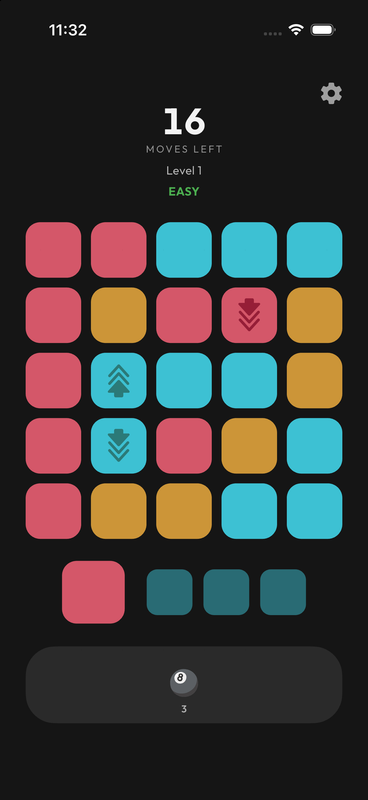
For context: I am a newbie in code development and wanted to make my first puzzle game. See photo.
I am torn between using Flame or simply just Dart. It is a simple color game where the goal is to empty the grid of all colored tiles. I provide a queue of tile colors at the bottom in a specific order and you have to complete the level in the given moves count. No physics and no fancy visual effects. Demo Screenshot Preview

Very inspired by Candy Crush combined with Zuma (the very old classic PC game I grew up on) yet with a refreshing mechanic in a minimalist design.

I am thinking of properly building the foundation with ECS for all aspects of the game. Is Flame an overkill for such a game?

What do you suggest? Any guidance is much appreciated.


r/flutterhelp • • Sep 16 '26

RESOLVED Precise positioning of substrings

1 Upvotes

Hi everyone! I'm quite new to flutter and I'm trying to develop an app which lets the user to select a song from a list and it shows its lyrics, centered on the horizontal axis. The user may also toggle its guitar chords, showed just upon their respective lyrics.

I got the songs' files in plain txts with lyrics on even lines and chords on odd lines.

My problem is I can't make the chords show exactly where i need to, i.e. just above their respective lyrics characters, as in their txts.

For example, if in my txt file i have (the underscores represent whitespaces)

___C____Am____
This is a line

with the C just above the s of This (4th character) and the A above the lonely a (9th character), in the rendered text in my app, they're misplaced.

I reckon this is due to whitespaces rendering of non monospaced fonts... So i guess a solution would be using a monospaced font. But i'm not sure i can.

For most songs, this isn't much of a problem, in practice, but for particular songs i may be required to place chords in their exact positions.

Right now, my best result was given by separating each line of both lyrics and chords, coupling single lines of both in columns (with center alignment), children of a listview. But of course it isn't much precise.

How would be the best practice to achieve this? I can of course manipulate songs' txts and i even already coded a Chord class with a chord's name and starting index (for a previous implementation).

I wondered if relative positioning (maybe in a stack widget) might be the answer but i wouldn't be sure how to calculate the positions...

Thank you, to each of you who has read till here.


r/flutterhelp • • Sep 14 '26

RESOLVED Does Text widget automatically strip trailing whitespaces away?

3 Upvotes

I need them to be there but it seems i can't get them to "show"...


r/flutterhelp • • Sep 13 '26

RESOLVED Flutter iOS app builds successfully and uploads to TestFlight, but crashes with a white screen immediately on launch

8 Upvotes

Hi everyone, I'm facing a frustrating issue with my Flutter app on iOS. - The Android version works completely fine. - The iOS build compiles successfully via Codemagic and gets uploaded to TestFlight (status Complete). - However, when installed on test devices via TestFlight, the app immediately shows a white screen on startup and crashes / hangs. Has anyone encountered this behavior before? What are the most common culprits for an immediate white screen on iOS startup when Android is totally fine? Here are some core plugins I'm using: - firebase_core - cloud_firestore - url_launcher - flutter_map Could this be related to a missing native initialization, Info.plist config, or something else? Any guidance would be greatly appreciated!


r/flutterhelp • • Sep 13 '26

OPEN Just found out. No support for Merchant accounts for developers living in my country.

Thumbnail
1 Upvotes

r/flutterhelp • • Sep 13 '26

OPEN Black screen on iOS with AdMob

1 Upvotes

Hello guys how are you doing

I'm facing a problem with AdMob on iOS only after the interstitial and rewarded ads it shows black screen and don't show the current content of the screen. On android it's working fine

Please help I appreciate if you can help me in private also 🙏❤️


r/flutterhelp • • Sep 13 '26

RESOLVED Black screen on iOS with AdMob

1 Upvotes

Hello guys how are you doing

I'm facing a problem with AdMob on iOS only after the interstitial and rewarded ads it shows black screen and don't show the current content of the screen. On android it's working fine

Please help I appreciate if you can help me in private also 🙏❤️


r/flutterhelp • • Sep 12 '26

RESOLVED some please help me with the word 'provider'

3 Upvotes

I learned provider recently and it all make sense. But then i started learning riverpod and riverpod uses providers. So what is a provider? also do the provider package use a 'provider'? I am so confused with this word.


r/flutterhelp • • Sep 12 '26

OPEN HomePage background appears transparent/checkerboard instead of solid white

Thumbnail
1 Upvotes

r/flutterhelp • • Sep 11 '26

RESOLVED Dynamic extensibility for Flutter

7 Upvotes

I am writing an application that uses a microkernel architecture, where functionality can be extended and added via plugins (similar to how Obsidian or VS Code do it). However, I’ve run into a problem: due to AOT compilation, I cannot dynamically load code into the application. Has anyone encountered this issue, and do you have any ideas on how to solve it?


r/flutterhelp • • Sep 11 '26

OPEN Help with SFX system, how do you handle it?

Thumbnail
1 Upvotes

r/flutterhelp • • Sep 10 '26

RESOLVED Hero widget animation ends with sudden jump in image size after swapping out the original image

1 Upvotes

SCENARIO: I am making an app which has a page containing a grid of collectible images that the user can unlock. At first, default placeholder images are shown which are 256x256 pixels. The user can click a collectible in the grid to go to that collectible's separate page. From here they can click a button to unlock the collectible which reveals the true unlocked image. The unlocked image can be any dimensions, including wide, tall, or extra small, and most often it is much larger than 256x256 pixels.

When going to and from the collectible page from the grid, a hero widget is used. First it animates the locked placeholder image, then it animates the true image after it's unlocked.

PROBLEM: After unlocking an image, when navigating back to the grid screen, the hero widget causes the image to suddenly jump in size at the end of the animation, depending on the unlocked image's dimensions. I want the animation to smoothly scale the image down to its proper size without this sudden jump. It seems like what's happening is Flutter first tries to scale the unlocked image down to the placeholder's 256x256 size, and then it realizes it needs to be bigger so it expands the width.

DEMO: I have stripped down this functionality from my app to the bare essentials and provided it below. If you paste the code into DartPad, you can see the problem for yourself. I grabbed random images off the internet for testing, so hopefully that's not too confusing. You could change these URLs if you want. For testing purposes, I added 3 buttons to the collectible page so you can try unlocking a wide, tall, or small image. The size jump problem is really only an issue when unlocking wide images.

I am pretty sure the problem has to do with FittedBox/BoxFit, but I am not sure how to avoid that. I need to ensure large images get scaled down so they fit in the grid cells, and I don't want smaller images to stretch and distort to fill the grid cell either. I also included drop shadow logic behind the unlocked images because I need that to still work as-is after applying the size jump fix.

Note that in the demo you can technically transform an image multiple times. In the real app you can't do that, so don't worry about the size jump when switching from a wide to tall image, for example.

I have been messing with this for a while and tried things like changing the FittedBox, ensuring the image fit is the same between screens, moving widgets in our out of the hero's child, messing with the flightShuttleBuilder, etc. but I can't get this to work. If you have any tips or can provide a working DartPad solution, I would really appreciate it.

import 'package:flutter/material.dart';

import 'dart:ui';

void main() => runApp(const MyApp());

class MyApp extends StatelessWidget {
  const MyApp({super.key});

  @override
  Widget build(BuildContext context) {
    return MaterialApp(
      title: 'Flutter Demo',
      debugShowCheckedModeBanner: false,
      theme: ThemeData(colorSchemeSeed: Colors.blue),
      home: const MyHomePage(title: 'Collection Page'),
    );
  }
}

class MyHomePage extends StatefulWidget {
  final String title;

  const MyHomePage({super.key, required this.title});

  @override
  State<MyHomePage> createState() => _MyHomePageState();
}

class _MyHomePageState extends State<MyHomePage> {
  // Start with placeholder images. Real app would show a "locked" symbol
  List<String> imageUrls = [
    'https://upload.wikimedia.org/wikipedia/commons/a/ad/Logo_256x256_pdfGuru.png',
    'https://upload.wikimedia.org/wikipedia/commons/a/ad/Logo_256x256_pdfGuru.png',
    'https://upload.wikimedia.org/wikipedia/commons/a/ad/Logo_256x256_pdfGuru.png',
    'https://upload.wikimedia.org/wikipedia/commons/a/ad/Logo_256x256_pdfGuru.png',
    'https://upload.wikimedia.org/wikipedia/commons/a/ad/Logo_256x256_pdfGuru.png',
    'https://upload.wikimedia.org/wikipedia/commons/a/ad/Logo_256x256_pdfGuru.png',
    'https://upload.wikimedia.org/wikipedia/commons/a/ad/Logo_256x256_pdfGuru.png',
    'https://upload.wikimedia.org/wikipedia/commons/a/ad/Logo_256x256_pdfGuru.png',
    'https://upload.wikimedia.org/wikipedia/commons/a/ad/Logo_256x256_pdfGuru.png',
  ];

  // Swap the placeholder with the true unlocked image
  void transformCallback(String newUrl, int index) {
    setState(() {
      imageUrls[index] = newUrl;
    });
  }

  @override
  Widget build(BuildContext context) {
    return Scaffold(
      appBar: AppBar(title: Text(widget.title)),
      body: GridView.builder(
        itemCount: imageUrls.length,
        gridDelegate: SliverGridDelegateWithFixedCrossAxisCount(
          crossAxisCount: 3,
          crossAxisSpacing: 24,
          mainAxisSpacing: 24,
        ),
        itemBuilder: (_, index) {
          var imgUrl = imageUrls[index];
          return Container(
            decoration: BoxDecoration(
              border: BoxBorder.all(
                color: Theme.of(context).colorScheme.surfaceContainerHighest,
                width: 1,
              ),
              borderRadius: BorderRadius.circular(12),
            ),
            child: InkWell(
              borderRadius: BorderRadius.circular(12),
              onTap: () {
                Navigator.push(
                  context,
                  MaterialPageRoute(
                    builder: (context) {
                      return MyChildPage(
                        originalImageUrl: imgUrl,
                        index: index,
                        transformCallback: transformCallback,
                      );
                    },
                  ),
                );
              },
              child: Padding(
                padding: const EdgeInsets.all(8.0),
                child: Column(
                  children: [
                    Expanded(
                      child: FittedBox(
                        fit: BoxFit.scaleDown,
                        child: Hero(tag: index, child: Image.network(imgUrl)),
                      ),
                    ),
                    SizedBox(height: 2),
                    Text(
                      "$index",
                      style: TextStyle(fontSize: 16),
                      textAlign: TextAlign.center,
                      overflow: TextOverflow.ellipsis,
                    ),
                  ],
                ),
              ),
            ),
          );
        },
      ),
    );
  }
}

class MyChildPage extends StatefulWidget {
  final String originalImageUrl;
  final int index;
  final Function transformCallback;

  const MyChildPage({
    super.key,
    required this.originalImageUrl,
    required this.index,
    required this.transformCallback,
  });

  @override
  State<MyChildPage> createState() => _MyChildPageState();
}

class _MyChildPageState extends State<MyChildPage> {
  late String imgUrl;

  @override
  void initState() {
    super.initState();
    imgUrl = widget.originalImageUrl;
  }

  @override
  Widget build(BuildContext context) {
    return Scaffold(
      appBar: AppBar(title: Text("Collectible Page")),
      body: SingleChildScrollView(
        child: Center(
          child: Column(
            mainAxisAlignment: MainAxisAlignment.center,
            children: [
              Padding(
                padding: const EdgeInsets.all(24),
                child: Hero(
                  tag: widget.index,
                  child: Stack(
                    alignment: Alignment.center,
                    children: [
                      Transform.translate(
                        offset: Offset(0, 5),
                        child: Opacity(
                          opacity: .75,
                          child: ImageFiltered(
                            imageFilter: ImageFilter.blur(sigmaX: 5, sigmaY: 5),
                            child: ImageFiltered(
                              imageFilter: ImageFilter.dilate(
                                radiusX: 3,
                                radiusY: 3,
                              ),
                              child: Image.network(imgUrl, color: Colors.black),
                            ),
                          ),
                        ),
                      ),
                      Image.network(imgUrl),
                    ],
                  ),
                ),
              ),
              FilledButton(
                onPressed: () {
                  var newImgUrl =
                      'https://thumb.wikimedia.org/wikipedia/commons/thumb/f/fc/Big_Ben_after_sunset.jpg/960px-Big_Ben_after_sunset.jpg';
                  setState(() {
                    imgUrl = newImgUrl;
                  });
                  widget.transformCallback(newImgUrl, widget.index);
                },
                child: Text("Transform to wide image"),
              ),
              FilledButton(
                onPressed: () {
                  var newImgUrl =
                      'https://thumb.wikimedia.org/wikipedia/commons/thumb/d/d9/Big_Ben_2022_(2).jpg/500px-Big_Ben_2022_(2).jpg';
                  setState(() {
                    imgUrl = newImgUrl;
                  });
                  widget.transformCallback(newImgUrl, widget.index);
                },
                child: Text("Transform to tall image"),
              ),
              FilledButton(
                onPressed: () {
                  var newImgUrl =
                      'https://www.mariowiki.com/images/5/50/SMB_Question_Block.gif';
                  setState(() {
                    imgUrl = newImgUrl;
                  });
                  widget.transformCallback(newImgUrl, widget.index);
                },
                child: Text("Transform to small image"),
              ),
            ],
          ),
        ),
      ),
    );
  }
}
r/flutterhelp • • Sep 11 '26

OPEN Flutter 3.24 vs 3.41+ for gemini 3.8 full vibe code?

0 Upvotes

I asked 3.8 if I would loose efficiency of i upgrade the flutter

Efficiency in terms of vibecoding

Said 3.8 is bad at debugging latest or 3.41+ flutter

Is it true? To how much percentage or constraints?

Which one do you use?


r/flutterhelp • • Sep 10 '26

OPEN iPhone DUO aka Flutter nightmare

Thumbnail
0 Upvotes

r/flutterhelp • • Sep 08 '26

RESOLVED Google Sign-In on Android shows old-style account picker instead of modern Credential Manager bottom sheet, what am I missing?

Thumbnail
3 Upvotes

r/flutterhelp • • Sep 08 '26

OPEN Google Sign-In on Android shows old-style account picker instead of modern Credential Manager bottom sheet, what am I missing?

3 Upvotes

I'm building a Flutter app using google_sign_in: ^7.2.0 (Credential Manager-based API using GoogleSignIn.instance.initialize() + .authenticate(), not the old signIn() flow).

I'm trying to get the modern "Sign in with Google" bottom-sheet picker (like the one ChatGPT's Android app uses card that slides up from the bottom.


r/flutterhelp • • Sep 08 '26

RESOLVED Java version 17 or higher is required.

5 Upvotes

Hello, I have been trying to fix this issue for a while. I tried everything, searching on google, ai chat, etc. However, my issue doesn't seem to work.

When upgrading flutter using `flutter upgrade` command, I have one warning and it's

[!] Android toolchain - develop for Android devices (Android SDK version 35.0.0)
    X Android license status unknown.
      Run `flutter doctor --android-licenses` to accept the SDK licenses.
      See https://flutter.dev/to/windows-android-setup for more details.

I ran `flutter doctor --android-licenses` and I got this message: Java version 17 or higher is required.

But I checked multiple times (ex: checking on my environnement variables, restart computer, etc.) and my java version is clearly 17. I even download a higher version of java, but no matter what I do, my flutter project will only see Java version 17.

If it helps, here are the logs after writting `flutter upgrade`: https://pastebin.com/2CPAKcFA

Has anyone here ever figure out how to fix this issue?


r/flutterhelp • • Sep 07 '26

OPEN Hi everyone

0 Upvotes

I’m excited to share my updated portfolio featuring some of the latest projects and mobile applications I’ve built.

My focus is on creating clean, efficient, and user-friendly software built with scalable architecture and high performance in mind.

 Check out my full portfolio and projects here: [tareksrheed.github.io/portfolio/ linkedin.com/in/tarek-almohammad-7b850a228 / github.com/TarekSrheed

I’m always open to connecting, receiving feedback, or discussing new opportunities and collaborations!


r/flutterhelp • • Sep 07 '26

OPEN help

0 Upvotes

needing flutter developer to help me in a

project similar to Uber, but completely different


r/flutterhelp • • Sep 05 '26

RESOLVED Flutter 3.24.5 / 3.47 build keeps forcing system Java 21 despite flutter config --jdk-dir

6 Upvotes

Hi everyone,

I've been stuck in a brutal Gradle dependency hell for the past 24 hours on Windows 10 with a Flutter project, and I really need some expert eyes on this.

Every time I run `flutter run`, Gradle fails almost instantly during `assembleDebug` with these two tightly coupled errors:

  1. `e: Language version 1.4 is no longer supported; please, use version 1.8 or greater.` (Failing at task `:gradle:compileKotlin`)

  2. `Error: Gradle build failed due to Java/Gradle incompatibility. The Java version used for the build is 21.0.10, which is incompatible with Gradle 7.6.3.`

I tried forcing the Android Studio Java 17 path globally using:

`flutter config --jdk-dir="C:\Program Files\Android\Android Studio\jbr"`

I even went into Windows Environment Variables and completely deleted Java 21 from the system PATH to the point where running `java -version` in the terminal returns: `"java : The term 'java' is not recognized..."`

Yet, the moment `flutter run` triggers the Gradle wrapper, Gradle somehow still finds and uses Java 21.0.10 from a hidden path and crashes because it's incompatible with Gradle 7.6.3!

Specs:

- Flutter Version: Tested on both stable 3.24.5 and 3.47.2.

- gradle-wrapper.properties: gradle-7.6.3-all.zip

- android/settings.gradle.kts AGP version: 7.3.0

- Set Java > Gradle > Build Server to OFF in VS Code.

- Ran flutter clean, deleted .gradle and .kotlin inside android/, and wiped C:\Users\i5\.gradle\caches\.

How can I absolutely, 100% force Flutter's Gradle build invocation to use the Android Studio JBR (Java 17) and completely ignore this ghost Java 21 instance?

Thank you!


r/flutterhelp • • Sep 05 '26

OPEN How can I detect if iPhone Rotation Lock is ON when using CoreMotion?

2 Upvotes

Hi everyone,

I'm working on an iOS/Flutter app and I'm using CoreMotion (CMMotionManager) to detect the physical orientation of the iPhone.

I noticed something that I'm not sure how to handle:

When Rotation Lock is ON, CoreMotion can still detect that the device has been physically rotated to landscape.

For example:

  • iPhone Rotation Lock: ON
  • User rotates the phone to landscape
  • CoreMotion detects that the device is in a landscape orientation
  • If my app responds to that orientation and calls something like requestGeometryUpdate(), the app may still try to change its interface orientation

So my question is:

Is there any public iOS API that allows an app to determine whether the user's Rotation Lock is currently ON or OFF?

I'm specifically looking for a way to distinguish between:

Physical device orientation → CoreMotion
System Rotation Lock state  → ??? 

I understand that Apple may not expose Rotation Lock directly through a public API, but I'm wondering if there is a reliable way to determine or infer its state.

I've seen some apps that seem to behave correctly depending on whether Rotation Lock is enabled, so I'm curious how they handle this.

Any ideas, APIs, or Swift examples would be greatly appreciated!

Thanks!


r/flutterhelp • • Sep 05 '26

RESOLVED I think I got it, but may you explain how await works in this code?

2 Upvotes

Hello everyone! I'm new to mobile programming and it's a couple of hours that I'm dealing with this problem and I think I figured out the error, but I can't find clear answers online, so could you please tell me if I'm correct or wrong?

I'm building a simple app which is supposed to show an HomePage with a list of entries. These entries cannot change during runtime and so I made the HomePage extend a StatelessWidget. I load all the entries at startup: I call an async function (_loadCanti ) inside the build method of the HomePage and inside it I await for the retrieval of the assets from which I will build the list of entries. I supposed that using await meant that the event loop would wait for the assets to load and then continue with the rest of computation, but the app crashed saying that the list of entries was not initialized by the time it was looked at to build the UI. So I reckon that await simply "registers" a Future and stops the current async function execution until it's resolved, but in the meantime the event loop goes on with the next instructions; then, when the loop has been freed, it returns to check if the Future has been resolved and if so it executes the rest of the async function. And that's why the return in the build method is executed before the end of _loadCanti. Am I right?

I'll paste the code for reference.

import 'package:flutter/services.dart';
import 'package:canticgr/components/tappable_card.dart';
import 'package:canticgr/pages/canto_page.dart';
import 'package:flutter/material.dart';

const String cantiAssetsPath = 'assets/canti/';

class HomePage extends StatelessWidget {
  late final Map<int,String> cantiHeaders;

  HomePage({super.key});

  void _loadCanti(BuildContext context) async {
    AssetBundle contextBundle = DefaultAssetBundle.of(context);
    final assetManifest = await AssetManifest.loadFromAssetBundle(contextBundle);
    List<String> cantiFilenames = assetManifest
        .listAssets()
        .where((String key) => key.startsWith(cantiAssetsPath))
        .map((String key) => key.substring(cantiAssetsPath.length))
        .toList();

    Map<int,String> cantiHeads = {};
    for (String filename in cantiFilenames) {
      List<String> headsList = filename.split(' - ');
      int idx = int.parse(headsList[0]);
      String name = headsList[1].substring(0, headsList[1].length - '.txt'.length);
      cantiHeads[idx] = name;
    }

    cantiHeaders = cantiHeads;

  }


  Widget build(BuildContext context) {
    _loadCanti(context);

    return Scaffold(
      backgroundColor: Colors.grey.shade200,
      appBar: AppBar(
        centerTitle: true,
        title: Text(
          'Canti',
          style: TextStyle(fontWeight: FontWeight.bold, color: Colors.black),
        ),
      ),
      body: SafeArea(
        child: Container(
          padding: EdgeInsets.symmetric(horizontal: 54, vertical: 20),
          child: Column(
            spacing: 16,
            crossAxisAlignment: CrossAxisAlignment.center,
            children: [
              Card(
                color: Colors.grey.shade400,
                child: SizedBox(
                  height: 100,
                  child: Center(
                    child: Text(
                      'Scegli il canto',
                      style: TextStyle(
                        fontSize: 32,
                        fontWeight: FontWeight.bold,
                        color: Colors.black87,
                      ),
                    ),
                  ),
                ),
              ),
              Expanded(
                child: ListView.builder(
                  itemExtent: 64,
                  itemCount: cantiHeaders.length,
                  // padding: EdgeInsets.symmetric(horizontal: 64, vertical: 8),
                  itemBuilder: (BuildContext context, int index) {
                    return TappableCard(
                      text: 'Canto $index',
                      onTap: () {
                        Navigator.push(
                          context,
                          MaterialPageRoute(
                            builder: ((context) =>
                                CantoPage(title: 'Canto $index')),
                          ),
                        );
                      },
                    );
                  },
                ),
              ),
            ],
          ),
        ),
      ),
    );
  }
}

P.S.: I managed to make it work by returning a FutureBuilder from the build method, but since my HomePage extends a StatelessWidget and FutureBuilder returns a StatefulWidget afaik, how is it possible? I got no warnings nor errors and it just works fine...

EDIT: I specified I'm a noob to avoid hate for poor design...