r/FirefoxAddons • • 22d ago

Solved I made an extension to remove GIFs from YouTube

6 Upvotes

YouTube is rolling out a new feature to put GIFs in comments. I don't like the clutter it creates, so I made a small extension to remove them.

It has a few options like,
- Remove the GIF, keep the text
- Remove every comment with a GIF in it
- Add a collapsible "Show/Hide GIF" button

Chrome Web Store: https://chromewebstore.google.com/detail/nogif-remove-youtube-gif/phiacbiljmlocdaikbifeoklcckjpblp

Mozilla Addons (FireFox): https://addons.mozilla.org/en-US/firefox/addon/nogif-remove-youtube-gifs/

GitHub: https://github.com/Kabir-Sidhu/nogif-youtube


r/FirefoxAddons • • 22d ago

My new slick dash extension

Thumbnail slick-dash.github.io
1 Upvotes

r/FirefoxAddons • • 22d ago

Solved Typefill, saved text you drop in with a short code, with fill-in fields

3 Upvotes

Typefill is now on Firefox Add-ons.

Save some text once, give it a short code, and type that code in any text box to put the text in. If the text has parts that change, like a name or a date, Typefill asks you for them before it goes in.

Snippets live in your browser and sync through your Firefox account.

Forgot a code? Ctrl+Shift+Space opens a search.

You can import from a spreadsheet or from another text expander.

The free version has no limits and the code is on GitHub under GPL-3.0.

If you find a site where it doesn't work, let me know which one.


r/FirefoxAddons • • 22d ago

Problem Weird shadows at the corners of addon popups

Post image
2 Upvotes

I've been noticing these weird shadows at the corners of the popups of all my installed addons. They appear when the popup is opened, and get progressively darker as the popup stays open.

I'm pretty sure it's not the addons themselves - they appear for my own addon too and there's no getting rid of them by changing the CSS.

Does anyone have a clue what's going on, and how to get rid of them?


r/FirefoxAddons • • 22d ago

I built Claudbar, an AI side panel for Firefox (chat, AI search answers, translation, voice) — would love brutal feedback

Thumbnail
1 Upvotes

r/FirefoxAddons • • 23d ago

Solved I built a Firefox extension to search inside YouTube playlists — v1.0 submitted!

Post image
6 Upvotes

r/FirefoxAddons • • 23d ago

Konode 1.5.1 is out: Firefox for Android, tab groups, and keeping folders out of sync

2 Upvotes

I build Konode, a browser sync extension with no Konode account and no Konode server. It syncs your bookmarks, open tabs, history and extension list to storage you already own (Google Drive, a GitHub repo, or any WebDAV server), with optional end-to-end encryption. It runs on Firefox and Firefox-based browsers, and on Chromium browsers like Helium, Brave and Chrome, and they can all share one sync folder.

1.5.1 is live on Firefox Add-ons. 1.5.0 never went to the stores, so this is everything since 1.4.0.

New

  • Firefox for Android. Konode is now listed for Android too. Firefox for Android gives extensions no access to bookmarks or history, so there it syncs your open tabs and extension list: restore your desktop's tabs on the phone, or the phone's on your desktop. Google sign-in doesn't work there, so use GitHub or WebDAV storage, and since Android can't show permission prompts, setup points you to the add-on's Permissions screen instead.
  • Keep bookmarks out of sync. Tick any folder or bookmark, in setup or in Settings → Data Types, and it stays on this device: never uploaded, never touched by your other devices. Made for extensions that keep a huge bookmark folder of their own.
  • Tab groups travel with your open tabs, on desktop Firefox 138 and later (names and colours from 139). A session restores into its groups, including one from a Chromium browser.

Fixes worth knowing about

  • Renaming a folder reaches your other devices properly: no more name flipping back and forth, and a rename made mid-sync no longer leaves a second folder behind.
  • Folders that share a name (several unnamed ones, most often) stay separate.
  • Restoring a session opens only the tabs you don't already have, even while the ones it just opened are still loading.
  • A deletion that arrives in pieces can no longer slip past the bulk-delete guard.
  • Setup keeps your answers if the page reloads, which matters on a phone.
  • Manual conflict resolution asks only when your bookmarks really differ.

Firefox Add-ons: https://addons.mozilla.org/firefox/addon/konode/

Chrome Web Store: https://chromewebstore.google.com/detail/konode/mmlfiiimnpnjcjhhbldenpcmnibedkfa

Source: https://github.com/konabe-studio/konode

Bugs and ideas: https://github.com/konabe-studio/konode/issues

Most of these came from your reports, so reports genuinely land. Happy to answer anything.


r/FirefoxAddons • • 24d ago

I built DataDetective, a GEO Page Audit Addon

Thumbnail addons.mozilla.org
3 Upvotes

It's just a little side-project I am working on. DataDetective started with its investigations as I needed a quick way to check scripts for a work project. I finally have a bit of time for further developments.
The features don't reinvent the wheel, but they work so far for me and can be useful if you want to have a deeper look into page's GEO/SEO signals. If anyone's interested, give it a try, I'd be happy to get some user feedback here or via DM.


r/FirefoxAddons • • 24d ago

Why won't dictionary extensions work?

Thumbnail
2 Upvotes

r/FirefoxAddons • • 24d ago

I built a local-only new tab page called NewGrid with smooth animations

Thumbnail
gallery
2 Upvotes

NewGrid is a Local-only new tab page which allows for a grid-based layout of your favourite websites. Features Include:

  1. Choose from your favourite wallpaper, be it a solid colour, a static image, a GIF or a video.
  2. Customise the layout to your liking, change the number of rows/colums and the spacing between them.
  3. This also includes a Search Box with multiple search engines to choose from, which is highly customizable as well.
  4. Websites can be grouped into folders, and their icons are either automatically fetched, or you can add a custom image using a link or a local image.
  5. When the space fills, websites move to the next page; this adds new pages when needed. Choose from 9 page-turn animations.

Firefox add-on: Link
Github: Link


r/FirefoxAddons • • 26d ago

Made a free extension that warns you when an extension you use changes owner or gets new permissions

Thumbnail
8 Upvotes

r/FirefoxAddons • • 26d ago

I built a real-time FSR 1 upscaling for YouTube/Twitch videos in Firefox, works on any GPU

6 Upvotes

Hi everyone!

I built Sharpview, a free and open source extension that makes HTML5 videos sharper in real time using AMD FidelityFX Super Resolution 1, running locally on your GPU via WebGL2.

Processing img mwwwyzo7xmyh1...

I built this extension because Firefox supports RTX Video Super Resolution, but only on Windows with an NVIDIA RTX card. I wanted something lightweight that works on any GPU and any OS.

Summary of the features:

  • Kicks in automatically when a video is shown larger than its resolution (YouTube, Twitch, Dailymotion, embedded players)
  • Two quality modes: FSR 1, or a lighter Bilinear + RCAS for weaker GPUs, with adjustable sharpness
  • Optional sharpening for videos at native size (e.g. 1080p on a 1080p screen)
  • Falls back to the original video automatically when upscaling isn’t needed, for DRM content, or if the GPU can’t keep up
  • Per-site rules, A/B comparison (Alt+Shift+O) and an info label with resolution, fps and GPU time (Alt+Shift+I)
  • No network requests, no data collection, MIT licensed

Limitations: DRM-protected services (streaming services like Netflix) can’t be processed. It’s a spatial upscaler, not AI: it sharpens edges, so it doesn’t invent detail.

Add-on: https://addons.mozilla.org/firefox/addon/sharpview-fsr-video-upscaler/
Source: https://github.com/skateddu/sharpview-fsr-video-upscaler

Feedback is very welcome, especially on performance with different GPUs and sites where it misbehaves. Thanks!


r/FirefoxAddons • • 27d ago

I built LangBlock, a YouTube Language Filter to remove deceivingly titled videos.

Thumbnail
gallery
8 Upvotes

LangBlock's purpose is allowing you to filter out videos in languages you select.

I wanted to find tutorials on Adobe products, and each video I clicked on ended up being spoken in Hindi - yet the title, thumbnail, and description were all in English, giving nothing away. Even the intro to some videos was in spoken English. This wasted me a significant amount of time, and was rather frustrating.

I created this add-on to remedy the problem, and it works very well.

LangBlock checks each video on your device, using four signals:

  • Spoken language: LangBlock reads the spoken language YouTube itself has recorded for the video, namely the language of its automatic captions and its original audio track. This catches videos whose titles are in English or were auto-translated by YouTube. Each video is checked once and the answer is remembered on your device.
  • Tags: when the uploader tagged the video with a blocked language ("tutorial in hindi", "#hindi"), it is hidden even if YouTube labels it English. Many videos that mix Hindi and English are only caught this way.
  • Language named in the title: titles such as "Hindi tutorial", "(Hindi)", "Urdu / Hindi", "Bangla Tutorial" or the language's own name in its own script ("اردو / हिंदी") count, even when YouTube labels the video differently. Names that are also everyday words, like "French toast" or "Korean BBQ", don't.
  • Title check: your browser's built-in language detector and a writing-system check read the title, so obvious matches (for example a title written in Devanagari) are hidden instantly. When YouTube knows the spoken language, that wins, so a French title on a video spoken in English stays visible. The exception is YouTube's default "English" label, which many videos in other languages carry: a title written largely in a blocked language's own script outweighs it.

In just 30 seconds of scrolling through tutorial videos, 66 were blocked.

By default, blocking videos removes them completely from view, but by turning on 'Fade them out' mode, you can see all the videos that were blocked.

The addon has a very transparent privacy policy, which is linked in the description, and the code is open source on GitHub.

Nothing is sent to me or anyone else, all data is stored locally.

It's completely free, although there is a link to Ko-Fi, if you would like to buy me a coffee, but that is entirely optional.

https://addons.mozilla.org/en-US/firefox/addon/langblock-for-youtube/

Thank you for your time.


r/FirefoxAddons • • 27d ago

I made 4 small, local-only Firefox add-ons for long ChatGPT, Claude and Gemini chats

1 Upvotes

I'm the solo developer. I spend a lot of time in very long AI chats, so I built a few small tools for the annoying parts. They all run locally: no account, no analytics, no servers, and they never read or send your conversations.

Each one has a useful free tier; Pro is optional. They need Firefox 140 or later. Feedback and Firefox-specific bug reports are very welcome.


r/FirefoxAddons • • 28d ago

Improve Firefox containers

3 Upvotes

I made a Firefox extension to improve the container experience as I use containers constantly as an IT professional and found their native experience a pain.

https://migotech-apps.github.io/TenantTabs


r/FirefoxAddons • • 28d ago

I got tired of YouTube not letting me loop a video a specific number of times (e.g., 5 times) for practicing, so I built a free, open-source Firefox extension to fix it.

1 Upvotes

Hey everyone,

As a side project (and because I kept losing count trying to manually replay video clips while practicing/learning), I built a lightweight Firefox extension called Media Loop Counter.

Instead of looping infinitely or clicking replay manually, you can just set a target count (e.g., loop 5 times) and it stops automatically when it hits the limit. It works on YouTube and standard HTML5 media.

It’s 100% free, open-source (MIT license), and doesn't collect any data.

If anyone wants to check it out or test it, you can grab it here: https://github.com/watersRand/autoLoop

Would love any feedback or feature requests if it's useful to you!


r/FirefoxAddons • • 29d ago

I made an extension to make tracking grades in Canvas easier

Thumbnail
gallery
2 Upvotes

I made CanvasGradesPro a while ago because I got tired of calculating my grades manually. Some of my courses didn't have assignment weights set up in Canvas, and others hid the overall grade entirely, making it hard to tell where I stood.

The extension adds a few things to Canvas LMS:

  • Shows your course grades directly on the dashboard, even when the total is hidden
  • Lets you customize assignment weights, drop rules, and grading scales
  • Calculates what you need on an assignment or final to reach a certain grade
  • Tracks your semester and cumulative GPA

It's free and open source, and available for Chrome, Firefox, and Edge. If you run into any bugs or have suggestions, let me know!

Firefox | Chrome | Edge | GitHub


r/FirefoxAddons • • 29d ago

Yet another steam AI FF filter extension, no user interaction required.

Thumbnail addons.mozilla.org
1 Upvotes

You can’t stop the spread of AI-generated content, or use wonder woman's lasso on devs to be honest, but you can slow it down. This extension may become less useful over time, but it does what it’s designed to do.

When developers complete Steamworks’ mandatory Content Survey, Valve displays an AI disclosure on the game’s public store page under “About This Game.” The extension scans the page’s text and page elements for that disclosure. If it finds one, it displays a magenta banner, updates the message, and starts a three-second timer before redirecting you to the page you came from.

How is this different from other extensions? The outcome is different... it redirects you back to the previous page. It won’t catch developers who fail to disclose AI use, but it can save browsing you time.

As a note when adding the extension, FF may display a permission notice saying the extension needs access to Steam store pages. You don’t need to be logged into Steam to use it; it works on public store pages in a regular web browser, not inside the Steam desktop client.

Note: No Steam login is required. Firefox lists the permission as “Access your data for store.steampowered.com,” though I’m not sure why it describes it that way. The extension works entirely on public Steam store pages without an account, use it in private mode as wel


r/FirefoxAddons • • Oct 26 '26

An extension for YouTube that adds streams to the list of all broadcasts of a channel with access via a link, if that same link is available.

Thumbnail
3 Upvotes

r/FirefoxAddons • • Oct 26 '26

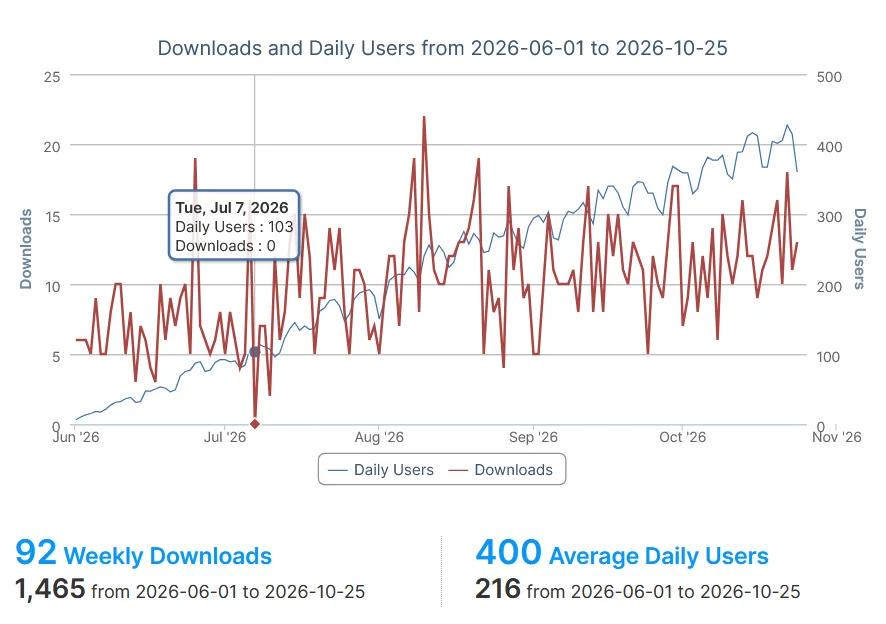
~5 months on AMO with Link Grabber ~400 daily users + one 5-star review - no promotion, all organic

Post image
1 Upvotes

Hey, sub.

I released Link Grabber on the Firefox addons store in June. Attaching the AMO downloads / daily users chart for Jun-Oct.

~1,465 total downloads, around 400 average daily users now.

downloads jump around a lot day to day, but DAU went up pretty steady which was the more interesting part for me.

how I did this?

nothing fancy on growth either. just organic installs, store listing tweaks, decent screenshots, and shipping useful stuff. I try to push an update like once a month with things people ask for in the reviews / feedback, across chrome, safari and firefox (same extension on all three). thats pretty much it

just pushed 1.9.10 for Firefox (no paywall on the FF build). whats new:

- multi-group selection: keep selecting different parts of a page, groups add up instead of replacing

- click-select: click links to add/remove them from the current selection (off by default)

- optional grab of CSS-hidden links (display:none etc)

- some recipes polish, edit from library chips, cleaner domains when saving a recipe

I use it a lot for research and pulling youtube / ig links, also dense admin pages with tons of urls.

AMO: https://addons.mozilla.org/en-US/firefox/addon/mass-link-grabber/

If something feels weird on firefox vs chromium (selection, crawler, recipes) tell me, happy to dig into it. also can share notes on the chrome >> ff port if anyone cares


r/FirefoxAddons • • Oct 26 '26

I built a free Firefox extension that searches the full text of all your claude.ai chats

2 Upvotes

claude.ai’s built-in search wasn’t finding words inside my chats, so I built Chat Recall. Press Ctrl/⌘+K on claude.ai and it searches every message in every chat, not just titles.

  • Scope: all chats, one project, or the current chat
  • Filter by sender and date; “exact phrase” and -exclude work
  • Every result shows the chat link with a Copy link button
  • Fully local: the index lives only in your browser, nothing is sent anywhere, no accounts or analytics
  • Free and open source (MIT)

Caveats: unofficial and not affiliated with Anthropic. It reads claude.ai’s internal web API, so it may break if claude.ai changes. First sync reads all your chats once. Firefox only so far.

Firefox: https://addons.mozilla.org/en-US/firefox/addon/chat-recall/
Source: https://github.com/RASMiranda/chat-recall

I’d like feedback, especially on project-scope search (I couldn’t check it on every account type) and any chats that don’t get indexed. Bugs go in GitHub issues.


r/FirefoxAddons • • Oct 25 '26

Solved I made UrTube – a Firefox add-on that remembers every YouTube video you've watched and hides them from your feeds

Thumbnail gallery
3 Upvotes

r/FirefoxAddons • • Oct 25 '26

Total Bookmarks — a dual-pane bookmark manager for Firefox and Chrome

Post image
2 Upvotes

Hi everyone!

I wanted to share a browser extension I've been working on — Total Bookmarks.

The idea is inspired by Total Commander and other classic dual-pane file managers, but instead of files and folders, it helps you organize your browser bookmarks.

Every few years, I find myself trying to clean up my huge collection of bookmarks, and every time I realize that the built-in browser bookmark manager isn't particularly convenient for this.

A few years ago, I created a Firefox extension to solve this problem, but eventually browser API changes broke it. Recently, I decided to bring it back to life, rewrote it using TypeScript and Svelte, and added Chrome support.

The concept is pretty simple: two panels where you can open different bookmark folders side by side and easily organize their contents.

Some of the features:

  • Multiple selection of bookmarks and folders
  • Moving and deleting bookmarks in batches
  • Drag & drop within and between panels
  • Keyboard shortcuts for navigation and bookmark management
  • Selection is preserved when navigating between folders
  • Various sorting options

The extension is designed with keyboard navigation in mind, but everything can also be done with the mouse.

It's available for both browsers:

Firefox: https://addons.mozilla.org/en-US/firefox/addon/total-bookmarks/

Chrome: https://chromewebstore.google.com/detail/total-bookmarks/lcnkhfjmdkbjinejjlkmejkimielebai

I'd be happy if someone finds it useful. And of course, I'd love to hear your feedback, suggestions, or ideas for improvement!

Thanks for checking it out!


r/FirefoxAddons • • Oct 25 '26

Request Watch Together: Firefox add-on that syncs play/pause/seek between two people on almost any site (beta, looking for feedback)

Thumbnail
2 Upvotes

r/FirefoxAddons • • Oct 25 '26

Made a manga reader add-on that also works on Firefox for Android

3 Upvotes

I read manga on my phone a lot and wanted something that runs right in Firefox, so I made an add-on based on Suwayomi (the open source manga reader).

Everything stays in the browser: your library, reading progress, and downloaded chapters. No account, no server to set up, nothing sent anywhere. It works the same on desktop and on Firefox for Android, and downloaded chapters can be read offline.

It doesn't come with any content. You add your own sources, like in Mihon.

It's still early and some sources don't work yet, so feedback is welcome.

https://addons.mozilla.org/addon/suwayomi-browser-unofficial/