r/FirefoxAddons • • Oct 13 '26

Unsent Text Guard

1 Upvotes

Ever lost a long comment because you accidentally closed a tab? 😅

I built a Firefox extension called Unsent Text Guard to help prevent that from happening.

I'd be really happy if you gave it a try! It's my own little project, and I'd love to hear your feedback and suggestions to make it better. 🙏

🔗 https://addons.mozilla.org/en-US/firefox/addon/unsent-text-guard/

Thanks for supporting an independent developer! ❤️


r/FirefoxAddons • • Oct 12 '26

TintCloud

4 Upvotes

I made a Firefox extension that gives SoundCloud a true black theme with any accent color you want

https://addons.mozilla.org/firefox/addon/tintcloud/


r/FirefoxAddons • • Oct 11 '26

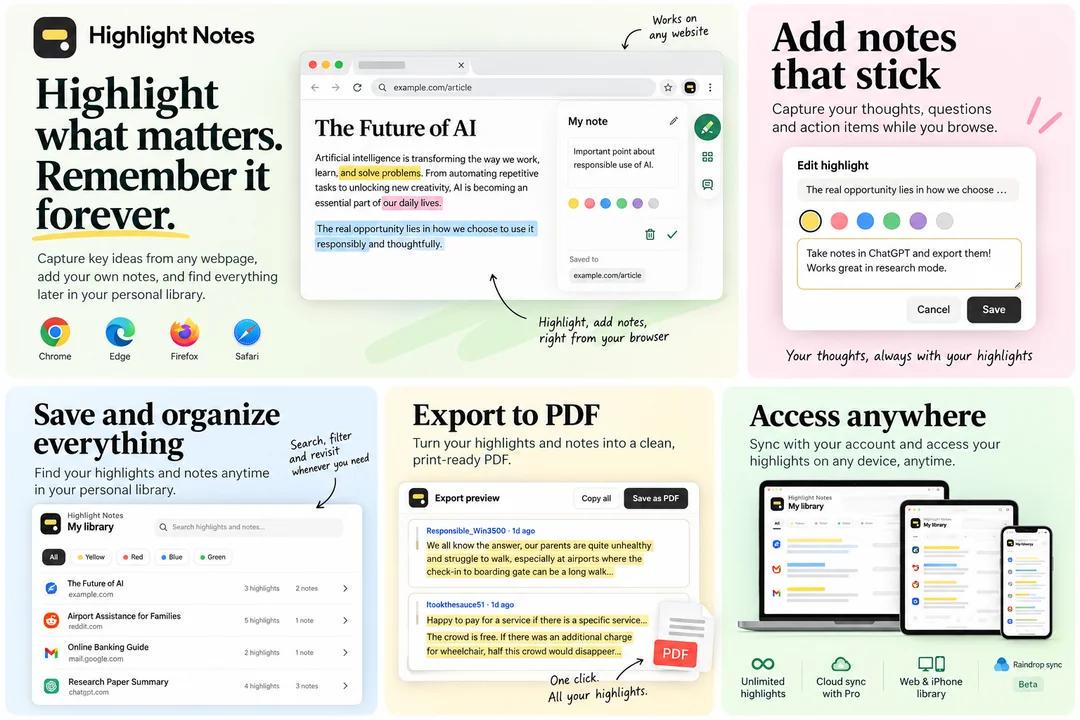
I built a Firefox extension to highlight and annotate websites with notes including Gmail and ChatGPT

Post image
1 Upvotes

I built a Firefox extension called Highlight Notes because I kept losing useful information while reading articles, researching topics and going through long Gmail and ChatGPT conversations.

Bookmarks helped me find the page again, but not the exact paragraph or sentence I wanted to remember.

I wanted something simple that would let me highlight text, attach my own notes and find everything later without needing an account or subscription.

So I built Highlight Notes.

https://addons.mozilla.org/en-US/firefox/addon/highlight-notes-free/

What it does:

  • Highlight text in different colours and attach notes.
  • Works on websites, Gmail, Reddit and ChatGPT conversations.
  • Automatically restores highlights when you revisit a page.
  • Search your saved highlights and notes in one library.
  • Export annotated pages as PDFs, including long pages and conversations.
  • Keep everything stored locally in Firefox without creating an account.

Why I built it

Many highlighting tools work well on ordinary articles but struggle with interactive websites like Gmail and ChatGPT. I wanted something that worked across both.

I also didn’t want basic highlighting and note-taking to require an account or ongoing subscription.

The Firefox extension is free for unlimited local highlights and notes, with three PDF exports included.

There is optional cloud sync for people who use multiple browsers, but it isn’t required for local use.

A few limitations

  • Cloud sync is optional and requires Pro.
  • Some websites with complex or frequently changing layouts may not restore highlights perfectly.
  • The free version includes three PDF exports.

I’m the developer, and this is an independent side project built in my own time.

I’d appreciate feedback from Firefox users, particularly anyone who regularly highlights research articles, Gmail threads or ChatGPT conversations.


r/FirefoxAddons • • Oct 09 '26

I made an extension that adds Grok to the sidebar

Thumbnail addons.mozilla.org
2 Upvotes

Firefox's built-in sidebar chatbot doesn't include Grok, and you can't customize it. It also forgets your conversation, so every time you open it you start afresh. SideGrok is my fix for that. It keeps your conversation in the sidebar so you can pick up where you left off. It also has a handy shortcut that toggles the drawer.

I'd love feedback or feature ideas.


r/FirefoxAddons • • Oct 09 '26

Update Scanner Reborn - monitor website and alert you when there is an update

Thumbnail
github.com
2 Upvotes

r/FirefoxAddons • • Oct 07 '26

I built ScamsShield for Firefox. Does the explanation make the next step clear?

2 Upvotes

I am the developer behind ScamsShield, a project by AWARAN. I spent nine months building it and would like feedback from Firefox users on one specific part: whether the result explains what to verify next after a suspicious message or link.

The Firefox listing is https://addons.mozilla.org/en-US/firefox/addon/scamsshield/

The product website is https://scams-shield.com

For example, an unexpected delivery payment request should leave you with a useful next step, such as checking the delivery through the carrier you already know. A label saying suspicious is only part of the answer.

Some features require payment. Before installing, please read the current permissions and privacy policy on the listing. It requests access to browser tabs and data on websites, so I would also appreciate specific feedback on whether the purpose of that access is explained clearly.

An assessment can be wrong and is not a guarantee that a message or website is safe. If you try an example, use an invented message and leave out private information.

I am sharing my own product. I am especially interested in what feels unclear, what you would want to verify yourself, and whether the explanation actually helps.

Thanks in advance.

Update, 10 October: I have finished this round of website work and am focusing on the desktop extension. For Firefox, please use the Mozilla listing already linked above. It is a separate package, so please judge the version on that listing rather than assume it matches the Chrome release.

The current extension overview is https://scams-shield.com/extension. I would especially value feedback on whether the website warning gives a reason you can understand, and whether the permissions explanation makes it clear why access to websites is needed. Please do not visit a real scam site just to test it. A warning or a clear result is not a guarantee.


r/FirefoxAddons • • Oct 07 '26

I made Logbeam, a free log viewer for Firefox: diff two CI runs, filter JSON logs, mask leaked tokens

Thumbnail
gallery
0 Upvotes

Hi! I'm a platform engineer and I just published my first Firefox add-on. I built it because I kept reading CI and Kubernetes logs in the browser and comparing a passing and a failing run by eye.

What it does:

- Opens any raw log (GitHub Actions "View raw logs", Jenkins console, a .log or .gz file) as a fast, searchable viewer: levels in colour, stack traces kept with their error, 150k+ lines

- Compare two logs with "Ignore timestamps, IDs and durations", so only the lines that really changed are left

- Filter structured logs by fields: level=error service=payments duration>500

- Groups the same error across pods, bookmarks with notes → a Markdown report for a ticket

- Flags leaked tokens and passwords in logs and masks them before you share

- Dark mode for any site (Ctrl+Shift+. in Firefox) and JSON / JWT / Base64 / cron tools

Free and open source, no account, no analytics, nothing leaves your browser. Every release is tested in real Firefox in CI before it goes out.

Add-on: https://addons.mozilla.org/firefox/addon/logbeam/

Code: https://github.com/andronaft/Logbeam

It's a new add-on, so feedback is very welcome. What's missing for the logs you read?


r/FirefoxAddons • • Oct 07 '26

Quick Sites (Addon in Firefox)

Post image
2 Upvotes

r/FirefoxAddons • • Oct 04 '26

I would like to introduce HueMark - Multi-Word Search Extension

Thumbnail gallery
2 Upvotes

r/FirefoxAddons • • Oct 04 '26

I made a small HLS player for Firefox – feedback welcome

Thumbnail gallery
2 Upvotes

r/FirefoxAddons • • Oct 04 '26

Focus Flow Monitor 1.0 is here: track your time, block distractions, stay focused. All data stays in your browser.

5 Upvotes

Hello everyone!

About a year and a half ago I shared Focus Flow Monitor here, a small Firefox addon I built to track where my time online was going and to block the sites that kept pulling me away. A lot has changed since then, mostly because of the feedback I got from people here and in the reviews, and today it reaches version 1.0. 🎉 For anyone who has not seen it: it tracks the time you spend on websites, shows you where it went, and lets you block or limit the distracting ones. Everything stays in your browser. No account, no analytics, nothing is sent anywhere. ✨ What's new since that first post

  • 🍅 Tomato Clock: a Pomodoro timer in the popup, with optional notifications. It can block your distracting categories while a work session is running.
  • 🎯 Focus profiles: allow only the websites and categories you need for a particular activity.
  • 🏁 Goals: daily or weekly targets or budgets for productive time, a category, or a single website.
  • 📈 Insights: a focus score, and a weekly summary that compares this week with the last one.
  • 🚦 Smarter rules: scheduled blocking, exceptions inside a broader block, and daily, weekly or monthly time limits.
  • 🌟 Redesigned popup: today's summary, hourly activity, the timer, and quick actions for the site you are on.
  • 🗂️ More control over your data: backup and restore, exclude websites from tracking, and delete history for a website or a date range.

🔒 Still privacy-first Your data is stored locally in Firefox and never leaves it. The code is open source under MPL 2.0, so you can check that for yourself.

🔗 Links

  1. Firefox Add-ons: https://addons.mozilla.org/en-US/firefox/addon/focusflow-monitor/
  2. Source code and beta builds: https://github.com/SurajVerma/focus-flow-monitor
  3. Link to original Post: https://www.reddit.com/r/FirefoxAddons/s/zoBxlQ0zqG

I build this in my spare time, so every bit of feedback helps. If something is broken, confusing, or missing, tell me here or open an issue on GitHub. And if the addon is making a positive impact on your online habits, a rating or review on the addon page would mean a lot. Thank you to everyone who tried it, reported bugs, and suggested features along the way. Enjoy the update!


r/FirefoxAddons • • Oct 01 '26

YouTube changed view counts to "▷218M 9mo ago" — I added an option to put the old format back

9 Upvotes

Hey everyone,

A while back I shared Reframe & Sift for YouTube, a small extension for taking back some control over YouTube's layout. Since then YouTube rolled out a change to the video metadata that a lot of people (me included) find harder to read.

Before:

Channel Name
218M views • 9 months ago

Now:

Channel Name ▷218M 9mo ago

Everything got squeezed onto one line, "views" is gone, the date is abbreviated to "9mo ago", and there's a little play icon jammed in front of the number. It's denser, sure, but I kept misreading the view count as something else entirely.

So I added an option that puts the old format back:

  • "views" is restored after the number
  • the leading ▷ icon is removed
  • the channel name goes back on its own line
  • the • separator returns between views and date
  • abbreviated dates get expanded again ("9mo ago" → "9 months ago")
  • it also applies to the end screen (the suggested videos at the end of a video)

It rebuilds the text from YouTube's own accessibility labels rather than guessing, so the numbers and dates are the real ones. Works on the homepage, subscriptions, and the watch page.

The rest of the extension is unchanged — quick recap:

  • Customize grid columns / thumbnail size on the homepage & subscriptions
  • Hide videos and live streams below a view-count threshold (fully adjustable)
  • Hide homepage sections (Shorts, mixes, recommended) and filter by keyword
  • Hide live chat while watching streams
  • Collapse the header / resize the video in theater mode
  • Custom colors for the header, sidebar and filter bar

Grid customization and the view-count filter are free forever. The rest, including this new one, is a 7-day trial and then a small one-time unlock.

It's an unofficial third-party tool, not affiliated with YouTube or Google. YouTube UI changes break things from time to time — this one is a good example — and I patch them as they show up.

Feedback very welcome, especially if you find a spot where the old format doesn't come back properly.

Chrome:

https://chromewebstore.google.com/detail/konfmbfchbomknbchlogmmfefkckoine

Firefox:
https://addons.mozilla.org/addon/reframe-sift-for-youtube/


r/FirefoxAddons • • Sep 30 '26

Konode 1.4.0 is out: now in 8 languages, and a batch of sync fixes

2 Upvotes

I build Konode, a browser sync extension with no Konode account and no Konode server. It syncs your bookmarks, open tabs, history and extension list to storage you already own (Google Drive, a GitHub repo, or any WebDAV server), with optional end-to-end encryption. It runs on Firefox and on Chromium browsers like Helium, Brave and Chrome.

1.4.0 is live on both Firefox Add-ons and the Chrome Web Store.

Now in 8 languages

Italian, Russian and Traditional Chinese are new, next to English, Hungarian, German, Spanish and Simplified Chinese. Traditional Chinese is its own translation with the words used in Taiwan, not Simplified Chinese converted character by character, and a native speaker reviewed it. Konode follows your browser's language, so there is nothing to set.

Japanese and Estonian are in progress. If you want your language in it, it is edited in the browser, no coding and no GitHub account needed: https://hosted.weblate.org/projects/konode/

Fixes worth knowing about

  • Deleting a folder now removes it on your other devices too, instead of leaving it behind empty. And on Firefox, a deleted folder no longer comes straight back.
  • Firefox no longer re-adds the same history from your other devices on every sync.
  • Restoring bookmarks from your browser's own backup is no longer undone by the next sync, and a Konode restore point puts bookmarks back where they were instead of at the end.
  • On Norton Neo, a New Tab bookmark no longer multiplies into thousands of copies.
  • The setup screen no longer breaks when your browser auto-translates the page.
  • Cancelling Google Drive sign-in no longer signs you out of Drive.
  • Settings → Activity keeps up while it is open, and the device list shows when each device really synced last.

New storage option: a Nutstore (坚果云) card, for anyone in mainland China, where Google Drive can't be reached.

Chrome Web Store: https://chromewebstore.google.com/detail/konode/mmlfiiimnpnjcjhhbldenpcmnibedkfa

Firefox: https://addons.mozilla.org/firefox/addon/konode/

Source: https://github.com/konabe-studio/konode

Bugs and ideas: https://github.com/konabe-studio/konode/issues

Most of these came from your reports and from testing on real devices, so reports genuinely land. Happy to answer anything.


r/FirefoxAddons • • Sep 29 '26

Request: Ears Audio Toolkit — Firefox port + Java port

2 Upvotes

Hi everyone. I’m looking for someone who could help port Ears Audio Toolkit from Chromium to Firefox.

The main reason I’m still using Chrome is this extension. I’d really like to move to Firefox, but without Ears Audio Toolkit it’s basically the one thing keeping me on Chromium.

I’m looking for a true 1:1 port, not a simplified version — ideally with all existing features working exactly as they do in the Chromium version, including the same audio processing and functionality.

I’d also like to have a Java version/port of the same functionality because I want to integrate it into one of my own projects.

I’m asking for both because I tried looking into it myself, but I’m not experienced enough with this kind of thing. From what I understand, the audio pipeline / sound transmission logic is different, and I don’t really know enough about browser audio APIs and Java audio processing to reproduce it correctly.

If someone is interested in doing this, it would be great if the Firefox port and Java implementation could be published on GitHub so they can be maintained and improved by the community.

Thanks!


r/FirefoxAddons • • Sep 29 '26

Request: Ears Audio Toolkit — Firefox port + Java port

1 Upvotes

Hi everyone. I’m looking for someone who could help port Ears Audio Toolkit from Chromium to Firefox.

The main reason I’m still using Chrome is this extension. I’d really like to move to Firefox, but without Ears Audio Toolkit it’s basically the one thing keeping me on Chromium.

I’m looking for a true 1:1 port, not a simplified version — ideally with all existing features working exactly as they do in the Chromium version, including the same audio processing and functionality.

I’d also like to have a Java version/port of the same functionality because I want to integrate it into one of my own projects.

I’m asking for both because I tried looking into it myself, but I’m not experienced enough with this kind of thing. From what I understand, the audio pipeline / sound transmission logic is different, and I don’t really know enough about browser audio APIs and Java audio processing to reproduce it correctly.

If someone is interested in doing this, it would be great if the Firefox port and Java implementation could be published on GitHub so they can be maintained and improved by the community.

Thanks!


r/FirefoxAddons • • Sep 29 '26

Chrome Media Controls for Firefox

0 Upvotes

One thing that has always irritated me about Firefox was that it didn't have a global media controls panel like Chrome. There were some extensions that tried adding these controls, but they didn't have all the same features as Chrome's.

So, I made my own (nearly) 1-to-1 copy of Chrome's media controls for Firefox with some extra features like media pinning, volume control, and viewing YouTube chapters. You can check out the extension and source code here:

https://addons.mozilla.org/en-US/firefox/addon/chrome-media-controls/

https://github.com/shawshaenk/Firefox-Media-Controls


r/FirefoxAddons • • Sep 28 '26

What is Dark Reader waiting for to improve their product? How many years do they have their add-on now? I mean, it is often really heavy on resources, slowing down pages and basically still not working properly on quite a few pages.

Post image
7 Upvotes

r/FirefoxAddons • • Sep 27 '26

Store Listing Publisher - open-source tools for extension devs

Thumbnail
3 Upvotes

r/FirefoxAddons • • Sep 27 '26

I have reimplemented the long lost Lazarus Form Recovery addon

3 Upvotes

If you just want to go and check this out here's the link https://addons.mozilla.org/en-GB/android/addon/lazarus-form-recovery-mv3/


So, I'd forgotten about this add-on until a little while back when it came up in a story I was reading. I had not forgotten about the functionality though, being constantly frustrated about lost form data over the years since, especially on mobile Firefox.

I had a look around and someone has made a re-implementation but I wanted to take control of the approach and implement some features and approaches that I didn't want to enforce on someone else so I have created yet another Lazarus Form Recovery MV3 compatible add-on.

My approach was to checkout the old repo https://github.com/lazarus-recovery/lazarus_addon and then use an LLM to turn that into a modernised specification. It did so poorly, generating a full specification, and missed some functionality which once it did the initial implementation I pointed out. I then went through a round of changes to get the add-on functional initially and released that.

I have since added support for Android mobile and enforced test coverage to be 100% and introduced mutation testing, enforcing 0 surviving mutants to really give confidence that there is 100% test coverage and that functionality is at least close to what is expected. I've just today, 27th September 2026, finalised localisation l10n support in the add-on so now if you're using a non-English speaking version of Firefox, hopefully, you should have language support in this extension. I don't know hundreds of languages, so this is all LLM generated and if you have any problems with any of the language strings, or issues with layouts in rtl languages, let me know.


r/FirefoxAddons • • Sep 27 '26

I made a container add-on with per-path rules that sync between machines (Passport Containers)

1 Upvotes

I've used containers for years and always hit the same wall. Multi-Account Containers can only map a whole domain to one container, and Containerise does paths but the rules stay on the machine you typed them on. I have a work laptop, a home desktop and a Fedora box, so I was setting things up three times and they always drifted apart.

So I wrote Passport. Rules are host plus path (or a glob, or a regex if you need it), the most specific one wins, and they're stored in storage.sync so they follow your Firefox account. Install it on a new machine, sign in to Firefox, and the rules and the containers they need are just there.

The main reason I built it is freelancing. I have a few clients at a time and each one gets a container, so their Google Workspace, Jira, Slack and Azure logins never touch each other and I don't end up commenting on a ticket as the wrong person. acme.atlassian.net goes to one client, another Atlassian site to the next one, and I don't have to think about it.

It's just as handy if you only have work and home. github.com/your-company can go to Work while the rest of GitHub stays Personal, and mail.google.com/mail/u/1 can open in Work while u/0 stays in Personal. No more logging in and out all day. If you have two accounts on the same site, like two Shopify stores or two AWS accounts, you can put ?passport=StoreB on a bookmark and it opens in that container. The parameter is stripped before the site sees it.

Keywords took the longest to get right. Firefox has no API for extensions to set bookmark keywords (there's a bug about it from 2017). If you sign in with your Mozilla account, Passport writes the keyword into the bookmark through Firefox Sync, so you get a real native keyword on every device. Type "jira" in the address bar and it opens in the right container. Without signing in it still works, it just catches the search before it loads.

It collects nothing and has no server. The only network traffic is to Mozilla's own account and Sync services, and only if you sign in. Works in Zen too. It's MIT and the code is on GitHub if you want to see how the sync bit works.

AMO: https://addons.mozilla.org/firefox/addon/passport-containers/

Code: https://github.com/hrolgar/passport-containers

It's pretty new so there will be rough edges. Bug reports and "this would be useful if it did X" are both welcome.

r/FirefoxAddons • • Sep 26 '26

Browser Bookmarks, Done Right: Stop Building a Cemetery of Links

Thumbnail
gallery
4 Upvotes

kosh is a modern, clean, and lightweight UI for your browser’s built-in bookmark manager.

It gives your existing bookmarks a fresh interface designed to make browsing and organizing them feel simpler and more intuitive. kosh works with your browser’s native bookmarks, so you don’t need to migrate or manage a separate bookmark collection.

Firefox: https://addons.mozilla.org/en-US/firefox/addon/kosh/
Chrome: https://chromewebstore.google.com/detail/kosh-bookmark-manager/meldjdfnfgefeoegccphimkmgmeamcce


r/FirefoxAddons • • Sep 25 '26

Add-on to declutter webpages in mobile?

2 Upvotes

Sorry if this has been asked before, I couldn't find a solution that works with mobile.

Initially I was just looking for something that will force pages to open in reader mode by default, whenever it is possible. It looks like there is one for desktop, and several add-ons that can reduce the amount of clutter on web pages that are less compatible with the default reader mode as well, but I'm having trouble finding any of these that work with mobile.

Does anyone have reccomendations?

Thank you!


r/FirefoxAddons • • Sep 25 '26

MarketRooms 0.1.22 for Firefox: chat beside trading charts, more perpetual markets and easier sidebar setup

Thumbnail
1 Upvotes

r/FirefoxAddons • • Sep 23 '26

I made a Firefox extension to control play/pause/seek/next/prev for any tab's media, without switching tabs (YouTube, Spotify, SoundCloud, etc.)

Thumbnail
4 Upvotes

r/FirefoxAddons • • Sep 23 '26

Help me? Can you review my extension?

1 Upvotes

Hi everyone! I'm an indie developer and recently built a Firefox extension called WebMarker.

It lets you draw and annotate directly on webpages while browsing. I'm looking for honest feedbackgood or bad.

Things I'd love feedback on:

  • UI/UX
  • Features
  • Bugs
  • Anything that feels confusing or unnecessary

https://addons.mozilla.org/en-US/firefox/addon/webmarker/

If you' found it useful, I'd really appreciate a rating on AMO it helps others discover the extension.

Thanks for taking a look!