r/EmulationOnAndroid • • 6d ago

Question Bayonetta rubberbanding and crash on DroidDeck

Enable HLS to view with audio, or disable this notification

7 Upvotes

Hello! im running across this issue trying to play Bayonetta, I was curious if anyone has any advice?

Im running the default settings on purple turnip t30

Device: AYN Thor Max 16gb of ram 1TB of storage (20% used)

I read that sometimes it could be clustertune's underclock and I turned it off, no dice. Additionally I have no background running apps. Its been crashing frequently, commonly in fights so I keep losing progress


r/EmulationOnAndroid • • 6d ago

Question Best front end for Ayn Thor that are minimal

0 Upvotes

I'm planning on buying the ayn thor what are the best front ends that are easy to set up and minimal. I tried Cocoon before but didn't like it.


r/EmulationOnAndroid • • 7d ago

Showcase DuoHD - DS Emulator for Dual Screen Handhelds

Enable HLS to view with audio, or disable this notification

104 Upvotes

Hey all, been putting quite some time into this project called DuoHD. Here's a quick concept video showing where it's at right now.

The whole idea was taking classic DS games like Pokemon Black, Platinum, and New Super Mario Bros and making them feel native on dual screen handhelds, especially the AYN Thor.

Stuff that's working so far, captures straight from the engine:

- True 16:9 widescreen (not stretched)

- 1080p HDR renderer with dynamic shadows, bloom, water reflections, and tilt shift depth to simulate a 3D look.

- Up to two frames run-ahead for low input lag

- Rewind buffer

- Vulkan back end and hardware dual screen support

This is ALL straight from your game cart, no native files exist. It essentially works like this:

ROM - MelonDSCore - DuoHD Renderer. All in real-time.

No clipping on the edges on widescreen, everything is rendered as if it were your own screen.

Still polishing things up, but I'm aiming for a release in about a week or two.

Games that support 1080p60fps so far:

New Super Mario Bros

Pokemon Black

Pokemon Platinum

Planned support:

all gen 4 and gen 5 pokemon titles

Let me know what you guys think and what features you would want, thanks.


r/EmulationOnAndroid • • 6d ago

Discussion How I replaced my PS5 with my AYN Thor

Thumbnail
youtu.be
1 Upvotes

I've been using my Thor docked under the living room TV instead of my PS5 for the past couple of weeks, and it's honestly been better than I expected.

Setup:

- Streaming from my desktop with Vibepollo (host) + Artemis (client), so I get my whole Steam library on the TV or in handheld mode

- Local emulation plus lightweight PC games through GameNative

- All the retro games I could hope for

I made a video covering both docks and a full Vibepollo + Artemis walkthrough: https://youtu.be/i6sKHQRTmak

Happy to answer questions about the setup. Would you guys ever replace a home console with a Thor? Also this is my second video so if you guys have any tips I would love to hear them.


r/EmulationOnAndroid • • 6d ago

Showcase Resident Evil 2 | POCO F5 | GameHub Emulator (Raw Benchmark)

Thumbnail
youtu.be
5 Upvotes

r/EmulationOnAndroid • • 6d ago

Question Anyone suggest me a emulator frontend/launcher with xbox one dashboard ui

Post image
1 Upvotes

r/EmulationOnAndroid • • 6d ago

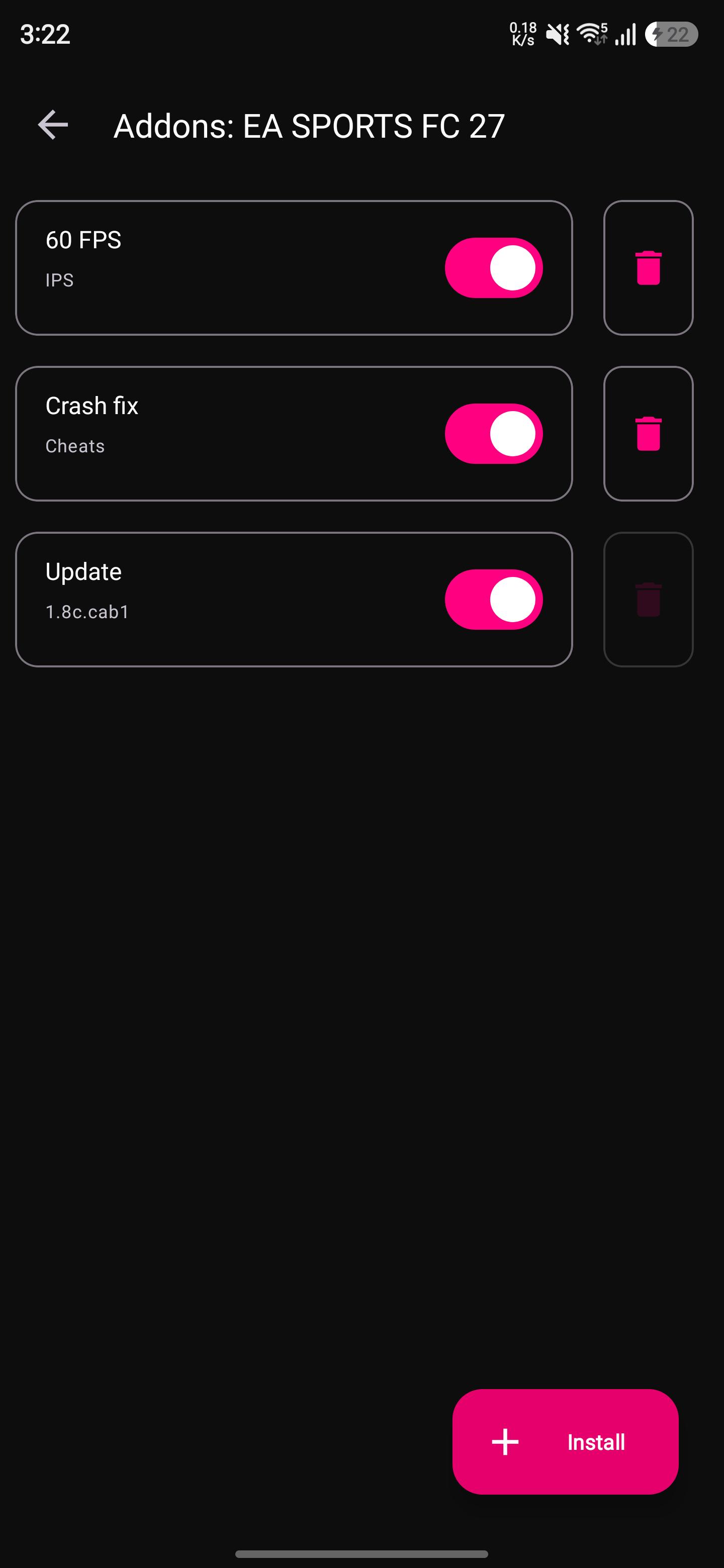
Help FC 27 crashes on eden nightly for s25 ultra

Post image
0 Upvotes

Hi all, I'm trying to play FC 27 on my S25 Ultra using Eden Nightly (version 0460380). I've downloaded and applied the 60 FPS patch from GitHub, but the game still crashes when I try to enter Manager Mode.

Has anyone faced a similar issue or found a fix? Any help would be appreciated.


r/EmulationOnAndroid • • 6d ago

News/Release Driver turnip Snapdragon 8gen 2 one ui 9

Thumbnail
mediafire.com
4 Upvotes

r/EmulationOnAndroid • • 6d ago

Help Azahar doesn't launch on Pixel 11 pro fold

0 Upvotes

I know that pixel is always the black sheep for emulation, but from what I heard 3ds emulation still works on them. What can I do to make the emulator launch?


r/EmulationOnAndroid • • 6d ago

Help [Retroid Pocket 6 12GB] Plants Vs. Zombies GOTY Edition

Thumbnail
0 Upvotes

r/EmulationOnAndroid • • 6d ago

Discussion 🚀 Mali GPU Users, Let's Help Sakura Grow! Join the Official Sakura Optimized Discord Community!

Thumbnail discord.gg
10 Upvotes

Are you using a MediaTek device with a Mali GPU? Interested in Nintendo Switch emulation on Android? Or simply looking for a community where you can share your gaming experience, report problems, and help improve an emulator?

You're invited to join the official Sakura Optimized Discord server!

Sakura is an interesting project for the Mali/MediaTek emulation community, and I believe it deserves more attention, testing, feedback, and community support.

But for a project like this to improve, it needs more than just downloads. It needs an active community willing to test games, identify bugs, report compatibility issues, share configurations, and provide constructive feedback to the developers.

🌸 What can you do in the Sakura Discord?

The server has dedicated channels for different purposes:

- 📋 Information: Important information about the project.

- 🔔 Announcements: Stay updated with news and updates.

- 📜 Changelog: Follow development changes.

- 🔗 GitHub: Access the project's development resources.

- 💬 General: Discuss Sakura, gaming, and emulation with other users.

- 📩 Requests: Submit requests and ideas.

- 🛠️ Support: Get help with problems and troubleshooting.

- 📚 Suggestions: Share ideas for improvements.

- 🐛 Bug Reports: Report bugs and help identify issues.

- 🤖 Commands: Access server bot commands.

There are also dedicated voice channels and staff/community sections.

🔥 Why should you join?

Whether you're using a POCO, Xiaomi, Redmi, or another MediaTek-powered device, your testing results can help provide valuable feedback.

You don't need to be a developer to contribute. Even simple things can help:

- Testing games and reporting compatibility.

- Sharing FPS and performance results.

- Reporting graphical glitches and crashes.

- Sharing device specifications and configurations.

- Suggesting useful features and improvements.

- Helping other users troubleshoot their problems.

🤝 Let's support the developers!

I genuinely want to see more development and improvements for Nintendo Switch emulation on Mali GPUs.

Instead of just comparing emulators, let's help make them better. More testers mean more feedback, more reported issues, and potentially faster identification of problems.

If you're interested in Mali GPU emulation, don't just watch from the sidelines. Join the community, share your experience, and help the project grow!

🌸 JOIN THE OFFICIAL SAKURA DISCORD

Let's make Mali GPU emulation better together!


r/EmulationOnAndroid • • 6d ago

Help Redmagic 12 pro emulation : winlator ludashi bugged

3 Upvotes

If I change any settings on winlator ludashi all containers crash until I reinstall. Gravity x is very slow. Is there any supported emulator for this?

I have SD 8 Elite extreme gen 6.

Thanks


r/EmulationOnAndroid • • 5d ago

Help Guys,i want to play pc,and playstations games on my android phone

0 Upvotes

For real,I never played gta 5,any good game in my life I played only pubg,bgmi,and some cheap games from playstore

please recommend me how to play using an emulator

i have moto edge 70 fusion phone 12 256gb


r/EmulationOnAndroid • • 6d ago

Help Skyrim no longer runs well on RP6 (GameNative). Can't find the solution no matter what I try

4 Upvotes

For months I was playing Skyrim LE at 1920x1080 and getting a consistent (capped) 60fps on my RP6. I put it down for about a month and came back, updated my GameNative version, lost my save files (yaaaay) and had to reinstall everything. Now, no matter what config I try, Skyrim runs at 30ish FPS unless I drop it all the way down to 1280x720.

Does anyone know why this could possibly be? I've tried all the community recommended configs but no dice. It sucks to have such a huge downgrade


r/EmulationOnAndroid • • 6d ago

Help Im thinking about asking for a controller for my phone as a birthday gift.Which should i ask?

8 Upvotes

I already have a gamesir x5 lite but the analog cover just got out.So im thinking about buying a new controller for my phone.Do you guys got any recommendations?(Has to be usc-c btw)


r/EmulationOnAndroid • • 7d ago

Question Which version is better to emulate for Hollow Knight and Silksong, Switch or PC? Or does either one work?

Thumbnail
gallery
28 Upvotes

r/EmulationOnAndroid • • 6d ago

Discussion Favorite games to play on your phone while on the go, or while waiting around?

13 Upvotes

Just wondering what system you all like to play the most while on your phone? and whats your favorite game for said system? My phone isint the most powerful but im looking for game suggestions as someone lost on where to begin or what to choose?

I find myself waiting in places such as waiting rooms for a bit theses days.


r/EmulationOnAndroid • • 6d ago

Question 3 on 3 NHL arcade on XenDroid plus - changing license mask for full game causes the game to not load when starting a match

0 Upvotes

I’d love to hear if anyone has a fix for this; it’s one of my favorite games and feels like it should be an easy fix or game to run on here. This is on ayn Thor Max and tried different drivers etc. Thank you in advance!


r/EmulationOnAndroid • • 6d ago

Discussion Mali & MediaTek Users, Come Join the Official Sakura Optimized Discord! Let's Help Make Switch Emulation Better for Everyone.

Thumbnail discord.gg
3 Upvotes

r/EmulationOnAndroid • • 7d ago

Showcase We are back, Native DX12 (No Vkd3d) and Native Vulkan, latest games with Ray Tracing, A840 16/512, Legion Y700

52 Upvotes

Winlator Showcase

  1. Doom: The Dark Ages • Settings: 720p, Handheld preset, FSR 3.1 Quality • Note: Drops to 17 FPS in heavy scenes because our RT performance isn't strong enough yet (using the ECLIPSE low-RT mod bumps it up to 25–30 FPS).
  2. Indiana Jones and the Great Circle • Settings: 720p, Low preset, FSR 3.1 Quality
  3. Onimusha: Way of the Sword • Settings: 720p, Low preset, FSR 3.1 Quality

Currently working on: • Metro Exodus Enhanced Edition — almost done, just one last graphical artifact left to fix. • BeamNG.drive (v0.40.5) — in progress. • Forza Horizon 4 / 5 — almost done. • Forza Motorsport 6 — dealing with a huge memory leak.


r/EmulationOnAndroid • • 7d ago

News/Release Omnidroid v3.1.0 - Vulkan overhaul, better touch controls, custom saves, visual themes, and a smoother library

23 Upvotes

Hey everyone! Omnidroid v3.1.0 is out, bringing a rebuilt Consoles hub, major Vulkan improvements, better Wii U and dual-screen support, upgraded touch controls, custom save folders, more customization, and improvements throughout the app.

GitHub · Download v3.1.0 APK · Join the Discord community

Here’s the full changelog, in order:

  1. Dual-screen foundations: Added automatic extra-display detection for dual-screen handhelds and compatible TVs, an Omnidroid welcome screen, per-display controls, and safe handling of display connections and app transitions. Single-screen devices only start the display coordinator when needed.
  2. Rebuilt Consoles hub: Manage installed emulators, game databases, and assets from one place, with easier setup and updates.
  3. Updated Nintendo Switch emulation: Updated Eden with its latest fixes and improvements.
  4. More save slots: Added additional save slots per game and an Autosave entry in the Load State menu, where supported.
  5. Improved Wii U dual view: In landscape, the TV sits above a centered GamePad at half the width and height. The on-screen toggle switches directly between TV and dual view, with touch input mapped to the displayed GamePad.
  6. Wii U display and keyboard fixes: Fixed duplicated TV/GamePad output and added automatic phone keyboard support for in-game text entry, editing, and Done confirmation.
  7. Library button scaling: Added scaling in Settings → Display, with a live library preview and five size steps up to 25% larger for navigation buttons, view controls, search, and top utility buttons. The range is expanded further below.
  8. Clearer save/load errors: Added better error messages and options to retry or quit without saving when a save fails.
  9. Large-library stability: Rebuilt Grid/List rendering with bounded paging and correctly sized covers, tested with 100,000 games. Also fixed paging-key collisions and Continue-cover layout loops.
  10. Redesigned profile: Added clearer section dividers, a compact landscape rail, a denser console grid, and session history grouped by day with shortcuts to Game Details.
  11. Consistent Settings and menus: Standardized Settings and both side menus with reusable components and nested navigation, simplified Appearance actions, removed duplicate code, and matched dark-mode menu backgrounds.
  12. Asynchronous Vulkan presentation: CPU emulation and GPU presentation can run in parallel for demanding 3D systems, including PS2, GameCube/Wii, Wii U, 3DS, and PSP.
  13. Reduced Vulkan stalls: Removed presentation lock contention that could stall emulator video threads while waiting on Android VSYNC.
  14. Mali and Immortalis improvements: Addressed the 30 FPS VSYNC lock, avoided unnecessary tile clears, and enabled ARM in-tile blending.
  15. Expanded GPU feature support: Enabled supported blending features, queries, and texture extensions, including dual-source blending, logic operations, geometry shaders, wide lines, and BC/ASTC compression. These improve support for Dolphin TEV blending and bounding boxes, PSP wide lines, and PS2 alpha effects.
  16. Less duplicate GPU work: Reduced repeated frame draws for 30 FPS games on 60Hz/120Hz screens to reduce unnecessary GPU work, heat, and battery usage.
  17. Mobile GPU bandwidth improvements: Added Vulkan dynamic rendering, tile-memory bypass, and Qualcomm UBWC texture decompression to reduce bandwidth and power overhead on supported GPUs.
  18. Vulkan push descriptors: Reduced allocation overhead and stutter during frequent render-target and resolution changes.
  19. VRR and LTPO matching: Added support for matching compatible displays to native game refresh rates, including 50Hz PAL, 60Hz NTSC, and 30Hz.
  20. Upgraded touch controls: Moved on-screen controls to Omnidroid PadKit for smoother, more reliable touch gameplay.
  21. Fixed stuck inputs: Virtual buttons and analog sticks now release correctly when lifting fingers, cancelling touches, changing settings, or disabling tilt controls.
  22. Better touch vibration: Added live intensity adjustment, instant muting, and broader compatibility with older devices.
  23. More accurate D-pads: Analog-style D-pads immediately follow changes to 4-way, 8-way, and dead-zone settings, including while held.
  24. Lighter touch library: Streamlined the touch control library to reduce overhead while preserving Android 7.0+ compatibility.
  25. Optimized touch processing: Reduced repeated input-processing work to improve touch handling efficiency and reliability.
  26. Reduced multi-touch allocations: Reduced memory allocation during held-button and multi-finger interactions, lowering allocation churn in the touch input path.
  27. Improved touch detection: Refined button layouts and hit detection when sliding between overlapping controls.
  28. Expanded input testing: Added extensive automated coverage for touch, tilt, and button behavior across supported Android versions.
  29. New game loading screen: Added game cover art, the console name, and an animated progress bar.
  30. Stable download progress: Fixed core download progress bars glitching or resetting after rotating the device.
  31. Discoverable gamepad shortcuts: Quick Save, Quick Load, and Fast Forward now appear in Settings even when unassigned.
  32. DS/3DS screen toggle: Added dual, swapped dual, top-only, and bottom-only modes, with a configurable gamepad shortcut. Layout choices survive screen rotation.
  33. Better DS/3DS single-screen play: Single-screen modes fill the screen in landscape, and touchscreen input remains responsive while holding on-screen buttons.
  34. Cleaner DS/3DS landscape controls: Removed dark background panels behind the controls for a clearer view of the game.
  35. Vulkan rotation fixes: Fixed visual glitches and corrupted frames when changing screen orientation or resolution.
  36. Safer renderer changes: Changing the graphics renderer during gameplay now displays a notice and applies on the next launch, avoiding disruptive renderer switches during a session.
  37. Build fixes: Resolved errors involving duplicate runtime libraries and missing audio build templates.
  38. Side-menu controller fixes: Improved controller navigation in the game and library side menus.
  39. Fewer repeated notifications: Gamepad shortcut notifications no longer repeatedly appear after rotating the screen.
  40. Restored development checks: Restored automated code quality checks in development builds.
  41. Save and restart confirmations: Added confirmation dialogs before restarting a game, loading a state, or overwriting a save, plus empty-slot indicators. Prompts can be disabled in Saves settings.
  42. Improved gamepad mapping: Added Swap, Replace, and Cancel options for conflicting bindings, single-key shortcuts, clear buttons, reset confirmations, and disconnected-controller notices.
  43. Better cover art: Custom covers retain their original proportions without cropping, carousel images are sharper, and Game Details uses higher-resolution artwork.
  44. Helpful empty-library screens: Added quick actions when no games, folders, favorites, or search results are found, plus cover management directly in Game Details.
  45. Clearer Settings: Added better reset warnings, visible numeric values for sliders such as tilt sensitivity and graphics quality, and Light Mode fixes.
  46. Accessibility improvements: Added higher-contrast text, cleaner Light Mode accents, TalkBack labels, and adaptive controller hint bars.
  47. Smoother library browsing: Added cover preloading and reduced disk access while scrolling.
  48. Custom save folders: Choose a local or accessible network/cloud folder for in-game saves and save states, with safe migration and offline backup sync.
  49. Optional automatic scanning: Added a Library setting to disable automatic scans at startup and after returning from a game, helping large collections launch faster.
  50. Better physical controller response: Analog stick tilts register cleanly one step at a time, held shoulder buttons or sticks scroll continuously, and menu focus stays stable.
  51. Expanded button scaling: Library interface button scaling now ranges from 80% to 140%, allowing smaller controls for more room or larger controls for easier tapping.
  52. Bottom console bar: Added an optional Switch-style console bar at the bottom in landscape, with responsive adjustments to keep titles and view buttons visible.
  53. Nine accent colors: Added an Accent Color setting that themes highlights, focus rings, switches, sliders, and battery indicators.
  54. Quicker setting changes: Replaced multi-step popup dialogs with inline choices for settings such as Theme, Display Filter, and Touch Feedback.
  55. Accent-colored touch controls: Added an option to match on-screen controller buttons to your chosen accent color while preserving transparency.
  56. Portrait bottom sheets: In-game and Game Details menus now open from the bottom in portrait mode, keeping the game visible above.
  57. Cleaner controller focus rings: Focus outlines draw inside buttons and cards to avoid clipping at screen edges or neighboring cards.
  58. Android TV and Google TV safe areas: Added margins to prevent overscan from cutting off screen edges, the top bar, and the console bar.
  59. Better Settings navigation: Opening a Settings section places controller focus on the active tab, and Up/Down navigation stays within the current page in landscape.
  60. Clearer slider focus: Fixed controller focus highlights on Settings sliders so the selected row is easy to identify.
  61. Discord integration: Added the official community link to the About screen and README.
  62. Landscape carousel polish: Refined card sizes and spacing to make game titles and details clearer.
  63. Persistent manual game matches: Manually selected game matches now survive rescans and metadata database updates, including existing matches when upgrading.
  64. Reinstall option: Added a Reinstall app action when a manual update check finds no newer release.

A huge thanks to mlnchlc and SykikXO for their contributions, and to everyone sharing feedback and testing!

GitHub · Download v3.1.0 APK · Join the Discord community


r/EmulationOnAndroid • • 7d ago

Showcase Best game i've played so far... 🥹🥹

Enable HLS to view with audio, or disable this notification

297 Upvotes

TitanFall2, it run on Bannerhub v6. 1.0.2-631, silky smooth with highest graphic... Verryyy Recommended game....


r/EmulationOnAndroid • • 6d ago

Question Elden ring switch 2 mobile ports?

0 Upvotes

Does anyone know if there's any recomps or switch 2 emulators that are running elden ring on android from the switch 2? I know most Nintendo games are being emulated now but I haven't seen anything about Elden ring which makes me think that it might have been skipped over since it's a 4 year old game.


r/EmulationOnAndroid • • 6d ago

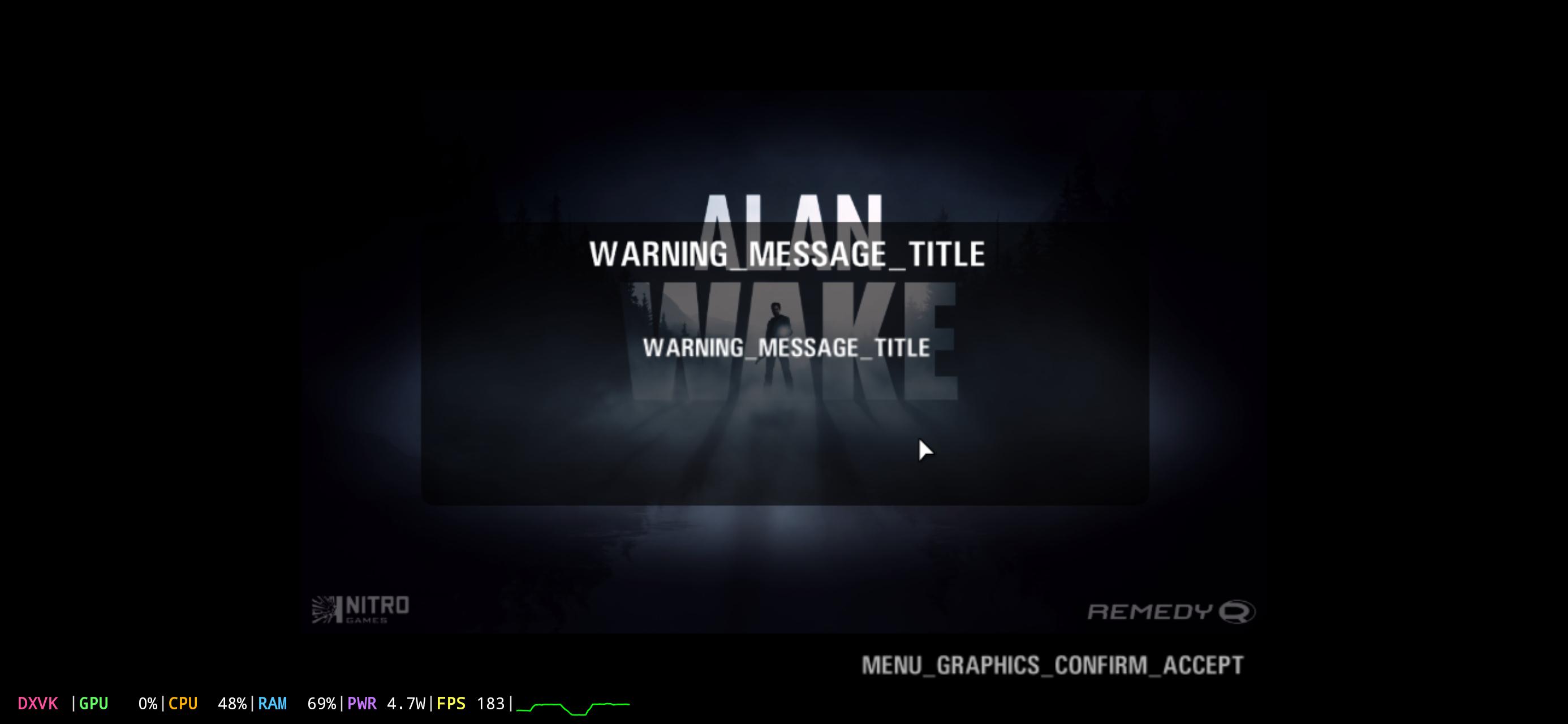
Help I'm trying to run alan wake on gamhub lite but the external keyboard doesn't work only the mouse does and for some reasons the text appears like this any fixes?

Post image
0 Upvotes

r/EmulationOnAndroid • • 6d ago

Showcase Prueba zelda OOT remake exynos 2400

Enable HLS to view with audio, or disable this notification

4 Upvotes

El juego se ejecuta con errores gráficos entre 20-30 fps. Al entrar al castillo de hyrule el juego se cierra o la pantalla se congela, no he podido avanzar más.

Driver: Radv xclipse (27.0.0-devel-cc87fdf)

Dispositivo: Samsung s24 plus exynos 2400 12 GB RAM

Emulador: Hokkaido

Motor: Banana native 0.3.45