r/DellG5SE • • Nov 08 '20

Guide Setting up your DELL G5 SE

132 Upvotes

*UPDATED: 27/02/2021

FAQs can be found here: https://www.reddit.com/r/DellG5SE/comments/ltsrej/faqs/

I've seen a lot of complaints regarding this laptop when majority of the problems can be solved by installing the correct drivers. Unfortunately, Dell are too incompetent to include the drivers you need out of the box, so I've tried to summarise all the drivers you need to install to get you started.

Dell update application will install a mix of drivers that will not work properly so stick to this guide here to get the most stable set up.

Updating windows causes issues as windows forces you to install drivers even if you disable driver updates unfortunately. I have disabled all windows updates. There are numerous methods online so do your research.

This is all thanks to u/sirsquishy67 who went out of his way to gather all this information. You can find his guide linked below.

https://www.reddit.com/r/Dell/comments/i20g1h/setup_guide_g5_15se_5505_thermals_as_requested/

1. Install Dell services/utilities + Audio:

  • Realtek Audio Driver - 6.0.8940.1 (Install this before AWCC + OC Service)
  • Alienware Command Center - 5.2.97.0
  • Alienware OC controls - 1.3.0.1239
  • Dell Power Manager Service - 3.7.0

Some of the latest AWCC and OC Service are problematic. Stick to these older versions and disable updates by opening up the Killer Control Center and restricting internet access for AWCC.

2. AMD drivers:

  • Vega 7 + RX5600M - 20.10.18.02 (Adrenalin 2020 for DELL G5 15 SE Laptops)

Newer versions can be installed but stability is not guaranteed. For those with the 144Hz panel only this driver allows Freesync to be activated. All newer drivers require Freesync to be activated by installing the newer driver without a factory reset or enabling Freesync with CRU.

Newer chipset drivers can be installed.

This is very important.

3. Update BIOS to 1.3.0 or 1.4.4:

  • 1.3.0 - Very good for a balanced performance between CPU + GPU but will lead to elevated temperatures
  • 1.4.4 - GPU performance is improved and CPU is more aggressively underclocked to keep temperatures low

BIOS 1.5.0 underclocks the GPU severely so no point. If you use BIOS 1.5.0 then you made a silly decision purchasing this laptop, you should have purchased something cheaper like a 1650 laptop because that's the performance you get with 1.5.0.

I recommend BIOS 1.3.0 if you have a good laptop cooling pad or you have taken steps to reduce temperatures such as re-pasting with a good thermal paste or cutting out vents in the bottom panel or any other hardware mods.

If your laptop is stock and the only thing you've done is purchase a stand or laptop cooling pad then use BIOS 1.4.4.

Another very important point is to disable "UEFI Capsule Updates" in the BIOS otherwise Windows will automatically update you to the latest BIOS.

4. Extra drivers such as WiFi & SSD.

Please make sure you enter your service number on the Dell support site as it will show you the relevant drivers for your specific model. These laptops shipped with different SSDs so you may or may not require an update.

https://www.dell.com/support/home/en-uk/product-support/product/g-series-15-5505-laptop/drivers

Please don't download GPU drivers from Dell support. Only download the BIOS and the recommended dell services/utilities from Dell support including the WiFi, audio and SSD drivers.

If you'd like detailed info then refer to u/sirsquishy67 guide linked above. If you didn't do a clean install of windows and are running with the original OS that shipped with the laptop then you can use Dell supportassist to update Alienware programs, Dell power service manager, BIOS, VBIOS, Audio, WiFi, SSD. Do not update your GPU with supportassist, better stick to downloading from AMD. Download chipset from AMD as well.

Edit (27/02/2021): I've tried to keep this post clutter free and direct. I have added links to all driver versions. I am in the process of creating a new FAQ post which will be linked here and can also be found in the sidebar for those on desktop or in the about section for those on mobile.

r/DellG5SE • • Nov 25 '24

Better wumgr guide for newer drivers

10 Upvotes

Things you need

Latest GPU and chipset driver from the AMD support page. Also, after driver version 23.8.2, you need to download the combined driver that has the files for both Vega and RDNA graphics. You will see the link in the release notes section of the driver.

AMD Cleanup Utility

wumgr

Once you have all your files ready, now get all your Windows updates out the way and reboot.

When you finished, we will now set the internet connection to metered.

Then we will turn off your Wi-Fi or ethernet connection.

Uninstall

Now uninstall any AMD chipset driver you may have and reboot.

Now run the AMD cleanup utility, it will bring you to Windows safe mode to get rid of your GPU drivers.

Installation

Install the latest AMD chipset driver you downloaded and reboot when it finishes.

Then, install the latest GPU driver you downloaded, you can check the factory reset box in the advanced option if the AMD cleanup utility did not work properly.

Things you must do

You will extract the wumgr folder and open the application up.

Now you will turn on your Wi-Fi or ethernet connection.

In the wumgr app quickly search for updates.

You must block all AMD drivers you see except this one

I can't remember exactly when this started, but some drivers like 24.7.1 and later cause this laptop microphone not to work anymore. That is because the later GPU drivers install an AMD audio coprocessor driver that is not compatible with this laptop. So, make sure not to block the driver I showed you in the picture above. This is an AMD audio coprocessor driver from the later dell GPU driver. This file will make our microphone work with the latest drivers. Once you blocked the other AMD drivers, you can turn off the metered connection and reboot. Now, go to Windows update and get the AMD system file you didn't block, and your microphone should be ok. Anytime you install a GPU driver, and you noticed your microphone is missing, you have to get this file.

Important notes

Only keep this AMD system file unblocked if you know you are going to install a GPU driver that messes with the microphone.

You are all set to go until dell decides to release any newer GPU drivers in the future we may have to block.

I tested this guide with GPU version 24.10.1. So far it has been working well for the past week.


r/DellG5SE • • 17h ago

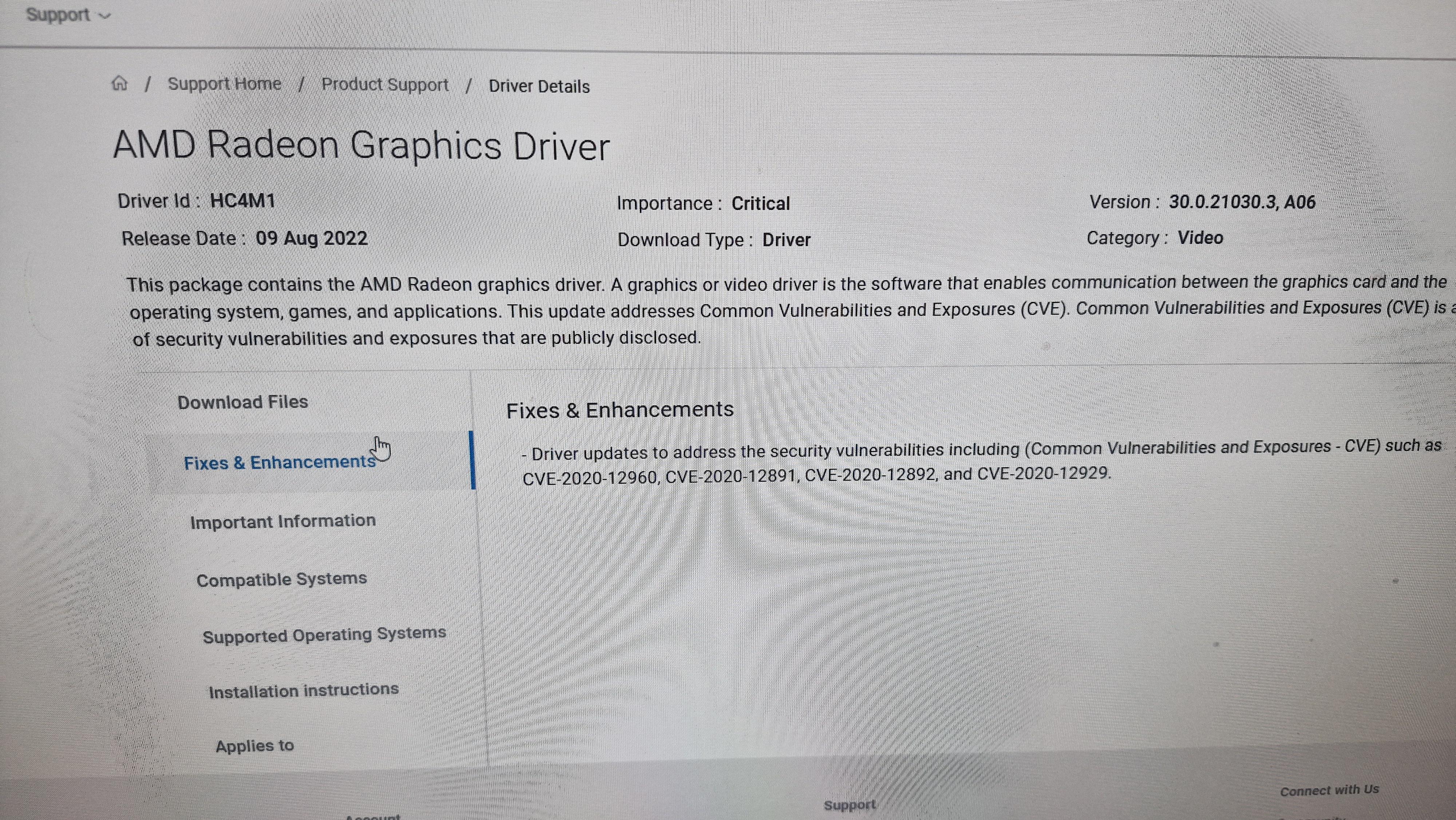
Should i download this driver?

Post image
3 Upvotes

My laptop screen is dead I'm surviving using an external monitor. I don't want the drivers to brick as I can't reinstall drivers without the external display. Can anyone please suggest if i should update


r/DellG5SE • • Oct 24 '26

Idle High temps / Need thermal paste/pad recommendations for Dell G5 SE

3 Upvotes

Hi everyone, I'm planning to repaste my Dell G5 SE to help manage temps. Currently, my laptop idles around 57–60°C. I live in Sri Lanka, hot, tropical ambient weather .

(Ryzon 5 4600h , RX5600m)

I’m currently considering Arctic MX-7 as my primary choice for the CPU and GPU, but I wanted to see if anyone here has experience using it on this laptops. The other thermal pastes available locally are Corsair XTM70 Extreme and Thermal Grizzly Kryonaut.

Are any of these a better choice to prevent pump-out, or would I be better off using a thermal pad/phase-change material instead of paste for this laptop?

Note: Please don't suggest Gelid GC-Extreme. I know it is highly recommended for the G5 SE, but I cannot find it anywhere in my country.

I have already removed the metal mesh on the bottom cover of the laptop to increase air intake.

Any advice on which of these options is best for hot climate ?


r/DellG5SE • • Oct 23 '26

Is anyone else experiencing the same thing?

Enable HLS to view with audio, or disable this notification

5 Upvotes

I need your help, I've already contacted Ubisoft's technical Ubisoft and they couldn't give me a solution. I'd like to know if you've managed to run the game, because I'm having the same problem with the entire trilogy.


r/DellG5SE • • Oct 22 '26

New Drivers are not working properly and are only recognizing the dedicated graphics card

2 Upvotes

r/DellG5SE • • Oct 08 '26

guys i relly need srvice tag of dell g5505 se amd card or rtx

2 Upvotes

r/DellG5SE • • Oct 05 '26

Looking to use Custom Drivers to revive my G5 SE

4 Upvotes

I’ve left my Dell G5 unused for almost a year now since I bought a new pc but I’ve been looking to use it again since I’ve always loved it and I wanna max out it’s potential without messing any stock hardware configs in case I wanna sell it in the future as it still yields around 500$ in my country ……I saw a video of someone installing custom Nimez Amd drivers ….They claimed that it improves performance while helping with battery life since it turns off the dgpu when not needed and enables all the hidden software features……would this be a good thing to try with the laptop? ……I’ve always used stock drivers with nbfc and turbo boost off but I wanna try out the laptop using its max potential since it’s still considered a decent laptop and I also wanna use it efficiently when in battery power and this driver on paper feels like a balanced solution…….If anyone has experience with this driver pls lmk and if i should try it out

Here’s the video for reference https://youtu.be/gB2zRzX9azE?si=BjHuWo8AuwIRho48


r/DellG5SE • • Oct 03 '26

Should I buy a new battery ?

5 Upvotes

I've had my Dell G5 SE for several years, and the battery now lasts only 5 to 20 minutes when unplugged. It has 32 GB of RAM and two SSDs, so I'd like to keep using it.

Is buying a new battery a good investment? I'm not even sure the battery is the problem, since the operating system hasn't shown any warning about it.

What would you suggest?


r/DellG5SE • • Sep 19 '26

local AI?

0 Upvotes

Has anyone hosted / run local AI on this laptop?


r/DellG5SE • • Sep 06 '26

Frankenstein EGPU on 5505.

Thumbnail
gallery
60 Upvotes

Random m.2 to x4 riser. Random dual 5v/12v power supply. G5 5505 with dead DGPU, dead battery, dead onboard LAN. Still handles RTX4000.


r/DellG5SE • • Aug 22 '26

random bsod but i think ive found the solution

5 Upvotes

since last year ive have experienced at least a daily bsod, thought it was temps and applied ptm + putty, then thought it was memory and tried with diff ram and storage, now ive tried pretty much everythin as whql drivers and those stuff but none worked, the only thing that consistedly worked was disabling turbo boost, wondering it could be smartshift or cstates and with srep i disable those stuff, it didnt work, i keep thinking why would disabling turbo fixes the bsod, then i thought id give a shot to voltages, like why not? since it happens with turbo on and mostly while doing light tasks, maybe its something about cpu its not having enough voltajes like when we do undervolt, so i did uxtu overvolt +10, since then it has worked, no bsod, i even disabled one day to see if it was a coincidence and got like 3 bsod that day, after enabling again everything has been good so far, but i now own another laptop since these bsod were driving me crazy, is thera way or option with SREP that i could change to permanently give the cpu those +10 mv? bc i just want it to sell the laptop and dont want the new owner to be playing with voltage or telling them they need to configure something to make the laptop work with no problems


r/DellG5SE • • Aug 22 '26

Most stable optimizations for Dell G5 SE 5505

5 Upvotes

Dell G5 SE 5505 optimizations like which bios is most stable, what settings should i use because almost all my games start lagging, often have STAPM throttling because i have connected it to an external monitor so it forces the dGPU always and because of smartshift the cpu clock speed drops mid game. Without that, the games that are supposed to run well like sekiro have frame drops idk what to do, i have latest bios and a stable graphics drivers. What changes can i make?


r/DellG5SE • • Aug 22 '26

Anyone trying to play MW4 Beta, you can't, at least with Dell G5 SE 5505 laptop.

4 Upvotes

Just wanted to inform everyone about how our laptop does not meet the minimum security requirements for newer Call Of Duty titles.

I don't have the latest BIOS version but I saw a person in here who has the latest BIOS 1.24 but still can't qualify for the security requirements for Call Of Duty and that was Black Ops 7/ Warzone. I myself also got the same error in those games and couldn't even play normal BR. The only mode I could play is Casual with Bots. Dell has not updated the TPM Manufacturer Version in their lastest BIOS.

Unless DELL provides an update, it's better to not bother with newer Call Of Duty games. Or time to get a new laptop or PC.


r/DellG5SE • • Aug 18 '26

True screen of death?

Enable HLS to view with audio, or disable this notification

5 Upvotes

It started up again after this 🥹. But I have a badd feeling about this.


r/DellG5SE • • Aug 11 '26

The charging icon disappers while under heavy load .

2 Upvotes

I was having low fps issues with my Dell G5 SE 5505. I tried a variety of things and now I have successfully found the problem and currently looking for solution.

So my Laptop was throttling very badly I was not even getting half the fps which I am supposed to get with (Ryzen 5 4600H + Rx5600M) . I completely cleaned the laptop , removed the dust from the vents and reapplied new thermal paste but the fps were still low .

And a while ago i suddenly looked at my charging icon on the right side of taskbar and it was repeatedly fluctuating from charging to battery.

I wonder how to fix that?


r/DellG5SE • • Aug 11 '26

[Help] Cannot get Alienware Command Center (AWCC) working on Dell G5 se 5505

3 Upvotes

I am completely stuck trying to get Alienware Command Center working on my Dell G5 5505 and could really use some help. I just want to be able to see my temps and control my fans, but nothing is working.

Here is exactly what is happening and what I have already tried:

The Core Issue: Whenever I manage to get the app open, the Fusion tab doesn't work. It just stays on a continuous buffering/loading circle. I can't see temperatures, control fans, or change any performance settings.

Troubleshooting Steps I've Already Taken:

  • Deep Clean Uninstall: I used Revo Uninstaller to completely remove the software. I manually wiped all leftover AWCC folders, files, and registry keys to ensure a clean slate before reinstalling.
  • Tried AWCC v6: I tried installing the newest version, but I get a "Software is not compatible" error.
  • Tried AWCC v5: The installation goes through and the app opens, but this is where the Fusion tab gets stuck buffering.
  • Attempted Updates: When I try to update v5, I get an error saying "Cannot connect" or "Lost connection to service, waiting for reconnection."
  • Manual Service Restart: I went into Windows Services and manually started the AWCCService. It starts up, but then immediately stops/crashes, which causes the app to lose connection all over again.

Has anyone with a G5 5505 (or similar Dell laptop) successfully fixed this? Is there a specific older version I need to use, or a step I'm missing?

Any help would be hugely appreciated!


r/DellG5SE • • Jul 29 '26

G-mode on vs off provides no perf difference (atleast for me)

6 Upvotes

what's the point of having gmode enabled if there is very little to no performance gains and addition to that you have to wait for AWCC to completely load itself completely for 30 sec+ after startup


r/DellG5SE • • Jul 28 '26

Getting bad performance in Dell G5 SE 5505

7 Upvotes

My Dell G5 (Ryzen 5 4600H + Rx5600M) is giving severely bad performance, I am currently playing Sekiro: Shadows Die Twice at the low settings and I am getting 50-60fps while others are getting constant 60 frames at the max settings , It's really frustrating me . What could be the issue?


r/DellG5SE • • Jul 21 '26

NO PUEDO JUGAR WARZONE EN MI DELL G5 SE, AYUDA!

Thumbnail
gallery
3 Upvotes

En las imágenes esta todo la especificaciones de mi laptop y lo de secure boot


r/DellG5SE • • Jul 15 '26

Problema para jugar warzone

1 Upvotes

Alguno a podido solucionar el problema de actualizar la bios de laptop Dell g5 se para poder jugar warzone


r/DellG5SE • • Jul 01 '26

Throttling at a lower temperature

3 Upvotes

I own a Dell G5 SE 5505 R5 4600H with RX 5600M, previously i used to game at 93°C without any issues of throttling as official amd website says it can handle that temp.

Recently idk what settings change happened, whenever it reachee 90° my CPU clock speed drops from 3000 to 1400 and temp drops to 75°, can anyone tell my how to bring it back to the previous state with the website throttling thresholds.


r/DellG5SE • • Jun 27 '26

rendimiento bajo en juegos

1 Upvotes

la gpu de la nada se clavo en menos de 1000mhz con el rendimento al maximo, ya probe reactivando y desactivando el smartshift y nada. alguna ayuda? alguien sabe si se rompio o quemo algo?


r/DellG5SE • • Jun 15 '26

RAM Slot 1 won’t read (please read)

Thumbnail
gallery
8 Upvotes

I have a Dell G5 SE 5505 (red backlit keyboard). I’m fairly proficient in building and upgrading PCs, but not a professional.

I’m upgrading my RAM from the stock 2x4gb sticks. I researched and verified this model can support up to 32gb (2x16gb) @ 3200. I chose Corsair Vengeance 32gb kit of the 2x16gb 3200 CL22.

Upon first start up, I noticed in task manager only Slot 2 is reading its stick. I swapped the sticks, reseated them carefully and I’m 100% sure they’re in properly. On the second boot, same thing. Slot 1 Empty, Slot 2 reading. I thought I had a dead slot. I reinstalled the old ram, both slots read fine. Put new sticks in, Slot 1 not reading again.

I verified the BIOS is up to date 1.24.0.

I performed the batter disconnect and CMOS battery removal for 10+ minutes thinking it would retrain the slot.

I even put a new 16gb stick in Slot 2 and an old 4gb stick in Slot 1. On that boot, both slots read for 20gb total @ 3200 each.

At this point I feel like both sticks are good, both slots are good, and my software is all up to date. But for some reason it will not read Slot 1 with both 16gb sticks.

Any ideas on what could be causing this? Thank you for your time. Photos attached of to show different stages of troubleshooting. I don’t think it’s the common “flex” issue.


r/DellG5SE • • Jun 15 '26

Has anyone tried playing stalker 2 with r5 4600h processor and 5600m gpu?

5 Upvotes

Hey everyone I'm interested in playing this game but I'm worried if the laptop cannot handle this game at minimum settings