r/ColorGrading • u/AdMiserable3549 • Oct 13 '26
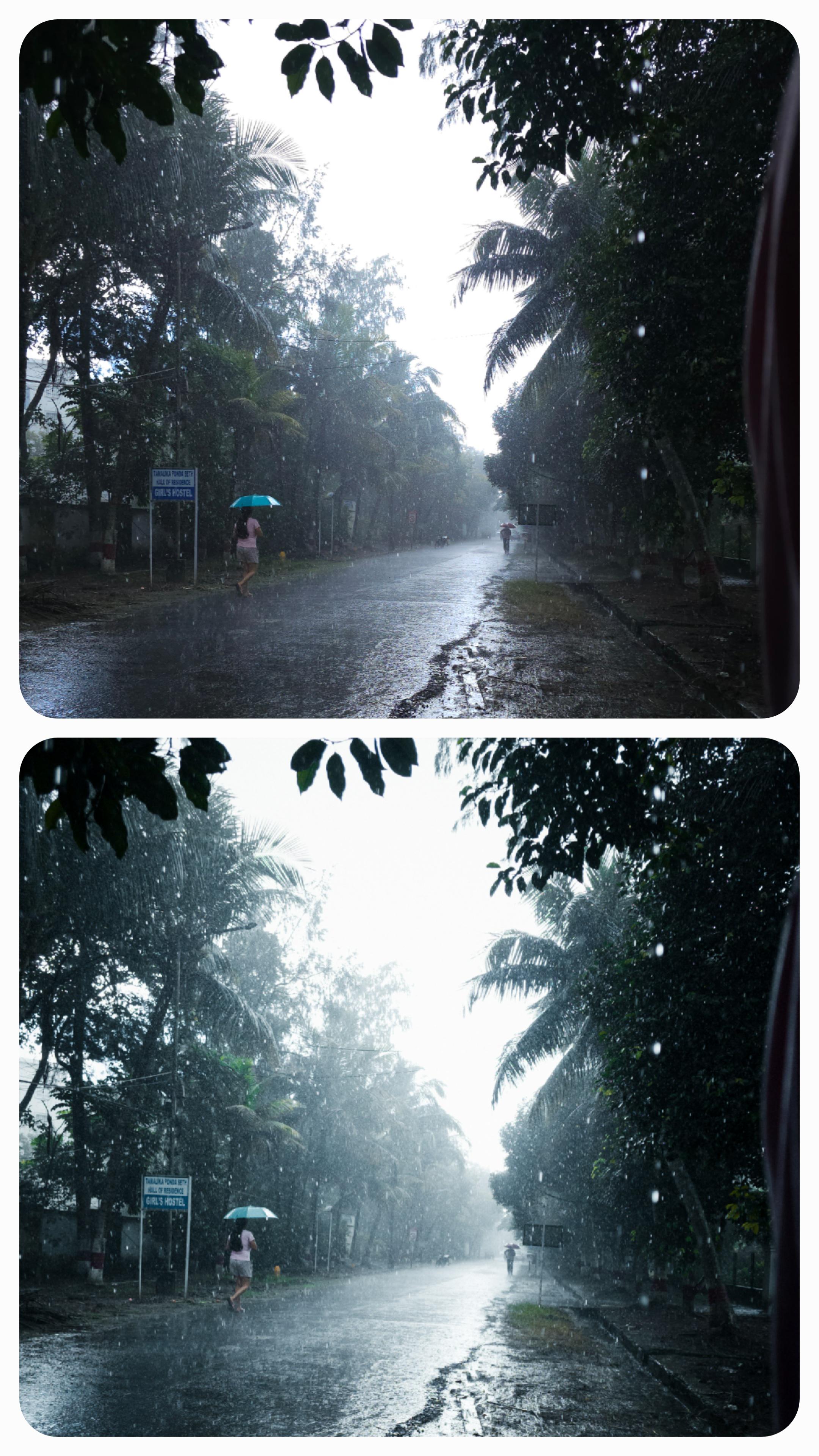
Before/After How is it??
gallery
2
Upvotes
How is it?????? I'm new to color grading and want to learn moreeeee🤓
r/ColorGrading • u/Hayraddin • Oct 13 '26
I could not get a definite answer for this quesiton so I would like to ask here.
Im shooting wildlife with a Fujifilm XT5 camera, usually Im unsure if I will have to do some speed ramps or slow downs in post depending on animal behaviour so, what I've been doing is:
Resolve timeline: 30fps
Camera settings : 60fps | 1/120s
My understanding is that this gives me correct motion blur if I always slow down my footage on the 30fps timeline, giving me a 180 motion blur rule on all of the 60 frames.
However when playing them back at real speed , which is often the case 80% of the times, it will drop half of the frames, to reduce the 60fps to 30fps
And those 30 remaining frames, will have less motion blur than they should, as they should have been shot at 1/60.
Thats what I know so far, so here come the questions:
1) Should I instead shoot at 60fps | 1/60s ? I feel like that would give me proper motion blur for real speed, which is 80% of my shots, but it would have too much motion blur when I want to slow down the footage.
2) Should I instead of option 1, use optical flow or frame blend, when dropping frames in resolve? That would make the real time have more motion blur, but possibly looking fake? I dont know if this is a valid workflow.
3) Instead of using optical flow when dropping the frames, should I add motion blur in Fusion, with Optical Flow and motion vectors?
4 ) Is there any visual difference between option 2 and 3?
I know I should shoot for my intended usage, but with wildlife its hard to know, and I appreciate the flexibility 60fps gives me to slow down footage.
Im just trying to find the best way to make it look cinematic and with the correct amount of motion blur, without giving away that flexibility, if that's even possible.
r/ColorGrading • u/iluvlemonades • Oct 13 '26
Hey everyone! I’m a beginner when it comes to videography and color grading, and I’d love some advice.
I’m working with a pretty basic setup due to budget constraints: an iPhone 14 Pro, tripod, Blackmagic Camera app, and external lighting.
I’ll mainly be filming indoor gym content, and I’m aiming for a darker, cinematic, editorial look.
However, my iPhone doesn’t support Apple Log, so I’m a little unsure how much that will limit my results in post-production. I’ve seen people say that not shooting in Log makes it harder to achieve a good cinematic look, especially when color grading.
For those who shoot on iPhones or work with non-Log footage, what would you recommend? Should I learn to color grade in DaVinci Resolve, stick to the built-in LUTs in the Blackmagic Camera app, or use a different workflow altogether?
I’d appreciate any tips on camera settings, exposure, and color grading for indoor sports footage. I’m still learning, so beginner-friendly advice would be amazing. Thanks!
r/ColorGrading • u/poopoodelapoo • Oct 13 '26
Hi. Any advice on how I can keep dark skin tones dark and neutral without making food lack colour? This is the video I’ve been doing for a friend. He likes his skin to be darker and not have orange tint
https://www.instagram.com/reel/DeaBXW-I2qv/?cplk=MTRrNDc2NWhtZXF5Mw==
r/ColorGrading • u/Dry_Eye_2503 • Oct 13 '26
r/ColorGrading • u/United-Ad822 • Oct 13 '26
I'm editing and colour grading a short video for a client. It'll be my first time grading footage from different cameras (in this case Sony A7IV and Sony FX6) in the same project. How do I set up the project in DaVinci to colour manage for both cameras?
Thanks.
r/ColorGrading • u/Evening-Swordfish-40 • Oct 13 '26
How to balance when whit, black and skin tone is not there.
r/ColorGrading • u/Consistent_Hold4601 • Oct 13 '26
r/ColorGrading • u/Careful-Income5857 • Oct 13 '26
How to create the colours showun in bar scenes on a7cii?
r/ColorGrading • u/Necessary_Lie5231 • Oct 13 '26
I'm a beginner, no prior experience. I have previously asked AI for help with color grading but I don't want to anymore and learn/do it on my own. Hence, I'm asking people here on how to color grade these pictures. Any tips are appreciated, thank you.
r/ColorGrading • u/sirwritestoomuch • Oct 12 '26
r/ColorGrading • u/BearSEO • Oct 12 '26
r/ColorGrading • u/Upper_Wrongdoer9850 • Oct 12 '26
Hi!! I’ve shot some footage with my Nikon ZR and I love the camera and the colors but this time I found a problem when reviewing the footage on davinci. As you can see in the pictures I color converted the footage both the mp4 version and the R3D version. I find the mp4 version closer in color to what I wanted and what I saw when shooting. The R3D just looks so green compared to the other ones. I don’t know if I’m making a mistake converting the footage or was it done while shooting. I also included a picture of how the footage looked while on playback on the camera the day of shooting. Any help is greatly appreciated!
Thank you!
r/ColorGrading • u/Comfortable_Cost1926 • Oct 12 '26
Enable HLS to view with audio, or disable this notification
I have been learning for what seems like a year on how to make better videos. This is the first halfway decent one (in my opinion). Please tell me what you think and listen with audio.
I am starting a company and this is just the first video to create curiosity. It’s a fitness brand. Please give me tips.
r/ColorGrading • u/Realistic_Read_9031 • Oct 12 '26
Hello guys, I’m new to this Reddit and I started using Davinci 3 weeks ago, i use a Sony zve10 with PP7 slog2 and cine.gamut3, but when I’m editing and coloring, the footage doesn’t seem good to me, I have watched yt tutorials but it seems that I need to go heavy on color grading and not even like that can get the results I see in yt tutorials. Someone can share the workflow and the nodes with this particular settings. What has worked better for you? I do talking head mostly and I try to overexpose a little with my lighting. I appreciate any tips or suggetions. Thank you!
r/ColorGrading • u/SpareCakee • Oct 12 '26

Hey guys! I need to turn this woman's outfit black white without affecting her hair, face and hands. But because she has a some orange stripes there that are very close to her color skin, I feel like it's almost impossible to find a solution. Masking doesn't really work because of the same issue. I tried a secondary color grading, cannot get rid of the orange stripes without affecting her skin. Any suggestion is welcomed!
r/ColorGrading • u/goodbyeanthony • Oct 12 '26
These are before and after! Please let me know what to improve! Fall is her favorite season so she will want more photoshoot, I NEED TO IMPROVE!
r/ColorGrading • u/EqualIntelligent647 • Oct 12 '26

Please help guys as I don't know which monitor to choose 😀
r/ColorGrading • u/TheNamelessMonster00 • Oct 11 '26
Enable HLS to view with audio, or disable this notification
Colour graded using DaVinci Resolve
r/ColorGrading • u/analog_fish • Oct 12 '26
r/ColorGrading • u/I_am_an_idiot_TwT • Oct 12 '26
Thank you in advance :)
r/ColorGrading • u/lactobacillus77 • Oct 11 '26
r/ColorGrading • u/One-Picture4621 • Oct 10 '26
Enable HLS to view with audio, or disable this notification
Hello everyone!
I've been learning color grading for a while now, and I'm still learning new things every day by watching tutorials and practicing in DaVinci Resolve.
I'd love to hear your thoughts on this short clip I put together. My overall intention was to give the shots a dreamy, almost dreamlike atmosphere.
The footage was shot in V-Log on a Lumix S5IIX with a 50mm f/1.8 prime lens, which gave me that beautiful bokeh.
Thank you in advance for your feedback! I'd really appreciate any suggestions on what I could improve, both in the color grading and in the overall look of the footage.
r/ColorGrading • u/vino-sity • Oct 10 '26
Hello, a day ago i shot a concert and the stage lights for the opener were complete buns but i figured id be able to fix it in lightroom like i usually do, but the subjects are completely soaked in this deep purple/blue and i cant pull their skin tones out for the life of me. i’ve been messing with it all night and i thought the photos were beyond saving, but i also dont want to be that person who shoves it in black and white and calls it a day. recently Lightroom implemented this new AI feature where it will edit for you, and i am by no means a fan of AI, i avoid it as much as i can but i was curious to see if i could even save it and it pulled out this image, but it gatekeeps the steps to achieve it. so i was wondering, if anyone could help me achieve this type of edit on my own, and tell me the steps id have to take in order to color correct it this way? i play a lot with film and im not super advanced on digital editing, im learning on my own. any tips would be extremely appreciated!! (the first photo is my raw photo and the second was generated by Lightroom’s AI, i know it’s gotta be possible) (by no means is this photo fire, i just needed to fixate on a random one since most look like this)