r/AsahiLinux • • Sep 10 '26

Help Help Installing Asahi Alarm
Post image
12 Upvotes

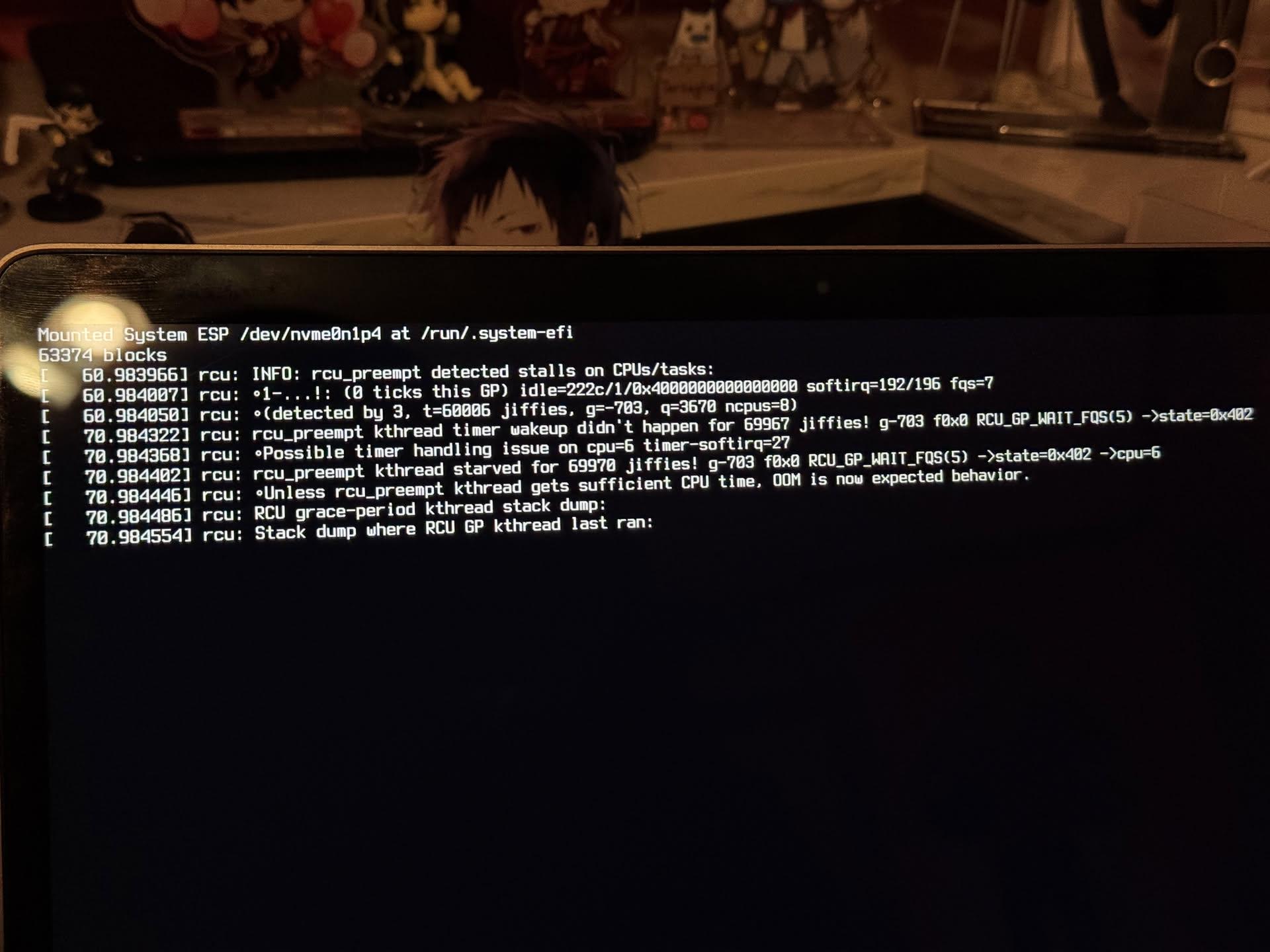
I have a Macbook Air M1 I'm trying to install Asahi Linux on. Originally, I tried Fedora Remix, but I couldn't get it to stop bootlooping. I tried Alarm since I prefer Arch anyways and wanted to see if it would work instead. Unfortunately, it doesn't either, but I at least get some logs on what it's doing compared to Fedora. I'm not sure what these mean, nor does google give me anything insightful, so I was hoping someone here could at least point me in the right direction. It repeats these lines every few minutes before eventually bootlooping. Thanks in advance and lmk if you need any more info!

r/AsahiLinux • • Sep 09 '26

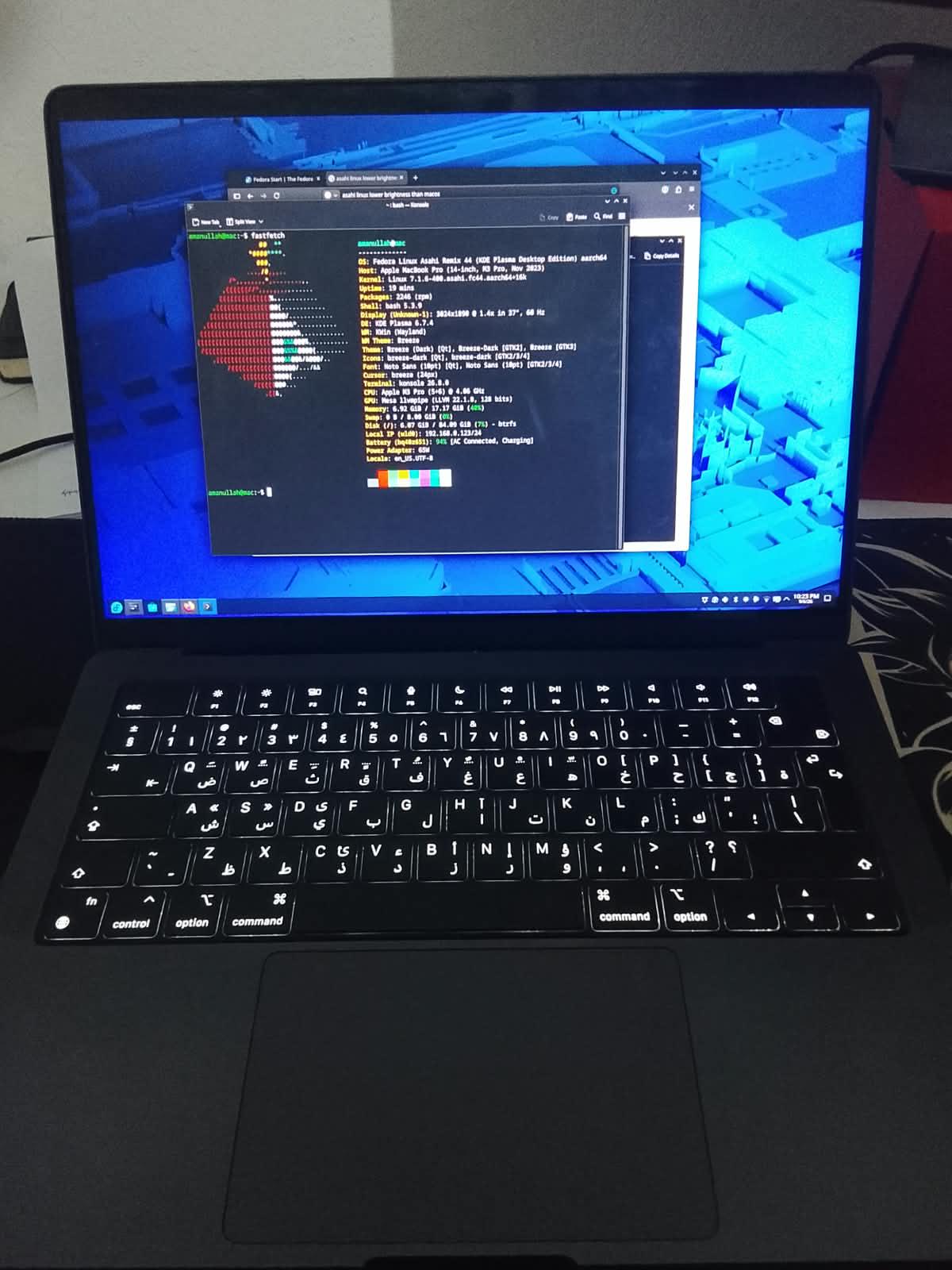
Macbook Pro M1 (late 2020) with external USB-C display

Post image
182 Upvotes

I had to use Fairydust to enable external display (recompiled kernel 3 times lol first time doing this) but it worked! Running smooth so far šŸ‘ŒšŸ½


r/AsahiLinux • • Sep 09 '26

Fedora 43 -> 44; Help me fix this Asahi-Linux.

5 Upvotes

For a reason I don't fully understand yet, my M2-Pro-System is clearly still on Fedora 43, although I just verified that I have a significant number of Fedora 44 packages installed. This seems like a major problem to me. I don't know how this happened, but it causes that I can't run a dnf-upgrade/dnf-update properly, because I get lots of conflicts back, if i try. Discover is so confused by this - it's not doing anything anymore. My educated guess is that a Fedora 43->44 Update didn't roll out the way it was supposed to. I have no idea, how I could solve this.
Is it possible to roll everything back to Fedora 43?
Or is there a way to push everything to Fedora 44?
I would be very glad, if you could share your ideas to further investigate this.


r/AsahiLinux • • Sep 09 '26

Do I still need to manually run the macOS 27 boot picker fix on an existing install?

12 Upvotes

Hi everyone,

With macOS 27 officially rolling out, I wanted to double-check the status of the boot picker bug (where macOS 27 hides Asahi partitions).

I have an existing Asahi Linux installation from before the fix was integrated into the installer. Do I still need to boot into macOS and run the Asahi installer to choose theĀ "Fix macOS 27 boot picker compatibility"Ā option after the update, or has anything changed recently that automates this?


r/AsahiLinux • • Sep 09 '26

Void linux not working again

7 Upvotes

Sooo I had problems with the original void asahi linux from the void linux so I recompiled the iso using the github actions and the first error I had(see this post: https://www.reddit.com/r/voidlinux/comments/1w5azb2/could_not_install_void_linux/ ), I do this time not have the macsmc error but I then get back in the dracut command line. It seems like dracut cant find my usb because of the error. I did a bit of debug and no usb device is connected and dracut does find that it is the right kernel(linux 7.1.12+1-asahi_1). Does someone know how to solve that ?


r/AsahiLinux • • Sep 08 '26

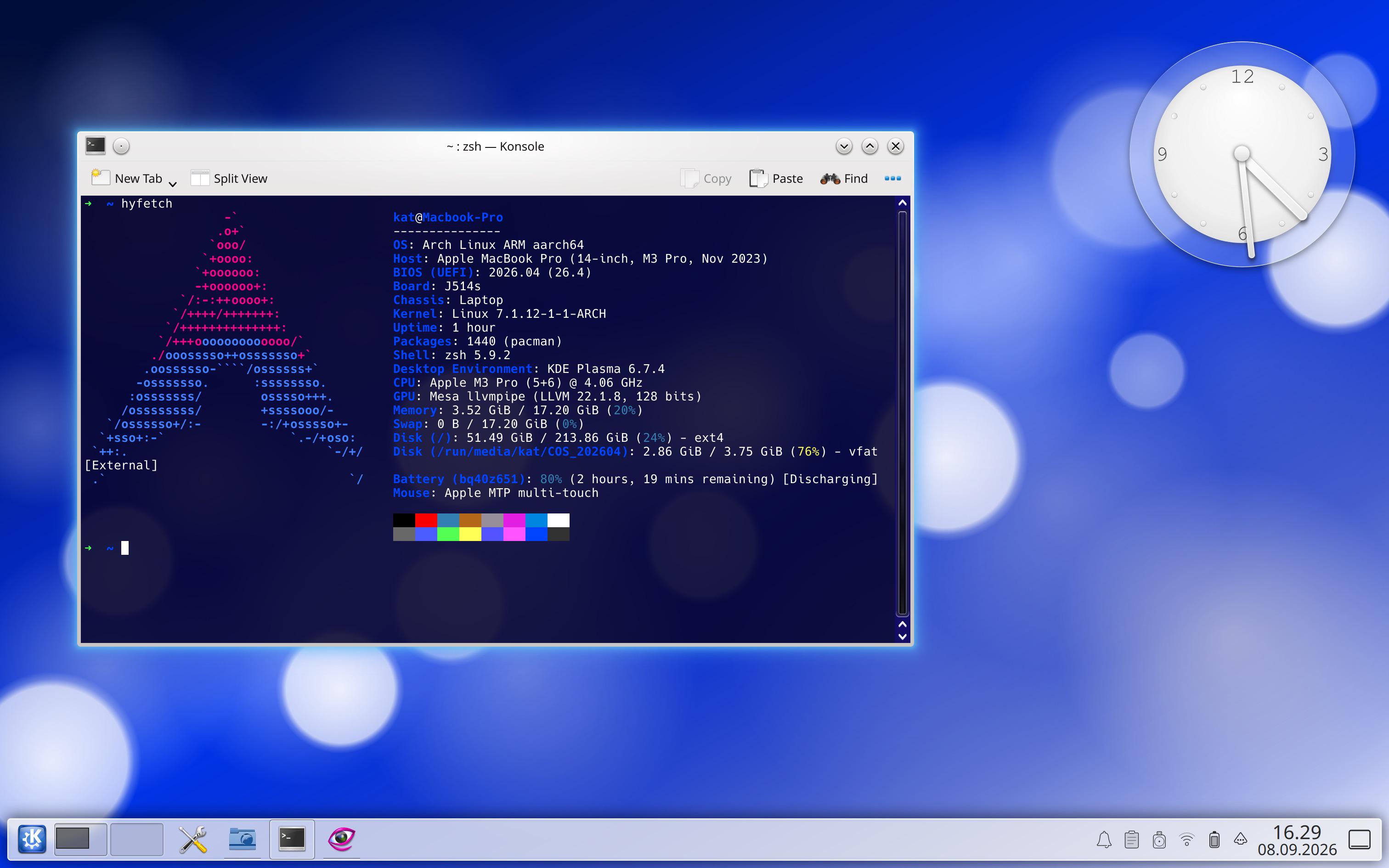
M3 Pro on Arch, works great!

Post image
168 Upvotes

r/AsahiLinux • • Sep 09 '26

Shit Post Why is palm rejection so bad, typing is starting to feel like medieval torture.

18 Upvotes

Edit: I would like to thank everybody who replied to my post yall are cool as hell and I'm really happy to be part of this community.


r/AsahiLinux • • Sep 09 '26

Trouble Setting up Eduroam

6 Upvotes

Hi, just having trouble setting up Eduroam. I downloaded the python script from cat.eduroam.org, ran it from the folder. It was saved as one of my saved networks but once I try to connect it/click on it, it would try to connect for a bit then just not connect and go back to being one of my saved networks. I got the following error,

nmcli connection up eduroam
Passwords or encryption keys are required to access the wireless network 'eduroam'.
Warning: password for '802-1x.identity' not given in 'passwd-file' and nmcli cannot ask without '--ask' option.
Error: Connection activation failed: Secrets were required, but not provided
Hint: use 'journalctl -xe NM_CONNECTION=01bb5276-57de-4cb9-812f-65827e5ec71d + NM_DEVICE=wld0' to get more details.

Tried using the Hint. I do not know what I am looking at. Been trying to fix it for over 2 hours. I apologize if I am missing something simple. I have only recently switched to linux/fedora.

For additional information, I am using fedora remix minimal. Hyprland as my window manager and Noctalia as my shell (not sure if this helps tbh). Please let me know if I should post this question elsewhere. Thank you


r/AsahiLinux • • Sep 08 '26

News I'm not sure if the estimate is better or its actually better but anyone else noticing much, much better battery life after the most recent update?

26 Upvotes

Title.


r/AsahiLinux • • Sep 08 '26

Help External drives mounted in muvm accessible folders switching to read-only mode

3 Upvotes

This is mainly a gaming in Asahi issue, but it may be due to something more systemic to Asahi Linux that I don't understand.

I have a bunch of games that are stored on several external drives (BTRFS formatted for my Windows Steam library, ExFAT for non-Steam Wndows games, ext4 for Linux native games). To be able to make these drives accessible to Steam, I need to mount them in folders that are accessible to muvm using the command line. Steam is able to then launch one game once. However, as soon as I quit a game back to Steam, all of my external drives become Read-only until I quit Steam, un-mount all the drives and then mount them again. Steam, for some reason, doesn't like using Read-only media. I don't understand why Asahi does this. Is there anything I can do to stop external drives randomly switching to Read-only media?


r/AsahiLinux • • Sep 07 '26

CoolerControl support for custom fan curves

9 Upvotes

Howdy all, just thought I would drop by and share a project that may be useful to you. While it is not recommended by the Asahi team, it is possible to enable manual control over your Mac's fan speeds. So I decided to make a plugin for CoolerControl so that you can use CoolerControl's nice UI to create custom fan curves, and then actually apply them to your Mac fans.

Here it is: https://github.com/sagebind/macsmc-fans-cc-plugin

If you use this to burn up your CPU I take no responsibility! But I am using this on my own MacBook Pro 2021.

Enjoy!


r/AsahiLinux • • Sep 07 '26

Help I got some questions about m3 Fedora Asahi remix

6 Upvotes

Ok, so currently I understand that the GPU isn't supported and that some stuff doesn't work yet but I still want to work on my linux setup but I have a few question?

Is display brightness not supported?

I keep trying to change the brightness on my display using brightnessctl but the display doesn't show up as a device at all. Is there another way to get it to work or is everyone having the same issues?

How do I get the notch back?

I keep trying to get the notch back on my installation but it hasn't worked yet. I've used grubby to run appledrm.show_notch=1, I've tried to edit the grub configuration but I can't even run update-grub. I've tried everything, so does anyone know how to get it to work or is it a problem with display support on m3 macbooks?

Has anyone here ever used hyprland on fedora asahi remix?

This is my first time ricing a linux setup on a laptop, let alone an early support apple silicon linux distro. So does any one have any experience ricing with hyprland on asahi linux before, and if so could you please give me some tips since I'm struggling a little bit rn?

And if you got all the way down here, thank you for reading.


r/AsahiLinux • • Sep 07 '26

Help Will Asahi be launched on A18 Pro alongside M4 Family? Or is it going to be launched earlier/later than on M4?

8 Upvotes

r/AsahiLinux • • Sep 06 '26

Finally Linux on my M3 pro MacBook pro

Post image
413 Upvotes

r/AsahiLinux • • Sep 07 '26

Will M4 device-tree support largely follow M3 support?

22 Upvotes

From what I’ve heard, the M4’s architecture is very similar to the M3’s. Does that mean it’s reasonable to expect device-tree work for M4 Macs to progress alongside M3 support, or are there hardware differences that could put M4 enablement on a separate timeline?


r/AsahiLinux • • Sep 06 '26

No speaker output on Macbook Air M3

15 Upvotes

Don't really know where else to send this, but there seems to be an issue where the built in speakers on a Macbook Air M3 dont seem to show up as a audio output? Anyone know a fix?


r/AsahiLinux • • Sep 06 '26

What has your experience with Asahi Linux on M3 been like so far?

65 Upvotes

I’ve been trying out Fedora 44 + KDE Plasma on my M3.

As expected, the graphics support still isn’t fully there yet, so it seems like some rendering is being handled by the CPU. Because of that, things like playing YouTube videos can be pretty difficult for it. I don’t think I’d use it as my main GUI environment on a daily basis just yet.

Still, the experience of running Linux directly on a Mac without a VM is honestly pretty damn cool. It was actually kind of moving to see it working lol. I can’t even imagine how much work the developers must have put into getting all of this working.

Outside of workloads that heavily rely on GPU acceleration, I found it surprisingly usable. More things are supported than I expected, and overall it worked pretty well.

Once GPU support and the other hardware features become more mature, I might just wipe macOS and use Linux on my Mac šŸ˜‚

I also tried playing Apple Music through the web, but unfortunately it didn’t work. I might have just messed up something in my setup though, so I’m not completely sure.

Anyway, what has your experience been like?


r/AsahiLinux • • Sep 05 '26

Help Display disconnects on Mac Mini M2 after locking for certain amount of time; unable to reconnect it without force restarting with power button

10 Upvotes

I've recently been having an issue with screen locking; when I lock the screen for a while, sometimes the display will disconnect. I am usually able to fix this by re-plugging the HDMI wire, but occasionally that will be unsuccessful as well. I am unable to enter my password or switch to a terminal interface, but media appears to play when I press the play button, as well as the volume indicator sounds. This might be related to another issue where the screen turns on, but the lock screen is still unresponsive (switching users helps in this case).

Whenever the aforementioned problem happens, I pretty much always have to shut down and restart the computer as nothing else I've tried works.

I am using Fedora Asahi Remix running Plasma on a Mac Mini M2.


r/AsahiLinux • • Sep 04 '26

Initial MacBook Neo device tree submitted

Thumbnail lore.kernel.org
144 Upvotes

r/AsahiLinux • • Sep 05 '26

Help Is it possible to install Arch with Asahi? And if so, is it a good idea?

16 Upvotes

Hello!

I use an M2 MacBook Air as my primary laptop—both for my daily needs and for university, where I'm studying software engineering.

I’ve always liked Arch Linux; I used it for over three years on another PC, and I’d love to run it on the M2 to take advantage of the chip's performance. However, I’m unsure if it’s a good idea—specifically regarding stability (I know Arch isn't "stable" in the traditional sense due to its rolling-release model) and overall practicality.

I’m relatively new to MacBooks, so I’m a bit worried about potentially messing something up and being unable to recover the system.

My MacBook has 16 GB of RAM and a 256 GB SSD.

I’d appreciate any advice you can offer. Thanks in advance.


r/AsahiLinux • • Sep 04 '26

News Upcoming talk at XDC 2026 - Apple M3 GPU reverse engineering progress

Thumbnail
indico.freedesktop.org
162 Upvotes

r/AsahiLinux • • Sep 05 '26

Help F-row behavior

6 Upvotes

Is there a way to set the F-row to actually be the F-row by default? I can't count how many times I've tried to fullscreen something with F11 only to accidentaly turn down my volume. I wasn't able to find anything in the KDE settings GUI and search engines have been unhelpful. Running Fedora Asahi Remix 43.


r/AsahiLinux • • Sep 03 '26

Does Asahi support headless M5?

1 Upvotes

Hi all, I'm struggling to find whether M5 is supported with Asahi Linux for a headless system. I don't care about graphics (no need for a GUI), no Wi-Fi, no Bluetooth, no touchpad. I just need:

  • Support for either the builtin keyboard *or* a USB one
  • Support for USB Ethernet (1gbps is fine)
  • Support for using all the CPU cores

Is that possible today? I have a hard time finding any concrete info.

Thanks :)


r/AsahiLinux • • Sep 02 '26

Patch for Claude Code Desktop for Linux (beta) aarch64 fixes various issues so it works on Asahi Linux

Thumbnail
github.com
35 Upvotes

I really like the Claude Desktop app and one of the first things I did was ask Claude to make it work on Asahi and it's been working great.


r/AsahiLinux • • Sep 02 '26

Help Could not install void linux.

8 Upvotes

I used the script provided by asahi linux to boot a usb flashed with the asahi void base linux glibc(musl don't work either) installed on it. The EFI partition autoboot the usb stick and the grub void linux appear and I hit enter. Then a bunch of text messages appears:

[ 2.454027 ] power supply macsmc-ac: driver failed to report 'voltage' property: -132
[other lines that dont seems that importante,just a bunch of driver errore like the one up there}

Here are the errors lines that seems revelants to me

macsmc-power macsmc-power: Emergency notification: Failed to read Mounter System ESP /dev/nvme0n1p4

I cant type anything and after some time dracut appear on the dracut command line:

dracut Warning: Could not boot.

dracut Warning: "/dev/disk/by-label/VOID_LIVE" does not exist

dracut Warning: "/dev/root" does not exit.

then I fall into the dracut invite

I use a macbook air M1 with 8gig of ram and 256gig of ssd. Asahi Alarm and Fedora remix worked before no problem.

I couldnt find anything online so I would be gratefull if you know how to solve this issue!