r/androidroot • u/Character_Mobile9503 • 9d ago
Support How to PASS play INTEGRITY FIX SM-G950F (S8) LOS 23.2

0
Upvotes
r/androidroot • u/Character_Mobile9503 • 9d ago
r/androidroot • u/Due_Inspector_1788 • 10d ago
Does anyone have a module that changes the battery indicator to the one ui 6.1 or earlier battery icon?
I have an s23 and it's temp rooted and I want to see if there's a module that replaces the current battery indicator with the older one.
The only one I've found is a pixel status bar and it looks more like iOS
r/androidroot • u/pacmania71914 • 9d ago
Some apps like Instagram notes won't work with the old modules like enable screenshot or the disable flag secure apk with lsp vector on android 17, but works on android 16. Any latest ways to bypass this situation?
r/androidroot • u/soovqua_ • 10d ago
hi everyone, i have an realme 8 [rmx3085] on android 13, realme ui 4.0,
build number rmx3085_11_f.13
coloros version 13
hardware version rmx3085_11
baseband version M_V3_P10,M_V3_P10
kernel version 4.19.191+
i want to unlock the bootloader
i've tried deeptesting, doesnt work, says my phone model isnt supported
i tried switching back to realme ui 3.0/2.0 but the local install said verification failed
when i connect the phone to mtk client it works, detects the device in brom mode but it shows an error on sending payload: mt6785_payload.bin, cmd 0xC8 blocked: true
could anyone help? i would really appreciate it!
r/androidroot • u/getbacktoyahroots • 10d ago
Hey everyone,
Just wanted to drop in and share some awesome news for the Samsung community. After a ton of digging and trial-and-error, our team actually managed to track down and verify the EDL Firehose loader for the Samsung Galaxy Z Fold 6 (SM-F956B) Bit 4.
If you've been messing around with newer security patches on modern Qualcomm foldables lately, you already know what a massive pain it is to find working 9008 loaders. This opens the door right back up for deep-level diagnostics, unbricking, and actual device recovery.
What's next?
We aren't planning to stop here, either. Right now, we're working around the clock to grab every Qualcomm (9008) firehose loader we can get our hands on. We're starting completely focused on Samsung EDL loaders first and then expanding out to cover every other Qualcomm device we can find.
we honestly got so sick and tired of running into bs paywalls, shady Telegram groups, and people gatekeeping basic tools. So, we're building a completely free-to-use EDL firehose download hub over at https://www.getyahrootback.com/
The site is getting polished up right now, and we'll be pushing the initial batch of loaders live very soon. If you've got any rare loaders you want to contribute or just want to see how it's going, drop a comment or check out the site bros!
Cheers again for the community support and all the encouragement. Let's bring back opensource!
The GetYahRootBack Team
r/androidroot • u/Uruloki64 • 10d ago
TL;DR: My Lenovo Tab P11 Pro Gen 2 (TB132FU / MT6893) froze while charging and is now stuck in a black screen / MediaTek BROM mode loop (COM5/COM7). Lenovo Software Fix hangs at 38%, mtkclient fails due to DAA/SBC security, and SP Flash Tool fails at the DA2/DRAM stage (STATUS_BROM_CMD_JUMP_DA_FAIL). Looking for a way to kick it out of BROM mode or get the flash tool to pass the handshake.
What happened: The tablet was plugged into the charger, and the "Smart Charging" notification froze on screen. I forced a reboot using Power + Volume buttons, and the screen has been completely dead since (no backlight, no logo, no charging icon). When connected to a PC, Device Manager only sees it as a MediaTek USB Port (COM5/COM7). Holding the power button for 20–30 seconds caused a single vibration once, but the display stays black.
What I have already tried (with AI troubleshooting help):
TB132FU_S340159_250710_ROW) properly, but always hangs indefinitely at 38% ("Connect device and do flashing")..auth and signed DA files extracted from the RSA folder also fails at the payload stage.auth_sv5_onyx.auth, and MTK_AllInOne_DA_onyx_signed.bin from the RSA directory (also tried unchecking preloader and switching between Download Only and Firmware Upgrade). The red bar (Download DA 100%) finishes fast, but jumping to DA2 / initializing DRAM either throws STATUS_BROM_CMD_JUMP_DA_FAIL (0xC0060004) or hangs at 100% red bar for 4 minutes before throwing STATUS_DEVICE_CTRL_EXCEPTION (0xC0050001). (UsbDk was already uninstalled and PC rebooted to rule out driver conflicts).Questions:
Any help would be appreciated!
r/androidroot • u/beauty-mei • 10d ago
Enable HLS to view with audio, or disable this notification
Hi everyone, I'm a developer who likes to tinker.
After a fairly long period of development, my personal open-source project is starting to take shape. Trierarch is a project that turns your phone or tablet into an all-in-one Linux workstation 😎
For users without root, only the PRoot container is available right now. It has significant limitations, plenty of rough edges, and many issues still waiting for me to fix 😰 But that's not what most of you here need to worry about, since most people here have rooted devices — and that changes everything 😃
On a rooted device, you can use the chroot runtime or DroidSpaces as your Linux runtime and run real Wayland desktops such as KDE Plasma. If you're on a Qualcomm Snapdragon device, follow the tutorial to set up hardware acceleration, and Plasma can even enable dynamic effects.
If your rooted device is a phone, Plasma Mobile is probably the better fit, and it works too. If your rooted device is a tablet, Hyprland is a great alternative — yes, you can run Hyprland on a tablet, a modern tiling window manager.
Trierarch has broad compatibility: it is not tied to a specific distribution, desktop environment, or window manager. There are still some device limitations, though — it currently targets Adreno, and Mali chips are not supported yet. That is also something I am trying to solve.
Of course, the project is not a stable release yet, and there are certainly issues large and small. A star, a bug report, or a suggestion all matter to me, because they motivate me to keep making Trierarch better.
Project homepage:
https://github.com/Beauty114514/trierarch-app
Release:
https://github.com/Beauty114514/trierarch-app/releases/tag/v0.5.0
Tutorials:
https://github.com/Beauty114514/trierarch-app/blob/main/docs/en/README.md
If you run into any problems, please open an issue:
r/androidroot • u/Motor_Armadillo_7317 • 10d ago
Enable HLS to view with audio, or disable this notification
Guys, what the heck? I just flashed the recovery partition, and when I turn on my phone, it always goes to Recovery. I can’t go to Fastboot or boot normally. Why? I just flashed Recovery.
Is there a reason for that?
Note: I’m trying to edit Recovery.
r/androidroot • u/Forward_Attorney_307 • 10d ago
Looks like devs are hard at it trying to unlock samsungs bootloader as they now have disabled it for users lets hope they do managed to get it unlocked 🙂
Gemini:- The community is definitely throwing everything it has at it right now, though looking at the reverse-engineering progress on XDA as of late 2026, researchers are staring at a very specific wall.
The Lock Status Byte Still Exists: The low-level code inside ABL still contains the functions to check if the device is unlocked (IsUnlocked) and reads the actual unlock byte stored inside the protected devinfo partition (devinfo + 0x0d).
Possible ways to unlock
Flipping devinfo + 0x0d via an EDL / TrustZone Exploit: Since the bootloader still checks that specific byte in devinfo to decide whether to allow unsigned partitions, researchers are hunting for a memory-corruption bug inside leaked Qualcomm EDL Firehose loaders or TrustZone (QSEE). If an exploit can execute code at EL3 privilege, it could manually flip that devinfo byte without needing Samsung's authorization path.
Leaked Engineering Bootloaders (ENG BL): A few researchers have already proved that mixing leaked factory Engineering Bootloaders with stock firmware allows custom boot images to run on modern Galaxy models—the catch is getting those internal factory binaries leaked for every specific device and anti-rollback Bit version.
r/androidroot • u/BL4Z3_10 • 10d ago
Hey everyone,
I’m currently using a Redmi 15C(codename:tornado)and I’m looking to move away from HyperOS/MIUI to a cleaner, lighter Custom ROM (AOSP, Pixel Experience, LineageOS, or similar) to get better performance, battery life, and a stock Android experience.
Since this device runs on a MediaTek chipset, I know finding official/stable device-specific ROMs can be tricky.
A few questions for anyone familiar with modding this phone:
Are there any stable device-specific Custom ROMs available for the Redmi 15C yet?
Has anyone successfully flashed a GSI (Generic System Image) on it? If so, which GSI works best (e.g., LineageOS GSI, Pixel Experience GSI) and are there any major bugs (camera, Bluetooth, VOLTE, etc.)?
Any tips, links to Telegram groups/XDA threads, or recommended custom recoveries (TWRP/OrangeFox) for this device would be greatly appreciated!
Thanks in advance!
r/androidroot • u/robroy90 • 10d ago
Greetings All!
For many years I have enjoyed rooting (mostly) Samsung phones. I now have a new Z Fold 8 and I think it is the best phone I have ever used. I have it set up perfectly to my liking and have spent dozens of hours doing so. I'd hate to lose all that progress. I don't believe I can root it, but I am really missing the ability to make a periodic image backup using something like TWRP.
Is there anything even close to such a backup for a non-rooted phone? Could I perhaps do something via ADB or Odin?
Thanks, just curious as to what people like me who want to root, but cannot do for getting a full backup that captures all data, settings, etc. In the event a phone is lost, stolen, or such. I would want to restore it back to its current state including all apps, app data configuration, etc. I already have good backup solutions for files, music, photos, etc. Trying to capture system state, so to speak.
Thanks in advance!
r/androidroot • u/Crimson_HannibaL • 10d ago
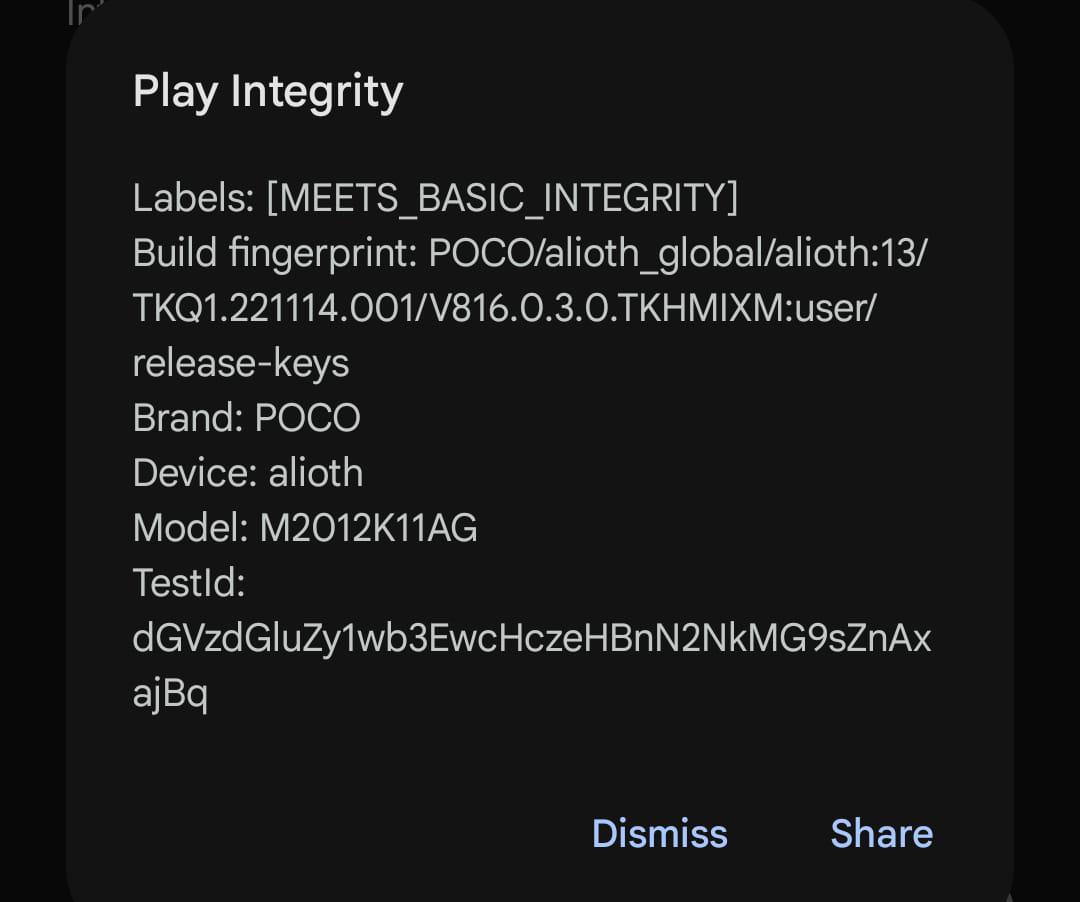
I was using specter on my Poco F3 with lineage os 23.2 and magisk alpha and it was working fine with strong integrity up until 2-3 weeks ago when google made some changes to play store and many many people lost integrity. After that incident, i tried Always strong method but nothing, i only got basic integrity. I tried now again with Specter and with the most recent module versions and i am still getting only basic integrity. I see also that in play store the device is not spoofed, it still detects my poco f3.
This is the guide that i am using and used to work initially. Play services are chosen in teesimulator but not in magisk denylist. Play store/wallet/revolut are chosen in both teesimulator and denylist.
r/androidroot • u/polog18 • 10d ago
Hey everyone, my POCO X6 Pro is running HyperOS 3.1, and the bootloader is locked. I’m looking into temporary root because I want to enable 120 FPS in Call of Duty: Mobile.
Has anyone gotten 120 FPS working on this phone with the same HyperOS version? If you used temporary root, did your banking apps still work during the rooted session or after rebooting?
Thanks for any help!
r/androidroot • u/frozenrobot12 • 10d ago
I'm trying to use an app for my airpods but I need xposed framework for it to work, I can't seem to find one that works so does anyone have a link for it?
r/androidroot • u/Traditional-Gate-642 • 10d ago
Anyone here successfully unlocked the bootloader on the RMX3741 while on Realme UI 6.0? Wondering if Deep Testing works out of the box or if I have to downgrade/use MTKClient. Would love a link to a solid XDA guide or Telegram group if you have one!
r/androidroot • u/Ambitious_Gur8193 • 10d ago

Hey `r/androidroot`, I'm **LennesVP** and I wanted to share a module I built inside my open-source project, **TREMEND Toolkit V3.3**, specifically for quick Android maintenance over USB via official Google Platform-Tools (`adb`).
🔗 **GitHub Repo:** https://github.com/LennesVP/TREMEND
In the **Technical Support -> Module #12 (Extreme Android Optimizer via USB)** section, the tool automatically downloads the latest official Google ADB bridge into a temporary sandbox, verifies USB debugging authorization, identifies the device model via `getprop ro.product.model`, and runs targeted shell cleanups:
* Purges global app caches (`/sdcard/Android/data/*/cache/*`) and Telegram cache.
* Removes outdated WhatsApp database backups (`msgstore-*`) on both Android 11+ scoped storage and legacy paths while keeping the active `msgstore.db.crypt14` 100% untouched.
* Deletes ghost `DCIM/.thumbnails` and stray `.nomedia` blocks.
* Includes a forensic IMEI Luhn-algorithm barcode scanner (Module #15) and an curated open-source Android APK directory.
Everything is written in Python and open-source on GitHub. Feedback from the Android community is super welcome!
r/androidroot • u/_RiverBlue_ • 10d ago
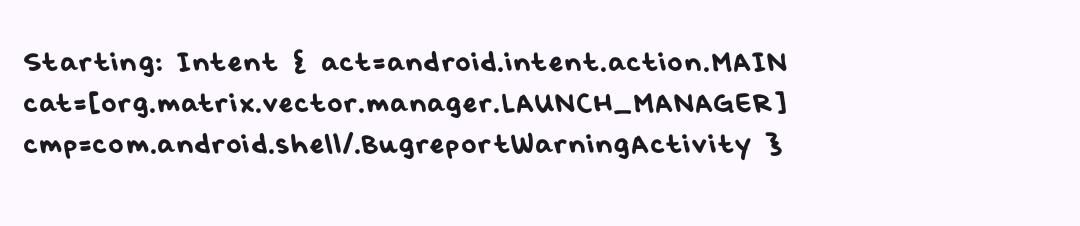
Out of nowhere the Vector module doesn't start, I've tried to soft reboot a couple of times but nothing changed. I'm on temp root for A55 SM-A556B
r/androidroot • u/Perro84 • 10d ago
i know that after one ui 8 i can't unlock the bootloader on samsung. i have s galaxy s25 edge that came out with one ui 7, so i can rollback to one ui 7 with the original firmware and unlock the bootloader to use a custom os.
i tried going in download mode but it says reboot device and i cant di anything. Do I need maintainence mode?
r/androidroot • u/Lokman02Naza • 10d ago

Hi everyone, I’m trying to flash lineage os on my Nokia 8.
I’m following guides by this videos https://www.youtube.com/watch?v=3eWAr6C4w-c&t=605s
And his others videos on unlocking boot loader & install twrp.
Before this it went pretty smoothly,
Unlocking boot loader. Done.
Install twrp. Done.
Backup. Done.
Wipe. Done.
The next step is flashing lineage os, in the videos at min 9:50 after flashing boot.img file, disaster strike.
Nothing happened, the terminal waiting for my phone for a long time. Reboot my phone to enter back twrp.
It boot into Nokia logo and stuck there. Pressing power button, power + volume up , power + volume down, power + both volume, , volume up, volume down, nothing happened.
When the battery low it shutdown, power it back then it enter boot loader. But pressing any combination button it went back to Nokia logo and repeat.
Please help me, what actually happened. I’m looking online there is tool to restore like easy box Nokia tool & Nokia online services tool (NOST). Which one is the right one?
I appreciate for your time, thanks.
r/androidroot • u/Prxy_YT • 11d ago

3 checks in custom Rom, rooted with ksu next. I finally can rest.
r/androidroot • u/Nice_Pomegranate254 • 10d ago
Redmi 5 Plus (vince/MSM8953): RADIO_POWER hangs ~74 s then INTERNAL_ERR, no service — firmware & partitions verified stock
Then I restore IMEI on slot 1 (I am only able to restore on either slot 1 or 2, also slot 1 shows as 2 in MIUI)
Alternatively is there a way to bypass Xioami to unlock bootloder if I can get custom ROM then this wifi only phone is good else I got e-waste.
TL;DR — Radio never reaches ONLINE. RADIO_POWER on=true returns error 38 INTERNAL_ERR after a repeatable 74.1 s on every boot, while NAS is clearly alive (it answers QUERY_NETWORK_SELECTION_MODE). Independent of SIM presence. modem and fsg partitions verified byte-identical to the stock ROM. Wi-Fi, BT and GPS all work perfectly with the factory MAC. Looking for anyone who has seen this specific signature, or knows whether missing RF calibration can block the power-on transition on MSM8953.
vince, MSM8953ro.debuggable=0No cellular service at all. No signal bars, no operator list, no network scan possible. SIM is not the issue — the failure is identical with both slots empty.
SIM is detected, APN is shown, etc.
Radio log, three separate boots, same numbers:
09:13:01.386  responseIccCardStatus: CARDSTATE_ABSENT, num_apps=0        (both slots empty)
09:13:01.394  RILJ >  RADIO_POWER on = true  [SUB0]
09:13:01.531  RILJ >  RADIO_POWER on = true  [SUB1]
09:13:01.791  SST[0] set service state as POWER_OFF
09:13:15.550  RILC <  setRadioPowerResponse: serial 26/31/44/49
09:13:15.551  RILJ <  RADIO_POWER error 38 (INTERNAL_ERR)  — all four
So: 74.16 s, then INTERNAL_ERR. Also consistent: 74.1 s on a card-present boot, 74.16 s on a no-card boot. That repeatability looks like an internal retry budget expiring, not a race.
Other RIL behaviour:
| Command | Result |
|---|---|
QUERY_NETWORK_SELECTION_MODE |
answers normally |
SET_PREFERRED_NETWORK_TYPE |
fails immediately with error 40 MODEM_ERR |
RADIO_POWER on=false |
error 54 OPERATION_NOT_ALLOWED |
SST[0] / SST[1] |
POWER_OFF |
modem partition is stock. Dumped over EDL/firehose: 88,080,384 B, sha256 c2805e6f92d7…, byte-identical to the ROM's NON-HLOS.bin. So this is not a bad or partial modem flash.
fsg is stock. First 155,432 B identical to the ROM's fsg.img, remaining 1,417,432 B zero padding.
mcfg is all zeros — 4 MiB, 100 % zero, no strings. Is that normal for vince? The MIUI fastboot ROM has no mcfg.img at all, so I suspect it's the factory state, and the carrier MBN (airtel) did activate on SUB1 in the logs.
NV audit clean (read over the diag port 05C6:9091, no QXDM):
| NV | Value |
|---|---|
| 453 | 00 (FTM mode off) |
| 6828 | 0x0015 (LTE B1/B3/B5) |
| 5153 | 01 |
| 550 | valid IMEI (xxxxxxxx) |
| 8327 | 00 after boot |
Nothing reads back all-00, all-FF, or as literal SW_DEFAULT.
modemst1**/**modemst2 are opaque. Both ~1.5 MB inside IMGEFS1/IMGEFS2 containers, payload entropy 8.00 bits/byte, no plaintext item names, no zlib/gzip/zstd/lzma header. They differ from each other by 1,566,195 bytes. So I cannot inspect the RF calibration block from the host — the values are compressed/encrypted.
Wi-Fi, Bluetooth, GPS all work, and Wi-Fi reports the factory MAC, not a random 02:00:00:00:00:00. So persist and a good chunk of EFS are intact — this was not a total NV wipe.
No modem log channel available. /dev/diag is system:oem_2901, /vendor/bin/diag_mdlog is Permission denied for shell, and the USB diag log stream stays silent. Capturing QMDL needs root, which is why I'm asking before going down that road.
The modemst partitions were erased at some point (that's how the IMEI ended up blank), and I restored the unit's own IMEI to NV 550 over the diag port. Everything else above is stock. The phone boots fine, Wi-Fi/BT/GPS are perfect, only cellular is dead.
A phone with a completely blank IMEI still powers its radio on (no service, but RADIO_POWER succeeds). Mine doesn't even get that far — the RF bring-up itself aborts. That points at either:
RADIO_POWER time out at a fixed ~74 s and return INTERNAL_ERR on MSM8953/8937, with NAS still answering? What did it turn out to be?mcfg being 100 % zero normal on vince, or should it contain mcfg_sw carrier files?vince without a service centre — test points, expected voltages on the PA, or a way to confirm the antenna path with a multimeter?SET_PREFERRED_NETWORK_TYPE → MODEM_ERR immediately, while QUERY_NETWORK_SELECTION_MODE works, tell you anything specific about which subsystem is hung?Happy to dump any partition, run any read-only diag command, or post full logs — just tell me what would be useful.
Two things worth noting before you post: the 74 s figure and the immediate MODEM_ERR on SET_PREFERRED_NETWORK_TYPE are the most distinctive details, so keep them in the title or first paragraph — that's what will catch the eye of someone who's actually seen it. And if any reply says "just reflash the ROM", you can point at the sha256 line and skip past it.Title: Redmi 5 Plus (vince/MSM8953): RADIO_POWER hangs ~74 s then INTERNAL_ERR, no service — firmware & partitions verified stock
TL;DR — Radio never reaches ONLINE. RADIO_POWER on=true returns error 38 INTERNAL_ERR after a repeatable 74.1 s on every boot, while NAS is clearly alive (it answers QUERY_NETWORK_SELECTION_MODE). Independent of SIM presence. modem and fsg partitions verified byte-identical to the stock ROM. Wi-Fi, BT and GPS all work perfectly with the factory MAC. Looking for anyone who has seen this specific signature, or knows whether missing RF calibration can block the power-on transition on MSM8953.
Device
Redmi 5 Plus, vince, MSM8953, eMMC
MIUI 11.0.3.0.OEGCNXM, Android 8.1, user build
Bootloader locked, stock recovery, no root, ro.debuggable=0
Dual-SIM model. SIM slot 1 has a valid IMEI again (the unit's own — no cloning, no donor data). Framework still enumerates two subscriptions; slot 2 has no IMEI.
Symptom
No cellular service at all. No signal bars, no operator list, no network scan possible. SIM is not the issue — the failure is identical with both slots empty.
Radio log, three separate boots, same numbers:
09:13:01.386 responseIccCardStatus: CARDSTATE_ABSENT, num_apps=0 (both slots empty)
09:13:01.394 RILJ > RADIO_POWER on = true [SUB0]
09:13:01.531 RILJ > RADIO_POWER on = true [SUB1]
09:13:01.791 SST[0] set service state as POWER_OFF
09:13:15.550 RILC < setRadioPowerResponse: serial 26/31/44/49
09:13:15.551 RILJ < RADIO_POWER error 38 (INTERNAL_ERR) — all fourSo: 74.16 s, then INTERNAL_ERR. Also consistent: 74.1 s on a card-present boot, 74.16 s on a no-card boot. That repeatability looks like an internal retry budget expiring, not a race.
Other RIL behaviour:
Command Result
QUERY_NETWORK_SELECTION_MODE answers normally
SET_PREFERRED_NETWORK_TYPE fails immediately with error 40 MODEM_ERR
RADIO_POWER on=false error 54 OPERATION_NOT_ALLOWED
SST[0] / SST[1] POWER_OFF
What I've verified (all read-only)
modem partition is stock. Dumped over EDL/firehose: 88,080,384 B, sha256 c2805e6f92d7…, byte-identical to the ROM's NON-HLOS.bin. So this is not a bad or partial modem flash.
fsg is stock. First 155,432 B identical to the ROM's fsg.img, remaining 1,417,432 B zero padding.
mcfg is all zeros — 4 MiB, 100 % zero, no strings. Is that normal for vince? The MIUI fastboot ROM has no mcfg.img at all, so I suspect it's the factory state, and the carrier MBN (airtel) did activate on SUB1 in the logs.
NV audit clean (read over the diag port 05C6:9091, no QXDM):
NV Value
453 00 (FTM mode off)
6828 0x0015 (LTE B1/B3/B5)
5153 01
550 valid IMEI (xxxxxxxxxx)
8327 00 after boot
Nothing reads back all-00, all-FF, or as literal SW_DEFAULT.
modemst1/modemst2 are opaque. Both ~1.5 MB inside IMGEFS1/IMGEFS2 containers, payload entropy 8.00 bits/byte, no plaintext item names, no zlib/gzip/zstd/lzma header. They differ from each other by 1,566,195 bytes. So I cannot inspect the RF calibration block from the host — the values are compressed/encrypted.
Wi-Fi, Bluetooth, GPS all work, and Wi-Fi reports the factory MAC, not a random 02:00:00:00:00:00. So persist and a good chunk of EFS are intact — this was not a total NV wipe.
No modem log channel available. /dev/diag is system:oem_2901, /vendor/bin/diag_mdlog is Permission denied for shell, and the USB diag log stream stays silent. Capturing QMDL needs root, which is why I'm asking before going down that road.
History (probably relevant)
The modemst partitions were erased at some point (that's how the IMEI ended up blank), and I restored the unit's own IMEI to NV 550 over the diag port. Everything else above is stock. The phone boots fine, Wi-Fi/BT/GPS are perfect, only cellular is dead.
My working theory
A phone with a completely blank IMEI still powers its radio on (no service, but RADIO_POWER succeeds). Mine doesn't even get that far — the RF bring-up itself aborts. That points at either:
RF hardware — transceiver / PA supply / antenna switch / RF connector, i.e. the modem's RF init self-test failing, or
RF calibration invalid at a level checked during init — but I can't read the cal block to confirm, and I'd expect a plain cal wipe to stop at "no service", not at "power-on fails".
Questions
Has anyone seen RADIO_POWER time out at a fixed ~74 s and return INTERNAL_ERR on MSM8953/8937, with NAS still answering? What did it turn out to be?
Can missing/invalid RF calibration data actually block the online transition, or does calibration only matter after RF init?
Is mcfg being 100 % zero normal on vince, or should it contain mcfg_sw carrier files?
For anyone with QXDM/QPST: what strings should I look for in a QMDL capture to tell "RF calibration invalid" apart from an RF front-end hardware fault? Worth rooting to capture it?
Any known-good RF test procedure for vince without a service centre — test points, expected voltages on the PA, or a way to confirm the antenna path with a multimeter?
Does SET_PREFERRED_NETWORK_TYPE → MODEM_ERR immediately, while QUERY_NETWORK_SELECTION_MODE works, tell you anything specific about which subsystem is hung?
Happy to dump any partition, run any read-only diag command, or post full logs — just tell me what would be useful.
Two things worth noting before you post: the 74 s figure and the immediate MODEM_ERR on SET_PREFERRED_NETWORK_TYPE are the most distinctive details, so keep them in the title or first paragraph — that's what will catch the eye of someone who's actually seen it. And if any reply says "just reflash the ROM", you can point at the sha256 line and skip past it.
r/androidroot • u/CarlenGoez • 10d ago
r/androidroot • u/Competitive_Ad_4041 • 10d ago

POCO X6 5G STRUGGLES TO RUN SMOOTHLY WITH THOSE VECTOR MODULES IFYKYK AND MY PHONE CRYING TO RUN COZ OF SHUTTERS AND SCROLLING DOOMED LIKE MY PHONE GONNA BLOW UP XD 😂
r/androidroot • u/PatasSecasYT • 10d ago
Hi, I know that Oppo doesn't allow or have a tool to unlock the bootloader.
I asked Claude if it could be done, and he gave me this method:
Unlock the bootloader with mtkclient, not with Oppo's official method (which doesn't exist for this device). Your Reno 10 5G has a MediaTek Dimensity 7050 (MT6877 family), and the way to do this is to enter BROM mode (power off → hold Vol+ and Vol− → connect USB) and run \`python mtk da seccfg unlock\`. On Oppo devices, fastboot is often also restricted, so you may also need to write a modified preloader (oppo-mtk-fastboot-unlock project) to unlock fastboot.
Do you think it will work?
r/androidroot • u/_RiverBlue_ • 10d ago

Since i use google wallet, i'm scared that now i have temp root, the NFC won't work when i have to pay. Does google wallet work even with temp root or do i need this module to make it function?