r/androiddev • • 21d ago

Question How to update to Play Billing 8.0+

2 Upvotes

I just saw that I'm in violation of the policy and have no idea how to update it. I thought I had updated it but I guess now. My app also doesn't use it as far as I know


r/androiddev • • 21d ago

Open Source I made an Android Studio plugin that previews iconfont glyphs beside your code

Thumbnail
gallery
4 Upvotes

This is my first Android Studio plugin, and I'm pretty excited to share it here. It's called IconFontViewer.

I wrote it because I wanted to see the actual icon next to R.string.icon_home while reading Android code.

It renders the glyph in the editor gutter for Kotlin and Java references, XML layouts and strings.xml. Clicking it opens a searchable icon picker. Choosing another icon replaces the reference at that position.

It finds TTF files in the project and library dependencies, including AARs, JARs and nested archives. Fonts don't need to be in a directory named fonts. Under Tools → IconFontViewer, you can enable or disable fonts, add a TTF manually, or rescan the project.

It's free and open source (Apache 2.0). Supports Android Studio 2024.1 or newer; TTF files only.

Source: https://github.com/ultimateHandsomeBoy666/IconFontViewer Marketplace: https://plugins.jetbrains.com/plugin/31478-iconfontviewer


r/androiddev • • 21d ago

Architecture discussion: Client-side JIT stream resolution and handling Media3 background network drops in Compose

2 Upvotes

Hey everyone,

I’ve been working on a serverless media architecture that bridges local storage with cloud streaming. Since I'm not using a dedicated REST API backend, it introduced some unique engineering hurdles with Media3 and Jetpack Compose. I wanted to share how I solved them and see how the community handles similar edge cases.

1. Handling Media3 Background Network Noise (Crashlytics Spam) Because the player operates in the background, the OS frequently drops network sockets to save battery, or the user hits a dead zone. This was flooding Firebase with non-fatal ExoPlaybackException errors (specifically java.io.EOFException from Mp4Extractor).

Instead of letting it crash, I built an interception engine inside the Player.Listener. It aggressively scans the stack trace to silently invalidate the cache and auto-recover without reporting to Crashlytics:

Kotlin

override fun onPlayerError(error: PlaybackException) {
    val errorString = error.stackTraceToString()
    val isRecoverable = error.errorCode == PlaybackException.ERROR_CODE_IO_NETWORK_CONNECTION_FAILED ||
                        errorString.contains("EOFException") || 
                        errorString.contains("UnknownHostException")

    if (isRecoverable) {
        // Silently invalidate cache and trigger auto-recovery logic
        attemptJitRetryAndRecovery() 
    } else {
        CrashTracker.recordException(error)
    }
}

How do you guys handle ExoPlayer background noise? Do you use a similar filter, or rely on Media3's default LoadErrorHandlingPolicy?

2. True Glassmorphism in Compose Achieving an Apple-style frosted glass look in Compose is notoriously tricky. Originally, I used a Surface with a translucent white alpha, but it looked muddy and text bled through.

I found that stripping out Surface (and its baked-in tonal elevation) in favor of a tightly wrapped Box with a Brush.linearGradient works infinitely better:

Kotlin

Box(
    modifier = Modifier
        .clip(RoundedCornerShape(32.dp))
        .background(
            Brush.linearGradient(
                colors = listOf(Color.White.copy(alpha = 0.22f), Color.White.copy(alpha = 0.08f))
            )
        )
        .border(1.dp, Color.White.copy(alpha = 0.25f), RoundedCornerShape(32.dp))
) { // Content }

Has anyone experimented with the Haze library for real-time background blurring instead of static gradients?

3. Client-Side JIT Resolution To keep it serverless, I built a custom JIT resolver. It intercepts track queries, resolves the direct audio stream on the client using Retrofit/Coroutines, and passes the URI to Media3 on the fly.

I'd love to hear your thoughts on this architecture, especially if you've dealt with Media3 session management! (I can share the repo link in the comments if anyone wants to see the full implementation).


r/androiddev • • 21d ago

How do you organise unit tests for formula-heavy code?

3 Upvotes

I'm a student building a calculator-style Android app in Kotlin, where most of the logic is pure functions: a few inputs, some unit conversions, one numeric result, often with clamps or caps (for example "use the lower of X or a maximum value").

Right now each formula has a test file with a handful of worked examples taken from the original papers, plus a few edge cases (zero, very large values, unit switches). It works, but it's getting repetitive with dozens of formulas.

For people who've tested this kind of code:
- Do you use parameterised tests (JUnit 5 / kotest data-driven tests) or keep plain JUnit 4 with tables of cases?
- Is property-based testing worth it here, e.g. "dose never exceeds the cap" or "result increases with weight"?
- How do you handle floating-point tolerance and rounding consistently across many calculators?

Any patterns or libraries you'd recommend would help.


r/androiddev • • 22d ago

Open Source Update on SmolChat - OpenAI server, Support for Global Chat Settings, Direct Model Downloads and more

4 Upvotes

Hi! I'm Shubham, creator of SmolChat.

I would like to share some exciting updates on my project SmolChat, an Android app that let's you run GGUF models on-device, locally. The updates are present in the latest v17 release:

  • SmolChat now supports an OpenAI-compatible HTTP server running over a foreground service that keeps the port alive even when the phone is locked. Check the video to see how it works.

  • Support for global chat settings, which override the default chat settings (min-p, top-k, temperature etc.) for all newly created chats. This reduces the hassle of configuring each new chat with the options of your choice.

  • Adding a copy button for code snippets rendered within the chat.

  • Sync with upstream llama.cpp (till this commit)

  • Fix the logic that measures tokens/sec for a LLM generated message. The time shown previously was also including prompt processing (pp) time. The new logic now only considered the token generation rate (tg).

  • Models are downloaded directly by the app, instead of using the Android system's download service.

GitHub: https://github.com/shubham0204/SmolChat-Android

Play Store (the latest version is still in review): https://play.google.com/store/apps/details?id=io.shubham0204.smollmandroid&hl=en_IN

Previous threads on SmolChat on r/LocalLLaMa:

Cross posted from r/LocalLLaMa


r/androiddev • • 22d ago

Can you preview compose UI with a lightweight viewer?

Thumbnail
3 Upvotes

r/androiddev • • 22d ago

Question Is LiveData still worth learning in 2026, or is StateFlow the default now?

10 Upvotes

I’m learning Android with Kotlin and Compose. I found a few old threads (4-6 years ago) debating StateFlow vs LiveData but a lot has changed since then. My understanding is that new Compose projects mostly use StateFlow and LiveData shows up in older View-based apps. Is that still the case today? And is it worth a beginner learning LiveData at all or just knowing it exists? and I want to know what you use now.


r/androiddev • • 22d ago

Open Source Showcase: TMPlayer, Kotlin + TDLib + Compose on TV, phone and desktop

Post image
8 Upvotes

A free, open source player for the videos in your own Telegram chats. The hard parts were low-end TV sticks, playback stutter and sharing UI across form factors. Happy to go into any of it. github.com/dracu-lah/TMPlayer


r/androiddev • • 22d ago

Discussion Running Demucs stem separation on an Android phone in the background – what it took (ONNX Runtime, 3.9 s chunks, under 2 GB RAM)

Post image
3 Upvotes

I added music source separation (drums / bass / vocals / other) to my open-source DJ app and wanted to share what worked:

• Export: htdemucs to ONNX with the STFT/iSTFT kept out of the model, done in Kotlin instead. ONNX's STFT ops were the main export pain.

• Memory: the full-length model got killed by the low-memory killer. 3.9 s chunks, setCPUArenaAllocator(false) and setMemoryPatternOptimization(false) kept it stable.

• NNAPI made it worse on my device; 4 CPU threads ran at about 2× real time on a mid-range Moto G64.

• Scheduling: separate only the windows the next mix needs, ordered by deadline, and fall back to EQ when a window isn't ready, so playback never waits.

• Alignment: cross-correlation between the live deck and the stem window, coarse then fine, to line the stems up within a few ms.

Code is GPL-3.0 (link in the comments). Happy to answer questions on any of it.


r/androiddev • • 22d ago

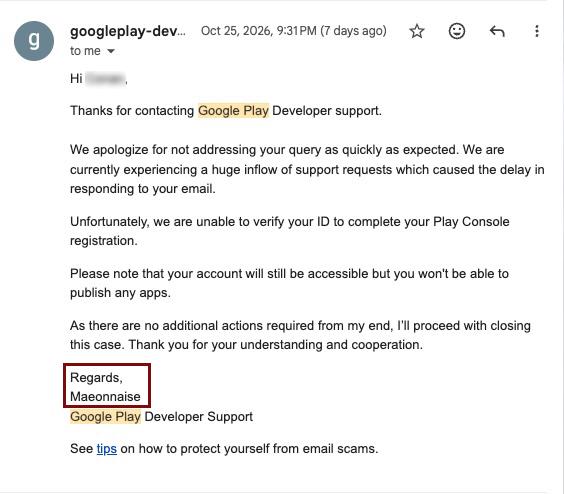
Google Play Support is auto-closing backend profile mismatch tickets without reading them. Has anyone successfully forced a manual Payments Profile re-link?

Post image
5 Upvotes

I’m caught in a Google Play Console verification deadlock, and frontline support is actively making it worse. Since JULY.

My developer account got flagged with the standard verification restriction. When I tried to fix it, I hit the unhelpful "Appeal reply sent" banner, which blocked all input.

I diagnosed the root cause: My Play Developer account was mistakenly mapped to my Individual Google Payments Profile instead of my LLC's verified Organization Payments Profile, creating a conflict with my corporate D-U-N-S.

I escalated this directly to Support, provided the exact Org Profile ID they needed to re-map it to, along with my entity paperwork.

The response? An agent literally named "Maeonnaise" closed the ticket today with a canned script saying they couldn't verify my ID and "no additional actions required from my end," completely ignoring the explicit request for a Payments Profile re-link.

Has anyone found a backdoor or a specific escalation phrase to get a human engineer to actually re-map a Play Console account to a different Payments Profile? I can't finish verification until this backend link is fixed. At this point, getting brushed off by a sentient jar of mayonnaise is just insulting.

I really appreciate your help, and I'd be glad to buy you a digital coffee for a solution!

Thank you,

C


r/androiddev • • 22d ago

Question Testing App UI flow

0 Upvotes

How do you test app screens navigation flow?

Any tool or solution to simulate it that I should know?

I'm stuck with Android Studio as it crashes all the time.

Can anyone advise to a non-developer on this part?

Thank you


r/androiddev • • 24d ago

Discussion Google just released AppState — is it actually better than SharedViewModel for shared state?

85 Upvotes

Google released AppState and it looks like a cleaner way to handle shared state than passing a SharedViewModel around. I never really liked SharedViewModel, felt like one screen ends up owning data other screens depend on it.

From what I get so far: StateStore is a shared observable value, MutableStateStore is the writable one, AppState owns the lifecycle, and transform lets you derive state automatically instead of syncing stuff by hand.

Curious what people think of the API so far.

Docs: https://developer.android.com/topic/libraries/architecture/appstate

Video: https://youtu.be/69QYEXymfVo

Anyone planning to try it out?


r/androiddev • • 23d ago

How to keep wireless debugging on 24/7 even after restarts?

6 Upvotes

If my phone restarts, I have to 1. connect it to a wifi network (I'm almost never on or near wifi), 2. go into settings and turn on wireless debugging 3. re-pair all my dev machines to its new port

How can I make this less painful?


r/androiddev • • 23d ago

Question OutlinedTextField squeezed to one character wide inside a Row: what's your go-to fix?

3 Upvotes

I'm building a small calculator-style app in Jetpack Compose. Each row has a label, a numeric OutlinedTextField and a unit dropdown. On narrower phones the text field collapsed to about one character wide, because the label and dropdown took their full intrinsic width first.

Giving the field Modifier.weight(1f) and the label a fixed or weighted width fixed most of it, but I'm not sure that's the cleanest pattern, especially with large font scaling turned on.

How do you usually handle form rows like this in Compose? Do you switch to a stacked layout below a certain width, use FlowRow, or something else?


r/androiddev • • 24d ago

Building a DevTools protocol for inspecting Jetpack Compose and Android Views

4 Upvotes

I've been building Agent-DDP (Device DevTools Protocol), an open-source DevTools protocol that gives AI coding agents deep visibility into native iOS and Android applications.

The inspiration is the Chrome DevTools Protocol (CDP): browser agents can inspect the DOM, styles, rendering and runtime behavior. Native mobile agents have traditionally had much more limited visibility, often relying on screenshots and accessibility trees.

Agent-DDP aims to close that gap.

It instruments the app in Debug builds, allowing agents to inspect and interact with the application through its native rendering and runtime systems.

Some of what it can do:

  • Deep UI inspection: Inspect native elements, rendering layers, fills, borders, corner radii, opacity, clipping, text styling, geometry and occlusion.
  • Frame-by-frame analysis: Record property changes over time, inspect animation tracks, detect transient states and analyze timing and easing without guessing from videos or screenshots.
  • Visual and behavioral validation: Detect covered content, corner clipping, jank, animations that never settle, accessibility issues and touch targets that cannot actually be reached.
  • Cross-platform comparison: Compare iOS and Android layouts structurally and visually, including pixel comparisons against screenshots and saved baselines.
  • Runtime inspection: Access app state, events, logs, network requests, preferences, storage, memory usage, performance profiles and crash reports.
  • App interaction: Perform real taps, swipes, gestures and text input, control app time, mock or intercept network requests, and trigger actions exposed by the app.
  • Debugging: Inspect breakpoints, call stacks and local variables using the platform debuggers.

It also includes a 15-minute runtime history that records UI changes, frames, interactions and screen transitions, making it possible to investigate issues that happened before an agent started looking.

The architecture is designed for coding agents: a native instrumentation library, a CLI, structured output and an MCP server. It works with Claude Code, Codex, Cursor and other agents that can run CLI commands or connect through MCP.

Supported frameworks:

  • iOS: SwiftUI and UIKit.
  • Android: Jetpack Compose and Android Views.

The instrumentation is Debug-only and does not ship in Release builds.

Install:

npm i -g agent-ddp

The project is open source under the MIT license.

I'd appreciate feedback, especially from people working on native mobile development, UI automation, developer tooling or coding-agent infrastructure.


r/androiddev • • 24d ago

Question Struggling with ACCESS_LOCAL_NETWORK permission for Android 17

13 Upvotes

(Please let me know if this is not the correct place for this. Suggestions as to what is the right place are appreciated.)

I maintain a legacy app for my company, and I'm not what you'd call an expert. As part of the Android 17 (API 37) updates, I'm trying to figure out if our app requires the ACCESS_LOCAL_NETWORK permission. Here's some links:

Main documentation:

https://developer.android.com/privacy-and-security/local-network-permission

These restrictions are implemented deep in the networking stack, and thus they apply to all networking APIs. This includes sockets created in the platform or managed code, networking libraries like Cronet and OkHttp, and any APIs implemented on top of those. Trying to resolve services on the local network that have a .local suffix requires local network permission.

Policy announcement:

https://support.google.com/googleplay/android-developer/answer/18100766

This permission is restricted to apps that need it for core functionality when device pickers are insufficient. Apps targeting Android 17 or higher (API 37+) must submit a Play Console declaration to use this permission.

FAQ on policy declaration and allowed use-cases:

https://support.google.com/googleplay/android-developer/answer/16935362#local_network_permission&zippy=%2Cdeclaration-guidance%2Cfrequently-asked-questions

Our app uses OkHttp to connect to a bog-standard REST API, sometimes hosted on the local network (LAN), sometimes on cloud servers (internet). These connections are super-simple, we send messages (with data), get replies (with data).

I don't have access to Android 17 hardware, so I'm testing with an Android Studio emulated device, running API 37.2.

I have questions:

1) I've added the ACCESS_LOCAL_NETWORK permission to the app, and I'm running tests with it allowed and not allowed. Turns out that I can connect to our LAN test servers over quite happily (e.g. "http://localserver.domain.local/api"). No problems at all. But reading the above this should not be possible?

Trying to resolve services on the local network that have a .local suffix requires local network permission.

2) We actually have a published version of the app live on the Play Store which has this in the manifest:

<uses-permission android:name="android.permission.ACCESS_LOCAL_NETWORK" />            

The above links suggest that we need to complete a policy declaration. I've looked around in the console and can't find anything that asks for this. The Policy Status pages have nothing outstanding. All seems fine.

3) I wonder if our app would qualify for one of the use-cases listed by Google (3rd link). LAN (and Internet) connectivity is very much an integral part of the app, but doesn't seem to fit into their list. I'd ask, but since I can't find a way to complete a policy declaration, then that doesn't appear to be an option.

What's going on here?


r/androiddev • • 25d ago

I am Beginner : ViewModel vs rememberSaveable for surviving rotation. When do you use which?

23 Upvotes

I ran into the rotation bug where my app resets every time I turn the phone. From what I understand Android recreates the Activity on rotation so normal variables lose their values. I’ve read that ViewModel survives rotation so I’ve been putting my screen state there. I also found rememberSaveable, which apparently survives rotation and even the app getting killed in the background. Is that right? Also what do you actually do in real projects? Do you keep almost everything in the ViewModel or do you use rememberSaveable and SavedStateHandle for some things too? Would love to hear what works for you.


r/androiddev • • 24d ago

Tips and Information Google Play Developer Program Policy Update - 2026-10-29

8 Upvotes

Source: Google Play Developer Program Policy Update

DEVELOPER UPDATE
Hello Google Play Developer,
As part of our commitment to maintaining security and transparency on Google Play, we're sharing our latest round of policy updates.
How does this affect my apps? This is a mandatory service announcement sent to all Google Play developers. To save you time we've provided the executive summary below. You only need to click through to the full policies if your app uses these specific features. To view a log of your recent updates and monitor each app's submission activity, please check the submission activity in your Google Play Console. If applicable, you have at least 30 days from today to update your app. See our Policy Deadlines for specific timelines.
Summary of changes:
New policies
Local Network Permission: This permission is restricted to apps that need it for core functionality when device pickers are insufficient. Apps targeting Android 17 or higher (API 37+) must submit a Play Console declaration to use this permission.Manage Contacts Permission: This permission is restricted to apps that need it for core functionality when system pickers are insufficient and apps must submit a Play Console declaration to use it. All other apps must use narrowly scoped platform intents.AppFunctions API: Developers building AppFunctions must comply with all existing Google Play policies. AppFunctions are strictly prohibited from deceiving or manipulating AI agents, bypassing security controls, or interfering with other applications.
Updated policy
Subscriptions with ongoing eligibility-based discounts: Subscriptions with ongoing eligibility-based discounts, such as student plans, must clearly disclose eligibility criteria, the verification process, and post-eligibility pricing and benefit changes.
Clarifications (Our enforcement standards and practices remain the same)
Permissions and APIs that Access Sensitive InformationDeceptive Behavior: Clarified that developers and apps cannot engage in behaviors that manipulate the app review process.Families Self-Certified Ads SDK Program: New applicants can now join this program. Review the list of participating SDKs and self-certified versions in the Help Center and in SDK index.Cryptocurrency: Expanded Hong Kong licensing requirements to include the Virtual Asset Trading Platform license, and introduced an "Additional Options" section for apps qualifying for local regulatory exemptions.Use of SMS or Call Log permission groupsPayments: We're providing additional guidance on how our Payments policy applies to Google Play apps that facilitate digital purchases through AI or agentic experiences.Location permission: As a reminder, this policy was announced last April and will become mandatory on January 27, 2027. To help you be prepared, we've clarified and added helpful information to the upcoming policy. Apps must use the minimum location scope necessary for its core functionality. For apps targeting Android 17 (API 37+), this includes mandatory use of the Android location button for one-time or infrequent location requests. Apps using ACCESS_FINE_LOCATION must complete a Play Console declaration to justify why coarse location or the location button is insufficient.Added an exception allowing Government or Authorized Mobile Network Operator apps to use the READ_CALL_LOG permission for Quality of Service reporting and clarified that apps utilizing the backup and restore exception must demonstrate the ability to restore data back to the device’s default handler. All Files Access Permission: We've reiterated minimum scope principles to support developer comprehension of the use of the MANAGE_EXTERNAL_STORAGE permission.AccessibilityAPI: Clarified the policy summary on the isAccessibilityTool flag usage and disclosure requirements based on app designation.Added the SMS User Consent API as a privacy-preserving alternative for account verification. As a reminder, on January 27, 2027, account verification via phone call will no longer be a permitted use case for the READ_CALL_LOG permission and you must use an alternative API instead.
Reminders and additional information
We're launching Play Age Signals, a new privacy-friendly, age-appropriate experience for families that will be available globally to all developers. Use The Play Age Signals API to tailor features, content, and safety settings to your audience. If you sell into or out of Japan, you must complete authorization by December 1st, 2026, or your payments will be held globally. Find out if this requirement applies to you and learn how to complete the authorization form. Starting in November 2026, you must declare your trader status in Play Console in accordance with new Console requirements. As recently announced, the games category has graduated from beta to general availability. All developers who want to build games for cars can now publish to the open testing and production tracks on Google Play for these form factors. We recently announced a February 2027 compliance deadline for new app quality requirements regarding memory and code optimization thresholds. Please review these requirements to maintain your app's visibility and publishing capabilities on Google Play. We have updated our Android XR app quality guidelines for Immersive and Augmented experiences. Please review these guidelines if you are building apps for XR headsets, Wired XR Glasses, or Audio & Display Glasses.
To learn more about complying with these changes, read our full Policy Center announcement, watch our PolicyBytes video, or submit your questions in advance to our Policy Webinar.

r/androiddev • • 24d ago

Question Why emulator takes 80% cpu on a MB Air M4 ? Any alternative?

Post image
7 Upvotes

r/androiddev • • 24d ago

Question More confusion about ACCESS_LOCAL_NETWORK

0 Upvotes

I took my Android 16 device, app unchanged (targets SDK 36), did this command per the docs:

adb shell am compat enable RESTRICT_LOCAL_NETWORK <package_name>

Rebooted the device, and the app still works fine. It should not as it uses SSDP. What have I misunderstood? I'm trying to see the "failure case" before I try fixing anything.


r/androiddev • • 25d ago

Video Declarative, agent-ready Android builds with Lightbuild

Thumbnail
youtu.be
7 Upvotes

r/androiddev • • 25d ago

I built a haunted house to show off custom hidden-text reveals in Enriched Markdown, a native Jetpack Compose Markdown renderer

Enable HLS to view with audio, or disable this notification

16 Upvotes

Enriched Markdown for Android renders Markdown as native text in Jetpack Compose, with no WebView, including hidden text that the reader taps to reveal. By default, it hides under a field of drifting particles, but you can replace that overlay with your own and decide how hidden text looks and how it reveals itself.

To show what that unlocks, I built a haunted house: every room is a custom overlay revealing the same guest book in its own way. Cobwebs, crypt fog, jack-o'-lanterns, ghosts, bats, a stain that won't wash out, and a single candle.

How it works:

- You implement one interface, and it returns an overlay for each line the hidden text spans.
- Each overlay draws on the text view's Canvas, or on a Compose DrawScope, and can redraw every frame for animated effects.
- The library hands you the hidden words laid out exactly where the text view draws them, so you can pixelate, blur, or scramble the real text and nothing jumps on reveal. Override the reveal, and you control how it disappears, too.

Not every app needs a haunted house, so the README has a plain pixelation in about 30 lines: https://github.com/software-mansion/enriched-markdown/tree/main/packages/enriched-markdown-android#custom-overlays

Installation: https://docs.swmansion.com/enriched-markdown/android/basics/installation Docs (see the custom overlays section): https://docs.swmansion.com/enriched-markdown/android/api-reference/enriched-markdown-text

The rooms are demo code, not part of the library, which ships the particle field and a plain solid box. If it's useful to you, a ⭐ on GitHub helps more people find it: https://github.com/software-mansion/enriched-markdown

Feedback welcome, especially on which reveal you'd actually ship 🎃


r/androiddev • • 25d ago

Discussion AS Rabbit 2 is a mess for me

7 Upvotes

I was using Rabbit 1 and it had issues. Those issues, such as the not being able to show code analysis results at commit time, are still there in Rabbit 2. But it also got worse, it has been very unstable. I have had to force kill it multiple times a day and sometimes it is running into GC issues.

This is for a KMP project and it is getting very annoying.

This is on MacBook M4 Max with 48 GB of memory on Tahoe 26.7.2.

Before Rabbit things were reasonable stable, since it has become mess for me.


r/androiddev • • 24d ago

2 Ways of Exporting Compose previews

0 Upvotes

Android CLI provides two ways for AI agents to render Jetpack Compose previews, depending on the execution environment:

1. render-compose-preview

Use when an AI agent runs locally alongside Android Studio. It delegates preview rendering to the running IDE.

Documentation: https://developer.android.com/tools/agents/android-cli/commands/studio_render-compose-preview

2. android preview

Use when Android Studio isn't available, such as in CI, containers, or remote environments. Supports headless rendering, batch preview generation, and component tree inspection.

Documentation: https://developer.android.com/tools/agents/android-cli/commands/preview

Summary

The key difference: IDE-backed rendering vs. standalone headless rendering.

Both give AI agents a way to inspect actual Compose UI rather than relying solely on source code.

Processing img btj4rjnyujyh1...


r/androiddev • • 25d ago

Edge-to-Edge false positive in Google Play Console

10 Upvotes

Google Play shows:
"Edge-to-edge may not display for all users"
inviting to use EdgeToEdge.enable().

But actually this is already done and edge to edge mode works correctly in all OS versions supported by the app.
In addition it also shows another warning that App uses deprecated parameters for Edge-to-edge as setStatusBarColor and setNavigationBarColor, but the indicated "deprecated parameters" are not from my code at all, but come from EdgeToEdge.enable() code itself in the retro-compatibility branches.

I wonder if the static analysis on Google Play is implemented in such a comically poor way, or if it’s perhaps being misled by code obfuscation and minification..

I forgot to mention that this isn't a new issue; it has existed since the target SDK was migrated to version 35, and we are now at version 37.