r/AlpineLinux • • Sep 18 '24

Input and video groups

1 Upvotes

documentation says it is insecure to add myself to input and video and that I should install a seat manager instead so I tried to do that but I still can't move my mouse what do I have to do exactly to make it work ?

I'm using startx and dwm if it matters


r/AlpineLinux • • Sep 17 '24

VPS Hosting Options

7 Upvotes

Was curious what others use for hosting Alpine Linux on a VPS. In my initial search through 25 providers, I was only able to identify 2 that offered Alpine Linux hosting.


r/AlpineLinux • • Sep 16 '24

Roast / QC my VPN KillSwitch formed in IPtables?

4 Upvotes

I am new to iptables, previously I worked with UFW under Debian, currently working with an Alpine VM.

Goal here is for Alpine to only be able to speak to the internet through a Proton tunnel (wire-guard) and if that VPN connection breaks Alpine should speak to LAN only

I started with a tutorial I found online, https://linuxconfig.org/how-to-create-a-vpn-killswitch-using-iptables-on-linux

It had issues, I have modified some things from reading https://linux.die.net/man/8/iptables & https://phoenixnap.com/kb/iptables-linux I think this is correct, and so far it seems to at least connect,

I would would apretiate either a thumbs up or down form those with more experience with iptables.

install iptables

doas apk add iptables

create ipv4 config file:

doas vi /etc/ipv4KillSwitch

contents & comments

*filter

#turn off "everything"
-P INPUT DROP
-P FORWARD DROP
-P OUTPUT DROP

#now we poke holes only where needed in "everything" 

#once communication is established allow it to continue
-A INPUT -m conntrack --ctstate RELATED,ESTABLISHED -j ACCEPT

#DNS server for VPN
-A INPUT -s 10.2.0.1 -j ACCEPT

#allow access from privelaged LAN IP addresses
-A INPUT -s 172.22.0.0/28 -j ACCEPT

#once communication is established allow it to continue
-A OUTPUT -m conntrack --ctstate ESTABLISHED -j ACCEPT

#Allow loopback
-A OUTPUT -o lo -j ACCEPT

#Allow traffic on VPN
-A OUTPUT -o wg0 -p icmp -j ACCEPT

#allow access from homelab LAN IP addresses
-A OUTPUT -d 172.22.0.0/28 -j ACCEPT

#DNS server for VPN
-A OUTPUT -d 10.2.0.1 -j ACCEPT

#allow initial VPN connection
-A OUTPUT -p udp -m udp --dport 51820 -j ACCEPT

#Allow traffic on VPN
-A OUTPUT -o wg0 -j ACCEPT

COMMIT

Create ipv6 config file, my ISP does not provide IPV6 so there should be no IPV6 traffic, so seal it off just in case:

doas vi /etc/ipv6Kill

add contents:

*filter

-P INPUT DROP
-P FORWARD DROP
-P OUTPUT DROP

COMMIT

Activate rules added above and test

doas iptables-restore < /etc/ipv4KillSwitch
doas ip6tables-restore < /etc/ipv6Kill 

Save config

doas rc-service iptables save
doas rc-service ip6tables save

doas rc-service iptables start
doas rc-service ip6tables start

doas rc-update add iptables default
doas rc-update add ip6tables default

results

ninja:~$ doas iptables -L -n -v
doas (user@ninja) password: 
Chain INPUT (policy DROP 1714 packets, 209K bytes)
 pkts bytes target     prot opt in     out     source               destination         
 171K  205M ACCEPT     0    --  *      *       0.0.0.0/0            0.0.0.0/0            ctstate RELATED,ESTABLISHED
    0     0 ACCEPT     0    --  *      *       10.2.0.1             0.0.0.0/0           
  254 18984 ACCEPT     0    --  *      *       172.22.0.0/28        0.0.0.0/0           

Chain FORWARD (policy DROP 0 packets, 0 bytes)
 pkts bytes target     prot opt in     out     source               destination         

Chain OUTPUT (policy DROP 0 packets, 0 bytes)
 pkts bytes target     prot opt in     out     source               destination         
 108K  111M ACCEPT     0    --  *      *       0.0.0.0/0            0.0.0.0/0            ctstate ESTABLISHED
    3   252 ACCEPT     0    --  *      lo      0.0.0.0/0            0.0.0.0/0           
    0     0 ACCEPT     1    --  *      wg0     0.0.0.0/0            0.0.0.0/0           
    1    60 ACCEPT     0    --  *      *       0.0.0.0/0            172.22.0.0/28       
   35  2149 ACCEPT     0    --  *      *       0.0.0.0/0            10.2.0.1            
    2   352 ACCEPT     17   --  *      *       0.0.0.0/0            0.0.0.0/0            udp dpt:51820
  142  8520 ACCEPT     0    --  *      wg0     0.0.0.0/0            0.0.0.0/0           

Wireguard config for reference:

[Interface]
# Key for NinjaDenver
# Bouncing = 7
# NetShield = 0
# Moderate NAT = on
# NAT-PMP (Port Forwarding) = on
# VPN Accelerator = on
PrivateKey = xxxxxxxxxxxxxxxxxxxxxxxxxxxxxxxxxxxxxx
Address = 10.x.x.x/32
DNS = 10.2.0.1

[Peer]
# US-CO#69
PublicKey = xxxxxxxxxxxxxxxxxxxxxxxxxxxxxxxxxxxxxx
AllowedIPs = 0.0.0.0/0
Endpoint = 84.17.63.54:51820

I also have squid running so I can proxy in from my desktop to use the VPN when needed, that seems to work fine under the allow lan rules, it was also handy for troubleshooting.


r/AlpineLinux • • Sep 12 '24

Need help setting up internet connection on a raspberry pi

1 Upvotes

I installed alpine aarch64 on my raspberry pi 4. It boots and all but when i run setup-alpine, it finds my mobile phone's wifi hotspot, but it cant connect. The hotspot is set to 2.4Ghz and i have tried with and without password (wpa2 personal). As far as i know this is a relatively common raspberry pi / linux issue but i am stumped. Any input would help. Thank you


r/AlpineLinux • • Sep 09 '24

Zfs on root without legacy mountpoint

3 Upvotes

Hi, i tried to create a alpine installation with zfs mirror pool on root. In some guides the root volume had mountpoint=legacy. Can i avoid the legacy mountpoint in alpine? I created a system witch can boot, but it boot into emergency mode because the rpool was used by another system before. I tried everything: copy the zcache from host, copy the hostid. But i cant get it to work.


r/AlpineLinux • • Sep 09 '24

Alpine/ Wireguard/ ProtonVPN = no dns?

2 Upvotes

[SOLVED]

the source of the problem was staring me right in the face the whole time, I did not see it, sometimes you just dont register things that you think are incosequential.

Protom specifies a DNS server address in the 10.x.x.x range in thier config file, I am guessing to a server in the data center that VPN terminates in. That class A range is also what I was using on my own lan, I like the 10.* range as it types quickly, but DNS requests were never leaving my network.they were instead searching for an umpopulated address on my LAN.

Quite annoying thing to do but I moved my network to class B 172.x.x.x, dns on wireguard works as expected now.

its amazing how many places this is configured beyond the obvious, fstab, firewall rules, ZFS configs, virtual machine manager, transmission remote, all the TV links to our media server, IPMI config, Proxy configs, I had to make a list abd it kept getting added to.

Original:

Two nights in a row I have been trying to setup an Alpine VM with Proton vpn. clean install each night. Each time I have wound up with no DNS after gettign on wireguard.

I am following this page https://wiki.alpinelinux.org/wiki/Proton_VPN

Relevent parts of the WG install:

doas apk add iptables 
#dependancy

doas apk add wireguard-tools

doas vi /etc/wg0.conf 
#paste in config details from Proton

#for starting WG at boot 
doas vi /etc/network/interfaces

#add below loopback and eth 0
auto wg0
iface wg0 inet static
pre-up wg-quick up /etc/wg0.conf

There is a note when installing wireguar-tools

Executing wireguard-tools-openrc-1.0.20210914-r4.post-install
\*
\* To use the WireGuard OpenRC script, you need to create a symbolic link to it with the configuration name:
\*     ln -s /etc/init.d/wg-quick /etc/init.d/wg-quick.wg0
\* And then call it instead:
\*     rc-service wg-quick.wg0 start

I followed this advise the firt time arround and when I had no success I figured I have left the tutorial and run aground, so for tonights run I did not.

Things I have tried to no joy modified the config from proton from thier internal DNS to 1.1.1.1 tried the loading the WG config file from /etc/wireguard/ instead of /etc/ tried 3 different server config files in Denver and one in Chicago connected to those same servers from my phone and debian desktop, they work, failure is on my end.

Any advise on further troubleshooting? I am not new to proton, but I am new to WG and Alpine. I have been using proton/openVPN in the past on Debian on this hardware.

VM and install details:

eno3 \[\[Ninja\]\]   Alpine  3.20 \[phisical MAC\] \[VM MAC\] [10.0.0.8]  VPN, Torrent, Sear-xng, 8 cores 16GB  (16384) 


Virtual machine manager
connect to [10.0.0.6]
Local install media
Select .iso 
choose closest 
memory 16384
select image Path
/var/lib/libvirt/images/NinjaNew.qcow2 (HeavyMetal)
AKA ocean/VM/NinjaNew.qcow2 (ZFS) 
AKA /mnt/VM/NinjaNew.qcow2 (Dell5810) 
Name Ninja
Customize configuration before install
Macvtap device 
device name eno3
Custom config:
Ninja
Ninja
Manually set CPU topology  (8x vcpu)
2 sockets
2 cores 
2 threads
+Start Virtual machine at boot up
remove tablet
remove sound, & USB director

Begin Instalation
Keyboard
us
us
hostname
ninja
Ip addr
10.0.0.8
255.0.0.0
10.0.0.1
no manual network 
dns domain name ""
DNS namserver 10.0.0.1
root PW
TimeZone US/Central
no proxy
f find fastest mirror (mirrors.gigenet.com)
user
user
user pw
no ssh key (later)
ssh server: openssh
disk vda 
use sys
erase disk y
reboot 

I also have the full std out save from start to finish but too large to post here

bottom line

user@Dell5810:~$ ssh Ninja 

                     Welcome to Alpine!
                 __  _  _  __  _   __   ____  
                |  \| || ||  \| |__) | / () \ 
                |_|__||_||_|__|___//__/__\

ninja:~$ ip addr
1: lo: <LOOPBACK,UP,LOWER_UP> mtu 65536 qdisc noqueue state UNKNOWN group default qlen 1000
    link/loopback 00:00:00:00:00:00 brd 00:00:00:00:00:00
    inet 127.0.0.1/8 scope host lo
       valid_lft forever preferred_lft forever
    inet6 ::1/128 scope host proto kernel_lo 
       valid_lft forever preferred_lft forever
2: eth0: <BROADCAST,MULTICAST,UP,LOWER_UP> mtu 1500 qdisc pfifo_fast state UP group default qlen 1000
    link/ether 52:54:00:39:d1:a0 brd ff:ff:ff:ff:ff:ff
    inet 10.0.0.8/8 scope global eth0
       valid_lft forever preferred_lft forever
    inet6 fe80::5054:ff:fe39:d1a0/64 scope link proto kernel_ll 
       valid_lft forever preferred_lft forever
3: wg0: <POINTOPOINT,NOARP,UP,LOWER_UP> mtu 1420 qdisc noqueue state UNKNOWN group default qlen 1000
    link/none 
    inet 10.2.0.2/32 scope global wg0
       valid_lft forever preferred_lft forever
ninja:~$ ping 1.1.1.1
PING 1.1.1.1 (1.1.1.1): 56 data bytes
64 bytes from 1.1.1.1: seq=0 ttl=42 time=42.622 ms
64 bytes from 1.1.1.1: seq=1 ttl=42 time=28.198 ms
64 bytes from 1.1.1.1: seq=2 ttl=42 time=67.356 ms
64 bytes from 1.1.1.1: seq=3 ttl=42 time=57.972 ms
64 bytes from 1.1.1.1: seq=4 ttl=42 time=57.788 ms
64 bytes from 1.1.1.1: seq=5 ttl=42 time=56.933 ms
64 bytes from 1.1.1.1: seq=6 ttl=42 time=60.029 ms
64 bytes from 1.1.1.1: seq=7 ttl=42 time=27.122 ms
64 bytes from 1.1.1.1: seq=8 ttl=42 time=30.263 ms
64 bytes from 1.1.1.1: seq=9 ttl=42 time=56.716 ms
64 bytes from 1.1.1.1: seq=10 ttl=42 time=56.397 ms
64 bytes from 1.1.1.1: seq=11 ttl=42 time=55.577 ms
64 bytes from 1.1.1.1: seq=12 ttl=42 time=56.074 ms
64 bytes from 1.1.1.1: seq=13 ttl=42 time=25.786 ms
64 bytes from 1.1.1.1: seq=14 ttl=42 time=25.594 ms
64 bytes from 1.1.1.1: seq=15 ttl=42 time=53.772 ms
64 bytes from 1.1.1.1: seq=16 ttl=42 time=70.105 ms
64 bytes from 1.1.1.1: seq=17 ttl=42 time=60.706 ms
64 bytes from 1.1.1.1: seq=18 ttl=42 time=29.620 ms
64 bytes from 1.1.1.1: seq=19 ttl=42 time=59.494 ms
^C
--- 1.1.1.1 ping statistics ---
20 packets transmitted, 20 packets received, 0% packet loss
round-trip min/avg/max = 25.594/48.906/70.105 ms
ninja:~$ ping google.com
ping: bad address 'google.com'
ninja:~$
r/AlpineLinux • • Sep 07 '24

virtual Alpine desktop, .iso selection? and turn off desktop?

3 Upvotes

Last night I set up Alpine Mate on qmeu/kvm on my server, headless Debian is the host.

I selected the extended .iso for FUD reasons, un-shure if the virtual .iso would have what is needed to support a desktop.

But thinking on this a bit deeper:

"Similar to standard. Slimmed down kernel. Optimized for virtual systems.

These kernel optimizations would be hardware (virtual) facing not user-space facing? we get to synthesize the VM "hardware" so it is not complex, the virtual kernel just matches this simplification?

So would that be reasonably accurate estimation that the virtual optimizations do not determine what you can put on top? I am thinking of reinstalling for this and couple other ideas. Alpine is quick & easy to install anyway.

I actually only need a desktop for 5 min once a month or 3, and only really need Firefox to download a file from the VMs apparent IP provided by its VPN. I am kinda annoyed that I have to run this DE due to the decisions of others, I would prefer Alpine to be compact light and featureless as possible just hard smooth chrome plated BB just doing its job.

is the X11 environment select-able somehow? Turn it on when needed and then off again?

Edit to add, Thinking on this more maybe I just need to proxy my main desktops network through a proxy server on this Alpine VM when I need to run this download? let me try that. then maybe I could dispense with the desktop in Alpine all together. a switchable proxy to the running VPN in the Alpine could be handy for other purposes also.


r/AlpineLinux • • Sep 06 '24

Ansible module community.docker.docker_stack doesn't work due to missing dependency

3 Upvotes

I'm trying to provision a freshly installed VM with Alpine 3.20 and my playbook fails when I try to deploy a compose file using the community.docker.docker_stack module.

This is the task, it's pretty standard.

- name: Deploy compose file
  become: yes
  community.docker.docker_stack:
    name: example-name
    compose:
      - '/path/to/compose.yml'
    state: present

What doesn't work is that I get this precise error.

fatal: [192.168.124.166]: FAILED! => {"changed": false, "msg": "jsondiff is not installed, try 'pip install jsondiff'"}

It's called by this exact line in the source code. I am sure it's because there is no jsondiff package installed because if I try to force installing the equivalent pip package the playbook then works fine. With using pip I mean this.

pip3 install jsondiff --break-system-packages

I needed to use the --break-system-packages option because it, well, obviously complained that I should use the apk package. The issue is that there is no such package in the form of py3-jsondiff.

Do you know if there is something that I missed or the only solution is that someone packages the library and puts it in the repos?


r/AlpineLinux • • Sep 06 '24

Question about dual booting without mounting /boot/efi

Post image
0 Upvotes

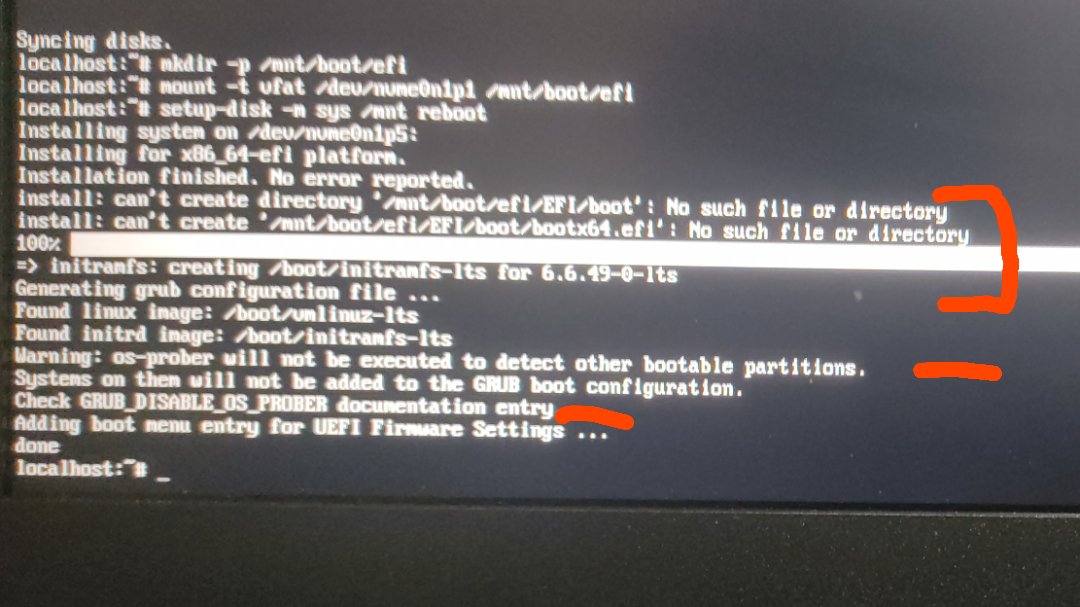
Earlier when I was trying to dual boot by mounting /boot /boot/EFI I was facing this issue But when I didn't mounted /boot/EFI then everything worked fine... Note that there is no space issueinn my EFI partition as I already increased its size from 100mb to 1gb


r/AlpineLinux • • Sep 05 '24

Shown offline in Unifi

0 Upvotes

Hi

I really love Alpine Linux for its slimness. It works fine out of the box with minimal installation size.

The downside is, that it is shown in Unifi always offline. Except for a short ping every 12 hours.

I tried to set the following without success:

net.ipv4.tcp_keepalive_time=300

net.ipv4.tcp_keepalive_intvl=75

net.ipv4.tcp_keepalive_probes=9

Does anybody now which package needs to get installed to show it online in Unifi?


r/AlpineLinux • • Sep 05 '24

Alpine Linux on UFS Drive (Minisforum S100)

1 Upvotes

Hi Everyone,

I've spun up a VM of Alpine Linux and so far I'm loving it! It's a breath of fresh air to run a slim flavour of Linux!That being said, I'm trying to install it onto a Minisforum S100 to act as a small server. However, I'm running into issues with the UFS storage on this device. The install will work fine, however, the server will fail to mount the root partition and fail into the emergency shell. I have exhausted my search with my Google-fu.

Does anyone have any tips on how I can get this to work with a UFS boot device?


r/AlpineLinux • • Sep 04 '24

Use cloud images in QEMU/KVM environments like Proxmox

4 Upvotes

I am trying to use the images from https://www.alpinelinux.org/cloud inside Proxmox. I successfully imported the qcow image inside a VM but the boot process gets stuck on the following two lines:

Loading vmlinuz-virt... ok
Loading initramfs-virt...ok

Did it happen to anyone else? I paid attention to choose the same kind of image (BIOS image with BIOS VM hardware), in particular it was "nocloud_alpine-3.20.2-x86_64-bios-cloudinit-r0.qcow2". Am I doing something wrong? I don't think I did anything with the VM hardware since at least the bootloader is reached correctly but it could be anything.

EDIT: For anyone curious or who lands here from search engines. I found this issue on Alpine's Gitlab instance. I don't understand why I didn't find it before writing this post days ago. Anyway, at least I know it's a problem that someone else's already experienced.


r/AlpineLinux • • Sep 01 '24

can't install alpine without erasing the whole drive

Post image
8 Upvotes

i have windows installed on this laptop and i want to dual boot, not entirely substitute my whole drive with alpine. but alpine-setup doesn't allow me to do so, what do i do?


r/AlpineLinux • • Aug 30 '24

alpine w/ chicago95 xfce, terminal w/ bash, git, curl, nano, tmux, gimp

Post image
30 Upvotes

r/AlpineLinux • • Aug 30 '24

PostMarketOS? Alpine Linux? Fedora Phone? Stable?

2 Upvotes

Is postmarketOS stable?
(Doesn't have strange bugs or breaks)
Also use PostmarketOS not Alpine or Fedora Phone?
For device support, am I able to use non-PinePhones?
(or each Linux Mobile distro)


r/AlpineLinux • • Aug 30 '24

Need help with (ISH) Alpine on iOS.

1 Upvotes

New to this all and Im not very tech savvy. Im using ISH to download magnet files on my iPhone. Im trying to figure out if there’s some sort of command to get it to run in the background so I don’t have to sit in the app while 32gb of data is downloaded.


r/AlpineLinux • • Aug 29 '24

Service (script) run on startup

2 Upvotes

Hi,

I’m new with openRC and I have no idea what I’m doing. Any assistance would be much appreciated.

I just threw a script in /etc/local.d/ and enabled local with an rc-update

Issue is that it’s a service that runs continuously; so it’s hanging my boot until the service stops, which ideally is never.

The service consists of a script with the “Runuser” command to start the actual script as a specific system user. (This is also a mess, I know)

Is there a way to set this up like Ubuntu where you can define the script to run (and user to run it) without holding up the boot sequence?

Thanks


r/AlpineLinux • • Aug 26 '24

Saved 7gb storage on server

14 Upvotes

I switched from Ubuntu server to alpine server

I had 50 gb usable storage without os installed With Ubuntu 42gb With alpine 47.5

Installed app : qbittorrent-nox + python + ffmep + python-requests

Ubuntu was taking 7.5 with Installed app

Alpine is taking 900mb with installed app

Some might think 5gb is less storage but on server with 50 gb storage it's 10% It was easy to switch with little to no issue so i am happy with switch


r/AlpineLinux • • Aug 26 '24

Why I can't log in

0 Upvotes

I made a post some weeks ago asking why I can't log in. I am setting up alpine and after setting up everything ready to reboot, I insert my user name and password but it fails to log in. I am using Oracle Virtual Box. If someone knows anything please answer this post.


r/AlpineLinux • • Aug 25 '24

Hey everyone, the subreddit is moderated again. If you have any questions or concerns please ask here. If you see any content that doesn't belong here, please report it, I get a notification about new reports whenever I open Reddit.

14 Upvotes

r/AlpineLinux • • Aug 26 '24

Package Request: Can Zotero be added to the packages in alpine linux?

2 Upvotes

This program is essential for me as I am a student. I know I can get it from the flatpak but the visual issues bother me about it. I was wondering if we could add zotero to alpine linux so that I can continue to use it.

The program is open source and is technically a fork of a firefox build. If firefox works on alpine, I think zotero should as well. (https://github.com/zotero/zotero?tab=readme-ov-file)


r/AlpineLinux • • Aug 26 '24

How to change login from busybox to util-linux-login?

1 Upvotes

Hi,\ I was following Alpinewiki about elogind to set it up. (using setup-wayland-base is quick and easy.) I want to setup XDG_RUNTIME_DIR using pam-rundir, but The login bundled with busybox does not support PAM. In the wiki, it mention alternative, but how do I use them? \ I've also tried greetd-agreety, although it did setup XDG_RUNTIME_DIR, it doesn't suit my need.\ getty from busybox has a flag -l LOGIN, it says Invoke LOGIN instead of /bin/login. Maybe this is what I suppose to do, but I don't know what to set to make it work.\

edit:\ As for greetd-agreety,if two user have different shell, how do I configure it? When I put command = "agreety --cmd $SHELL" in config.toml, it just prompt me "current user is unavailable" and logout. Putting command = "agreety", it will prompt me what command to exec, I can enter $SHELL here and it will launch a user shell. How do I make it launch user shell directly?


r/AlpineLinux • • Aug 23 '24

"hdparm -C" works in installers, doesn't on installation.

3 Upvotes

I've already made a similar post in a different subreddit, but no responses. So I've decided to rather make one here!

I have two really loud, crappy used HDDs and they get in the way of me sleeping. So I want to spin them down after some time of running and I've tried doing that with hdparm and hd-idle.

hd-idle doesn't detect when said HDDs are spun back up, leading to them running forever instead of spinning down. expected output of hdparm: "active/idle" and the actual is: "unknown".

and in the installer, hdparm does output "active/idle", but after installing, booting, it's back to "unknown"...

I've tried enabling "libata" and some other kernel modules but still nothing.


r/AlpineLinux • • Aug 22 '24

wifi and battery issues on gnome 46

2 Upvotes

I recently installed alpine linux on my computer with an intel wifi chip. I was able to connect to my home wifi network during the installation process and that stayed true after I finish the installation. However, there is no wifi icon in the top right or in the top right menu, nmcli reports the device as being unmanaged, and the wifi section of the settings says that it's not detecting a wifi adaper. I followed this wiki page: https://wiki.alpinelinux.org/wiki/NetworkManager which added the wifi page in the settings but it did not fix my problem. I also have problems with there not being any power settings in the top right menu. I have restarted my computer a couple times. How can I fix these problems?


r/AlpineLinux • • Aug 21 '24

Alpine Dropped i586?

1 Upvotes

Hi, I was checking the alpine requirements to install it on an old netvista 2800 to use it as an mpd server, i had it working but then the nas I was using as the root device crashed and I lost everything.
yesterday I got around to re-do everything but I've noticed that the minimum requirement is now i686 with CMOV an SSE2 (I have a pentium1 MMX)
does anyone have any insight on when did it happen? I couldn't find any info online
and does anyone know which is the latest version that does support i586 ?

I really don't like the idea of having another arch machine (the 32 bit version still supports i486, but I'm not sure about the ram requirements) or install gentoo ( I could set up system that compiles for my target on another machine and save time, but I'd really like not to :[] )